最开始的配置:
nginx
server {
    listen      7000;
    server_name  localhost;

    location /api {
        proxy_pass http://111.111.211.111:1234;
        add_header 'Access-Control-Allow-Origin' '*';
        add_header 'Access-Control-Allow-Credentials' 'true';
        add_header 'Access-Control-Allow-Methods' 'GET, POST, OPTIONS , PUT, DELETE';
        add_header 'Access-Control-Allow-Headers' 'DNT,web-token,app-token,Authorization,Accept,Origin,Keep-Alive,User-Agent,X-Mx-ReqToken,X-Data-Type,X-Auth-Token,X-Requested-With,If-Modified-Since,Cache-Control,Content-Type,Range';
    }

    location / {
        root   html/test7000;
        index  index.html index.htm;
    }
}
错误现象:
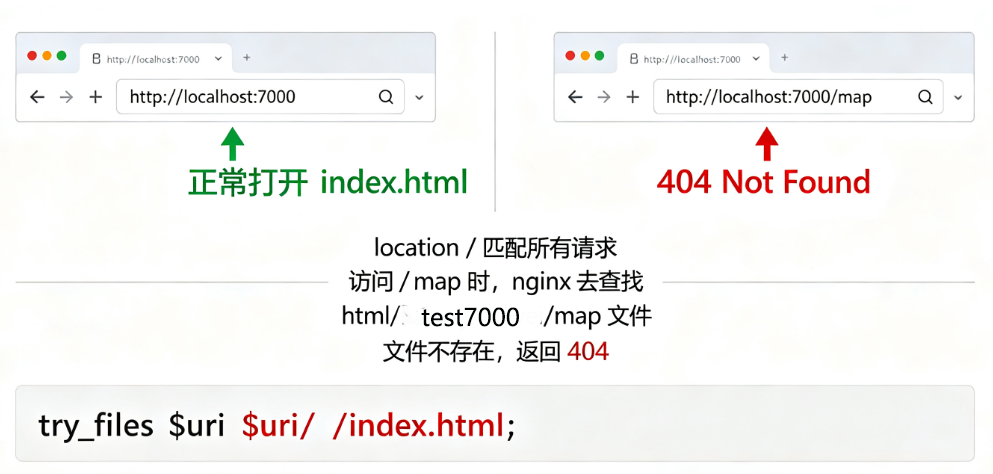
http://localhost:7000正常,http://localhost:7000/map 报错404
核心结论
现有配置本身语法没问题,但逻辑不能支持 /map 访问
nginx
location / {
    root   html/test7000;
    index  index.html index.htm;
}
location / 会匹配所有请求 :/、/map、/map/xxx
-
访问
[http://localhost:7000](http://localhost:7000)匹配
/,去html/test7000/index.html拿到页面,页面内部JS代码做了前端路由跳转 ,跳到/map(不是nginx跳转!这点很关键),页面本身正常打开。 -
访问
[http://localhost:7000/map](http://localhost:7000/map)nginx 会到目录:
html/test7000/map去找文件。你的打包文件直接放在
test7000下,不存在 map 这个子文件夹,所以直接404。
✅ 关键点区分:
/打开页面 → 前端SPA路由在浏览器里把地址改成 /map- 直接访问
/map,请求发给nginx,nginx去磁盘找test7000/map,不存在 →404
解决方案:保留原有目录,修改nginx,SPA刷新不404(推荐)
nginx
server {
    listen      7000;
    server_name  localhost;

    location /api {
        proxy_pass http://111.111.211.111:1234;
        add_header 'Access-Control-Allow-Origin' '*';
        add_header 'Access-Control-Allow-Credentials' 'true';
        add_header 'Access-Control-Allow-Methods' 'GET, POST, OPTIONS , PUT, DELETE';
        add_header 'Access-Control-Allow-Headers' 'DNT,web-token,app-token,Authorization,Accept,Origin,Keep-Alive,User-Agent,X-Mx-ReqToken,X-Data-Type,X-Auth-Token,X-Requested-With,If-Modified-Since,Cache-Control,Content-Type,Range';
    }

    location / {
        root   html/test7000;
        index  index.html index.htm;
       # 增加这一行:SPA兜底,任意路径都返回index.html
        try_files $uri $uri/ /index.html;**
    }
}
修改后:
[http://localhost:7000](http://localhost:7000)正常打开[http://localhost:7000/map](http://localhost:7000/map)→ nginx找不到map文件,命中try_files,返回index.html,前端接管路由,页面正常渲染/map/xxx子路由刷新也不会404
⚠️ 注意:不用改文件夹,不用alias,只加 try_files,这就是你当前场景最简单的修复!
一句话总结
/ 能打开页面是因为加载了index.html,前端JS把地址栏改成/map ;直接访问/map,nginx会去硬盘找map文件,找不到就404。加上try_files $uri $uri/ /index.html; 即可解决SPA刷新404问题。
加上try_files之后,你直接访问 [http://localhost:7000/map](http://localhost:7000/map) 就能正常打开页面了,你可以直接测试。