前言
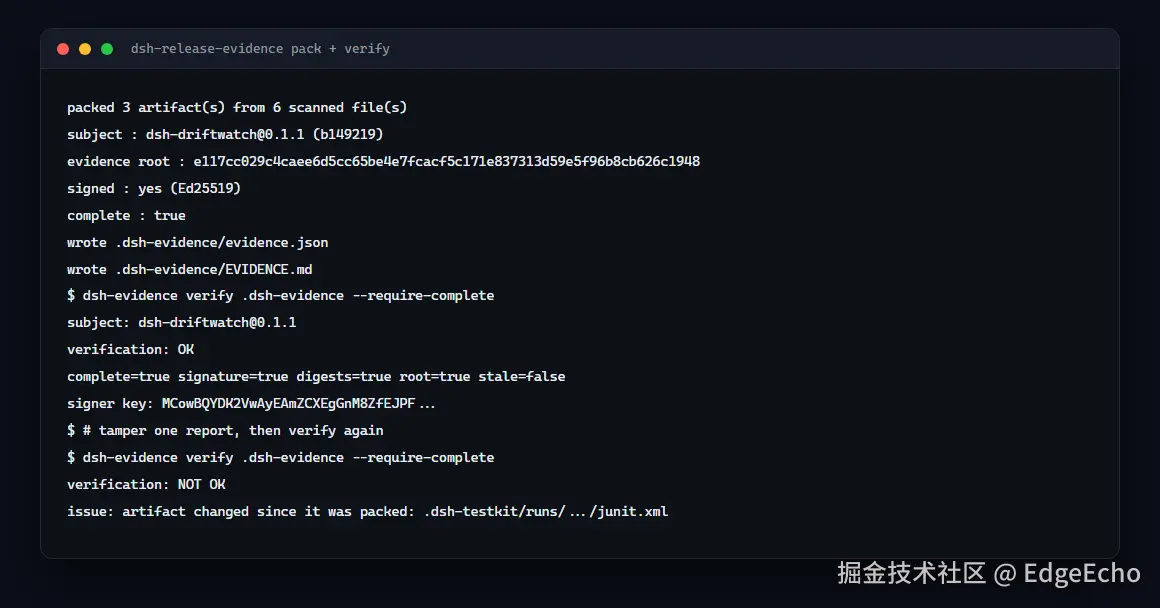
我做了一个复合 Action:跑测试门禁 → 打包证据 → Ed25519 签名 → 第三方验证 → 上传产物。
本地:tsc 通过、13 项单测通过、24 项 CLI 检查通过、action.yml 自我感觉良好。
真实 runner:五个 bug,第一个让整个文件一行都不执行。
这篇把五个都拆开讲,附可复制的修法。
Bug 1:// 注释让 manifest 完全加载不了
yaml
// The release gate a plugin author drops into a workflow.   ← 我写的
name: DSH release evidence
description: ...
runs:
  using: composite
YAML 的注释是 #,不是 //。
报错:
less
##[error]Edge-Echo/xxx/main/action.yml: (Line: 7, Col: 5, Idx: 381)
         Mapping values are not allowed in this context.
##[error]Failed to load Edge-Echo/xxx/main/action.yml
为什么这个最坑
manifest 加载失败 → 文件里的步骤一个都不执行 → 没有任何 step 日志。
你在 Actions UI 上只会看到:
csharp
[failure] 1. Set up job没有第二步。 我定义的 inputs、表达式、注释,全部没被解析过。
唯一的线索在 job 原始日志里(UI 不显示):
bash
# 下载原始日志
curl -sL -H "Authorization: token $TOKEN" \
  -o job.zip \
  https://api.github.com/repos/<owner>/<repo>/actions/jobs/<job_id>/logs
修法 + 本地防线
改成 # 注释。然后写了个本地检查器:
js
// scripts/check-action.mjs ------ 挡住这一类错误
lines.forEach((line, i) => {
  if (/^\s*\/\//.test(line)) issues.push(`line ${i + 1}: // is not a YAML comment`)
  if (/^\t/.test(line)) issues.push(`line ${i + 1}: tab indentation`)
})
for (const key of ['name:', 'description:', 'runs:']) {
  if (!lines.some((l) => l.startsWith(key))) issues.push(`missing top-level "${key}"`)
}
// 复合 Action 里每个 run: 都要有 shell:
// inputs.X 必须声明过;steps.X.outputs 必须真的存在这个 id
接进 npm run verify,本地就能挡住这一整类。
Bug 2:打包成功、验证成功、静默不传
shell
##[error]No files were found with the provided path: .dsh-evidence/.actions/upload-artifact@v4 默认 include-hidden-files: false 。我的输出目录是 .dsh-evidence(跟随生态里 .dsh-testkit 的命名)。
点开头的目录会被跳过。
yaml
- uses: actions/upload-artifact@v4
  with:
    path: .dsh-evidence/
    if-no-files-found: error
    include-hidden-files: true    # ← 少了这行就是"绿了但空的"
Bug 3 + 5:npx 解析的是包名,不是二进制名
vbnet
npm error could not determine executable to run          # npx dsh-evidence
npm error notarget No matching version found for dsh-test@^0.4.4
npx <name> 里的 <name> 是包名:
| 二进制 | 所属包 |
|---|---|
dsh-test |
dsh-testkit |
dsh-evidence |
dsh-release-evidence |
所以两个都错了。两种正确写法:
bash
# 1. 显式指明包,再给二进制名
npx --yes --package=dsh-testkit@^0.4.4 dsh-test --suite quick .

# 2. 或者先装,再直接调(注意安装状态要保证)
npm install --no-save dsh-release-evidence@^0.2.0
./node_modules/.bin/dsh-evidence pack
我中间试过第 2 种,结果 exit 127(那一步的安装状态不保证),最后回到第 1 种。
这两个 bug 是同一个误解的两面------理解一个,另一个立刻清楚。
Bug 4:位置参数没传,然后"非法输入"被当成"没失败"
swift
dsh-test: plugin source is required签名是 dsh-test [plugin-source] [directory],plugin-source 是位置参数。
关键是修法不只是补参数:
bash
set +e
npx --yes --package=dsh-testkit@^0.4.4 dsh-test --suite quick --dsh 0.1.5-rc.1 "."
code=$?
set -e
echo "dsh-test exited $code"
if [ "$code" = "1" ]; then exit 1; fi   # 生命周期失败
if [ "$code" = "2" ]; then              # 输入非法 ------ 也必须失败
  echo "::error::dsh-test rejected its input; check plugin-source and dsh-version"
  exit 1
fi
为什么 exit 2 必须算失败 :否则一个"根本没测"的运行会安静地产出残缺的包,而那个包在验证阶段只表现为"证据不全",看不出是参数传错了。
验收
修完之后在真实 runner 上:
csharp
[success ] 1. Set up job
[success ] 2. Run actions/checkout@v4
[success ] 3. Run actions/setup-node@v4
[success ] 4. Install and build the plugin
[success ] 5. Run the lifecycle gate and pack the evidence
[success ] 6. Report the action outputs
[success ] 7. Third-party verification, from a clean checkout而且第三方验证步骤按设计失败过一次 ------门禁没产出证据 + require-complete: true,Action 拒绝放行不完整的包。这个"正确的失败"也是验证的一部分。
总结
| # | 坑 | 一句话 |
|---|---|---|
| 1 | // 注释 |
manifest 加载不了 → 文件一行不执行、没有日志 |
| 2 | 隐藏目录 | upload-artifact@v4 默认跳过 . 开头的路径 → 绿了但空的 |
| 3 | npx dsh-evidence |
npx 按包名解析 |
| 4 | 缺位置参数 | 且 exit 2 必须当失败,否则残缺包无声通过 |
| 5 | npx dsh-test@^0.4.4 |
包名是 dsh-testkit,dsh-test 只是二进制 |
没有一个是逻辑错误,全是平台约定层面的。 本地 37 项检查全绿也测不出来。
如果你在做 GitHub Action:跑一次,然后去下载原始 job 日志。 UI 在这一步什么都不告诉你。