一. graphRAG 是什么?
GraphRAG(Graph Retrieval‑Augmented Generation),微软研究院 2024 年提出 ,是知识图谱 + RAG 检索增强生成的高级方案Microsoft ...
下图就是一个典型的传统RAG解决方案:利用ES 和 milvus实现数据检索,然后合并去重,之后利用重排模型将RAG到的文档全部重新排序,然后将文档交给大模型搜索答案。
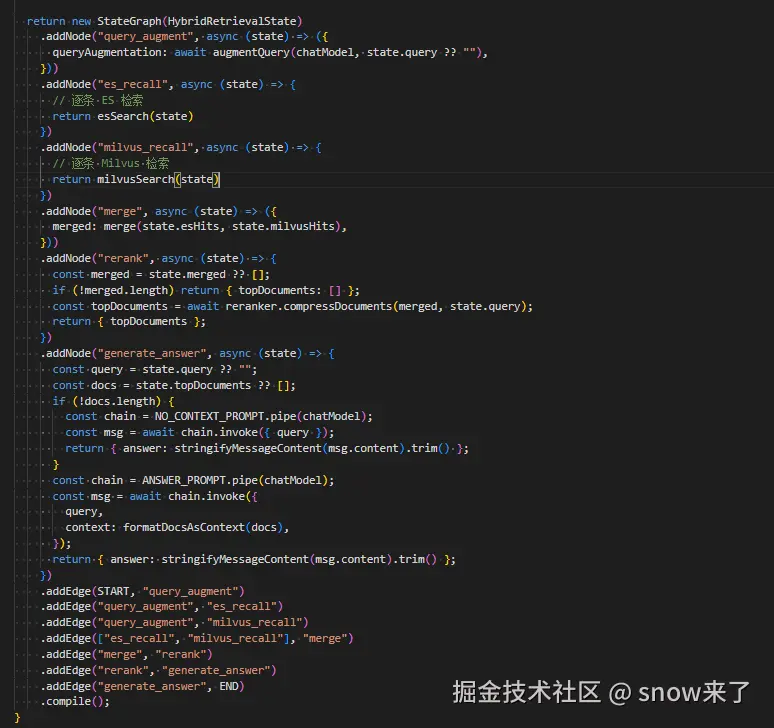
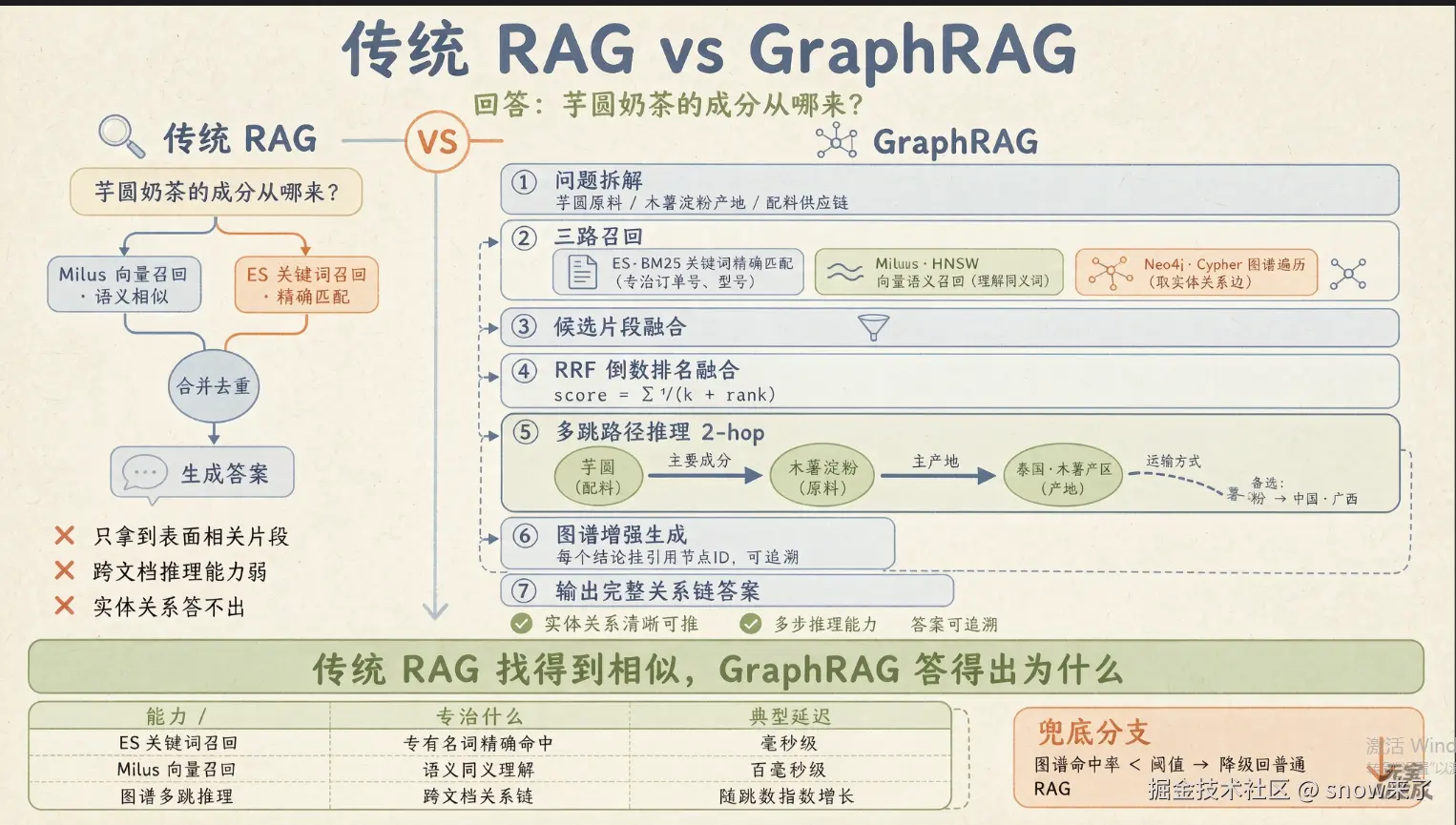
上图传统RAG有个问题:无法捕捉数据之间的关联关系,只能实现"单点式"检索,难以应对需要挖掘数据内在逻辑、关联链路的场景。
比如我搜索奶茶,ES 和 milvus 只去搜索奶茶,不会考虑奶茶的原料,商店,口味,填料比如珍珠,椰果等等信息。
如果我想要知道货物的来龙去脉的时候,ES 和 milvus 就会显得很局促,不能胜任这份工作。此时我们就想到了neo4j 工具。
由neo4j 加持的RAG 就叫GraphRAG ,
GraphRAG 会先将非结构化数据中的实体、关系提取出来,用 Neo4j 这样的图数据库构建知识图谱,再结合向量检索的语义优势,实现"图谱关联+语义匹配"的双重检索,既能找到语义相近的内容,又能顺着知识图谱的关联链路,完成跨文档、多步骤的复杂推理,让 RAG 生成的答案更精准、更具可解释性。
二.neo4j是什么?
Neo4j 是一个图数据库------数据不是存在表里,而是存成「点」和「线」。点就是实体(芋圆、木薯淀粉、泰国),线就是它们之间的关系(芋圆-主要成分是-木薯淀粉)。
和mysql比较
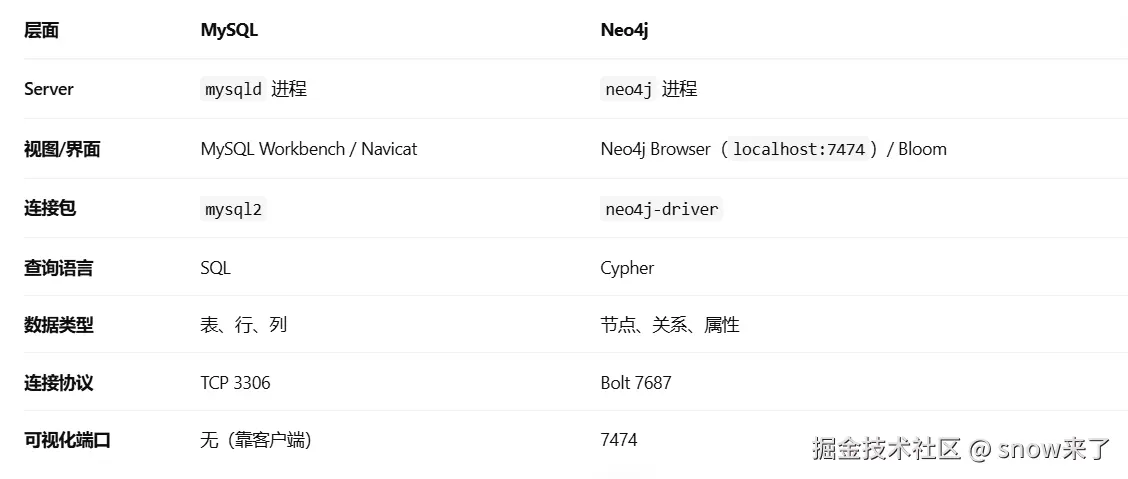
neo4j 和 mysql 一样,有个服务 server,用来装数据。也有个可视化软件用来连接server,对数据直接增删改查。
你还可以在nodejs乡里面安装 neo4j-driver 将项目和neo4j 数据库连接起来,在项目里面对图数据库里面的数据做增删改查。
mysql的连接
js
const mysql = require("mysql2/promise");
const pool = mysql.createPool({ host: "localhost", user: "root", password: "xxx", database: "test" });
//建表
// 增
await pool.execute("INSERT INTO users (name) VALUES (?)", ["张三"]);
// 查
const [rows] = await pool.execute("SELECT * FROM users WHERE name = ?", ["张三"]);
neo4j的连接
js
const neo4j = require("neo4j-driver");
const driver = neo4j.driver("bolt://localhost:7687", neo4j.auth.basic("neo4j", "xxx"));

// 增(CREATE = INSERT)
const session = driver.session();
await session.executeWrite(tx =>
  tx.run("CREATE (u:User {name: $name})", { name: "张三" })
);

// 查(MATCH = SELECT)
const result = await session.executeRead(tx =>
  tx.run("MATCH (u:User {name: $name}) RETURN u", { name: "张三" })
);
session.close();
mysql和Neo4j的区别
MySQL 的表是预先定义 schema 的(CREATE TABLE),Neo4j 的节点不用建表 ,直接 CREATE 就有结构了,字段随便加。这是图数据库的特点------schema-free。
MySQL看数据需要下载MySQL Workbench软件, Neo4j Browser看数据只需要在浏览器打 http://localhost:7474。
mysql增删改查的语句是sql语句。neo4j用的是cypher语句。在MySQL Workbench软件里面执行mysql可以对数据表做增删改查操作。在 Neo4j Browser里面可以执行cypher语句,添加节点和连接。
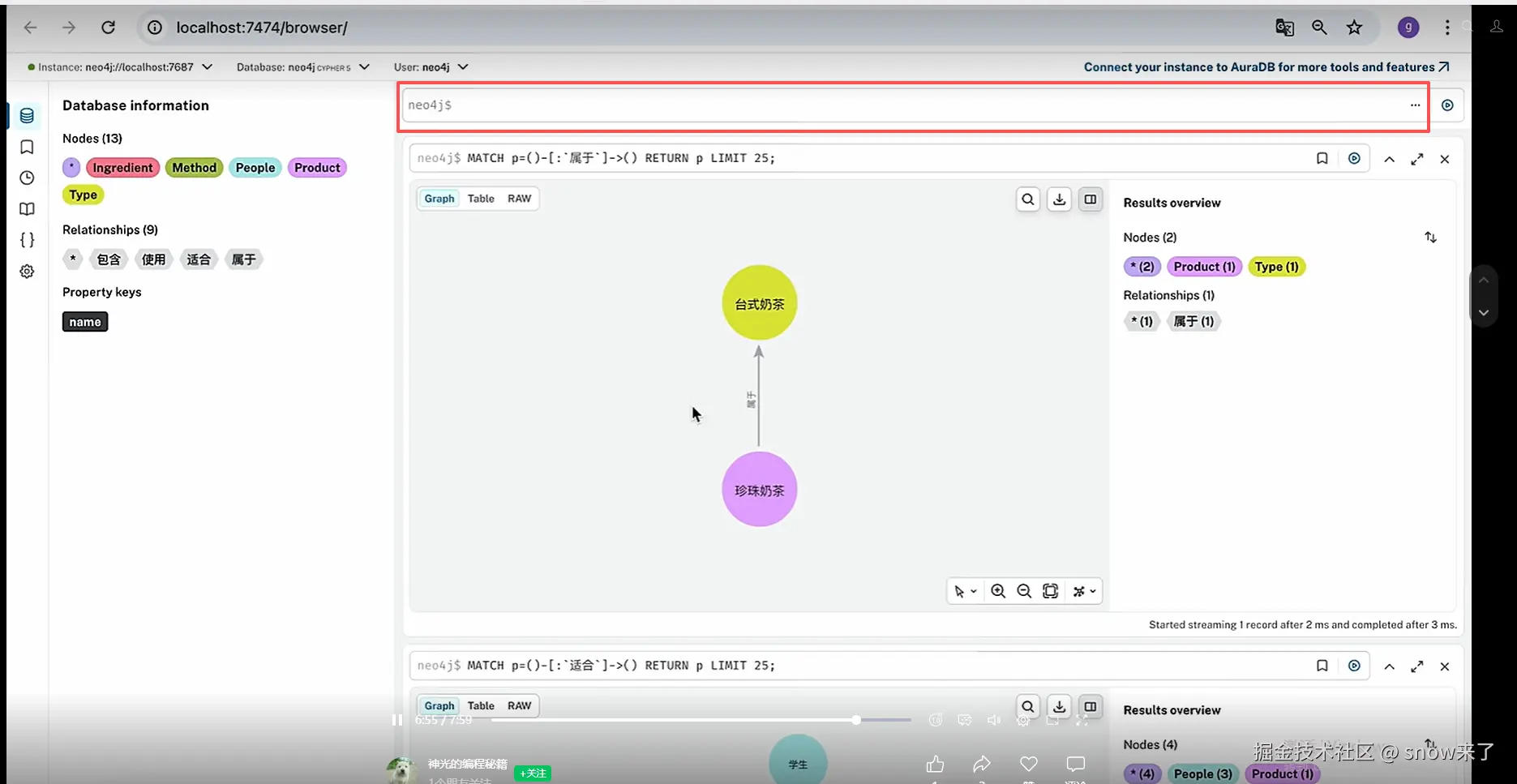
在红框里面写入cypher 语句,直接创建知识图谱,删除的时候,是先删除关系线,然后才能删除节点,只有节点上没有任何关联线的时候才能删除节点。
下载
去 neo4j.com/download 下 Desktop 版,装完新建一个本地库,连接方式选 bolt://localhost:7687,用户名 neo4j,首次登录会强制改密码。
验证 :浏览器打开 http://localhost:7474,输密码能进去就行。
在nestjs项目里面使用
js
npm install neo4j-driver
npm install -D @types/node
添加环境变量
js
NEO4J_URI=bolt://localhost:7687
NEO4J_USERNAME=neo4j
NEO4J_PASSWORD=yourpassword
NEO4J_DATABASE=neo4j
最小连接案例
js
const neo4j = require("neo4j-driver");

// 1. 创建 driver(全局一个,自带连接池)
const driver = neo4j.driver(
  "bolt://localhost:7687",
  neo4j.auth.basic("neo4j", "yourpassword"),
  {
    maxConnectionPoolSize: 50,
    connectionAcquisitionTimeout: 30000,
  }
);

// 2. 启动时探活
async function main() {
  await driver.verifyConnectivity();
  console.log("✅ 已连接到 Neo4j");

  // 3. 每个请求开自己的 session
  const session = driver.session({ database: "neo4j" });

  try {
    // 4. 写操作放 executeWrite,读操作放 executeRead
    const result = await session.executeRead((tx) => {
      return tx.run(
        "MATCH (e:Entity {name: $name})-[r]->(b) RETURN type(r) AS rel, b.name AS target",
        { name: "芋圆" }  // 参数化,防注入
      );
    });

    result.records.forEach((r) => {
      console.log(`${r.get("rel")} → ${r.get("target")}`);
    });
  } finally {
    // 5. 必须关 session,否则连接池会被吃光
    await session.close();
  }
}

main()
  .catch(console.error)
  .finally(() => driver.close());  // 进程退出前关 driver
批量写操作
js
async function createGraph(driver) {
  const session = driver.session({ database: "neo4j" });
  try {
    await session.executeWrite(async (tx) => {
      // 批量写入用 UNWIND,一次网络往返搞定
      await tx.run(
        `UNWIND $rows AS row
         MERGE (a:Entity {name: row.from})
         MERGE (b:Entity {name: row.to})
         MERGE (a)-[:CONTAINS]->(b)`,
        {
          rows: [
            { from: "芋圆奶茶", to: "芋圆" },
            { from: "芋圆", to: "木薯淀粉" },
            { from: "木薯淀粉", to: "泰国" },
          ],
        }
      );
    });
    console.log("✅ 图谱写入完成");
  } finally {
    await session.close();
  }
}
单个写数据操作
js
async function createGraph(driver) {
  const session = driver.session({ database: "neo4j" });
  try {
    // 单条写入:依次建节点和关系,每条独立执行
    await session.executeWrite(async (tx) => {
      // 1. 创建节点:芋圆奶茶
      await tx.run(
        "CREATE (:Entity {name: $name})",
        { name: "芋圆奶茶" }
      );
      // 2. 创建节点:芋圆
      await tx.run(
        "CREATE (:Entity {name: $name})",
        { name: "芋圆" }
      );
      // 3. 创建节点:木薯淀粉
      await tx.run(
        "CREATE (:Entity {name: $name})",
        { name: "木薯淀粉" }
      );
      // 4. 创建节点:泰国
      await tx.run(
        "CREATE (:Entity {name: $name})",
        { name: "泰国" }
      );

      // 5. 建立关系:芋圆奶茶 -> 芋圆
      await tx.run(
        `MATCH (a:Entity {name: $from})
         MATCH (b:Entity {name: $to})
         CREATE (a)-[:CONTAINS]->(b)`,
        { from: "芋圆奶茶", to: "芋圆" }
      );
      // 6. 建立关系:芋圆 -> 木薯淀粉
      await tx.run(
        `MATCH (a:Entity {name: $from})
         MATCH (b:Entity {name: $to})
         CREATE (a)-[:CONTAINS]->(b)`,
        { from: "芋圆", to: "木薯淀粉" }
      );
      // 7. 建立关系:木薯淀粉 -> 泰国
      await tx.run(
        `MATCH (a:Entity {name: $from})
         MATCH (b:Entity {name: $to})
         CREATE (a)-[:CONTAINS]->(b)`,
        { from: "木薯淀粉", to: "泰国" }
      );
    });
    console.log("✅ 图谱写入完成");
  } finally {
    await session.close();
  }
}
读数据
js
async function findPath(driver, start, maxHops = 2) {
  const session = driver.session({ database: "neo4j" });
  try {
    const result = await session.executeRead((tx) =>
      tx.run(
        `MATCH path = (a:Entity {name: $start})-[*1..${maxHops}]->(end)
         RETURN [n IN nodes(path) | n.name] AS path, length(path) AS hops
         ORDER BY hops
         LIMIT 20`,
        { start }
      )
    );

    return result.records.map((r) => ({
      path: r.get("path"),
      hops: r.get("hops").toNumber(),  // Integer 转 JS number
    }));
  } finally {
    await session.close();
  }
}

// 调用
const paths = await findPath(driver, "芋圆奶茶", 2);
paths.forEach((p) => console.log(`${p.hops} 跳: ${p.path.join(" → ")}`));
// 输出: 1 跳: 芋圆奶茶 → 芋圆
//       2 跳: 芋圆奶茶 → 芋圆 → 木薯淀粉
封装neo4j
js
// db.js
const neo4j = require("neo4j-driver");

let driver;

function connect(config) {
  driver = neo4j.driver(
    config.uri,
    neo4j.auth.basic(config.username, config.password),
    { maxConnectionPoolSize: 50 }
  );
  return driver.verifyConnectivity();
}

async function read(cypher, params = {}) {
  const session = driver.session();
  try {
    const result = await session.executeRead((tx) =>
      tx.run(cypher, params)
    );
    return result.records.map((r) => r.toObject());
  } finally {
    await session.close();
  }
}

async function write(cypher, params = {}) {
  const session = driver.session();
  try {
    return await session.executeWrite((tx) => tx.run(cypher, params));
  } finally {
    await session.close();
  }
}

async function close() {
  return driver && driver.close();
}

module.exports = { connect, read, write, close };
使用
js
const db = require("./db");

async function main() {
  await db.connect({
    uri: "bolt://localhost:7687",
    username: "neo4j",
    password: "yourpassword",
  });

  const data = await db.read(
    "MATCH (e:Entity) RETURN e.name AS name LIMIT 10"
  );
  console.log(data);

  await db.close();
}

main();
三.基于neo4j实现graphRAG
安装包
js
pnpm install @langchain/community @langchain/openai @langchain/core @langchain/langgraph dotenv配置环境变量
js
OPENAI_API_KEY=sk-xx
OPENAI_BASE_URL=https://dashscope.aliyuncs.com/compatible-mode/v1
RERANK_URL=https://dashscope.aliyuncs.com/api/v1/services/rerank/text-rerank/text-rerank
MODEL_NAME=qwen-plus
graphRAG+neo4j
js
import 'dotenv/config'
import { Neo4jGraph } from '@langchain/community/graphs/neo4j_graph'
import { ChatOpenAI } from '@langchain/openai'
import { StateGraph, END, START } from '@langchain/langgraph'
import { HumanMessage } from '@langchain/core/messages'

// ----------------------
// 连接 Neo4j 知识图谱
// ----------------------
const graph = new Neo4jGraph({
  url: 'bolt://localhost:7687',
  username: 'neo4j',
  password: '12345678',
})

// ----------------------
// 大模型
// ----------------------
const llm = new ChatOpenAI({
  model: process.env.MODEL_NAME,
  temperature: 0,
  configuration: { baseURL: process.env.OPENAI_BASE_URL }
})

// ----------------------
// 定义状态
// ----------------------
const state = {
  messages: {
    value: (left, right) =>
      left.concat(Array.isArray(right) ? right : [right]),
    default: () => [],
  },
  cypher: null,
  context: null,
  answer: null,
}

function userQuery(state) {
  const last = state.messages[state.messages.length - 1]
  return last.content
}

// ----------------------
// 步骤1:生成 Cypher
// ----------------------
async function generateCypher(state) {
    const prompt = `
      你是一个专业的 Neo4j Cypher 生成器。
      严格按照下面的结构生成正确语句,只返回纯 Cypher 代码,不要任何解释、不要标点、不要 markdown。

      节点:
      - Product: 奶茶产品
      - Ingredient: 配料
      - Type: 奶茶类型
      - Method: 制作工艺
      - People: 适合人群

      关系方向(必须严格遵守):
      - (Product)-[:属于]->(Type)
      - (Product)-[:包含]->(Ingredient)
      - (Product)-[:适合]->(People)
      - (Ingredient)-[:使用]->(Method)

      规则:
      1. 关系方向绝对不能反
      2. 多跳查询请使用多个 MATCH,不要连错路径
      3. 只返回最终可运行的 Cypher 语句

      用户问题:${userQuery(state)}
    `
    const res = await llm.invoke([new HumanMessage(prompt)])
    return { cypher: res.content }
  }

// ----------------------
// 步骤2:执行图查询
// ----------------------
async function executeGraphQuery(state) {
  try {
    const res = await graph.query(state.cypher)
    return { context: JSON.stringify(res) }
  } catch (e) {
    return { context: '未查询到相关知识' }
  }
}

// ----------------------
// 步骤3:生成答案
// ----------------------
async function generateAnswer(state) {
  const prompt = `
    你是奶茶专家,根据下方「检索结果」回答用户问题;检索结果为空或不足时简要说明无法从图谱得到答案,不要编造。
    回答要求:
    - 直接列出事实,不要推断图谱里未出现的配料(如水、冰、添加剂等)。

    检索结果:${state.context}
    用户问题:${userQuery(state)}
  `
  const res = await llm.invoke([new HumanMessage(prompt)])
  return { answer: res.content }
}

// ----------------------
// 构建 LangGraph 工作流
// ----------------------
const workflow = new StateGraph({ channels: state })
  .addNode('generateCypher', generateCypher)
  .addNode('executeGraph', executeGraphQuery)
  .addNode('generateAnswer', generateAnswer)
  .addEdge(START, 'generateCypher')
  .addEdge('generateCypher', 'executeGraph')
  .addEdge('executeGraph', 'generateAnswer')
  .addEdge('generateAnswer', END)

const app = workflow.compile()

async function printWorkflowMermaid() {
  const drawable = await app.getGraphAsync()
  const mermaid = drawable.drawMermaid({ withStyles: true })
  console.log('--- LangGraph 工作流 (Mermaid) ---')
  console.log(mermaid)
  console.log('-----------------------------------------------------------')
}

// ----------------------
// 运行 GraphRAG
// ----------------------
async function runGraphRAG(question) {
  const res = await app.invoke({
    messages: [new HumanMessage(question)],
  })

  console.log('======================================')
  console.log('用户问题:', question)
  console.log('生成 Cypher:', res.cypher)
  console.log('检索结果:', res.context)
  console.log('最终回答:', res.answer)
  console.log('======================================')
}

// ======================
// 测试
// ======================
;(async () => {
  await printWorkflowMermaid()
  await Promise.all([
    runGraphRAG('我们这款珍珠奶茶有哪些配料?'),
    runGraphRAG('台式奶茶的饮品都有哪些配料?'),
    runGraphRAG('珍珠奶茶适合哪些人群饮用?'),
  ])
})().catch(console.error)在企业级项目里面,neo4j是在ES,milvus检索的平级使用的,就是他们三个一起搜索,提高RAG文档片段的准确性。因为给大模型的文档越准确,他的回复就越接近正确答案。
四.比较Milvus,ES,neo4j
Milvus 向量语义检索
适合场景
- 用户提问没有明确关键词,是自然语言大白话;
- 需要语义相似、意思相近匹配,不是字面一样;
- 模糊查询、泛化查询、推荐类场景;
- 非结构化文档:笔记、手册、文章、FAQ 模糊问答。
不懂关键词、只看意思相近,交给 Milvus。
ElasticSearch BM25 关键词检索
适合场景
- 用户有明确专有名词、专业术语、编号、文件名;
- 需要精准分词、字面命中、高亮匹配;
- 官方文档、规章条款、接口文档、目录检索;
- 过滤、排序、时间筛选、字段精准匹配。
要精准匹配关键词、专业名词、固定术语,交给 ES。
Neo4j 知识图谱检索(GraphRAG) 适合场景
- 需要实体关联、关系查询、多跳推理;
- 要查「A 和 B 什么关系、A 包含哪些、A 属于哪类」;
- 层级结构、分类体系、上下游、从属、配料、品类等链路查询;
- 传统检索给的是零散文本,需要逻辑推理、脉络梳理的场景。
要查关系、层级、脉络、多跳推理,交给知识图谱。
三者短板刚好互补:
Milvus: 擅长语义模糊匹配,但没有结构、不懂关系
ES: 擅长关键词精准命中、分词倒排、过滤筛选,但也只是文本孤岛
Neo4j: 擅长实体关联、多跳推理、层级脉络,但不擅长模糊语义、全文海量文档检索