效果图
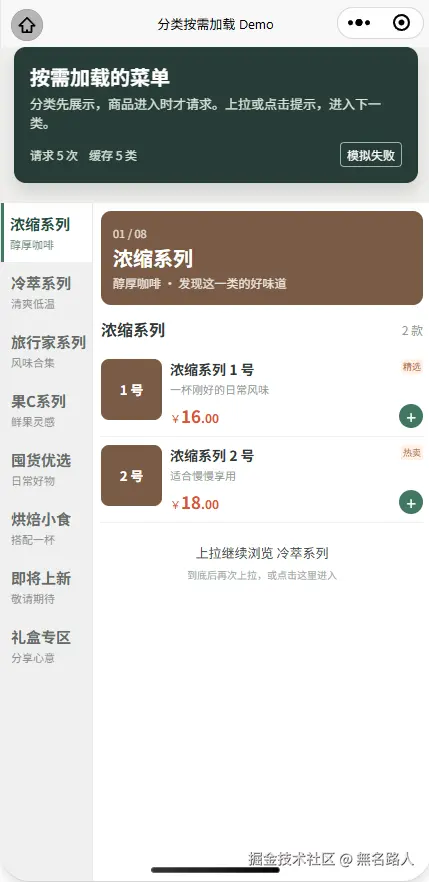
点餐页的分类商品,不必在进页时一次加载完
点餐页常见的做法是先请求分类,再把所有分类的商品一起取回来,右侧排成一条长列表。这样做左右联动很直观:滚到哪一段,就选中左边哪一类。但商超分类多、商品数量差异又大时,用户可能只看了前两类,后面十几类的商品却已经全部请求并渲染了。
这次想试的是另一种节奏:分类目录先展示,右侧一次只看一个分类;进入某一类时才加载它的商品。少的分类只有一两件,多的分类可以有十几件。滑到当前分类底部,会看到"上拉继续浏览下一类";再次上拉,或者直接点击提示,才进入下一类。
实现时,页面保留一个主要的纵向滚动容器,左侧分类栏吸顶并可独立滚动。右侧只渲染当前分类,重点是把商品请求放到真正进入分类的时刻。
分类目录和商品数据分开
页面一开始就知道分类的顺序、名称和下一类是谁,但不因此生成所有商品。Demo 用本地 categories 模拟分类目录,用 fetchCategoryDishes(category) 模拟按分类 ID 请求商品。makeDishes 在这次模拟请求执行时才生成该分类的商品,进入页面只加载第一类。
ts
const activeIndex = ref(0)
const activeCategory = computed(() => categories[activeIndex.value])
const nextCategory = computed(() => categories[activeIndex.value + 1])
const productCache = ref<Record<string, DishItem[]>>({})

onMounted(() => {
  scheduleMeasure()
  loadCategory(activeCategory.value)
})
这里的商品数量只是 mock 配置,用来展示两件、九件、一件、十二件以及空分类等不同高度。真实接口接入时,应让分类接口返回目录,再按当前分类 ID 请求商品;不要把 Demo 的 count 当作实际商品列表。
切换分类时,右侧只替换当前内容
点击左侧分类、点击底部提示、上拉进入下一类,最终都走分类切换逻辑。它先更新左侧高亮和右侧分类信息,再把外层滚动位置移回菜单顶部,最后加载目标分类。已访问过的分类直接从 productCache 恢复,不再发同一请求。
ts
async function selectCategory(index: number) {
  if (index < 0 || index >= categories.length || index === activeIndex.value)
    return

  activeIndex.value = index
  leftScrollIntoView.value = `left-cat-${categories[index].id}`
  await nextTick()
  scrollToMenu()
  loadCategory(categories[index])
}
因此这不是"把下一类追加到当前列表底下"的无限列表。切换后右侧只有目标分类,向前查看可以点左侧分类,已请求的数据仍在本页缓存中。Demo 顶部的"请求次数 / 缓存类数"就是为了直观看出这点。
模拟请求也有两个容易忽略的保护:pendingRequests 按分类 ID 复用尚未结束的 Promise,避免快速重复操作发出同一请求;请求回来后只有目标分类仍是当前分类,才把结果显示到右侧。快速从 A 切到 B 时,A 的迟到响应可以入缓存,但不能覆盖 B 的页面。
到底只是提示,再上拉才切换
如果一滚到底就立刻请求下一类,短分类会尤其容易被跳过。这个 Demo 把"到达底部"和"确认继续"拆成两次动作:滚动事件和 scrolltolower 更新底部状态;手指按下时记录本次手势开始前是否已经到底;抬起时还在底部、且向上滑过一定距离,才切换下一类。
ts
function handleTouchStart(event) {
  touchStartY = event.touches?.[0]?.clientY ?? 0
  touchStartedAtBottom = isAtBottom.value && requestState.value === 'ready'
}

function handleTouchEnd(event) {
  const endY = event.changedTouches?.[0]?.clientY ?? touchStartY
  if (touchStartedAtBottom && isAtBottom.value
    && touchStartY - endY > 55 && nextCategory.value) {
    goToNextCategory()
  }
  touchStartedAtBottom = false
}触摸事件只绑在右侧商品区域,滚动左侧分类栏不会误触发"下一类"。不想再滑一次时,next-cue 本身也可以点击。最后一个分类只显示"已浏览全部分类",不会继续请求不存在的分类。
短列表也要给吸顶栏留出行程
一两件商品的分类还有一个布局问题:右侧内容太短,左侧 position: sticky 所在的父容器如果也只有一小段高度,左栏还没来得及贴住固定头部,整个菜单就滚走了。固定的 demo-hero 随后会盖住分类。
所以需要量出 demo-hero 的实际高度,再分别计算滚动内容的顶部留白和左栏的吸顶位置。菜单区域至少占满一屏,让短商品列表也有足够的吸顶行程。
ts
const headerOffset = computed(() => heroHeight.value + menuShellGap.value)
const scrollContentStyle = computed(() => ({
  paddingTop: heroHeight.value
    ? `${heroHeight.value + heroBottomGap.value}px`
    : '430rpx',
}))
const sideStyle = computed(() => ({
  top: `${headerOffset.value}px`,
  height: `calc(100vh - ${headerOffset.value}px)`,
}))
scss
.menu-section {
  display: flex;
  min-height: 100vh;
}
页面只有一个主要的纵向 scroll-view,左侧分类栏才有自己的内部滚动。切换分类后,scrollToMenu 用菜单相对于滚动内容的位置减去固定头部高度,让右侧从菜单顶部开始展示,不把分类标题藏到 demo-hero 后面。
加载、空态和失败都属于这个交互
按需加载不能只处理"有商品"的成功状态。Demo 分别展示加载中、零商品和加载失败;顶部"模拟失败"会让下一次未缓存分类的模拟请求失败,右侧可点击"重新加载"。缓存中即使是空数组,也代表该分类已经成功请求过,不应反复请求。
目前的 fetchCategoryDishes 只是延时 mock,没有接真实接口,也没有做单分类分页。如果真实分类内部还有多页商品,应该先把该分类的页加载到结束,再允许底部提示进入下一分类;否则"上拉下一类"会抢走"加载当前类下一页"的手势。
Demo 放在这里
代码在 menu-scroll-on-demand.vue,微信小程序页面路由为 /pages-demo/menu-scroll-on-demand。依次看两件商品的短分类、九件商品的长分类、零商品分类,再返回已经访问过的分类,可以观察滚动边界、请求计数与缓存行为。
这套方式适合"用户一次专注一类,按需进入下一类"的商超菜单。分类目录保持完整,商品请求则跟随用户的选择推进,页面不必为尚未浏览的分类提前承担加载和渲染成本。
代码
xml
<script setup lang="ts">
import { computed, getCurrentInstance, nextTick, onBeforeUnmount, onMounted, ref } from 'vue'
import PriceDisplay from '@/components/price-display.vue'

definePage({
  style: {
    navigationStyle: 'default',
    navigationBarTitleText: '分类按需加载 Demo',
  },
})

interface CategorySeed {
  id: string
  name: string
  subtitle: string
  count: number
  color: string
}

interface DishItem {
  id: string
  name: string
  desc: string
  badge: string
  price: number
  color: string
}

// 分类目录先到达;商品只在进入对应分类时由 mock 请求生成。
const categories: CategorySeed[] = [
  { id: 'coffee', name: '浓缩系列', subtitle: '醇厚咖啡', count: 2, color: '#795b45' },
  { id: 'cold', name: '冷萃系列', subtitle: '清爽低温', count: 9, color: '#547b81' },
  { id: 'travel', name: '旅行家系列', subtitle: '风味合集', count: 1, color: '#a16c44' },
  { id: 'fruit', name: '果C系列', subtitle: '鲜果灵感', count: 12, color: '#d47943' },
  { id: 'select', name: '囤货优选', subtitle: '日常好物', count: 2, color: '#8a7865' },
  { id: 'bake', name: '烘焙小食', subtitle: '搭配一杯', count: 7, color: '#ab8060' },
  { id: 'new', name: '即将上新', subtitle: '敬请期待', count: 0, color: '#799281' },
  { id: 'gift', name: '礼盒专区', subtitle: '分享心意', count: 1, color: '#9b6764' },
]

const instance = getCurrentInstance()
const activeIndex = ref(0)
const activeCategory = computed(() => categories[activeIndex.value])
const nextCategory = computed(() => categories[activeIndex.value + 1])
const leftScrollIntoView = ref(`left-cat-${categories[0].id}`)
const productCache = ref<Record<string, DishItem[]>>({})
const dishes = ref<DishItem[]>([])
const requestState = ref<'loading' | 'ready' | 'error'>('loading')
const requestCount = ref(0)
const failNextRequest = ref(false)
const cachedCount = computed(() => Object.keys(productCache.value).length)

const heroHeight = ref(0)
const heroBottomGap = ref(0)
const menuShellGap = ref(0)
const outerScrollTop = ref(0)
const targetScrollTop = ref(0)
const viewportHeight = ref(0)
const scrollHeight = ref(0)
const isAtBottom = ref(false)
const headerOffset = computed(() => heroHeight.value + menuShellGap.value)
const scrollContentStyle = computed(() => ({
  paddingTop: heroHeight.value ? `${heroHeight.value + heroBottomGap.value}px` : '430rpx',
}))
const sideStyle = computed(() => ({
  top: `${headerOffset.value}px`,
  height: `calc(100vh - ${headerOffset.value}px)`,
}))

const pendingRequests = new Map<string, Promise<DishItem[]>>()
let measureTimer: ReturnType<typeof setTimeout> | undefined
const mockTimers = new Set<ReturnType<typeof setTimeout>>()
let touchStartY = 0
let touchStartedAtBottom = false
let disposed = false

function makeDishes(category: CategorySeed): DishItem[] {
  const badges = ['精选', '热卖', '新品', '推荐']
  const descriptions = ['一杯刚好的日常风味', '适合慢慢享用', '清爽又有层次', '这份值得尝试']

  return Array.from({ length: category.count }, (_, index) => ({
    id: `${category.id}-${index + 1}`,
    name: `${category.name} ${index + 1} 号`,
    desc: descriptions[index % descriptions.length],
    badge: badges[index % badges.length],
    price: 16 + activePriceBase(category.id) + index * 2,
    color: category.color,
  }))
}

function activePriceBase(categoryId: string) {
  return categories.findIndex(item => item.id === categoryId) * 3
}

function fetchCategoryDishes(category: CategorySeed): Promise<DishItem[]> {
  const existing = pendingRequests.get(category.id)
  if (existing)
    return existing

  requestCount.value += 1
  const shouldFail = failNextRequest.value
  failNextRequest.value = false
  const request = new Promise<DishItem[]>((resolve, reject) => {
    const timer = setTimeout(() => {
      mockTimers.delete(timer)
      if (shouldFail)
        reject(new Error('模拟请求失败'))
      else resolve(makeDishes(category))
    }, 420)
    mockTimers.add(timer)
  }).finally(() => pendingRequests.delete(category.id))

  pendingRequests.set(category.id, request)
  return request
}

async function loadCategory(category: CategorySeed) {
  const cached = productCache.value[category.id]
  if (cached) {
    dishes.value = cached
    requestState.value = 'ready'
    scheduleMeasure()
    return
  }

  requestState.value = 'loading'
  dishes.value = []
  try {
    const result = await fetchCategoryDishes(category)
    if (disposed)
      return
    productCache.value[category.id] = result
    if (activeCategory.value.id === category.id) {
      dishes.value = result
      requestState.value = 'ready'
      scheduleMeasure()
    }
  }
  catch {
    if (!disposed && activeCategory.value.id === category.id) {
      requestState.value = 'error'
      scheduleMeasure()
    }
  }
}

function measureLayout() {
  if (!instance?.proxy)
    return
  const query = uni.createSelectorQuery().in(instance.proxy)
  query.select('.demo-hero').boundingClientRect()
  query.select('.menu-page__scroll').boundingClientRect()
  query.select('.menu-scroll-content').boundingClientRect()
  query.exec((results: any[]) => {
    const hero = results?.[0]
    const viewport = results?.[1]
    const content = results?.[2]
    heroHeight.value = Number(hero?.height || heroHeight.value)
    viewportHeight.value = Number(viewport?.height || viewportHeight.value)
    scrollHeight.value = Number(content?.height || scrollHeight.value)
    updateBottomState()
  })
}

function scheduleMeasure() {
  if (measureTimer)
    clearTimeout(measureTimer)
  nextTick(measureLayout)
  measureTimer = setTimeout(measureLayout, 180)
}

function updateBottomState() {
  isAtBottom.value = scrollHeight.value > 0
    && viewportHeight.value > 0
    && scrollHeight.value - viewportHeight.value - outerScrollTop.value <= 10
}

function scrollToMenu() {
  if (!instance?.proxy)
    return
  const query = uni.createSelectorQuery().in(instance.proxy)
  query.select('.menu-scroll-content').boundingClientRect()
  query.select('.menu-shell').boundingClientRect()
  query.exec((results: any[]) => {
    const content = results?.[0]
    const menu = results?.[1]
    if (!content || !menu)
      return
    const menuTop = Number(menu.top) - Number(content.top)
    const next = Math.max(0, menuTop - headerOffset.value)
    // scroll-top 的同值赋值不会再次定位,先偏移 1px 以支持反复点击。
    targetScrollTop.value = Math.abs(targetScrollTop.value - next) < 1 ? next + 1 : next
    isAtBottom.value = false
  })
}

async function selectCategory(index: number) {
  if (index < 0 || index >= categories.length || index === activeIndex.value)
    return
  activeIndex.value = index
  leftScrollIntoView.value = `left-cat-${categories[index].id}`
  touchStartedAtBottom = false
  isAtBottom.value = false
  await nextTick()
  scrollToMenu()
  loadCategory(categories[index])
}

function handleScroll(event: { detail: { scrollTop: number, scrollHeight: number } }) {
  outerScrollTop.value = Number(event.detail.scrollTop || 0)
  scrollHeight.value = Number(event.detail.scrollHeight || scrollHeight.value)
  updateBottomState()
}

function handleScrollToLower() {
  isAtBottom.value = true
}

function handleTouchStart(event: { touches: Array<{ clientY: number }> }) {
  touchStartY = event.touches?.[0]?.clientY ?? 0
  // 必须在本次手势开始前就已到底;一次惯性滑到底不会跳过提示。
  touchStartedAtBottom = isAtBottom.value && requestState.value === 'ready'
}

function handleTouchEnd(event: { changedTouches: Array<{ clientY: number }> }) {
  const endY = event.changedTouches?.[0]?.clientY ?? touchStartY
  if (touchStartedAtBottom && isAtBottom.value && touchStartY - endY > 55 && nextCategory.value) {
    goToNextCategory()
  }
  touchStartedAtBottom = false
}

function goToNextCategory() {
  if (nextCategory.value)
    selectCategory(activeIndex.value + 1)
}

function retryCurrent() {
  loadCategory(activeCategory.value)
}

function armFailure() {
  failNextRequest.value = !failNextRequest.value
  uni.showToast({ title: failNextRequest.value ? '下一次新分类请求将失败' : '已取消模拟失败', icon: 'none' })
}

function handleDemoAction(name: string) {
  uni.showToast({ title: `演示:${name}`, icon: 'none' })
}

onMounted(() => {
  const { windowWidth = 375 } = uni.getSystemInfoSync()
  heroBottomGap.value = 20 * windowWidth / 750
  menuShellGap.value = 16 * windowWidth / 750
  scheduleMeasure()
  loadCategory(activeCategory.value)
})

onBeforeUnmount(() => {
  disposed = true
  if (measureTimer)
    clearTimeout(measureTimer)
  mockTimers.forEach(timer => clearTimeout(timer))
  mockTimers.clear()
})
</script>

<template>
  <view class="demo-page">
    <view class="demo-hero">
      <view class="demo-hero__title">
        按需加载的菜单
      </view>
      <view class="demo-hero__desc">
        分类先展示,商品进入时才请求。上拉或点击提示,进入下一类。
      </view>
      <view class="demo-hero__stats">
        <text>请求 {{ requestCount }} 次</text>
        <text>缓存 {{ cachedCount }} 类</text>
        <text class="demo-hero__test" @tap.stop="armFailure">{{ failNextRequest ? '取消失败' : '模拟失败' }}</text>
      </view>
    </view>

    <scroll-view
      class="menu-page__scroll"
      scroll-y
      enhanced
      :scroll-top="targetScrollTop"
      :show-scrollbar="false"
      lower-threshold="20"
      @scroll="handleScroll"
      @scrolltolower="handleScrollToLower"
    >
      <view class="menu-scroll-content" :style="scrollContentStyle">
        <view class="menu-shell">
          <view class="menu-section">
            <view class="menu-side" :style="sideStyle">
              <scroll-view
                class="menu-side__scroll"
                scroll-y
                :scroll-into-view="leftScrollIntoView"
                :show-scrollbar="false"
              >
                <view
                  v-for="(category, index) in categories"
                  :id="`left-cat-${category.id}`"
                  :key="category.id"
                  class="menu-side__item"
                  :class="{ 'menu-side__item--active': index === activeIndex }"
                  @tap.stop="selectCategory(index)"
                >
                  <text class="menu-side__item-name">{{ category.name }}</text>
                  <text class="menu-side__item-sub">{{ category.subtitle }}</text>
                </view>
              </scroll-view>
            </view>

            <view class="menu-content" @touchstart="handleTouchStart" @touchend="handleTouchEnd">
              <view class="category-banner" :style="{ backgroundColor: activeCategory.color }">
                <text class="category-banner__small">{{ String(activeIndex + 1).padStart(2, '0') }} / {{ String(categories.length).padStart(2, '0') }}</text>
                <text class="category-banner__title">{{ activeCategory.name }}</text>
                <text class="category-banner__subtitle">{{ activeCategory.subtitle }} · 发现这一类的好味道</text>
              </view>

              <view class="menu-group">
                <view class="menu-group__head">
                  <text class="menu-group__title">{{ activeCategory.name }}</text>
                  <text class="menu-group__count">{{ requestState === 'ready' ? `${dishes.length} 款` : '按需加载' }}</text>
                </view>

                <view v-if="requestState === 'loading'" class="menu-state">
                  正在加载 {{ activeCategory.name }}...
                </view>
                <view v-else-if="requestState === 'error'" class="menu-state menu-state--error">
                  <text>这一类暂时加载失败,请重试。</text>
                  <text class="menu-state__retry" @tap.stop="retryCurrent">重新加载</text>
                </view>
                <view v-else-if="!dishes.length" class="menu-state">
                  这一类还没有商品,继续上拉看看下一类。
                </view>

                <view v-for="dish in dishes" :key="dish.id" class="dish-card">
                  <view class="dish-card__thumb" :style="{ backgroundColor: dish.color }">
                    {{ dish.name.slice(-3) }}
                  </view>
                  <view class="dish-card__main">
                    <view class="dish-card__head">
                      <text class="dish-card__name">{{ dish.name }}</text>
                      <text class="dish-card__badge">{{ dish.badge }}</text>
                    </view>
                    <text class="dish-card__desc">{{ dish.desc }}</text>
                    <view class="dish-card__foot">
                      <PriceDisplay :price="dish.price" unit-font-size="20rpx" yuan-font-size="30rpx" decimal-font-size="22rpx" color="#d95535" />
                      <view class="dish-card__action" @tap.stop="handleDemoAction(dish.name)">
                        +
                      </view>
                    </view>
                  </view>
                </view>

                <view v-if="requestState === 'ready'" class="next-cue" :class="{ 'next-cue--action': nextCategory }" @tap.stop="goToNextCategory">
                  <template v-if="nextCategory">
                    <text class="next-cue__title">上拉继续浏览 {{ nextCategory.name }}</text>
                    <text class="next-cue__hint">到底后再次上拉,或点击这里进入</text>
                  </template>
                  <text v-else class="next-cue__title">已浏览全部分类</text>
                </view>
              </view>
            </view>
          </view>
        </view>
      </view>
    </scroll-view>
  </view>
</template>

<style scoped lang="scss">
.demo-page {
  min-height: 100vh;
  background: #f1f0ed;
}
.menu-page__scroll {
  position: fixed;
  inset: 0;
  z-index: 10;
}
.menu-scroll-content {
  min-height: 100%;
  padding: 430rpx 0 0;
  box-sizing: border-box;
}

.demo-hero {
  position: fixed;
  z-index: 40;
  top: 0;
  left: 24rpx;
  right: 24rpx;
  padding: 28rpx;
  border-radius: 22rpx;
  color: #fff;
  background: #273c37;
  box-shadow: 0 16rpx 32rpx rgb(26 46 39 / 16%);
}
.demo-hero__title {
  font-size: 36rpx;
  line-height: 48rpx;
  font-weight: 700;
}
.demo-hero__desc {
  margin-top: 8rpx;
  font-size: 23rpx;
  line-height: 34rpx;
  color: #d8e3d9;
}
.demo-hero__stats {
  display: flex;
  align-items: center;
  gap: 20rpx;
  margin-top: 18rpx;
  font-size: 22rpx;
  color: #d8e3d9;
}
.demo-hero__test {
  margin-left: auto;
  padding: 6rpx 12rpx;
  border: 1rpx solid #91b4a4;
  border-radius: 8rpx;
  color: #fff;
}

.menu-shell {
  width: 100%;
  margin-top: 16rpx;
  background: #f5f5f3;
}
.menu-section {
  display: flex;
  align-items: flex-start;
  width: 100%;
  min-height: 100vh;
}
.menu-side {
  position: sticky;
  flex: 0 0 160rpx;
  overflow: hidden;
  background: #f0f0ef;
  border-right: 1rpx solid #e9e9e7;
}
.menu-side__scroll {
  height: 100%;
}
.menu-side__item {
  display: flex;
  flex-direction: column;
  justify-content: center;
  gap: 4rpx;
  min-height: 104rpx;
  padding: 16rpx 10rpx 16rpx 18rpx;
  box-sizing: border-box;
  color: #656a68;
}
.menu-side__item--active {
  border-left: 6rpx solid #427863;
  padding-left: 12rpx;
  color: #244e3b;
  background: #fff;
}
.menu-side__item-name {
  font-size: 27rpx;
  line-height: 38rpx;
  font-weight: 600;
}
.menu-side__item-sub {
  font-size: 20rpx;
  line-height: 28rpx;
  opacity: 0.75;
}

.menu-content {
  flex: 1 1 0;
  min-width: 0;
  min-height: inherit;
  background: #fff;
}
.category-banner {
  display: flex;
  flex-direction: column;
  justify-content: center;
  gap: 8rpx;
  margin: 14rpx 14rpx 0;
  padding: 22rpx;
  min-height: 164rpx;
  box-sizing: border-box;
  border-radius: 18rpx;
  color: #fff;
}
.category-banner__small {
  font-size: 20rpx;
  opacity: 0.8;
}
.category-banner__title {
  font-size: 35rpx;
  line-height: 44rpx;
  font-weight: 700;
}
.category-banner__subtitle {
  font-size: 22rpx;
  opacity: 0.85;
}
.menu-group {
  padding: 22rpx 14rpx 40rpx;
}
.menu-group__head {
  display: flex;
  align-items: center;
  justify-content: space-between;
  gap: 10rpx;
  margin-bottom: 18rpx;
}
.menu-group__title {
  min-width: 0;
  font-size: 29rpx;
  line-height: 42rpx;
  font-weight: 700;
  color: #303735;
}
.menu-group__count {
  flex-shrink: 0;
  font-size: 21rpx;
  color: #929b96;
}
.menu-state {
  padding: 32rpx 8rpx;
  font-size: 23rpx;
  line-height: 36rpx;
  color: #828c87;
}
.menu-state--error {
  display: flex;
  flex-direction: column;
  gap: 16rpx;
}
.menu-state__retry {
  align-self: flex-start;
  padding: 8rpx 14rpx;
  border-radius: 8rpx;
  color: #fff;
  background: #427863;
}

.dish-card {
  display: flex;
  gap: 14rpx;
  padding: 14rpx 0;
  border-bottom: 1rpx solid #f0f0ee;
}
.dish-card__thumb {
  display: flex;
  flex-shrink: 0;
  align-items: center;
  justify-content: center;
  width: 108rpx;
  height: 108rpx;
  border-radius: 14rpx;
  color: #fff;
  font-size: 23rpx;
  font-weight: 600;
}
.dish-card__main {
  flex: 1;
  min-width: 0;
}
.dish-card__head {
  display: flex;
  align-items: flex-start;
  justify-content: space-between;
  gap: 4rpx;
}
.dish-card__name {
  flex: 1;
  min-width: 0;
  font-size: 25rpx;
  line-height: 36rpx;
  font-weight: 600;
  color: #303735;
}
.dish-card__badge {
  flex-shrink: 0;
  padding: 2rpx 5rpx;
  border-radius: 4rpx;
  font-size: 17rpx;
  color: #b36638;
  background: #fff1e5;
}
.dish-card__desc {
  display: block;
  margin-top: 4rpx;
  font-size: 20rpx;
  line-height: 30rpx;
  color: #929b96;
}
.dish-card__foot {
  display: flex;
  align-items: center;
  justify-content: space-between;
  margin-top: 12rpx;
}
.dish-card__action {
  display: flex;
  align-items: center;
  justify-content: center;
  width: 42rpx;
  height: 42rpx;
  border-radius: 50%;
  background: #427863;
  color: #fff;
  font-size: 30rpx;
  line-height: 1;
}
.next-cue {
  display: flex;
  flex-direction: column;
  align-items: center;
  gap: 8rpx;
  padding: 36rpx 0 16rpx;
  color: #424a46;
  text-align: center;
}
.next-cue--action {
  cursor: pointer;
}
.next-cue__title {
  font-size: 24rpx;
  line-height: 36rpx;
}
.next-cue__hint {
  font-size: 19rpx;
  color: #a1aaa5;
}
</style>