https://academy.langchain.com/courses/intro-to-langgraph
https://github.com/shangxiang0907/langchain-academy
文章目录
- [Time travel 时间旅行](#Time travel 时间旅行)
-
- [Review 复习](#Review 复习)
- [Goals 目标](#Goals 目标)
- [Browsing History 浏览历史记录](#Browsing History 浏览历史记录)
- [Replaying 重放](#Replaying 重放)
- [Forking 分叉](#Forking 分叉)
-
- [Time travel with LangGraph API 通过 LangGraph API 实现时间旅行](#Time travel with LangGraph API 通过 LangGraph API 实现时间旅行)
-
- [Re-playing 重放](#Re-playing 重放)
- [Forking 分叉](#Forking 分叉)
- [LangGraph Studio](#LangGraph Studio)
Time travel 时间旅行
Review 复习
We discussed motivations for human-in-the-loop:
我们讨论了引入人工干预(human-in-the-loop)的动因:
(1) Approval - We can interrupt our agent, surface state to a user, and allow the user to accept an action
(1)审批(Approval)------我们可以中断代理运行,将当前状态呈现给用户,并允许用户接受某项操作
(2) Debugging - We can rewind the graph to reproduce or avoid issues
(2)调试(Debugging)------我们可以将图倒回到某个历史状态,以复现或规避问题
(3) Editing - You can modify the state
(3)编辑(Editing)------您可以修改状态
We showed how breakpoints can stop the graph at specific nodes or allow the graph to dynamically interrupt itself.
我们展示了断点如何在特定节点处暂停图的执行,或让图动态地自行中断。
Then we showed how to proceed with human approval or directly edit the graph state with human feedback.
随后,我们展示了如何基于人工审批继续执行,或直接利用人工反馈编辑图状态。
Goals 目标
Now, let's show how LangGraph supports debugging by viewing, re-playing, and even forking from past states.
现在,让我们展示 LangGraph 如何通过查看、重放甚至从历史状态分叉(forking)来支持调试。
We call this time travel.
我们将此称为 时间旅行(time travel)。
python
%%capture --no-stderr
%pip install --quiet -U langgraph langchain_openai langgraph_sdk langgraph-prebuilt
python
import os, getpass

def _set_env(var: str):
    if not os.environ.get(var):
        os.environ[var] = getpass.getpass(f"{var}: ")

from dotenv import find_dotenv, load_dotenv

load_dotenv(find_dotenv(usecwd=True))
_set_env("OPENAI_API_KEY")
Let's build our agent.
让我们构建我们的代理。
python
import os
from langchain_openai import ChatOpenAI

def multiply(a: int, b: int) -> int:
    """Multiply a and b.

    Args:
        a: first int
        b: second int
    """
    return a * b

# This will be a tool
def add(a: int, b: int) -> int:
    """Adds a and b.

    Args:
        a: first int
        b: second int
    """
    return a + b

def divide(a: int, b: int) -> float:
    """Divide a by b.

    Args:
        a: first int
        b: second int
    """
    return a / b

tools = [add, multiply, divide]
llm = ChatOpenAI(model=os.getenv("OPENAI_MODEL", "qwen-plus"), base_url=os.getenv("OPENAI_BASE_URL", "https://dashscope.aliyuncs.com/compatible-mode/v1"))
llm_with_tools = llm.bind_tools(tools)
python
from IPython.display import Image, display

from langgraph.checkpoint.memory import MemorySaver
from langgraph.graph import MessagesState
from langgraph.graph import START, END, StateGraph
from langgraph.prebuilt import tools_condition, ToolNode

from langchain_core.messages import AIMessage, HumanMessage, SystemMessage

# System message
sys_msg = SystemMessage(content="You are a helpful assistant tasked with performing arithmetic on a set of inputs.")

# Node
def assistant(state: MessagesState):
   return {"messages": [llm_with_tools.invoke([sys_msg] + state["messages"])]}

# Graph
builder = StateGraph(MessagesState)

# Define nodes: these do the work
builder.add_node("assistant", assistant)
builder.add_node("tools", ToolNode(tools))

# Define edges: these determine the control flow
builder.add_edge(START, "assistant")
builder.add_conditional_edges(
    "assistant",
    # If the latest message (result) from assistant is a tool call -> tools_condition routes to tools
    # If the latest message (result) from assistant is a not a tool call -> tools_condition routes to END
    tools_condition,
)
builder.add_edge("tools", "assistant")

memory = MemorySaver()
graph = builder.compile(checkpointer=MemorySaver())

# Show
display(Image(graph.get_graph(xray=True).draw_mermaid_png()))
Let's run it, as before.
让我们像之前一样运行它。
python
# Input
initial_input = {"messages": HumanMessage(content="Multiply 2 and 3")}

# Thread
thread = {"configurable": {"thread_id": "1"}}

# Run the graph until the first interruption
for event in graph.stream(initial_input, thread, stream_mode="values"):
event['messages'][-1].pretty_print()================================[1m Human Message [0m=================================
Multiply 2 and 3
==================================[1m Ai Message [0m==================================
Tool Calls:
multiply (call_ikJxMpb777bKMYgmM3d9mYjW)
Call ID: call_ikJxMpb777bKMYgmM3d9mYjW
Args:
a: 2
b: 3
=================================[1m Tool Message [0m=================================
Name: multiply
6
==================================[1m Ai Message [0m==================================
The result of multiplying 2 and 3 is 6.Browsing History 浏览历史记录
We can use get_state to look at the current state of our graph, given the thread_id!
我们可以使用 get_state,结合 thread_id,查看图的当前状态!
python
graph.get_state({'configurable': {'thread_id': '1'}})StateSnapshot(values={'messages': [HumanMessage(content='Multiply 2 and 3', id='4ee8c440-0e4a-47d7-852f-06e2a6c4f84d'), AIMessage(content='', additional_kwargs={'tool_calls': [{'id': 'call_ikJxMpb777bKMYgmM3d9mYjW', 'function': {'arguments': '{"a":2,"b":3}', 'name': 'multiply'}, 'type': 'function'}], 'refusal': None}, response_metadata={'token_usage': {'completion_tokens': 17, 'prompt_tokens': 131, 'total_tokens': 148}, 'model_name': 'gpt-4o-2024-05-13', 'system_fingerprint': 'fp_157b3831f5', 'finish_reason': 'tool_calls', 'logprobs': None}, id='run-bc24d334-8013-4f85-826f-e1ed69c86df0-0', tool_calls=[{'name': 'multiply', 'args': {'a': 2, 'b': 3}, 'id': 'call_ikJxMpb777bKMYgmM3d9mYjW', 'type': 'tool_call'}], usage_metadata={'input_tokens': 131, 'output_tokens': 17, 'total_tokens': 148}), ToolMessage(content='6', name='multiply', id='1012611a-30c5-4732-b789-8c455580c7b4', tool_call_id='call_ikJxMpb777bKMYgmM3d9mYjW'), AIMessage(content='The result of multiplying 2 and 3 is 6.', additional_kwargs={'refusal': None}, response_metadata={'token_usage': {'completion_tokens': 14, 'prompt_tokens': 156, 'total_tokens': 170}, 'model_name': 'gpt-4o-2024-05-13', 'system_fingerprint': 'fp_157b3831f5', 'finish_reason': 'stop', 'logprobs': None}, id='run-b46f3fed-ca3b-4e09-83f4-77ea5071e9bf-0', usage_metadata={'input_tokens': 156, 'output_tokens': 14, 'total_tokens': 170})]}, next=(), config={'configurable': {'thread_id': '1', 'checkpoint_ns': '', 'checkpoint_id': '1ef6a440-ac9e-6024-8003-6fd8435c1d3b'}}, metadata={'source': 'loop', 'writes': {'assistant': {'messages': [AIMessage(content='The result of multiplying 2 and 3 is 6.', additional_kwargs={'refusal': None}, response_metadata={'token_usage': {'completion_tokens': 14, 'prompt_tokens': 156, 'total_tokens': 170}, 'model_name': 'gpt-4o-2024-05-13', 'system_fingerprint': 'fp_157b3831f5', 'finish_reason': 'stop', 'logprobs': None}, id='run-b46f3fed-ca3b-4e09-83f4-77ea5071e9bf-0', usage_metadata={'input_tokens': 156, 'output_tokens': 14, 'total_tokens': 170})]}}, 'step': 3, 'parents': {}}, created_at='2024-09-03T22:29:54.309727+00:00', parent_config={'configurable': {'thread_id': '1', 'checkpoint_ns': '', 'checkpoint_id': '1ef6a440-a759-6d02-8002-f1da6393e1ab'}}, tasks=())We can also browse the state history of our agent.
我们还可以浏览代理的状态历史记录。
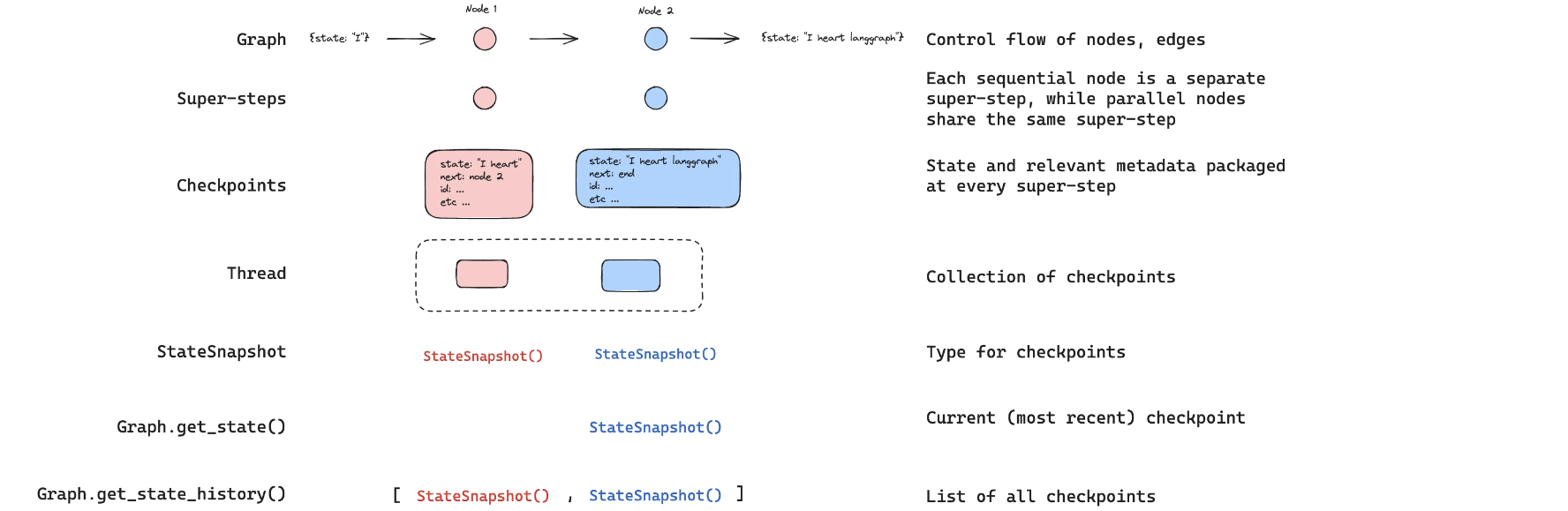
get_state_history lets us get the state at all prior steps.
get_state_history 可让我们获取所有先前步骤对应的状态。
python
all_states = [s for s in graph.get_state_history(thread)]
python
len(all_states)5The first element is the current state, just as we got from get_state.
第一个元素即为当前状态,与调用 get_state 所得结果一致。
python
all_states[-2]StateSnapshot(values={'messages': [HumanMessage(content='Multiply 2 and 3', id='4ee8c440-0e4a-47d7-852f-06e2a6c4f84d')]}, next=('assistant',), config={'configurable': {'thread_id': '1', 'checkpoint_ns': '', 'checkpoint_id': '1ef6a440-a003-6c74-8000-8a2d82b0d126'}}, metadata={'source': 'loop', 'writes': None, 'step': 0, 'parents': {}}, created_at='2024-09-03T22:29:52.988265+00:00', parent_config={'configurable': {'thread_id': '1', 'checkpoint_ns': '', 'checkpoint_id': '1ef6a440-9ffe-6512-bfff-9e6d8dc24bba'}}, tasks=(PregelTask(id='ca669906-0c4f-5165-840d-7a6a3fce9fb9', name='assistant', error=None, interrupts=(), state=None),))Everything above we can visualize here:
以上所有内容均可在此处可视化:
Replaying 重放
We can re-run our agent from any of the prior steps.
我们可以从任意先前步骤重新运行我们的代理。
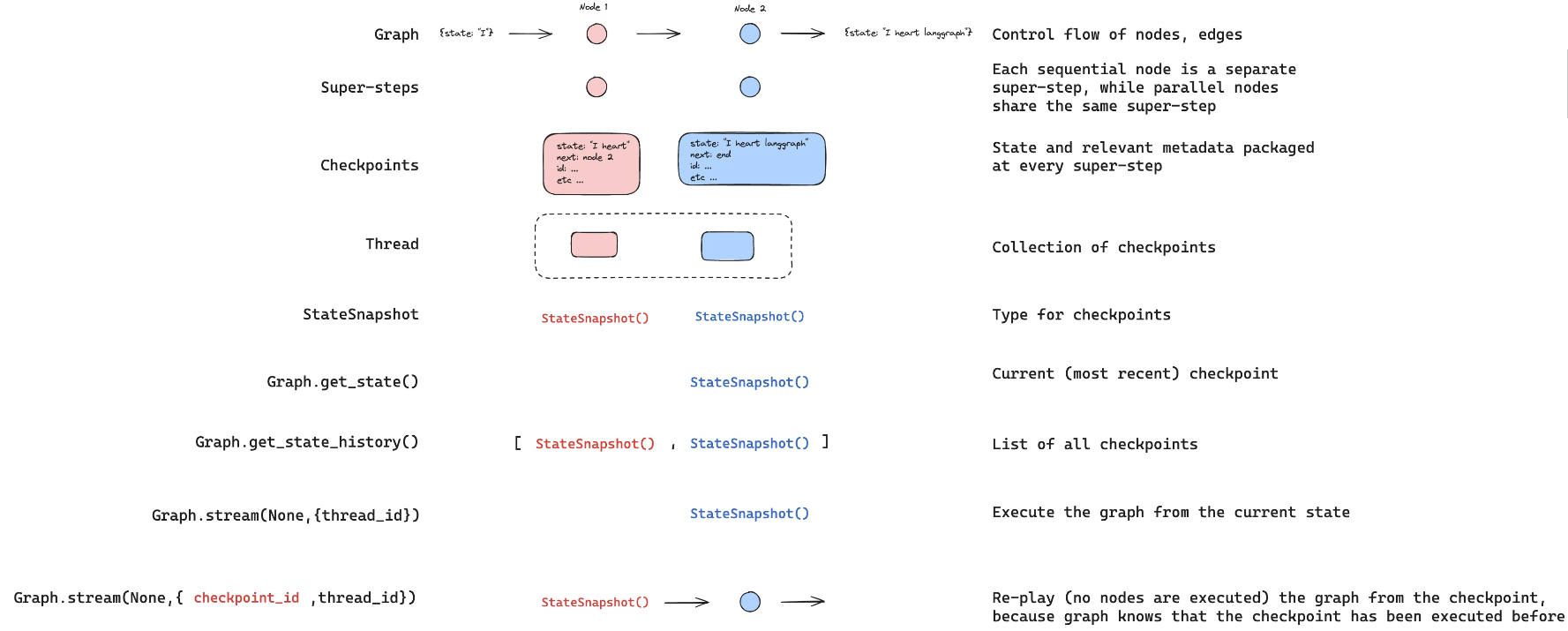
Let's look back at the step that recieved human input!
让我们回顾一下接收人工输入的那个步骤!
python
to_replay = all_states[-2]
python
to_replayStateSnapshot(values={'messages': [HumanMessage(content='Multiply 2 and 3', id='4ee8c440-0e4a-47d7-852f-06e2a6c4f84d')]}, next=('assistant',), config={'configurable': {'thread_id': '1', 'checkpoint_ns': '', 'checkpoint_id': '1ef6a440-a003-6c74-8000-8a2d82b0d126'}}, metadata={'source': 'loop', 'writes': None, 'step': 0, 'parents': {}}, created_at='2024-09-03T22:29:52.988265+00:00', parent_config={'configurable': {'thread_id': '1', 'checkpoint_ns': '', 'checkpoint_id': '1ef6a440-9ffe-6512-bfff-9e6d8dc24bba'}}, tasks=(PregelTask(id='ca669906-0c4f-5165-840d-7a6a3fce9fb9', name='assistant', error=None, interrupts=(), state=None),))Look at the state.
查看该状态。
python
to_replay.values{'messages': [HumanMessage(content='Multiply 2 and 3', id='4ee8c440-0e4a-47d7-852f-06e2a6c4f84d')]}We can see the next node to call.
我们可以看到下一个待调用的节点。
python
to_replay.next('assistant',)We also get the config, which tells us the checkpoint_id as well as the thread_id.
我们还能获得配置(config),其中包含 checkpoint_id 和 thread_id。
python
to_replay.config{'configurable': {'thread_id': '1',
'checkpoint_ns': '',
'checkpoint_id': '1ef6a440-a003-6c74-8000-8a2d82b0d126'}}To replay from here, we simply pass the config back to the agent!
要从此处重放,只需将该配置传回给代理即可!
The graph knows that this checkpoint has aleady been executed.
图知道该检查点(checkpoint)已被执行过。
It just re-plays from this checkpoint!
它仅从此检查点开始重放!
python
for event in graph.stream(None, to_replay.config, stream_mode="values"):
event['messages'][-1].pretty_print()================================[1m Human Message [0m=================================
Multiply 2 and 3
==================================[1m Ai Message [0m==================================
Tool Calls:
multiply (call_SABfB57CnDkMu9HJeUE0mvJ9)
Call ID: call_SABfB57CnDkMu9HJeUE0mvJ9
Args:
a: 2
b: 3
=================================[1m Tool Message [0m=================================
Name: multiply
6
==================================[1m Ai Message [0m==================================
The result of multiplying 2 and 3 is 6.Now, we can see our current state after the agent re-ran.
现在,我们可以看到代理重放后得到的当前状态。
Forking 分叉
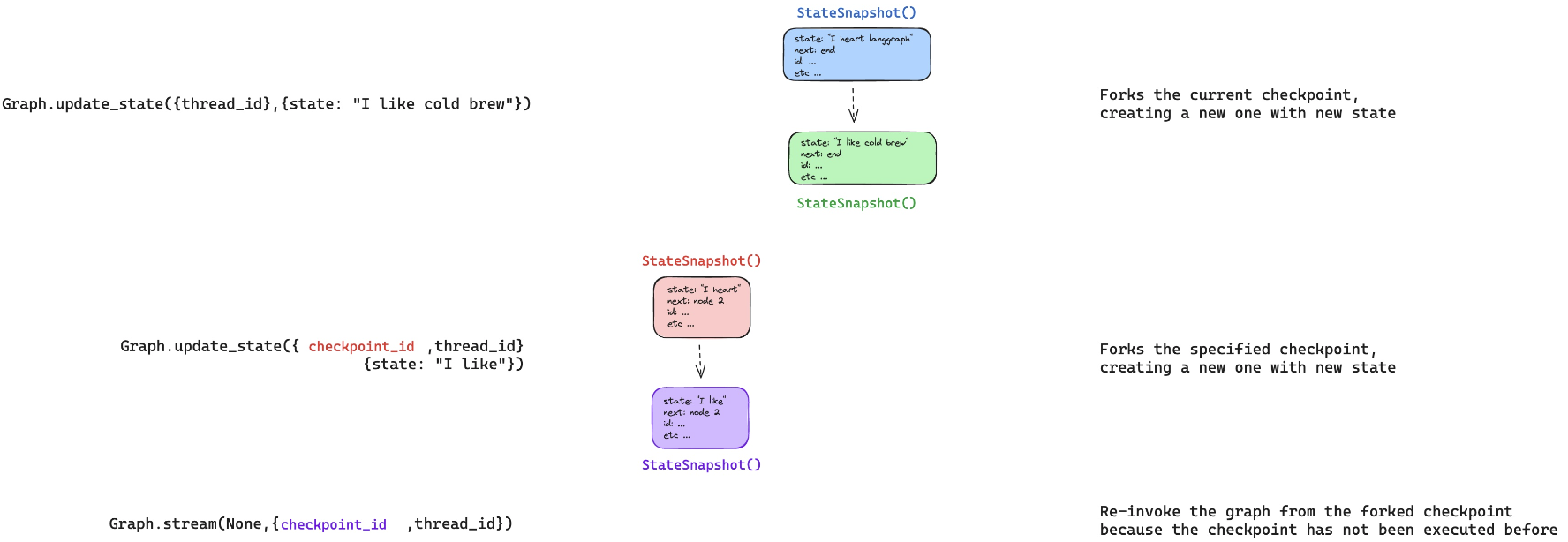
What if we want to run from that same step, but with a different input.
如果我们希望从同一检查点出发,但使用不同的输入,该怎么办?
This is forking.
这就是分叉(forking)。
python
to_fork = all_states[-2]
to_fork.values["messages"][HumanMessage(content='Multiply 2 and 3', id='4ee8c440-0e4a-47d7-852f-06e2a6c4f84d')]Again, we have the config.
同样,我们拥有该配置。
python
to_fork.config{'configurable': {'thread_id': '1',
'checkpoint_ns': '',
'checkpoint_id': '1ef6a440-a003-6c74-8000-8a2d82b0d126'}}Let's modify the state at this checkpoint.
让我们修改该检查点处的状态。
We can just run update_state with the checkpoint_id supplied.
我们只需调用 update_state 并传入 checkpoint_id 即可。
Remember how our reducer on messages works:
请回顾 messages 上的归约器(reducer)是如何工作的:
-
It will append, unless we supply a message ID.
- 除非提供消息 ID,否则它会追加消息。
-
We supply the message ID to overwrite the message, rather than appending to state!
- 我们提供消息 ID 以覆盖(overwrite)消息,而非向状态追加!
So, to overwrite the the message, we just supply the message ID, which we have to_fork.values["messages"].id.
因此,要覆盖该消息,我们只需提供其消息 ID,即 to_fork.values["messages"].id。
python
fork_config = graph.update_state(
    to_fork.config,
    {"messages": [HumanMessage(content='Multiply 5 and 3',
                               id=to_fork.values["messages"][0].id)]},
)
python
fork_config{'configurable': {'thread_id': '1',
'checkpoint_ns': '',
'checkpoint_id': '1ef6a442-3661-62f6-8001-d3c01b96f98b'}}This creates a new, forked checkpoint.
这将创建一个全新的、已分叉的检查点。
But, the metadata - e.g., where to go next - is perserved!
但元数据(例如下一步去向)会被保留!
We can see the current state of our agent has been updated with our fork.
我们可以看到,代理的当前状态已更新为我们的分叉结果。
python
all_states = [state for state in graph.get_state_history(thread) ]
all_states[0].values["messages"][HumanMessage(content='Multiply 5 and 3', id='4ee8c440-0e4a-47d7-852f-06e2a6c4f84d')]
python
graph.get_state({'configurable': {'thread_id': '1'}})StateSnapshot(values={'messages': [HumanMessage(content='Multiply 5 and 3', id='4ee8c440-0e4a-47d7-852f-06e2a6c4f84d')]}, next=('assistant',), config={'configurable': {'thread_id': '1', 'checkpoint_ns': '', 'checkpoint_id': '1ef6a442-3661-62f6-8001-d3c01b96f98b'}}, metadata={'source': 'update', 'step': 1, 'writes': {'__start__': {'messages': [HumanMessage(content='Multiply 5 and 3', id='4ee8c440-0e4a-47d7-852f-06e2a6c4f84d')]}}, 'parents': {}}, created_at='2024-09-03T22:30:35.598707+00:00', parent_config={'configurable': {'thread_id': '1', 'checkpoint_ns': '', 'checkpoint_id': '1ef6a440-a003-6c74-8000-8a2d82b0d126'}}, tasks=(PregelTask(id='f8990132-a8d3-5ddd-8d9e-1efbfc220da1', name='assistant', error=None, interrupts=(), state=None),))Now, when we stream, the graph knows this checkpoint has never been executed.
现在,当我们进行流式输出(stream)时,图知道该检查点尚未被执行过。
So, the graph runs, rather than simply re-playing.
因此,图将实际运行,而非简单地重放。
python
for event in graph.stream(None, fork_config, stream_mode="values"):
event['messages'][-1].pretty_print()================================[1m Human Message [0m=================================
Multiply 5 and 3
==================================[1m Ai Message [0m==================================
Tool Calls:
multiply (call_KP2CVNMMUKMJAQuFmamHB21r)
Call ID: call_KP2CVNMMUKMJAQuFmamHB21r
Args:
a: 5
b: 3
=================================[1m Tool Message [0m=================================
Name: multiply
15
==================================[1m Ai Message [0m==================================
The result of multiplying 5 and 3 is 15.Now, we can see the current state is the end of our agent run.
现在,我们可以看到当前状态已是代理运行的最终状态。
python
graph.get_state({'configurable': {'thread_id': '1'}})StateSnapshot(values={'messages': [HumanMessage(content='Multiply 5 and 3', id='4ee8c440-0e4a-47d7-852f-06e2a6c4f84d'), AIMessage(content='', additional_kwargs={'tool_calls': [{'id': 'call_KP2CVNMMUKMJAQuFmamHB21r', 'function': {'arguments': '{"a":5,"b":3}', 'name': 'multiply'}, 'type': 'function'}], 'refusal': None}, response_metadata={'token_usage': {'completion_tokens': 17, 'prompt_tokens': 131, 'total_tokens': 148}, 'model_name': 'gpt-4o-2024-05-13', 'system_fingerprint': 'fp_157b3831f5', 'finish_reason': 'tool_calls', 'logprobs': None}, id='run-bc420009-d1f6-49b8-bea7-dfc9fca7eb79-0', tool_calls=[{'name': 'multiply', 'args': {'a': 5, 'b': 3}, 'id': 'call_KP2CVNMMUKMJAQuFmamHB21r', 'type': 'tool_call'}], usage_metadata={'input_tokens': 131, 'output_tokens': 17, 'total_tokens': 148}), ToolMessage(content='15', name='multiply', id='9232e653-816d-471a-9002-9a1ecd453364', tool_call_id='call_KP2CVNMMUKMJAQuFmamHB21r'), AIMessage(content='The result of multiplying 5 and 3 is 15.', additional_kwargs={'refusal': None}, response_metadata={'token_usage': {'completion_tokens': 14, 'prompt_tokens': 156, 'total_tokens': 170}, 'model_name': 'gpt-4o-2024-05-13', 'system_fingerprint': 'fp_157b3831f5', 'finish_reason': 'stop', 'logprobs': None}, id='run-86c21888-d832-47c5-9e76-0aa2676116dc-0', usage_metadata={'input_tokens': 156, 'output_tokens': 14, 'total_tokens': 170})]}, next=(), config={'configurable': {'thread_id': '1', 'checkpoint_ns': '', 'checkpoint_id': '1ef6a442-a2e2-6e98-8004-4a0b75537950'}}, metadata={'source': 'loop', 'writes': {'assistant': {'messages': [AIMessage(content='The result of multiplying 5 and 3 is 15.', additional_kwargs={'refusal': None}, response_metadata={'token_usage': {'completion_tokens': 14, 'prompt_tokens': 156, 'total_tokens': 170}, 'model_name': 'gpt-4o-2024-05-13', 'system_fingerprint': 'fp_157b3831f5', 'finish_reason': 'stop', 'logprobs': None}, id='run-86c21888-d832-47c5-9e76-0aa2676116dc-0', usage_metadata={'input_tokens': 156, 'output_tokens': 14, 'total_tokens': 170})]}}, 'step': 4, 'parents': {}}, created_at='2024-09-03T22:30:46.976463+00:00', parent_config={'configurable': {'thread_id': '1', 'checkpoint_ns': '', 'checkpoint_id': '1ef6a442-9db0-6056-8003-7304cab7bed8'}}, tasks=())Time travel with LangGraph API 通过 LangGraph API 实现时间旅行
⚠️ Notice
⚠️ 注意
Since filming these videos, we've updated Studio so that it can now be run locally and accessed through your browser.
自录制这些视频以来,我们已更新 Studio,使其现在可本地运行并通过浏览器访问。
This is the preferred way to run Studio instead of using the Desktop App shown in the video.
这是运行 Studio 的首选方式,而非视频中演示的桌面应用。
It is now called LangSmith Studio instead of LangGraph Studio.
它现在被称为 LangSmith Studio ,而非 LangGraph Studio。
Detailed setup instructions are available in the "Getting Setup" guide at the start of the course.
详细的安装说明见本课程开头的"环境准备(Getting Setup)"指南。
You can find a description of Studio here, and specific details for local deployment here.
您可在此处查阅 Studio 的介绍文档:链接,以及本地部署的具体细节:链接。
To start the local development server, run the following command in your terminal in the /studio directory in this module:
要在本地启动开发服务器,请在本模块的 /studio 目录下于终端中运行以下命令:
langgraph devYou should see the following output:
您应看到如下输出:
- 🚀 API: http://127.0.0.1:2024
- 🎨 Studio UI: https://smith.langchain.com/studio/?baseUrl=http://127.0.0.1:2024
- 📚 API Docs: http://127.0.0.1:2024/docs
Open your browser and navigate to the Studio UI URL shown above.
打开您的浏览器并导航至上方显示的 Studio UI URL。
We connect to it via the SDK and show how the LangGraph API supports time travel.
我们通过 SDK 连接该服务,并展示 LangGraph API 如何支持时间旅行。
python
if 'google.colab' in str(get_ipython()):
    raise Exception("Unfortunately LangGraph Studio is currently not supported on Google Colab")
python
from langgraph_sdk import get_client
client = get_client(url="http://127.0.0.1:2024")
Re-playing 重放
Let's run our agent streaming updates to the state of the graph after each node is called.
让我们运行代理,并对每个节点调用后的图状态流式输出 updates。
python
initial_input = {"messages": HumanMessage(content="Multiply 2 and 3")}
thread = await client.threads.create()
async for chunk in client.runs.stream(
    thread["thread_id"],
    assistant_id = "agent",
    input=initial_input,
    stream_mode="updates",
):
    if chunk.data:
        assisant_node = chunk.data.get('assistant', {}).get('messages', [])
        tool_node = chunk.data.get('tools', {}).get('messages', [])
        if assisant_node:
            print("-" * 20+"Assistant Node"+"-" * 20)
            print(assisant_node[-1])
        elif tool_node:
            print("-" * 20+"Tools Node"+"-" * 20)
print(tool_node[-1])--------------------Assistant Node--------------------
{'content': '', 'additional_kwargs': {'tool_calls': [{'index': 0, 'id': 'call_SG7XYqDENGq7mwXrnioNLosS', 'function': {'arguments': '{"a":2,"b":3}', 'name': 'multiply'}, 'type': 'function'}]}, 'response_metadata': {'finish_reason': 'tool_calls', 'model_name': 'gpt-4o-2024-05-13', 'system_fingerprint': 'fp_157b3831f5'}, 'type': 'ai', 'name': None, 'id': 'run-2c120fc3-3c82-4599-b8ec-24fbee207cad', 'example': False, 'tool_calls': [{'name': 'multiply', 'args': {'a': 2, 'b': 3}, 'id': 'call_SG7XYqDENGq7mwXrnioNLosS', 'type': 'tool_call'}], 'invalid_tool_calls': [], 'usage_metadata': None}
--------------------Tools Node--------------------
{'content': '6', 'additional_kwargs': {}, 'response_metadata': {}, 'type': 'tool', 'name': 'multiply', 'id': '3b40d091-58b2-4566-a84c-60af67206307', 'tool_call_id': 'call_SG7XYqDENGq7mwXrnioNLosS', 'artifact': None, 'status': 'success'}
--------------------Assistant Node--------------------
{'content': 'The result of multiplying 2 and 3 is 6.', 'additional_kwargs': {}, 'response_metadata': {'finish_reason': 'stop', 'model_name': 'gpt-4o-2024-05-13', 'system_fingerprint': 'fp_fde2829a40'}, 'type': 'ai', 'name': None, 'id': 'run-1272d9b0-a0aa-4ff7-8bad-fdffd27c5506', 'example': False, 'tool_calls': [], 'invalid_tool_calls': [], 'usage_metadata': None}Now, let's look at replaying from a specified checkpoint.
现在,让我们查看如何从指定检查点进行重放。
We simply need to pass the checkpoint_id.
我们只需传入 checkpoint_id。
python
states = await client.threads.get_history(thread['thread_id'])
to_replay = states[-2]
to_replay{'values': {'messages': [{'content': 'Multiply 2 and 3',
'additional_kwargs': {'example': False,
'additional_kwargs': {},
'response_metadata': {}},
'response_metadata': {},
'type': 'human',
'name': None,
'id': 'df98147a-cb3d-4f1a-b7f7-1545c4b6f042',
'example': False}]},
'next': ['assistant'],
'tasks': [{'id': 'e497456f-827a-5027-87bd-b0ccd54aa89a',
'name': 'assistant',
'error': None,
'interrupts': [],
'state': None}],
'metadata': {'step': 0,
'run_id': '1ef6a449-7fbc-6c90-8754-4e6b1b582790',
'source': 'loop',
'writes': None,
'parents': {},
'user_id': '',
'graph_id': 'agent',
'thread_id': '708e1d8f-f7c8-4093-9bb4-999c4237cb4a',
'created_by': 'system',
'assistant_id': 'fe096781-5601-53d2-b2f6-0d3403f7e9ca'},
'created_at': '2024-09-03T22:33:51.380352+00:00',
'checkpoint_id': '1ef6a449-817f-6b55-8000-07c18fbdf7c8',
'parent_checkpoint_id': '1ef6a449-816c-6fd6-bfff-32a56dd2635f'}Let's stream with stream_mode="values" to see the full state at every node as we replay.
让我们使用 stream_mode="values" 进行流式处理,以便在重放过程中查看每个节点的完整状态。
python
async for chunk in client.runs.stream(
    thread["thread_id"],
    assistant_id="agent",
    input=None,
    stream_mode="values",
    checkpoint_id=to_replay['checkpoint_id']
):
    print(f"Receiving new event of type: {chunk.event}...")
    print(chunk.data)
print("\n\n")Receiving new event of type: metadata...
{'run_id': '1ef6a44a-5806-6bb1-b2ee-92ecfda7f67d'}
Receiving new event of type: values...
{'messages': [{'content': 'Multiply 2 and 3', 'additional_kwargs': {'example': False, 'additional_kwargs': {}, 'response_metadata': {}}, 'response_metadata': {}, 'type': 'human', 'name': None, 'id': 'df98147a-cb3d-4f1a-b7f7-1545c4b6f042', 'example': False}]}
Receiving new event of type: values...
{'messages': [{'content': 'Multiply 2 and 3', 'additional_kwargs': {'example': False, 'additional_kwargs': {}, 'response_metadata': {}}, 'response_metadata': {}, 'type': 'human', 'name': None, 'id': 'df98147a-cb3d-4f1a-b7f7-1545c4b6f042', 'example': False}, {'content': '', 'additional_kwargs': {'tool_calls': [{'index': 0, 'id': 'call_Rn9YQ6iZyYtzrELBz7EfQcs0', 'function': {'arguments': '{"a":2,"b":3}', 'name': 'multiply'}, 'type': 'function'}]}, 'response_metadata': {'finish_reason': 'tool_calls', 'model_name': 'gpt-4o-2024-05-13', 'system_fingerprint': 'fp_157b3831f5'}, 'type': 'ai', 'name': None, 'id': 'run-e60d82d7-7743-4f13-bebd-3616a88720a9', 'example': False, 'tool_calls': [{'name': 'multiply', 'args': {'a': 2, 'b': 3}, 'id': 'call_Rn9YQ6iZyYtzrELBz7EfQcs0', 'type': 'tool_call'}], 'invalid_tool_calls': [], 'usage_metadata': None}]}
Receiving new event of type: values...
{'messages': [{'content': 'Multiply 2 and 3', 'additional_kwargs': {'example': False, 'additional_kwargs': {}, 'response_metadata': {}}, 'response_metadata': {}, 'type': 'human', 'name': None, 'id': 'df98147a-cb3d-4f1a-b7f7-1545c4b6f042', 'example': False}, {'content': '', 'additional_kwargs': {'tool_calls': [{'index': 0, 'id': 'call_Rn9YQ6iZyYtzrELBz7EfQcs0', 'function': {'arguments': '{"a":2,"b":3}', 'name': 'multiply'}, 'type': 'function'}]}, 'response_metadata': {'finish_reason': 'tool_calls', 'model_name': 'gpt-4o-2024-05-13', 'system_fingerprint': 'fp_157b3831f5'}, 'type': 'ai', 'name': None, 'id': 'run-e60d82d7-7743-4f13-bebd-3616a88720a9', 'example': False, 'tool_calls': [{'name': 'multiply', 'args': {'a': 2, 'b': 3}, 'id': 'call_Rn9YQ6iZyYtzrELBz7EfQcs0', 'type': 'tool_call'}], 'invalid_tool_calls': [], 'usage_metadata': None}, {'content': '6', 'additional_kwargs': {}, 'response_metadata': {}, 'type': 'tool', 'name': 'multiply', 'id': 'f1be0b83-4565-4aa2-9b9a-cd8874c6a2bc', 'tool_call_id': 'call_Rn9YQ6iZyYtzrELBz7EfQcs0', 'artifact': None, 'status': 'success'}]}
Receiving new event of type: values...
{'messages': [{'content': 'Multiply 2 and 3', 'additional_kwargs': {'example': False, 'additional_kwargs': {}, 'response_metadata': {}}, 'response_metadata': {}, 'type': 'human', 'name': None, 'id': 'df98147a-cb3d-4f1a-b7f7-1545c4b6f042', 'example': False}, {'content': '', 'additional_kwargs': {'tool_calls': [{'index': 0, 'id': 'call_Rn9YQ6iZyYtzrELBz7EfQcs0', 'function': {'arguments': '{"a":2,"b":3}', 'name': 'multiply'}, 'type': 'function'}]}, 'response_metadata': {'finish_reason': 'tool_calls', 'model_name': 'gpt-4o-2024-05-13', 'system_fingerprint': 'fp_157b3831f5'}, 'type': 'ai', 'name': None, 'id': 'run-e60d82d7-7743-4f13-bebd-3616a88720a9', 'example': False, 'tool_calls': [{'name': 'multiply', 'args': {'a': 2, 'b': 3}, 'id': 'call_Rn9YQ6iZyYtzrELBz7EfQcs0', 'type': 'tool_call'}], 'invalid_tool_calls': [], 'usage_metadata': None}, {'content': '6', 'additional_kwargs': {}, 'response_metadata': {}, 'type': 'tool', 'name': 'multiply', 'id': 'f1be0b83-4565-4aa2-9b9a-cd8874c6a2bc', 'tool_call_id': 'call_Rn9YQ6iZyYtzrELBz7EfQcs0', 'artifact': None, 'status': 'success'}, {'content': 'The result of multiplying 2 and 3 is 6.', 'additional_kwargs': {}, 'response_metadata': {'finish_reason': 'stop', 'model_name': 'gpt-4o-2024-05-13', 'system_fingerprint': 'fp_157b3831f5'}, 'type': 'ai', 'name': None, 'id': 'run-55e5847a-d542-4977-84d7-24852e78b0a9', 'example': False, 'tool_calls': [], 'invalid_tool_calls': [], 'usage_metadata': None}]}We can all view this as streaming only updates to state made by the nodes that we reply.
我们可以将此理解为仅流式传输节点在重放时对状态所做的 updates(更新)。
python
async for chunk in client.runs.stream(
    thread["thread_id"],
    assistant_id="agent",
    input=None,
    stream_mode="updates",
    checkpoint_id=to_replay['checkpoint_id']
):
    if chunk.data:
        assisant_node = chunk.data.get('assistant', {}).get('messages', [])
        tool_node = chunk.data.get('tools', {}).get('messages', [])
        if assisant_node:
            print("-" * 20+"Assistant Node"+"-" * 20)
            print(assisant_node[-1])
        elif tool_node:
            print("-" * 20+"Tools Node"+"-" * 20)
print(tool_node[-1])--------------------Assistant Node--------------------
{'content': '', 'additional_kwargs': {'tool_calls': [{'index': 0, 'id': 'call_I2qudhMCwcw1GzcFN5q80rjj', 'function': {'arguments': '{"a":2,"b":3}', 'name': 'multiply'}, 'type': 'function'}]}, 'response_metadata': {'finish_reason': 'tool_calls', 'model_name': 'gpt-4o-2024-05-13', 'system_fingerprint': 'fp_157b3831f5'}, 'type': 'ai', 'name': None, 'id': 'run-550e75ad-dbbc-4e55-9f00-aa896228914c', 'example': False, 'tool_calls': [{'name': 'multiply', 'args': {'a': 2, 'b': 3}, 'id': 'call_I2qudhMCwcw1GzcFN5q80rjj', 'type': 'tool_call'}], 'invalid_tool_calls': [], 'usage_metadata': None}
--------------------Tools Node--------------------
{'content': '6', 'additional_kwargs': {}, 'response_metadata': {}, 'type': 'tool', 'name': 'multiply', 'id': '731b7d4f-780d-4a8b-aec9-0d8b9c58c40a', 'tool_call_id': 'call_I2qudhMCwcw1GzcFN5q80rjj', 'artifact': None, 'status': 'success'}
--------------------Assistant Node--------------------
{'content': 'The result of multiplying 2 and 3 is 6.', 'additional_kwargs': {}, 'response_metadata': {'finish_reason': 'stop', 'model_name': 'gpt-4o-2024-05-13', 'system_fingerprint': 'fp_157b3831f5'}, 'type': 'ai', 'name': None, 'id': 'run-2326afa5-eb43-4568-b5ed-424c0a0fa076', 'example': False, 'tool_calls': [], 'invalid_tool_calls': [], 'usage_metadata': None}Forking 分叉
Now, let's look at forking.
现在,让我们来看分叉。
Let's get the same step as we worked with above, the human input.
让我们获取与上文相同的步骤------即人类输入。
Let's create a new thread with our agent.
让我们使用我们的 agent 创建一个新线程。
python
initial_input = {"messages": HumanMessage(content="Multiply 2 and 3")}
thread = await client.threads.create()
async for chunk in client.runs.stream(
    thread["thread_id"],
    assistant_id="agent",
    input=initial_input,
    stream_mode="updates",
):
    if chunk.data:
        assisant_node = chunk.data.get('assistant', {}).get('messages', [])
        tool_node = chunk.data.get('tools', {}).get('messages', [])
        if assisant_node:
            print("-" * 20+"Assistant Node"+"-" * 20)
            print(assisant_node[-1])
        elif tool_node:
            print("-" * 20+"Tools Node"+"-" * 20)
print(tool_node[-1])--------------------Assistant Node--------------------
{'content': '', 'additional_kwargs': {'tool_calls': [{'index': 0, 'id': 'call_HdWoyLELFZGEcqGxFt2fZzek', 'function': {'arguments': '{"a":2,"b":3}', 'name': 'multiply'}, 'type': 'function'}]}, 'response_metadata': {'finish_reason': 'tool_calls', 'model_name': 'gpt-4o-2024-05-13', 'system_fingerprint': 'fp_157b3831f5'}, 'type': 'ai', 'name': None, 'id': 'run-cbd081b1-8cef-4ca8-9dd5-aceb134404dc', 'example': False, 'tool_calls': [{'name': 'multiply', 'args': {'a': 2, 'b': 3}, 'id': 'call_HdWoyLELFZGEcqGxFt2fZzek', 'type': 'tool_call'}], 'invalid_tool_calls': [], 'usage_metadata': None}
--------------------Tools Node--------------------
{'content': '6', 'additional_kwargs': {}, 'response_metadata': {}, 'type': 'tool', 'name': 'multiply', 'id': '11dd4a7f-0b6b-44da-b9a4-65f1677c8813', 'tool_call_id': 'call_HdWoyLELFZGEcqGxFt2fZzek', 'artifact': None, 'status': 'success'}
--------------------Assistant Node--------------------
{'content': 'The result of multiplying 2 and 3 is 6.', 'additional_kwargs': {}, 'response_metadata': {'finish_reason': 'stop', 'model_name': 'gpt-4o-2024-05-13', 'system_fingerprint': 'fp_157b3831f5'}, 'type': 'ai', 'name': None, 'id': 'run-936cf990-9302-45c7-9051-6ff1e2e9f316', 'example': False, 'tool_calls': [], 'invalid_tool_calls': [], 'usage_metadata': None}
python
states = await client.threads.get_history(thread['thread_id'])
to_fork = states[-2]
to_fork['values']{'messages': [{'content': 'Multiply 2 and 3',
'additional_kwargs': {'example': False,
'additional_kwargs': {},
'response_metadata': {}},
'response_metadata': {},
'type': 'human',
'name': None,
'id': '93c18b95-9050-4a52-99b8-9374e98ee5db',
'example': False}]}
python
to_fork['values']['messages'][0]['id']'93c18b95-9050-4a52-99b8-9374e98ee5db'
python
to_fork['next']['assistant']
python
to_fork['checkpoint_id']'1ef6a44b-27ec-681c-8000-ff7e345aee7e'Let's edit the state.
让我们编辑状态。
Remember how our reducer on messages works:
还记得我们作用于 messages 的归约器(reducer)是如何工作的吗?
-
It will append, unless we supply a message ID.
- 除非我们提供消息 ID,否则它会追加消息。
-
We supply the message ID to overwrite the message, rather than appending to state!
- 我们提供消息 ID 是为了覆盖该消息,而非向状态中追加!
python
forked_input = {"messages": HumanMessage(content="Multiply 3 and 3",
                                         id=to_fork['values']['messages'][0]['id'])}

forked_config = await client.threads.update_state(
    thread["thread_id"],
    forked_input,
    checkpoint_id=to_fork['checkpoint_id']
)
python
forked_config{'configurable': {'thread_id': 'c99502e7-b0d7-473e-8295-1ad60e2b7ed2',
'checkpoint_ns': '',
'checkpoint_id': '1ef6a44b-90dc-68c8-8001-0c36898e0f34'},
'checkpoint_id': '1ef6a44b-90dc-68c8-8001-0c36898e0f34'}
python
states = await client.threads.get_history(thread['thread_id'])
states[0]{'values': {'messages': [{'content': 'Multiply 3 and 3',
'additional_kwargs': {'additional_kwargs': {},
'response_metadata': {},
'example': False},
'response_metadata': {},
'type': 'human',
'name': None,
'id': '93c18b95-9050-4a52-99b8-9374e98ee5db',
'example': False}]},
'next': ['assistant'],
'tasks': [{'id': 'da5d6548-62ca-5e69-ba70-f6179b2743bd',
'name': 'assistant',
'error': None,
'interrupts': [],
'state': None}],
'metadata': {'step': 1,
'source': 'update',
'writes': {'__start__': {'messages': {'id': '93c18b95-9050-4a52-99b8-9374e98ee5db',
'name': None,
'type': 'human',
'content': 'Multiply 3 and 3',
'example': False,
'additional_kwargs': {},
'response_metadata': {}}}},
'parents': {},
'graph_id': 'agent'},
'created_at': '2024-09-03T22:34:46.678333+00:00',
'checkpoint_id': '1ef6a44b-90dc-68c8-8001-0c36898e0f34',
'parent_checkpoint_id': '1ef6a44b-27ec-681c-8000-ff7e345aee7e'}To rerun, we pass in the checkpoint_id.
要重新运行,需传入 checkpoint_id。
python
async for chunk in client.runs.stream(
    thread["thread_id"],
    assistant_id="agent",
    input=None,
    stream_mode="updates",
    checkpoint_id=forked_config['checkpoint_id']
):
    if chunk.data:
        assisant_node = chunk.data.get('assistant', {}).get('messages', [])
        tool_node = chunk.data.get('tools', {}).get('messages', [])
        if assisant_node:
            print("-" * 20+"Assistant Node"+"-" * 20)
            print(assisant_node[-1])
        elif tool_node:
            print("-" * 20+"Tools Node"+"-" * 20)
print(tool_node[-1])--------------------Assistant Node--------------------
{'content': '', 'additional_kwargs': {'tool_calls': [{'index': 0, 'id': 'call_aodhCt5fWv33qVbO7Nsub9Q3', 'function': {'arguments': '{"a":3,"b":3}', 'name': 'multiply'}, 'type': 'function'}]}, 'response_metadata': {'finish_reason': 'tool_calls', 'model_name': 'gpt-4o-2024-05-13', 'system_fingerprint': 'fp_157b3831f5'}, 'type': 'ai', 'name': None, 'id': 'run-e9759422-e537-4b9b-b583-36c688e13b4b', 'example': False, 'tool_calls': [{'name': 'multiply', 'args': {'a': 3, 'b': 3}, 'id': 'call_aodhCt5fWv33qVbO7Nsub9Q3', 'type': 'tool_call'}], 'invalid_tool_calls': [], 'usage_metadata': None}
--------------------Tools Node--------------------
{'content': '9', 'additional_kwargs': {}, 'response_metadata': {}, 'type': 'tool', 'name': 'multiply', 'id': '89787b0b-93de-4c0a-bea8-d2c3845534e1', 'tool_call_id': 'call_aodhCt5fWv33qVbO7Nsub9Q3', 'artifact': None, 'status': 'success'}
--------------------Assistant Node--------------------
{'content': 'The result of multiplying 3 by 3 is 9.', 'additional_kwargs': {}, 'response_metadata': {'finish_reason': 'stop', 'model_name': 'gpt-4o-2024-05-13', 'system_fingerprint': 'fp_157b3831f5'}, 'type': 'ai', 'name': None, 'id': 'run-0e16610f-4e8d-46f3-a5df-c2f187fae593', 'example': False, 'tool_calls': [], 'invalid_tool_calls': [], 'usage_metadata': None}LangGraph Studio
Let's look at forking in the Studio UI with our agent, which uses module-1/studio/agent.py set in module-1/studio/langgraph.json.
让我们在 Studio UI 中查看我们 agent 的分叉功能,该 agent 使用 module-1/studio/agent.py,并在 module-1/studio/langgraph.json 中配置。