# 正常使用后,再运行下句,避免每次运行都要查询。
# 不运行也行,就是白白浪费掉好几分钟的时间。
export HF_HUB_OFFLINE=1
应用场景:
- 嵌入式
- 电子书
- 通用
piper-tts 安装难点:
依赖 g2pW 出现网络问题;
其他语言模型可在
## 方法 1
export HF_ENDPOINT=https://hf-mirror.com
# 下载整个中文声库:方便
hf download rhasspy/piper-voices  --include "zh/*"   --local-dir ./piper-voices

## 方法 2
# onnx 和 同名 json 都要同时下载
wget https://hf-mirror.com/rhasspy/piper-voices/resolve/main/zh/zh_CN/huayan/medium/zh_CN-huayan-medium.onnx
wget https://hf-mirror.com/rhasspy/piper-voices/resolve/main/zh/zh_CN/huayan/medium/zh_CN-huayan-medium.onnx.json
calibre 安装难点:
也是网络问题,但国内有模型可下载。
目前官方说:只支持 http,不支持 socks5
测试平台:
ubuntu 24.04
- 纯 CPU,8GB 内存可运行。
- 估计 2、4GB内存也行?
麻烦:中文语言模型,好像不好找?piper 官方只有 3个人音色?
"phoneme_type": "espeak",:应该最轻量,在低端 CPU上可实时运行?piper 也像真人发声;但不如 "pinyin" ?拉丁语可用于落地产品。中文用于实验用途?
"phoneme_type": "pinyin",:g2pW 增加了 152M 模型。音质还行,像真人发声。可落地产品?
新仓 piper1-gpl > GitHub - OHF-Voice/piper1-gpl: Fast and local neural text-to-speech engine · GitHub
> GitHub - rhasspy/piper: A fast, local neural text to speech system · GitHub
安装 piper-tts
当前版本:piper-tts 1.8.0
pip install piper-ttsRequires
Python >=3.9
-
实测:Python 3.10.21 ,conda # OK
pip install sentence_stream
依赖 g2pW 缺失
echo '欢迎来到哈哈哈!' | piper --model zh_CN-chaowen-medium.onnx --output_file welcome.wav外网被 X
INFO:piper.phonemize_chinese:Downloading g2pW model from 'https://huggingface.co/datasets/rhasspy/piper-checkpoints/resolve/main/zh/zh_CN/_resources/g2pw.tar.gz?download=true' to '/home/abc/.cache/calibre/piper-voices/g2pW'
手动安装 依赖 g2pW
- 安装成功后,再次运行时,会联网查询 5次是否有更新。无网络时,虽然可以成功运行,但总是出现 5次联网尝试,麻烦。
解决联网问题:
全部 OK后, 只需要:export HF_HUB_OFFLINE=1
export HF_HUB_OFFLINE=1
export TRANSFORMERS_OFFLINE=1
export HF_DATASETS_OFFLINE=1
离线安装 g2pW
要那个啥,才能下载?
wget https://huggingface.co/datasets/rhasspy/piper-checkpoints/resolve/main/zh/zh_CN/_resources/g2pw.tar.gz下载 2: https://download.csdn.net/download/ken2232/93660166
当前工作目录
|-- onnx 模型文件
|-- g2pw 目录
- 注意:模型需要在工作目录下。软件默认的吧?
tree -h piper-voices
[4.0K]  piper-voices
├── [ 60M]  en_US-amy-medium.onnx
├── [4.8K]  en_US-amy-medium.onnx.json
├── [ 61M]  en_US-john-medium.onnx
├── [4.8K]  en_US-john-medium.onnx.json
├── [4.0K]  g2pW  # 直接解压到这个目录下
│   ├── [ 347]  config.py
│   ├── [152M]  g2pw.onnx
│   ├── [118K]  MONOPHONIC_CHARS.txt
│   ├── [100K]  POLYPHONIC_CHARS.txt
│   ├── [4.0K]  __pycache__  # 运行命令后,会自动生成这个文件夹(echo '欢迎来到哈哈哈!' | piper   --model zh_CN-chaowen-medium.onnx  --output_file welcome.wav)
│   │   └── [ 489]  config.cpython-310.pyc
│   └── [   5]  version
├── [108M]  g2pw.tar.gz  # 直接手动下载时,可得到这个文件
├── [ 60M]  zh_CN-xiao_ya-medium.onnx
└── [2.9K]  zh_CN-xiao_ya-medium.onnx.json
piper-tts 测试 2段话,结果:
- "phoneme_type": "espeak",:出现断句错误;有一个字发音错误。
- "phoneme_type": "pinyin",:OK。
zh_CN-huayan-medium.onnx.json
"espeak": {
"voice": "cmn"
},
"inference": {
"noise_scale": 0.667,
"length_scale": 1,
"noise_w": 0.8
},
"phoneme_type": "espeak",
zh_CN-xiao_ya-medium.onnx.json 和 zh_CN-chaowen-medium.onnx.json
"espeak": {
"voice": "zh"
},
"phoneme_type": "pinyin",
Piper Recording Studio
> GitHub - rhasspy/piper-recording-studio: Local voice recording for creating Piper datasets · GitHub
Local tool for recording yourself to train a Piper text to speech voice.
============
calibre 9.15.0
依赖 g2pW 还没有集成进去?估计需要等待软件未来的升级来解决?
影响:"phoneme_type": "pinyin",:
- 目前版本:只有 zh_CN-huayan-medium.onnx.json 模型可用。
- zh_CN-xiao_ya-medium.onnx.json 和 zh_CN-chaowen-medium.onnx.json 出来的是乱音。
- calibre 中文自动按照句号来拆分,分别进行 TTS。而不是一整段文字进行 TTS.。
calibre-9.15.0-x86_64/resources
|-- piper.so # piper被作为一个库来使用。
|-- piper-voices.json # 里面有各种语言的下载链接。
# piper-voices.json

      "huayan": {
        "medium": {
          "model": "https://huggingface.co/rhasspy/piper-voices/resolve/main/zh/zh_CN/huayan/medium/zh_CN-huayan-medium.onnx",
          "config": "https://huggingface.co/rhasspy/piper-voices/resolve/main/zh/zh_CN/huayan/medium/zh_CN-huayan-medium.onnx.json",
          "card": "https://huggingface.co/rhasspy/piper-voices/resolve/main/zh/zh_CN/huayan/medium/MODEL_CARD"
        },
        "x_low": {
          "model": "https://huggingface.co/rhasspy/piper-voices/resolve/main/zh/zh_CN/huayan/x_low/zh_CN-huayan-x_low.onnx",
          "config": "https://huggingface.co/rhasspy/piper-voices/resolve/main/zh/zh_CN/huayan/x_low/zh_CN-huayan-x_low.onnx.json",
          "card": "https://huggingface.co/rhasspy/piper-voices/resolve/main/zh/zh_CN/huayan/x_low/MODEL_CARD"
        }
      },
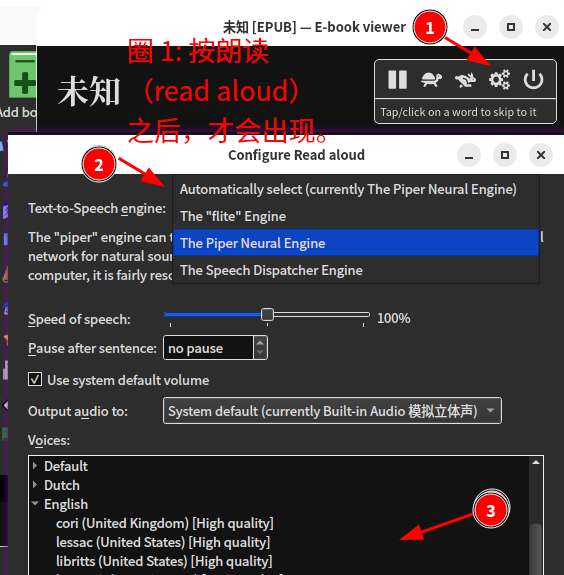
- 圈 1: 按朗读(read aloud)之后,才会出现。
=====================