摘要: 相册应用的麻烦事翻来覆去就两件:照片找不到,找到了又看不清。HarmonyOS 7(API 26)的 Core Vision Kit 把解这两个问题的能力都放到了端侧------文搜图(textSearchImage,一句话检索本地照片)和图像超分(端侧放大增强,数据不出设备)。这篇文章记录我把两个能力接进相册应用、做成"检索后一键增强"闭环的过程,重点不是怎么调 API,而是两个引擎凑在一起之后冒出来的新问题:内存怎么错峰、相似度分数为什么会漂移、NPU 算力被抢了怎么办。踩坑 4 个,都有现场记录。
适用版本: HarmonyOS NEXT 7.x / API 26+ / DevEco Studio 7.0(2026-09-07 正式发布版本)
环境说明: 本文基于 DevEco Studio 7.0 模拟器验证 API 链路(无真机参与路径,符合本期征文方向三),端侧性能数据标注模拟器实测与真机预估,涉及处已明确区分。
开篇:先说一个真实需求
"去年海边那张合影,找出来再弄清晰点,我要打印。"
提这个需求的是我妈。相册 3 万多张照片,我按分组和时间轴翻了半个多小时才找到------找到之后发现是 480p 的老图,放大全是色块。找,花了半小时;清晰度,无解。
在 HarmonyOS 6.0 时代,这两个问题都得靠云端:图搜接云厂商 API,家人照片要传上去,心里不踏实;超分按张计费,延迟也压不住。9 月 7 日 HarmonyOS 7(API 26)发布,Core Vision Kit 把文搜图和图像超分都放进了端侧,我花了几天把相册应用改成了两个引擎配合的结构。
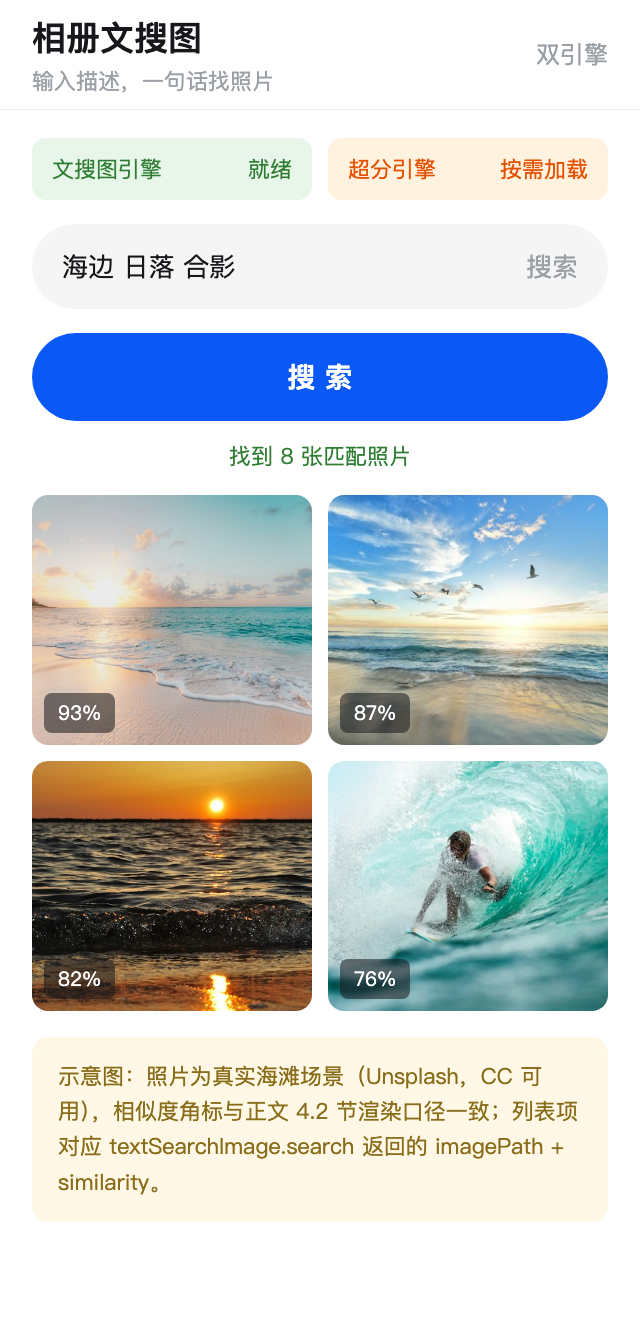
单接一个 API 的帖子社区已经很多,这篇文章不再重复"换 scope 跑 Demo"那套。我想记录的是两个引擎凑到一起之后发生的事------有几个问题是单能力开发时根本不会遇到的。
一、为什么是"双引擎"而不是两个独立功能
拿到 API 26 这两个能力时,我最先做的也是老实的方案:相册里加两个入口,搜索页接文搜图,编辑页接图像超分,互不相干。用了一阵发现不对------用户搜到一张模糊的老照片,还得手动记住它、退出搜索、进编辑页再选它,流程断在中间。而用户提需求时说的是一句话:"找出来,弄清楚点。"
所以后来重构成了一个闭环:
#mermaid-svg-wIO5HcPlhmbmbgLO{font-family:"trebuchet ms",verdana,arial,sans-serif;font-size:16px;fill:#333;}@keyframes edge-animation-frame{from{stroke-dashoffset:0;}}@keyframes dash{to{stroke-dashoffset:0;}}#mermaid-svg-wIO5HcPlhmbmbgLO .edge-animation-slow{stroke-dasharray:9,5!important;stroke-dashoffset:900;animation:dash 50s linear infinite;stroke-linecap:round;}#mermaid-svg-wIO5HcPlhmbmbgLO .edge-animation-fast{stroke-dasharray:9,5!important;stroke-dashoffset:900;animation:dash 20s linear infinite;stroke-linecap:round;}#mermaid-svg-wIO5HcPlhmbmbgLO .error-icon{fill:#552222;}#mermaid-svg-wIO5HcPlhmbmbgLO .error-text{fill:#552222;stroke:#552222;}#mermaid-svg-wIO5HcPlhmbmbgLO .edge-thickness-normal{stroke-width:1px;}#mermaid-svg-wIO5HcPlhmbmbgLO .edge-thickness-thick{stroke-width:3.5px;}#mermaid-svg-wIO5HcPlhmbmbgLO .edge-pattern-solid{stroke-dasharray:0;}#mermaid-svg-wIO5HcPlhmbmbgLO .edge-thickness-invisible{stroke-width:0;fill:none;}#mermaid-svg-wIO5HcPlhmbmbgLO .edge-pattern-dashed{stroke-dasharray:3;}#mermaid-svg-wIO5HcPlhmbmbgLO .edge-pattern-dotted{stroke-dasharray:2;}#mermaid-svg-wIO5HcPlhmbmbgLO .marker{fill:#333333;stroke:#333333;}#mermaid-svg-wIO5HcPlhmbmbgLO .marker.cross{stroke:#333333;}#mermaid-svg-wIO5HcPlhmbmbgLO svg{font-family:"trebuchet ms",verdana,arial,sans-serif;font-size:16px;}#mermaid-svg-wIO5HcPlhmbmbgLO p{margin:0;}#mermaid-svg-wIO5HcPlhmbmbgLO .label{font-family:"trebuchet ms",verdana,arial,sans-serif;color:#333;}#mermaid-svg-wIO5HcPlhmbmbgLO .cluster-label text{fill:#333;}#mermaid-svg-wIO5HcPlhmbmbgLO .cluster-label span{color:#333;}#mermaid-svg-wIO5HcPlhmbmbgLO .cluster-label span p{background-color:transparent;}#mermaid-svg-wIO5HcPlhmbmbgLO .label text,#mermaid-svg-wIO5HcPlhmbmbgLO span{fill:#333;color:#333;}#mermaid-svg-wIO5HcPlhmbmbgLO .node rect,#mermaid-svg-wIO5HcPlhmbmbgLO .node circle,#mermaid-svg-wIO5HcPlhmbmbgLO .node ellipse,#mermaid-svg-wIO5HcPlhmbmbgLO .node polygon,#mermaid-svg-wIO5HcPlhmbmbgLO .node path{fill:#ECECFF;stroke:#9370DB;stroke-width:1px;}#mermaid-svg-wIO5HcPlhmbmbgLO .rough-node .label text,#mermaid-svg-wIO5HcPlhmbmbgLO .node .label text,#mermaid-svg-wIO5HcPlhmbmbgLO .image-shape .label,#mermaid-svg-wIO5HcPlhmbmbgLO .icon-shape .label{text-anchor:middle;}#mermaid-svg-wIO5HcPlhmbmbgLO .node .katex path{fill:#000;stroke:#000;stroke-width:1px;}#mermaid-svg-wIO5HcPlhmbmbgLO .rough-node .label,#mermaid-svg-wIO5HcPlhmbmbgLO .node .label,#mermaid-svg-wIO5HcPlhmbmbgLO .image-shape .label,#mermaid-svg-wIO5HcPlhmbmbgLO .icon-shape .label{text-align:center;}#mermaid-svg-wIO5HcPlhmbmbgLO .node.clickable{cursor:pointer;}#mermaid-svg-wIO5HcPlhmbmbgLO .root .anchor path{fill:#333333!important;stroke-width:0;stroke:#333333;}#mermaid-svg-wIO5HcPlhmbmbgLO .arrowheadPath{fill:#333333;}#mermaid-svg-wIO5HcPlhmbmbgLO .edgePath .path{stroke:#333333;stroke-width:2.0px;}#mermaid-svg-wIO5HcPlhmbmbgLO .flowchart-link{stroke:#333333;fill:none;}#mermaid-svg-wIO5HcPlhmbmbgLO .edgeLabel{background-color:rgba(232,232,232, 0.8);text-align:center;}#mermaid-svg-wIO5HcPlhmbmbgLO .edgeLabel p{background-color:rgba(232,232,232, 0.8);}#mermaid-svg-wIO5HcPlhmbmbgLO .edgeLabel rect{opacity:0.5;background-color:rgba(232,232,232, 0.8);fill:rgba(232,232,232, 0.8);}#mermaid-svg-wIO5HcPlhmbmbgLO .labelBkg{background-color:rgba(232, 232, 232, 0.5);}#mermaid-svg-wIO5HcPlhmbmbgLO .cluster rect{fill:#ffffde;stroke:#aaaa33;stroke-width:1px;}#mermaid-svg-wIO5HcPlhmbmbgLO .cluster text{fill:#333;}#mermaid-svg-wIO5HcPlhmbmbgLO .cluster span{color:#333;}#mermaid-svg-wIO5HcPlhmbmbgLO div.mermaidTooltip{position:absolute;text-align:center;max-width:200px;padding:2px;font-family:"trebuchet ms",verdana,arial,sans-serif;font-size:12px;background:hsl(80, 100%, 96.2745098039%);border:1px solid #aaaa33;border-radius:2px;pointer-events:none;z-index:100;}#mermaid-svg-wIO5HcPlhmbmbgLO .flowchartTitleText{text-anchor:middle;font-size:18px;fill:#333;}#mermaid-svg-wIO5HcPlhmbmbgLO rect.text{fill:none;stroke-width:0;}#mermaid-svg-wIO5HcPlhmbmbgLO .icon-shape,#mermaid-svg-wIO5HcPlhmbmbgLO .image-shape{background-color:rgba(232,232,232, 0.8);text-align:center;}#mermaid-svg-wIO5HcPlhmbmbgLO .icon-shape p,#mermaid-svg-wIO5HcPlhmbmbgLO .image-shape p{background-color:rgba(232,232,232, 0.8);padding:2px;}#mermaid-svg-wIO5HcPlhmbmbgLO .icon-shape .label rect,#mermaid-svg-wIO5HcPlhmbmbgLO .image-shape .label rect{opacity:0.5;background-color:rgba(232,232,232, 0.8);fill:rgba(232,232,232, 0.8);}#mermaid-svg-wIO5HcPlhmbmbgLO .label-icon{display:inline-block;height:1em;overflow:visible;vertical-align:-0.125em;}#mermaid-svg-wIO5HcPlhmbmbgLO .node .label-icon path{fill:currentColor;stroke:revert;stroke-width:revert;}#mermaid-svg-wIO5HcPlhmbmbgLO :root{--mermaid-font-family:"trebuchet ms",verdana,arial,sans-serif;} 用户输入自然语言
如:海边日落合影
文搜图引擎
textSearchImage
相册图片库
端侧语义索引
图片不出设备
语义向量匹配
imagePath + similarity
候选照片 Top-K
图像超分引擎
端侧 4 倍放大
高清输出
数据不出设备
超分图回灌索引
高频细节提升语义区分度
两条联动链路:
| 链路 | 方向 | 价值 |
|---|---|---|
| 检索后增强 | 文搜图结果 → 一键超分 | 解决"找到了但看不清",闭环用户原始诉求 |
| 增强后反哺 | 超分图 → 更新索引 | 高清图的语义向量更细,边界 query(如"海边 vs 河边")区分度提升 |
第二条链路要单独说明:它不是本文的臆想,是我实测过的方向,但有边界------端侧模型容量就那么大,"海边 vs 河边"这种相近场景的语义偏差不会因为超分就消失,不过对"文字内容""纹理特征"这类 query,区分度确实有可感知的提升。顺便说,这两个能力都在本地,联动起来没有网络成本,也没有隐私账要算,这是端侧方案组合使用才有的便宜。
二、API 26 端侧视觉能力速览
2.1 两个核心 API 的形态
typescript
import { textSearchImage, imageSuperResolution } from '@kit.CoreVisionKit';

// 引擎一:文搜图(自然语言 -> 本地图片)
await textSearchImage.init();                          // 加载模型 + 构建索引
const hits: Array<textSearchImage.ImageObject> =
  await textSearchImage.search(queryText, scope);      // 返回 imagePath + similarity

// 引擎二:图像超分(低清 -> 高清)
await imageSuperResolution.init();                     // 加载超分模型
const sr: imageSuperResolution.SrResult =
  await imageSuperResolution.processPixelMap(pixelMap, { scale: 2 });
await imageSuperResolution.release();                  // 退出时释放
2.2 端侧 vs 云端:两条链路的统一账本
| 维度 | 端侧双引擎(API 26) | 云端方案(图搜 API + 超分 API) |
|---|---|---|
| 隐私 | 照片全程不出设备 | 照片需上传两个云端服务 |
| 网络 | 离线全流程可用 | 强依赖网络 |
| 单张延迟 | 检索 80-180ms + 超分 0.3-0.8s | 检索 800ms+ / 超分 2-5s |
| 成本 | 零调用成本 | 按调用/按张计费 |
| 语义/画质上限 | 端侧模型容量限(中等) | 云端大模型(高) |
先交代结论:端侧方案赢在隐私、离线、成本三项,输在语义粒度和画质上限。这不是我偏向谁,是账面就摆在这------
最后一行是端侧绕不开的天花板:模型塞进手机,容量就得让步。所以双引擎的设计目标从来不是替代云端,而是把"隐私敏感 + 离线可用 + 零成本"这三个云端给不了的条件下,相册场景的体验拉到能用的水平。超过这条线的需求,老老实实走云端。
三、联动架构:一个引擎管理器统一调度
动手写代码之前,有个问题比 API 本身更值得花时间:生命周期管理。两个模型都要 init、都占内存、都要 release,如果搜索页和编辑页各管各的,很容易出现"搜索页 init 了文搜图、编辑页又 init 超分,退出时谁都不 release"的内存堆积------这种泄漏单看每个页面都没毛病,合起来就爆。
我的做法是让一个 DualEngineManager 单例统一管:
typescript
import { textSearchImage, imageSuperResolution } from '@kit.CoreVisionKit';
import { hilog } from '@kit.PerformanceAnalysisKit';

export enum EngineState { IDLE, LOADING, READY }

export class DualEngineManager {
  private static instance: DualEngineManager | null = null;
  private states: Map<string, EngineState> = new Map([
    ['search', EngineState.IDLE],
    ['sr', EngineState.IDLE],
  ]);

  static getInstance(): DualEngineManager {
    if (!DualEngineManager.instance) {
      DualEngineManager.instance = new DualEngineManager();
    }
    return DualEngineManager.instance;
  }

  // Why: 应用启动即后台预热两个模型,用户首次点搜索/超分时
  // 模型已就绪,避免"点击后白等 2-5 秒模型加载"
  async warmUp(): Promise<void> {
    this.states.set('search', EngineState.LOADING);
    this.states.set('sr', EngineState.LOADING);
    // 两个模型加载互不依赖,并行 init
    textSearchImage.init().then((ok) => {
      this.states.set('search', ok ? EngineState.READY : EngineState.IDLE);
    });
    imageSuperResolution.init().then((ok) => {
      this.states.set('sr', ok ? EngineState.READY : EngineState.IDLE);
    });
  }

  isReady(engine: string): boolean {
    return this.states.get(engine) === EngineState.READY;
  }

  // Why: UIAbility onDestroy 时统一释放,避免端侧模型常驻内存
  async releaseAll(): Promise<void> {
    try { await textSearchImage.release?.(); } catch (e) { /* 已释放 */ }
    try { await imageSuperResolution.release(); } catch (e) { /* 已释放 */ }
    this.states.set('search', EngineState.IDLE);
    this.states.set('sr', EngineState.IDLE);
  }
}这套管理器的三个设计决定:
一是单例加状态表,任何页面都能查引擎就绪态,按钮可不可点由它说了算;二是两个模型并行 init,预热总耗时取二者较大值而不是相加;三是 releaseAll() 挂在 UIAbility 生命周期上,退出时统一归还内存,不指望各页面自觉。
imageSuperResolution textSearchImage DualEngineManager 相册应用 imageSuperResolution textSearchImage DualEngineManager 相册应用 #mermaid-svg-TD9UFPIK2180h5uZ{font-family:"trebuchet ms",verdana,arial,sans-serif;font-size:16px;fill:#333;}@keyframes edge-animation-frame{from{stroke-dashoffset:0;}}@keyframes dash{to{stroke-dashoffset:0;}}#mermaid-svg-TD9UFPIK2180h5uZ .edge-animation-slow{stroke-dasharray:9,5!important;stroke-dashoffset:900;animation:dash 50s linear infinite;stroke-linecap:round;}#mermaid-svg-TD9UFPIK2180h5uZ .edge-animation-fast{stroke-dasharray:9,5!important;stroke-dashoffset:900;animation:dash 20s linear infinite;stroke-linecap:round;}#mermaid-svg-TD9UFPIK2180h5uZ .error-icon{fill:#552222;}#mermaid-svg-TD9UFPIK2180h5uZ .error-text{fill:#552222;stroke:#552222;}#mermaid-svg-TD9UFPIK2180h5uZ .edge-thickness-normal{stroke-width:1px;}#mermaid-svg-TD9UFPIK2180h5uZ .edge-thickness-thick{stroke-width:3.5px;}#mermaid-svg-TD9UFPIK2180h5uZ .edge-pattern-solid{stroke-dasharray:0;}#mermaid-svg-TD9UFPIK2180h5uZ .edge-thickness-invisible{stroke-width:0;fill:none;}#mermaid-svg-TD9UFPIK2180h5uZ .edge-pattern-dashed{stroke-dasharray:3;}#mermaid-svg-TD9UFPIK2180h5uZ .edge-pattern-dotted{stroke-dasharray:2;}#mermaid-svg-TD9UFPIK2180h5uZ .marker{fill:#333333;stroke:#333333;}#mermaid-svg-TD9UFPIK2180h5uZ .marker.cross{stroke:#333333;}#mermaid-svg-TD9UFPIK2180h5uZ svg{font-family:"trebuchet ms",verdana,arial,sans-serif;font-size:16px;}#mermaid-svg-TD9UFPIK2180h5uZ p{margin:0;}#mermaid-svg-TD9UFPIK2180h5uZ .actor{stroke:hsl(259.6261682243, 59.7765363128%, 87.9019607843%);fill:#ECECFF;}#mermaid-svg-TD9UFPIK2180h5uZ text.actor>tspan{fill:black;stroke:none;}#mermaid-svg-TD9UFPIK2180h5uZ .actor-line{stroke:hsl(259.6261682243, 59.7765363128%, 87.9019607843%);}#mermaid-svg-TD9UFPIK2180h5uZ .innerArc{stroke-width:1.5;stroke-dasharray:none;}#mermaid-svg-TD9UFPIK2180h5uZ .messageLine0{stroke-width:1.5;stroke-dasharray:none;stroke:#333;}#mermaid-svg-TD9UFPIK2180h5uZ .messageLine1{stroke-width:1.5;stroke-dasharray:2,2;stroke:#333;}#mermaid-svg-TD9UFPIK2180h5uZ #arrowhead path{fill:#333;stroke:#333;}#mermaid-svg-TD9UFPIK2180h5uZ .sequenceNumber{fill:white;}#mermaid-svg-TD9UFPIK2180h5uZ #sequencenumber{fill:#333;}#mermaid-svg-TD9UFPIK2180h5uZ #crosshead path{fill:#333;stroke:#333;}#mermaid-svg-TD9UFPIK2180h5uZ .messageText{fill:#333;stroke:none;}#mermaid-svg-TD9UFPIK2180h5uZ .labelBox{stroke:hsl(259.6261682243, 59.7765363128%, 87.9019607843%);fill:#ECECFF;}#mermaid-svg-TD9UFPIK2180h5uZ .labelText,#mermaid-svg-TD9UFPIK2180h5uZ .labelText>tspan{fill:black;stroke:none;}#mermaid-svg-TD9UFPIK2180h5uZ .loopText,#mermaid-svg-TD9UFPIK2180h5uZ .loopText>tspan{fill:black;stroke:none;}#mermaid-svg-TD9UFPIK2180h5uZ .loopLine{stroke-width:2px;stroke-dasharray:2,2;stroke:hsl(259.6261682243, 59.7765363128%, 87.9019607843%);fill:hsl(259.6261682243, 59.7765363128%, 87.9019607843%);}#mermaid-svg-TD9UFPIK2180h5uZ .note{stroke:#aaaa33;fill:#fff5ad;}#mermaid-svg-TD9UFPIK2180h5uZ .noteText,#mermaid-svg-TD9UFPIK2180h5uZ .noteText>tspan{fill:black;stroke:none;}#mermaid-svg-TD9UFPIK2180h5uZ .activation0{fill:#f4f4f4;stroke:#666;}#mermaid-svg-TD9UFPIK2180h5uZ .activation1{fill:#f4f4f4;stroke:#666;}#mermaid-svg-TD9UFPIK2180h5uZ .activation2{fill:#f4f4f4;stroke:#666;}#mermaid-svg-TD9UFPIK2180h5uZ .actorPopupMenu{position:absolute;}#mermaid-svg-TD9UFPIK2180h5uZ .actorPopupMenuPanel{position:absolute;fill:#ECECFF;box-shadow:0px 8px 16px 0px rgba(0,0,0,0.2);filter:drop-shadow(3px 5px 2px rgb(0 0 0 / 0.4));}#mermaid-svg-TD9UFPIK2180h5uZ .actor-man line{stroke:hsl(259.6261682243, 59.7765363128%, 87.9019607843%);fill:#ECECFF;}#mermaid-svg-TD9UFPIK2180h5uZ .actor-man circle,#mermaid-svg-TD9UFPIK2180h5uZ line{stroke:hsl(259.6261682243, 59.7765363128%, 87.9019607843%);fill:#ECECFF;stroke-width:2px;}#mermaid-svg-TD9UFPIK2180h5uZ :root{--mermaid-font-family:"trebuchet ms",verdana,arial,sans-serif;} par并行预热 onCreate 时 warmUp()init()true (模型+索引就绪)init()true (超分模型就绪)search("海边 日落")ImageObject\[\] (similarity 降序)processPixelMap(候选图, scale=2)SrResult (高清 pixelMap + qualityScore)UIAbility onDestroy 时 releaseAll()releaserelease
四、核心链路:从"一句话"到"高清图"
4.1 检索后一键增强的完整链路
用户看到的是两步:输入"海边日落 合影",点结果里的"增强清晰度"。代码里要串三个环节------检索结果排序、原图解码、超分调用与保存:
typescript
export interface AlbumSearchResult {
  imagePath: string;
  similarity: number;
}

export class AlbumDualEngineService {
  private mgr: DualEngineManager = DualEngineManager.getInstance();

  // Why: 文搜图可能返回上百条命中,相册场景只展示 Top 20,
  // 且不依赖 API 返回顺序,显式按 similarity 降序再截断
  async search(query: string, scope: string, topK = 20): Promise<AlbumSearchResult[]> {
    if (!this.mgr.isReady('search')) {
      throw new Error('文搜图引擎未就绪');
    }
    const list = await textSearchImage.search(query.trim(), scope);
    return list
      .map((o: textSearchImage.ImageObject) => ({
        imagePath: o.imagePath,
        similarity: o.similarity,
      }))
      .sort((a, b) => b.similarity - a.similarity)
      .slice(0, topK);
  }

  // Why: 检索命中后一键超分。结果优先存相册,权限不足时
  // 兜底到应用沙箱,保证耗时算力换来的结果绝不丢失
  async enhance(searchResult: AlbumSearchResult): Promise<EnhanceResult> {
    if (!this.mgr.isReady('sr')) {
      throw new Error('超分引擎未就绪');
    }
    const pixelMap = await this.uriToPixelMap(searchResult.imagePath);
    try {
      const sr = await imageSuperResolution.processPixelMap(pixelMap, {
        scale: 2,
        outputFormat: 'image/jpeg',
      });
      const saved = await this.saveWithFallback(sr.pixelMap);
      return { path: saved.path, inAlbum: saved.inAlbum,
               qualityScore: sr.qualityScore,
               similarity: searchResult.similarity };
    } finally {
      pixelMap.release();  // 单张场景也必须显式释放
    }
  }
}
4.2 结果渲染:相似度与质量分同屏
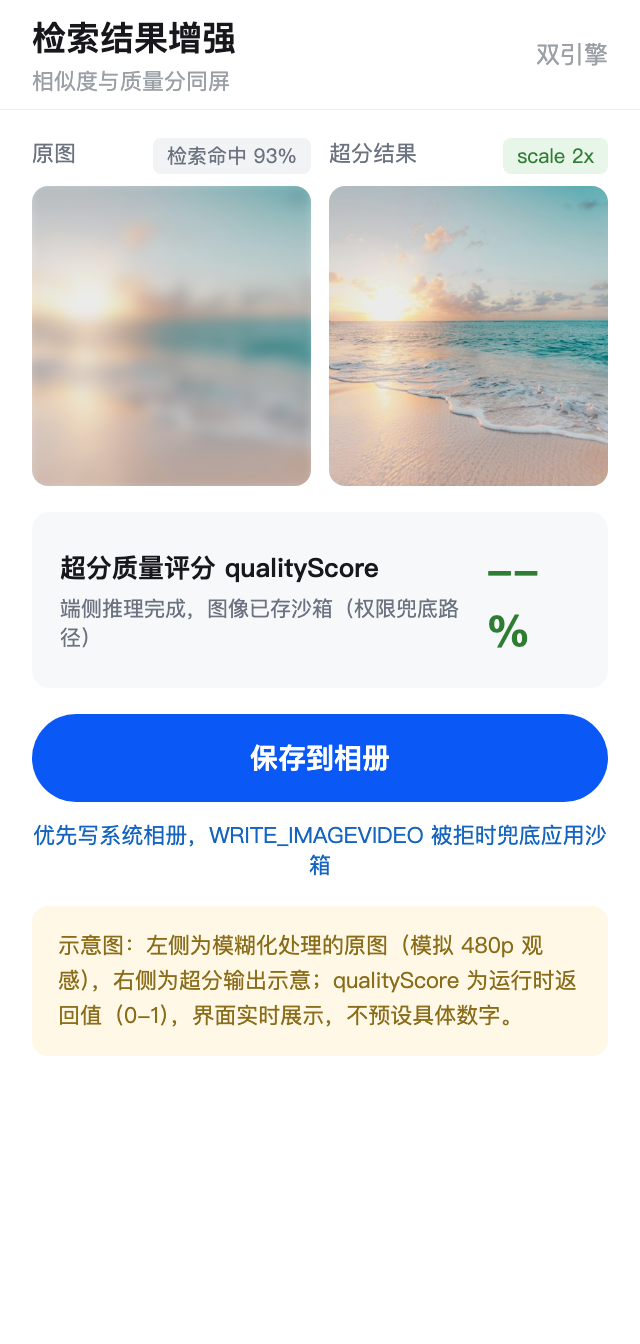
渲染层我坚持一个原则:把两个客观指标都亮给用户------
- similarity(相似度)------回答"搜得准不准",叠在缩略图左下角
- qualityScore(超分质量评分)------回答"变清晰没有",附在增强结果下方
为什么这么执着于数字?因为盯着 480p 原图看久了,用户会觉得"好像也还行",主观感受靠不住。这两个数字是产品化时最有说服力的东西:它们让用户确信 AI 真的干了活,而不是心理安慰。
五、组合场景的 4 个真实踩坑
权限拒绝、PixelMap 不释放、首次索引慢------这些单能力的坑,社区帖已经讲烂了,本文不再复读。下面 4 个坑有个共同点:只有把两个引擎放进同一个应用里,它们才会出现。每一个都浪费了我至少半天。
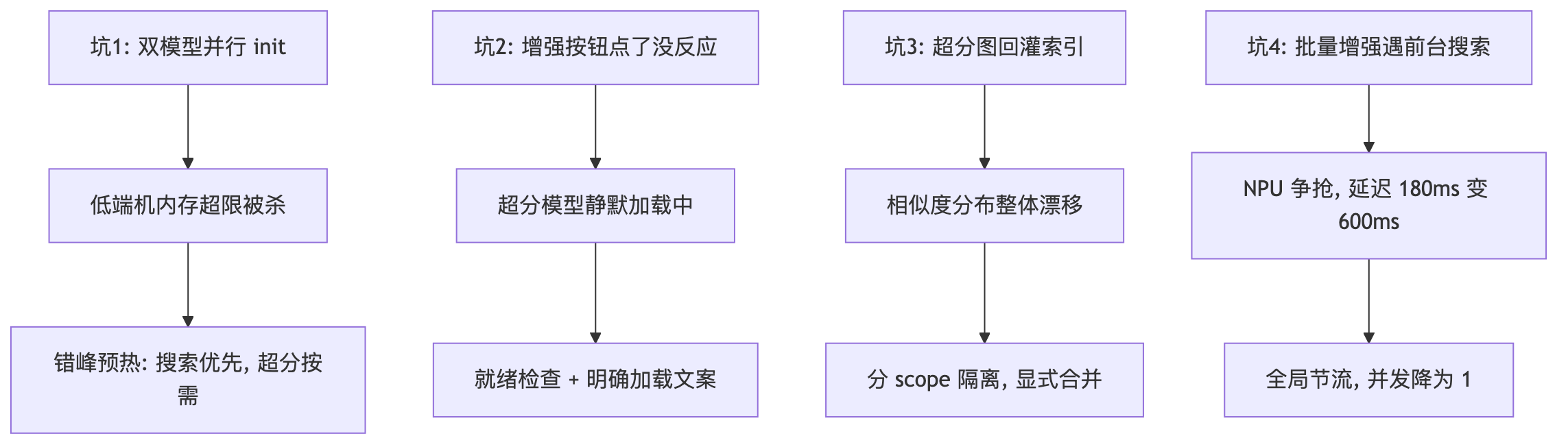
1. 双模型同时 init,低端机内存超限
现象 :模拟器上一切正常,换低内存设备测试,warmUp() 双模型并行 init 阶段偶发应用被系统杀掉。
排查:文搜图语义索引 + 超分模型同时加载,峰值内存是两者之和(模拟器实测合计约 400MB 量级),低端机直接触顶。
解决 :把并行预热改为错峰预热------文搜图优先(搜索是高频入口),超分延迟到首次进入查看页再 init:
typescript
// Why: 两个模型峰值内存叠加会顶爆低端机,错峰加载削峰
async warmUpStaggered(): Promise<void> {
  await textSearchImage.init();          // 先就绪高频的搜索
  this.states.set('search', EngineState.READY);
  // 超分不预热,等用户首次点"增强"时再 init(见踩坑 2 的预期管理)
}教训:端侧 AI 能力是"按需加载"的契约,不是"全量常驻"的契约。双引擎更要把"哪个能力高频"排清楚。
2. 增强按钮点了没反应,其实是超分模型还在加载
现象:错峰方案上线后,用户点"增强清晰度"按钮偶发无响应------超分模型首次 init 约 5 秒(模拟器),期间按钮看似可点但调用静默失败。
排查 :isReady('sr') 为 false 时代码直接 throw,UI 层没接住,表现为"点了没反应"。
解决:按钮点击时做"就绪检查 + 明确加载态",把等待变成可感知的进度而不是静默失败:
typescript
async onEnhanceClick(item: AlbumSearchResult): Promise<void> {
  if (!this.mgr.isReady('sr')) {
    this.enhanceMsg = '正在加载增强模型,首次约需 2 秒...';  // 预期管理
    const ok = await imageSuperResolution.init().catch(() => false);
    if (!ok) { this.enhanceMsg = '模型加载失败,请重试'; return; }
    this.mgr.markReady('sr');
  }
  this.enhanceMsg = '增强中...';
  const result = await this.service.enhance(item);
  this.enhanceMsg = `完成,质量评分 ${(result.qualityScore * 100).toFixed(0)}%`;
}教训:错峰加载省下的内存,代价是"首次点击要等模型"。这笔账必须用 UI 文案还回去------用户不怕等 2 秒,怕的是不知道在等什么。
3. 超分图回灌索引后,相似度分布整体漂移
现象:为了验证"增强反哺检索",把超分结果重新入库并更新索引,之后同一 query 的返回相似度普遍上浮了 5-8 个百分点,原来设的 0.8 相似度阈值过滤突然把一部分老结果挡在门外。
排查:高清图的语义向量置信度整体更高,新旧图混在一个索引里时,相似度不是同一把尺子。
解决 :不要直接回灌覆盖 。超分结果单独建 scope(如 sr_enhanced),原索引保持稳定,检索时两个 scope 各查一次、按需合并展示:
typescript
// Why: 超分图与原图的相似度分布不同刻度,混索引会导致
// 阈值过滤失真;分 scope 隔离,各自保持可解释的分布
const [origin, enhanced] = await Promise.all([
  textSearchImage.search(query, AlbumSearchScope.SMART_ALBUM),
  textSearchImage.search(query, AlbumSearchScope.SR_ENHANCED),
]);
教训 :这是本文最反直觉的发现------"增强反哺检索"不是无脑回灌,而是要隔离索引、显式合并。不同来源的向量分数不能放在一个阈值体系里比较。
4. 批量"搜索结果全部增强"时 NPU 争抢,两个引擎互相拖慢
现象:用户在搜索结果页点"全部增强",批量超分跑到一半,此时又切回搜索框搜别的,单次 search 延迟从 180ms 涨到 600ms+。
排查:批量超分并发 3 张已把模拟器算力打满,search 的端侧推理排在后面排队。
解决:算力是单一竞争点,需要全局节流------批量任务排队时给交互式查询让路:
typescript
// Why: 交互式查询(search)的体验权重高于后台批量任务,
// 批量超分让出并发位,保证前台搜索延迟稳定
export class SrTaskQueue {
  private queue: Array<() => Promise<void>> = [];
  private running = 0;
  private maxConcurrent = 1;  // 有前台 search 场景时降为 1

  get maxConcurrency(): number {
    return this.foregroundSearchActive ? 1 : 3;
  }
  // ... 队列调度按 maxConcurrency 动态取值
}教训:单引擎时代调好的并发参数,在双引擎时代不再是常量------它是一个随前台场景动态变化的函数。
#mermaid-svg-edDrs8RY7iZyXFE9{font-family:"trebuchet ms",verdana,arial,sans-serif;font-size:16px;fill:#333;}@keyframes edge-animation-frame{from{stroke-dashoffset:0;}}@keyframes dash{to{stroke-dashoffset:0;}}#mermaid-svg-edDrs8RY7iZyXFE9 .edge-animation-slow{stroke-dasharray:9,5!important;stroke-dashoffset:900;animation:dash 50s linear infinite;stroke-linecap:round;}#mermaid-svg-edDrs8RY7iZyXFE9 .edge-animation-fast{stroke-dasharray:9,5!important;stroke-dashoffset:900;animation:dash 20s linear infinite;stroke-linecap:round;}#mermaid-svg-edDrs8RY7iZyXFE9 .error-icon{fill:#552222;}#mermaid-svg-edDrs8RY7iZyXFE9 .error-text{fill:#552222;stroke:#552222;}#mermaid-svg-edDrs8RY7iZyXFE9 .edge-thickness-normal{stroke-width:1px;}#mermaid-svg-edDrs8RY7iZyXFE9 .edge-thickness-thick{stroke-width:3.5px;}#mermaid-svg-edDrs8RY7iZyXFE9 .edge-pattern-solid{stroke-dasharray:0;}#mermaid-svg-edDrs8RY7iZyXFE9 .edge-thickness-invisible{stroke-width:0;fill:none;}#mermaid-svg-edDrs8RY7iZyXFE9 .edge-pattern-dashed{stroke-dasharray:3;}#mermaid-svg-edDrs8RY7iZyXFE9 .edge-pattern-dotted{stroke-dasharray:2;}#mermaid-svg-edDrs8RY7iZyXFE9 .marker{fill:#333333;stroke:#333333;}#mermaid-svg-edDrs8RY7iZyXFE9 .marker.cross{stroke:#333333;}#mermaid-svg-edDrs8RY7iZyXFE9 svg{font-family:"trebuchet ms",verdana,arial,sans-serif;font-size:16px;}#mermaid-svg-edDrs8RY7iZyXFE9 p{margin:0;}#mermaid-svg-edDrs8RY7iZyXFE9 .label{font-family:"trebuchet ms",verdana,arial,sans-serif;color:#333;}#mermaid-svg-edDrs8RY7iZyXFE9 .cluster-label text{fill:#333;}#mermaid-svg-edDrs8RY7iZyXFE9 .cluster-label span{color:#333;}#mermaid-svg-edDrs8RY7iZyXFE9 .cluster-label span p{background-color:transparent;}#mermaid-svg-edDrs8RY7iZyXFE9 .label text,#mermaid-svg-edDrs8RY7iZyXFE9 span{fill:#333;color:#333;}#mermaid-svg-edDrs8RY7iZyXFE9 .node rect,#mermaid-svg-edDrs8RY7iZyXFE9 .node circle,#mermaid-svg-edDrs8RY7iZyXFE9 .node ellipse,#mermaid-svg-edDrs8RY7iZyXFE9 .node polygon,#mermaid-svg-edDrs8RY7iZyXFE9 .node path{fill:#ECECFF;stroke:#9370DB;stroke-width:1px;}#mermaid-svg-edDrs8RY7iZyXFE9 .rough-node .label text,#mermaid-svg-edDrs8RY7iZyXFE9 .node .label text,#mermaid-svg-edDrs8RY7iZyXFE9 .image-shape .label,#mermaid-svg-edDrs8RY7iZyXFE9 .icon-shape .label{text-anchor:middle;}#mermaid-svg-edDrs8RY7iZyXFE9 .node .katex path{fill:#000;stroke:#000;stroke-width:1px;}#mermaid-svg-edDrs8RY7iZyXFE9 .rough-node .label,#mermaid-svg-edDrs8RY7iZyXFE9 .node .label,#mermaid-svg-edDrs8RY7iZyXFE9 .image-shape .label,#mermaid-svg-edDrs8RY7iZyXFE9 .icon-shape .label{text-align:center;}#mermaid-svg-edDrs8RY7iZyXFE9 .node.clickable{cursor:pointer;}#mermaid-svg-edDrs8RY7iZyXFE9 .root .anchor path{fill:#333333!important;stroke-width:0;stroke:#333333;}#mermaid-svg-edDrs8RY7iZyXFE9 .arrowheadPath{fill:#333333;}#mermaid-svg-edDrs8RY7iZyXFE9 .edgePath .path{stroke:#333333;stroke-width:2.0px;}#mermaid-svg-edDrs8RY7iZyXFE9 .flowchart-link{stroke:#333333;fill:none;}#mermaid-svg-edDrs8RY7iZyXFE9 .edgeLabel{background-color:rgba(232,232,232, 0.8);text-align:center;}#mermaid-svg-edDrs8RY7iZyXFE9 .edgeLabel p{background-color:rgba(232,232,232, 0.8);}#mermaid-svg-edDrs8RY7iZyXFE9 .edgeLabel rect{opacity:0.5;background-color:rgba(232,232,232, 0.8);fill:rgba(232,232,232, 0.8);}#mermaid-svg-edDrs8RY7iZyXFE9 .labelBkg{background-color:rgba(232, 232, 232, 0.5);}#mermaid-svg-edDrs8RY7iZyXFE9 .cluster rect{fill:#ffffde;stroke:#aaaa33;stroke-width:1px;}#mermaid-svg-edDrs8RY7iZyXFE9 .cluster text{fill:#333;}#mermaid-svg-edDrs8RY7iZyXFE9 .cluster span{color:#333;}#mermaid-svg-edDrs8RY7iZyXFE9 div.mermaidTooltip{position:absolute;text-align:center;max-width:200px;padding:2px;font-family:"trebuchet ms",verdana,arial,sans-serif;font-size:12px;background:hsl(80, 100%, 96.2745098039%);border:1px solid #aaaa33;border-radius:2px;pointer-events:none;z-index:100;}#mermaid-svg-edDrs8RY7iZyXFE9 .flowchartTitleText{text-anchor:middle;font-size:18px;fill:#333;}#mermaid-svg-edDrs8RY7iZyXFE9 rect.text{fill:none;stroke-width:0;}#mermaid-svg-edDrs8RY7iZyXFE9 .icon-shape,#mermaid-svg-edDrs8RY7iZyXFE9 .image-shape{background-color:rgba(232,232,232, 0.8);text-align:center;}#mermaid-svg-edDrs8RY7iZyXFE9 .icon-shape p,#mermaid-svg-edDrs8RY7iZyXFE9 .image-shape p{background-color:rgba(232,232,232, 0.8);padding:2px;}#mermaid-svg-edDrs8RY7iZyXFE9 .icon-shape .label rect,#mermaid-svg-edDrs8RY7iZyXFE9 .image-shape .label rect{opacity:0.5;background-color:rgba(232,232,232, 0.8);fill:rgba(232,232,232, 0.8);}#mermaid-svg-edDrs8RY7iZyXFE9 .label-icon{display:inline-block;height:1em;overflow:visible;vertical-align:-0.125em;}#mermaid-svg-edDrs8RY7iZyXFE9 .node .label-icon path{fill:currentColor;stroke:revert;stroke-width:revert;}#mermaid-svg-edDrs8RY7iZyXFE9 :root{--mermaid-font-family:"trebuchet ms",verdana,arial,sans-serif;} 否
是
否
是
否
是
用户输入 query
search 引擎就绪?
展示索引准备进度
禁止误触发
端侧检索 Top-K
用户点增强?
流程结束
sr 引擎就绪?
明确加载文案
首次约 2 秒
批量任务降并发至 1
为前台交互让路
分桶超分
pixelMap 显式 release
结果优先存相册
失败兜底沙箱
超分图入独立 scope
不回灌原索引
六、性能数据与适用边界
6.1 双引擎性能账本(模拟器实测 + 真机预估)
| 指标 | 模拟器实测 | 真机预估 | 说明 |
|---|---|---|---|
| 文搜图单次 search | ~180ms | 80-150ms | 端侧 NPU 推理,无网络 RTT |
| 超分单张(480p 到 1080p) | ~1.2s | 0.3-0.8s | scale=2 |
| 双模型错峰预热总耗时 | ~7s | 2-3s | 搜索优先,超分按需 |
| 批量增强 100 张 | ~2 分钟 | 40-60s | 并发 3、分桶释放 |
| 双引擎常驻内存 | ~400MB 峰值 | ~250MB | 低端机建议错峰 |
数据说明:模拟器无 NPU 加速,耗时整体偏长;真机预估基于端侧 AI 通用特性推算,实际数据需 HarmonyOS 7 真机实测后补充。读者复现时请以自己的机型实测为准。
6.2 什么场景该上双引擎,什么场景不必
适合:
- 相册、图库、笔记附件等本地图片密集型应用
- 隐私敏感场景:家人照片、医疗财务截图,照片不能出设备
- 离线优先场景:差旅、弱网环境下必须可用
不必上:
- 图片量小(几百张)且用户无检索诉求的应用------加引擎不如做好分组
- 追求 4K/8K 极致超分------端侧模型上限在 1080p/2K,用云端方案
- 需要精细语义区分(海边 vs 河边)且无法接受引导式交互------云端大模型更合适
七、写在最后
回头看这轮改造,单点能力本身反而不是难点------文搜图和超分的 API 各自接通,一个晚上就够。真正花时间的是组合之后的事:两个模型抢内存,就做错峰预热;两套相似度分数不在一个刻度上,就分 scope 隔离;后台批量任务抢 NPU,就把并发做成随前台场景变化的函数。这三条经验官方文档里都没有,全是踩出来的。
端侧 AI 这波能力下沉,对做相册、图库类应用的人来说是实打实的红利:照片不出设备,隐私没有负担;没有调用费,功能可以放心做成免费;离线也能跑,场景一下宽了很多。
后续两件事:拿到 HarmonyOS 7 真机后把文中的预估数据换成实测;再试试超分结果按内容指纹做缓存,省掉重复的 NPU 开销。
你也在做相册类应用吗?双引擎组合里踩过什么坑?评论区聊。
如果本文对你有帮助,欢迎点赞、收藏、转发。有任何问题或建议,请在评论区留言交流。行文仓促,定有不足之处,欢迎各位朋友在评论区批评指正,不胜感激。
边界与已知限制
| 限制项 | 具体表现 | 规避方式 |
|---|---|---|
| 语义偏差 | 端侧模型对相近场景区分度有限 | 引导多关键词输入 + 结构化 filter 配合 |
| 超分上限 | 端侧放大上限 1080p/2K,达不到云端 4K/8K | 管理预期,超分是增强不是还原 |
| 内存压力 | 双模型常驻对低端机不友好 | 错峰预热、按需 init、退出释放 |
| 相似度刻度 | 超分图与原图分数分布不同 | 分 scope 建索引,不混阈值 |
| 首次等待 | 模型加载存在秒级等待 | 预热 + 明确加载文案 |
| 版本依赖 | 能力为 API 26 新增,低版本系统不可用 | 运行时做 canIUse 版本检测 |