ESP32驱动MAX30102脉搏血氧心率传感器
-
- MAX30102脉搏血氧心率传感器
- MAX30102模块引脚定义
- MAX30102模块与ESP32开发板引脚接线
- [MAX30102 Arduino驱动程序](#MAX30102 Arduino驱动程序)
MAX30102脉搏血氧心率传感器
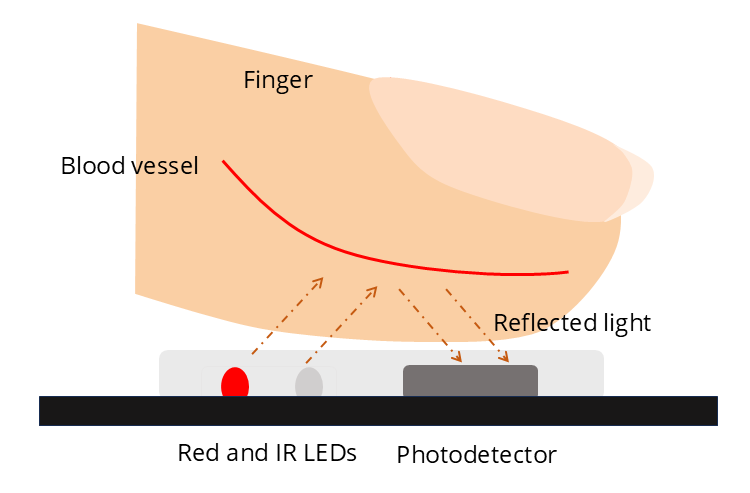
MAX30102一种光学传感器,能够以无创方式检测血氧饱和度(SpO2)和心率。此外,它还配备有温度传感器,用于进行温度补偿和校准。MAX30102包含一个红色LED、一个红外LED以及一个光检测器。这些LED会向皮肤发出光线,而光检测器则负责检测反射回来的光线。随着心脏的跳动,血液流动状况的变化会导致反射光强度的改变。含氧血红蛋白会吸收更多的红外线;脱氧血红蛋白会吸收更多的红光。根据红色和红外线波长下反射光强度的比值,传感器便可计算出血氧饱和度SpO2值。而每次心跳时血液容量的变化则有助于我们测定心率。
MAX30102模块引脚定义
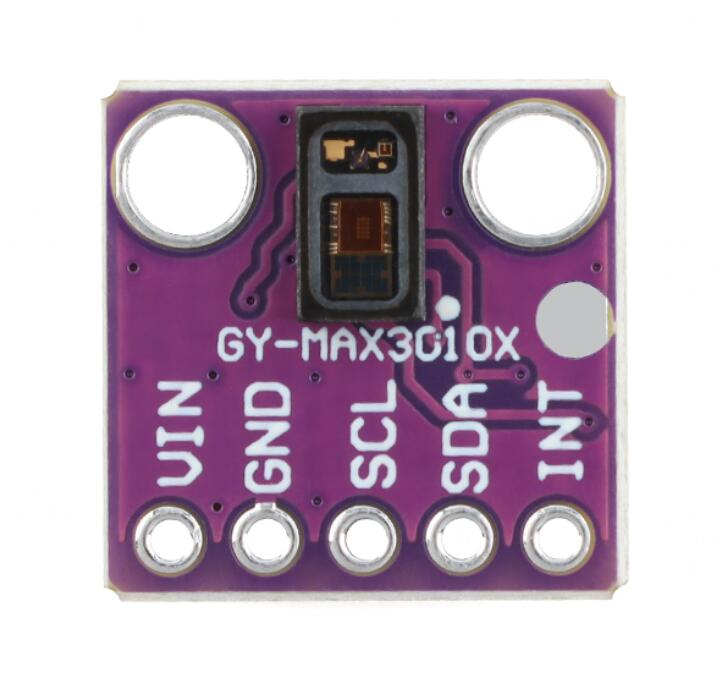
VIN:供电3.3/5V
GND:供电负极
SCL:IIC通信时钟信号
SDA:IIC通信数据信号
INT:中断输出
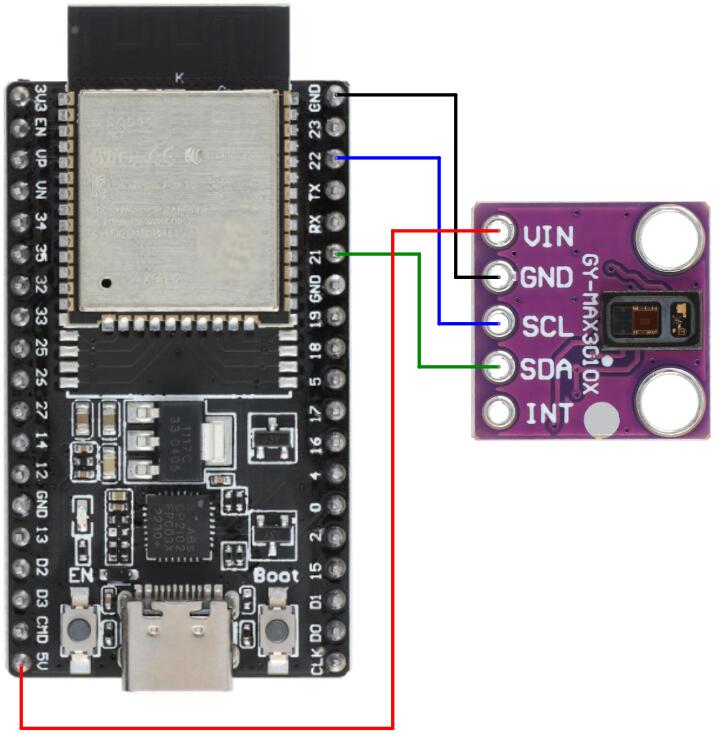
MAX30102模块与ESP32开发板引脚接线
| MAX30102 | ESP32开发板 |
|---|---|
| GND | GND |
| VIN | 5V |
| SDA | 21 |
| SCL | 22 |
MAX30102 Arduino驱动程序
打开Arduino IDE库管理器安装SparkFun MAX3010x驱动库
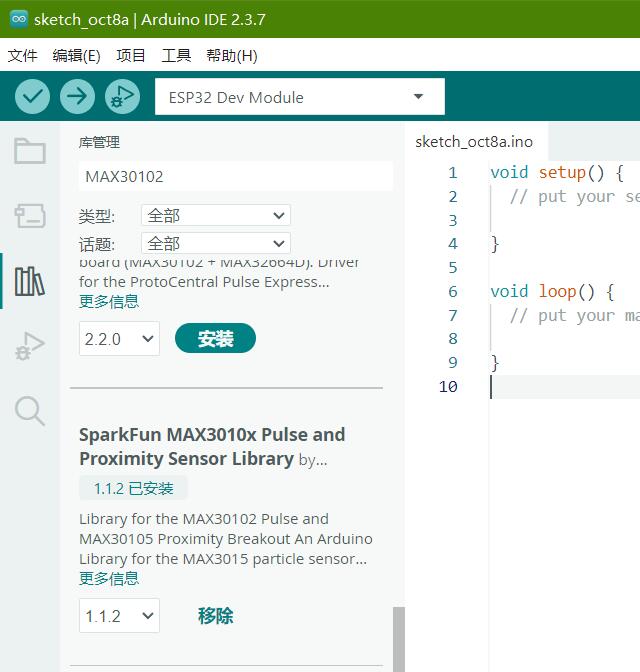
获取心率数据
javascript
#include <Wire.h>
#include "MAX30105.h"
#include "heartRate.h"

MAX30105 sensor;

// Settings
const byte RATE_SIZE = 5;   // How many beats we average
byte rates[RATE_SIZE];      // Store last few valid BPM values
byte rateSpot = 0;
byte validBeats = 0;
long lastBeat = 0;
float currentBPM = 0;
int averageBPM = 0;

unsigned long lastPrint = 0;

// Only accept realistic heart rates (adjust for your case)
const float MIN_BPM = 45;
const float MAX_BPM = 180;

void setup() {
 Serial.begin(115200);
 Serial.println("MAX30102 Heart Rate Sensor");
 Serial.println();
 Serial.println("Place your finger on the sensor...");
 Serial.println();

 // Initialize the sensor
 if (!sensor.begin(Wire, I2C_SPEED_FAST)) {
   Serial.println("Error initializing the sensor...");
   while (1);
 }

 sensor.setup();                    // Use default settings
 sensor.setPulseAmplitudeRed(0);    // Turn off red LED
}

void loop() {
 long irValue = sensor.getIR();      // Read infrared value

 // Check if a heartbeat was detected
 if (checkForBeat(irValue)) {
   long timeBetweenBeats = millis() - lastBeat;
   lastBeat = millis();

   currentBPM = 60.0 / (timeBetweenBeats / 1000.0);

   // Only keep realistic values
   if (currentBPM >= MIN_BPM && currentBPM <= MAX_BPM) {
     rates[rateSpot] = (byte)currentBPM;
     rateSpot++;
     if (rateSpot >= RATE_SIZE){
       rateSpot = 0;
     }
     // Count valid beats (until buffer is full)
     if (validBeats < RATE_SIZE) {
       validBeats++;
     }

     // Only calculate average when buffer is full
     if (validBeats >= RATE_SIZE) {
       // Calculate the average
       averageBPM = 0;
       for (byte i = 0; i < RATE_SIZE; i++) {
         averageBPM += rates[i];
       }
       averageBPM /= RATE_SIZE;
     }
   }
 }

 // Print once every second
 if (millis() - lastPrint >= 1000) {
   lastPrint = millis();

   if (irValue < 50000) {
     // No finger on the sensor
     Serial.println("Waiting for finger...");
   }
   else if (averageBPM == 0) {
     // Finger is present but not enough valid beats yet
     Serial.println("Measuring... keep your finger still");
   }
   else {
     // We have a valid average
     Serial.print("Heart Rate: ");
     Serial.print(averageBPM);
     Serial.println(" BPM");
   }
 }
}
上传程序到开发板,打开串口监视器,把手指按压到传感器表面上,稍等片刻即可输出心率数据
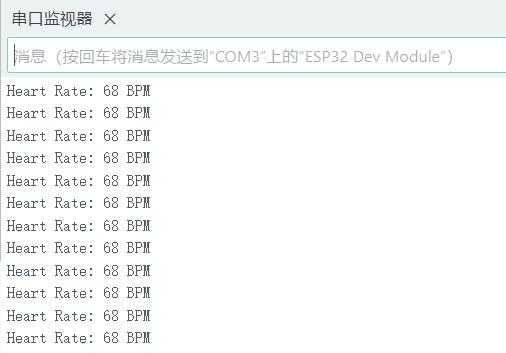
人静坐时的心率通常属于静息心率范畴,一般成年人在 50~100 次/分钟 之间都算正常。
获取血氧饱和度数值
cpp
#include <Wire.h>
#include "MAX30105.h"
#include "spo2_algorithm.h"

MAX30105 sensor;

// Buffers needed by the algorithm
#define BUFFER_SIZE 100
uint32_t irBuffer[BUFFER_SIZE];
uint32_t redBuffer[BUFFER_SIZE];

int32_t spo2;          // Oxygen saturation value
int8_t  validSPO2;     // 1 = valid reading, 0 = not valid yet
int32_t heartRate;     // Not used, but required by the function
int8_t  validHeartRate;

void setup() {
  Serial.begin(115200);
  Serial.println("MAX30102 Oxygen Saturation");
  Serial.println();
  Serial.println("Place your finger on the sensor...");
  Serial.println();

  // Initialize the sensor
  if (!sensor.begin(Wire, I2C_SPEED_FAST)) {
    Serial.println("Error initializing the sensor...");
    while (1);
  }

  byte ledBrightness = 60;  // 0=Off to 255=50mA
  byte sampleAverage = 4;   // 1, 2, 4, 8, 16, 32
  byte ledMode = 2;         // 1 = Red only, 2 = Red + IR, 3 = Red + IR + Green
  byte sampleRate = 100;    // 50, 100, 200, 400, 800, 1000, 1600, 3200
  int pulseWidth = 411;     // 69, 118, 215, 411
  int adcRange = 4096;      // 2048, 4096, 8192, 16384

  // Configure sensor with these settings
  sensor.setup(ledBrightness, sampleAverage, ledMode, sampleRate, pulseWidth, adcRange);
}

void loop() {
  // Collect 100 samples (takes a few seconds)
  for (byte i = 0; i < BUFFER_SIZE; i++) {
    while (sensor.available() == false) {
      sensor.check();
    }

    redBuffer[i] = sensor.getRed();
    irBuffer[i]  = sensor.getIR();
    sensor.nextSample();
  }

  // Calculate SpO2
  maxim_heart_rate_and_oxygen_saturation(irBuffer, BUFFER_SIZE, redBuffer, &spo2, &validSPO2, &heartRate, &validHeartRate);

  // Display oxygen saturation
  if (validSPO2) {
    Serial.print("Oxygen Saturation: ");
    Serial.print(spo2);
    Serial.println(" %");
  } else {
    Serial.println("Measuring... keep your finger still");
  }

  Serial.println();
}
上传程序到开发板,打开串口监视器,把手指按压到传感器表面上,稍等片刻即可输出血氧饱和度数值
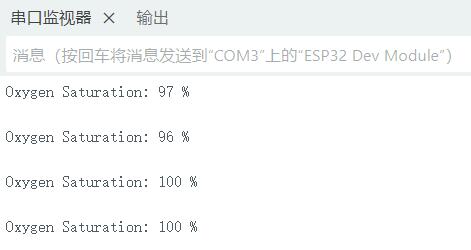
静坐或安静状态下:
98%~100%:很常见,很好;
95%~97%:一般也算正;
93%~94%:偏低,建议复测,看是否手指冷、末梢循环差、指甲油、仪器误差等;
≤92%:尤其如果持续这样,建议就医;
≤90%:属于低氧血症范围,比较危险,尤其伴呼吸困难、胸闷、意识模糊时,应尽快就医。
获取指尖温度
MAX30102传感器还配备了一个温度传感器,该传感器可用于校准心率及血氧饱和度数值。还可以利用这个传感器来获取体温值(此处指指尖温度)。以下代码展示了如何使用ESP32从MAX30102传感器中获取体温值。
cpp
#include <Wire.h>
#include "MAX30105.h"

MAX30105 sensor;

void setup() {
  Serial.begin(115200);
  Serial.println("MAX30102 Temperature Sensor");
  Serial.println();

  // Initialize the sensor
  if (!sensor.begin(Wire, I2C_SPEED_FAST)) {
    Serial.println("Error initializing the sensor...");
    while (1);
  }

  // Turn off the LEDs so they don't heat the sensor
  sensor.setup(0);            // 0 = LEDs off
  sensor.enableDIETEMPRDY();  // Enable temperature ready signal
}

void loop() {
  // Read temperature in Celsius
  float tempC = sensor.readTemperature();

  // Convert to Fahrenheit
  float tempF = tempC * 1.8 + 32.0;

  // Print the temperature readings
  Serial.print("Temperature: ");
  Serial.print(tempC, 2);
  Serial.print(" °C   |   ");
  Serial.print(tempF, 2);
  Serial.println(" °F");

  delay(1000);
}
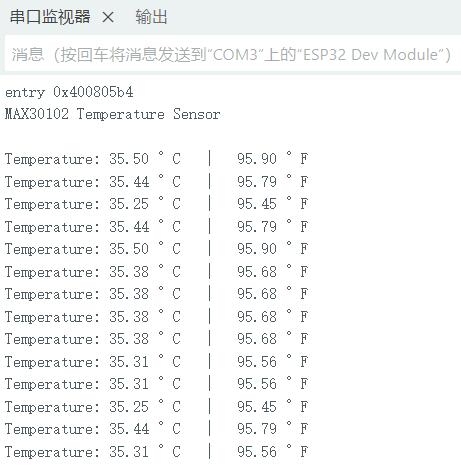
上传程序到开发板,打开串口监视器,把手指按压到传感器表面上,即可输出温度值