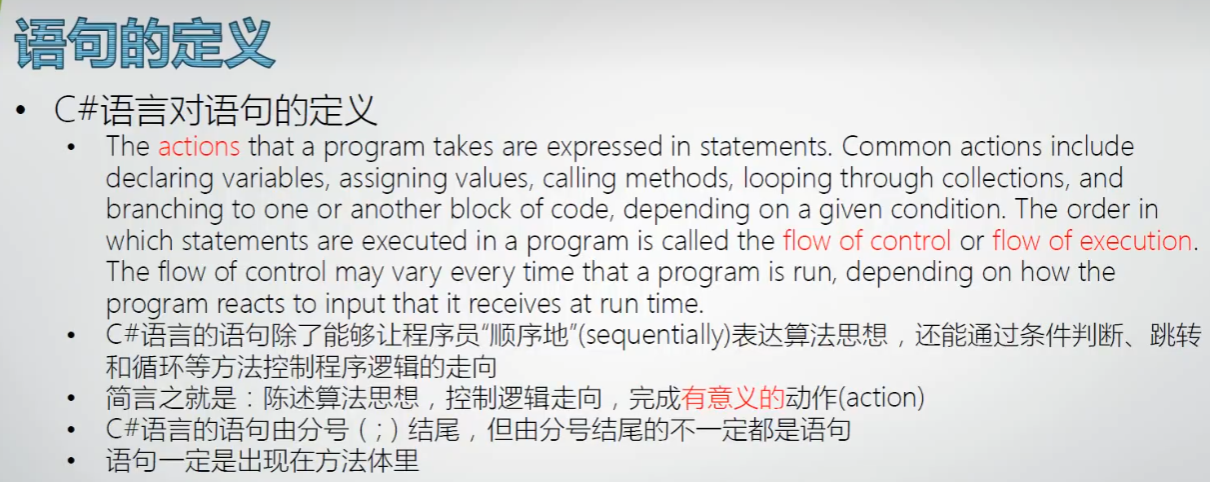
语句的定义:
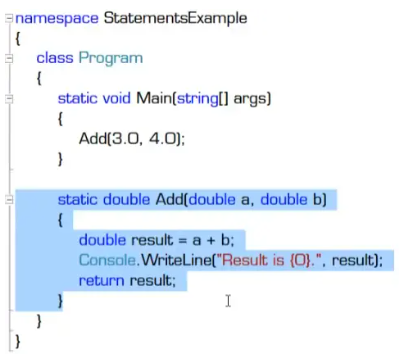
常量在申明的时候必须赋值;变量也先申明,以后再赋值;const int x = 100;
Console.WriteLine是成员访问,后面加上()才是调用方法;
单一职责原则:
一个方法只做一件事,避免一个方法做两件事,否则会有这样的问题:当方法其中一个功能需求变了,要改这个方法,那么由于该方法具备另一个功能而在其它地方被调用,改动就可能会影响到另外一个功能的使用,引起意想不到的bug,例如下面的例子就是反例,即WriteLine又return,有2个功能:
语句详解:
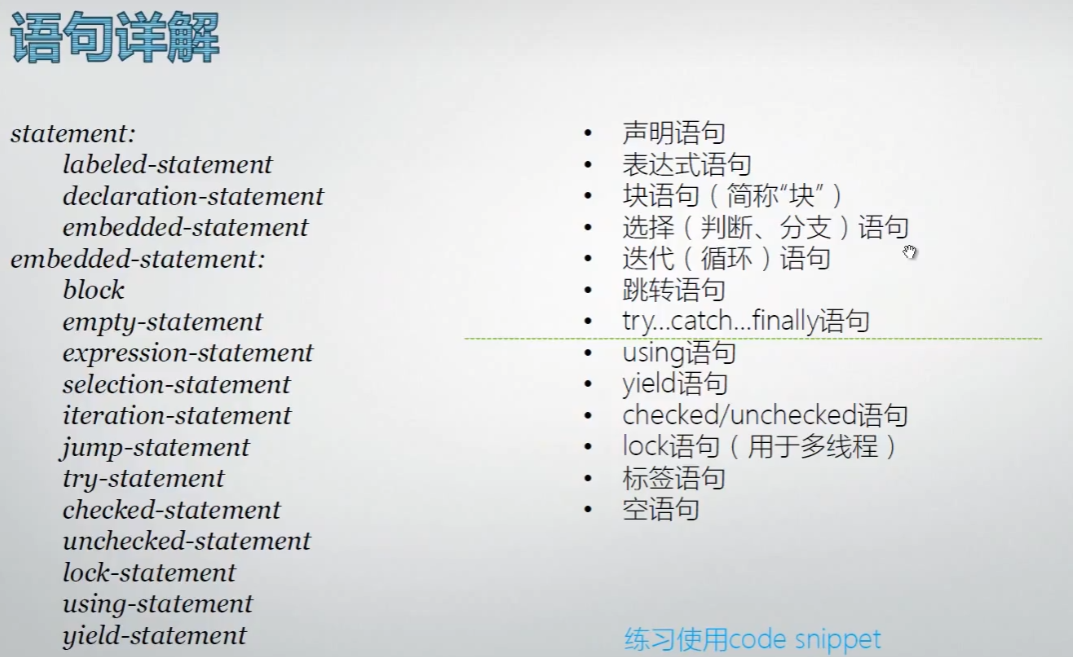
statement(语句):
-
labeled-statement(标签语句)
-
declaration-statement(声明语句)
-
embedded-statement(嵌入式语句)
embedded-statement(嵌入式语句):
-
block(块)
-
empty-statement(空语句)
-
expression-statement(表达式语句)
-
selection-statement(选择语句)
-
iteration-statement(迭代语句)
-
jump-statement(跳转语句)
-
try-statement(try 语句)
-
checked-statement(checked 语句)
-
unchecked-statement(unchecked 语句)
-
lock-statement(lock 语句)
-
using-statement(using 语句)
-
yield-statement(yield 语句)
块语句:
block 用于在只允许使用单个语句的上下文中编写多条语句。
*语句只能出现在方法体中,同理,块语句也只能出现在方法体中,方法体中出现**{}**,那就是块语句,会被编译器当成一条语句看待,而且当成一条完整的语句,不用在后面加分号;
*小技巧:
快速跳转花括号:ctrl+右花括号键},光标可以在开始和结束的花括号之间跳动;
*变量作用域:
在块语句中申明的变量,作用域只是这个块语句,出了这个块语句就无效了。在块语句前面申明的变量,则在块语句内也有效;
switch语句:
用于精准数值匹配,if用于区间匹配;
*switch中的expression没有浮点类型;
cs
//80~100->A;60~79->B;40~59->C;0~39->D;其他->Error

int score = -39;
switch (score / 10)
{
    case 10:  //case后的数值必须和switch()括号内的数值是相同类型
        if (score == 100)
        {
            goto case 9;
        }
        else
        {
            goto default;
        }
    case 9:
    case 8:
        Console.WriteLine("A");
        break;
    case 7:
    case 6:
        Console.WriteLine("B");
        break;
    case 5:
    case 4:
        Console.WriteLine("C");
        break;
    case 0:
        if (score == 0)
        {
            goto case 1;
        }
        else
        {
            goto default;
        }
    case 3:
    case 2:
    case 1:
        Console.WriteLine("D");
        break;
    default:  //相当于else
        Console.WriteLine("Error");
        break;
}
*switch使用枚举的强大功能:
cs
class Program
{
    static void Main(string[] args)
    {
        Level myLevel = Level.Mid;
        switch (myLevel)
        {
            case Level.High:
                Console.WriteLine("High Level");
                break;
            case Level.Mid:
                Console.WriteLine("Mid Level");
                break;
            case Level.Low:
                Console.WriteLine("Low Level");
                break;
            default:
                Console.WriteLine("Error");
                break;
        }
    }
}

enum Level
{
    High,
    Mid,
    Low
}
finally语句:
1.释放系统资源
2.程序log,执行记录
cs
 class Program
 {
     static void Main(string[] args)
     {
         Calculator c = new Calculator();
         int r = c.Add("100", "3");
         Console.WriteLine(r);
     }
 }

 class Calculator
 {
     public int Add(string arg1, string arg2)
     {
         int a = 0;
         int b = 0;
         bool hasError = false;

         try
         {
             a = int.Parse(arg1);
             b = int.Parse(arg2);
         }
         //各项具体异常,查MSDN文档
         catch (ArgumentException ane)
         {
             Console.WriteLine(ane.Message);
             hasError = true;
         }
         catch (FormatException fe)
         {
             Console.WriteLine(fe.Message);
             hasError = true;
         }
         catch (OverflowException oe)
         {
             Console.WriteLine(oe.Message);
             hasError = true;
         }
         finally
         {
             if (hasError)
             {
                 Console.WriteLine("Execution has error!!");
             }
             else
             {
                 Console.WriteLine("Done!");
             }
         }

         int result = a + b;
         return result;
     }
 }
throw语句:
抛出异常,谁调用谁处理
cs
  class Program
  {
      static void Main(string[] args)
      {
          Calculator c = new Calculator();
          int r = 0;
          try
          {
              r = c.Add("9999999999999", "3");
          }
          catch(OverflowException oe)
          {
              Console.WriteLine(oe.Message);
          }
          Console.WriteLine(r);
      }
  }

  class Calculator
  {
      public int Add(string arg1, string arg2)
      {
          int a = 0;
          int b = 0;

          try
          {
              a = int.Parse(arg1);
              b = int.Parse(arg2);
          }
          //各项具体异常,查MSDN文档
          catch (ArgumentException ane)
          {
              Console.WriteLine(ane.Message);
          }
          catch (FormatException fe)
          {
              Console.WriteLine(fe.Message);
          }
          catch (OverflowException oe)
          {
              throw oe;
              //throw;
              //Console.WriteLine(oe.Message);
          }

          int result = a + b;
          return result;
      }
  }
while语句:
循环体可能一次都不执行
cs
class Program
{
    static void Main(string[] args)
    {
        int score = 0;
        bool canContinue = true;
        while (canContinue)
        {
            Console.WriteLine("Please input first number:");
            string str1=Console.ReadLine();
            int x = int.Parse(str1);

            Console.WriteLine("Please input second number:");
            string str2 = Console.ReadLine();
            int y = int.Parse(str2);

            int sum = x + y;
            if (sum == 100)
            {
                score++;
                Console.WriteLine("Correct!{0}+{1}={2}", x, y, sum);
            }
            else
            {
                Console.WriteLine("Error!{0}+{1}!={2}", x, y, sum);
                canContinue = false;
            }


        }
        Console.WriteLine("Your score is {0}.",score);
        Console.WriteLine("Game Over!");
    }
}
do while语句:
循环体至少执行一次
cs
class Program
{
    static void Main(string[] args)
    {
        int score = 0;
        int sum = 0;

        do
        {
            Console.WriteLine("Please input first number:");
            string str1=Console.ReadLine();
            int x = int.Parse(str1);

            Console.WriteLine("Please input second number:");
            string str2 = Console.ReadLine();
            int y = int.Parse(str2);

            sum = x + y;
            if (sum == 100)
            {
                score++;
                Console.WriteLine("Correct!{0}+{1}={2}", x, y, sum);
            }
            else
            {
                Console.WriteLine("Error!{0}+{1}!={2}", x, y, sum);
            }
        }while(sum==100);

        Console.WriteLine("Your score is {0}.",score);
        Console.WriteLine("Game Over!");
    }
}
continue:放弃当前循环,开始一次新的循环
break:立刻结束循环语句,跳出循环
continue语句:
cs
static void Main(string[] args)
{
    int score = 0;
    int sum = 0;

    do
    {
        Console.WriteLine("Please input first number:");
        string str1 = Console.ReadLine();
        int x = 0;
        try
        {
            x = int.Parse(str1);
        }
        catch
        {
            Console.WriteLine("First number has problem!Restart.");
            continue;
        }

        Console.WriteLine("Please input second number:");
        string str2 = Console.ReadLine();
        int y = 0;
        try
        {
            y = int.Parse(str2);
        }
        catch
        {
            Console.WriteLine("Second number has problem!Restart.");
            continue;
        }

        sum = x + y;
        if (sum == 100)
        {
            score++;
            Console.WriteLine("Correct!  {0}+{1}={2}", x, y, sum);
        }
        else
        {
            Console.WriteLine("Error!  {0}+{1}!={2}", x, y, sum);
        }
    } while (sum == 100);

    Console.WriteLine("Your score is {0}.", score);
    Console.WriteLine("Game Over!");
}
break语句:
cs
static void Main(string[] args)
{
    int score = 0;
    int sum = 0;

    do
    {
        Console.WriteLine("Please input first number:");
        string str1 = Console.ReadLine();
        if (str1.ToLower() == "end") //字符全部转为小写
        {
            break;
        }
        int x = 0;
        try
        {
            x = int.Parse(str1);
        }
        catch
        {
            Console.WriteLine("First number has problem!Restart.");
            continue;
        }

        Console.WriteLine("Please input second number:");
        string str2 = Console.ReadLine();
        if (str2.ToLower() == "end")
        {
            break;
        }
        int y = 0;
        try
        {
            y = int.Parse(str2);
        }
        catch
        {
            Console.WriteLine("Second number has problem!Restart.");
            continue;
        }

        sum = x + y;
        if (sum == 100)
        {
            score++;
            Console.WriteLine("Correct!  {0}+{1}={2}", x, y, sum);
        }
        else
        {
            Console.WriteLine("Error!  {0}+{1}!={2}", x, y, sum);
        }
    } while (sum == 100);

    Console.WriteLine("Your score is {0}.", score);
    Console.WriteLine("Game Over!");
}
for语句:
计数循环,循环次数固定
cs
//打印九九乘法表
for (int a = 1; a <= 9; a++)
{
    for(int b = 1; b <= a; b++)
    {
        Console.Write("{0}×{1}={2}\t",a,b,a*b);  //  \t制表符
    }
    Console.WriteLine();
}
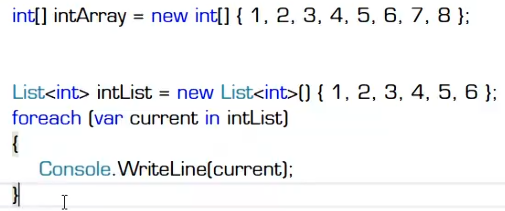
foreach语句:
对集合进行遍历,并对集合中的每个元素执行一次相关的嵌入语句(指月,有10个月亮)
(1)什么样的集合可以被遍历:一个类以大写的I 开头,那就是接口,Interface的缩写;C#中所有实现了IEnumerable接口的类,就是可以被遍历的集合; (10个月亮)
(2)迭代器:C#中所有可以被迭代的集合,都可以获得自己的迭代器; (手指头)
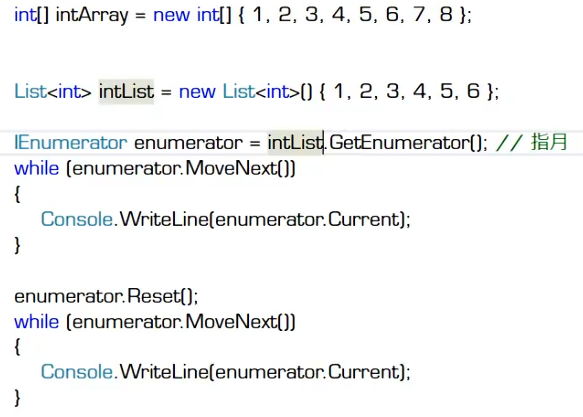
current是 迭代变量,intList是 被遍历的集合
return语句:
*return使用注意事项:
①尽早return;
②当方法返回值类型不是void,且方法中包含选择语句时,每一个选择分支都要有return;