一个使用数组 includes 常见的场景,确保传入的字符串在预期内,否则报错。
ts
const output = process.argv[2] || ''

if (!["file", "stdout"].includes(output)) {
  throw new Error("output mode must be file or stdout")
}

output // 👈 仍然是 `string`
上面的代码有什么问题?功能上没有问题,类型有。
我们预期之后 output 的类型应该具化到 "file" | "stdout",但实际上仍然是 string:
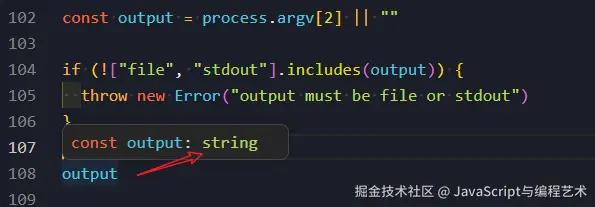
为什么需要让类型更精确"narrowing 缩窄"?是为了输入时能 Auto complete 以及做 Exausitive Pattern Checking,总之是为提高 DX 体验和减少潜在 Bug。
一/ 大家猜猜下面的方法能否做到?
ts
const output = process.argv[2] || ""

assert(
  "file" === output || "stdout" === output,
  "output must be file or stdout",
)

output // 👈 ✔️ 神奇地变成了 `"file" | "stdout"`
答案是能,解法是用 assert 函数。
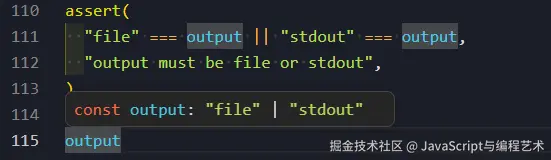
↑ 光标 hover 发现神奇地变成了预期的
"file" | "stdout"
二/ 原理是什么?
我们看看源码。
assert 来自 "node:assert":
ts
/**
 * The `node:assert` module provides a set of assertion functions for verifying
 * invariants.
 * @see [source](https://github.com/nodejs/node/blob/v22.x/lib/assert.js)
 */
declare module "assert" {
    import strict = require("assert/strict");
    /**
     * An alias of {@link assert.ok}.
     * @since v0.5.9
     * @param value The input that is checked for being truthy.
     */
    function assert(value: unknown, message?: string | Error): asserts value;
    ...
就是这么一坨代码:
ts
function assert(
  value: unknown,
  message?: string | Error
): asserts value;
精髓或关键点在返回标注 :asserts value,这是一种我们从未见过的新标注,TypeScript 把他叫做 assert function。
但其实早在 TS 3.0 就已支持。
三/ 自定义自己的 assertIncludes 方法
了解了原理,我们自定义方法,不用 Node.js 内置的 assert:
ts
function assertIncludes<const T>(allows: T[], value: any): asserts value is T {
  if (!allows.includes(value)) {
    throw new Error("output must be file or stdout")
  }
}

assertIncludes(["file", "stdout"], output)

output // ✔️ `"file" | "stdout"`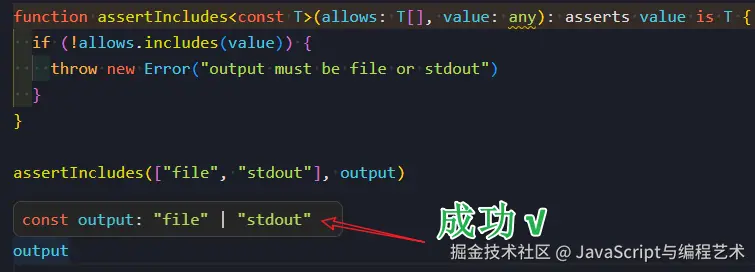
我们这里用到了 assert 函数的第二种形态 assert x is Y。
为什么 Node.js 源码内的 assert 只需 asserts value?这是因为 TypeScript 类型检查器看到了
"file" === output || "stdout" === output 因此能从代码控制流(Control Flow Analysis)分析出之后必定是两种类型之一。
而 includes 相对于简单的等于和|| 这种代码控制流的分析还做不到准确的推导。
故需要我们显示标注 asserts value is T 来帮助"尚未成熟"的 TypeScript 类型检查器。
四/ <const T>: const type parameters
眼尖的读者会发现我们在泛型参数前加入了 const,这是为何,非本文主题,详见《TypeScript v5 一个非常有用的新语法:"const 类型参数"》
五/ 再完美点 const 类型参数结合 readonly
现在还有什么问题?
如果传入的是变量而非字面量,即使加了 as const 也达不到缩窄类型的目的:
ts
const allows = ["file", "stdout"] as const我们需要升级 const type parameter 到 readonly const type parameter:
ts
function assertIncludes<const T extends readonly string[]>(
  allows: T,
  value: any,
): asserts value is T[number] {
  if (!allows.includes(value)) {
    throw new Error("output must be file or stdout")
  }
}六/ 这是 TS 语法 JS 也可以吗?
答案:可以。用 jsdoc 标注返回值。
我这里给出了两种写法:
第一种函数参数类型标注 + @template const T
js
// foo.js
// @ts-check

/**
 * @template const T
 * @param {T[]} allows
 * @param {any} value
 * @returns {asserts value is T }
 */
function assertIncludes1(allows, value) {
  if (!allows.includes(value)) {
    throw new Error(`output must be one of ${allows}`)
  }
}

const output = process.argv[2] || "" // string

assertIncludes1(["file", "stdout"], output)

output // ✔️ `"file" | "stdout"`七/ 第二种针对低版本 TS
如果 @template const T 不支持(官方把它叫做"const modifier on type parameters")
Support for "const modifier on type parameters" with JSDoc
我们可以先定义类型然后赋予函数。
js
// foo.js

/**
 * @typedef {<const T>(allows: T[], value: any) => asserts value is T} AssertIncludes
 */
通过 /** @type {AssertIncludes} */ 让 assertIncludes2 "复活":
js
// foo.js

/** @type {AssertIncludes} */
const assertIncludes2 = (allows, value) => {
  if (!allows.includes(value)) {
    throw new Error(`output must be one of ${allows}`)
  }
}
同样有效果。
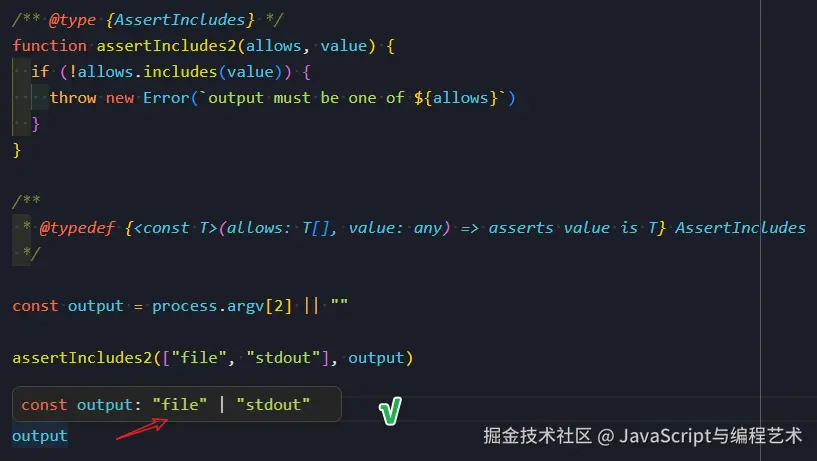
这次我们在 JS 中成功实现了 assert function。
--- 文章结束 🎉!---