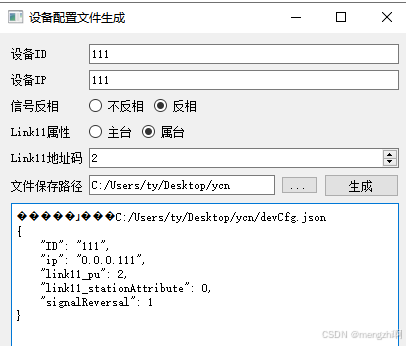
MainWidget.h
cpp
#pragma once

#include <QWidget>

class Ui_MainWidget;

class MainWidget final : public QWidget
{
    Q_OBJECT

public:
    MainWidget();
    ~MainWidget() override;

private:
    void selectPath();
    void save();

    QScopedPointer<Ui_MainWidget> _ui;
};
MainWidget.cpp
cpp
#include "MainWidget.h"
#include <QHostAddress>
#include <QStandardPaths>
#include <QFileDialog>
#include <QFile>
#include <QJsonDocument>
#include <QJsonObject>
#include <QMessageBox>
#include "ui_MainWidget.h"

namespace {

const auto _SAVE_PATH_TITLE = QString("选择保存路径");
const auto _SAVE_FILE_TITLE = QString("保存文件");

}

MainWidget::MainWidget() : QWidget(nullptr), _ui(new Ui_MainWidget())
{
    _ui->setupUi(this);

    auto path = QStandardPaths::writableLocation(QStandardPaths::DownloadLocation);
    _ui->path->setText(path);

    connect(_ui->selectPath, &QPushButton::clicked, this, &MainWidget::selectPath);
    connect(_ui->save, &QPushButton::clicked, this, &MainWidget::save);
}

MainWidget::~MainWidget() { }

void MainWidget::selectPath()
{
    auto path = _ui->path->text();
    path = QFileDialog::getExistingDirectory(this, _SAVE_PATH_TITLE, path);
    auto info = QFileInfo(path);
    path = info.absoluteFilePath();
    if (!path.isEmpty()) {
        _ui->path->setText(path);
    }
}

void MainWidget::save()
{
    QFile file;

    do {
        auto ID = _ui->ID->text();
        if (ID.isEmpty()) {
            QMessageBox::warning(this, _SAVE_FILE_TITLE, "设备ID为空");
            break;
        }

        auto IP = _ui->IP->text();
        auto address = QHostAddress(IP);
        if (address.isNull()) {
            QMessageBox::warning(this, _SAVE_FILE_TITLE, "设备IP错误");
            break;
        }

        auto name = QString("%1/devCfg.json").arg(_ui->path->text());
        file.setFileName(name);
        bool isSucceed = true;
        if (file.exists()) {
            auto text = QString("%1\n文件已存在, 是否覆盖?").arg(name);
            auto code = QMessageBox::warning(this, _SAVE_FILE_TITLE, text,
                                             QMessageBox::Yes | QMessageBox::Cancel,
                                             QMessageBox::Cancel);
            isSucceed = code == QMessageBox::Yes;
        }
        if (!isSucceed) {
            QMessageBox::information(this, _SAVE_FILE_TITLE, "用户取消");
            break;
        }

        file.remove();
        isSucceed = file.open(QFile::WriteOnly);
        if (!isSucceed) {
            QMessageBox::warning(this, _SAVE_FILE_TITLE, "打开文件失败");
            break;
        }

        auto object = QJsonObject();

        auto key = QString("ID");
        auto value = QJsonValue(ID);
        object.insert(key, value);

        key = QString("ip");
        value = QJsonValue(address.toString());
        object.insert(key, value);

        key = QString("signalReversal");
        if (_ui->disinversion->isChecked()) {
            value = QJsonValue(0);
        } else {
            value = QJsonValue(1);
        }
        object.insert(key, value);

        key = QString("link11_stationAttribute");
        if (_ui->subStation->isChecked()) {
            value = QJsonValue(0);
        } else {
            value = QJsonValue(1);
        }
        object.insert(key, value);

        key = QString("link11_pu");
        value = QJsonValue(_ui->PU->value());
        object.insert(key, value);

        auto json = QJsonDocument(object);
        auto bytes = json.toJson(QJsonDocument::Indented);

        auto size = file.write(bytes);
        if (size != bytes.size()) {
            QMessageBox::warning(this, _SAVE_FILE_TITLE, "写入文件失败");
            break;
        }

        auto log = QString("导出成功:%1").arg(name);
        _ui->log->append(log);

        log = QString::fromUtf8(bytes);
        _ui->log->append(log);
    } while (false);

    if (file.isOpen()) {
        file.close();
    }
}
MainWidget.ui
c
<?xml version="1.0" encoding="UTF-8"?>
<ui version="4.0">
 <class>MainWidget</class>
 <widget class="QWidget" name="MainWidget">
  <property name="geometry">
   <rect>
    <x>0</x>
    <y>0</y>
    <width>410</width>
    <height>600</height>
   </rect>
  </property>
  <property name="windowTitle">
   <string>设备配置文件生成</string>
  </property>
  <layout class="QVBoxLayout" name="verticalLayout">
   <item>
    <layout class="QFormLayout" name="formLayout">
     <item row="0" column="0">
      <widget class="QLabel" name="IDLabel">
       <property name="text">
        <string>设备ID</string>
       </property>
      </widget>
     </item>
     <item row="0" column="1">
      <widget class="QLineEdit" name="ID">
       <property name="maxLength">
        <number>20</number>
       </property>
      </widget>
     </item>
     <item row="2" column="0">
      <widget class="QLabel" name="inversionLabel">
       <property name="text">
        <string>信号反相</string>
       </property>
      </widget>
     </item>
     <item row="2" column="1">
      <layout class="QHBoxLayout" name="horizontalLayout_3">
       <item>
        <widget class="QRadioButton" name="disinversion">
         <property name="text">
          <string>不反相</string>
         </property>
         <property name="checked">
          <bool>true</bool>
         </property>
         <attribute name="buttonGroup">
          <string notr="true">inversionGroup</string>
         </attribute>
        </widget>
       </item>
       <item>
        <widget class="QRadioButton" name="inversion">
         <property name="text">
          <string>反相</string>
         </property>
         <attribute name="buttonGroup">
          <string notr="true">inversionGroup</string>
         </attribute>
        </widget>
       </item>
       <item>
        <spacer name="horizontalSpacer">
         <property name="orientation">
          <enum>Qt::Horizontal</enum>
         </property>
         <property name="sizeHint" stdset="0">
          <size>
           <width>40</width>
           <height>20</height>
          </size>
         </property>
        </spacer>
       </item>
      </layout>
     </item>
     <item row="3" column="0">
      <widget class="QLabel" name="stationLabel">
       <property name="text">
        <string>Link11属性</string>
       </property>
      </widget>
     </item>
     <item row="3" column="1">
      <layout class="QHBoxLayout" name="horizontalLayout_2">
       <item>
        <widget class="QRadioButton" name="mainStation">
         <property name="text">
          <string>主台</string>
         </property>
         <property name="checked">
          <bool>true</bool>
         </property>
         <attribute name="buttonGroup">
          <string notr="true">stationGroup</string>
         </attribute>
        </widget>
       </item>
       <item>
        <widget class="QRadioButton" name="subStation">
         <property name="text">
          <string>属台</string>
         </property>
         <attribute name="buttonGroup">
          <string notr="true">stationGroup</string>
         </attribute>
        </widget>
       </item>
       <item>
        <spacer name="horizontalSpacer_2">
         <property name="orientation">
          <enum>Qt::Horizontal</enum>
         </property>
         <property name="sizeHint" stdset="0">
          <size>
           <width>40</width>
           <height>20</height>
          </size>
         </property>
        </spacer>
       </item>
      </layout>
     </item>
     <item row="4" column="0">
      <widget class="QLabel" name="PULabel">
       <property name="text">
        <string>Link11地址码</string>
       </property>
      </widget>
     </item>
     <item row="4" column="1">
      <widget class="QSpinBox" name="PU">
       <property name="minimum">
        <number>2</number>
       </property>
       <property name="maximum">
        <number>62</number>
       </property>
      </widget>
     </item>
     <item row="1" column="0">
      <widget class="QLabel" name="label_2">
       <property name="text">
        <string>设备IP</string>
       </property>
      </widget>
     </item>
     <item row="1" column="1">
      <widget class="QLineEdit" name="IP"/>
     </item>
    </layout>
   </item>
   <item>
    <layout class="QHBoxLayout" name="horizontalLayout">
     <item>
      <widget class="QLabel" name="label">
       <property name="text">
        <string>文件保存路径</string>
       </property>
      </widget>
     </item>
     <item>
      <widget class="QLineEdit" name="path">
       <property name="readOnly">
        <bool>true</bool>
       </property>
      </widget>
     </item>
     <item>
      <widget class="QToolButton" name="selectPath">
       <property name="text">
        <string>...</string>
       </property>
      </widget>
     </item>
     <item>
      <widget class="QPushButton" name="save">
       <property name="text">
        <string>生成</string>
       </property>
      </widget>
     </item>
    </layout>
   </item>
   <item>
    <widget class="QTextBrowser" name="log"/>
   </item>
  </layout>
 </widget>
 <resources/>
 <connections/>
 <buttongroups>
  <buttongroup name="stationGroup"/>
  <buttongroup name="inversionGroup"/>
 </buttongroups>
</ui>