1. 场景从八个实体开始
先不急着做游戏。画布上放八个会移动的小球,再留几个按钮:新增、删除、切换速度、清空。这样一个很小的场景,已经足够把 ECS 的几种状态变化放到眼前:实体创建后进入查询集合,组件被移除后退出集合,最后整个场景被清理。
Fleks 是 Kotlin Multiplatform 的 ECS 库。这次按 CPF-KMP-CMP 的鸿蒙 Native 路线接入共享代码,让 Fleks 管理实体,让 ArkTS 显示画布。先把这条调用链做小,再逐步观察组件和系统之间的关系,比一开始塞进完整游戏更容易判断问题出在哪里。
每个小球携带 Position 和 Velocity。前者保存坐标,后者保存速度;实体本身提供身份,把这些组件联系起来。MotionSystem 使用 all(Position, Velocity) 定义 Family,只有同时具有两种组件的实体才参加位置更新。
更新公式很简单:坐标加上速度乘以 deltaTime。示例里的反弹也放在同一个系统里,超过边界后反转速度并限制坐标。这里的边界处理用于让小球留在画布内,碰撞和物理求解尚未实现。
初始化时,resetScene 先释放旧 World,再创建新 World 和八个实体。后续按钮也操作这份 World。下面保留完整 Kotlin 入口,创建、更新、组件切换和检查代码都能沿着函数名找到。
package harmony.fleks

import com.github.quillraven.fleks.*
import com.github.quillraven.fleks.World.Companion.family
import kotlin.math.abs

private data class Position(var x: Float, var y: Float) : Component<Position> {
    override fun type() = Position
    companion object : ComponentType<Position>()
}
private data class Velocity(var x: Float, var y: Float) : Component<Velocity> {
    override fun type() = Velocity
    companion object : ComponentType<Velocity>()
}
private class MotionSystem : IteratingSystem(family { all(Position, Velocity) }) {
    override fun onTickEntity(entity: Entity) {
        val p = entity[Position]
        val v = entity[Velocity]
        p.x += v.x * deltaTime
        p.y += v.y * deltaTime
        if (p.x < 3f || p.x > 97f) { v.x = -v.x; p.x = p.x.coerceIn(3f, 97f) }
        if (p.y < 5f || p.y > 95f) { v.y = -v.y; p.y = p.y.coerceIn(5f, 95f) }
    }
}
private fun newWorld() = configureWorld { systems { add(MotionSystem()) } }
private var scene = newWorld()
private var frames = 0
private var serial = 0
private var note = "位置和速度由 Kotlin / Fleks 更新"

private fun addParticle() {
    val n = serial++
    scene.entity {
        it += Position(12f + (n * 13 % 72), 15f + (n * 19 % 65))
        it += Velocity(if (n % 2 == 0) 12f else -10f, if (n % 3 == 0) 8f else -6f)
    }
}
fun resetScene(): String {
    scene.dispose(); scene = newWorld(); frames = 0; serial = 0
    repeat(8) { addParticle() }
    note = "8 个实体,各自携带 Position 与 Velocity"
    return sceneSnapshot()
}
fun sceneAction(action: Int): String {
    when (action) {
        0 -> return resetScene()
        1 -> { if (scene.numEntities < 48) addParticle(); note = "创建实体:实体总数 ${scene.numEntities}" }
        2 -> { val entity = scene.family { all(Position) }.firstOrNull(); if (entity != null) scene -= entity; note = "删除实体:Family 自动同步" }
        3 -> {
            val entity = scene.family { all(Position) }.firstOrNull()
            if (entity != null) with(scene) {
                val moving = entity.getOrNull(Velocity) != null
                entity.configure { if (moving) it -= Velocity else it += Velocity(12f, 8f) }
                note = if (moving) "移除 Velocity:这个实体退出运动 Family" else "补回 Velocity:这个实体重新开始运动"
            }
        }
        4 -> { scene.update(0.05f); frames++ }
        5 -> { scene.removeAll(); note = "清空实体:World 与 Family 都归零" }
    }
    return sceneSnapshot()
}
fun sceneSnapshot(): String {
    val family = scene.family { all(Position, Velocity) }
    val items = mutableListOf<String>()
    scene.forEach { e ->
        val p = e[Position]
        items += "{\"id\":${e.id},\"x\":${p.x},\"y\":${p.y},\"moving\":${e.getOrNull(Velocity) != null}}"
    }
    return "{\"entities\":${scene.numEntities},\"moving\":${family.numEntities},\"frames\":$frames,\"note\":\"$note\",\"items\":[${items.joinToString(",")}] }"
}
fun runChecks(): String {
    val reports = mutableListOf<String>()
    var passed = 0
    fun verify(label: String, predicate: Boolean) {
        if (predicate) passed++
        reports += "{\"name\":\"$label\",\"ok\":$predicate}"
    }
    try {
        val w = newWorld()
        val movers = w.family { all(Position, Velocity) }
        verify("空 World 与 Family", w.numEntities == 0 && movers.numEntities == 0)
        val moving = w.entity { it += Position(10f, 20f); it += Velocity(4f, 2f) }
        val still = w.entity { it += Position(40f, 60f) }
        verify("创建与 Family 过滤", w.numEntities == 2 && movers.numEntities == 1)
        w.update(0.5f)
        with(w) {
            verify("System 使用 deltaTime", abs(moving[Position].x - 12f) < 0.001f && abs(moving[Position].y - 21f) < 0.001f)
            verify("无速度实体保持位置", still[Position].x == 40f && still[Position].y == 60f)
            moving.configure { it -= Velocity }
            verify("移除组件更新 Family", movers.numEntities == 0)
            w.update(0.5f)
            verify("退出 Family 后停止运动", abs(moving[Position].x - 12f) < 0.001f)
            moving.configure { it += Velocity(4f, 2f) }
            verify("补回组件重新匹配", movers.numEntities == 1)
        }
        w -= still
        verify("删除实体更新 World", w.numEntities == 1)
        val snapshot = w.snapshot()
        w.removeAll()
        verify("清空同步所有查询", w.numEntities == 0 && movers.numEntities == 0)
        w.loadSnapshot(snapshot)
        verify("加载内存快照恢复实体", w.numEntities == 1 && movers.numEntities == 1)
        movers.forEach { e -> w -= e }
        verify("遍历时删除实体", w.numEntities == 0 && movers.numEntities == 0)
        repeat(100) { w.entity { it += Position(1f, 2f); it += Velocity(1f, 1f) } }
        verify("扩容创建 100 个实体", w.numEntities == 100 && movers.numEntities == 100)
        w.dispose()
        verify("dispose 清空实体", w.numEntities == 0)
    } catch (error: Throwable) {
        reports += "{\"name\":\"异常:${error::class.simpleName}\",\"ok\":false}"
    }
    return "{\"passed\":$passed,\"total\":${reports.size},\"checks\":[${reports.joinToString(",")}] }"
}
2. 一个小球停下,实体数量并没有少
最值得观察的是"切换首个实体速度"。按下后,画布中一个小球变成橙色并停住,实体总数仍为八,运动 Family 变成七。这两个数放在一起,就能区分删除实体与移除组件。
代码通过 entity.configure 移除 Velocity,Position 保留下来,所以页面还能画出这个实体。MotionSystem 的查询条件已经不满足,下次更新自然不会处理它。再次按下按钮会补回 Velocity,运动 Family 恢复为八;示例补回的是预设速度,之前被移除的速度数值没有另行保存。
这些变化都在最终安装包上试过。MatePad Edge arm64 真机与 x86_64 模拟器分别完成新增、删除、移除速度、补回速度、暂停、清空和重置。下面依次是真机与模拟器的连续录制,坐标和 Family 数量由设备上的 Fleks 返回。
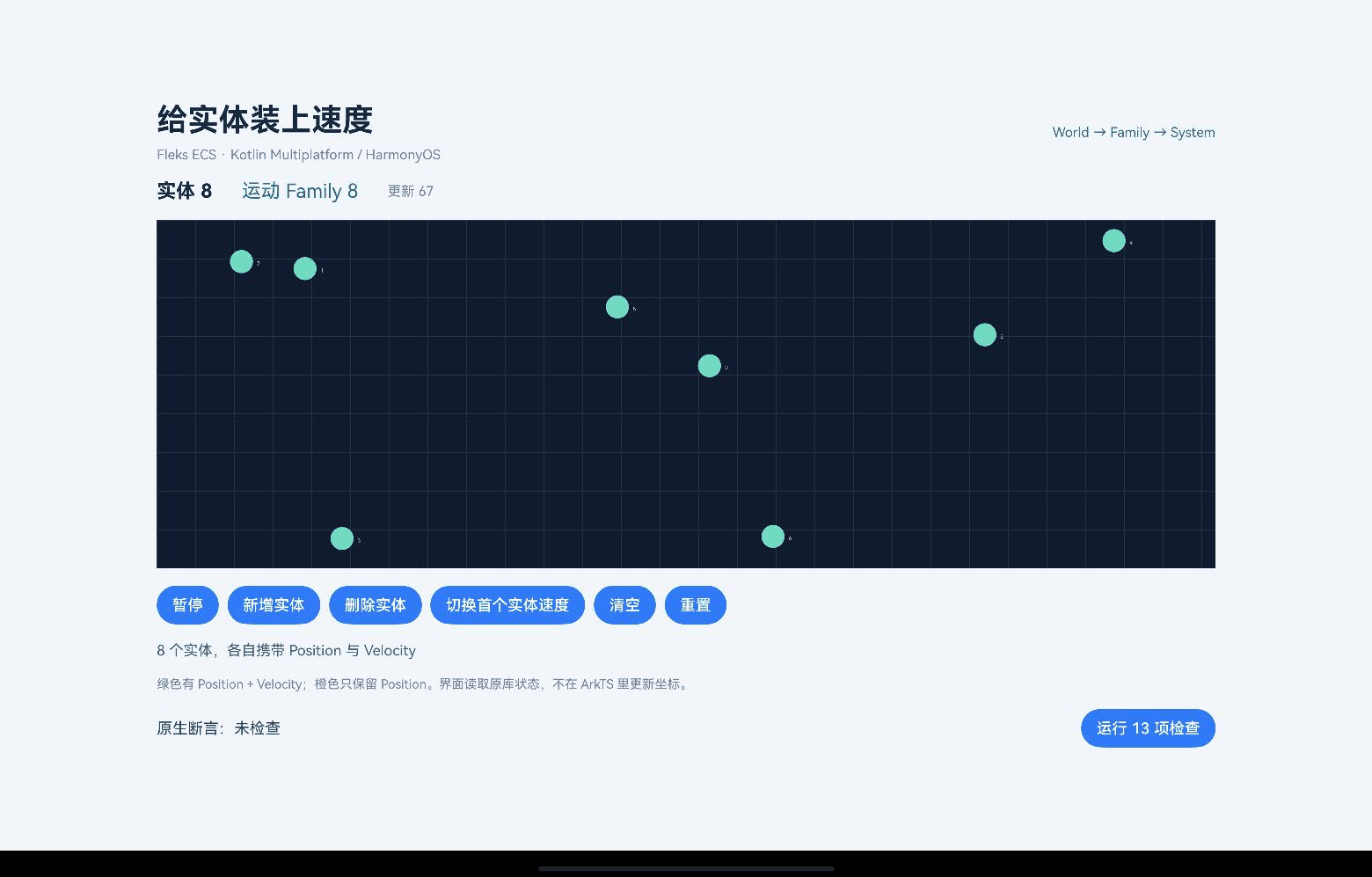
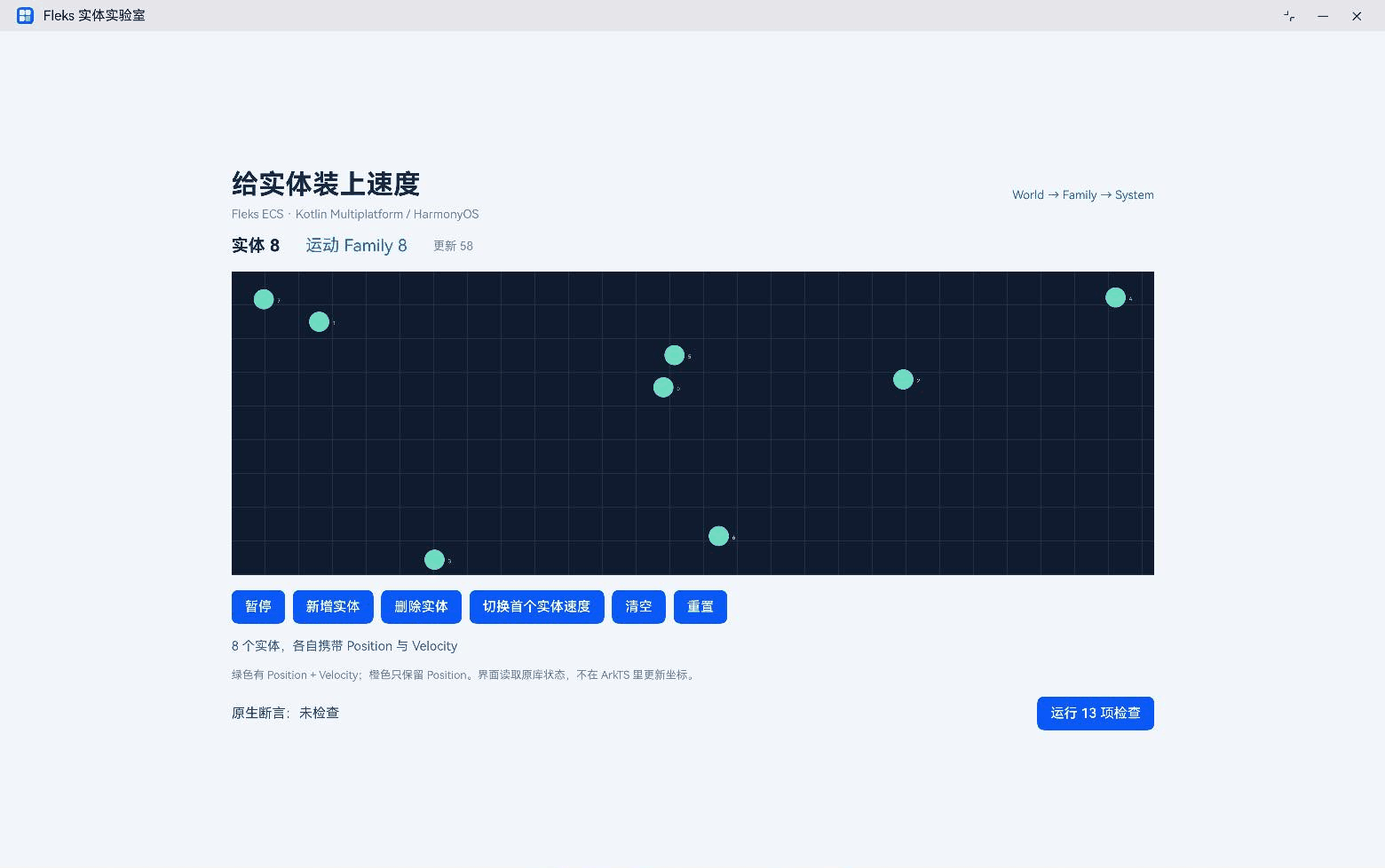
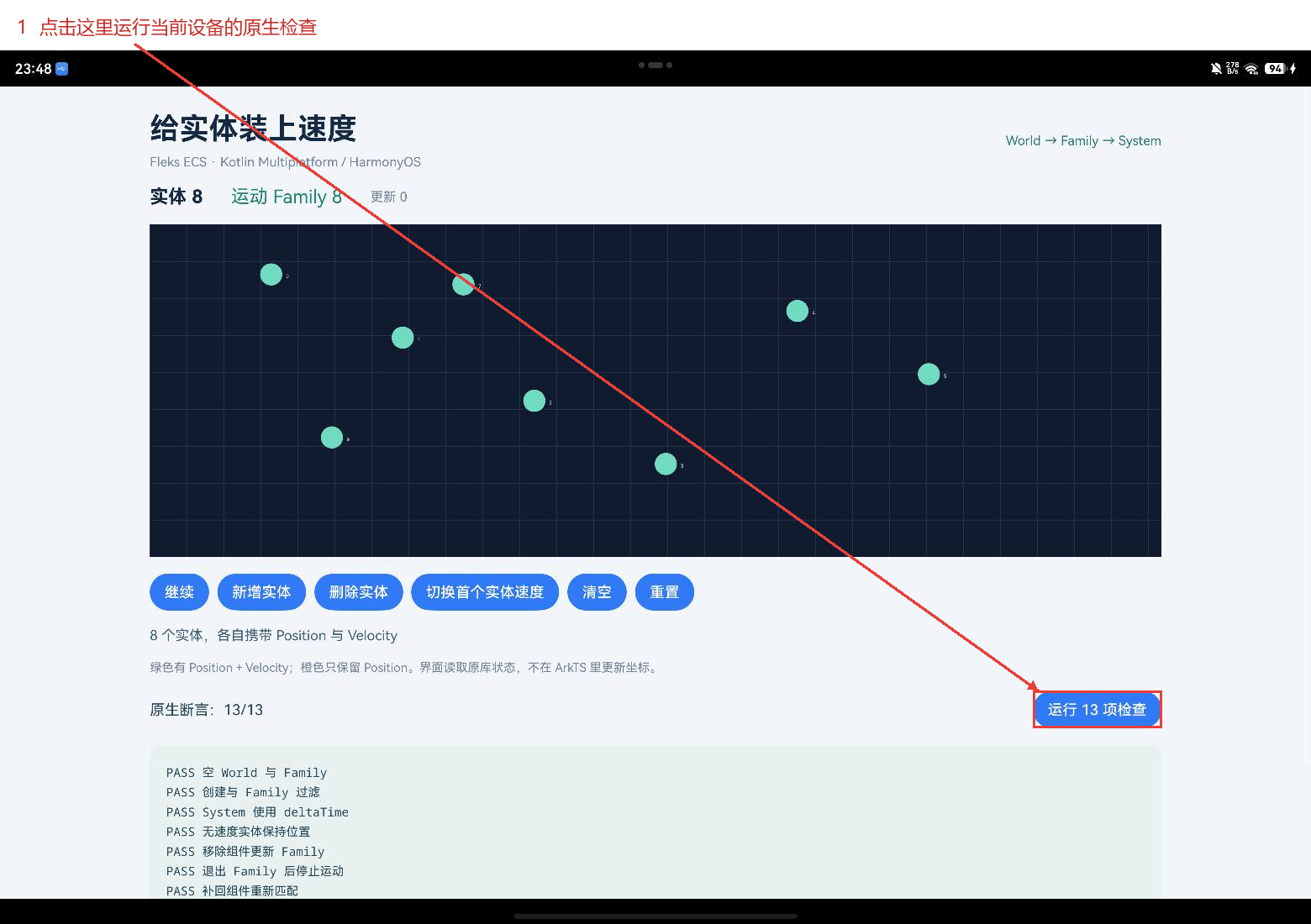
暂停与移除速度也有区别。暂停按钮停止页面触发更新,所有实体和组件仍留在 World 中;切换速度则改变指定实体的组件。清空会让实体数和 Family 数一起归零,重置会重新建立八个实体,但不会顺便改变页面当前的播放状态。把这些操作分开,可以避免一个"重置"按钮同时承担太多含义。
3. 让鸿蒙页面拿到这一份 World
场景逻辑集中后,适配工作沿调用链往外补。原来的 src/commonMain 保留 Fleks 实现;新增的 harmony/src/ohosMain/kotlin/FleksBridge.kt 放演示入口;原仓 example/harmony 放可运行的鸿蒙程序。这样的目录安排可以同时找到共享逻辑、平台接入和示例,后续改组件时也容易判断该改哪一层。
构建环境直接参考 CPF-KMP-CMP 官方快速开始。本次使用上游版本配置为 2.15 的源码,鸿蒙 Kotlin/Native 为 2.2.21-1.1.0。上游原构建配置声明 Kotlin 2.4.10,因此鸿蒙版本与依赖放到独立的 harmony/build.gradle.kts 中,原仓版本配置继续保留。
配置分别加入 ohosArm64、ohosX64,把 atomicfu 和 serialization 对齐到社区提供的鸿蒙产物。双目标都需要对应的 KLIB,不能直接用其他平台的编译产物代替。
plugins {
    kotlin("multiplatform") version "2.2.21-1.1.0"
    kotlin("plugin.serialization") version "2.2.21-1.1.0"
}
kotlin {
    listOf(ohosArm64(), ohosX64()).forEach { target ->
        target.binaries.sharedLib { baseName = "fleks" }
    }
    sourceSets {
        commonMain {
            kotlin.srcDir("../src/commonMain/kotlin")
            dependencies {
                implementation("org.jetbrains.kotlinx:atomicfu:0.31.0-1.0.0")
                implementation("org.jetbrains.kotlinx:kotlinx-serialization-core:1.9.1-1.0.0")
                implementation("org.jetbrains.kotlinx:kotlinx-serialization-json:1.9.1-1.0.0")
            }
        }
        commonTest { kotlin.srcDir("../src/commonTest/kotlin"); dependencies { implementation(kotlin("test")) } }
        val ohosMain by creating { dependsOn(commonMain.get()); kotlin.srcDir("src/ohosMain/kotlin") }
        getByName("ohosArm64Main").dependsOn(ohosMain)
        getByName("ohosX64Main").dependsOn(ohosMain)
    }
}
实际构建由 harmony/scripts/build-native.py 完成:共享源码与示例入口编译成 KLIB,再链接动态库并生成 C 头文件。Gradle 配置定义了目标与依赖,本例使用 konanc 命令行生成双架构产物。应用使用 DevEco Studio 6.1.1.300 和 API 24 SDK,两台设备也都是 API 24,尚未验证 API 26。
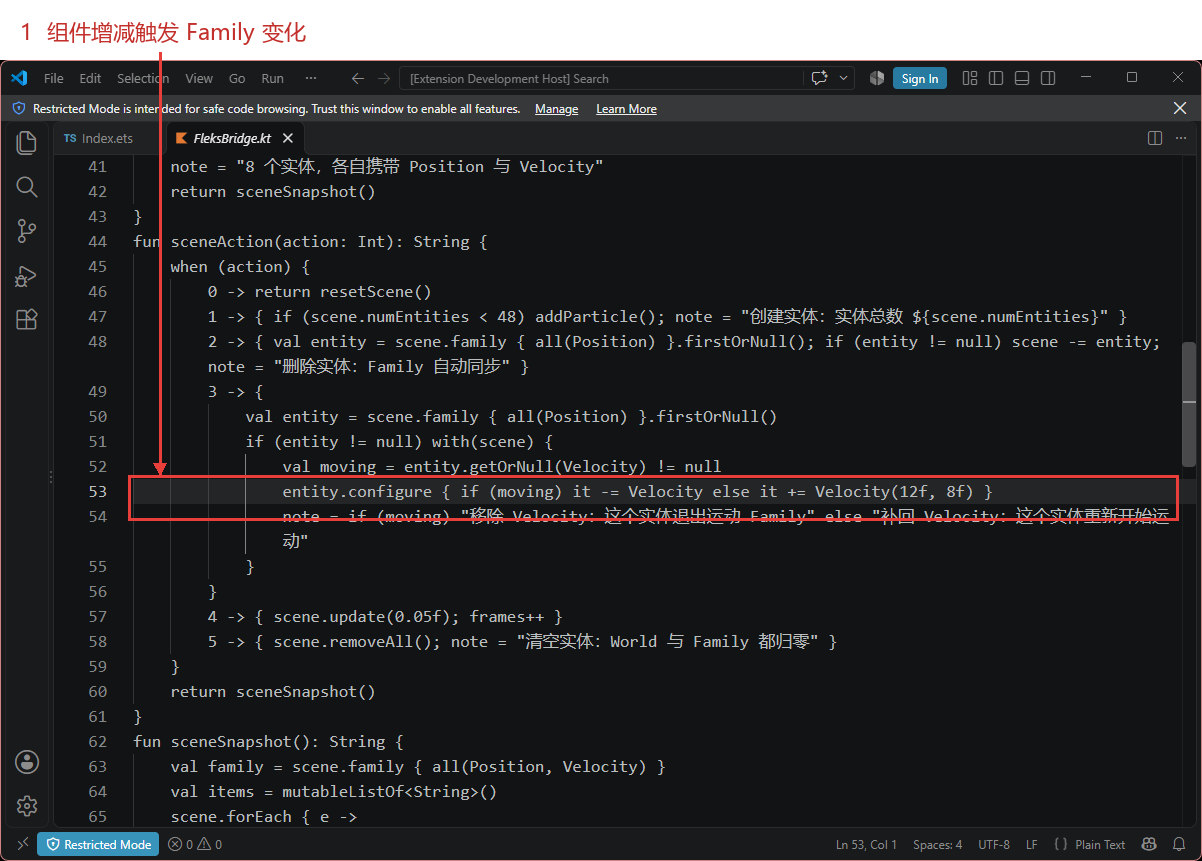
example/harmony 中的 fleks_napi.cpp 调用生成头文件里的入口,CMake 根据架构链接 libfleks.so。桥接层把字符串复制成 ArkTS 可接收的值,随后调用 DisposeString 释放 Kotlin/Native 返回的字符串;周期更新会反复经过这里,资源释放需要与每次调用配对。
#include "napi/native_api.h"
#include "fleks_api.h"
static napi_value CopyResult(napi_env env, const char* text) {
  napi_value value; napi_create_string_utf8(env,text?text:"{}",NAPI_AUTO_LENGTH,&value);
  if(text) fleks_symbols()->DisposeString(text); return value;
}
static napi_value Reset(napi_env env,napi_callback_info info) { return CopyResult(env,fleks_symbols()->kotlin.root.harmony.fleks.resetScene()); }
static napi_value Action(napi_env env,napi_callback_info info) {
  size_t argc=1; napi_value args[1]; napi_get_cb_info(env,info,&argc,args,nullptr,nullptr);
  int32_t value=0;
  if(argc!=1 || napi_get_value_int32(env,args[0],&value)!=napi_ok) { napi_throw_type_error(env,nullptr,"Expected an action number");return nullptr; }
  return CopyResult(env,fleks_symbols()->kotlin.root.harmony.fleks.sceneAction(value));
}
static napi_value Check(napi_env env,napi_callback_info info) { return CopyResult(env,fleks_symbols()->kotlin.root.harmony.fleks.runChecks()); }
static napi_value Init(napi_env env,napi_value exports) {
  napi_property_descriptor methods[]={
    {"reset",nullptr,Reset,nullptr,nullptr,nullptr,napi_default,nullptr},
    {"action",nullptr,Action,nullptr,nullptr,nullptr,napi_default,nullptr},
    {"runChecks",nullptr,Check,nullptr,nullptr,nullptr,napi_default,nullptr}};
  napi_define_properties(env,exports,3,methods);return exports;
}
static napi_module module={1,0,nullptr,Init,"fleksbridge",nullptr,{0}};
extern "C" __attribute__((constructor)) void RegisterFleks(){napi_module_register(&module);}
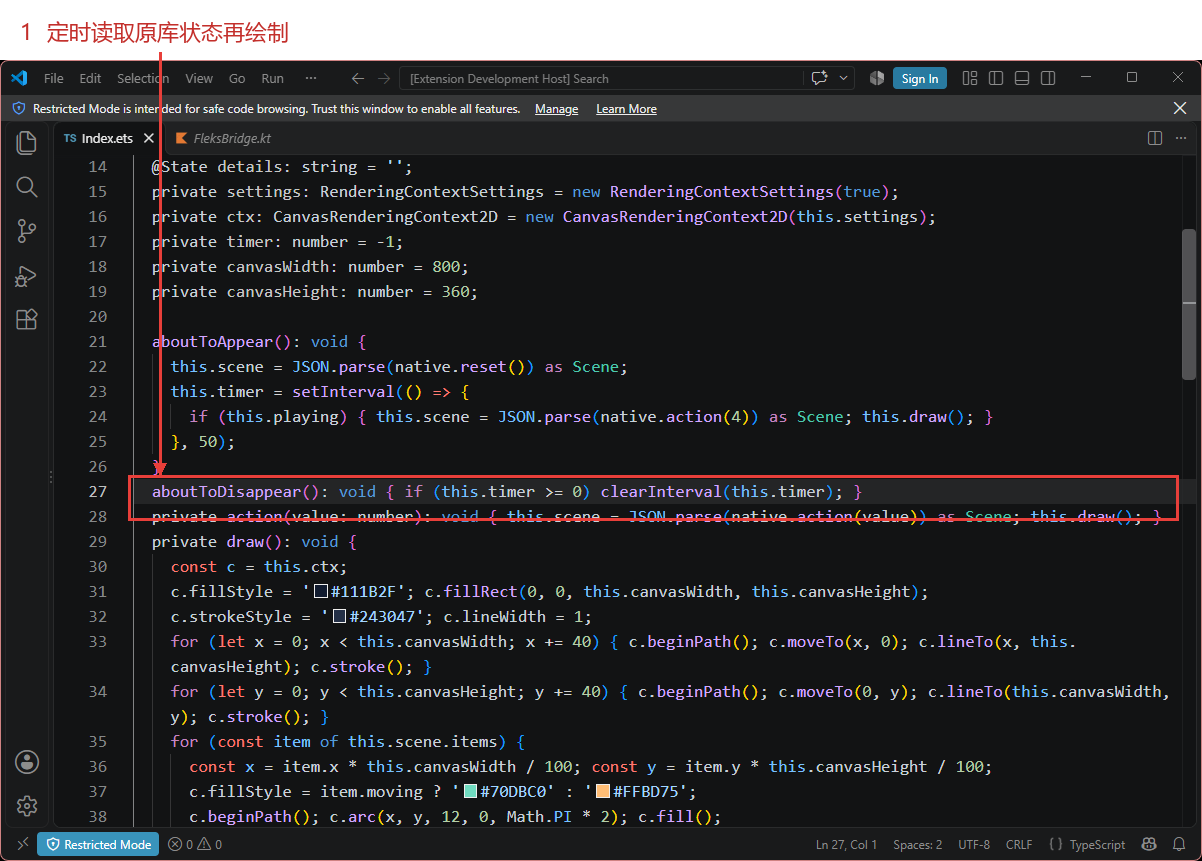
页面每隔 50 毫秒请求一次更新,用快照里的坐标绘制 Canvas。实体位置按百分比保存,画布尺寸决定最终显示坐标,组件移除后快照中的 moving 也随之改变。界面读取这些字段,就能同时画出小球颜色、数量和提示信息。
这里使用固定时间步,主要观察组件变化后的运动状态,尚未测量帧率和延迟。页面退出时关闭定时器;暂停时停止推进 World,但按钮仍可以修改实体。页面代码如下。
import native from 'libfleksbridge.so';

interface Particle { id: number; x: number; y: number; moving: boolean; }
interface Scene { entities: number; moving: number; frames: number; note: string; items: Particle[]; }
interface Check { name: string; ok: boolean; }
interface Checks { passed: number; total: number; checks: Check[]; }

@Entry
@Component
struct Index {
  @State scene: Scene = { entities: 0, moving: 0, frames: 0, note: '', items: [] };
  @State playing: boolean = true;
  @State checked: string = '未检查';
  @State details: string = '';
  private settings: RenderingContextSettings = new RenderingContextSettings(true);
  private ctx: CanvasRenderingContext2D = new CanvasRenderingContext2D(this.settings);
  private timer: number = -1;
  private canvasWidth: number = 800;
  private canvasHeight: number = 360;

  aboutToAppear(): void {
    this.scene = JSON.parse(native.reset()) as Scene;
    this.timer = setInterval(() => {
      if (this.playing) { this.scene = JSON.parse(native.action(4)) as Scene; this.draw(); }
    }, 50);
  }
  aboutToDisappear(): void { if (this.timer >= 0) clearInterval(this.timer); }
  private action(value: number): void { this.scene = JSON.parse(native.action(value)) as Scene; this.draw(); }
  private draw(): void {
    const c = this.ctx;
    c.fillStyle = '#111B2F'; c.fillRect(0, 0, this.canvasWidth, this.canvasHeight);
    c.strokeStyle = '#243047'; c.lineWidth = 1;
    for (let x = 0; x < this.canvasWidth; x += 40) { c.beginPath(); c.moveTo(x, 0); c.lineTo(x, this.canvasHeight); c.stroke(); }
    for (let y = 0; y < this.canvasHeight; y += 40) { c.beginPath(); c.moveTo(0, y); c.lineTo(this.canvasWidth, y); c.stroke(); }
    for (const item of this.scene.items) {
      const x = item.x * this.canvasWidth / 100; const y = item.y * this.canvasHeight / 100;
      c.fillStyle = item.moving ? '#70DBC0' : '#FFBD75';
      c.beginPath(); c.arc(x, y, 12, 0, Math.PI * 2); c.fill();
      c.fillStyle = '#D5DFEE'; c.font = '12px sans-serif'; c.fillText(`${item.id}`, x + 16, y + 4);
    }
  }
  build() {
    Scroll() {
      Column({ space: 18 }) {
        Row() {
          Column({ space: 8 }) {
            Text('给实体装上速度').fontSize(32).fontWeight(FontWeight.Bold).fontColor('#142943')
            Text('Fleks ECS · Kotlin Multiplatform / HarmonyOS').fontSize(14).fontColor('#748397')
          }.alignItems(HorizontalAlign.Start).layoutWeight(1)
          Text('World → Family → System').fontSize(14).fontColor('#287B70')
        }.width('100%')
        Row({ space: 30 }) {
          Text(`实体 ${this.scene.entities}`).fontSize(20).fontWeight(FontWeight.Bold).fontColor('#142943').id('entityCount')
          Text(`运动 Family ${this.scene.moving}`).fontSize(20).fontColor('#218570').id('movingCount')
          Text(`更新 ${this.scene.frames}`).fontSize(14).fontColor('#758298').id('frameCount')
        }.width('100%')
        Canvas(this.ctx).height(360).width('100%').borderRadius(18).id('ecsCanvas')
          .onReady(() => this.draw())
          .onAreaChange((oldArea: Area, newArea: Area) => { this.canvasWidth = Number(newArea.width); this.canvasHeight = Number(newArea.height); this.draw(); })
        Row({ space: 9 }) {
          Button(this.playing ? '暂停' : '继续').id('toggle').onClick(() => this.playing = !this.playing)
          Button('新增实体').id('add').onClick(() => this.action(1))
          Button('删除实体').id('remove').onClick(() => this.action(2))
          Button('切换首个实体速度').id('velocity').onClick(() => this.action(3))
          Button('清空').id('clear').onClick(() => this.action(5))
          Button('重置').id('reset').onClick(() => this.action(0))
        }.width('100%')
        Text(this.scene.note).fontSize(15).fontColor('#426277').width('100%').id('sceneNote')
        Text('绿色有 Position + Velocity;橙色只保留 Position。界面读取原库状态,不在 ArkTS 里更新坐标。')
          .fontSize(13).fontColor('#738296').width('100%')
        Row() {
          Text(`原生断言:${this.checked}`).fontSize(16).fontColor('#294A5D').layoutWeight(1).id('checkStatus')
          Button('运行 13 项检查').id('checks').onClick(() => {
            const result = JSON.parse(native.runChecks()) as Checks;
            this.checked = `${result.passed}/${result.total}`;
            this.details = result.checks.map((item: Check) => `${item.ok ? 'PASS' : 'FAIL'} ${item.name}`).join('\n');
          })
        }.width('100%')
        if (this.details.length > 0) {
          Text(this.details).fontSize(13).fontColor('#294A5D').lineHeight(21).fontFamily('monospace').width('100%')
            .padding(18).backgroundColor('#E8F1EF').borderRadius(12).id('checkDetail')
        }
      }.padding(28).width('100%').constraintSize({ maxWidth: 1150 })
    }.width('100%').height('100%').backgroundColor('#F2F6FA')
  }
}
4. 场景结束后再检查一次
只看小球在动,还不足以判断 ECS 适配是否正确。设备端另外创建了一份 World,检查空集合、Family 筛选、时间步更新、静止实体、组件移除与恢复、实体删除、清空、快照加载、遍历中删除、百个实体扩容以及 dispose。真机与模拟器均返回 13/13,这份检查 World 不会清空正在展示的场景。
其中快照检查使用内存对象:先保存快照,清空 World,再加载回来,确认实体与查询数量恢复。序列化依赖参与了构建,但这一步没有覆盖 JSON 编解码和文件持久化。如果后续要保存游戏进度,还需要把组件序列化、版本变化和恢复失败分别补进测试。
这个示例的收获很具体:创建和删除可以对上实体数量,速度组件的变化可以对上 Family,系统更新可以对上坐标,清空和释放也有独立断言。共享源码、双架构产物、桥接入口和 example/harmony 都留下了对应位置,读者可以从任意一个按钮往回追到实际库调用。
继续扩展时,可以先加一类组件或一个系统,保留同样明确的预期结果。实体规模、序列化和系统执行顺序都值得单独验证;性能比较则需要固定数据规模与测量方式。Fleks 的 API 和原有测试可继续查阅 上游仓库,鸿蒙目标及依赖维护参考 CPF-KMP-CMP。
项目源码:harmonyos-crossplatform-libs。本文示例位于 libraries/fleks,构建步骤见 适配说明。