1.脚本
第 1 步:打开记事本
-
按
Win + R,输入notepad,回车。 -
或者:开始菜单 → 搜索"记事本" → 打开。
第 2 步:粘贴代码
html
<!DOCTYPE html>
<html lang="zh-CN">
<head>
<meta charset="UTF-8">
<title>贪吃蛇</title>
<style>
body{margin:0;height:100vh;display:flex;flex-direction:column;justify-content:center;align-items:center;
background:#0d1117;font-family:system-ui,sans-serif;color:#c9d1d9;gap:14px}
canvas{background:#161b22;border-radius:14px;box-shadow:0 0 30px rgba(80,200,255,.25)}
#score{font-size:22px;letter-spacing:1px}
#score b{color:#58a6ff}
.tip{font-size:14px;color:#8b949e}
</style>
</head>
<body>
<div id="score">分数:<b>0</b> | 最高:<b id="best">0</b></div>
<canvas id="cv" width="400" height="400"></canvas>
<div class="tip">方向键 ↑↓←→ 移动 · 空格暂停 · 撞墙或撞自己就结束</div>
<script>
const cv = document.getElementById('cv');
const ctx = cv.getContext('2d');
const SIZE = 20; // 每格 20px
const COLS = cv.width / SIZE;
let snake, dir, nextDir, food, score, best, timer, speed, running, over;
best = +localStorage.getItem('snakeBest') || 0;
document.getElementById('best').textContent = best;
function reset() {
snake = [{x:8,y:10},{x:7,y:10},{x:6,y:10}];
dir = {x:1,y:0};
nextDir = {x:1,y:0};
score = 0;
speed = 140;
running = true;
over = false;
placeFood();
updateScore();
clearInterval(timer);
timer = setInterval(loop, speed);
}
function placeFood() {
do {
food = {x: Math.floor(Math.random()*COLS), y: Math.floor(Math.random()*COLS)};
} while (snake.some(s => s.x===food.x && s.y===food.y));
}
function loop() {
if (!running) return;
dir = nextDir;
const head = {x: snake[0].x + dir.x, y: snake[0].y + dir.y};
// 撞墙
if (head.x<0 || head.y<0 || head.x>=COLS || head.y>=COLS) return gameOver();
// 撞自己
if (snake.some(s => s.x===head.x && s.y===head.y)) return gameOver();
snake.unshift(head);
if (head.x===food.x && head.y===food.y) {
score += 10;
updateScore();
placeFood();
// 每吃 5 个加速
if (score % 50 === 0 && speed > 60) {
speed -= 12;
clearInterval(timer);
timer = setInterval(loop, speed);
}
} else {
snake.pop();
}
draw();
}
function draw() {
ctx.clearRect(0,0,cv.width,cv.height);
// 网格
ctx.strokeStyle = '#21262d';
ctx.lineWidth = 1;
for (let i=1;i<COLS;i++){
ctx.beginPath(); ctx.moveTo(i*SIZE,0); ctx.lineTo(i*SIZE,cv.height); ctx.stroke();
ctx.beginPath(); ctx.moveTo(0,i*SIZE); ctx.lineTo(cv.width,i*SIZE); ctx.stroke();
}
// 食物
ctx.fillStyle = '#f85149';
ctx.shadowColor = '#f85149'; ctx.shadowBlur = 16;
ctx.beginPath();
ctx.arc(food.x*SIZE+SIZE/2, food.y*SIZE+SIZE/2, SIZE/2-2, 0, Math.PI*2);
ctx.fill();
ctx.shadowBlur = 0;
// 蛇
snake.forEach((s,i)=>{
const t = i / snake.length;
ctx.fillStyle = i===0 ? '#7ee787' : `hsl(${140 - t*40}, 70%, ${60 - t*20}%)`;
ctx.shadowColor = '#7ee787'; ctx.shadowBlur = i===0 ? 14 : 4;
ctx.beginPath();
ctx.roundRect(s.x*SIZE+1, s.y*SIZE+1, SIZE-2, SIZE-2, 5);
ctx.fill();
});
ctx.shadowBlur = 0;
if (!running && !over) {
ctx.fillStyle = 'rgba(0,0,0,.6)';
ctx.fillRect(0,0,cv.width,cv.height);
ctx.fillStyle = '#c9d1d9';
ctx.font = 'bold 28px system-ui';
ctx.textAlign = 'center';
ctx.fillText('已暂停', cv.width/2, cv.height/2);
ctx.font = '14px system-ui';
ctx.fillText('按空格继续', cv.width/2, cv.height/2+34);
}
}
function gameOver() {
over = true;
running = false;
clearInterval(timer);
if (score > best) {
best = score;
localStorage.setItem('snakeBest', best);
document.getElementById('best').textContent = best;
}
ctx.fillStyle = 'rgba(0,0,0,.7)';
ctx.fillRect(0,0,cv.width,cv.height);
ctx.fillStyle = '#f85149';
ctx.font = 'bold 32px system-ui';
ctx.textAlign = 'center';
ctx.fillText('游戏结束', cv.width/2, cv.height/2-16);
ctx.fillStyle = '#c9d1d9';
ctx.font = '18px system-ui';
ctx.fillText('得分:' + score, cv.width/2, cv.height/2+24);
ctx.font = '14px system-ui';
ctx.fillStyle = '#8b949e';
ctx.fillText('按空格重新开始', cv.width/2, cv.height/2+58);
}
function updateScore() {
document.querySelector('#score b').textContent = score;
}
document.addEventListener('keydown', e=>{
const k = e.key;
if (k===' ') {
e.preventDefault();
if (over) reset();
else { running = !running; draw(); }
return;
}
if (!running) return;
if (k==='ArrowUp' && dir.y===0) nextDir={x:0,y:-1};
if (k==='ArrowDown' && dir.y===0) nextDir={x:0,y:1};
if (k==='ArrowLeft' && dir.x===0) nextDir={x:-1,y:0};
if (k==='ArrowRight' && dir.x===0) nextDir={x:1,y:0};
});
reset();
</script>
</body>
</html>把之前那段完整的 HTML 代码(从 <!DOCTYPE html> 到 </html>)全部复制粘贴进去。
第 3 步:另存为到桌面
-
点击记事本菜单:文件 → 另存为。
-
在弹出的窗口里:
-
保存位置 :选择 桌面。
-
文件名 :输入 贪吃蛇
.html -
保存类型 :改成 所有文件 (.) ← 这一步很关键!
-
编码 :选 UTF-8
-
-
点击保存。
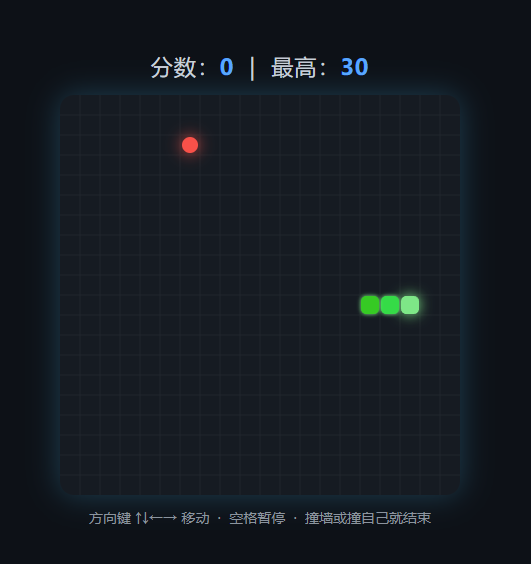
2.效果图