零、写在前面
📌 本系列教程完整目录 :ArcGIS JS 系列基础教程(100个项目常用热门功能)
💡 在线示例 :完整可运行的 HTML 示例,无需任何环境配置,可直接在浏览器中打开体验 🗂️ 专栏导航 :收藏 + 关注,专栏文章第一时间送达 ❤️ 一键三连:点赞 + 评论 + 收藏
一、功能介绍
VoxelIsosurface(等值面)表示体数据某一特定数值对应的曲面:它把"数据值等于某阈值的点"连成一个面,是观察连续标量场(如温度、盐度、浓度)分层结构的常用手段。
前置条件(三者缺一不可):
- 变量必须是 连续变量(continuous variable),离散变量(如类别)没有等值面概念;
voxelLayer.renderMode必须为"surfaces";voxelLayer.enableIsosurfaces必须为true。
此外,最多只能同时绘制 4 个等值面。
参考:VoxelIsosurface API | VoxelVariableStyle API | 官方示例 Explore a VoxelLayer using isosurface
二、功能实现
2.1 启用等值面并添加
javascript
const VoxelIsosurface = await $arcgis.import("@arcgis/core/layers/voxel/VoxelIsosurface.js");

voxelLayer.when(() => {
    // 等价面只在 surfaces 模式 + enableIsosurfaces 时绘制
    voxelLayer.renderMode = "surfaces";
    voxelLayer.enableIsosurfaces = true;

    // 等值面集合位于「变量样式」而非「体积样式」
    const variableStyle = voxelLayer.getVariableStyle(null); // VoxelVariableStyle

    // 从变量的 transferFunction.stretchRange 取数值范围,用中间值作为首个等值面
    const range = variableStyle.transferFunction.stretchRange;
    const min = Math.min(range[0], range[1]);
    const max = Math.max(range[0], range[1]);
    const mid = Math.floor((min + max) / 2);

    const iso = new VoxelIsosurface({
        value: mid,
        enabled: true,
        color: [102, 136, 248],
        colorLocked: true
    });
    variableStyle.isosurfaces.add(iso);  // 加入集合即渲染
});
2.2 等值面的核心属性
| 属性 | 类型 | 说明 |
|---|---|---|
value |
number |
等值面对应的数据值(核心) |
enabled |
boolean |
是否渲染(默认 true) |
color |
Color |
等值面颜色(autocast,支持 [r,g,b]) |
colorLocked |
boolean |
true 锁定颜色(默认);false 时随转移函数色带变化 |
label |
string |
标签文本 |
2.3 集合的增删改(上限 4)
isosurfaces 是 Collection<VoxelIsosurface>:
javascript
// 新增(先判断上限)
if (variableStyle.isosurfaces.length < 4) {
    variableStyle.isosurfaces.add(new VoxelIsosurface({ value: 21, color: [102,136,248] }));
}

// 移除最末
variableStyle.isosurfaces.removeAt(variableStyle.isosurfaces.length - 1);

// 实时修改(无需重载)
const iso = variableStyle.isosurfaces.getItemAt(0);
iso.value = 30;                       // 改变曲面所代表的数值
iso.color = [255, 0, 0];
iso.colorLocked = false;
2.4 颜色辅助与图层开关
VoxelLayer 提供了根据连续变量值取色的辅助方法,以及几个常用的图层级开关:
javascript
// 1) 根据连续变量值取色(常用于自定义 UI 配色)
const color = voxelLayer.getColorForContinuousDataValue(
    voxelLayer.currentVariableId,  // 变量 id
    21,                            // 数据值
    false                          // 是否叠加 opacityStops
);

// 2) 是否出现在图例中
voxelLayer.legendEnabled = true;   // 默认 true

// 3) 不透明度(注意 3D 限制)
// voxelLayer.opacity = 0.5;  // ⚠️ 3D SceneView 中 VoxelLayer 不支持修改 opacity!
⚠️ 3D 限制 :
opacity是Layer的继承属性,但官方明确:在 3DSceneView中 VoxelLayer 不支持修改opacity。想做"淡入淡出"效果,应通过transferFunction.opacityStops(连续变量)或enableIsosurfaces/enableSlices等开关实现,而非opacity。
三、功能应用
| 应用场景 | 实现要点 |
|---|---|
| 阈值分层观察 | 设置 value 为某一临界值,观察该等值面位置 |
| 多阈值对比 | 添加多条等值面(≤4),各自取不同 value |
| 温度/盐度剖面 | 配合 currentVariableId 切换变量后重新添加等值面 |
| 颜色随场变化 | colorLocked = false 让等值面跟随转移函数色带 |
| 取色辅助 | getColorForContinuousDataValue 取连续变量值对应颜色 |
四、核心代码
📦 完整代码 已保存至
sample/lesson34_voxel_isosurface.html,可直接在浏览器打开。
html
<!DOCTYPE html>
<html lang="zh-CN">
<head>
    <meta charset="UTF-8">
    <meta name="viewport" content="width=device-width, initial-scale=1.0">
    <title>第34课:VoxelIsosurface 等值面</title>
    <link rel="stylesheet" href="https://js.arcgis.com/5.0/esri/themes/light/main.css">
    <script type="module" src="https://js.arcgis.com/5.0/"></script>
    <style>
        * { margin: 0; padding: 0; box-sizing: border-box; }
        body { font-family: "Microsoft YaHei", sans-serif; }
        #mapContainer { width: 100vw; height: 100vh; }
        .page-title {
            position: absolute; top: 20px; left: 50%; transform: translateX(-50%);
            background: rgba(255,255,255,0.95); padding: 10px 24px; border-radius: 6px;
            font-size: 18px; font-weight: bold; z-index: 100;
            box-shadow: 0 2px 8px rgba(0,0,0,0.15);
        }
        .control-panel {
            position: absolute; top: 80px; right: 20px;
            background: rgba(255,255,255,0.95); padding: 16px; border-radius: 8px;
            box-shadow: 0 2px 12px rgba(0,0,0,0.15);
            z-index: 100; min-width: 320px;
        }
        .control-panel h3 { margin: 0 0 8px 0; font-size: 14px; color: #333; }
        .section { margin-bottom: 12px; padding-bottom: 10px; border-bottom: 1px solid #eee; }
        .section:last-child { border-bottom: none; margin-bottom: 0; }
        .btn-row { display: flex; gap: 8px; flex-wrap: wrap; margin-top: 6px; }
        .btn-row button {
            flex: 1; min-width: 60px; padding: 6px 0;
            border: 1px solid #d9d9d9; border-radius: 4px;
            background: white; cursor: pointer; font-size: 12px;
        }
        .btn-row button:hover { border-color: #1890ff; color: #1890ff; }
        .btn-row button.on { background: #1890ff; color: white; border-color: #1890ff; }
        .btn-row button:disabled { opacity: 0.5; cursor: not-allowed; }
        .slider-row { margin-top: 8px; font-size: 12px; color: #333; }
        .slider-row label { display: flex; justify-content: space-between; margin-bottom: 2px; }
        .slider-row .v { color: #1890ff; font-weight: bold; }
        .slider-row input[type=range] { width: 100%; }
        .color-row { margin-top: 8px; font-size: 12px; color: #333; display: flex; align-items: center; gap: 8px; }
        .color-row input[type=color] { width: 32px; height: 24px; border: none; background: none; cursor: pointer; }
        .info-card {
            margin-top: 10px; padding: 10px 12px;
            background: #f0f5ff; border-radius: 6px;
            border-left: 3px solid #1890ff; font-size: 12px; line-height: 1.6;
        }
        .info-card .val { font-weight: bold; color: #1890ff; }
        .status-text {
            position: absolute; bottom: 20px; left: 50%; transform: translateX(-50%);
            background: rgba(0,0,0,0.7); color: white; padding: 8px 20px;
            border-radius: 20px; font-size: 13px; z-index: 100; pointer-events: none;
            white-space: nowrap;
        }
    </style>
</head>
<body>
<h1 class="page-title">第34课:VoxelIsosurface 等值面</h1>

<div class="control-panel">
    <div class="section">
        <h3>🟢 等值面(VoxelIsosurface)</h3>
        <div class="btn-row">
            <button id="btnAdd">添加等值面</button>
            <button id="btnRemove">移除最末</button>
        </div>
        <div style="font-size:11px;color:#888;margin-top:4px;">仅连续变量 + surfaces 模式,最多 4 个</div>
    </div>
    <div class="section">
        <h3>🎯 选中等值面</h3>
        <div class="btn-row">
            <button id="btnPrev">上一个</button>
            <button id="btnNext">下一个</button>
        </div>
    </div>
    <div class="section">
        <h3>⚙️ 等值面参数(选中项)</h3>
        <div class="slider-row">
            <label>数据值 value<span class="v" id="valVal">-</span></label>
            <input type="range" id="rngVal" min="0" max="100" value="50">
        </div>
        <div class="color-row">
            <span>颜色 color</span>
            <input type="color" id="clrPick" value="#6688f8">
            <button id="btnAutoColor" style="flex:0 0 auto;padding:4px 8px;">用取色器设色</button>
            <label style="display:flex;align-items:center;gap:4px;margin-left:auto;">
                <input type="checkbox" id="chkLocked" checked> colorLocked
            </label>
        </div>
    </div>
    <div class="section">
        <h3>🔧 图层开关</h3>
        <div class="btn-row">
            <button id="btnLegend" class="on">图例:开</button>
        </div>
    </div>
    <div class="info-card">
        <div>当前变量:<span class="val" id="varName">加载中...</span></div>
        <div>数据范围:<span class="val" id="range">-</span></div>
        <div>等值面数:<span class="val" id="count">0</span> / 4</div>
        <div>选中索引:<span class="val" id="activeIdx">-</span></div>
    </div>
</div>

<div class="status-text" id="statusText">VoxelIsosurface | 连续变量的特定值曲面</div>

<div id="mapContainer"></div>

<script type="module">
    const Map = await $arcgis.import("@arcgis/core/Map.js");
    const SceneView = await $arcgis.import("@arcgis/core/views/SceneView.js");
    const VoxelLayer = await $arcgis.import("@arcgis/core/layers/VoxelLayer.js");
    const VoxelIsosurface = await $arcgis.import("@arcgis/core/layers/voxel/VoxelIsosurface.js");
    const getTianditu = await $arcgis.import("https://openlayers.vip/examples/resources/tianditu.js");

    const vecLayers = getTianditu.default({ type: "vec_w" });
    const map = new Map({ basemap: { baseLayers: [vecLayers.base, vecLayers.anno] } });

    const view = new SceneView({
        container: "mapContainer", map: map,
        viewingMode: "local",
        camera: { position: { longitude: -70, latitude: 18, z: 800000 }, heading: 0, tilt: 60 }
    });
    const voxelLayer = new VoxelLayer({
        url: "https://gs3d.geosceneonline.cn/server/rest/services/Hosted/VoxelPM10/SceneServer"
    });
    map.add(voxelLayer);

    let variableStyle = null;  // VoxelVariableStyle
    let activeIndex = 0;       // 当前选中的等值面索引
    let rangeMin = 0, rangeMax = 100; // 当前连续变量的拉伸范围
    let seq = 0;               // 等值面序号

    view.when(() => {
        voxelLayer.when(() => {
            // 等值面只在 renderMode = "surfaces" 且 enableIsosurfaces = true 时绘制
            voxelLayer.renderMode = "surfaces";
            voxelLayer.enableIsosurfaces = true;

            // 变量样式:等值面集合位于 VoxelVariableStyle.isosurfaces
            variableStyle = voxelLayer.getVariableStyle(null);

            // 通过 transferFunction.stretchRange 获取变量数值范围
            const range = variableStyle.transferFunction.stretchRange;
            rangeMin = Math.min(range[0], range[1]);
            rangeMax = Math.max(range[0], range[1]);
            const mid = Math.floor((rangeMin + rangeMax) / 2);

            // 当前变量信息
            const varObj = voxelLayer.variables.getItemAt(voxelLayer.currentVariableId);
            document.getElementById("varName").textContent = varObj.name + "(" + varObj.unit + ")";
            document.getElementById("range").textContent = rangeMin + " ~ " + rangeMax;

            // 默认添加一条位于中间值的等值面
            addIsosurface(mid);

            view.goTo(voxelLayer.fullExtent, { duration: 2000 });
        }).catch(err => {
            document.getElementById("statusText").textContent = "加载失败";
            console.error(err);
        });
    });

    // 构造并添加等值面;value 取变量数值范围内的一个值
    function addIsosurface(value) {
        if (variableStyle.isosurfaces.length >= 4) {
            document.getElementById("statusText").textContent = "已达上限(4 个)";
            return;
        }
        const iso = new VoxelIsosurface({
            label: "Isosurface " + (++seq),
            enabled: true,
            value: value,
            color: [102, 136, 248],
            colorLocked: true
        });
        variableStyle.isosurfaces.add(iso);
        activeIndex = variableStyle.isosurfaces.length - 1;
        syncControlsToActive();
        updateInfo();
    }

    function updateInfo() {
        document.getElementById("count").textContent = variableStyle.isosurfaces.length;
        document.getElementById("activeIdx").textContent =
            variableStyle.isosurfaces.length ? activeIndex : "-";
        document.getElementById("btnAdd").disabled = variableStyle.isosurfaces.length >= 4;
    }

    // 将选中等值面的属性同步到控件显示
    function syncControlsToActive() {
        if (!variableStyle.isosurfaces.length) return;
        const iso = variableStyle.isosurfaces.getItemAt(activeIndex);
        const rng = document.getElementById("rngVal");
        rng.min = rangeMin; rng.max = rangeMax; rng.value = iso.value;
        document.getElementById("valVal").textContent = iso.value;
        const c = iso.color;
        if (c) {
            document.getElementById("clrPick").value =
                "#" + [c.r, c.g, c.b].map(x => Math.round(x).toString(16).padStart(2, "0")).join("");
        }
        document.getElementById("chkLocked").checked = iso.colorLocked;
        updateInfo();
    }

    document.getElementById("btnAdd").addEventListener("click", function () {
        const mid = Math.floor((rangeMin + rangeMax) / 2);
        addIsosurface(mid);
        document.getElementById("statusText").textContent = "已添加等值面";
    });

    document.getElementById("btnRemove").addEventListener("click", function () {
        const n = variableStyle.isosurfaces.length;
        if (n === 0) return;
        variableStyle.isosurfaces.removeAt(n - 1);   // 移除最末等值面
        if (activeIndex >= variableStyle.isosurfaces.length) {
            activeIndex = Math.max(0, variableStyle.isosurfaces.length - 1);
        }
        syncControlsToActive();
        document.getElementById("statusText").textContent = "已移除最末等值面";
    });

    document.getElementById("btnPrev").addEventListener("click", function () {
        if (variableStyle.isosurfaces.length === 0) return;
        activeIndex = (activeIndex - 1 + variableStyle.isosurfaces.length) % variableStyle.isosurfaces.length;
        syncControlsToActive();
    });

    document.getElementById("btnNext").addEventListener("click", function () {
        if (variableStyle.isosurfaces.length === 0) return;
        activeIndex = (activeIndex + 1) % variableStyle.isosurfaces.length;
        syncControlsToActive();
    });

    // 实时修改选中等值面的数据值
    document.getElementById("rngVal").addEventListener("input", function () {
        if (!variableStyle.isosurfaces.length) return;
        const iso = variableStyle.isosurfaces.getItemAt(activeIndex);
        iso.value = Number(this.value);
        document.getElementById("valVal").textContent = this.value;
    });

    // 修改颜色
    document.getElementById("clrPick").addEventListener("input", function () {
        if (!variableStyle.isosurfaces.length) return;
        const iso = variableStyle.isosurfaces.getItemAt(activeIndex);
        const hex = this.value; // #rrggbb
        const r = parseInt(hex.slice(1, 3), 16);
        const g = parseInt(hex.slice(3, 5), 16);
        const b = parseInt(hex.slice(5, 7), 16);
        iso.color = [r, g, b];
    });

    // 用 getColorForContinuousDataValue 取色并应用到选中等值面
    document.getElementById("btnAutoColor").addEventListener("click", function () {
        if (!variableStyle.isosurfaces.length) return;
        const cur = variableStyle.isosurfaces.getItemAt(activeIndex);
        const c = voxelLayer.getColorForContinuousDataValue(
            voxelLayer.currentVariableId, cur.value, false
        );
        if (c) {
            cur.color = [c.r, c.g, c.b, c.a];
            document.getElementById("clrPick").value =
                "#" + [c.r, c.g, c.b].map(x => x.toString(16).padStart(2, "0")).join("");
            document.getElementById("statusText").textContent = "已用取色器设色";
        }
    });

    // 切换 colorLocked
    document.getElementById("chkLocked").addEventListener("change", function () {
        if (!variableStyle.isosurfaces.length) return;
        const iso = variableStyle.isosurfaces.getItemAt(activeIndex);
        iso.colorLocked = this.checked;
        document.getElementById("statusText").textContent = "colorLocked = " + this.checked;
    });

    // 图例开关
    document.getElementById("btnLegend").addEventListener("click", function () {
        voxelLayer.legendEnabled = !voxelLayer.legendEnabled;
        this.classList.toggle("on", voxelLayer.legendEnabled);
        this.textContent = voxelLayer.legendEnabled ? "图例:开" : "图例:关";
    });
</script>
</body>
</html>
五、在线示例
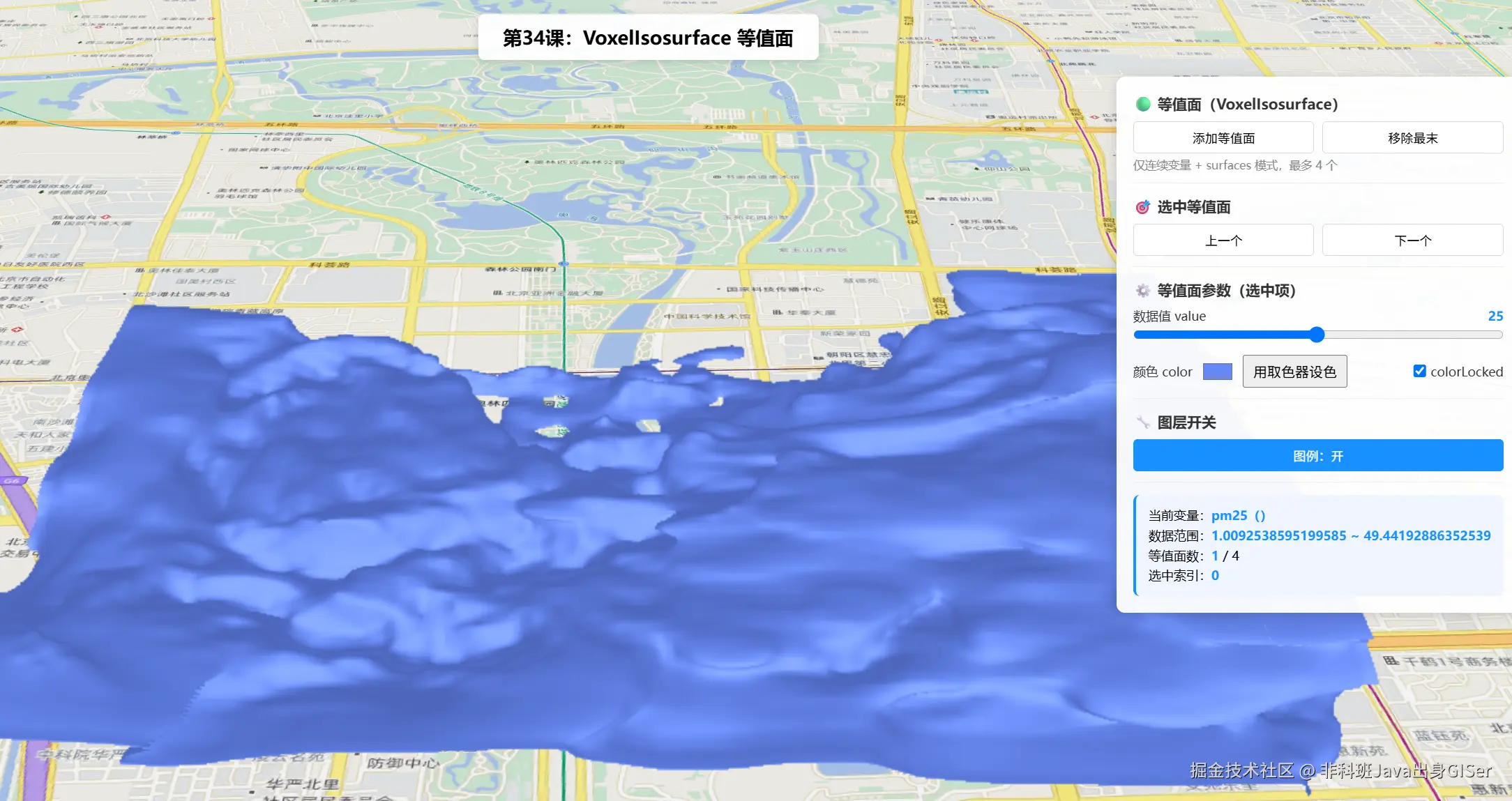
操作说明:
- 场景加载后默认
renderMode = "surfaces"、enableIsosurfaces = true,并在当前连续变量的中间值处放置一条等值面。添加等值面可继续追加(最多 4 个),移除最末删除;上一个/下一个选择等值面。- 拖动
value滑块改变等值面所代表的数值,观察曲面位置随之移动。用取色器设色调用getColorForContinuousDataValue按当前值取色并应用;图例开关控制legendEnabled。
六、关键 API 说明
| API | 说明 |
|---|---|
voxelLayer.renderMode |
必须为 "surfaces" |
voxelLayer.enableIsosurfaces |
必须设为 true 才绘制等值面 |
voxelLayer.getVariableStyle(null) |
返回 VoxelVariableStyle,其 isosurfaces 为 Collection<VoxelIsosurface> |
variableStyle.transferFunction.stretchRange |
连续变量的数值拉伸范围 [min, max] |
new VoxelIsosurface(properties) |
构造等值面,value/color/colorLocked/label |
isosurfaces.add/removeAt/getItemAt |
集合增删改,修改属性实时生效;上限 4 个 |
voxelLayer.getColorForContinuousDataValue(id, value, applyOpacityStops) |
按连续变量值取色(颜色辅助方法) |
voxelLayer.legendEnabled |
是否出现在图例中(默认 true) |
voxelLayer.opacity |
⚠️ 3D SceneView 中 不支持修改(继承属性但有此限制) |
参考链接: VoxelIsosurface | VoxelVariableStyle | 官方示例
七、系列导航
💡 小贴士 :等值面与切片、动态剖面最大的不同是:它挂在变量样式 (
getVariableStyle)而非体积样式 (getVolumeStyle)上,且只面向连续变量 。记住"切片/剖面归体积、等值面归变量",定位问题会快很多。另外opacity在 3D 体元图层上改不动,想调透明度请用transferFunction.opacityStops。