前言
以 StatefulSet → PVC → 动态 PV → Pod 调度 → Attach → Mount → 容器挂载 为主线,梳理CSI的实现方式。
注:
-
CSI开发文档参考:kubernetes-csi.github.io/docs/introd...
-
kubernetes:1.36.1 -
alibaba-cloud-csi-driver:1.37.3
一、部署形态
以alibaba-cloud-csi-driver为例,集群里主要是两种工作负载。
Shell
kubectl get pods -n kube-system | grep csi
csi-plugin-btqph                              4/4     Running     0          17m
csi-provisioner-65bbc85856-cfjt7 10/10 Running 0 17m| 工作负载 | Kind | 角色 |
|---|---|---|
csi-provisioner |
Deployment | 控制面:CreateVolume / Attach / Resize / Snapshot |
csi-plugin |
DaemonSet | 数据面:NodeStage / NodePublish,向 kubelet 注册 socket |
每种工作负载 = csi主容器 + sidecar容器 * N 。
1.1. 控制面:csi-provisioner Pod
csi-provisioner Pod 有 10 个 容器:
| 容器名 | 官方仓库 | 作用 |
|---|---|---|
csi-provisioner |
alibaba-cloud-csi-driver | --run-controller-service=true,实现 disk/nas/oss 的 CreateVolume、ControllerPublish 等 |
external-disk-provisioner |
external-provisioner | watch 云盘 PVC → CreateVolume → 写 PV |
external-disk-attacher |
external-attacher | watch VolumeAttachment → disk ControllerPublish / Unpublish |
external-disk-resizer |
external-resizer | 云盘 PVC 扩容 → ControllerExpandVolume |
external-csi-snapshotter |
external-snapshotter / csi-snapshotter | sidecar:连 CSI socket,调驱动 CreateSnapshot 等 |
external-snapshot-controller |
external-snapshotter / snapshot-controller | 编排 VolumeSnapshot CR(不挂 /csi) |
external-nas-provisioner |
external-provisioner | watch NAS PVC → nas CreateVolume |
external-nas-resizer |
external-resizer | NAS 卷扩容 |
external-oss-provisioner |
external-provisioner | watch OSS PVC → oss CreateVolume |
external-oss-attacher |
external-attacher | OSS ControllerPublish(拉起 fuse Pod 等) |
csi-provisioner作为主容器,开启3个Unix Domain Socket,分别处理disk/nas/oss不同存储类型的CSI请求;sidecar容器,watch不同k8s资源,gRPC调用主容器,更新k8s资源回apiserver。
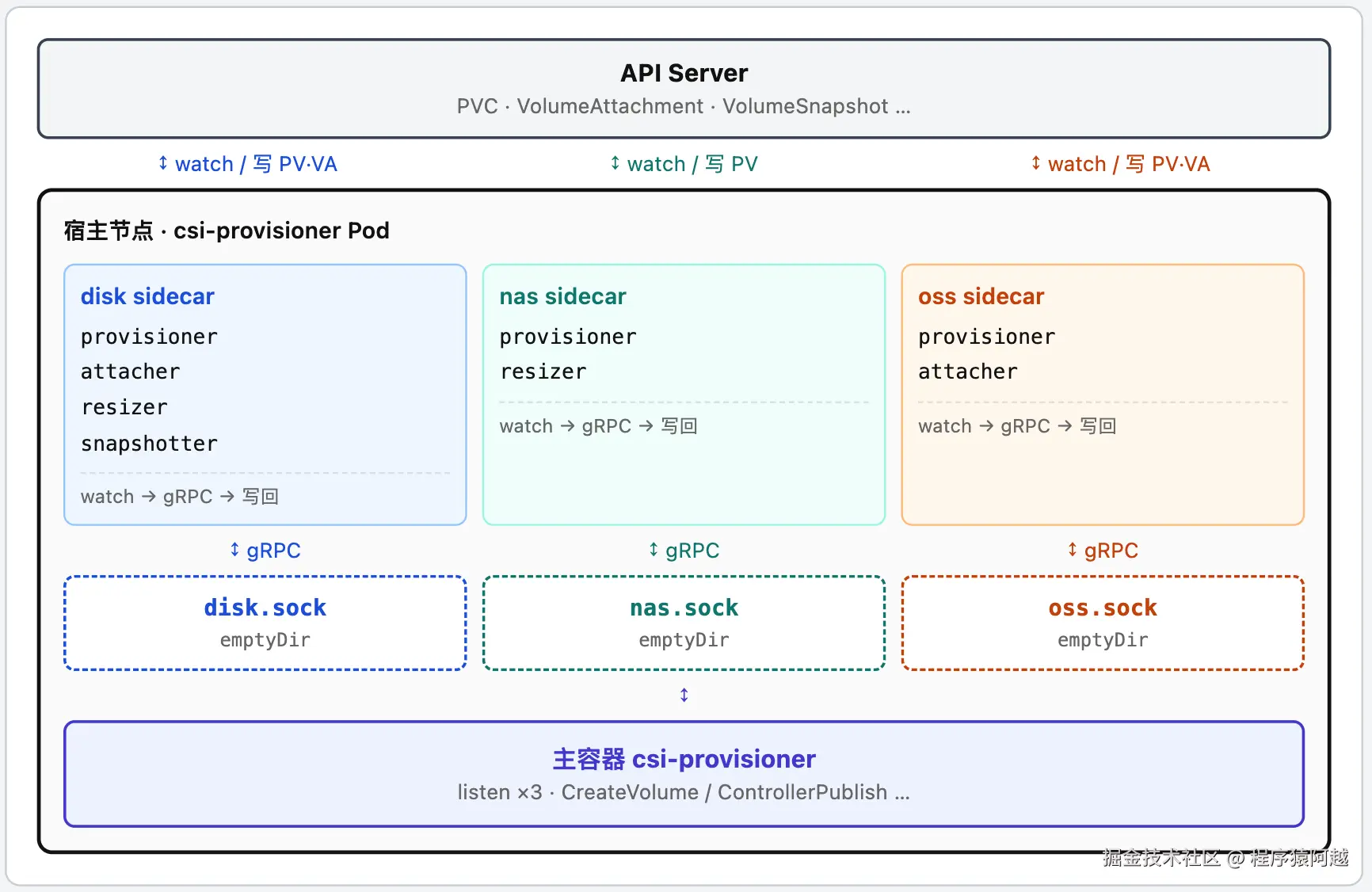
简化资源清单如下:
YAML
apiVersion: apps/v1
kind: Deployment
metadata:
  name: csi-provisioner
  namespace: kube-system
spec:
  replicas: 1
  selector:
    matchLabels:
      app: csi-provisioner
  template:
    metadata:
      labels:
        app: csi-provisioner
    spec:
      containers:
      # ── 主容器:Controller 服务,为 disk/nas/oss 各写一个 UDS ──
      - name: csi-provisioner
        args:
        - --endpoint=unix://csi/driverplugin.csi.alibabacloud.com-replace/csi.sock
        - --driver=disk,nas,oss
        - --run-controller-service=true
        - --run-node-service=false
        volumeMounts:
        - name: disk-provisioner-dir
          mountPath: /csi/diskplugin.csi.alibabacloud.com
        - name: nas-provisioner-dir
          mountPath: /csi/nasplugin.csi.alibabacloud.com
        - name: oss-provisioner-dir
          mountPath: /csi/ossplugin.csi.alibabacloud.com
      # ── disk sidecars:共享 disk-provisioner-dir → /csi/csi.sock ──
      - name: external-disk-provisioner
        args:
        - --csi-address=/csi/csi.sock
        - --volume-name-prefix=disk
        - --strict-topology=true
        - --leader-election=true
        volumeMounts:
        - name: disk-provisioner-dir
          mountPath: /csi
      - name: external-disk-attacher
        args: [--csi-address=/csi/csi.sock, --leader-election=true]
        volumeMounts:
        - name: disk-provisioner-dir
          mountPath: /csi
      # ── oss sidecars:共享 oss-provisioner-dir ──
      - name: external-oss-provisioner
        args:
        - --csi-address=/csi/csi.sock
        - --volume-name-prefix=oss
        - --leader-election=true
        volumeMounts:
        - name: oss-provisioner-dir
          mountPath: /csi
      volumes:
      - name: disk-provisioner-dir
        emptyDir: {}
      - name: nas-provisioner-dir
        emptyDir: {}
      - name: oss-provisioner-dir
        emptyDir: {}
宿主节点可以看到3个socket:
Shell
root@worker:~# ls /var/lib/kubelet/pods/<poduid>/volumes/kubernetes.io~empty-dir
disk-provisioner-dir  nas-provisioner-dir  oss-provisioner-dir
root@worker:~# ls /var/lib/kubelet/pods/<poduid>/volumes/kubernetes.io~empty-dir/disk-provisioner-dir
csi.sock
1.2. 数据面:csi-plugin Pod(4 容器 + init)
| 容器名 | 官方仓库 | 作用 |
|---|---|---|
init(initContainer) |
alibaba-cloud-csi-driver | 节点环境准备(依赖 / 配置),跑完退出 |
csi-plugin |
alibaba-cloud-csi-driver | --run-node-service=true,为 disk/nas/oss 各起 Node 侧 UDS,实现 NodeStage / NodePublish |
disk-driver-registrar |
node-driver-registrar | sidecar,向 kubelet 注册 disk CSI socket |
nas-driver-registrar |
node-driver-registrar | sidecar,向 kubelet 注册 nas CSI socket |
oss-driver-registrar |
node-driver-registrar | sidecar,向 kubelet 注册 oss CSI socket |
数据面sidecar利用kubelet的插件发现机制,仅负责将csi的UDS注册到kubelet,详细逻辑见第五章。
Pod:
YAML
apiVersion: v1
kind: Pod
metadata:
  name: csi-plugin-dfcnk
  namespace: kube-system
spec:
  containers:
  # CSI 驱动
  - name: csi-plugin
    args:
    - --endpoint=unix://csi/driverplugin.csi.alibabacloud.com-replace/csi.sock
    - --driver=nas,oss,disk
    - --run-node-service=true
    volumeMounts:
    - name: oss-plugin-dir
      mountPath: /csi/ossplugin.csi.alibabacloud.com
  # registrar:在 plugins_registry 里放 *-reg.sock,等 kubelet 来发现
  - name: oss-driver-registrar
    args:
    - --csi-address=/csi/csi.sock
    - --kubelet-registration-path=/var/lib/kubelet/csi-plugins/ossplugin.csi.alibabacloud.com/csi.sock
    volumeMounts:
    - name: oss-plugin-dir      # 连驱动 socket
      mountPath: /csi
    - name: registration-dir    # 创建 reg.sock
      mountPath: /registration
  volumes:
  # kubelet 监视的目录
  - name: registration-dir
    hostPath:
      path: /var/lib/kubelet/plugins_registry
  # 主容器 oss存储暴露CSI socket
  - name: oss-plugin-dir
    hostPath:
      path: /var/lib/kubelet/csi-plugins/ossplugin.csi.alibabacloud.com
宿主节点看到3个socket:
Shell
# 3个sidecar分别暴露1个socket,给kubelet发现自己
root@worker:~# ls /var/lib/kubelet/plugins_registry
diskplugin.csi.alibabacloud.com-reg.sock  nasplugin.csi.alibabacloud.com-reg.sock  ossplugin.csi.alibabacloud.com-reg.sock
# 主容器3个socket,暴露CSI gRPC接口
root@worker:~# ls /var/lib/kubelet/csi-plugins/*
/var/lib/kubelet/csi-plugins/diskplugin.csi.alibabacloud.com:
csi.sock
/var/lib/kubelet/csi-plugins/nasplugin.csi.alibabacloud.com:
csi.sock
/var/lib/kubelet/csi-plugins/ossplugin.csi.alibabacloud.com:
csi.sock
1.3. 三种 StorageClass(disk / nas / oss)
Disk: WaitForFirstConsumer,按拓扑开盘。
YAML
apiVersion: storage.k8s.io/v1
kind: StorageClass
metadata:
  name: alicloud-disk-topology-alltype
provisioner: diskplugin.csi.alibabacloud.com
parameters:
  # ECS 云盘种类;逗号分隔时按顺序尝试,任一成功即停(ESSD → SSD → 高效云盘)
  type: cloud_essd,cloud_ssd,cloud_efficiency
# Delete:删 PVC 后调 DeleteVolume,真删云盘
reclaimPolicy: Delete
allowVolumeExpansion: true
# 等 Pod 调度后再开盘,盘落在 Pod 所选节点可用区
volumeBindingMode: WaitForFirstConsumer
NAS subpath:在已有文件系统上建子目录。
YAML
apiVersion: storage.k8s.io/v1
kind: StorageClass
metadata:
  name: alicloud-nas-subpath
mountOptions:
- nolock,tcp,noresvport
- vers=3
parameters:
  # 供给模式:subpath=在已有 NAS 上为每个 PV 建子目录;另有 filesystem=新建整套文件系统
  volumeAs: subpath
  # 已有 NAS 挂载点,格式 host:/basePath;子目录建在此路径下
  server: "xxx.cn-shanghai.nas.aliyuncs.com:/"
  # reclaimPolicy=Delete 时:true=归档子目录(默认),false=删除子目录(需 storage-controller + EnableSubpathFinalizer)
  archiveOnDelete: "true"
provisioner: nasplugin.csi.alibabacloud.com
reclaimPolicy: Delete
OSS :要求reclaimPolicy 必须为 Retain。
YAML
apiVersion: storage.k8s.io/v1
kind: StorageClass
metadata:
  name: oss-sc
parameters:
  # 已有 OSS Bucket 名(CreateVolume 不新建 Bucket,只写入 PV)
  bucket: oss-bucket
  # Bucket 内挂载路径,原样写入 PV 后挂载
  path: /subpath
  # OSS Endpoint
  url: oss-cn-hangzhou.aliyuncs.com
  # NodePublish 时拉取访问凭证的 Secret(通常含 akId / akSecret)
  csi.storage.k8s.io/node-publish-secret-name: oss-secret
  csi.storage.k8s.io/node-publish-secret-namespace: default
  # 传给 ossfs 的额外挂载参数
  otherOpts: '-o allow_other -o umask=000'
provisioner: ossplugin.csi.alibabacloud.com
reclaimPolicy: Retain
volumeBindingMode: Immediate
二、整体流程
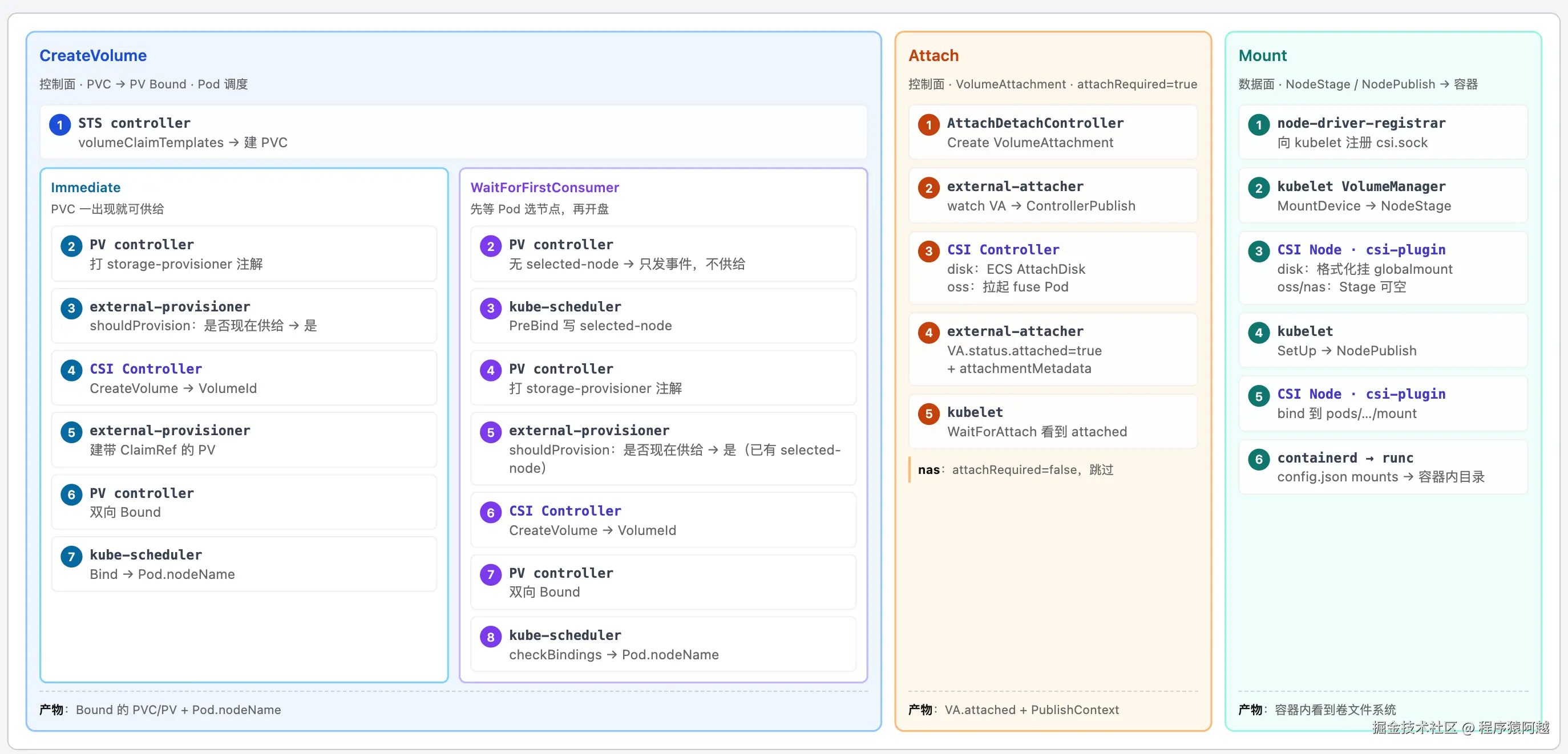
Step1,controller-manager中的PVController发现PVC,执行动态PV供给流程。CSI执行CreateVolume并创建PV,PVController完成PV和PVC绑定。kube-scheduler最终Pod调度完成;
Step2,如果CSIDriver.attachRequired=true(云盘/OSS),controller-manager中的AttachDetachController创建VolumeAttachment,CSI执行ControllerPublishVolume并标记VolumeAttachment完成,依赖该Volume的Pod在kubelet侧可以继续创建;
Step3,kubelet中的VolumeManager调用CSI的NodeStageVolume和NodePublishVolume,将volume挂载到pod目录,kubelet将配置传给containerd,containerd→shim→runc最终mount到容器的目标路径下;
三、控制面 CreateVolume
以OSS挂载为例,最终PV和PVC如下。
YAML
apiVersion: v1
kind: PersistentVolumeClaim
metadata:
  annotations:
    pv.kubernetes.io/bind-completed: "yes"
    pv.kubernetes.io/bound-by-controller: "yes"
    volume.beta.kubernetes.io/storage-provisioner: ossplugin.csi.alibabacloud.com
    volume.kubernetes.io/storage-provisioner: ossplugin.csi.alibabacloud.com
  finalizers:
  - kubernetes.io/pvc-protection
  name: oss-pvc
  namespace: default
spec:
  accessModes:
  - ReadWriteMany
  resources:
    requests:
      storage: 20Gi
  storageClassName: oss-sc
  volumeMode: Filesystem
  volumeName: oss-c44cf82f-6c42-45cf-be13-199c961de5c4
status:
  accessModes:
  - ReadWriteMany
  capacity:
    storage: 20Gi
  phase: Bound
---
apiVersion: v1
kind: PersistentVolume
metadata:
  annotations:
    pv.kubernetes.io/provisioned-by: ossplugin.csi.alibabacloud.com
    volume.kubernetes.io/provisioner-deletion-secret-name: ""
    volume.kubernetes.io/provisioner-deletion-secret-namespace: ""
  finalizers:
  - kubernetes.io/pv-protection
  - external-attacher/ossplugin-csi-alibabacloud-com
  name: oss-c44cf82f-6c42-45cf-be13-199c961de5c4
spec:
  accessModes:
  - ReadWriteMany
  capacity:
    storage: 20Gi
  claimRef:
    apiVersion: v1
    kind: PersistentVolumeClaim
    name: oss-pvc
    namespace: default
    resourceVersion: "8481"
    uid: c44cf82f-6c42-45cf-be13-199c961de5c4
  csi:
    driver: ossplugin.csi.alibabacloud.com
    fsType: ossfs
    nodePublishSecretRef:
      name: oss-secret
      namespace: default
    volumeAttributes:
      bucket: my-bucket
      csi.alibabacloud.com/reclaimPolicy: Retain
      csi.alibabacloud.com/storageclassName: oss-sc
      otherOpts: -o allow_other -o umask=000
      path: /subpath
      storage.kubernetes.io/csiProvisionerIdentity: 1792043364184-3281-ossplugin.csi.alibabacloud.com
      url: oss-cn-hangzhou.aliyuncs.com
    volumeHandle: oss-c44cf82f-6c42-45cf-be13-199c961de5c4
  persistentVolumeReclaimPolicy: Retain
  storageClassName: oss-sc
  volumeMode: Filesystem
status:
  phase: Bound
流程图:
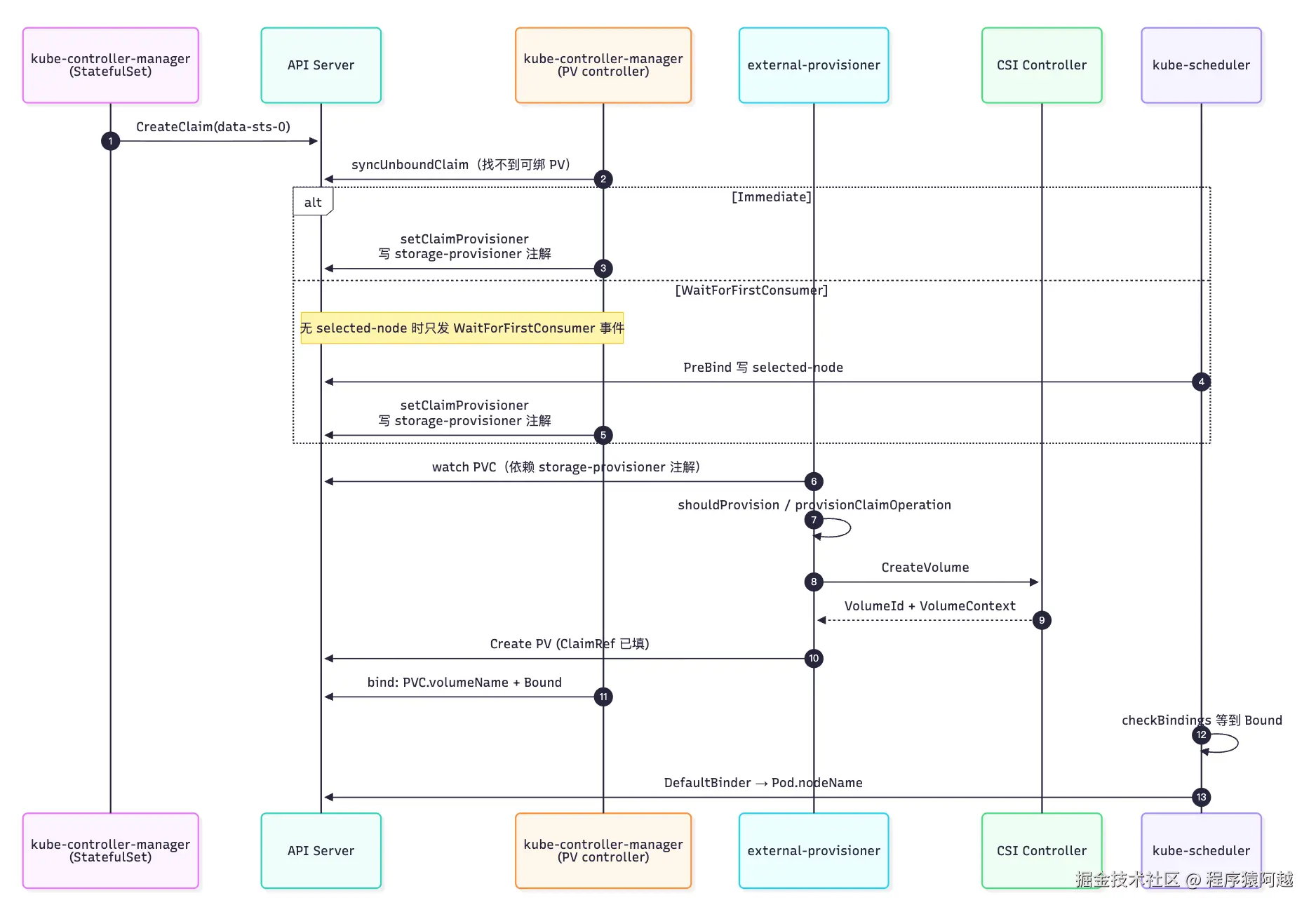
3.1. controller-manager:按 volumeClaimTemplates 创建 PVC
pkg/controller/statefulset/stateful_pod_control.go:为 StatefulSet 创建 POD 时,会为每个 POD 创建 PVC。
Go
func (spc *StatefulPodControl) CreateStatefulPod(ctx context.Context, set *apps.StatefulSet, pod *v1.Pod) error {
	// 使用STS模板创建PVC
	spc.createPersistentVolumeClaims(set, pod)
	// 创建POD
	spc.objectMgr.CreatePod(ctx, pod, set)
	// 根据STS的persistentVolumeClaimRetentionPolicy 更新PVC的owner
	// 默认whenDeleted/whenScaled=Retain,不用更新PVC的owner
	spc.UpdatePodClaimForRetentionPolicy(ctx, set, pod)
	return err
}
StatefulSet 为每个 ordinal 从模板生成 PVC,命名规则:{claimTemplate.Name}-{sts.Name}-{ordinal}(模板名 data、STS 名 web → data-web-0)。
构造 PVC 名与对象 --- pkg/controller/statefulset/stateful_set_utils.go:
go
func getPersistentVolumeClaimName(set *apps.StatefulSet, claim *v1.PersistentVolumeClaim, ordinal int) string {
	return fmt.Sprintf("%s-%s-%d", claim.Name, set.Name, ordinal)
}

func getPersistentVolumeClaims(set *apps.StatefulSet, pod *v1.Pod) map[string]v1.PersistentVolumeClaim {
	ordinal := getOrdinal(pod)
	templates := set.Spec.VolumeClaimTemplates
	claims := make(map[string]v1.PersistentVolumeClaim, len(templates))
	for i := range templates {
		claim := templates[i].DeepCopy()
		claim.Name = getPersistentVolumeClaimName(set, claim, ordinal)
		claim.Namespace = set.Namespace
		// ... 合并 selector labels ...
		claims[templates[i].Name] = *claim
	}
	return claims
}
缺失则创建 --- pkg/controller/statefulset/stateful_pod_control.go:
go
func (spc *StatefulPodControl) createPersistentVolumeClaims(set *apps.StatefulSet, pod *v1.Pod) error {
	var errs []error
	for _, claim := range getPersistentVolumeClaims(set, pod) {
		pvc, err := spc.objectMgr.GetClaim(claim.Namespace, claim.Name)
		switch {
		case apierrors.IsNotFound(err):
			err := spc.objectMgr.CreateClaim(&claim, set)
		}
	}
	return errorutils.NewAggregate(errs)
}

func (om *realStatefulPodControlObjectManager) CreateClaim(claim *v1.PersistentVolumeClaim, ss *apps.StatefulSet) error {
	claim, err := om.client.CoreV1().PersistentVolumeClaims(claim.Namespace).Create(context.TODO(), claim, metav1.CreateOptions{})
	return err
}
PVC 带着模板里的 storageClassName 进入 API Server。接下来先由 PV controller 处理未绑定 claim,再由 external-provisioner 供给。
3.2. controller-manager(PV controller):打 storage-provisioner 注解
PVC 创建后 spec.volumeName 为空,注解pv.kubernetes.io/bind-completed=true不存在,代表PVC还未绑定PV。
PV controller 的 syncUnboundClaim:同步未绑定PVC
-
findBestMatchForClaim:尝试在已有 PV 中找最佳匹配(静态供给 / 预创建 PV); -
provisionClaim:找不到现成PV,且 PVC 带 StorageClass,走动态供给;
-
VolumeBindingMode=
WaitForFirstConsumer(WFFC),但没有volume.kubernetes.io/selected-node注解,代表还没有Pod用这个PVC,等kube-scheduler调度Pod; -
VolumeBindingMode=
WFFC且volume.kubernetes.io/selected-node注解存在 或 VolumeBindingMode=Immediate(默认),则给PVC打注解volume.kubernetes.io/storage-provisioner=storageclass.provisionerName;
Go
// kubernetes .../persistentvolume/pv_controller.go
func (ctrl *PersistentVolumeController) syncUnboundClaim(ctx context.Context, claim *v1.PersistentVolumeClaim) error {
	if claim.Spec.VolumeName == "" {
		// delayBinding = storageclass存在 AND VolumeBindingMode=WaitForFirstConsumer
		delayBinding, err := storagehelpers.IsDelayBindingMode(claim, ctrl.classLister)
		volume, err := ctrl.volumes.findBestMatchForClaim(claim, delayBinding)
		if volume == nil {
			switch {
			case delayBinding && !storagehelpers.IsDelayBindingProvisioning(claim):
				// WFFC 且 PVC无volume.kubernetes.io/selected-node注解
				// 只发 WaitForFirstConsumer 事件,暂不供给
				return ctrl.emitEventForUnboundDelayBindingClaim(claim)
			case storagehelpers.GetPersistentVolumeClaimClass(claim) != "":
			    // WFFC且已经选定Node or Immediate
				// PVC打volume.kubernetes.io/storage-provisioner注解=storageclass.provisionerName
				return ctrl.provisionClaim(ctx, claim)
			default:
				ctrl.eventRecorder.Event(claim, v1.EventTypeNormal, events.FailedBinding, "no persistent volumes available for this claim and no storage class is set")
			}
			// 不满足上述条件,比如PVC设置storageClass是空串,PENDING
			ctrl.updateClaimStatus(ctx, claim, v1.ClaimPending, nil)
			return nil
		}
		// volume != nil:静态匹配,直接 bind(略)
	}
	return nil
}
外部供给路径的核心是 打注解volume.kubernetes.io/storage-provisioner=storageclass.provisionerName,external-provisioner 依赖这个注解才愿供给。
Go
// kubernetes .../persistentvolume/pv_controller.go
func (ctrl *PersistentVolumeController) provisionClaimOperationExternal(...) (string, error) {
	provisionerName := storageClass.Provisioner
	newClaim, err := ctrl.setClaimProvisioner(ctx, claim, provisionerName)
	msg := fmt.Sprintf("Waiting for a volume to be created either by the external provisioner '%s' ...", provisionerName)
	ctrl.eventRecorder.Event(claim, v1.EventTypeNormal, events.ExternalProvisioning, msg)
	return provisionerName, nil
}
// pv_controller_base.go
func (ctrl *PersistentVolumeController) setClaimProvisioner(...) (*v1.PersistentVolumeClaim, error) {
	claimClone := claim.DeepCopy()
    // volume.beta.kubernetes.io/storage-provisioner
	metav1.SetMetaDataAnnotation(&claimClone.ObjectMeta, storagehelpers.AnnBetaStorageProvisioner, provisionerName)
    // volume.kubernetes.io/storage-provisioner
	metav1.SetMetaDataAnnotation(&claimClone.ObjectMeta, storagehelpers.AnnStorageProvisioner, provisionerName)
	return ctrl.kubeClient.CoreV1().PersistentVolumeClaims(claim.Namespace).Update(ctx, claimClone, metav1.UpdateOptions{})
}
至此 PVC 仍是 Pending,PV controller 在供给之后还会再出现一次,完成双向 Bound(见3.5)。
3.3. external-provisioner:watch PVC 变更 创建PV
vendor/sigs.k8s.io/sig-storage-lib-external-provisioner/v13/controller/controller.go:
-
shouldProvision:判断目前能否创建PV; -
provisionClaimOperation:执行创建PV;
Go
func (ctrl *ProvisionController) syncClaim(ctx context.Context, obj any) error {
	claim, ok := obj.(*v1.PersistentVolumeClaim)
	should, err := ctrl.shouldProvision(ctx, claim)
	if err != nil {
		return err
	} else if should {
		status, err := ctrl.provisionClaimOperation(ctx, claim)
		return err
	}
	return nil
}
3.3.1. shouldProvision:是否现在创建 PV
-
如果PVC已经有volumeName,不创建;
-
如果
volume.kubernetes.io/storage-provisioner不存在(PV Controller还没打标),不创建; -
校验
volume.kubernetes.io/storage-provisioner= 当前provisioner对应driver,不同则不创建。如external-oss-provisioner容器启动,调用csi-provisioner主容器IdentityServer.GetPluginInfo获取driver名; -
如果StorageClass指定
volumeBindingMode为WaitForFirstConsumer,要等待kube-scheduler选好节点后,给PVC打上volume.kubernetes.io/selected-node才能创建PV;
Go
func (ctrl *ProvisionController) shouldProvision(ctx context.Context, claim *v1.PersistentVolumeClaim) (bool, error) {
	if claim.Spec.VolumeName != "" {
		// 已经有PV
		return false, nil
	}
	// 校验"volume.kubernetes.io/storage-provisioner"="ossplugin.csi.alibabacloud.com"=主容器提供的driver名
	if qualifier, ok := ctrl.provisioner.(Qualifier); ok {
		if !qualifier.ShouldProvision(ctx, claim) {
			return false, nil
		}
	}
	if class.VolumeBindingMode != nil && *class.VolumeBindingMode == storage.VolumeBindingWaitForFirstConsumer {
		// 延迟绑定:必须有 "volume.kubernetes.io/selected-node" 才供给
		if selectedNode, ok := claim.Annotations[annSelectedNode]; ok && selectedNode != "" {
			return true, nil
		}
		return false, nil  // 跳过本次,等 scheduler PreBind
	}
	return true, nil  // Immediate:可直接 CreateVolume
}
// external-provisioner/pkg/controller/controller.go
func (p *csiProvisioner) ShouldProvision(ctx context.Context, claim *v1.PersistentVolumeClaim) bool {
	provisioner, ok := claim.Annotations[annStorageProvisioner]
	if !ok {
		provisioner = claim.Annotations[annBetaStorageProvisioner]
	}
	if provisioner != p.driverName {
		return false
	}
	return true
}
3.3.2. provisionClaimOperation:调 CSI CreateVolume,写带 ClaimRef 的 PV
Go
func (ctrl *ProvisionController) provisionClaimOperation(ctx context.Context, claim *v1.PersistentVolumeClaim) (ProvisioningState, error) {
	pvName := ctrl.volumeNameHook(claim)
	claimRef, err := ref.GetReference(scheme.Scheme, claim)
	var selectedNodeName string
	// annSelectedNode      = "volume.kubernetes.io/selected-node"
	if nodeName, ok := getString(claim.Annotations, annSelectedNode, annAlphaSelectedNode); ok {
		selectedNodeName = nodeName
	}
	options := ProvisionOptions{
		StorageClass: class, PVName: pvName, PVC: claim, SelectedNodeName: selectedNodeName,
	}
    // CSI CreateVolume
	volume, result, err := ctrl.provisioner.Provision(ctx, options)
    // 关联PVC
	volume.Spec.ClaimRef = claimRef
	// pv.kubernetes.io/provisioned-by = "ossplugin.csi.alibabacloud.com"
	metav1.SetMetaDataAnnotation(&volume.ObjectMeta, annDynamicallyProvisioned, class.Provisioner)
	// 关联storageClass
	volume.Spec.StorageClassName = claimClass
	// 存储PV
	if err := ctrl.volumeStore.StoreVolume(logger, claim, volume); err != nil {
		return ProvisioningFinished, err
	}
	return ProvisioningFinished, nil
}
CSI Provision → CreateVolume gRPC:external-provisioner 调用主容器的 CSI 插件,创建云资源,返回 PV Spec。
Go
// external-provisioner/pkg/controller/controller.go
func (p *csiProvisioner) Provision(ctx context.Context, options controller.ProvisionOptions) (*v1.PersistentVolume, controller.ProvisioningState, error) {
	// 构造请求 CreateVolumeRequest
	result, state, err := p.prepareProvision(ctx, claim, options.StorageClass, options.SelectedNodeName)
	req := result.req
	// ...
	// 调用CSI插件 CreateVolume
	rep, err := p.csiClient.CreateVolume(createCtx, req)
	// 用 CreateVolumeResponse.Volume 组装 PV Spec...
	// provisionerIDKey=storage.kubernetes.io/csiProvisionerIdentity=进程id
	volumeAttributes := map[string]string{provisionerIDKey: p.identity}
	// CreateVolume大部分参数都在 rep.Volume.VolumeContext,不同存储参数不同
	maps.Copy(volumeAttributes, rep.Volume.VolumeContext)
	// VolumeHandle = rep.Volume.VolumeId
	result.csiPVSource.VolumeHandle = p.volumeIdToHandle(rep.Volume.VolumeId)
	result.csiPVSource.VolumeAttributes = volumeAttributes
	result.csiPVSource.ReadOnly = pvReadOnly
	pv := &v1.PersistentVolume{
		ObjectMeta: metav1.ObjectMeta{
			Name: pvName,
		},
		Spec: v1.PersistentVolumeSpec{
			// AccessModes = PVC的AccessModes
			AccessModes:  options.PVC.Spec.AccessModes,
			MountOptions: options.StorageClass.MountOptions,
			Capacity: v1.ResourceList{
				v1.ResourceName(v1.ResourceStorage): bytesToQuantity(respCap),
			},
			// csi = result.csiPVSource
			PersistentVolumeSource: v1.PersistentVolumeSource{
				CSI: result.csiPVSource,
			},
		},
	}
	if p.supportsTopology() {
		pv.Spec.NodeAffinity = GenerateVolumeNodeAffinity(rep.Volume.AccessibleTopology)
	}
	return pv, controller.ProvisioningFinished, nil
}prepareProvision:
-
构造
CreateVolumeRequest:Name,PV名,由参数volumeNamePrefix和PVC的id拼接而成,volumeNamePrefix=启动参数,如--volume-name-prefix=oss。Parameters,StorageClass的parameters,排除密钥引用; -
构造
csiPVSource,即PV.Spec.CSI,从StorageClass.parameters提取密钥引用,如ControllerPublishSecretRef用于ControllerPublish CSI调用;
Go
func (p *csiProvisioner) prepareProvision(ctx context.Context, claim *v1.PersistentVolumeClaim, sc *storagev1.StorageClass, selectedNodeName string) (*prepareProvisionResult, controller.ProvisioningState, error) {
	// 生成PV名 前缀volumeNamePrefix=启动参数,如--volume-name-prefix=oss 拼接pvc的id
	pvName, err := makeVolumeName(p.volumeNamePrefix, string(claim.ObjectMeta.UID), p.volumeNameUUIDLength)
	capacity := claim.Spec.Resources.Requests[v1.ResourceName(v1.ResourceStorage)]
	volSizeBytes := capacity.Value()
	volumeCaps, err := p.getVolumeCapabilities(claim, sc, fsType)
	req := csi.CreateVolumeRequest{
		Name:               pvName,
		Parameters:         sc.Parameters,
		VolumeCapabilities: volumeCaps,
		CapacityRange: &csi.CapacityRange{
			RequiredBytes: int64(volSizeBytes),
		},
	}
	if p.supportsTopology() {
	    // ...
		req.AccessibilityRequirements = requirements
	}
	// 从StorageClass的parameters里提取secret引用,provisioner的用于本次CreateVolumeRequest
	// csi.storage.k8s.io/provisioner-secret-name和provisioner-secret-namespace
	provisionerSecretRef, err := getSecretReference(provisionerSecretParams, sc.Parameters, pvName, claim)
	provisionerCredentials, err := getCredentials(ctx, p.client, provisionerSecretRef)
	req.Secrets = provisionerCredentials
	// 其他写到PV
	// csi.storage.k8s.io/controller-publish-secret-name = oss-secret
	// csi.storage.k8s.io/controller-publish-secret-namespace = default
	controllerPublishSecretRef, err := getSecretReference(controllerPublishSecretParams, sc.Parameters, pvName, claim)
	// ...
	csiPVSource := &v1.CSIPersistentVolumeSource{
		Driver: p.driverName,
		ControllerPublishSecretRef: controllerPublishSecretRef,
		NodeStageSecretRef:         nodeStageSecretRef,
		NodePublishSecretRef:       nodePublishSecretRef,
		ControllerExpandSecretRef:  controllerExpandSecretRef,
		NodeExpandSecretRef:        nodeExpandSecretRef,
	}
	// 把密钥引用从Parameters中移除
	req.Parameters, err = removePrefixedParameters(sc.Parameters)
	return &prepareProvisionResult{
		fsType:              fsType,
		migratedVolume:      migratedVolume,
		req:                 &req,
		csiPVSource:         csiPVSource,
		provDeletionSecrets: deletionAnnSecrets,
		provModifySecrets:   modifyAnnSecrets,
	}, controller.ProvisioningNoChange, nil
}
3.4. csi-provisioner CreateVolume
主容器会开启3个socket,给不同 external-provisioner sidecar 调用,CreateVolume实现不同。
disk:建云盘,调 ECS CreateDisk,返回云盘 ID。
Go
// disk: pkg/disk/controllerserver.go --- 真正开盘
diskID, attempt, err := cs.cd.createDisk(ctx, req.GetName(), snapshotID, diskVol, supportedTypes, selectedInstance, isVirtualNode)
tmpVol := volumeCreate(attempt, diskID, utils.Gi2Bytes(int64(diskVol.RequestGB)), volumeContext, ...)
return &csi.CreateVolumeResponse{Volume: tmpVol}, nil
nas:subpath模式,算 path=<base>/<pvName>,调 NAS CreateDir建子目录。
Go
// nas subpath: pkg/nas/subpath_controller.go --- 在已有 NAS 上建子目录
path = filepath.Join(path, req.Name)
volumeContext["path"] = path
// ...
cs.nasClient.CreateDir(ctx, &sdk.CreateDirRequest{
	FileSystemId: &filesystemId, RootDirectory: &path, Permission: new("0777"), ...
})
return &csi.CreateVolumeResponse{Volume: &csi.Volume{VolumeId: req.Name, VolumeContext: volumeContext}}, nil
oss:校验 reclaimPolicy=Retain,buildVolumeContext 后直接返回,没有网络调用,Bucket 需预先存在。
Go
// oss: pkg/oss/controllerserver.go --- 不建 Bucket,只填 PV 上下文
volumeContext, err := buildVolumeContext(req.Parameters, req.GetName())
return &csi.CreateVolumeResponse{Volume: &csi.Volume{
	VolumeId: req.Name, CapacityBytes: volSizeBytes, VolumeContext: volumeContext,
}}, nil
3.5. controller-manager(PV controller):watch PV,完成双向绑定
这是 PV controller 的第二次 出场:供给前已打过 storage-provisioner 注解;此时 external-provisioner 已建好带 spec.claimRef 的 PV,PV controller 在 syncVolume / syncClaim 中调用 bind:
Go
// kubernetes .../persistentvolume/pv_controller.go
func (ctrl *PersistentVolumeController) bind(ctx context.Context, volume *v1.PersistentVolume, claim *v1.PersistentVolumeClaim) error {
	// PV spec.claimRef = PVC(external-provisioner已经完成这一步)
	ctrl.bindVolumeToClaim(ctx, volume, claim)
	// PV status.phase = Bound
	ctrl.updateVolumePhase(ctx, volume, v1.VolumeBound, "")
	// PVC spec.volumeName = PV
	ctrl.bindClaimToVolume(ctx, claim, volume)
	// PVC status.phase = Bound
	ctrl.updateClaimStatus(ctx, claim, v1.ClaimBound, volume)
}
写 PVC.spec.volumeName 时,设置pv.kubernetes.io/bound-by-controller=yes代表是controller完成绑定,pv.kubernetes.io/bind-completed=yes代表PV绑定完成。
Go
func (ctrl *PersistentVolumeController) bindClaimToVolume(ctx context.Context, claim *v1.PersistentVolumeClaim, volume *v1.PersistentVolume) (*v1.PersistentVolumeClaim, error) {
	claimClone := claim.DeepCopy()
	if volume.Name != claim.Spec.VolumeName {
		claimClone.Spec.VolumeName = volume.Name
		metav1.SetMetaDataAnnotation(&claimClone.ObjectMeta, storagehelpers.AnnBoundByController, "yes")
	}
	if !metav1.HasAnnotation(claimClone.ObjectMeta, storagehelpers.AnnBindCompleted) {
		metav1.SetMetaDataAnnotation(&claimClone.ObjectMeta, storagehelpers.AnnBindCompleted, "yes")
	}
	newClaim, err := ctrl.kubeClient.CoreV1().PersistentVolumeClaims(claim.Namespace).Update(ctx, claimClone, metav1.UpdateOptions{})
	return newClaim, err
}
3.6. kube-scheduler:为 Pod 选节点后 PreBind + DefaultBinder
调度循环:Filter → Score → Reserve(Assume) → PreBind(VolumeBinding) → Bind(DefaultBinder)。
Filter + Score 最终 为 Pod 选定节点,Reserve(Assume) 内存预留资源,给PVC打volume.kubernetes.io/selected-node=选中节点注解。
Go
// binder.go --- Assume
claimClone := dynamicProvision.PVC.DeepCopy()
metav1.SetMetaDataAnnotation(&claimClone.ObjectMeta, volume.AnnSelectedNode, nodeName)
PreBind :更新PVC,WFFC 场景下写完 selected-node 后,PV controller 会再走 3.3.2 的 provisionClaim(打 storage-provisioner 注解),external-provisioner 才真正 CreateVolume。checkBindings轮询 API,等 provisioner 建 PV(3.4),PV controller 绑定完成(3.5)。
Go
// pkg/scheduler/framework/plugins/volumebinding/volume_binding.go
func (pl *VolumeBinding) PreBind(ctx context.Context, cs fwk.CycleState, pod *v1.Pod, nodeName string) *fwk.Status {
	podVolumes, ok := s.podVolumesByNode[nodeName]
	err = pl.Binder.BindPodVolumes(ctx, pod, podVolumes)
	// ...
	return nil
}
// binder.go --- BindPodVolumes
// Update PVC
err = b.bindAPIUpdate(ctx, assumedPod, bindings, claimsToProvision)
// 等待PVC和PV绑定
err = wait.PollUntilContextTimeout(ctx, time.Second, b.bindTimeout, false, func(ctx context.Context) (bool, error) {
	return b.checkBindings(logger, assumedPod, bindings, claimsToProvision)
})

func (b *volumeBinder) checkBindings(...) (bool, error) {
	for _, claim := range claimsToProvision {
		pvc, err := b.pvcCache.GetAPIObj(getPVCName(claim))
		selectedNode := pvc.Annotations[volume.AnnSelectedNode]
		if selectedNode != pod.Spec.NodeName {
			return false, fmt.Errorf("provisioning failed for PVC %q", pvc.Name)
		}
        // pvc.spec.VolumeName非空 && 注解pv.kubernetes.io/bind-completed存在
		if !b.isPVCFullyBound(pvc) {
			return false, nil
		}
	}
	return true, nil
}Bind:最终把Pod.Spec.nodeName写入apiserver,至此完成Pod调度,触发节点 kubelet 与 controller-manager 的 AttachDetachController。
Go
// pkg/scheduler/framework/plugins/defaultbinder/default_binder.go
func (b DefaultBinder) Bind(ctx context.Context, state fwk.CycleState, p *v1.Pod, nodeName string) *fwk.Status {
	binding := &v1.Binding{
		ObjectMeta: metav1.ObjectMeta{Namespace: p.Namespace, Name: p.Name, UID: p.UID},
		Target:     v1.ObjectReference{Kind: "Node", Name: nodeName},
	}
	err := b.handle.ClientSet().CoreV1().Pods(binding.Namespace).Bind(ctx, binding, metav1.CreateOptions{})
	return fwk.AsStatus(err)
}
四、控制面 Attach
仅 CSIDriver.attachRequired=true,如云盘、OSS,走本节;attachRequired=false ,如NAS,跳过。
这一步的产物是VolumeAttachment,如下面是oss的:
YAML
apiVersion: storage.k8s.io/v1
kind: VolumeAttachment
metadata:
  annotations:
    csi.alpha.kubernetes.io/node-id: k3s-node1
  finalizers:
  - external-attacher/ossplugin-csi-alibabacloud-com
  name: csi-b3b4db53af69178472a9350cf84253036dea79c7e8de66abe58ad480ef253005
  resourceVersion: "8511"
  uid: 7539196d-1d2d-4280-9f6a-30e025cf5de7
spec:
  attacher: ossplugin.csi.alibabacloud.com
  nodeName: k3s-node1
  source:
    persistentVolumeName: oss-c44cf82f-6c42-45cf-be13-199c961de5c4
status:
  attached: true
  attachmentMetadata:
    fusePod: ack-csi-fuse/csi-fuse-ossfs-xmf75
    mountPorxySocket: /run/fuse.ossfs/97c411799ec539754283df15c9965750ea1080affb6b088ef8f07567fbb2f443/mounter.sock
流程图:
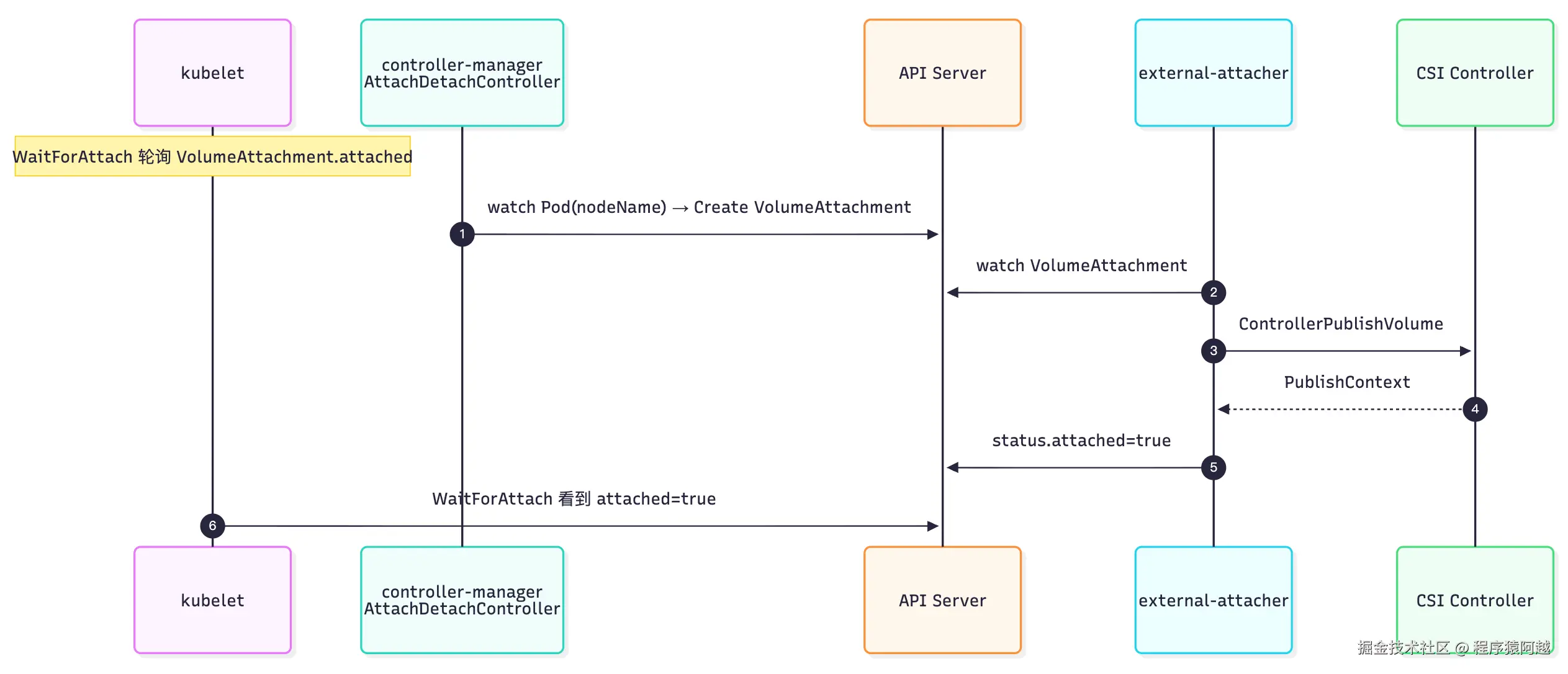
4.1. kubelet:WaitForAttach,等待 VolumeAttachment.status.attached=true
kubelet 在 kube-scheduler 对 Pod 打上 nodeName 后开始工作。
pkg/kubelet/kubelet.go:每个Pod对应一个Worker协程,WaitForAttachAndMount会阻塞等待Pod相关卷完成挂载。
Go
func (kl *Kubelet) SyncPod(ctx context.Context, updateType kubetypes.SyncPodType, pod, mirrorPod *v1.Pod, podStatus *kubecontainer.PodStatus) (isTerminal bool, postSync func(), err error) {
    // 1. 用 runtime 状态生成 v1.PodStatus
    apiPodStatus := kl.generateAPIPodStatus(ctx, pod, podStatus, false)
    // 2. 已终态:不再创建容器,下一轮走 Terminatin
    if apiPodStatus.Phase == v1.PodSucceeded || apiPodStatus.Phase == v1.PodFailed {
        kl.statusManager.SetPodStatus(logger, pod, apiPodStatus)
        return true, nil, nilg
    }
     // 3. 本地缓存,异步 PATCH apiserver
    kl.statusManager.SetPodStatus(logger, pod, apiPodStatus)
    // 4. Pod 级 cgroup
    pcm.EnsureExists(logger, pod)
    // 5. 静态 Pod 保证 mirror 存在且与 spec 一致
    kl.tryReconcileMirrorPods(ctx, pod, mirrorPod)
    // 6. /var/lib/kubelet/pods/<uid>/
    kl.makePodDataDirs(pod)
    // 7. 等卷 attach/mount 【阻塞】
    kl.volumeManager.WaitForAttachAndMount(ctx, pod)
    // 8. 启动探针 worker
    kl.probeManager.AddPod(ctx, pod)
    // 9. 核心:对比 Spec vs podStatus,调 CRI 把实际状态拉齐
    result := kl.containerRuntime.SyncPod(sctx, pod, podStatus, pullSecrets, kl.crashLoopBackOff, restartingAllContainers)
    return false, postSync, result.Error()
}WaitForAttachAndMount:SyncPod Pod Worker 协程,等待卷就绪,每300ms轮询一次内存状态,超时时间2分钟。
Go
// pkg/kubelet/volumemanager/volume_manager.go
func (vm *volumeManager) WaitForAttachAndMount(ctx context.Context, pod *v1.Pod) error {
	expectedVolumes := getExpectedVolumes(pod)
	err := wait.PollUntilContextTimeout(
		ctx, podAttachAndMountRetryInterval, podAttachAndMountTimeout, true,
		vm.verifyVolumesMountedFunc(uniquePodName, expectedVolumes))
	// ...
}
func (vm *volumeManager) verifyVolumesMountedFunc(podName types.UniquePodName, expectedVolumes []string) wait.ConditionWithContextFunc {
	return func(_ context.Context) (done bool, err error) {
		if errs := vm.desiredStateOfWorld.PopPodErrors(podName); len(errs) > 0 {
			return true, errors.New(strings.Join(errs, "; "))
		}
        // 未mount卷为0
		return len(vm.getUnmountedVolumes(podName, expectedVolumes)) == 0, nil
	}
}pkg/kubelet/volumemanager/volume_manager.go:这个内存数据来源于VolumeManager自己的调谐循环。
-
desiredStateOfWorld:代表期望,通过Pod→PVC→PV拿到VolumeName;
-
actualStateOfWorld:代表实际状态,包括Attach状态和Mount状态,这一步是等Attach和Mount都完成;
-
Attach状态来源于:
-
pkg/volume/csi/csi_plugin.go:如果PV.Spec.csi.driver查询到CSIDriver资源的attachRequired=false,直接标记Attach,比如nas; -
Node.status.volumesAttached:记录了Node上完成Attach的所有卷,用唯一卷名标识,比如kubernetes.io/csi/ossplugin.csi.alibabacloud.com^oss-d879655c-2d4d-452e-b783-22c2a09b2518,kubernetes.io/csi代表使用CSI volume plugin,ossplugin.csi.alibabacloud.com是csi driver名,oss-d879655c-2d4d-452e-b783-22c2a09b2518是pv.spec.csi.volumeHandle= CreateVolume返回的VolumeId;
-
Go
func (vm *volumeManager) getUnmountedVolumes(podName types.UniquePodName, expectedVolumes []string) []string {
	unmountedVolumes := []string{}
	// DSW pod -> volumeName
	volumeNames := vm.desiredStateOfWorld.GetVolumeNamesForPod(podName)
	for _, outerName := range expectedVolumes {
		volumeName, ok := volumeNames[outerName]
		if !ok {
			unmountedVolumes = append(unmountedVolumes, outerName)
			continue
		}
        // ASW pod -> 已经mount完成的volumeName
		_, ok = vm.actualStateOfWorld.GetMountedVolumeForPod(podName, volumeName)
		if !ok {
			unmountedVolumes = append(unmountedVolumes, outerName)
		}
	}
	slices.Sort(unmountedVolumes)
	return unmountedVolumes
}
VolumeManager为每个Volume启动一个goroutine,实际挂载操作由 GenerateMountVolumeFunc 生成,其中先 WaitForAttach,需要等待控制面完成Attach。
Go
// pkg/volume/util/operationexecutor/operation_generator.go
if volumeAttacher != nil {
	devicePath, err = volumeAttacher.WaitForAttach(
		volumeToMount.VolumeSpec, devicePath, volumeToMount.Pod, waitForAttachTimeout)
	// ...
}pkg/volume/csi/csi_attacher.go:id = csi-<sha256(volName,csiDriverName,NodeName)>查询VolumneAttachment,等 Status.Attached。
Go
func (c *csiAttacher) WaitForAttach(spec *volume.Spec, _ string, pod *v1.Pod, _ time.Duration) (string, error) {
	attachID := getAttachmentName(source.VolumeHandle, source.Driver, string(c.plugin.host.GetNodeName()))
	attach, err := c.k8s.StorageV1().VolumeAttachments().Get(context.TODO(), attachID, metav1.GetOptions{})
	successful, err := verifyAttachmentStatus(attach, volumeHandle)
	if !successful {
		return "", fmt.Errorf("volume %v is not attached for volume attachment %v", volumeHandle, attachID)
	}
	return attach.Name, nil
}
func verifyAttachmentStatus(attachment *storage.VolumeAttachment, volumeHandle string) (bool, error) {
	if attachment.Status.Attached {
		return true, nil
	}
	return false, nil
}
4.2. controller-manager(AttachDetachController):创建 VolumeAttachment 等待 attached,更新 Node.status.volumesAttached
pkg/controller/volume/attachdetach/reconciler/reconciler.go:AttachDetachController调谐循环。
DSW(Desired State of World)来自 已调度 Pod 需要 attach 的卷,ASW(Actual State of World)来自 kubelet 上报的 Node 已挂状态volumesAttached,reconciler 对 DSW−ASW 差集执行 attach:
-
对 ASW - DSW 执行 Detach;
-
attachDesiredVolumes:对 DSW−ASW 执行 Attach; -
nodeStatusUpdater.UpdateNodeStatuses:最终调用api server更新,比如Attach完成,Node.status.volumesAttached=kubernetes.io/csi/ossplugin.csi.alibabacloud.com^oss-d879655c-2d4d-452e-b783-22c2a09b2518;
Go
func (rc *reconciler) reconcile(ctx context.Context) {
    // ...处理Detach
    for _, attachedVolume := range rc.actualStateOfWorld.GetAttachedVolumes() {
		if !rc.desiredStateOfWorld.VolumeExists
            attachedVolume.VolumeName, attachedVolume.NodeName) {
        }
    }
    // 处理Attach
    rc.attachDesiredVolumes(logger)
    // 更新Node
    err := rc.nodeStatusUpdater.UpdateNodeStatuses(logger)
}
func (rc *reconciler) attachDesiredVolumes(logger klog.Logger) {
	for _, volumeToAttach := range rc.desiredStateOfWorld.GetVolumesToAttach() {
		err := rc.attacherDetacher.AttachVolume(logger, volumeToAttach.VolumeToAttach, rc.actualStateOfWorld)
	}
}
func (oe *operationExecutor) AttachVolume(
	logger klog.Logger,
	volumeToAttach VolumeToAttach,
	actualStateOfWorld ActualStateOfWorldAttacherUpdater) error {
    // attach闭包
	generatedOperations :=
		oe.operationGenerator.GenerateAttachVolumeFunc(logger, volumeToAttach, actualStateOfWorld)
    // 对于Volume开启单独goroutine
	return oe.pendingOperations.Run(
		volumeToAttach.VolumeName, "" /* podName */, "" /* nodeName */, generatedOperations)
}pkg/volume/util/operationexecutor/operation_generator.go:根据volume类型执行Attach,内存标记Attached,用于更新Node。
Go
func (og *operationGenerator) GenerateAttachVolumeFunc(
    logger klog.Logger,
    volumeToAttach VolumeToAttach,
    actualStateOfWorld ActualStateOfWorldAttacherUpdater) volumetypes.GeneratedOperations {
    attachVolumeFunc := func() volumetypes.OperationContext {
        attachableVolumePlugin, err :=
            og.volumePluginMgr.FindAttachablePluginBySpec(volumeToAttach.VolumeSpec)
        migrated := getMigratedStatusBySpec(volumeToAttach.VolumeSpec)
        volumeAttacher, newAttacherErr := attachableVolumePlugin.NewAttacher()
        // 创建VolumeAttachment,等Attach
        devicePath, attachErr := volumeAttacher.Attach(
            volumeToAttach.VolumeSpec, volumeToAttach.NodeName)
        // 内存标记Attached,供后续更新Node状态
        addVolumeNodeErr := actualStateOfWorld.MarkVolumeAsAttached(
            logger, volumeToAttach.VolumeName, volumeToAttach.VolumeSpec, volumeToAttach.NodeName, devicePath)
        return volumetypes.NewOperationContext(nil, nil, migrated)
    }
}pkg/volume/csi/csi_attacher.go:CSI卷Attach,controller-manager只创建VolumeAttachment,轮询等待status.attached=true。
Go
func (c *csiAttacher) Attach(spec *volume.Spec, nodeName types.NodeName) (string, error) {
	attachID := getAttachmentName(pvSrc.VolumeHandle, pvSrc.Driver, node)
	if attachment == nil {
		attachment := &storage.VolumeAttachment{
			ObjectMeta: metav1.ObjectMeta{Name: attachID},
			Spec: storage.VolumeAttachmentSpec{
				NodeName: node,
				Attacher: pvSrc.Driver,
				Source:   storage.VolumeAttachmentSource{PersistentVolumeName: &pvName},
			},
		}
		_, err = c.k8s.StorageV1().VolumeAttachments().Create(context.TODO(), attachment, metav1.CreateOptions{})
	}
	// 轮询 lister,直到 Status.Attached
	return "", c.waitForVolumeAttachmentWithLister(spec, pvSrc.VolumeHandle, attachID, c.watchTimeout)
}
4.3. external-attacher:ControllerPublishVolume,标记 attached=true
pkg/controller/controller.go:只处理当前进程对应csi插件对应的VolumeAttachment,还是启动时通过UDS + grpc 调用 csi-provisioner 主容器IdentityServer.GetPluginInfo获取driver名;
Go
func (ctrl *CSIAttachController) syncVA(ctx context.Context) {
	vaName, quit := ctrl.vaQueue.Get()
	defer ctrl.vaQueue.Done(vaName)
	va, err := ctrl.vaLister.Get(vaName)
	// attacher = ossplugin.csi.alibabacloud.com
	if va.Spec.Attacher != ctrl.attacherName {
		return
	}
	ctrl.handler.SyncNewOrUpdatedVolumeAttachment(ctx, va)
}
func (h *csiHandler) SyncNewOrUpdatedVolumeAttachment(ctx context.Context, va *storage.VolumeAttachment) {
	if va.DeletionTimestamp == nil {
        // Attach
		err = h.syncAttach(ctx, va)
	} else {
		err = h.syncDetach(ctx, va)
	}
	if err != nil {
		h.vaQueue.AddRateLimited(va.Name)
		return
	}
	h.vaQueue.Forget(va.Name)
}external-attacher/pkg/controller/csi_handler.go:调用CSI ControllerPublishVolume,更新VolumeAttachment。
-
request.attributes=PV.spec.csi.volumeAttributes,即CSI CreateVolume返回VolumeContext;
-
request.secrets=PV.spec.csi.controllerPublishSecretRef,上一步从StorageClass.parameters解析写入PV;
-
response.PublishContext 写入 VolumeAttachment.attachmentMetadata;
Go
func (h *csiHandler) syncAttach(ctx context.Context, va *storage.VolumeAttachment) error {
	if !h.consumeForceSync(va.Name) && va.Status.Attached {
		return nil
	}
    // 调用CSI
	va, metadata, err := h.csiAttach(ctx, va)
    // 更新VolumeAttachment Attached=true & AttachmentMetadata = Attach响应PublishContext
	if _, err := markAsAttached(ctx, h.client, va, metadata); err != nil {
		return fmt.Errorf("failed to mark as attached: %s", err)
	}
	return nil
}
func (h *csiHandler) csiAttach(...) (*storage.VolumeAttachment, map[string]string, error) {
	// 从 PV 取 CSI source、capability、secrets、nodeID ...
	publishInfo, _, err := h.attacher.Attach(ctx, volumeHandle, readOnly, nodeID, volumeCapabilities, attributes, secrets)
	return va, publishInfo, err
}
// external-attacher/pkg/attacher/attacher.go
func (a *attacher) Attach(...) (map[string]string, bool, error) {
	req := csi.ControllerPublishVolumeRequest{
		VolumeId: volumeID, NodeId: nodeID, VolumeCapability: caps,
		Readonly: readOnly, VolumeContext: context, Secrets: secrets,
	}
	rsp, err := a.client.ControllerPublishVolume(ctx, &req)
	return rsp.PublishContext, false, err
}
func markAsAttached(...) (*storage.VolumeAttachment, error) {
	clone := va.DeepCopy()
	clone.Status.Attached = true
    // metadata = publishInfo = response.PublishContext
	clone.Status.AttachmentMetadata = metadata
	clone.Status.AttachError = nil
	patch, err := createMergePatch(va, clone)
	newVA, err := client.StorageV1().VolumeAttachments().Patch(ctx, va.Name, types.MergePatchType, patch,
		metav1.PatchOptions{}, "status")
	return newVA, nil
}
4.4. csi-provisioner ControllerPublishVolume
4.4.1. disk
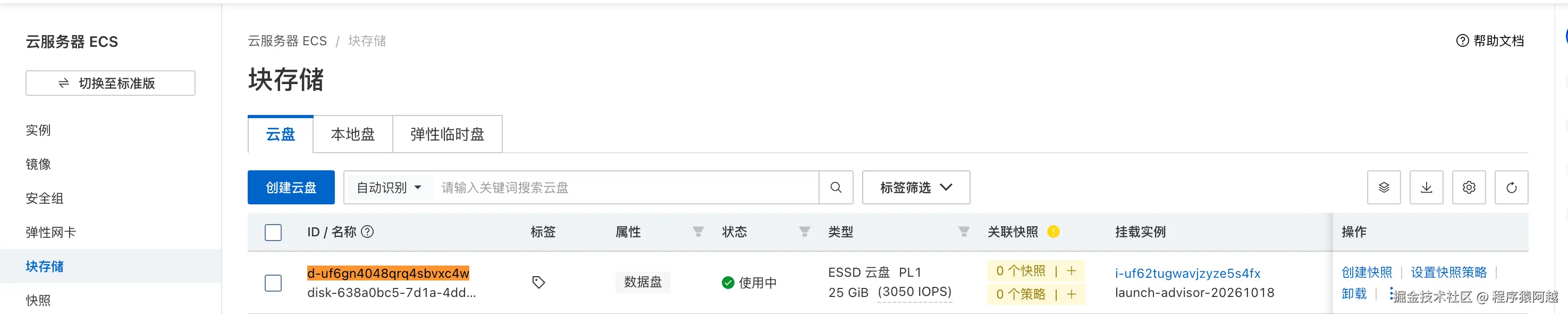
比如PV.spec.csi.volumeHandle=d-uf6gn4048qrq4sbvxc4w就是云盘id。
YAML
apiVersion: v1
kind: PersistentVolume
metadata:
  name: d-uf6j5x0cn4pq2ur1ha88
spec:
  // ...
  csi:
    driver: diskplugin.csi.alibabacloud.com
    fsType: ext4
    volumeAttributes:
      storage.kubernetes.io/csiProvisionerIdentity: 1792312050624-3224-diskplugin.csi.alibabacloud.com
      type: cloud_essd
    volumeHandle: d-uf6j5x0cn4pq2ur1ha88
 // ...
pkg/disk/cloud.go:disk云盘,调用openapi,先根据volumeId查询云盘状态,然后执行ECS云盘挂载。
Go
func (ad *DiskAttachDetach) attachDisk(ctx context.Context, diskID, nodeID string) (attachResult, error) {
	var r attachResult
    // 根据req.volumeId(PV.spec.csi.volumeHandle) 查询云盘
	disk, err := ad.findDiskByID(ctx, diskID)
    // 判断执行操作
	action, err := chooseAttachAction(disk, nodeID)
	currentInstanceID := disk.InstanceId
	switch action {
	case alreadyAttached:
        // 如果已经attach,先detach
		r.devicePath, err = ad.repo.GetAttached(logger, diskID)
		currentInstanceID = nodeID
		fallthrough
	case detachFirst:
		detachRequest := ecs.CreateDetachDiskRequest()
		detachRequest.InstanceId = currentInstanceID
		detachRequest.DiskId = diskID
		_, err = ad.ecs.DetachDisk(detachRequest)
		ad.waitForDiskDetached(ctx, diskID, nodeID)
	}
    // attach
	attachRequest := ecs.CreateAttachDiskRequest()
	attachRequest.InstanceId = nodeID
	attachRequest.DiskId = diskID
	response, err := throttle.Throttled(ad.attachThrottler, ad.ecs.AttachDisk)(ctx, attachRequest)
    // 等attach完成
	disk, err = ad.waitForDiskAttached(ctx, diskID, nodeID)
    r.disk = disk
	return r, nil
}disk最终会返回一个serialNumber,记录到VolumeAttachment,用于后续数据面Mount。
YAML
apiVersion: storage.k8s.io/v1
kind: VolumeAttachment
metadata:
  annotations:
    csi.alpha.kubernetes.io/node-id: i-uf6iw0uqsmw7k1s70pnb
  finalizers:
  - external-attacher/diskplugin-csi-alibabacloud-com
  name: csi-2a58951758896be4bf254ba08c327293ce35fcc746f844a4a7e3ce1aa718b554
spec:
  attacher: diskplugin.csi.alibabacloud.com
  nodeName: izuf6iw0uqsmw7k1s70pnbz
  source:
    persistentVolumeName: d-uf6j5x0cn4pq2ur1ha88
status:
  attached: true
  attachmentMetadata:
    serialNumber: uf6j5x0cn4pq2ur1ha88
4.4.2. oss
pkg/oss/controllerserver.go:oss会在Pod所在节点上,创建一个fusePod,用于后续与数据面通讯(执行mount),返回一个socket地址 + fusePod名称,存储到VolumeAttachment上。
Go
func (cs *controllerServer) ControllerPublishVolume(ctx context.Context, req *csi.ControllerPublishVolumeRequest) (*csi.ControllerPublishVolumeResponse, error) {
	nodeName := req.NodeId
	opts, err := parseOptions(ctx, cs.cnfsGetter, req.GetVolumeContext(), req.GetSecrets(), []*csi.VolumeCapability{req.GetVolumeCapability()}, req.GetReadonly(), "", false, false, cs.metadata)
	fusePod, err := cs.fusePodManagers[opts.FuseType].Create(&fpm.FusePodContext{
		Context:           ctx,
		Namespace:         fusePodNamespace,
		NodeName:          nodeName,
		VolumeId:          req.VolumeId,
		FuseType:          opts.FuseType,
		FdPassing:         opts.FdPassing,
		Recovery:          opts.Recovery,
		AuthConfig:        authCfg,
		PodTemplateConfig: ptCfg,
	}, controllerPublishPath)
	return &csi.ControllerPublishVolumeResponse{
		PublishContext: map[string]string{
            // socket地址
			mountProxySocket: mounterutils.GetMountProxySocketPath(req.VolumeId, mounterutils.OssFuseAttachDir),
            // fusePod名称
			"fusePod": fmt.Sprintf("%s/%s", fusePod.Namespace, fusePod.Name),
		},
	}, nil
}fusePod指定nodeName,直接调度到挂载Pod对应节点:
-
打开
/run/fuse.ossfs/sha256(VolumeId)/mounter.sock,数据面mount需要通过这个socket与fusePod通讯,执行ossfs挂载; -
Bidirectional挂载传播模式,Pod挂载会传播到宿主机,OSS fuse Pod 需要它,是因为 ossfs 是在 容器里 做 FUSE 挂载的(挂到 /run/fuse.ossfs//globalmount),而 CSI NodePublish 要在 宿主机 上看到这个挂载点,才能再 bind 进业务 Pod; -
一个节点只要一个fusePod,会通过label里的 fuse-type + mount-path-hash + volume-id,查询是否已经存在fusePod,如果存在则不会重复创建;
YAML
apiVersion: v1
kind: Pod
metadata:
  annotations:
    cluster-autoscaler.kubernetes.io/safe-to-evict: "true"
    csi.alibabacloud.com/mount-path: /run/fuse.ossfs/9d975c39089fb55424fce46b608024d0efc41b9d530fafe8e9af56ee8a0dd93d/globalmount
  generateName: csi-fuse-ossfs-
  generation: 1
  labels:
    alibabacloud.com/drain-pod: skip
    csi.alibabacloud.com/fuse-type: ossfs
    csi.alibabacloud.com/mount-path-hash: 6d6968bbcb
    csi.alibabacloud.com/volume-id: oss-0fb3ca45-12e4-4372-9a50-d3d193683b9f
    topology.kubernetes.io/region: cn-shanghai
    topology.kubernetes.io/zone: cn-shanghai-g
  name: csi-fuse-ossfs-jm6gx
  namespace: ack-csi-fuse
spec:
  containers:
  - args:
    - --socket=/run/fuse.ossfs/9d975c39089fb55424fce46b608024d0efc41b9d530fafe8e9af56ee8a0dd93d/mounter.sock
    - -v=4
    image: registry-cn-shanghai.ack.aliyuncs.com/acs/csi-ossfs:v1.91.12.ack.2-5cf3371
    name: ossfs
    readinessProbe:
      exec:
        command:
        - test
        - -S
        - /run/fuse.ossfs/9d975c39089fb55424fce46b608024d0efc41b9d530fafe8e9af56ee8a0dd93d/mounter.sock
    volumeMounts:
    - mountPath: /run/fuse.ossfs/9d975c39089fb55424fce46b608024d0efc41b9d530fafe8e9af56ee8a0dd93d
      mountPropagation: Bidirectional
      name: target-dir
  hostNetwork: true
  nodeName: izuf62tugwavjzyze5s4fxz
  preemptionPolicy: PreemptLowerPriority
  priority: 2000001000
  priorityClassName: system-node-critical
  restartPolicy: Always
  tolerations:
  - operator: Exists
  volumes:
  - hostPath:
      path: /run/fuse.ossfs/9d975c39089fb55424fce46b608024d0efc41b9d530fafe8e9af56ee8a0dd93d
      type: DirectoryOrCreate
    name: target-dir
五、数据面 Mount
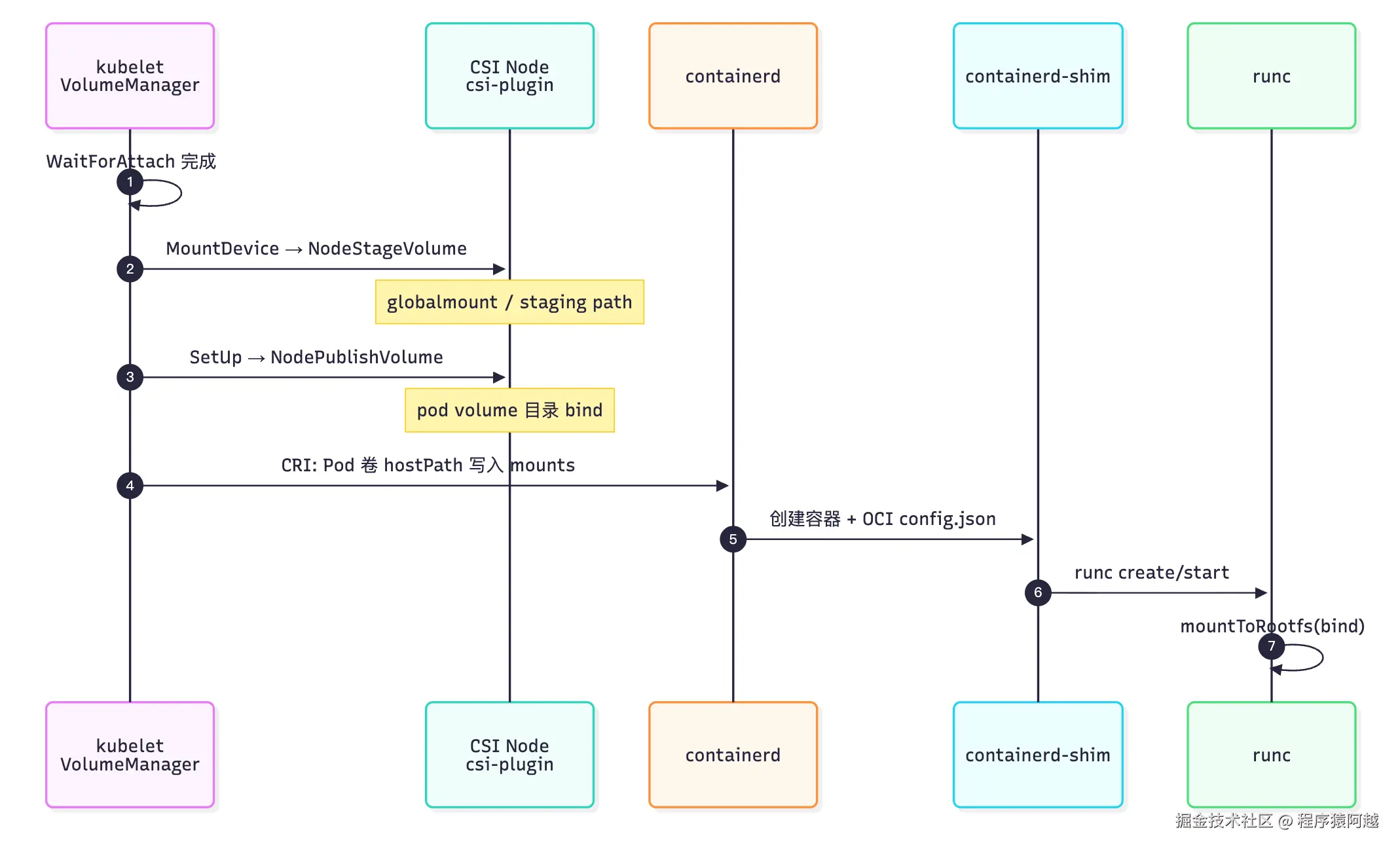
5.1. node-driver-registrar:注册CSI Plugin给kubelet发现
kubelet 发现 csi 插件流程如下(其他DRA、DevicePlugin也类似):
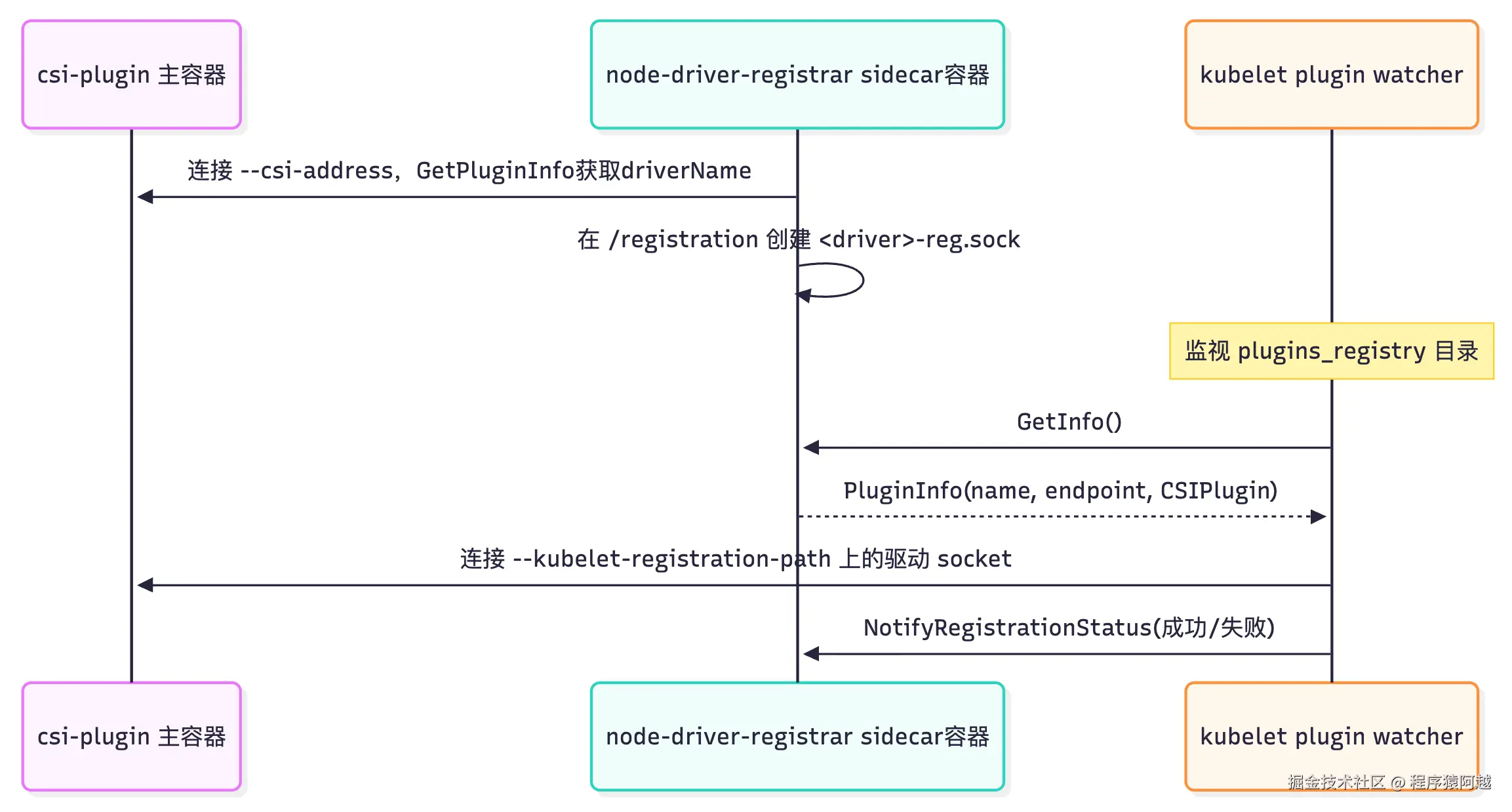
pkg/kubelet/pluginmanager/pluginwatcher/plugin_watcher.go:kubelet启动,watch/var/lib/kubelet/plugins_registry目录。
Go
func (w *Watcher) Start(ctx context.Context, stopCh <-chan struct{}) error {
	fsWatcher, err := fsnotify.NewWatcher()
    // watch /var/lib/kubelet/plugins_registry
	w.traversePluginDir(ctx, w.path);
	go func(fsWatcher *fsnotify.Watcher) {
		for {
			select {
			case event := <-fsWatcher.Events:
				if event.Has(fsnotify.Create) {
					err := w.handleCreateEvent(ctx, event)
				} else if event.Has(fsnotify.Remove) {
					w.handleDeleteEvent(ctx, event)
				}
				continue
             //...
				return
			}
		}
	}(fsWatcher)
	return nil
}pkg/kubelet/pluginmanager/operationexecutor/operation_generator.go:kubelet发现新socket
-
连接registrar,调用GetInfo获取endpoint、type、driverName、version;
-
根据type获取不同handler,比如csi或dra等;
-
handler.ValidatePlugin,校验version是否支持;
-
handler.RegisterPlugin,连接endpoint,这里是csi.sock,调用NodeGetInfo获取信息,调用apiserver创建或更新CSINode信息;
-
调用registrar NotifyRegistrationStatus,告知注册成功;
Go
func (og *operationGenerator) GenerateRegisterPluginFunc(
ctx context.Context,
// 注册socket,如ossplugin.csi.alibabacloud.com-reg.sock
socketPath string,
pluginUUID types.UID,
pluginHandlers map[string]cache.PluginHandler,
actualStateOfWorldUpdater ActualStateOfWorldUpdater) func() error {
registerPluginFunc := func() error {
// 连接registrar
client, conn, err := dial(ctx, socketPath, dialTimeoutDuration)
// 调用registrar GetInfo 获取endpoint、type、driverName
infoResp, err := client.GetInfo(ctxWithTimeout, ®isterapi.InfoRequest{})
// Type = CSIPlugin
handler, ok := pluginHandlers[infoResp.Type]
if infoResp.Endpoint == "" {
infoResp.Endpoint = socketPath
}
// 校验GetInfo返回的version是否支持
if err := handler.ValidatePlugin(infoResp.Name, infoResp.Endpoint, infoResp.SupportedVersions); err != nil {
// 调用registrar NotifyRegistrationStatus 告知注册失败
return ...
}
// 调用csi.sock NodeGetInfo,调用apiserver 创建/更新CSINode资源
handler.RegisterPlugin(infoResp.Name, infoResp.Endpoint, infoResp.SupportedVersions, nil)
// 调用registrar NotifyRegistrationStatus 告知注册成功
og.notifyPlugin(ctx, client, true, "");
return nil
}
return registerPluginFunc
}cmd/csi-node-driver-registrar/main.go:node-driver-registrar容器
-
暴露
RegistrationServer; -
GetInfo:给kubelet返回-
endpoint:csi-plugin的socket位置,
--kubelet-registration-path启动参数指定; -
driverName:启动通过
--csi-address连接csi-plugin主容器,调用GetPluginInfo获取得到; -
type:这里固定
CSIPlugin;(其他枚举,如DevicePlugin、DRAPlugin); -
supportedVersions:固定1.0.0;
-
-
NotifyRegistrationStatus:kubelet连接csi-plugin完成,返回注册结果;
Go
func newRegistrationServer(driverName string, endpoint string, versions []string) registerapi.RegistrationServer {
return ®istrationServer{
// 调用csi-plugin的csi.sock GetPluginInfo
driverName: driverName,
// csi.sock位置,后面通过GetInfo给kubelet
endpoint: endpoint,
version: versions,
}
}
// kubelet -> registrar
func (e registrationServer) GetInfo(ctx context.Context, req *registerapi.InfoRequest) (*registerapi.PluginInfo, error) {
return ®isterapi.PluginInfo{
Type: registerapi.CSIPlugin,
Name: e.driverName,
// 后面kubelet就通过这个csi.sock和主容器通讯了
Endpoint: e.endpoint,
SupportedVersions: e.version,
}, nil
}
// kubelet -> registrar
func (e registrationServer) NotifyRegistrationStatus(ctx context.Context, status *registerapi.RegistrationStatus) (*registerapi.RegistrationStatusResponse, error) {
if !status.PluginRegistered {
// kubelet返回注册失败,registrar退出
os.Exit(1)
}
return ®isterapi.RegistrationStatusResponse{}, nil
}5.2. kubelet:Attach 完成后 MountDevice + SetUp
pkg/volume/util/operationexecutor/operation_generator.go:数据面kubelet需要等到Attach完成(或CSIDriver无需Attach,如nas),执行后续Mount挂载。
Go
func (og *operationGenerator) GenerateMountVolumeFunc(...) volumetypes.GeneratedOperations {
    mountVolumeFunc := func() volumetypes.OperationContext {
        devicePath := volumeToMount.DevicePath
        if volumeAttacher != nil {
            // 1) WaitForAttach(第四节已述)等待 Attach 结束
            devicePath, err = volumeAttacher.WaitForAttach(
                volumeToMount.VolumeSpec, devicePath, volumeToMount.Pod, waitForAttachTimeout)
        }
        // 2) MountDevice → NodeStageVolume(全局 staging)
        err = volumeDeviceMounter.MountDevice(...)
        markDeviceMountedErr := actualStateOfWorld.MarkDeviceAsMounted(...)
        // 3) SetUp → NodePublishVolume(Pod 目录)
        mountErr := volumeMounter.SetUp(volume.MounterArgs{...})
        markVolMountedErr := actualStateOfWorld.MarkVolumeAsMounted(markOpts)
    }
}
5.2.1. MountDevice
pkg/volume/csi/csi_attacher.go:MountDevice → NodeStageVolume。
-
调用csi,NodeGetCapabilities,判断是否有STAGE阶段,比如nas无STAGE阶段,跳过;
-
/var/lib/kubelet/plugins/kubernetes.io/csi/pv/<driver>/<volumeHandle>/vol_data.json:数据面数据存储在节点上,不会存储到apiserver,Stage阶段包括VolumeHandle、driverName,UnmountDevice阶段只能收到deviceMountPath,从这里拿挂载阶段数据; -
调用csi,NodeStageVolume;
Go
// deviceMountPath=/var/lib/kubelet/plugins/kubernetes.io/csi/pv/<driver>/<volumeHandle>/globalmount
func (c *csiAttacher) MountDevice(spec *volume.Spec, devicePath string, deviceMountPath string, deviceMounterArgs volume.DeviceMounterArgs) error {
	// pv.spec.csi
	csiSource, err := getPVSourceFromSpec(spec)
	// csi客户端 调用csi-plugin
	csi := c.csiClient
	ctx, cancel := createCSIOperationContext(spec, c.watchTimeout)
	defer cancel()
	// 调用csi,NodeGetCapabilities,判断是否有STAGE阶段 STAGE_UNSTAGE_VOLUME
	stageUnstageSet, err := csi.NodeSupportsStageUnstage(ctx)
	nodeName := string(c.plugin.host.GetNodeName())
	// 如果CSIDriver支持attach,从VolumeAttachment中获取attachmentMetadata
	publishContext, err := c.plugin.getPublishContext(c.k8s, csiSource.VolumeHandle, csiSource.Driver, nodeName)
	// 提取pv.spec.csi.NodeStageSecretRef为secret
	nodeStageSecrets := map[string]string{}
	if csiSource.NodeStageSecretRef != nil && stageUnstageSet {
		nodeStageSecrets, err = getCredentialsFromSecret(c.k8s, csiSource.NodeStageSecretRef)
	}
	// 创建目录
	filesystem.MkdirAllWithPathCheck(deviceMountPath, 0750)
	dataDir := filepath.Dir(deviceMountPath)
	// 存储到vol_data.json的数据
	// volumeHandle + dirverName
	data := map[string]string{
		volDataKey.volHandle:  csiSource.VolumeHandle,
		volDataKey.driverName: csiSource.Driver,
	}
	// 没有STAGE和UNSTAGE,返回
	if !stageUnstageSet {
		return nil
	}
	// 存储到/var/lib/kubelet/plugins/kubernetes.io/csi/pv/<driver>/<volumeHandle>/vol_data.json
	err = saveVolumeData(dataDir, volDataFileName, data)
	fsType := csiSource.FSType
	// 调用csi NodeStageVolume
	csiRPCError := csi.NodeStageVolume(...)
	if csiRPCError != nil {
		return csiRPCError
	}
	return nil
}pkg/volume/csi/csi_client.go:NodeStageVolumeRequest 如下。
-
VolumeId:volumeHandle,卷标识;
-
PublishContext:来源于Attach阶段,
VolumeAttachment.status.attachmentMetadata,csiControllerPublishVolume阶段返回的metadata; -
StagingTargetPath:宿主节点挂载目录,
/var/lib/kubelet/plugins/kubernetes.io/csi/pv/<driver>/<volumeHandle>/globalmount -
VolumeCapability:volumeCapability,卷访问模式,如RWX、RWO;
-
Secrets:nodeStageSecrets,NodeStageVolume阶段需要的secret;
-
VolumeContext:
pv.spec.csi.volumeAttributes,来源于 csiCreateVolume返回VolumeContext;
Go
func (c *csiDriverClient) NodeStageVolume(...) error {
	req := &csipbv1.NodeStageVolumeRequest{
		VolumeId:          volID,
		PublishContext:    publishContext,
		StagingTargetPath: stagingTargetPath,
		VolumeCapability: &csipbv1.VolumeCapability{
			AccessMode: &csipbv1.VolumeCapability_AccessMode{
				Mode: accessModeMapper(accessMode),
			},
		},
		Secrets:       secrets,
		VolumeContext: volumeContext,
	}
	_, err = nodeClient.NodeStageVolume(ctx, req)
	if err != nil && !isFinalError(err) {
		return volumetypes.NewUncertainProgressError(err.Error())
	}
	return err
}
5.2.2. SetUp
pkg/volume/csi/csi_mounter.go:SetUp → NodePublishVolume。
-
流程类似Stage,先存数据到vol_data.json,然后调用csi,NodePublishVolume;
-
VolumeContext里会加入pod信息;
-
入参dir=
/var/lib/kubelet/pods/<podUid>/volumes/kubernetes.io~csi/<pv-name>/mount,该 Pod 在宿主机上的卷挂载点;
Go
func (c *csiMountMgr) SetUp(mounterArgs volume.MounterArgs) error {
	return c.SetUpAt(c.GetPath(), mounterArgs)
}
func (c *csiMountMgr) SetUpAt(dir string, mounterArgs volume.MounterArgs) error {
	// 组装数据...
	// 往VolumeAttributes里加Pod信息
	volAttribs = mergeMap(volAttribs, getPodInfoAttrs(c.pod, c.volumeLifecycleMode))
	nodeName := string(c.plugin.host.GetNodeName())
	volData := map[string]string{
		// spec.Name():PV 名(或 ephemeral 时为 pod volume 名),用于路径中间段
		volDataKey.specVolID:           c.spec.Name(),
		// CSI VolumeHandle → NodePublishVolume.VolumeId
		volDataKey.volHandle:           volumeHandle,
		volDataKey.driverName:          string(c.driverName),
		volDataKey.nodeName:            nodeName,
		volDataKey.volumeLifecycleMode: string(c.volumeLifecycleMode),
		// csi-<sha256(volName,csiDriverName,NodeName)>,VolumeAttachmentId
		volDataKey.attachmentID:        getAttachmentName(volumeHandle, string(c.driverName), nodeName),
	}
	// 保存/var/lib/kubelet/pods/<podUid>/volumes/kubernetes.io~csi/<pv-name>/vol_data.json
	err = saveVolumeData(parentDir, volDataFileName, volData)
	// 调用csi NodePublishVolume
	csiRPCError := csi.NodePublishVolume(...)
	if csiRPCError != nil {
		return csiRPCError
	}
	return nil
}
func getPodInfoAttrs(pod *api.Pod, volumeMode storage.VolumeLifecycleMode) map[string]string {
	attrs := map[string]string{
		"csi.storage.k8s.io/pod.name":            pod.Name,
		"csi.storage.k8s.io/pod.namespace":       pod.Namespace,
		"csi.storage.k8s.io/pod.uid":             string(pod.UID),
		"csi.storage.k8s.io/serviceAccount.name": pod.Spec.ServiceAccountName,
		"csi.storage.k8s.io/ephemeral":           strconv.FormatBool(volumeMode == storage.VolumeLifecycleEphemeral),
	}
	return attrs
}pkg/volume/csi/csi_client.go:NodePublishVolumeRequest
-
StagingTargetPath:
/var/lib/kubelet/plugins/kubernetes.io/csi/ossplugin.csi.alibabacloud.com/<sha(volumeId)>/globalmount,Stage阶段节点级挂载目录; -
TargetPath:
/var/lib/kubelet/pods/<podUid>/volumes/kubernetes.io~csi/<pv-name>/mount,该 Pod 在宿主机上的卷挂载点; -
Secrets:
pv.spec.csi.nodePublishSecretRef解析引用得到,如oss的secret; -
VolumeId和PublishContext和VolumeContext:同Stage;
Go
func (c *csiDriverClient) NodePublishVolume(...) error {
	req := &csipbv1.NodePublishVolumeRequest{
		VolumeId:       volID,
		TargetPath:     targetPath,
		Readonly:       readOnly,
		PublishContext: publishContext,
		VolumeContext:  volumeContext,
		Secrets:        secrets,
		VolumeCapability: &csipbv1.VolumeCapability{
			AccessMode: &csipbv1.VolumeCapability_AccessMode{
				Mode: accessModeMapper(accessMode),
			},
		},
	}
	if stagingTargetPath != "" {
		req.StagingTargetPath = stagingTargetPath
	}
	_, err = nodeClient.NodePublishVolume(ctx, req)
	if err != nil && !isFinalError(err) {
		return volumetypes.NewUncertainProgressError(err.Error())
	}
	return err
}
5.3. csi-plugin NodeStageVolume / NodePublishVolume
5.3.1. oss
pkg/oss/nodeserver.go:oss声明STAGE_UNSTAGE_VOLUME能力,Stage是空实现,主要用于Unstage。
Go
func (ns *nodeServer) NodeGetCapabilities(ctx context.Context, req *csi.NodeGetCapabilitiesRequest) (*csi.NodeGetCapabilitiesResponse, error) {
	return &csi.NodeGetCapabilitiesResponse{Capabilities: []*csi.NodeServiceCapability{
		{
			Type: &csi.NodeServiceCapability_Rpc{
				Rpc: &csi.NodeServiceCapability_RPC{
					Type: csi.NodeServiceCapability_RPC_STAGE_UNSTAGE_VOLUME,
				},
			},
		},
	}}, nil
}
func (ns *nodeServer) NodeStageVolume(
	ctx context.Context,
	req *csi.NodeStageVolumeRequest) (
	*csi.NodeStageVolumeResponse, error) {
	return &csi.NodeStageVolumeResponse{}, nil
}

func (ns *nodeServer) NodeUnstageVolume(
	ctx context.Context,
	req *csi.NodeUnstageVolumeRequest) (
	*csi.NodeUnstageVolumeResponse, error) {
		//...实现忽略
}pkg/oss/nodeserver.go:oss NodePublishVolume。
-
判断 该 Pod 在宿主机上的卷挂载点
/var/lib/kubelet/pods/<pod-uid>/volumes/kubernetes.io~csi/<pv-name>/mount是否已经存在,如果已经存在则直接返回成功; -
通过
/run/fuse.ossfs/<sha(volumeId)>/mounter.sock,调用当前节点上的fusePod,ossfs/ossfs2 挂载bucket子目录到节点/run/fuse.ossfs/<sha(volumeId)>/globalmount(没有StagingTargetPath挂载点); -
把
globalmountbind mount 到该 Pod 在宿主机上的卷挂载点;
Go
func (ns *nodeServer) NodePublishVolume(ctx context.Context, req *csi.NodePublishVolumeRequest) (*csi.NodePublishVolumeResponse, error) {
	if !ns.locks.TryAcquire(req.VolumeId) {
		return nil, status.Errorf(codes.Aborted, "There is already an operation for %s", req.VolumeId)
	}
	defer ns.locks.Release(req.VolumeId)
	// 该 Pod 在宿主机上的卷挂载点 /var/lib/kubelet/pods/<pod-uid>/volumes/kubernetes.io~csi/<pv-name>/mount
	targetPath := req.GetTargetPath()
	// ossfs ossfs2...
	fusePodManager := ns.fusePodManagers[opts.FuseType]
	authCfg, err := makeAuthConfig(opts, fusePodManager, ns.metadata, true)
	// 判断是否没挂载
	var notMntTarget bool
	if fdPassingEffective {
		notMntTarget, err = checkMountPointFdPassing(ns.rawMounter, targetPath)
	} else {
		notMntTarget, err = checkMountPointLegacy(ns.rawMounter, targetPath)
	}
	needRotateToken := needRotateToken(opts.FuseType, authCfg.Secrets)
	// 没挂载不需要执行后续逻辑
	forwardToMounter := notMntTarget || needRotateToken || opts.Overlay
	if !forwardToMounter {
	    // 幂等处理,如果该 Pod 在宿主机上的卷挂载点已经存在,直接返回
		return &csi.NodePublishVolumeResponse{}, nil
	}
	// ossfs ossfs2 ...
	ossfsMounter = mounter.NewForMounter(mounter.NewProxyMounter(socketPath, ns.rawMounter))
	attachPath := mounterutils.GetAttachPath(req.VolumeId, mounterutils.OssFuseAttachDir)
	notMntAttach, err := mounterutils.SafeIsNotMountPoint(ns.rawMounter, attachPath, fdPassingEffective)
	if !notMntTarget || notMntAttach {
		err = ossfsMounter.ExtendedMount(ctx, &mounter.MountOperation{
			// {bucket}:{subpath}
			Source:      mountSource,
			// /run/fuse.ossfs/<sha256(volumeId)>/globalmount
			Target:      attachPath,
			// ossfs / ossfs2
			FsType:      opts.FuseType,
			Options:     mountOptions,
			Args:        mountFlags,
			// secret
			Secrets:     authCfg.Secrets,
            // ...
		})
	}
	// bind mount
	err := ns.rawMounter.Mount(attachPath, targetPath, "", []string{"bind"});
}
实际挂载命令类似:
Shell
ossfs \
  -o allow_other,umask=000,url=https://oss-cn-hangzhou.aliyuncs.com \
  {bucket}/{subpath} \
  /run/fuse.ossfs/<sha(volumeId)>/globalmount

mount --bind \
  /run/fuse.ossfs/<sha(volumeId)>/globalmount \
  /var/lib/kubelet/pods/<podUid>/volumes/kubernetes.io~csi/<pv-name>/mount
5.3.2. disk
pkg/disk/nodeserver.go:NodeStageVolume,格式化并挂载到globalmount,这里需要用到Attach阶段的serialNumber。如果globalmount已经挂载跳过。
Shell
# 设备存在/dev/disk/by-id/virtio-<serialNumber>
stat /dev/disk/by-id/virtio-uf6j5x0cn4pq2ur1ha88
# 挂载前检查
fsck -a /dev/disk/by-id/virtio-uf6j5x0cn4pq2ur1ha88
# 挂载 新盘没格式化 失败
mount -t ext4 -o shared,defaults \
  /dev/disk/by-id/virtio-uf6j5x0cn4pq2ur1ha88 \
  .../csi/diskplugin.../<sha>/globalmount
# 挂失败后探测是否已格式化
blkid -p -s TYPE -s PTTYPE -o export \
  /dev/disk/by-id/virtio-uf6j5x0cn4pq2ur1ha88
# 格式化
mkfs.ext4 -F -m0 /dev/disk/by-id/virtio-uf6j5x0cn4pq2ur1ha88
# 挂载
mount -t ext4 -o shared,defaults \
  /dev/disk/by-id/virtio-uf6j5x0cn4pq2ur1ha88 \
  .../globalmount
# 文件系统对齐云盘容量
resize2fs /dev/disk/by-id/virtio-uf6j5x0cn4pq2ur1ha88pkg/disk/nodeserver.go:NodePublishVolume,mount --bind globalmount pod目录,如果 pod 目录已经挂载则跳过。
Go
func (ns *nodeServer) NodePublishVolume(ctx context.Context, req *csi.NodePublishVolumeRequest) (*csi.NodePublishVolumeResponse, error) {
	logger := klog.FromContext(ctx)
	if !ns.locks.TryAcquire(req.VolumeId) {
		return nil, status.Errorf(codes.Aborted, "There is already an operation for %s", req.VolumeId)
	}
	defer ns.locks.Release(req.VolumeId)
	 // ...
	sourcePath := req.StagingTargetPath
	targetPath := req.GetTargetPath()
	// Pod目录已经挂在,直接返回
	notMounted, err := ns.k8smounter.IsLikelyNotMountPoint(targetPath)
	if !notMounted {
		return &csi.NodePublishVolumeResponse{}, nil
	}
	// mount --bind 同oss
	if err = ns.k8smounter.Mount(sourcePath, targetPath, fsType, options); err != nil {
		return nil, status.Errorf(codes.Internal, "mount %s to %s: %v", sourcePath, targetPath, err)
	}
	return &csi.NodePublishVolumeResponse{}, nil
}
5.3.3. nas
YAML
apiVersion: v1
kind: PersistentVolume
spec:
  csi:
    driver: nasplugin.csi.alibabacloud.com
    fsType: nfs
    volumeAttributes:
      fileSystemId: 031snn89w2l3qnna9
      fileSystemType: standard
      path: /nas-41dfd860-2157-4085-9d0c-8971e34b0ee5
      server: 031snn89w2l3qnna9-pss41.cn-shanghai.nas.aliyuncs.com
      storage.kubernetes.io/csiProvisionerIdentity: 1792487972037-3855-nasplugin.csi.alibabacloud.com
      volumeAs: subpath
    volumeHandle: nas-41dfd860-2157-4085-9d0c-8971e34b0ee5
  mountOptions:
  - nolock,tcp,noresvport
  - vers=3
  persistentVolumeReclaimPolicy: Delete
  storageClassName: alicloud-nas-subpath
volumeMode: Filesystempkg/nas/nodeserver.go:nas没有Attach,也没有Stage,CreateVolume阶段就包含所有参数,NodePublishVolume类似执行命令。
Shell
mount -t nfs -o nolock,tcp,noresvport,vers=3 \
  031snn89w2l3qnna9-pss41.cn-shanghai.nas.aliyuncs.com:/nas-41dfd860-2157-4085-9d0c-8971e34b0ee5 \
  /var/lib/kubelet/pods/4c8950da-db90-43c6-b8b1-3b5f4fa587e7/volumes/kubernetes.io~csi/nas-41dfd860-2157-4085-9d0c-8971e34b0ee5/mount
5.4. containerd → shim → runc:按 config.json 挂载宿主目录到容器
kubelet 在 CRI CreateContainer 里把已 NodePublish 的宿主路径作为 mount 传给 containerd;containerd 写入 OCI Spec:
Go
// containerd/internal/cri/opts/spec_linux_opts.go
func withMounts(...) oci.SpecOpts {
	return func(ctx context.Context, client oci.Client, _ *containers.Container, s *runtimespec.Spec) (err error) {
		criMounts = config.GetMounts()
		// ... merge / sort ...
		s.Mounts = append(s.Mounts, runtimespec.Mount{
			Source:      src,   // 宿主上的 volume 路径(NodePublish 目标)
			Destination: dst,   // 容器内挂载点
			Type:        "bind",
			Options:     options,
		})
		return nil
	}
}
/run/k3s/containerd/io.containerd.runtime.v2.task/k8s.io/<容器id>/config.json:runc接收的配置
JSON
{
    "ociVersion": "1.3.0",
    "process": {
        "args": [
            "docker-entrypoint.sh",
            "nginx",
            "-g",
            "daemon off;"
        ],
        "env": [
            "PATH=/usr/local/sbin:/usr/local/bin:/usr/sbin:/usr/bin:/sbin:/bin",
            ...
        ],
        "cwd": "/",
        ...
    },
    "root": {
        "path": "rootfs"
    },
    "mounts": [
        // ...
        {
            // 容器里挂载到data目录
            "destination": "/data",
            "type": "bind",
            // 宿主目录(oss是fuse mount后,bind mount到这里)
            "source": "/var/lib/kubelet/pods/6387bc7e-aef7-4152-a56e-4f2d3f6ad486/volumes/kubernetes.io~csi/oss-c44cf82f-6c42-45cf-be13-199c961de5c4/mount",
            "options": [
                "rbind",
                "rprivate",
                "rw"
            ]
        },
    ],
    //...
}
shim 拉起 runc;runc 在新 mount namespace 里执行挂载:
Go
// runc/libcontainer/rootfs_linux.go
if err := mountToRootfs(mountConfig, entry); err != nil {
	return fmt.Errorf("error mounting %q to rootfs at %q: %w", m.Source, m.Destination, err)
}

func mountToRootfs(c *mountConfig, m mountEntry) error {
	// 按 m.Device / bind 等类型把 Source 挂到 rootfs 内 Destination
	if err := m.createOpenMountpoint(rootfs); err != nil {
		return fmt.Errorf("create mountpoint for %s mount: %w", m.Destination, err)
	}
	// bind / propagate ...
}
容器进程看到的即是 CSI NodePublish 后的文件系统视图。
总结
部署形态
控制面:
-
sidecar容器:官方
external-xxx实现,与apiserver和csi主容器通讯,包括watch资源,调用csi主容器,更新资源; -
csi主容器:通过Unix Domain Socket暴露gRPC服务,给sidecar容器调用,如:
CreateVolume,ControllerPublishVolume;
数据面:
-
sidecar容器:官方
node-driver-registrar实现,接入kubelet的插件发现机制,通过reg.sock暴露gRPC服务,通过GetInfo给kubelet返回csi主容器socket位置; -
csi主容器:通过Unix Domain Socket暴露gRPC服务,给kubelet调用,如:
NodeStageVolume,NodePublishVolume;
整体流程
用户创建StatefuleSet,PVC模板指定storageClassName=xxx。
控制面:
-
controller-manager:根据Pod下标 + PVC模板,查询PVC是否存在,如果不存在则创建 PVC;
-
controller-manager:PV controller,发现 PVC
spec.volumeName为空,注解pv.kubernetes.io/bind-completed=true不存在,代表PVC还没绑定PV。优先从已有 PV 中找最佳匹配(静态供给 / 预创建 PV)。找不到现成PV,且 PVC 带 StorageClass,根据VolumeBindingMode决策是否给PVC打注解volume.kubernetes.io/storage-provisioner=storageclass.provisionerName。-
VolumeBindingMode=WaitForFirstConsumer:volume.kubernetes.io/selected-node存在,代表kube-scheduler已经在 PreBind阶段 调度 Pod 使用该 PVC; -
VolumeBindingMode=Immediate:默认,直接供给,无需等待PVC被使用;
-
-
external-provisioner:watch到PVC的
volume.kubernetes.io/storage-provisioner=自己的driverName,调用 csi-provisioner 主容器CreateVolume; -
csi-provisioner:
-
disk:建云盘,调 ECS
CreateDisk,返回云盘 ID 作为 VolumeId; -
nas:如果subpath模式,算
path=<base>/<pvName>,调 NASCreateDir建子目录; -
oss:校验 reclaimPolicy=Retain,
buildVolumeContext后直接返回,没有网络调用,Bucket 需预先存在;
-
-
external-provisioner:调用apiserver创建PV,数据来源于csi CreateVolume响应和PVC
-
VolumeHandle = rep.Volume.VolumeId;
-
VolumeAttributes = rep.Volume.VolumeContext;
-
ClaimRef = PVC引用;
-
StorageClassName = PVC上的storageClassName;
-
-
controller-manager:PV controller,发现 PV 匹配上 PVC,执行双向绑定
-
PV:status.phase = Bound;
-
PVC:spec.volumeName = PV,status.phase = Bound,设置
pv.kubernetes.io/bound-by-controller=yes代表是controller完成绑定,pv.kubernetes.io/bind-completed=yes代表PV绑定完成;
-
-
kube-scheduler:PreBind 等待
pvc.spec.VolumeName非空 且 注解pv.kubernetes.io/bind-completed存在,进入Bind,调用apiserver更新Pod的NodeName,Pod调度完成,触发节点 kubelet 与 controller-manager 的 AttachDetachController; -
CSIDriver.attachRequired=true的场景,如oss、disk,进入Attach流程。数据面 kubelet 阻塞在WaitForAttachAndMount的WaitForAttach子流程,等待VolumeAttachment.status.attached=true完成; -
controller-manager:AttachDetachController,发现 Pod 要使用 Volume,但是
Node.Status.VolumesAttached没有该 Volume,创建VolumeAttachment,轮询等待VolumeAttachment.status.attached=true,Node.Status.VolumesAttached加上attach完成的卷; -
external-attacher:发现
VolumeAttachment.spec.attacher= csi-provisioner 主容器的 driverName,调用 csi-provisioner 主容器ControllerPublishVolume; -
csi-provisioner:不同存储返回不同的PublishContext,用于后续数据面操作
-
disk:先根据volumeId查询云盘状态,然后执行ECS云盘挂载,得到序列号serialNumber;
-
oss:在Pod所在节点上,创建一个fusePod,暴露一个socket后续与数据面csi-plugin通讯。返回 PublishContext = socket地址 + fusePod名称;
-
-
external-attacher:response.PublishContext 写入 VolumeAttachment.attachmentMetadata,标记
VolumeAttachment.status.attached=true;
数据面:
-
csi-plugin:启动阶段通过node-driver-registrar注册socket给kubelet,这是通用的kubelet插件注册逻辑;
-
kubelet:对于需要attach的卷,VolumeManager 发现
VolumeAttachment.status.attached=true,从WaitForAttach等待中恢复,开始执行 Volume 挂载; -
kubelet:MountDevice,存储
/var/lib/kubelet/plugins/kubernetes.io/csi/pv/<driver>/<volumeHandle>/vol_data.json包括VolumeHandle、driverName,用于后续UnmountDevice,调用 csi-pluginNodeStageVolume; -
kubelet:SetUp,保存
/var/lib/kubelet/pods/<podUid>/volumes/kubernetes.io~csi/<pv-name>/vol_data.json用于后续TearDown,调用 csi-pluginNodePublishVolume -
csi-plugin:
-
oss:Stage阶段,空实现;Publish阶段,执行ossfs执行fuse挂载到节点级globalmount目录,然后
mount --bind globalmount pod卷目录; -
disk:Stage阶段,格式化并挂载到globalmount,Publish阶段,
mount --bind globalmount pod卷目录; -
nas:无Stage;Publish阶段,
mount -t nfs nas接入点 pod卷目录;
-