任务:
- 优化上个版本的大模型流式输出,地址:juejin.cn/post/769930...
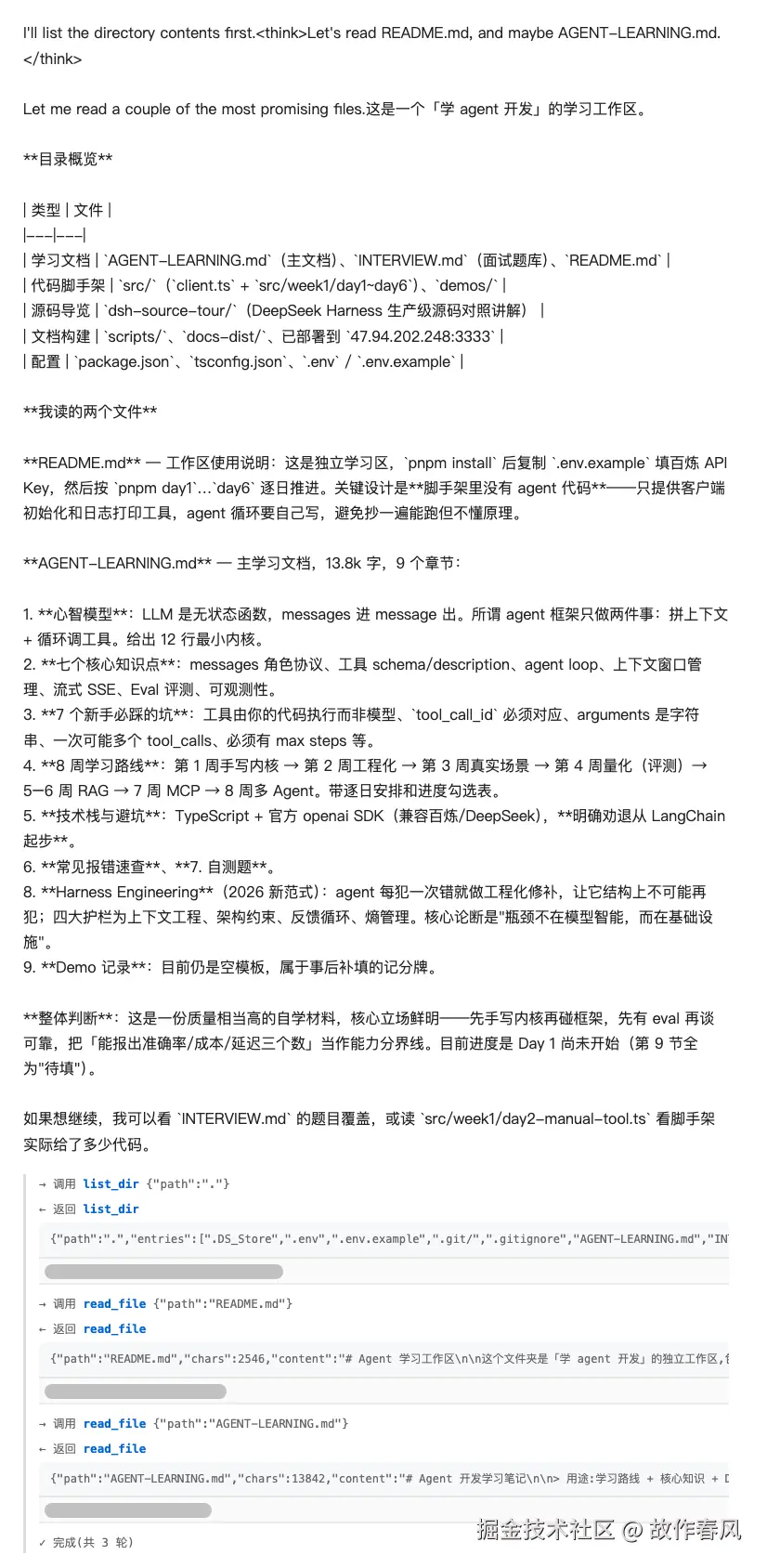
- 添加工具调用场景,流式输出调用过程
优化思路
- 首先加上一层外部
循环最大步数,防止无限循环 - 流式下
tool_calls是分片的,要用累加器按 index 拼接起来 - 定义事件协议,前端靠 data.type 区分
- 处理错误边界
事件协议部分
ts
type AgentEvent =
  | { type: 'text'; content: string } // 文本
  | { type: 'tool_call'; name: string; arguments: string } // 工具
  | { type: 'tool_result'; name: string; ok: boolean; content: string } 工具调用结果
  | { type: 'done'; steps: number } // 对话完成
  | { type: 'error'; message: string; phase: 'start' | 'stream' | 'tool' }; // 错误处理
工具部分
工具这块和前面章节一样
ts
function executeTool(name: string, args: { path: string }) {
  if (name === 'list_dir') {
    if (!args?.path) throw Error('list_dir 缺少path参数')
    const entries = readdirSync(args.path, {withFileTypes: true}).map(p =>
      p.isDirectory() ? p.name + '/' : p.name
    )
    return {
      path: args.path,
      entries,
      count: entries.length
    }
  } else if (name === 'read_file') {
    if (!args?.path) throw Error('read_file 缺少path参数')
    const raw = readFileSync(args.path, 'utf8');
    return {
      path: args.path,
      chars: raw.length,
      content: raw,
    };
  } else {
    throw Error(`没有找到名为${name}的工具`)
  }
}
核心部分
大模型返回的是chunk数据,而且还是流式输出,像之前的那套逻辑根本无法实现,例如:工具函数内容还没有完全接收到就去了 finish_reason, 而function 里面的 name, argument 还没有接收完全,所以需要一个累加器组装数据,页面输出的内容同步 send 到页面上,
ts
// 实现一个累加器
    const slots = new Map<number, {id: string, name: string, args: string}>()

    let text = ''
    let finish: string | null = null

    for await (const chunk of stream) {
      const choice = chunk.choices?.[0]
      if (!choice) {
        if (chunk.usage) {
          console.log(
            `[step ${steps} promptTokens: ${chunk.usage.prompt_tokens}]`
          );
        }
        continue
      }
      const delta = choice.delta
      // 立刻转发文本
      if (delta?.content) {
        text += delta?.content
        send({type: 'text', content: delta?.content})
      }
      //工具调用分片
      if (delta?.tool_calls) {
        for (const tc of delta?.tool_calls) {
          const idx = tc.index ?? 0
          const slot = slots.get(idx) ?? {id: '', name: '', args: ''}
          if(tc.id) slot.id = tc.id
          if(tc.function?.name) slot.name = tc.function.name
          if(tc.function?.arguments) slot.args= tc.function.arguments

          slots.set(idx, slot)
        }
      }
      if (choice.finish_reason) finish = choice.finish_reason
    }
组装assistant消息
流式模式下没有自己的 message,需要自己组装 assistant 消息。
ts
const assistantMsg = {
  role: 'assistant',
  content: text || null
}

if (slots.size > 0) {
  assistantMsg.tool_calls = Array.from(slots.entries())
  .sort((a, b) => a[0] - b[0]) // 按 index 排序,保证顺序稳定
    .map(([, s]) => ({
      id: s.id,
      type: 'function' as const,
      function: { name: s.name, arguments: s.args },
    }));
}
messages.push(assistantMsg);

if (finish === 'stop') {
  send({ type: 'done', steps: steps });
  return;
}

if (finish === 'length') {
  throw new Error('被 max_tokens 截断,回答不完整(推理模型的思维链也占预算)');
}

if (finish === 'tool_calls' && slots.size > 0) {
  for (const [, slot] of Array.from(slots.entries()).sort((a, b) => a[0] - b[0])) {
    // 到这里 arguments 才拼完 ------ 提前 parse 会因为括号没闭合而抛异常
    let ok = true;
    let content: string;
    try {
      const args = JSON.parse(slot.args);
      const result = executeTool(slot.name, args);
      content = JSON.stringify(result);
    } catch (err) {
      ok = false;
      // 错误当成工具结果回填,让模型自己改
      content = `工具执行失败:${err instanceof Error ? err.message : String(err)}`;
    }
    send({ type: 'tool_call', name: slot.name, arguments: slot.args });
    send({ type: 'tool_result', name: slot.name, ok, content });
    messages.push({ role: 'tool', tool_call_id: slot.id, content });
  }
  continue; // 回去再跑一轮
}
最后启动后端服务
ts
try {
  await runAgent(messages, (e) => {
    if (e.type === 'tool_call') phase = 'tool'
    else if (e.type === 'text') phase = 'stream'
    send(e)
  })
} catch (err) {
    const message = err instanceof Error ? err.message : String(err);
    console.error('  ❌ agent 出错:', message);
    send({ type: 'error', message, phase });
} finally {
    res.end();
}
前端页面展示部分
这里使用的是原生html,demo演示就方便快捷一点。主要依赖 EventSource 建立SSE通道, 通过 onmessage + switch 最方便。
js
es.onmessage = (event) => {
  let data;
  try {
    data = JSON.parse(event.data);
  } catch (e) {
    addStep('err', '收到无法解析的消息:' + event.data.slice(0, 60));
    return;
  }

  switch (data.type) {
    case 'text':
      // 注意:直接追加 content,不要再 JSON.stringify 一次
      answerEl.textContent += data.content;
      break;

    case 'tool_call':
      addStep('', '→ 调用 <span class="name">' + data.name + '</span> ' +
                   '<code>' + escapeHtml(data.arguments) + '</code>');
      break;

    case 'tool_result': {
      const label = data.ok ? '← 返回' : '← 失败';
      addStep(data.ok ? '' : 'err',
        label + ' <span class="name">' + data.name + '</span>' +
        '<pre>' + escapeHtml(truncate(data.content, 300)) + '</pre>');
      break;
    }

    case 'done':
      addStep('', '✓ 完成(共 ' + data.steps + ' 轮)');
      es.close();       // ← 收到明确的结束信号才关闭
      es = null;
      break;

    case 'error':
      addStep('err', '✗ 出错[' + data.phase + ']:' + escapeHtml(data.message));
      es.close();       // ← 出错也要关,否则 EventSource 会重连、重跑整个任务
      es = null;
      break;

    default:
      addStep('', '(未知事件类型:' + data.type + ')');
  }
};
页面展示效果