
大家好!😃
先说一个让我很不爽的现实。
2026 年了,AI 编码工具已经满天飞------Cursor、Claude Code、Codex、各种 IDE 插件。但每次让它帮我写一个业务组件,每次对话死循环是这样的👇:
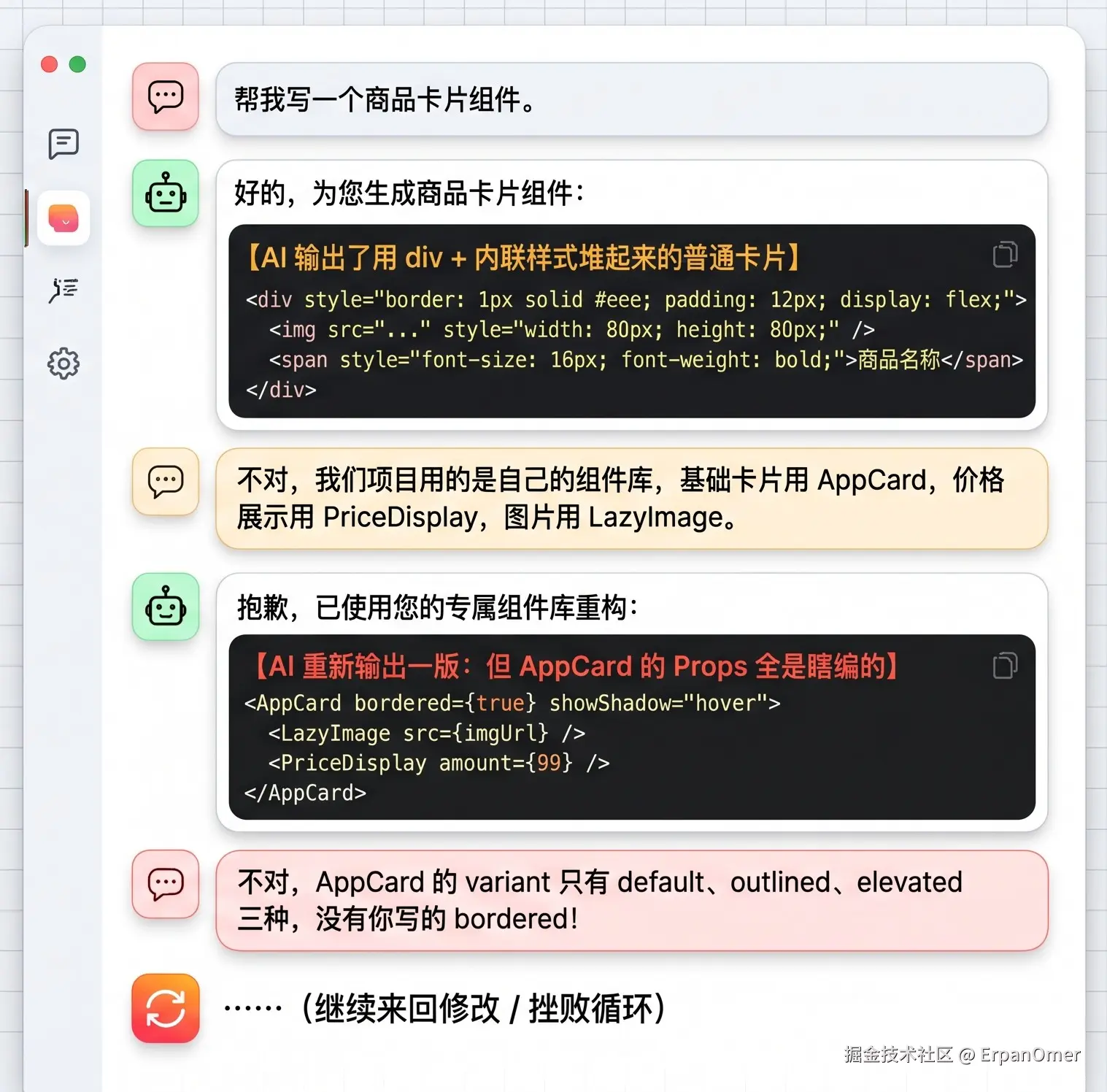
来回三四轮,不如我自己写。
问题的本质不是 AI 不够聪明,而是它对你的项目一无所知。 它不知道你的组件库有哪些组件、每个组件的 Props 是什么、设计规范要求间距用 8px 的倍数、你们团队约定表单校验统一用 Zod。它只能基于公开的通用知识去猜,而猜出来的东西在你的项目里大概率用不了🤷♂️。
直到我接触了 MCP。下面我们细聊👇
MCP 到底是什么?不吹不黑
MCP 全称 Model Context Protocol,是 Anthropic 在 2024 年底开源的一套协议。一句话解释:它让 AI 模型能够主动连接外部的数据源和工具,而不是只靠你在对话框里喂信息。
传统的 AI 编码流程和MCP 的流程:
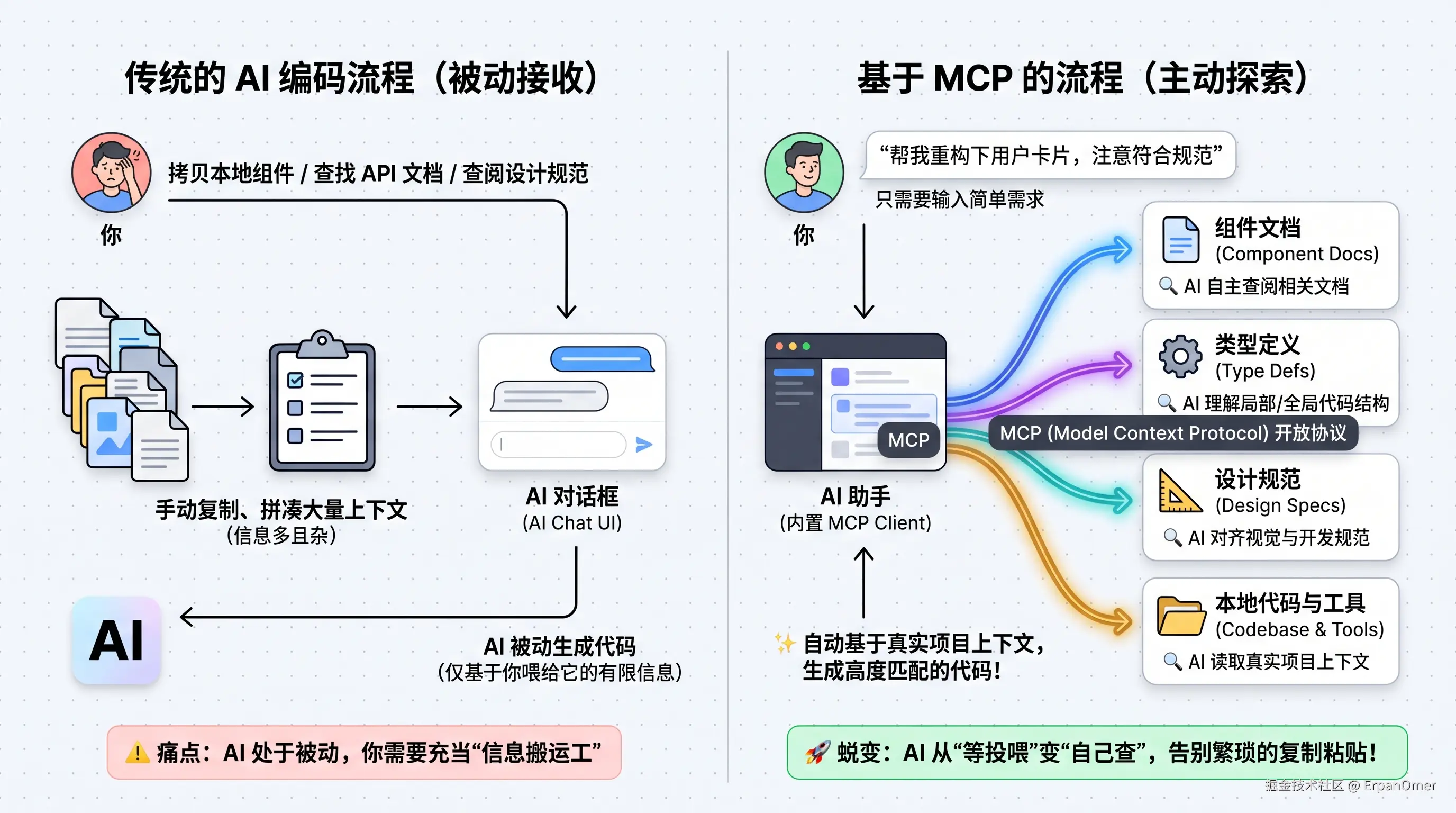
区别在哪?AI 从被动接收你喂的信息变成了主动去你的项目里找信息。 你不需要每次都把组件文档复制粘贴一遍,AI 自己会去查。
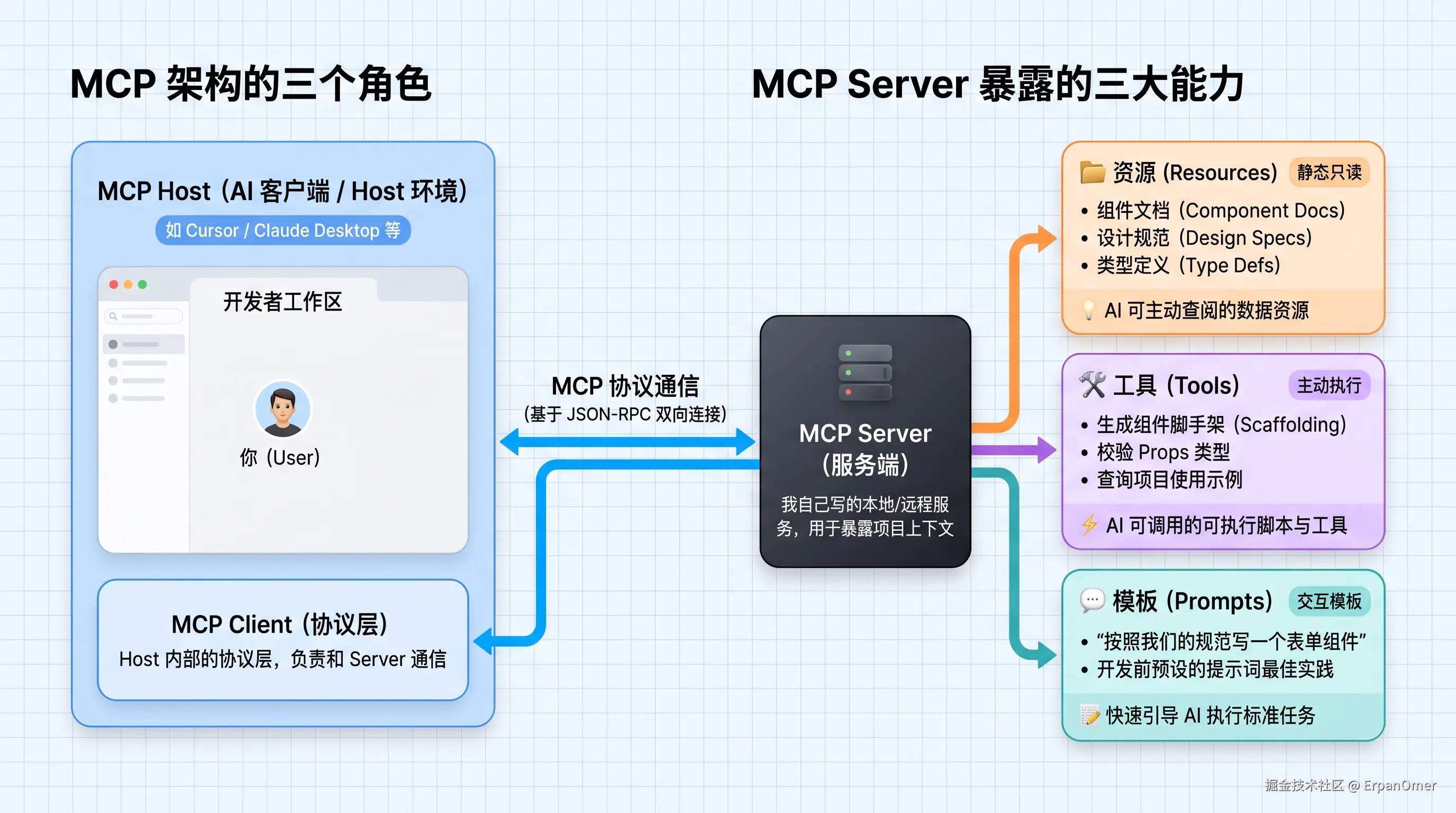
MCP 的架构很简单,就三个角色👇:
我是怎么把它接进组件库的
我们的组件库大约有 60 个组件,每个组件有 Props 类型定义、使用文档和设计规范。之前这些信息散落在 Storybook、README、TypeScript 类型文件里,AI 根本触达不到。
我花了大约两天时间,写了一个 MCP Server,把这些信息结构化地暴露出来。
核心代码不复杂,用 @modelcontextprotocol/sdk 这个官方 SDK:
typescript
// mcp-server/index.ts
import { McpServer, ResourceTemplate } from '@modelcontextprotocol/sdk/server/mcp.js';
import { StdioServerTransport } from '@modelcontextprotocol/sdk/server/stdio.js';
import { z } from 'zod';
import { getComponentMeta, getAllComponentNames, getDesignTokens } from './loaders.js';

const server = new McpServer({
  name: 'our-component-library',
  version: '1.0.0',
});

// Resource:暴露所有组件的元信息
server.resource(
  'component-list',
  'components://list',
  async (uri) => ({
    contents: [{
      uri: uri.href,
      mimeType: 'application/json',
      text: JSON.stringify(getAllComponentNames()),
    }],
  })
);

// Resource 模板:按组件名查询详细信息
server.resource(
  'component-detail',
  new ResourceTemplate('components://detail/{name}', { list: undefined }),
  async (uri, { name }) => {
    const meta = await getComponentMeta(name as string);
    if (!meta) {
      return { contents: [{ uri: uri.href, text: `组件 ${name} 不存在` }] };
    }
    return {
      contents: [{
        uri: uri.href,
        mimeType: 'application/json',
        text: JSON.stringify({
          name: meta.name,
          description: meta.description,
          props: meta.props,        // 完整的 Props 类型定义
          slots: meta.slots,        // 插槽定义
          events: meta.events,      // 事件定义
          examples: meta.examples,  // 3-5 个真实使用示例
          designNotes: meta.designNotes, // 设计规范备注
        }),
      }],
    };
  }
);

// Resource:设计 Token(间距、颜色、字号等)
server.resource(
  'design-tokens',
  'design://tokens',
  async (uri) => ({
    contents: [{
      uri: uri.href,
      mimeType: 'application/json',
      text: JSON.stringify(getDesignTokens()),
    }],
  })
);
然后加了两个 Tool,让 AI 不只能读,还能做:
typescript
// Tool:根据需求描述,推荐应该使用哪些组件
server.tool(
  'recommend-components',
  '根据业务需求描述,推荐应该组合使用的组件',
  { requirement: z.string().describe('业务需求的自然语言描述') },
  async ({ requirement }) => {
    const allComponents = getAllComponentNames();
    // 基于组件的 description 和 tags 做简单的关键词匹配
    // 生产环境可以接入向量检索
    const recommendations = matchComponents(requirement, allComponents);
    return {
      content: [{
        type: 'text',
        text: JSON.stringify(recommendations, null, 2),
      }],
    };
  }
);

// Tool:校验一段代码是否正确使用了组件的 Props
server.tool(
  'validate-component-usage',
  '校验代码片段中组件的 Props 使用是否符合类型定义',
  { code: z.string().describe('包含组件调用的代码片段') },
  async ({ code }) => {
    const issues = validateComponentUsage(code);
    return {
      content: [{
        type: 'text',
        text: issues.length === 0
          ? '所有组件用法符合规范'
          : `发现 ${issues.length} 个问题:\n${issues.map(i => `- ${i}`).join('\n')}`,
      }],
    };
  }
);

// 启动
const transport = new StdioServerTransport();
await server.connect(transport);
最后在 Claude Code 的配置文件里注册这个 Server:
json
{
  "mcpServers": {
    "our-components": {
      "command": "npx",
      "args": ["tsx", "/path/to/mcp-server/index.ts"]
    }
  }
}
接入前后的效果对比
我拿同一个需求做了对比:写一个商品卡片组件,要有图片、标题、价格和加购按钮。
接入 MCP 之前
tsx
// AI 生成的代码------全是猜的
const ProductCard = ({ product }) => (
  <div className="card" style={{ border: '1px solid #eee', padding: 16 }}>
    <img src={product.image} alt={product.title} style={{ width: '100%' }} />
    <h3>{product.title}</h3>
    <span className="price">¥{product.price}</span>
    <button onClick={() => addToCart(product.id)}>加入购物车</button>
  </div>
);
没有用任何项目组件,全是原生 HTML 元素加内联样式。Props 没有类型定义,addToCart 凭空出现,价格格式化也是硬编码的。
接入 MCP 之后
Claude 在生成代码之前,自动调用了 recommend-components 工具,然后逐个查询了推荐组件的详细 Props。最终输出:
tsx
import { AppCard } from '@/components/AppCard';
import { LazyImage } from '@/components/LazyImage';
import { PriceDisplay } from '@/components/PriceDisplay';
import { ActionButton } from '@/components/ActionButton';
import type { Product } from '@/types/product';

interface ProductCardProps {
  product: Product;
  onAddToCart: (productId: string) => void;
}

export function ProductCard({ product, onAddToCart }: ProductCardProps) {
  return (
    <AppCard variant="outlined" padding="md">
      <LazyImage
        src={product.coverUrl}
        alt={product.title}
        aspectRatio="4:3"
        fallback="/images/product-placeholder.png"
      />
      <AppCard.Body>
        <AppCard.Title level={3}>{product.title}</AppCard.Title>
        <PriceDisplay
          amount={product.price}
          currency={product.currency}
          originalAmount={product.originalPrice}
        />
      </AppCard.Body>
      <AppCard.Footer>
        <ActionButton
          variant="primary"
          size="sm"
          onClick={() => onAddToCart(product.id)}
        >
          加入购物车
        </ActionButton>
      </AppCard.Footer>
    </AppCard>
  );
}
每一个组件名、每一个 Prop 值都是从我们组件库的真实定义里拿到的。 AppCard 的 variant 只用了我们定义过的 outlined,LazyImage 带了 fallback 和 aspectRatio,PriceDisplay 能处理原价和币种------这些全是 AI 通过 MCP 查到的,不是猜的。
讲一讲 MCP 还存在的一些问题
用了两个月之后,我对 MCP 的判断是:它真的有用,但离标准接口还有距离。 几个你需要知道的问题:
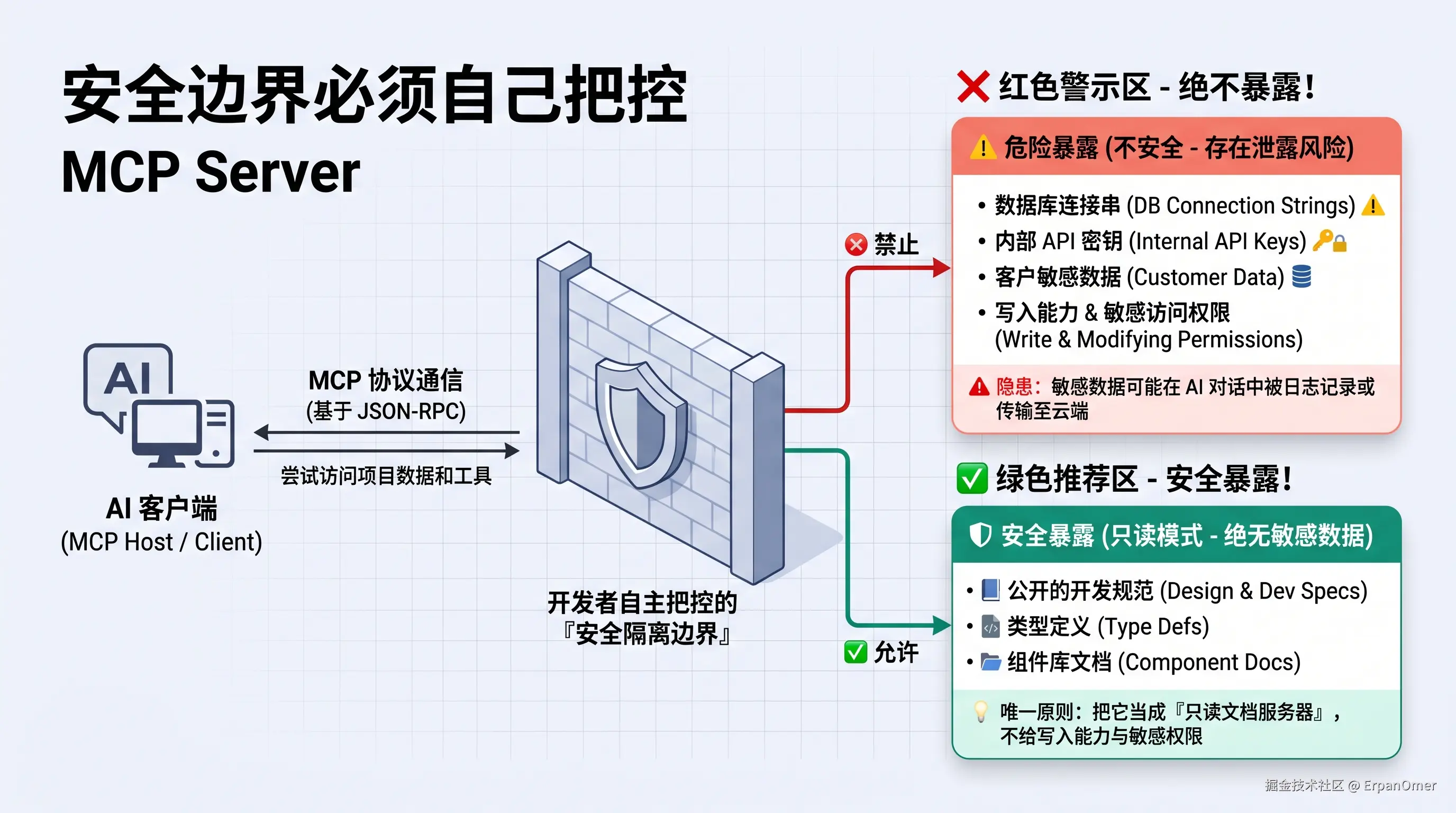
MCP Server 暴露的每一个 Resource 和 Tool,AI 都能访问。如果你不小心把数据库连接串、内部 API 密钥、或者客户数据暴露在 MCP 里,AI 的对话内容有可能被日志记录或者传输到云端。
我的原则是:MCP Server 只暴露公开的开发规范和类型定义,不暴露任何运行时数据、密钥和内部接口。 把它当成一个只读的文档服务器,不要给它写入能力和敏感数据访问权限。
组件元信息的维护成本
MCP 的效果完全取决于你暴露的元信息质量。如果你的组件文档是过时的、Props 描述是模糊的、使用示例是错误的------AI 生成的代码也会继承这些错误。
我们现在的做法是从 TypeScript 类型定义和 JSDoc 注释里自动提取元信息,不手动维护单独的文档:
typescript
// loaders.ts ------ 从源码自动提取组件元信息
import { Project } from 'ts-morph';

const project = new Project({
  tsConfigFilePath: './tsconfig.json',
});

export function getComponentMeta(name: string) {
  const sourceFile = project.getSourceFile(`src/components/${name}/index.tsx`);
  if (!sourceFile) return null;

  const propsInterface = sourceFile.getInterface(`${name}Props`);
  if (!propsInterface) return null;

  const props = propsInterface.getProperties().map(prop => ({
    name: prop.getName(),
    type: prop.getType().getText(),
    required: !prop.hasQuestionToken(),
    description: prop.getJsDocs().map(d => d.getDescription().trim()).join(' '),
  }));

  return { name, props, /* ... */ };
}
这样只要开发者维护好了 TypeScript 类型和注释,MCP 暴露的信息就自动是准确的。不需要额外维护一层文档。
值不值得现在就接入?
我的判断很直接:
如果你的团队有超过 30 个自研组件、有自己的设计规范、日常大量使用 AI 辅助编码------值得花两天时间接一个 MCP Server。 投入不大,但能显著减少AI 生成的代码和项目实际规范对不上的来回沟通成本。
如果你的项目直接用 Ant Design / Element Plus 这类公开组件库,AI 对它们的训练数据已经很充分了,MCP 的边际收益并不大。
至于 MCP 能不能成为前端 AI 工程的标准接口------现在下结论太早。但它指明了一个方向:谁先把自己的工程知识结构化地暴露给 AI,谁就能先吃到 AI 提效的真实红利!

喜欢我的文章,也欢迎关注我的微信公众号:【前端技术官】。
主要分享:前端架构 · AI 编程 · 职场认知 · 开发者成长

微信扫码关注 👆
不定期更新,不刷屏,聊点真正有用的干货。