控制台基础设置
csharp
//隐藏光标
Console.CursorVisible = false;
//通过两个变量来存储舞台的大小
int w = 50;
int h = 30;
//设置舞台(控制台)的大小
Console.SetWindowSize(w, h);
Console.SetBufferSize(w, h);
多个场景
csharp
int nowSceneID = 1;
while (true)
{
	//不同的场景ID,进行不同的逻辑处理
	switch (nowSceneID)
	{
		//开始场景
		case 1:
			Console.Clear();
			Console.WriteLine("开始场景");
			break;
		//游戏场景
		case 2:
            Console.Clear();
            Console.WriteLine("游戏场景");
            break;
		//结束场景
		case 3:
            Console.Clear();
            Console.WriteLine("结束场景");
            break;
	}
}
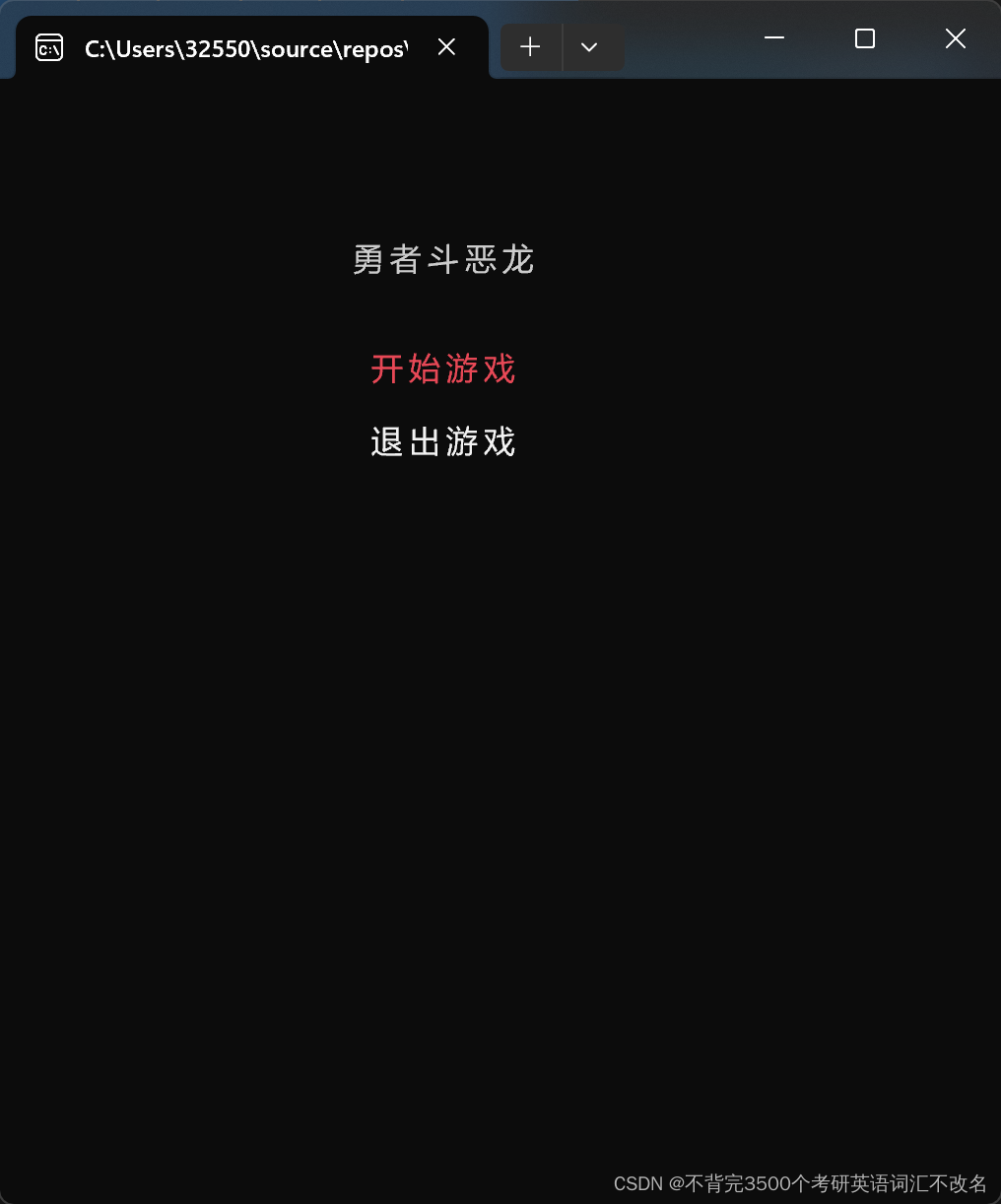
开始场景逻辑实现
csharp
Console.SetCursorPosition(w / 2 - 7, 4);
Console.Write("勇者斗恶龙");

//当前选项的编号
int nowSelIndex = 0;
//因为要输入,完没可以构造一个开始界面自己的死循环
//专门用来处理开始场景相关逻辑
while (true)
{
	//用一个标识来处理想要在while循环内部的switch逻辑执行时希望退出外层循环时改变标识即可。
	bool isQuitWhite = false;
	//显示内容
	//先设置光标位置,再显示内容
	//根据当前选择的编号来决定是否变色。
	Console.SetCursorPosition(w / 2 - 6, 7);
	Console.ForegroundColor = nowSelIndex == 0 ? ConsoleColor.Red : ConsoleColor.White;
	Console.Write("开始游戏");
    Console.SetCursorPosition(w / 2 - 6, 9);
    Console.ForegroundColor = nowSelIndex == 1 ? ConsoleColor.Red : ConsoleColor.White;
    Console.Write("退出游戏");
    //检测输入
    //检测玩家输入的一个键内容,并且不会在控制台上显示输入的内容
    char input=Console.ReadKey(true).KeyChar;

	switch (input)
	{
		case 'w':
		case 'W':
			--nowSelIndex;
			if (nowSelIndex < 0)
				nowSelIndex = 0;
			break;
		case 's':
		case 'S':
			++nowSelIndex;
			if (nowSelIndex > 1)
				nowSelIndex = 1;
			break;
		case 'j':
		case 'J':
			if (nowSelIndex == 0)
			{
				//1.改变当前选择的场景ID
				nowSceneID = 2;
				//2.退出内层while循环
				isQuitWhite = true;
			}
			else
			{
				//关闭控制台
				Environment.Exit(0);
			}
			break;
	}
	if (isQuitWhite)
	{
		break;
	}
}
游戏场景
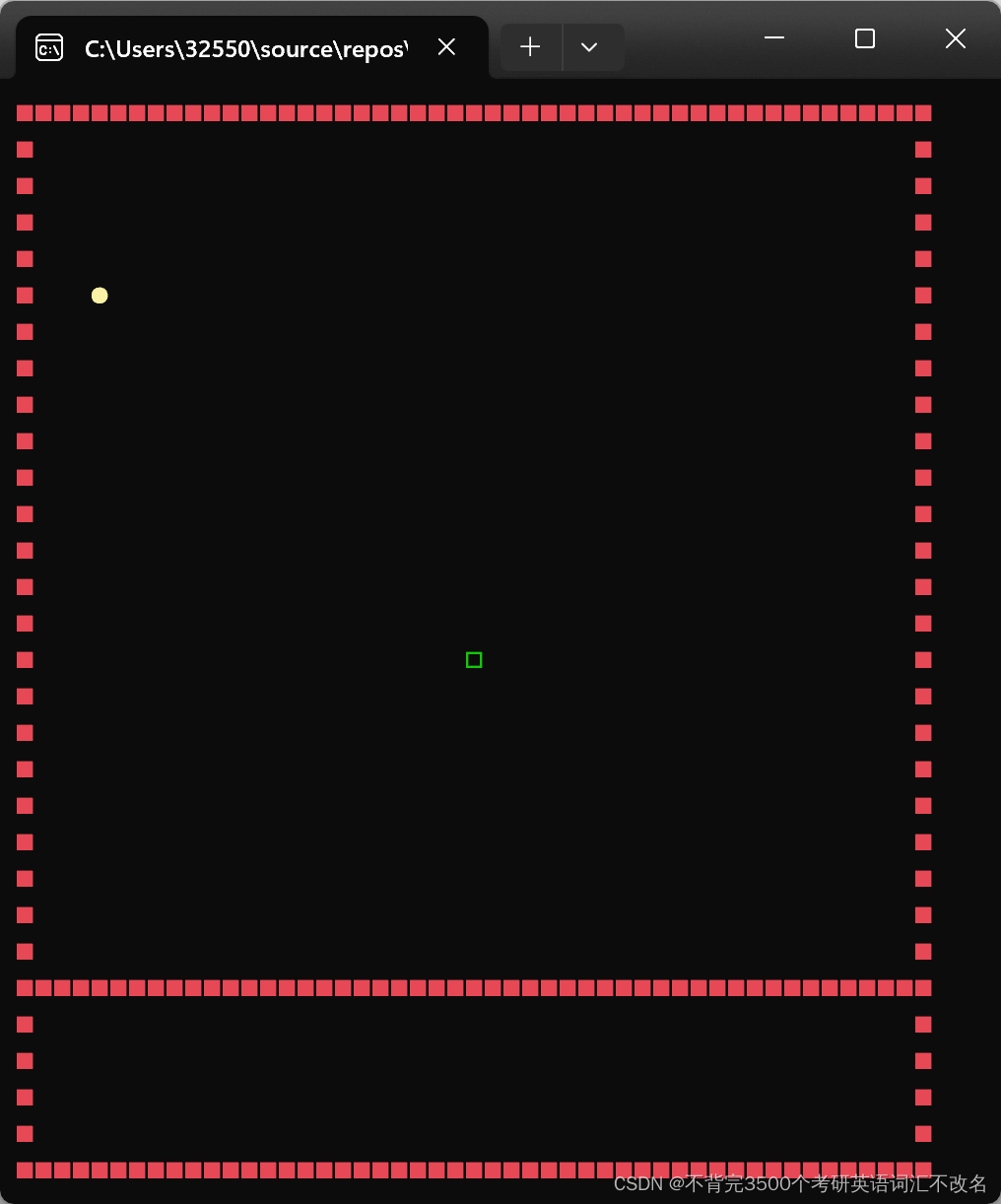
不变的红墙
csharp
//设置颜色为红色
Console.ForegroundColor = ConsoleColor.Red;
//画墙
for (int i = 0; i <= w - 2; i++)
{
    //上方墙
    Console.SetCursorPosition(i, 0);
    Console.Write("■");

    //下方墙
    Console.SetCursorPosition(i, h - 1);
    Console.Write("■");

    //中间墙
    Console.SetCursorPosition(i, h - 6);
    Console.Write("■");
}

for (int i = 0; i < h; i++)
{
    //左边的墙
    Console.SetCursorPosition(0, i);
    Console.Write("■");

    //右边的墙
    Console.SetCursorPosition(w - 2, i);
    Console.Write("■");
}
boss相关
csharp
int bossX = 24;
int bossY = 15;
int bossAtkMin = 7;
int bossAtkMax = 13;
int bossHp = 100;
string bossIcon = "□";
//声明一个颜色变量
ConsoleColor bossColor = ConsoleColor.Green;

//boss活着时才绘制
if (bossHp > 0)
{
    Console.SetCursorPosition(bossX, bossY);
    Console.ForegroundColor = bossColor;
    Console.Write(bossIcon);
}
主角移动相关
csharp
int playerX = 4;
int playerY = 5;
int playerAtkMin = 8;
int playerAtkMax = 12;
int playerHp = 100;
string playerIcon = "●";
ConsoleColor playerColor = ConsoleColor.Yellow;
//玩家输入的内容,外面声明,节约性能
char playerInput;
csharp
//画出玩家
Console.SetCursorPosition(playerX, playerY);
Console.ForegroundColor = playerColor;
Console.Write(playerIcon);
//得到玩家的输入
playerInput = Console.ReadKey(true).KeyChar;
//擦除
Console.SetCursorPosition(playerX, playerY);
Console.Write(' ');
//改位置
switch (playerInput)
{
    case 'W':
    case 'w':
        --playerY;
        if (playerY < 1)
        {
            playerY = 1;
        }
        //位置如果和boss重合了,并且boss没有死
        else if (playerX == bossX && playerY == bossY && bossHp > 0)
        {
            //拉回去
            ++playerY;
        }
        break;
    case 'A':
    case 'a':
        playerX -= 2;
        if (playerX < 2)
        {
            playerX = 2;
        }
        //位置如果和boss重合了,并且boss没有死
        else if (playerX == bossX && playerY == bossY && bossHp > 0)
        {
            //拉回去
            playerX += 2;
        }
        break;
    case 'S':
    case 's':
        ++playerY;
        if (playerY > h - 7)
        {
            playerY = h - 7;
        }
        //位置如果和boss重合了,并且boss没有死
        else if (playerX == bossX && playerY == bossY && bossHp > 0)
        {
            //拉回去
            --playerY;
        }
        break;
    case 'D':
    case 'd':
        playerX += 2;
        if (playerX > w - 4)
        {
            playerX = w - 4;
        }
        else if (playerX == bossX && playerY == bossY && bossHp > 0)
        {
            //拉回去
            playerX -= 2;
        }
        break;
    case 'J':
    case 'j':
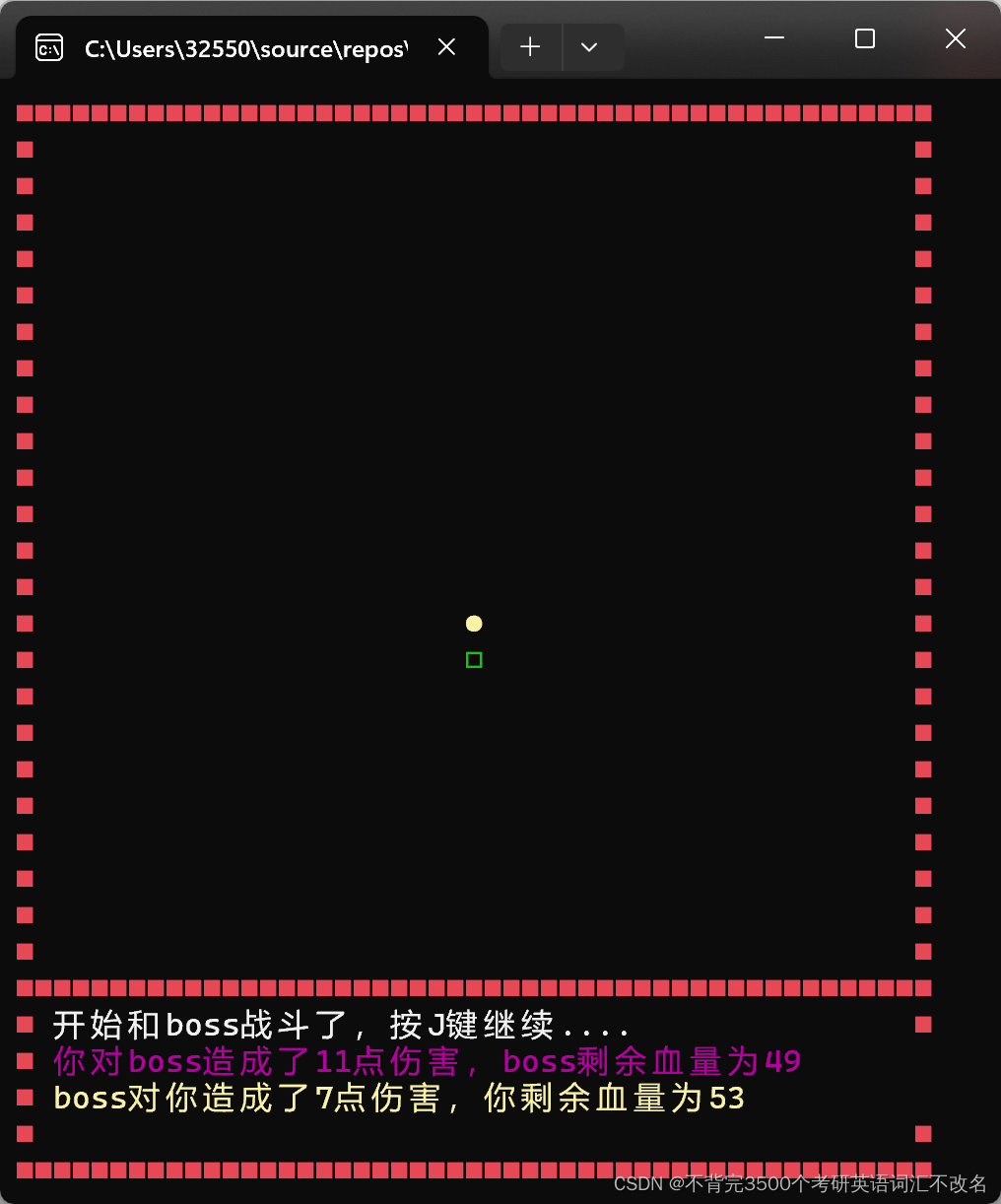
        //开始战斗
        if ((playerX == bossX && playerY == bossY - 1 || playerX == bossX && playerY == bossY + 1 || playerX == bossX - 2 && playerY == bossY || playerX == bossX + 2 && playerY == bossY) && bossHp > 0)
        {
            isFight = true;
            //可以开始战斗
            Console.SetCursorPosition(2, h - 5);
            Console.ForegroundColor = ConsoleColor.White;
            Console.Write("开始和boss战斗了,按J键继续....");
            Console.SetCursorPosition(2, h - 4);
            Console.Write("玩家当前的血量为{0}", playerHp);
            Console.SetCursorPosition(2, h - 3);
            Console.Write("boss当前的血量为{0}", bossHp);
        }
        break;

}
主角和boss战斗
csharp
bool isFight = false;
csharp
//只会处理J键
if (playerInput == 'j' || playerInput == 'J')
{
    //在这里判断玩家或者boss是否死亡,如果死亡了,继续之后的流程
    if (playerHp < 0)
    {
        //游戏结束
        //输掉了,应该直接显示游戏结束界面
        nowSceneID = 3;
        break;
    }
    else if (bossHp < 0)
    {
        //去营救公主
        //boss擦除
        Console.SetCursorPosition(bossX,bossY);
        Console.Write(' ');
        isFight = false;
    }
    else
    {
        //去处理按j键打架
        //玩家打boss
        Random random = new Random();
        //得到随机攻击力
        int atk = random.Next(playerAtkMin, playerAtkMax);
        //血量减对应的攻击力
        bossHp -= atk;
        //打印信息
        Console.ForegroundColor = ConsoleColor.Magenta;
        //先擦除这一行,上次显示的信息
        Console.SetCursorPosition(2, h - 4);
        Console.Write("                                                   ");
        //再来写新的信息
        Console.SetCursorPosition(2, h - 4);
        Console.Write("你对boss造成了{0}点伤害,boss剩余血量为{1}", atk, bossHp);
        //boss打玩家
        if (bossHp > 0)
        {
            //得到随机攻击力
            atk = random.Next(bossAtkMin, bossAtkMax);
            //血量减对应的攻击力
            playerHp -= atk;

            //打印信息
            Console.ForegroundColor = ConsoleColor.Yellow;
            //先擦除这一行,上次显示的信息
            Console.SetCursorPosition(2, h - 3);
            Console.Write("                                                ");
            //再来写新的信息
            Console.SetCursorPosition(2, h - 3);
            Console.Write("boss对你造成了{0}点伤害,你剩余血量为{1}", atk, playerHp);

        }
        else
        {
            //擦除之前的战斗信息
            Console.SetCursorPosition(2, h - 5);
            Console.Write("                                               ");
            Console.SetCursorPosition(2, h - 4);
            Console.Write("                                               ");
            Console.SetCursorPosition(2, h - 3);
            Console.Write("                                               ");
            //显示恭喜胜利的信息
            Console.SetCursorPosition(2, h - 5);
            Console.Write("你战胜了boss,快去营救公主吧");
            Console.SetCursorPosition(2, h - 4);
            Console.Write("前往公主身边按J键继续...");
        }
    }

}
公主相关
csharp
int princessX = 24;
int princessY = 5;
string princessIcon = "★";
ConsoleColor princessColor = ConsoleColor.Blue;
csharp
//作用是从while循环内部的switch改变标识,用来跳出外层的while循环
bool isOver = false;
csharp
Console.SetCursorPosition(princessX, princessY);
Console.ForegroundColor = princessColor;
Console.Write(princessIcon);
csharp
 //判断是否在公主身边按J键
 else if ((playerX == princessX && playerY == princessY - 1 || playerX == princessX && playerY == princessY + 1 || playerX == princessX - 2 && playerY == princessY || playerX == princessX + 2 && playerY == princessY) && bossHp <= 0)
 {
     nowSceneID = 3;
     isOver=true;
     break;
 }
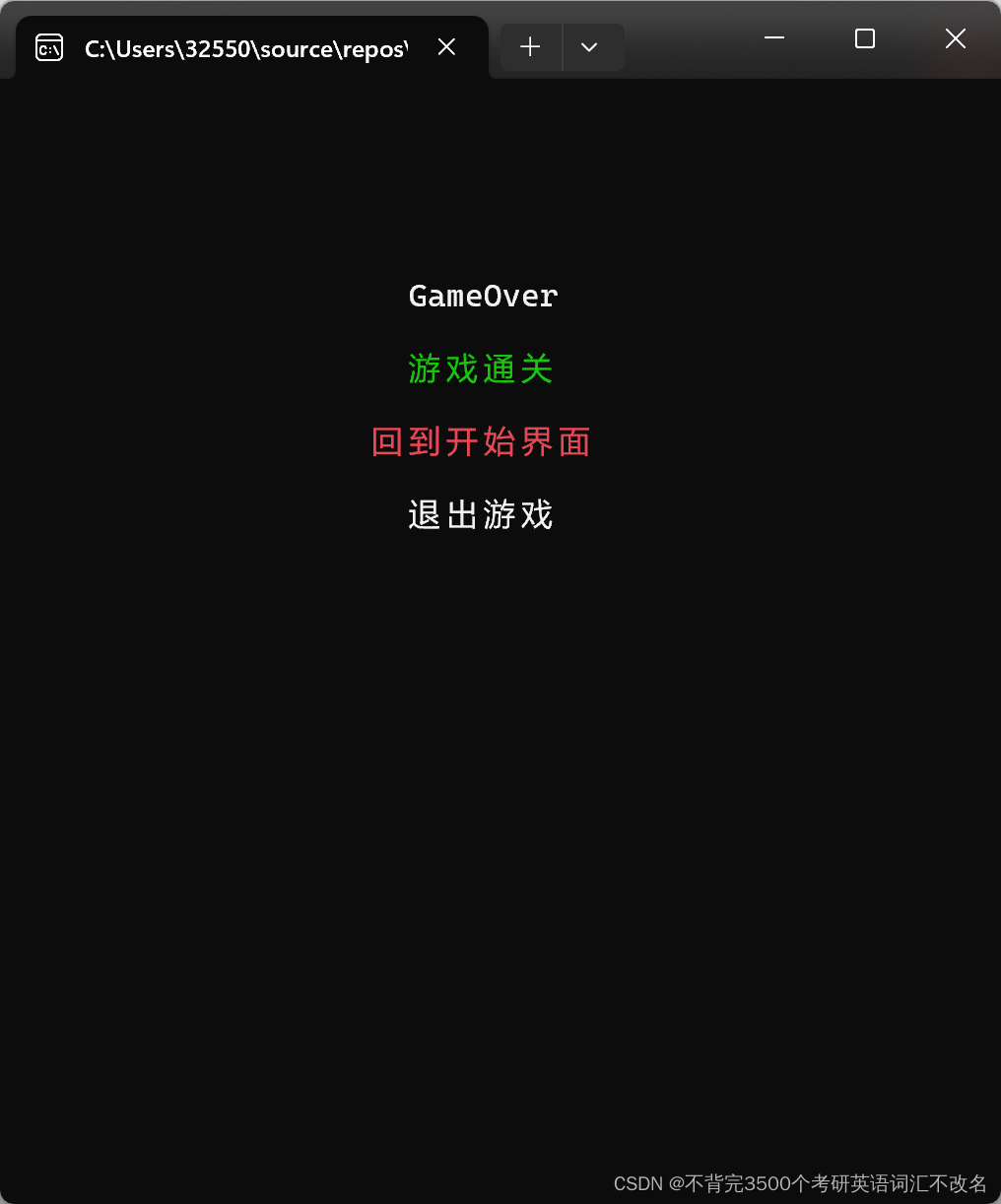
结束场景逻辑实现
csharp
Console.Clear();
//标题的显示
Console.SetCursorPosition(w / 2 - 4, 5);
Console.ForegroundColor = ConsoleColor.White;
Console.Write("GameOver");
//可变内容的显示,根据失败活着成功显示的内容不一样
Console.SetCursorPosition(w / 2 - 4, 7);
Console.ForegroundColor = ConsoleColor.Green;
Console.Write(gameOver);
int nowSelEndIndex = 0;
while (true)
{

    bool isQuitEndWhile = false;

    Console.SetCursorPosition(w / 2 - 6, 9);
    Console.ForegroundColor = nowSelEndIndex == 0 ? ConsoleColor.Red : ConsoleColor.White;
    Console.Write("回到开始界面");
    Console.SetCursorPosition(w / 2 - 4, 11);
    Console.ForegroundColor = nowSelEndIndex == 1 ? ConsoleColor.Red : ConsoleColor.White;
    Console.Write("退出游戏");

    char input = Console.ReadKey(true).KeyChar;

    switch (input)
    {
        case 'w':
        case 'W':
            --nowSelEndIndex;
            if (nowSelEndIndex < 0)
            {
                nowSelEndIndex = 0;
            }
            break;
        case 's':
        case 'S':
            ++nowSelEndIndex;
            if (nowSelEndIndex > 1)
            {
                nowSelEndIndex = 1;
            }
            break;
        case 'j':
        case 'J':
            if (nowSelEndIndex == 0)
            {
                nowSceneID = 1;
                isQuitEndWhile=true;
            }
            else
            {
                Environment.Exit(0);
            }
            break;
    }

    //为了从switch中跳出上一成的while循环加的标识
    if (isQuitEndWhile)
    {
        break;
    }
}
游戏截图: