企业微信接入系列-上传附件资源
文档介绍
企业发表内容到客户的朋友圈的文档地址:https://developer.work.weixin.qq.com/document/path/93506,在企业发表内容到客户朋友圈的接口中涉及到上传附件资源的操作,具体文档地址:https://developer.work.weixin.qq.com/document/path/95098,本文主要讲述的就是上传附件资源的操作。
上传附件资源
企业微信官方文档关于上传附件资源这一块写的不是很清楚,这里鉴于上传插件太多的情况,我不针对于具体的一款上传插件举例,通俗化来说明
1.更改上传链接
就是说不管你是什么上传插件,在上传链接这里变更一下,同时注意接收上传方法返回的参数
html
uploadUrl: '/file/weChatUpload', //上传的地址2.上传附件资源接口
参数说明
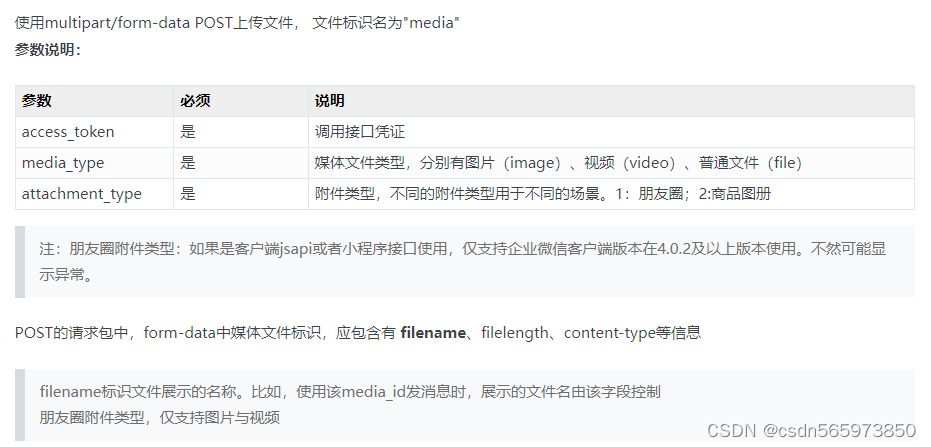
3.java上传方法
java
 /**

     * 朋友圈图片或者视频上传

     */

    @PostMapping("/file/weChatUpload")

    @ResponseBody

    public AjaxResult weChatUpload(MultipartFile file){

        try

        {

            WeChatUploadAttachmentResponse res = weChatService.uploadAttachment(file);

            if (res != null) {

                AjaxResult ajax = AjaxResult.success();

                ajax.put("fileName", file.getOriginalFilename());

                ajax.put("url", res.getMediaId());

                return ajax;

            }else {

                return AjaxResult.error("上传失败!");

            }

        }

        catch (Exception e)

        {

            return AjaxResult.error(e.getMessage());

        }

    }
企业微信接口调用方法
java
   /**

     * 上传附件资源--朋友圈

     * https://developer.work.weixin.qq.com/document/path/95098

     *  素材上传得到media_id,该media_id仅三天内有效

     *   media_id在同一企业内应用之间可以共享

     *    朋友圈附件类型,仅支持图片与视频

     * @param file

     * @return

     */

    @Override

    public WeChatUploadAttachmentResponse uploadAttachment(MultipartFile file) {

        //获取accesstoken

        String accessToken = getAccessToken();

        if (StringUtils.isNotEmpty(accessToken)) {

            String filename = file.getOriginalFilename();

            //获取上传文件后缀

            int i = filename.lastIndexOf(".");

            String substring = filename.substring(i + 1);

            String mediaType = "";

            if ("jpg".equals(substring) || "JPG".equals(substring) || "png".equals(substring) || "PNG".equals(substring)) {

                mediaType = "image";

            }else if ("mp4".equals(substring) || "MP4".equals(substring)) {

                mediaType = "video";

            }

      //上传附件资源接口连接

            String url = "https://qyapi.weixin.qq.com/cgi-bin/media/upload_attachment?access_token="+accessToken+

                    "&attachment_type=1&media_type="+mediaType;

      //添加请求头信息

            HttpHeaders headers = new HttpHeaders();

            headers.setContentType(MediaType.MULTIPART_FORM_DATA);

            File file1 = null;

            try {

        //获取上传附件大小

                int length = file.getBytes().length;

                headers.setContentLength(length);

        //设置请求包 Content-Disposition form-data中媒体文件标识

                ContentDisposition contentDisposition =

                        ContentDisposition.builder("form-data").filename(filename).name("media").build();

                headers.setContentDisposition(contentDisposition);

        //MultipartFile 转 File

                file1 = toFile(file);

        //获取FileSystemResource

                FileSystemResource resource = new FileSystemResource(file1);

                MultiValueMap<String, Object> params = new LinkedMultiValueMap<>();

                params.add("media", resource);

        //设置请求包

                HttpEntity<MultiValueMap<String, Object>> requestEntity = new HttpEntity<>(params, headers);

        //post调用企业微信上传附件资源接口

                ResponseEntity<String> post = RestUtils.post(url,requestEntity,String.class);

                if (Objects.nonNull(post)) {

          //获取接口返回值

                    String body = post.getBody();

                    WeChatUploadAttachmentResponse res = JSON.parseObject(body, WeChatUploadAttachmentResponse.class);

                    return res;

                }

            }catch (Exception e) {

                e.printStackTrace();

            }finally {

                if (file1 != null) {

                    file1.delete();

                }

            }

        }

        return null;

    }


  //MultipartFile  转 File

    private File toFile(MultipartFile multipartFile) {

        //文件上传前的名称

        String fileName = multipartFile.getOriginalFilename();

        File file = new File(fileName);

        OutputStream out = null;

        try{

            //获取文件流,以文件流的方式输出到新文件

            out = new FileOutputStream(file);

            byte[] ss = multipartFile.getBytes();

            for(int i = 0; i < ss.length; i++){

                out.write(ss[i]);

            }

            return file;

        }catch(IOException e){

            e.printStackTrace();

            return null;

        }finally {

            if (out != null){

                try {

                    out.close();

                } catch (IOException e) {

                    e.printStackTrace();

                }

            }

        }

    }
返回值对象代码
java
public class WeChatUploadAttachmentResponse extends WeChatResponse{

    private static final long serialVersionUID = -6462589895169294923L;

    @ApiField("type")

    private String type;

    @ApiField("media_id")

    private String mediaId;

    @ApiField("created_at")

    private Long createdAt;


    public String getType() {

        return type;

    }


    public void setType(String type) {

        this.type = type;

    }


    public String getMediaId() {

        return mediaId;

    }


    public void setMediaId(String mediaId) {

        this.mediaId = mediaId;

    }


    public Long getCreatedAt() {

        return createdAt;

    }


    public void setCreatedAt(Long createdAt) {

        this.createdAt = createdAt;

    }

}
上传插件通过页面返回值取出对应的media_id即可,至此企业微信上传附件资源就算完成了。
写在最后
这里说一下这个上传附件资源,由于企业微信接口文档写的太模糊,又没有上传的demo代码,所以在开发时关于上传附件资源这块比较费劲,这里是最后上传成功的版本,希望对大家有帮助,有问题的小伙伴也可以一起讨论哈。