(1)Image图片组件是用来显示一张图片的
Image参数介绍
kotlin
fun Image(
    painter: Painter, /// 图片资源
    contentDescription: String?, // 图片描述
    modifier: Modifier = Modifier, // 修饰符
    alignment: Alignment = Alignment.Center,// 位置
    contentScale: ContentScale = ContentScale.Fit,// 缩放
    alpha: Float = DefaultAlpha,// 透明度
    colorFilter: ColorFilter? = null // 颜色修改
)
(2)Image的使用
kotlin
 Image(
        painterResource(R.drawable.im),
        contentDescription = "一张图片"
    )
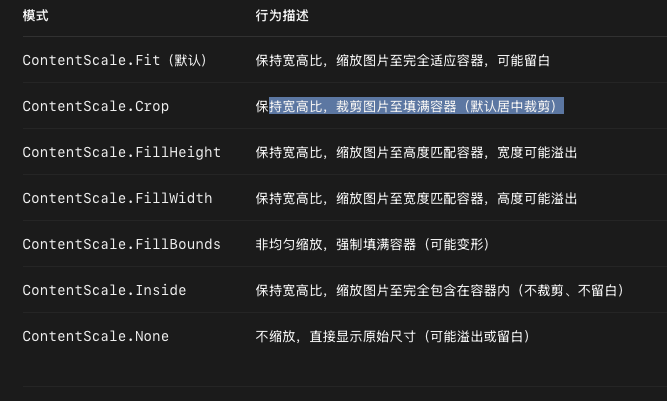
(3)重要参数讲解:ContentScale。参数说明:
基础语法:
kotlin
Image(
    painterResource(R.drawable.im),
    contentDescription = "一张图片",
    contentScale = ContentScale.Inside
)
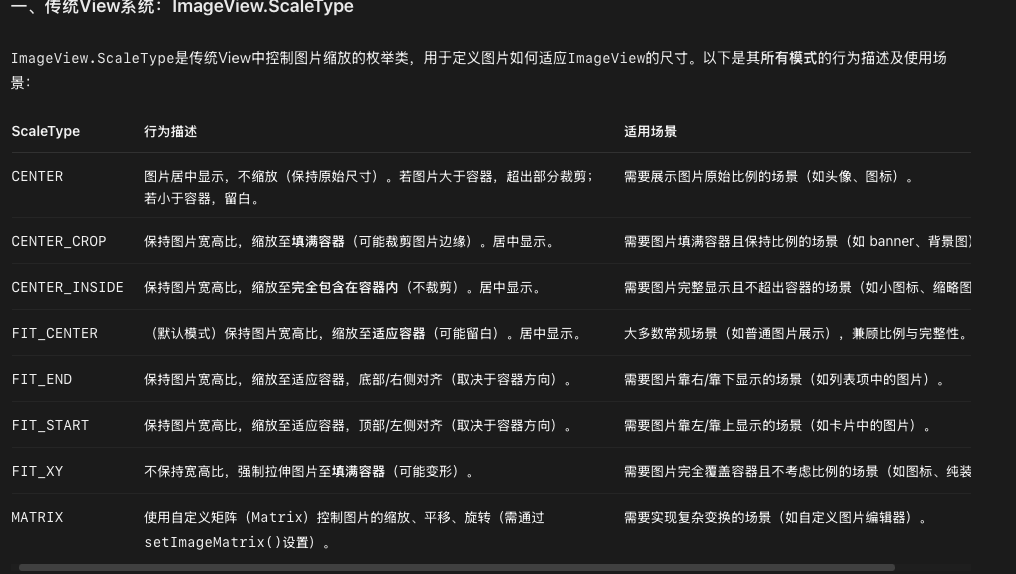
(4)与Android ImageView scaleType 对比