本章教程,主要分享一个本地wifi密码查看器,用python实现的,感兴趣的可以试一试。
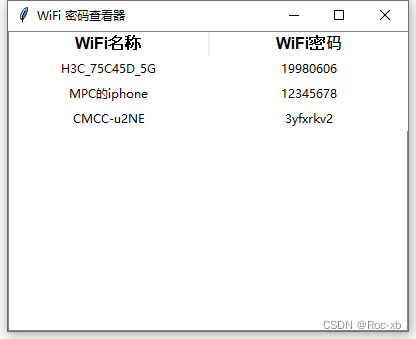
具体代码
python
import subprocess  # 导入 subprocess 模块,用于执行系统命令
import tkinter as tk  # 导入 tkinter 模块,用于创建图形用户界面
from tkinter import messagebox, ttk  # 从 tkinter 模块中导入 messagebox 和 ttk 子模块

def get_wifi_passwords():
    """
    获取本地计算机上所有已连接过的 WiFi 配置文件及其密码。
    """
    try:
        # 执行命令获取所有 WiFi 配置文件的列表
        profiles_data = subprocess.check_output(['netsh', 'wlan', 'show', 'profiles']).decode('utf-8', errors='ignore')
        # 解析输出,提取配置文件名称
        profiles = [line.split(':')[1].strip() for line in profiles_data.split('\n') if "All User Profile" in line]

        wifi_passwords = []  # 存储 WiFi 名称和密码的列表

        # 遍历每个配置文件,获取密码
        for profile in profiles:
            profile_info = subprocess.check_output(['netsh', 'wlan', 'show', 'profile', profile, 'key=clear']).decode('utf-8', errors='ignore')
            password_lines = [line.split(':')[1].strip() for line in profile_info.split('\n') if "Key Content" in line]
            password = password_lines[0] if password_lines else "N/A"  # 如果没有密码,则显示 "N/A"
            wifi_passwords.append((profile, password))

        return wifi_passwords
    except Exception as e:
        # 如果发生错误,显示错误信息
        messagebox.showerror("错误", f"发生错误: {str(e)}")
        return []

def copy_password(event):
    """
    复制选中的 WiFi 密码到剪贴板。
    """
    selected_item = tree.selection()[0]
    password = tree.item(selected_item, 'values')[1]
    root.clipboard_clear()
    root.clipboard_append(password)
    messagebox.showinfo("信息", "密码已复制到剪贴板")

def center_window(window, width, height):
    """
    将窗口显示在屏幕中央。
    """
    screen_width = window.winfo_screenwidth()
    screen_height = window.winfo_screenheight()
    x = (screen_width - width) // 2
    y = (screen_height - height) // 2
    window.geometry(f'{width}x{height}+{x}+{y}')

# 创建主窗口
root = tk.Tk()
root.title("WiFi 密码查看器")  # 设置窗口标题
window_width = 400
window_height = 300
root.geometry(f'{window_width}x{window_height}')  # 设置窗口大小
center_window(root, window_width, window_height)  # 窗口居中显示

# 创建表格
tree = ttk.Treeview(root, columns=('SSID', '密码'), show='headings')
tree.heading('SSID', text='WiFi名称', anchor='center')
tree.heading('密码', text='WiFi密码', anchor='center')
tree.column('SSID', anchor='center')
tree.column('密码', anchor='center')
tree.pack(fill=tk.BOTH, expand=True)

# 设置表格样式
style = ttk.Style()
style.configure('Treeview', rowheight=25)
style.configure('Treeview.Heading', font=('Arial', 12, 'bold'))

# 获取 WiFi 密码并显示在表格中
wifi_passwords = get_wifi_passwords()
for wifi, password in wifi_passwords:
    tree.insert('', tk.END, values=(wifi, password))

# 绑定双击事件,双击表格中的一行即可复制密码
tree.bind('<Double-1>', copy_password)

# 启动主事件循环
root.mainloop()
点击wifi名称行,可以快速复制wifi密码到粘贴板上。