在前面的文章中,我们了解了如何使用FlutterPage来创建Flutter容器。
但更多的时候,我们需要的是一种类似FlutterFragment的方式来进行引用,可喜的是,鸿蒙实现这种方式也并不复杂,因为不论是FlutterPage,还是FlutterFragment,它内部实际上是通过FlutterView的方式来创建的,所以,很快就有开发者提了PR,让鸿蒙可以支持FlutterFragment的方式进行开发,这个组件就是------FlutterEntry,原始PR地址如下。
gitee.com/openharmony...
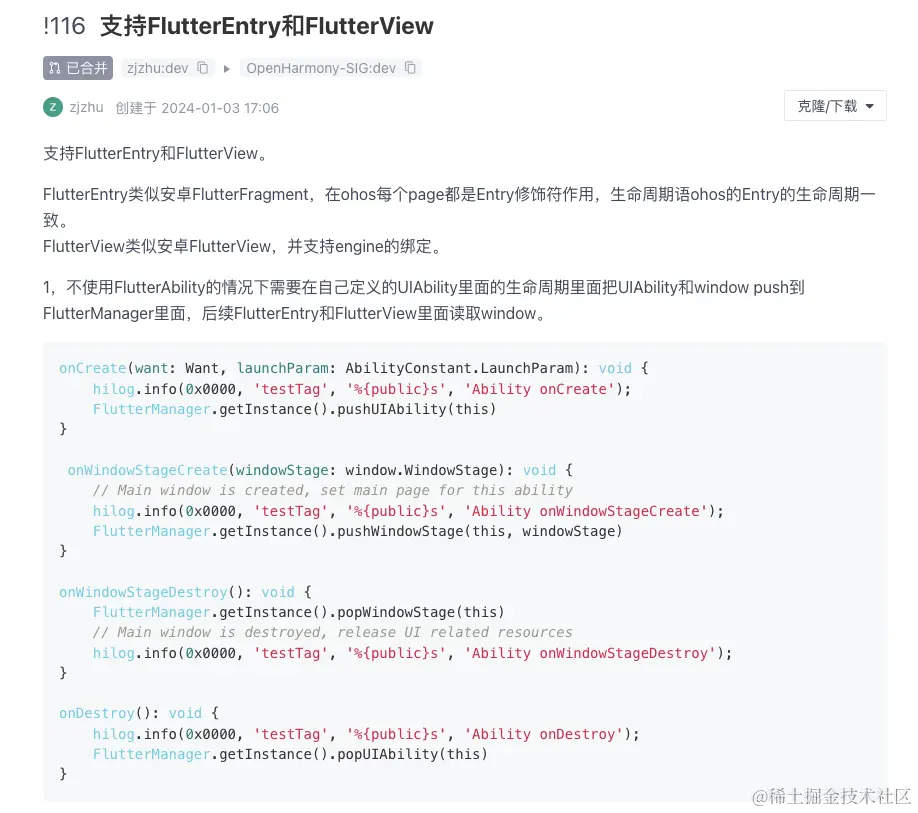
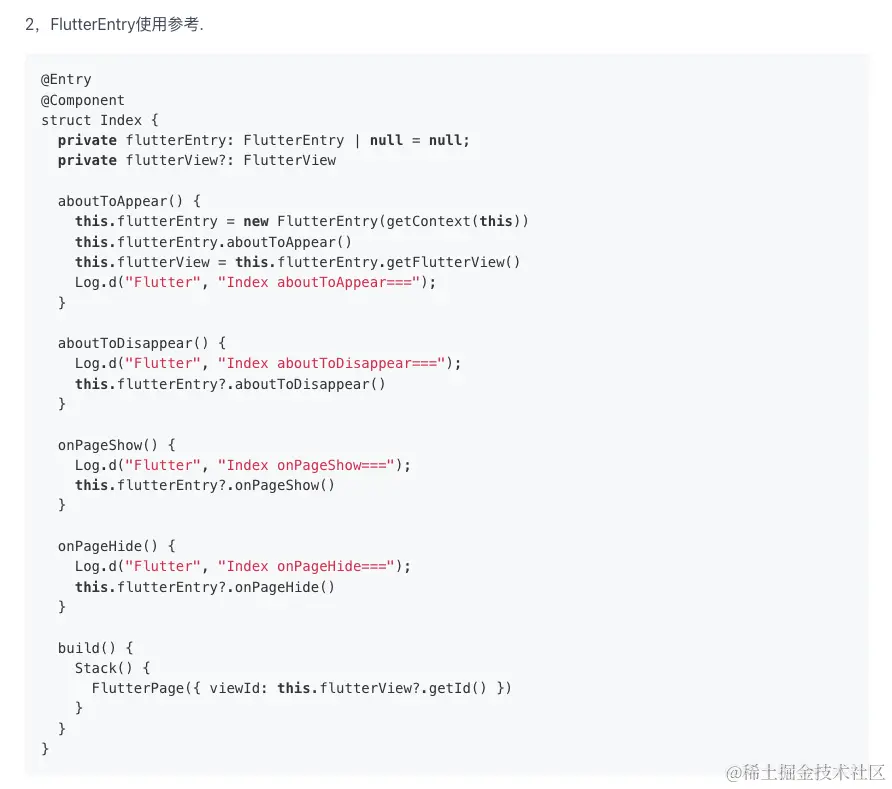
使用还是相当简单的,添加生命周期的依赖注入即可。
和FlutterPage的使用很类似,FlutterEntry也提供了getDartEntrypointArgs、configureFlutterEngine等方法,仿照Native的封装思路,我们也封装下FlutterEntry。
arkts
复制代码
import FlutterEntry from '@ohos/flutter_ohos/src/main/ets/embedding/ohos/FlutterEntry'; import FlutterEngine from '@ohos/flutter_ohos/src/main/ets/embedding/engine/FlutterEngine'; import MethodChannel, { MethodCallHandler, MethodResult } from '@ohos/flutter_ohos/src/main/ets/plugin/common/MethodChannel'; import MethodCall from '@ohos/flutter_ohos/src/main/ets/plugin/common/MethodCall'; import { NativeNetApi, NativeNetApiImp } from './NetChannel'; export default class BaseFlutterEntry extends FlutterEntry implements MethodCallHandler { private channel: MethodChannel | null = null; routeParams: string = ''; constructor(context: Context, routeParams: string) { super(context); this.routeParams = routeParams } getDartEntrypointArgs(): string[] { let map = new Map<string, string>() map.set('xxx', 'xxx') map.set('xxx', this.routeParams) return new Array(this.mapToString(map)); } mapToString(map: Map<string, string>): string { if (map.size === 0) { return ''; } let obj: object = new Object; map.forEach((value, key) => { obj[key] = value; }) return JSON.stringify(obj); } configureFlutterEngine(flutterEngine: FlutterEngine): void { this.channel = new MethodChannel(flutterEngine.dartExecutor.getBinaryMessenger(), 'com.xxx.flutter.method_call'); this.channel?.setMethodCallHandler(this); NativeNetApi.setup(flutterEngine.dartExecutor, new NativeNetApiImp()) } onMethodCall(call: MethodCall, result: MethodResult): void { switch (call.method) { case 'testChannel': result.success('Harmony') break; } } }
在这两个关键方法中,我们实现了Native到鸿蒙的参数传递,以及Channel的封装,MethodChannel和Native一样,直接实现接口即可,自定义Channel,可以通过鸿蒙版的pigeon来实现(后面我们单独来讲)。
接下来再封装一个布局,用于承载这个FlutterEntry。
arkts
复制代码
import Log from '@ohos/flutter_ohos/src/main/ets/util/Log'; import { FlutterView } from '@ohos/flutter_ohos/src/main/ets/view/FlutterView'; import { FlutterPage } from '@ohos/flutter_ohos'; import BaseFlutterEntry from '../maintabability/flutter/BaseFlutterEntry'; @Entry @Component export struct FlutterEntryIndex { private flutterEntry: BaseFlutterEntry | null = null; private flutterView?: FlutterView params: string = ''; aboutToAppear() { this.flutterEntry = new BaseFlutterEntry(getContext(this), this.params) this.flutterEntry.aboutToAppear() this.flutterView = this.flutterEntry.getFlutterView() Log.d("Flutter", "Index aboutToAppear==="); } aboutToDisappear() { Log.d("Flutter", "Index aboutToDisappear==="); this.flutterEntry?.aboutToDisappear() } onPageShow() { Log.d("Flutter", "Index onPageShow==="); this.flutterEntry?.onPageShow() } onPageHide() { Log.d("Flutter", "Index onPageHide==="); this.flutterEntry?.onPageHide() } build() { Stack() { FlutterPage({ viewId: this.flutterView?.getId() }) } } }
这里和官方示例的区别主要是参数的传递和FlutterEntry的封装,其它都没有变化。
最后,我们需要在承载FlutterEntry的Ability中添加相关的生命周期处理。
arkts
复制代码
import AbilityConstant from '@ohos.app.ability.AbilityConstant'; import hilog from '@ohos.hilog'; import UIAbility from '@ohos.app.ability.UIAbility'; import Want from '@ohos.app.ability.Want'; import window from '@ohos.window'; import FlutterManager from '@ohos/flutter_ohos/src/main/ets/embedding/ohos/FlutterManager'; export default class MainAbility extends UIAbility { onCreate(want: Want, launchParam: AbilityConstant.LaunchParam): void { hilog.info(0x0000, 'testTag', '%{public}s', 'Ability onCreate'); FlutterManager.getInstance().pushUIAbility(this) } onDestroy(): void { hilog.info(0x0000, 'testTag', '%{public}s', 'Ability onDestroy'); FlutterManager.getInstance().popUIAbility(this) } onWindowStageCreate(windowStage: window.WindowStage): void { // Main window is created, set main page for this ability hilog.info(0x0000, 'testTag', '%{public}s', 'Ability onWindowStageCreate'); windowStage.getMainWindowSync().setWindowLayoutFullScreen(true, () => { }) windowStage.loadContent('pages/xxxx', (err, data) => { if (err.code) { hilog.error(0x0000, 'testTag', 'Failed to load the content. Cause: %{public}s', JSON.stringify(err) ?? ''); return; } hilog.info(0x0000, 'testTag', 'Succeeded in loading the content. Data: %{public}s', JSON.stringify(data) ?? ''); }); FlutterManager.getInstance().pushWindowStage(this, windowStage) } onWindowStageDestroy(): void { // Main window is destroyed, release UI related resources hilog.info(0x0000, 'testTag', '%{public}s', 'Ability onWindowStageDestroy'); FlutterManager.getInstance().popWindowStage(this) } onForeground(): void { // Ability has brought to foreground hilog.info(0x0000, 'testTag', '%{public}s', 'Ability onForeground'); } onBackground(): void { // Ability has back to background hilog.info(0x0000, 'testTag', '%{public}s', 'Ability onBackground'); } }
以及它的布局文件(省略了一些代码)。
arkts
复制代码
import { FlutterEntryIndex } from './FlutterEntryIndex' @Entry @Component export struct xxxx { @State currentTabIndex: number = 1 private tabsController: TabsController = new TabsController(); build() { Navigation(this.mainNavStack) { Tabs({ index:this.currentTabIndex, controller:this.tabsController }) { TabContent() { XXXX() } .tabBar(this.bar('xxx', $r('xxxxx'), 0)) TabContent() { FlutterEntryIndex({params:'XXXXPage'}) } .tabBar(this.bar('xxx', $r('xxxxxx'), 1)) TabContent() { FlutterEntryIndex({params:'XXXXPage'}) } .tabBar(this.bar('xxx', $r('xxxxxx'), 2)) } .onChange((index) => { this.currentTabIndex = index }) } }
至此,我们基本跑通了Flutter在鸿蒙的各种场景,以及Flutter和鸿蒙之间的通信。
鸿蒙的支持还是很快的,当前Flutter稳定在3.7版本,这个版本算是一个中规中矩的官方版本,既不会太陈旧,也不会太新,没有引入Dart3.0,以及新的渲染引擎的适配,所以整体性能可以得到保证的同时,也可以让Flutter开发者减少对鸿蒙的适配。
相对于Native开发来说,在鸿蒙中使用Flutter是相对简单的,毕竟少了很多生命周期的管理和适配,统一基于FlutterView来实现,整体性能可控,同时鸿蒙申明式的UI创建方式,和Flutter也保持同步,在开发思路上能更加的符合,当然更重要的是,鸿蒙摈弃了Android的一些历史问题导致的bug,可以基于一个全新的系统来适配,其潜力可想而知。
遥遥领先,确实有点东西。