目录
说在前面
- 操作系统:windows 11
- 浏览器:edge版本 124.0.2478.97
- recast-navigation-js版本:0.29.0
- golang版本:1.21.5
- 上一篇:【recast-navigation-js】使用three.js辅助绘制Agent
setAgentTarget
-
使用
recast navigation接口requestMoveTarget设置agent的目标位置typescriptpublic setAgentTarget(pos: Vector3) { const { point: target } = this._meshQuery.findClosestPoint(pos); this._agent.requestMoveTarget(target); this._agentTarget = new Vector3().copy(target as Vector3) }
绘制寻路路径
-
使用
three.js中的Line绘制寻路路径typescriptprivate _updatePath(scene: Scene) { if (!this._agentTarget) { return } const path = []//[this._agent.position(), ...this._agent.corners()]; path.push(new Vector3().set(this._agent.position().x, this._agent.position().y, this._agent.position().z)) this._agent.corners().forEach((v) => { path.push(new Vector3().set(v.x, v.y, v.z)) }) if (path.length <= 1) { return } const spline = new CatmullRomCurve3(path); const samples = spline.getPoints(path.length * 12); const geometrySpline = new BufferGeometry().setFromPoints(samples); const line = new Line(geometrySpline, new LineDashedMaterial({ color: 0x66ccff, dashSize: 1, gapSize: 0.5 })); line.computeLineDistances(); if (this.crowdPathLine) { scene.remove(this.crowdPathLine) } this.crowdPathLine = line scene.add(line) } -
CatmullRomCurve3
给定输入点,创建相对平滑的曲线(实际上可以不用这个,使用实际的寻路关键点更能反映寻路结果) -
LineDashedMaterial
虚线材质 -
update,每帧重新绘制寻路路径
typescriptpublic update(delta: number, scene: Scene) { this._crowd.update(delta) this.crowdHelper.update() this._updatePath(scene) }

结果
- 鼠标右键设置agent起始位置
- 鼠标左键设置agent目标位置
问题
-
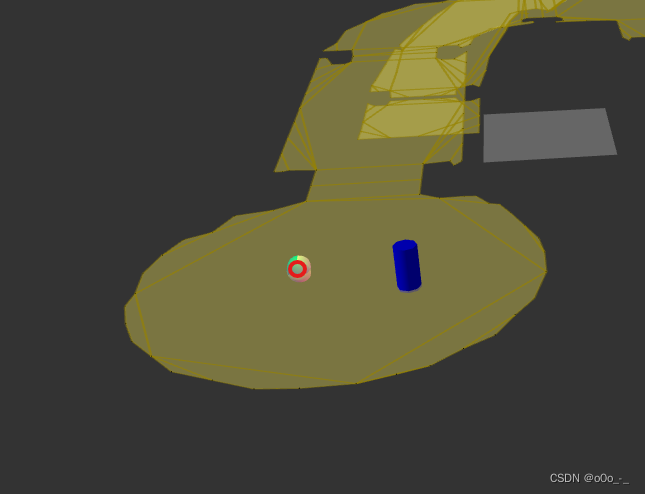
最开始使用Teleport方法设置agent起点的时候,发现有些地方不太对,比如点击下图红色位置传送不过去
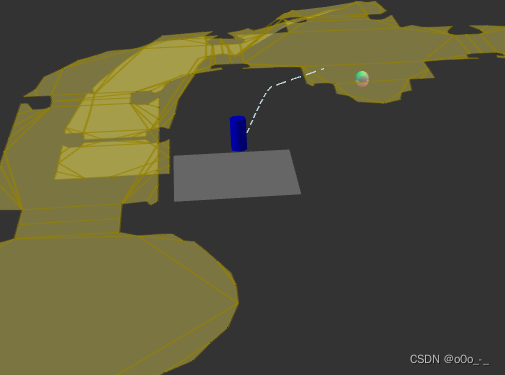
寻路也不对
-
后来发现是创建
DebugDrawer的时候自己把它的位置做了下偏移typescriptconst tmpDebugDrawer = new DebugDrawer(); tmpDebugDrawer.drawNavMesh(mesh); tmpDebugDrawer.position.z += 10 -
导致实际点击得到的位置也有一定的偏移,所以在传给
recastnavigation使用的时候需要将这个偏移去掉,或者在创建的时候不要加偏移
其他
- 完整代码再等等