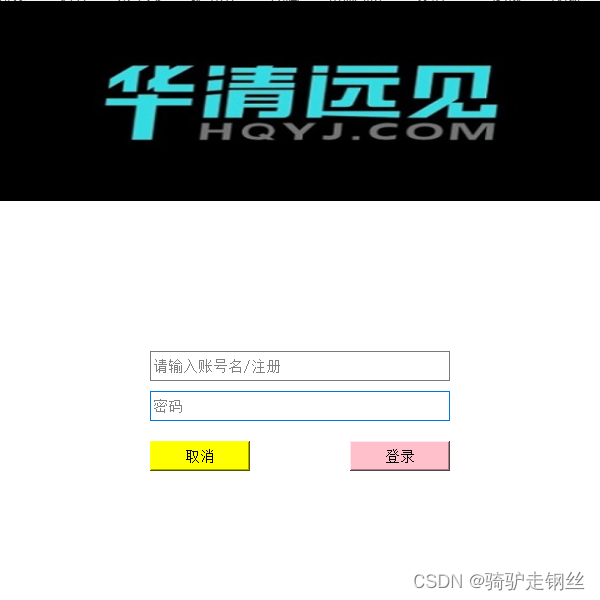
作业:
#include "mywidget.h"
mywidget::mywidget(QWidget *parent)
: QWidget(parent)
{
this->setStyleSheet("background-color:white");
this->resize(600,600);
this->setWindowFlag(Qt::FramelessWindowHint);
this->setWindowTitle("华清远见登录");
// QLabel *lab1=new QLabel(this);
// lab1->resize(95,55);
// lab1->setStyleSheet("background-color:green");
// lab1->setPixmap(QPixmap("C:\\Users\\ASUS\\Desktop\\微信图片_20240613194429.png"));
QLabel *lab2=new QLabel(this);
//lab2->move(100,100);
lab2->resize(600,200);
lab2->setStyleSheet("background-color:green");
lab2->setPixmap(QPixmap("E:\\1.QQ\\1774024653\\FileRecv\\pictrue\\logo.png"));
// QMovie *mov=new QMovie("C:\\Users\\ASUS\\Desktop\\zz.gif");
// lab2->setMovie(mov);
// mov->start();
lab2->setScaledContents(true);
QLineEdit *edit1=new QLineEdit(this); //设置行编辑
edit1->move(150,350);
edit1->resize(300,30);
edit1->setPlaceholderText("请输入账号名/注册");
edit1->setEchoMode(QLineEdit::Normal);
QLineEdit *edit2=new QLineEdit(this);
edit2->move(150,390);
edit2->resize(300,30);
edit2->setPlaceholderText("密码");
edit2->setEchoMode(QLineEdit::Password);
QLabel *la1=new QLabel(this);
la1->resize(30,30);
la1->move(120,350);
//la1->setStyleSheet("background-color:green");
la1->setPixmap(QPixmap("E:\\1.QQ\\1774024653\\FileRecv\\pictrue\\login.png"));
la1->setScaledContents(1);
QPushButton *btn1=new QPushButton("登录",this);
btn1->move(350,440);
btn1->resize(100,30);
btn1->setStyleSheet("background-color:pink");
QPushButton *btn2=new QPushButton("取消",this);
btn2->move(150,440);
btn2->resize(100,30);
btn2->setStyleSheet("background-color:yellow");
}
mywidget::~mywidget()
{
}