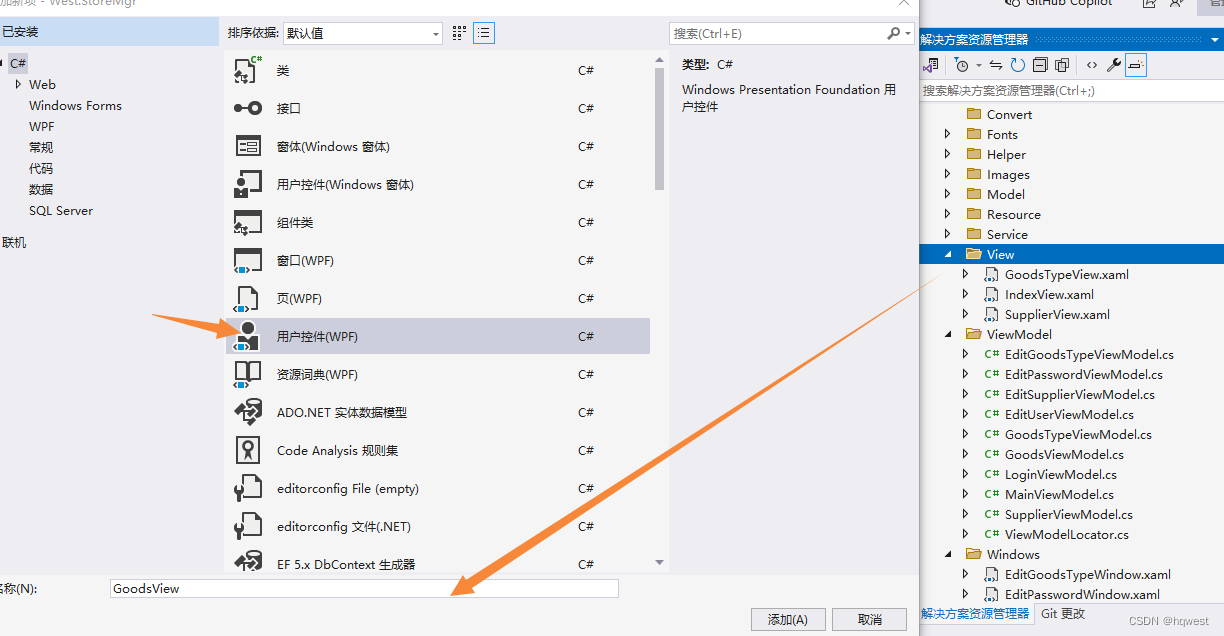
1、添加窗体
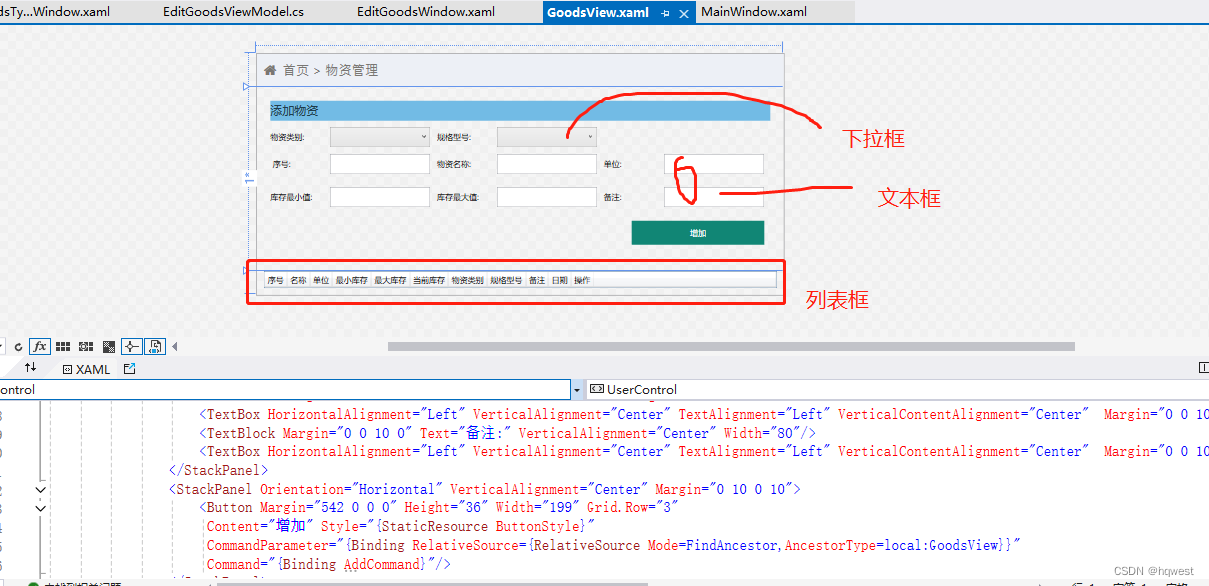
2、设计UI界面
注意这个下拉框的绑定,你看到的选项是由displaymember决定,当你选择了哪个选项时,后台绑定这个选项的ID 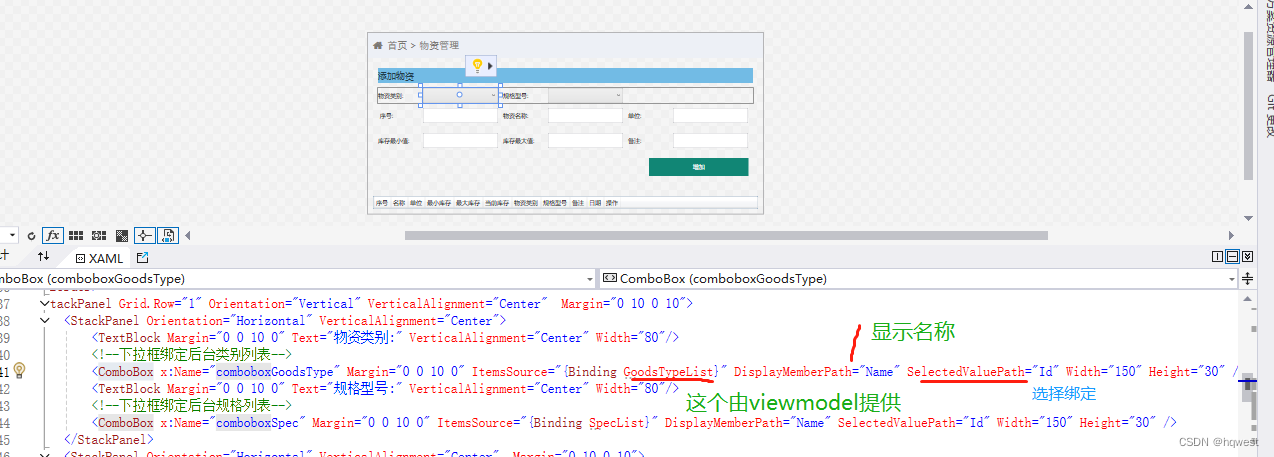
cs
<UserControl x:Class="West.StoreMgr.View.GoodsView"
xmlns="http://schemas.microsoft.com/winfx/2006/xaml/presentation"
xmlns:x="http://schemas.microsoft.com/winfx/2006/xaml"
xmlns:mc="http://schemas.openxmlformats.org/markup-compatibility/2006"
xmlns:d="http://schemas.microsoft.com/expression/blend/2008"
xmlns:local="clr-namespace:West.StoreMgr.View"
xmlns:i="http://schemas.microsoft.com/expression/2010/interactivity"
mc:Ignorable="d"
DataContext="{Binding Source={StaticResource Locator},Path=Goods}">
<!--加载页面时获取物资列表数据-->
<i:Interaction.Triggers>
<i:EventTrigger EventName="Loaded">
<i:InvokeCommandAction Command="{Binding LoadCommand}"/>
</i:EventTrigger>
</i:Interaction.Triggers>
<Grid>
<Grid.RowDefinitions>
<RowDefinition Height="50"/>
<RowDefinition/>
<RowDefinition/>
</Grid.RowDefinitions>
<!--标题-->
<StackPanel Background="#EDF0F6" Orientation="Horizontal">
<TextBlock Margin="10 0 0 0" Text="" FontSize="20" FontFamily="/Fonts/#FontAwesome" HorizontalAlignment="Left" VerticalAlignment="Center" Foreground="#797672"/>
<TextBlock Margin="10 0 0 0" Text="首页 > 物资管理" FontSize="20" FontFamily="/Fonts/#FontAwesome" HorizontalAlignment="Left" VerticalAlignment="Center" Foreground="#797672"/>
</StackPanel>
<!--增加-->
<Grid Grid.Row="1" Margin="20">
<Grid.RowDefinitions>
<RowDefinition Height="30"/>
<RowDefinition/>
</Grid.RowDefinitions>
<Border Background="#72BBE5">
<TextBlock Text="添加物资" FontSize="18" VerticalAlignment="Center" Foreground="#1F3C4C" Margin="0 0 10 0"/>
</Border>
<StackPanel Grid.Row="1" Orientation="Vertical" VerticalAlignment="Center" Margin="0 10 0 10">
<StackPanel Orientation="Horizontal" VerticalAlignment="Center">
<TextBlock Margin="0 0 10 0" Text="物资类别:" VerticalAlignment="Center" Width="80"/>
<!--下拉框绑定后台类别列表-->
<ComboBox x:Name="comboboxGoodsType" Margin="0 0 10 0" ItemsSource="{Binding GoodsTypeList}" DisplayMemberPath="Name" SelectedValuePath="Id" Width="150" Height="30" />
<TextBlock Margin="0 0 10 0" Text="规格型号:" VerticalAlignment="Center" Width="80"/>
<!--下拉框绑定后台规格列表-->
<ComboBox x:Name="comboboxSpec" Margin="0 0 10 0" ItemsSource="{Binding SpecList}" DisplayMemberPath="Name" SelectedValuePath="Id" Width="150" Height="30" />
</StackPanel>
<StackPanel Orientation="Horizontal" VerticalAlignment="Center" Margin="0 10 0 10">
<TextBlock Margin="0 0 10 0" Text=" 序号:" VerticalAlignment="Center" Width="80"/>
<TextBox HorizontalAlignment="Left" VerticalAlignment="Center" TextAlignment="Left" VerticalContentAlignment="Center" Margin="0 0 10 0" Text="{Binding Goods.Serial,Mode=TwoWay,UpdateSourceTrigger=PropertyChanged}" Width="150" Height="30" />
<TextBlock Margin="0 0 10 0" Text="物资名称:" VerticalAlignment="Center" Width="80"/>
<TextBox HorizontalAlignment="Left" VerticalAlignment="Center" TextAlignment="Left" VerticalContentAlignment="Center" Margin="0 0 10 0" Text="{Binding Goods.Name,Mode=TwoWay,UpdateSourceTrigger=PropertyChanged}" Width="150" Height="30" />
<TextBlock Margin="0 0 10 0" Text="单位:" VerticalAlignment="Center" Width="80"/>
<TextBox HorizontalAlignment="Left" VerticalAlignment="Center" TextAlignment="Left" VerticalContentAlignment="Center" Margin="0 0 10 0" Text="{Binding Goods.Unit,Mode=TwoWay,UpdateSourceTrigger=PropertyChanged}" Width="150" Height="30" />
</StackPanel>
<StackPanel Orientation="Horizontal" VerticalAlignment="Center" Margin="0 10 0 10">
<TextBlock Margin="0 0 10 0" Text="库存最小值:" VerticalAlignment="Center" Width="80"/>
<TextBox HorizontalAlignment="Left" VerticalAlignment="Center" TextAlignment="Left" VerticalContentAlignment="Center" Margin="0 0 10 0" Text="{Binding Goods.Min,Mode=TwoWay,UpdateSourceTrigger=PropertyChanged}" Width="150" Height="30" />
<TextBlock Margin="0 0 10 0" Text="库存最大值:" VerticalAlignment="Center" Width="80"/>
<TextBox HorizontalAlignment="Left" VerticalAlignment="Center" TextAlignment="Left" VerticalContentAlignment="Center" Margin="0 0 10 0" Text="{Binding Goods.Max,Mode=TwoWay,UpdateSourceTrigger=PropertyChanged}" Width="150" Height="30" />
<TextBlock Margin="0 0 10 0" Text="备注:" VerticalAlignment="Center" Width="80"/>
<TextBox HorizontalAlignment="Left" VerticalAlignment="Center" TextAlignment="Left" VerticalContentAlignment="Center" Margin="0 0 10 0" Text="{Binding Goods.Tag,Mode=TwoWay,UpdateSourceTrigger=PropertyChanged}" Width="150" Height="30" />
</StackPanel>
<StackPanel Orientation="Horizontal" VerticalAlignment="Center" Margin="0 10 0 10">
<Button Margin="542 0 0 0" Height="36" Width="199" Grid.Row="3"
Content="增加" Style="{StaticResource ButtonStyle}"
CommandParameter="{Binding RelativeSource={RelativeSource Mode=FindAncestor,AncestorType=local:GoodsView}}"
Command="{Binding AddCommand}"/>
</StackPanel>
</StackPanel>
</Grid>
<!--浏览-->
<Grid Grid.Row="2" Margin="10 0 10 10">
<DataGrid ItemsSource="{Binding GoodsList}" CanUserDeleteRows="False" CanUserAddRows="False" AutoGenerateColumns="False">
<DataGrid.Columns>
<DataGridTextColumn Header="序号" Binding="{Binding Serial}"/>
<DataGridTextColumn Header="名称" Binding="{Binding Name}"/>
<DataGridTextColumn Header="单位" Binding="{Binding Unit}"/>
<DataGridTextColumn Header="最小库存" Binding="{Binding Min}"/>
<DataGridTextColumn Header="最大库存" Binding="{Binding Max}"/>
<DataGridTextColumn Header="当前库存" Binding="{Binding Quant}"/>
<DataGridTextColumn Header="物资类别" Binding="{Binding GoodsTypeName}" IsReadOnly="True"/>
<DataGridTextColumn Header="规格型号" Binding="{Binding SpecName}" IsReadOnly="True"/>
<DataGridTextColumn Header="备注" Binding="{Binding Tag}"/>
<DataGridTextColumn Header="日期" Binding="{Binding InsertDate}"/>
<DataGridTemplateColumn Header="操作">
<DataGridTemplateColumn.CellTemplate>
<DataTemplate>
<StackPanel Orientation="Horizontal">
<Button Content="编辑"
Command="{Binding RelativeSource={RelativeSource Mode=FindAncestor,AncestorType=local:GoodsView},Path=DataContext.EditCommand}"
CommandParameter="{Binding RelativeSource={RelativeSource Mode=Self}}"
Tag="{Binding}"
Style="{StaticResource DataGridButtonStyle}" />
<Button Content="删除"
Command="{Binding RelativeSource={RelativeSource Mode=FindAncestor,AncestorType=local:GoodsView},Path=DataContext.DeleteCommand}"
CommandParameter="{Binding RelativeSource={RelativeSource Mode=Self}}"
Tag="{Binding}"
Style="{StaticResource DataGridButtonStyle}" />
</StackPanel>
</DataTemplate>
</DataGridTemplateColumn.CellTemplate>
</DataGridTemplateColumn>
</DataGrid.Columns>
</DataGrid>
</Grid>
</Grid>
</UserControl>3、添加viewmodel

cs
using GalaSoft.MvvmLight;
using GalaSoft.MvvmLight.Command;
using System;
using System.Collections.Generic;
using System.Linq;
using System.Text;
using System.Threading.Tasks;
using System.Windows.Controls;
using CommonServiceLocator;
using West.StoreMgr.Service;
using West.StoreMgr.Helper;
using West.StoreMgr.View;
using West.StoreMgr.Windows;
using static West.StoreMgr.Windows.MsgBoxWindow;

namespace West.StoreMgr.ViewModel
{
    /// <summary>
    /// 物资viewmodel
    /// </summary>
    public class GoodsViewModel : ViewModelBase
    {
        public GoodsViewModel()
        {

        }

        private Goods goods = new Goods();
        public Goods Goods
        {
            get { return goods; }
            set { goods = value; RaisePropertyChanged(); }
        }

        private List<Goods> goodsList = new List<Goods>();
        /// <summary>
        /// 物资列表
        /// </summary>
        public List<Goods> GoodsList
        {
            get { return goodsList; }
            set { goodsList = value; RaisePropertyChanged(); }
        }

        private List<GoodsType> goodsTypeList = new List<GoodsType>();
        /// <summary>
        /// 物资类别集合
        /// </summary>
        public List<GoodsType> GoodsTypeList
        {
            get { return goodsTypeList; }
            set { goodsTypeList = value; RaisePropertyChanged(); }
        }

        private List<Spec> specList = new List<Spec>();
        /// <summary>
        /// 物资规格集合
        /// </summary>
        public List<Spec> SpecList
        {
            get { return specList; }
            set { specList = value; RaisePropertyChanged(); }
        }

        /// <summary>
        /// 加载页面时获取数据
        /// </summary>
        public RelayCommand LoadCommand
        {
            get
            {
                return new RelayCommand(() =>
                {
                    GoodsList = new GoodsService().Select();//物资列表
                    GoodsTypeList = new GoodsTypeService().Select();//物资类别列表
                    SpecList = new SpecService().Select();//规格列表
                });
            }
        }


        //添加
        public RelayCommand<UserControl> AddCommand
        {
            get
            {
                var command = new RelayCommand<UserControl>((obj) =>
                {
                    if (!(obj is GoodsView view)) return;
                    if (string.IsNullOrEmpty(Goods.Name) == true
                    || string.IsNullOrEmpty(Goods.Serial) == true)
                    {
                        MsgWinHelper.ShowError("序号和名字不能为空");
                        return;
                    }

                    Goods.InsertDate = DateTime.Now;
                    Goods.UserInfoId = AppData.Instance.User.Id;
                    var goodsType = view.comboboxGoodsType.SelectedItem as GoodsType;//将选择的下拉框类别转换成物资类别对象
                    var spec = view.comboboxSpec.SelectedItem as Spec;//将选择的下拉框规格转换成物资规格对象
                    if (goodsType != null) Goods.GoodsTypeId = goodsType.Id;
                    if (spec != null) Goods.SpecId = spec.Id;

                    var service = new GoodsService();
                    int count = service.Insert(Goods);
                    if (count > 0)
                    {
                        GoodsList = service.Select();
                        MsgWinHelper.ShowMessage("物资添加成功!");
                        Goods = new Goods();
                    }
                    else
                    {
                        MsgWinHelper.ShowError("物资添加失败!");
                    }
                });

                return command;
            }
        }

        //修改
        public RelayCommand<Button> EditCommand
        {
            get
            {
                var command = new RelayCommand<Button>((view) =>
                {
                    var old = view.Tag as Goods;
                    if (old == null) return;
                    var vm = ServiceLocator.Current.GetInstance<EditGoodsViewModel>();
                    vm.Goods = old;
                    vm.GoodsType = vm.GoodsTypeList.FirstOrDefault(t => t.Id == old.GoodsTypeId);
                    vm.Spec = vm.SpecList.FirstOrDefault(t => t.Id == old.SpecId);
                    var window = new EditGoodsWindow();
                    window.ShowDialog();
                    GoodsList = new GoodsService().Select();
                });

                return command;
            }
        }

        //删除
        public RelayCommand<Button> DeleteCommand
        {
            get
            {
                var command = new RelayCommand<Button>((view) =>
                {
                    if (MsgWinHelper.ShowQuestion("您确定要删除该物资吗?") == CustomMessageBoxResult.OK)
                    {
                        var old = view.Tag as Goods;
                        if (old == null) return;

                        var service = new GoodsService();
                        int count = service.Delete(old);
                        if (count > 0)
                        {
                            GoodsList = service.Select();
                            MsgWinHelper.ShowMessage("操作成功");
                        }
                        else
                        {
                            MsgWinHelper.ShowError("操作失败");
                        }
                    }
                });

                return command;
            }
        }
    }
}
4、运行程序

 5、修改物资
1)添加窗体
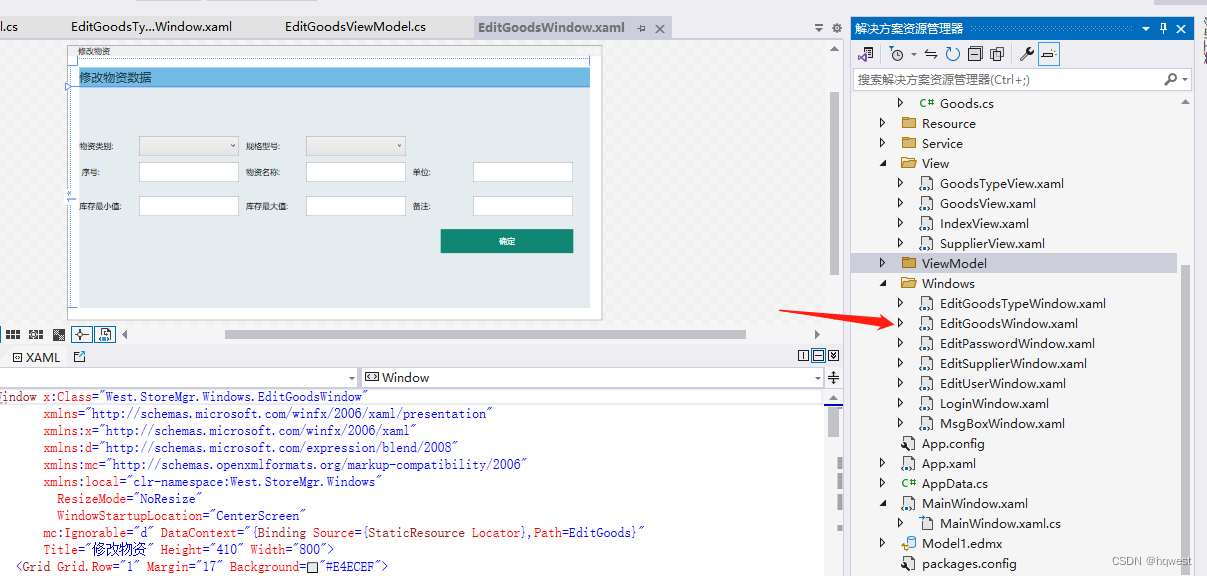
2)UI布局
cs
<Window x:Class="West.StoreMgr.Windows.EditGoodsWindow"
        xmlns="http://schemas.microsoft.com/winfx/2006/xaml/presentation"
        xmlns:x="http://schemas.microsoft.com/winfx/2006/xaml"
        xmlns:d="http://schemas.microsoft.com/expression/blend/2008"
        xmlns:mc="http://schemas.openxmlformats.org/markup-compatibility/2006"
        xmlns:local="clr-namespace:West.StoreMgr.Windows"
          ResizeMode="NoResize"
          WindowStartupLocation="CenterScreen"
        mc:Ignorable="d" DataContext="{Binding Source={StaticResource Locator},Path=EditGoods}"
        Title="修改物资" Height="410" Width="800">
    <Grid Grid.Row="1" Margin="17" Background="#E4ECEF">
        <Grid.RowDefinitions>
            <RowDefinition Height="30"/>
            <RowDefinition/>
        </Grid.RowDefinitions>
        <Border Background="#72BBE5">
            <TextBlock Text="修改物资数据" FontSize="18" VerticalAlignment="Center" Foreground="#1F3C4C" Margin="0 0 10 0"/>
        </Border>
        <StackPanel Grid.Row="1" Orientation="Vertical" VerticalAlignment="Center"  Margin="0 10 0 10">
            <StackPanel Orientation="Horizontal" VerticalAlignment="Center">
                <TextBlock Margin="0 0 10 0" Text="物资类别:" VerticalAlignment="Center" Width="80"/>
                <ComboBox x:Name="comboboxGoodsType" Margin="0 0 10 0" ItemsSource="{Binding GoodsTypeList}" SelectedItem="{Binding GoodsType}" DisplayMemberPath="Name" SelectedValuePath="Id" Width="150" Height="30" />
                <TextBlock Margin="0 0 10 0" Text="规格型号:" VerticalAlignment="Center" Width="80"/>
                <ComboBox x:Name="comboboxSpec" Margin="0 0 10 0" ItemsSource="{Binding SpecList}" SelectedItem="{Binding Spec}" DisplayMemberPath="Name" SelectedValuePath="Id" Width="150" Height="30" />
            </StackPanel>
            <StackPanel Orientation="Horizontal" VerticalAlignment="Center"  Margin="0 10 0 10">
                <TextBlock Margin="0 0 10 0" Text=" 序号:" VerticalAlignment="Center" Width="80"/>
                <TextBox Margin="0 0 10 0" Text="{Binding Goods.Serial,Mode=TwoWay,UpdateSourceTrigger=PropertyChanged}" Width="150" Height="30" IsReadOnly="True" />
                <TextBlock Margin="0 0 10 0" Text="物资名称:" VerticalAlignment="Center" Width="80"/>
                <TextBox Margin="0 0 10 0" Text="{Binding Goods.Name,Mode=TwoWay,UpdateSourceTrigger=PropertyChanged}" Width="150" Height="30" />
                <TextBlock Margin="0 0 10 0" Text="单位:" VerticalAlignment="Center" Width="80"/>
                <TextBox Margin="0 0 10 0" Text="{Binding Goods.Unit,Mode=TwoWay,UpdateSourceTrigger=PropertyChanged}" Width="150" Height="30" />
            </StackPanel>
            <StackPanel Orientation="Horizontal" VerticalAlignment="Center"  Margin="0 10 0 10">
                <TextBlock Margin="0 0 10 0" Text="库存最小值:" VerticalAlignment="Center" Width="80"/>
                <TextBox Margin="0 0 10 0" Text="{Binding Goods.Min,Mode=TwoWay,UpdateSourceTrigger=PropertyChanged}" Width="150" Height="30" />
                <TextBlock Margin="0 0 10 0" Text="库存最大值:" VerticalAlignment="Center" Width="80"/>
                <TextBox Margin="0 0 10 0" Text="{Binding Goods.Max,Mode=TwoWay,UpdateSourceTrigger=PropertyChanged}" Width="150" Height="30" />
                <TextBlock Margin="0 0 10 0" Text="备注:" VerticalAlignment="Center" Width="80"/>
                <TextBox Margin="0 0 10 0" Text="{Binding Goods.Tag,Mode=TwoWay,UpdateSourceTrigger=PropertyChanged}" Width="150" Height="30" />
            </StackPanel>
            <StackPanel Orientation="Horizontal" VerticalAlignment="Center" Margin="0 10 0 10">
                <!--button-->
                <Button Margin="542 0 0 0" Height="36" Width="199" Grid.Row="3" FontSize="21"
                        Content="确 定" Style="{StaticResource ButtonStyle}"
                        CommandParameter="{Binding RelativeSource={RelativeSource Mode=FindAncestor,AncestorType=local:EditGoodsWindow}}"
                        Command="{Binding EditCommand}"/>
            </StackPanel>
        </StackPanel>
    </Grid>
</Window>
3)添加viewmodel
cs
using GalaSoft.MvvmLight;
using GalaSoft.MvvmLight.Command;
using System;
using System.Collections.Generic;
using System.Linq;
using System.Text;
using System.Threading.Tasks;
using System.Windows;
using West.StoreMgr.Helper;
using West.StoreMgr.Service;

namespace West.StoreMgr.ViewModel
{
    /// <summary>
    /// 修改物资viewmodel
    /// </summary>
    public class EditGoodsViewModel : ViewModelBase
    {
        public EditGoodsViewModel()
        {
            GoodsTypeList = new GoodsTypeService().Select();
            SpecList = new SpecService().Select();
        }


        private GoodsType goodsType = new GoodsType();
        /// <summary>
        /// 物资类别
        /// </summary>
        public GoodsType GoodsType
        {
            get { return goodsType; }
            set { goodsType = value; RaisePropertyChanged(); }
        }

        private Spec spec = new Spec();
        /// <summary>
        /// 物资规格
        /// </summary>
        public Spec Spec
        {
            get { return spec; }
            set { spec = value; RaisePropertyChanged(); }
        }


        private List<GoodsType> goodsTypeList = new List<GoodsType>();
        /// <summary>
        /// 物资类别集合
        /// </summary>
        public List<GoodsType> GoodsTypeList
        {
            get { return goodsTypeList; }
            set { goodsTypeList = value; RaisePropertyChanged(); }
        }

        private List<Spec> specList = new List<Spec>();
        /// <summary>
        /// 物资规格集合
        /// </summary>
        public List<Spec> SpecList
        {
            get { return specList; }
            set { specList = value; RaisePropertyChanged(); }
        }


        private Goods goods = new Goods();
        public Goods Goods
        {
            get { return goods; }
            set { goods = value; RaisePropertyChanged(); }
        }

        //修改
        public RelayCommand<Window> EditCommand
        {
            get
            {
                var command = new RelayCommand<Window>((window) =>
                {
                    if (string.IsNullOrEmpty(Goods.Name) == true
                    || string.IsNullOrEmpty(Goods.Serial) == true)
                    {
                        MsgWinHelper.ShowError("序号和名字不能为空!");
                        return;
                    }
                    Goods.GoodsTypeId = GoodsType.Id;
                    Goods.SpecId = Spec.Id;
                    var service = new GoodsService();
                    int count = service.Update(Goods);
                    if (count > 0)
                    {
                        MsgWinHelper.ShowMessage("修改成功!");
                        window.Close();
                    }
                    else
                    {
                        MsgWinHelper.ShowError("修改失败!");
                    }
                });

                return command;
            }
        }


        //取消
        public RelayCommand<Window> CancelCommand
        {
            get
            {
                var command = new RelayCommand<Window>((window) =>
                {
                    window.Close();
                });

                return command;
            }
        }
    }
}
4)运行程序
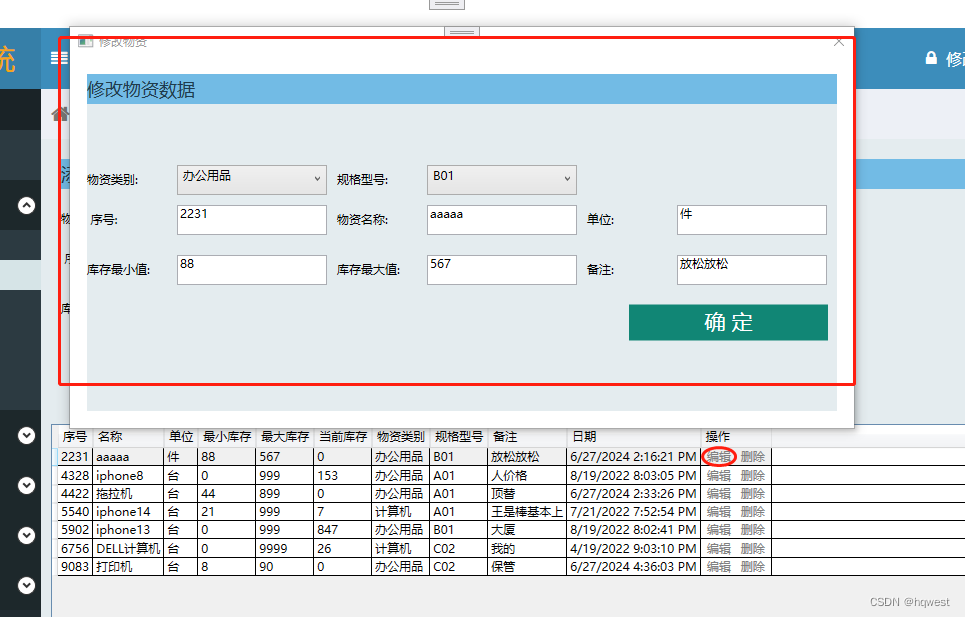
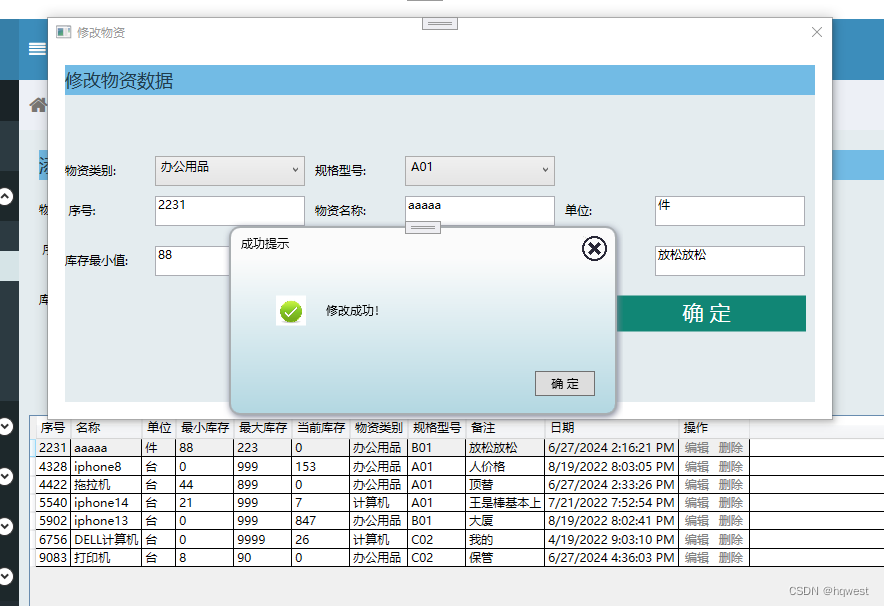
6、删除物资
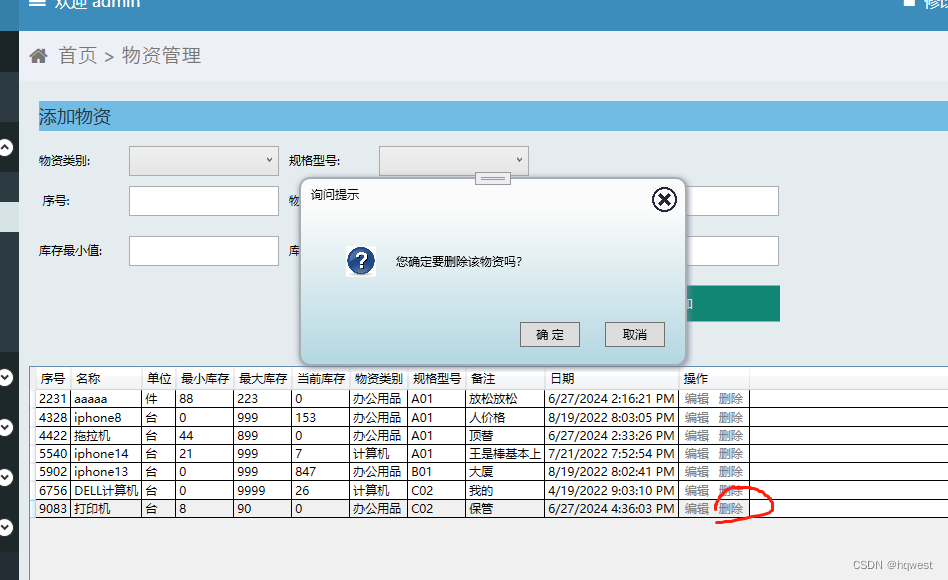

原创不易,打字不易,截图不易,多多点赞,送人玫瑰,留有余香,财务自由明日实现。