《深入浅出WPF》读书笔记.6binding系统(中)
背景
这章主要讲各种模式的数据源和目标的绑定。
代码
把控件作为Binding源与Binding标记扩展
方便UI元素之间进行关联互动
cs
<Window x:Class="BindingSysDemo.BindingEle"
        xmlns="http://schemas.microsoft.com/winfx/2006/xaml/presentation"
        xmlns:x="http://schemas.microsoft.com/winfx/2006/xaml"
        xmlns:d="http://schemas.microsoft.com/expression/blend/2008"
        xmlns:mc="http://schemas.openxmlformats.org/markup-compatibility/2006"
        xmlns:local="clr-namespace:BindingSysDemo"
        mc:Ignorable="d"
        Title="BindingEle" Height="300" Width="400">
    <Grid>
        <Canvas>
            <TextBox x:Name="tb1" Text="{Binding ElementName=slider1, Path=Value, Mode=TwoWay, UpdateSourceTrigger=PropertyChanged}" Width="200"
                     Canvas.Left="100" Canvas.Top="117" HorizontalAlignment="Center" VerticalAlignment="Top"></TextBox>
            <Slider x:Name="slider1" Maximum="100" Minimum="0" Canvas.Left="100" Canvas.Top="142" Width="200"
                    RenderTransformOrigin="0.5,-0.069" HorizontalAlignment="Center" VerticalAlignment="Top"
                    Value="50"/>
            <Button x:Name="btn" Content="失去焦点" Width="120" Canvas.Left="140" Canvas.Top="165"></Button>
        </Canvas>
    </Grid>
</Window>
控制Binding的方向及数据更新
Mode:
TwoWay:双向
OneWay:单向(source到target)
OneTime:一次(source到target)
OneWayToSource:单向(Target到source)
Default:看情况随机调整
Binding的路径(Path)
使用binding path来指定所关注的属性值
cs
<Window x:Class="BindingSysDemo.ListPathDemo"
        xmlns="http://schemas.microsoft.com/winfx/2006/xaml/presentation"
        xmlns:x="http://schemas.microsoft.com/winfx/2006/xaml"
        xmlns:d="http://schemas.microsoft.com/expression/blend/2008"
        xmlns:mc="http://schemas.openxmlformats.org/markup-compatibility/2006"
        xmlns:local="clr-namespace:BindingSysDemo"QA
        xmlns:sys="clr-namespace:System;assembly=mscorlib"
        mc:Ignorable="d"
        Title="ListPathDemo" Height="300" Width="400">
    <Grid>
        <StackPanel>
            <StackPanel.Resources>
                <sys:String x:Key="myStr">
                    菩提本无树,明镜亦非台
                </sys:String>
            </StackPanel.Resources>
            <TextBox x:Name="tb1"></TextBox>
            <TextBox x:Name="tb2"></TextBox>
            <TextBox x:Name="tb3"></TextBox>
            <TextBox x:Name="tbNopath" Text="{Binding Path=.,Source={StaticResource ResourceKey=myStr}}"></TextBox>
        </StackPanel>

    </Grid>
</Window>
cs
using System;
using System.Collections.Generic;
using System.Linq;
using System.Text;
using System.Threading.Tasks;
using System.Windows;
using System.Windows.Controls;
using System.Windows.Data;
using System.Windows.Documents;
using System.Windows.Input;
using System.Windows.Media;
using System.Windows.Media.Imaging;
using System.Windows.Shapes;

namespace BindingSysDemo
{
    /// <summary>
    /// ListPathDemo.xaml 的交互逻辑
    /// </summary>
    public partial class ListPathDemo : Window
    {
        public ListPathDemo()
        {
            InitializeComponent();
            //List<string> strList = new List<string>() { "Tim", "Tom", "John" };
            //this.tb1.SetBinding(TextBox.TextProperty, new Binding("/") { Source = strList });
            //this.tb2.SetBinding(TextBox.TextProperty, new Binding("/Length") { Source = strList, Mode = BindingMode.OneWay });
            //this.tb3.SetBinding(TextBox.TextProperty, new Binding("/[2]") { Source = strList, Mode = BindingMode.OneWay });

            List<Country> countryList = new List<Country>(){new Country()
            {
                Name = "美国",
                ProvinceList = new List<Province> { new Province { Name="德克萨斯洲",CityList=new List<City>
            {
                new City{Name="纽约"},
                new City{Name="哈萨克"}
            } } }
            } };
            this.tb1.SetBinding(TextBox.TextProperty, new Binding("/Name") { Source = countryList });
            this.tb2.SetBinding(TextBox.TextProperty, new Binding("/ProvinceList/Name") { Source = countryList, Mode = BindingMode.OneWay });
            this.tb3.SetBinding(TextBox.TextProperty, new Binding("/ProvinceList/CityList/Name") { Source = countryList, Mode = BindingMode.OneWay });
        }
    }
    class City
    {
        public string Name { get; set; }
    }

    class Province
    {
        public string Name { get; set; }
        public List<City> CityList { get; set; }
    }

    class Country
    {
        public string Name { get; set; }
        public List<Province> ProvinceList { get; set; }
    }
}
"没有Path"的Binding
binding源本身就是数据,Path=.指定自身
cs
<Window x:Class="BindingSysDemo.ListPathDemo"
        xmlns="http://schemas.microsoft.com/winfx/2006/xaml/presentation"
        xmlns:x="http://schemas.microsoft.com/winfx/2006/xaml"
        xmlns:d="http://schemas.microsoft.com/expression/blend/2008"
        xmlns:mc="http://schemas.openxmlformats.org/markup-compatibility/2006"
        xmlns:local="clr-namespace:BindingSysDemo"
        xmlns:sys="clr-namespace:System;assembly=mscorlib"
        mc:Ignorable="d"
        Title="ListPathDemo" Height="300" Width="400">
    <Grid>
        <StackPanel>
            <StackPanel.Resources>
                <sys:String x:Key="myStr">
                    菩提本无树,明镜亦非台
                </sys:String>
            </StackPanel.Resources>
            <TextBox x:Name="tb1"></TextBox>
            <TextBox x:Name="tb2"></TextBox>
            <TextBox x:Name="tb3"></TextBox>
            <TextBox x:Name="tbNopath" Text="{Binding Path=.,Source={StaticResource ResourceKey=myStr}}"></TextBox>
        </StackPanel>

    </Grid>
</Window>
为Binding指定源(Source)的几种方法
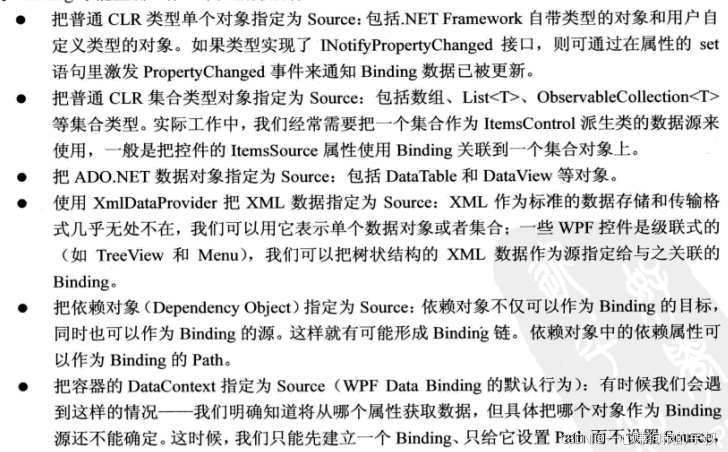

没有Source的BindingDatataContext作为Binding的源
DataContext做为依赖属性当控件底层元素没有设置dataconetxt时会向下传递。看起来像在一层一层向上找。
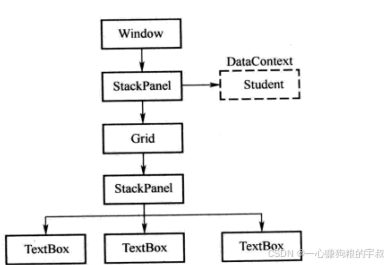
cs
<Window x:Class="BindingSysDemo.DataContextDemo"
        xmlns="http://schemas.microsoft.com/winfx/2006/xaml/presentation"
        xmlns:x="http://schemas.microsoft.com/winfx/2006/xaml"
        xmlns:d="http://schemas.microsoft.com/expression/blend/2008"
        xmlns:mc="http://schemas.openxmlformats.org/markup-compatibility/2006"
        xmlns:local="clr-namespace:BindingSysDemo"
        mc:Ignorable="d"
        Title="DataContextDemo" Height="300" Width="400">
    <StackPanel Background="LightBlue">
        <StackPanel.DataContext>
            <local:Employee Id="1" Age="20" Name="Jack"></local:Employee>
        </StackPanel.DataContext>
        <Grid>
        <StackPanel>
            <TextBox Text="{Binding Path=Id}" Margin="5"></TextBox>
            <TextBox Text="{Binding Path=Name}" Margin="5"></TextBox>
            <TextBox Text="{Binding Path=Age}" Margin="5"></TextBox>
        </StackPanel>
    </Grid>
    </StackPanel>
</Window>
使用集合对象作为列表控件的 ItemsSource
在使用集合类型作为列表控件的ItemsSource 时一般会考虑使用ObservableCollection<T>代替
List<T>,因为ObservableCollection<T>类实现了INotifyCollectionChanged和INotifyPropertyChanged接口,能把集合的变化
立刻通知显示它的列表控件,改变会立刻显现出来,
cs
<Window x:Class="BindingSysDemo.ItemSourceDemo"
        xmlns="http://schemas.microsoft.com/winfx/2006/xaml/presentation"
        xmlns:x="http://schemas.microsoft.com/winfx/2006/xaml"
        xmlns:d="http://schemas.microsoft.com/expression/blend/2008"
        xmlns:mc="http://schemas.openxmlformats.org/markup-compatibility/2006"
        xmlns:local="clr-namespace:BindingSysDemo"
        mc:Ignorable="d"
        Title="ItemSourceDemo" Height="300" Width="400">
    <Grid>
        <StackPanel x:Name="sp1" Background="LightBlue">
            <TextBlock Text="Employee ID:" Margin="5"></TextBlock>
            <TextBox x:Name="tbId" Margin="5"></TextBox>
            <TextBlock x:Name="tblId" Margin="5" Text="Employee List:"></TextBlock>
            <ListBox x:Name="listBoxEmployee" Height="150" Margin="5">
                <!--在xaml中适用DataTemplate-->
                <ListBox.ItemTemplate>
                    <DataTemplate>
                        <StackPanel Orientation="Horizontal">
                            <TextBlock Text="{Binding Path=Id}" Width="120"></TextBlock>
                            <TextBlock Text="{Binding Path=Name}" Width="120"></TextBlock>
                            <TextBlock Text="{Binding Path=Age}" Width="120"></TextBlock>
                        </StackPanel>
                    </DataTemplate>
                </ListBox.ItemTemplate>
            </ListBox>
        </StackPanel>
    </Grid>
</Window>
cs
using System;
using System.Collections.Generic;
using System.Linq;
using System.Text;
using System.Threading.Tasks;
using System.Windows;
using System.Windows.Controls;
using System.Windows.Data;
using System.Windows.Documents;
using System.Windows.Input;
using System.Windows.Media;
using System.Windows.Media.Imaging;
using System.Windows.Shapes;

namespace BindingSysDemo
{
    /// <summary>
    /// ItemSourceDemo.xaml 的交互逻辑
    /// </summary>
    public partial class ItemSourceDemo : Window
    {
        public ItemSourceDemo()
        {
            InitializeComponent();
            List<Employee> employees = new List<Employee>()
            {
                new Employee(){Id=1,Name="Tom",Age="20" },
                new Employee(){Id=2,Name="Shoyn",Age="20" },
                new Employee(){Id=3,Name="Timi",Age="20" },
                new Employee(){Id=4,Name="Jack",Age="20" }
            };
            this.listBoxEmployee.ItemsSource = employees;
            //在listBox获取ItemsSource后会以DisplayMemberPath创建binding
            //this.listBoxEmployee.DisplayMemberPath = "Name";
            Binding binding = new Binding("SelectedItem.Id") { Source = this.listBoxEmployee,
                Mode = BindingMode.OneWay, UpdateSourceTrigger = UpdateSourceTrigger.PropertyChanged };
            this.tbId.SetBinding(TextBox.TextProperty, binding);
        }
    }
}
使用ADO.NET对象作为Binding的源
正常使用dataview用来binding,当datatable放在datacontext中时,可以自动选找到datable的defaultview进行绑定
cs
<Window x:Class="BindingSysDemo.DatatableDemo"
        xmlns="http://schemas.microsoft.com/winfx/2006/xaml/presentation"
        xmlns:x="http://schemas.microsoft.com/winfx/2006/xaml"
        xmlns:d="http://schemas.microsoft.com/expression/blend/2008"
        xmlns:mc="http://schemas.openxmlformats.org/markup-compatibility/2006"
        xmlns:local="clr-namespace:BindingSysDemo"
        mc:Ignorable="d"
        Title="DatatableDemo" Height="300" Width="400">
    <Grid>
        <StackPanel Background="AliceBlue">
            <ListView x:Name="listView1" Height="250" Margin="5">
                <ListView.View>
                    <GridView>
                        <GridViewColumn Header="Id" Width="80" DisplayMemberBinding="{Binding Id}"></GridViewColumn>
                        <GridViewColumn Header="Name" Width="80" DisplayMemberBinding="{Binding Name}"></GridViewColumn>
                        <GridViewColumn Header="Age" Width="80" DisplayMemberBinding="{Binding Age}"></GridViewColumn>
                    </GridView>
                </ListView.View>
            </ListView>
            <Button x:Name="btn1" Click="btn1_Click" Content="点击一下" Width="120"></Button>
        </StackPanel>
    </Grid>
</Window>
cs
using System;
using System.Collections.Generic;
using System.Data;
using System.Linq;
using System.Text;
using System.Threading.Tasks;
using System.Windows;
using System.Windows.Controls;
using System.Windows.Data;
using System.Windows.Documents;
using System.Windows.Input;
using System.Windows.Media;
using System.Windows.Media.Imaging;
using System.Windows.Shapes;

namespace BindingSysDemo
{
    /// <summary>
    /// DatatableDemo.xaml 的交互逻辑
    /// </summary>
    public partial class DatatableDemo : Window
    {
        public DatatableDemo()
        {
            InitializeComponent();
        }

        private void btn1_Click(object sender, RoutedEventArgs e)
        {
            DataTable dt = new DataTable();
            dt.Columns.Add("Id", typeof(int));
            dt.Columns.Add("Name", typeof(string));
            dt.Columns.Add("Age", typeof(string));

            for (int i = 0; i < 5; i++)
            {
                DataRow dataRow = dt.NewRow();
                dataRow["Id"] = i;
                dataRow["Name"] = "Name" + i.ToString();
                dataRow["Age"] = 20 + i;
                dt.Rows.Add(dataRow);
            }

            this.listView1.ItemsSource = dt.DefaultView;
            this.listView1.DisplayMemberPath = "Name";
        }
    }
}
使用XML数据作为Binding的源
使用xpath而不是path
cs
<Window x:Class="BindingSysDemo.XmlSourceBindingDemo"
        xmlns="http://schemas.microsoft.com/winfx/2006/xaml/presentation"
        xmlns:x="http://schemas.microsoft.com/winfx/2006/xaml"
        xmlns:d="http://schemas.microsoft.com/expression/blend/2008"
        xmlns:mc="http://schemas.openxmlformats.org/markup-compatibility/2006"
        xmlns:local="clr-namespace:BindingSysDemo"
        mc:Ignorable="d"
        Title="XmlSourceBindingDemo" Height="400" Width="400">
    <StackPanel>
        <ListView x:Name="listView1" Height="300" Margin="5">
            <ListView.View>
                <GridView>
                    <!--@Id表示xml元素的attribute Id Name则代表子级元素 -->
                    <GridViewColumn Header="Id" Width="120" DisplayMemberBinding="{Binding XPath=@Id}"></GridViewColumn>
                    <GridViewColumn Header="Name" Width="120" DisplayMemberBinding="{Binding XPath=Name}"></GridViewColumn>
                </GridView>
            </ListView.View>
        </ListView>
        <Button x:Name="btn1" Content="添加数据" Width="120" Click="btn1_Click"></Button>
    </StackPanel>
</Window>
cs
using System;
using System.Collections.Generic;
using System.Linq;
using System.Text;
using System.Threading.Tasks;
using System.Windows;
using System.Windows.Controls;
using System.Windows.Data;
using System.Windows.Documents;
using System.Windows.Input;
using System.Windows.Media;
using System.Windows.Media.Imaging;
using System.Windows.Shapes;
using System.Xml;

namespace BindingSysDemo
{
    /// <summary>
    /// XmlSourceBindingDemo.xaml 的交互逻辑
    /// </summary>
    public partial class XmlSourceBindingDemo : Window
    {
        public XmlSourceBindingDemo()
        {
            InitializeComponent();
        }

        private void btn1_Click(object sender, RoutedEventArgs e)
        {
            XmlDocument xmlDocument = new XmlDocument();
            string xmlPath = AppDomain.CurrentDomain.BaseDirectory + "StudentList.xml";
            xmlDocument.Load(xmlPath);
            XmlDataProvider xdp = new XmlDataProvider();
            //xdp.Document = xmlDocument;
            xdp.Source=new Uri(xmlPath);
            xdp.XPath = @"/StudentList/Student";

            this.listView1.DataContext = xdp;
            this.listView1.SetBinding(ListView.ItemsSourceProperty, new Binding());

        }
    }
}
XML
<?xml version="1.0" encoding="utf-8" ?>
<StudentList>
	<Student Id="1">
		<Name>Tom</Name>
		<Age>20</Age>
	</Student>
	<Student Id="2">
		<Name>Tim</Name>
		<Age>20</Age>
	</Student>
	<Student Id="3">
		<Name>Jack</Name>
		<Age>20</Age>
	</Student>
	<Student Id="4">
		<Name>john</Name>
		<Age>20</Age>
	</Student>
	<Student Id="5">
		<Name>Mark</Name>
		<Age>20</Age>
	</Student>
</StudentList>
层级结构
cs
<Window x:Class="BindingSysDemo.HierarchicalDataTplDemo"
        xmlns="http://schemas.microsoft.com/winfx/2006/xaml/presentation"
        xmlns:x="http://schemas.microsoft.com/winfx/2006/xaml"
        xmlns:d="http://schemas.microsoft.com/expression/blend/2008"
        xmlns:mc="http://schemas.openxmlformats.org/markup-compatibility/2006"
        xmlns:local="clr-namespace:BindingSysDemo"
        mc:Ignorable="d"
        Title="HierarchicalDataTplDemo" Height="400" Width="400">
    <Window.Resources>
        <XmlDataProvider x:Key="xdp" XPath="FileSystem/Forder">
            <x:XData>
                <FileSystem xmlns="">
                    <Forder Name="Books">
                        <Forder Name="Programming">
                            <Forder Name="Windows">
                                <Forder Name="WPF"></Forder>
                                <Forder Name="MFC"></Forder>
                                <Forder Name="Dephi"></Forder>
                            </Forder>
                        </Forder>
                        <Forder Name="Tools">
                            <Forder Name="Developmentg"></Forder>
                            <Forder Name="Designment"></Forder>
                            <Forder Name="Players"></Forder>
                        </Forder>
                    </Forder>
                </FileSystem>
            </x:XData>
        </XmlDataProvider>
    </Window.Resources>
    <Grid>
        <TreeView ItemsSource="{Binding Source={StaticResource xdp}}">
            <TreeView.ItemTemplate>
                <HierarchicalDataTemplate ItemsSource="{Binding XPath=Forder}">
                    <TextBlock Text="{Binding XPath=@Name}"></TextBlock>
                </HierarchicalDataTemplate>
            </TreeView.ItemTemplate>
        </TreeView>
    </Grid>
</Window>
使用LINQ检查结果作为Binding的源
cs
<Window x:Class="BindingSysDemo.LinqBindingDemo"
        xmlns="http://schemas.microsoft.com/winfx/2006/xaml/presentation"
        xmlns:x="http://schemas.microsoft.com/winfx/2006/xaml"
        xmlns:d="http://schemas.microsoft.com/expression/blend/2008"
        xmlns:mc="http://schemas.openxmlformats.org/markup-compatibility/2006"
        xmlns:local="clr-namespace:BindingSysDemo"
        mc:Ignorable="d"
        Title="LinqBindingDemo" Height="400" Width="400">
    <Grid>
        <StackPanel Background="AliceBlue">
            <ListView x:Name="listView1" Height="250" Margin="5">
                <ListView.View>
                    <GridView>
                        <GridViewColumn Header="Id" Width="80" DisplayMemberBinding="{Binding Id}"></GridViewColumn>
                        <GridViewColumn Header="Name" Width="80" DisplayMemberBinding="{Binding Name}"></GridViewColumn>
                        <GridViewColumn Header="Age" Width="80" DisplayMemberBinding="{Binding Age}"></GridViewColumn>
                    </GridView>
                </ListView.View>
            </ListView>
            <Button x:Name="btn1" Click="btn1_Click" Content="点击一下" Width="120"></Button>
        </StackPanel>
    </Grid>
</Window>
cs
using System;
using System.Collections.Generic;
using System.Linq;
using System.Text;
using System.Threading.Tasks;
using System.Windows;
using System.Windows.Controls;
using System.Windows.Data;
using System.Windows.Documents;
using System.Windows.Input;
using System.Windows.Media;
using System.Windows.Media.Imaging;
using System.Windows.Shapes;
using System.Xml;
using System.Xml.Linq;

namespace BindingSysDemo
{
    /// <summary>
    /// LinqBindingDemo.xaml 的交互逻辑
    /// </summary>
    public partial class LinqBindingDemo : Window
    {
        public LinqBindingDemo()
        {
            InitializeComponent();
        }

        private void btn1_Click(object sender, RoutedEventArgs e)
        {
            //操作List
            //List<Employee> employees = new List<Employee>()
            //{
            //    new Employee(){Id=1,Name="Tom",Age="20" },
            //    new Employee(){Id=2,Name="Shoyn",Age="20" },
            //    new Employee(){Id=3,Name="Timi",Age="20" },
            //    new Employee(){Id=4,Name="Jack",Age="20" }
            //};
            //this.listView1.ItemsSource = from stu in employees where stu.Name.Contains("T") select stu;
            XDocument xmlDoc = XDocument.Load(AppDomain.CurrentDomain.BaseDirectory + "StudentList2.xml");
            //适用linq操作xml Descendants可以跨越层级
            this.listView1.ItemsSource = from eml in xmlDoc.Descendants("Student")
                                         where eml.Attribute("Name").Value.StartsWith("T")
                                         select new Employee
                                         {
                                             Id = int.Parse(eml.Attribute("Id").Value),
                                             Name = eml.Attribute("Name").Value,
                                             Age = eml.Attribute("Age").Value
                                         };

        }
    }
}
使用ObjectDataProvider对象作为Binding的Source
当不想暴漏类对象的全部属性值,或者想使用方法返回值作为绑定值时
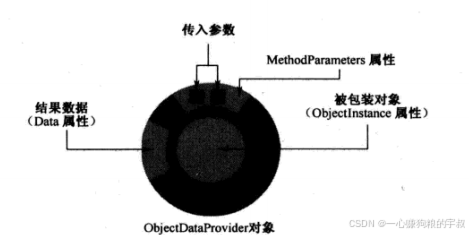
cs
<Window x:Class="BindingSysDemo.ObjectDataProviderDemo"
        xmlns="http://schemas.microsoft.com/winfx/2006/xaml/presentation"
        xmlns:x="http://schemas.microsoft.com/winfx/2006/xaml"
        xmlns:d="http://schemas.microsoft.com/expression/blend/2008"
        xmlns:mc="http://schemas.openxmlformats.org/markup-compatibility/2006"
        xmlns:local="clr-namespace:BindingSysDemo"
        mc:Ignorable="d"
        Title="ObjectDataProviderDemo" Height="400" Width="400">
    <StackPanel Background="AliceBlue">
        <TextBox x:Name="tbArg1" Margin="5"></TextBox>
        <TextBox x:Name="tbArg2" Margin="5"></TextBox>
        <TextBox x:Name="tbRes" Margin="5"></TextBox>
    </StackPanel>
</Window>
cs
using System;
using System.Collections.Generic;
using System.Linq;
using System.Text;
using System.Threading.Tasks;
using System.Windows;
using System.Windows.Controls;
using System.Windows.Data;
using System.Windows.Documents;
using System.Windows.Input;
using System.Windows.Media;
using System.Windows.Media.Imaging;
using System.Windows.Shapes;

namespace BindingSysDemo
{
    /// <summary>
    /// ObjectDataProviderDemo.xaml 的交互逻辑
    /// 当只想暴漏部分属性的时候
    /// </summary>
    public partial class ObjectDataProviderDemo : Window
    {
        public ObjectDataProviderDemo()
        {
            InitializeComponent();
            this.SetBinding();
        }

        private void SetBinding()
        {
            ObjectDataProvider odp = new ObjectDataProvider();
            //让ObjectDataProvider自行创建对象
            //odp.ObjectType = typeof(Calculator);
            odp.ObjectInstance = new Calculator();
            odp.MethodName = "Add";
            //ObjectDataProvider通过参数数量来区分重载方法
            //MethodParameters并非依赖属性
            odp.MethodParameters.Add("0");
            odp.MethodParameters.Add("0");

            Binding binding2Arg1 = new Binding("MethodParameters[0]")
            {
                Source = odp,
                //直接写若obp对象而不是Calculator
                BindsDirectlyToSource = true,
                UpdateSourceTrigger = UpdateSourceTrigger.PropertyChanged
            };

            Binding binding2Arg2 = new Binding("MethodParameters[1]")
            {
                Source = odp,
                BindsDirectlyToSource = true,
                UpdateSourceTrigger = UpdateSourceTrigger.PropertyChanged
            };
            Binding binding2Res = new Binding(".") { Source = odp };

            this.tbArg1.SetBinding(TextBox.TextProperty, binding2Arg1);
            this.tbArg2.SetBinding(TextBox.TextProperty, binding2Arg2);
            this.tbRes.SetBinding(TextBox.TextProperty, binding2Res);

        }
    }
}
cs
using System;
using System.Collections.Generic;
using System.Linq;
using System.Text;
using System.Threading.Tasks;

namespace BindingSysDemo
{
    public class Calculator
    {
        public string Add(string arg1, string arg2)
        {
            double x = 0;
            double y = 0;
            double z = 0;
            if (double.TryParse(arg1, out x) && double.TryParse(arg2, out y))
            {
                z = x + y;
                return z.ToString();
            }
            return "Input Error!";
        }
    }
}
使用Binding的RelativeSource
不确定数据来源,但在UI层级上有关系时使用
cs
<Window x:Class="BindingSysDemo.RelativeSouceDemo"
        xmlns="http://schemas.microsoft.com/winfx/2006/xaml/presentation"
        xmlns:x="http://schemas.microsoft.com/winfx/2006/xaml"
        xmlns:d="http://schemas.microsoft.com/expression/blend/2008"
        xmlns:mc="http://schemas.openxmlformats.org/markup-compatibility/2006"
        xmlns:local="clr-namespace:BindingSysDemo"
        mc:Ignorable="d"
        Title="RelativeSouce" Height="400" Width="400">
    <Grid x:Name="g1" Background="Red" Margin="10">
        <DockPanel x:Name="d1" Background="Orange" Margin="10">
            <Grid x:Name="g2" Background="Yellow" Margin="10">
                <DockPanel x:Name="d2" Background="LawnGreen" Margin="10">
                    <TextBox x:Name="tb1" FontSize="24" Margin="10"
                             Text="{Binding RelativeSource={RelativeSource AncestorLevel=2 ,AncestorType={x:Type Grid}},Path=Name}"></TextBox>
                </DockPanel>
            </Grid>
        </DockPanel>
    </Grid>
</Window>
cs
using System;
using System.Collections.Generic;
using System.Linq;
using System.Text;
using System.Threading.Tasks;
using System.Windows;
using System.Windows.Controls;
using System.Windows.Data;
using System.Windows.Documents;
using System.Windows.Input;
using System.Windows.Media;
using System.Windows.Media.Imaging;
using System.Windows.Shapes;

namespace BindingSysDemo
{
    /// <summary>
    /// RelativeSouce.xaml 的交互逻辑
    /// 当不知道source是什么,但清楚其与binding的目标对象有层级关系时
    /// </summary>
    public partial class RelativeSouceDemo : Window
    {
        public RelativeSouceDemo()
        {
            InitializeComponent();

            /*RelativeSource rs =new RelativeSource(RelativeSourceMode.FindAncestor);//RelativeSourceMode.Self 绑定自身属性

            //从当前层向上找到第二个Grid
            rs.AncestorLevel = 2;
            rs.AncestorType = typeof(Grid);

            Binding binding = new Binding("Name") { RelativeSource = rs };
            this.tb1.SetBinding(TextBox.TextProperty, binding);*/
        }
    }
}
git地址
GitHub - wanghuayu-hub2021/WpfBookDemo: 深入浅出WPF的demo