效果:
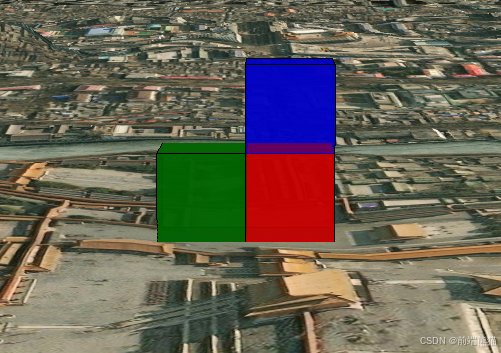
知识了解:
在同一水平上,盒子经纬度计算:经度有误差,纬度没有误差
纬度计算:lat=50/111320 约等于0.000449
经度计算:lon=50/111320*cos(纬度) 约等于0.000519°
一个立方体:
javascript
  // 添加一个立方体
  const redbox = viewer.entities.add({
    // 名称
    name: "Red box with black outline",
    // 位置(经度、纬度、高度)
    position: Cesium.Cartesian3.fromDegrees(116.397, 39.917, 0),
    box: {
      // 设置立方体的尺寸(长宽高)数值单位是米
      dimensions: new Cesium.Cartesian3(40.0, 30.0, 50.0), // 立方体尺寸
      // withAlpha(0.5)表示 50% 的透明度
      material: Cesium.Color.RED.withAlpha(0.5), // 立方体颜色
      outline: true, // 是否显示边框
      outlineColor: Cesium.Color.BLACK, // 边框颜色
    },
  });
  // 将视图聚焦到创建的立方体
  viewer.zoomTo(redbox);
多个立方体:
封装生成多个或者一个立方体的方法:
javascript
//BoxEntityManager.js
import * as Cesium from "cesium";

class BoxEntityManager {
  constructor(viewer) {
    this.viewer = viewer;
    this.boxEntities = [];
  }

  // 创建单个立方体
  createBox (position, dimensions, color, name) {
    const boxEntity = this.viewer.entities.add({
      name: name || `Box-${this.boxEntities.length}`,
      position: position,
      box: {
        dimensions: dimensions || new Cesium.Cartesian3(116.397, 39.917, 100),
        material: color || Cesium.Color.fromRandom({ alpha: 1.0 }),
        outline: true,
        outlineColor: Cesium.Color.BLACK
      }
    });

    this.boxEntities.push(boxEntity);
    return boxEntity;
  }

  // 创建多个立方体
  createMultipleBoxes (positionsArray) {
    positionsArray.forEach((pos, index) => {
      this.createBox(
        Cesium.Cartesian3.fromDegrees(pos.lon, pos.lat, pos.height),
        pos.dimensions,
        pos.color,
        pos.name
      );
    });
  }

  // 根据名称删除立方体
  removeBoxByName (name) {
    const entity = this.boxEntities.find(e => e.name === name);
    if (entity) {
      this.viewer.entities.remove(entity);
      this.boxEntities = this.boxEntities.filter(e => e.name !== name);
    }
  }

  // 删除所有立方体
  removeAllBoxes () {
    this.boxEntities.forEach(entity => {
      this.viewer.entities.remove(entity);
    });
    this.boxEntities = [];
  }

  // 聚焦到所有立方体
  zoomToBoxes () {
    this.viewer.zoomTo(this.viewer.entities);
  }
}

// 导出类
export default BoxEntityManager;
计算经纬度加减50米后的盒子坐标:
javascript
// calculateCoordinateOffset.js
/**
 * 计算经纬度加减50米后的坐标
 * @param {number} longitude - 原始经度
 * @param {number} latitude - 原始纬度
 * @returns {Object} - 返回加减50米后的坐标对象
 */
export function calculateCoordinateOffset (longitude, latitude) {
  // 地球半径(米)
  const EARTH_RADIUS = 6371000;
  // 偏移距离(米)
  const OFFSET_METERS = 50;

  // 计算纬度1度对应的距离(米)
  const LAT_METERS_PER_DEGREE = 111320;
  // 计算经度1度对应的距离(米)(需要根据纬度计算)
  const LON_METERS_PER_DEGREE = LAT_METERS_PER_DEGREE * Math.cos(latitude * Math.PI / 180);

  // 计算偏移的经纬度值
  const latOffset = OFFSET_METERS / LAT_METERS_PER_DEGREE;
  const lonOffset = OFFSET_METERS / LON_METERS_PER_DEGREE;

  return {
    longitude: {
      minus: longitude - lonOffset,  // 经度减50米
      plus: longitude + lonOffset    // 经度加50米
    },
    latitude: {
      minus: latitude - latOffset,   // 纬度减50米
      plus: latitude + latOffset     // 纬度加50米
    }
  };
}
使用:
javascript
<template>
  <div id="cesiumContainer"></div>
</template>

<script setup>
import * as Cesium from "cesium";
import { onMounted, ref } from "vue";
import BoxEntityManager from './js/boxEntities.js';
import { calculateCoordinateOffset } from "./js/coordinateOffset.js";
onMounted(() => {
  // 使用Cesium的Ion服务进行认证
  Cesium.Ion.defaultAccessToken =
    "认证码";

  // 创建一个Viewer实例
  const viewer = new Cesium.Viewer("cesiumContainer", {
    // 使用默认的影像图层和地形图层
    terrainProvider: Cesium.createWorldTerrain({ requestWaterMask: true }),
    // 查找位置工具
    geocoder: false,
    // 返回首页按钮
    homeButton: false,
    // 场景视角
    sceneModePicker: false,
    // 图层选择
    baseLayerPicker: false,
    // 导航帮助信息
    navigationHelpButton: false,
    // 动画播放速度
    animation: false,
    // 时间轴
    timeline: false,
    // 全屏按钮
    fullscreenButton: false,
    // VR按钮
    vrButton: false,
  });
  // 去除logo
  viewer.cesiumWidget.creditContainer.style.display = "none";
  // 飞入
  var destination = Cesium.Cartesian3.fromDegrees(116.397, 39.917, 1000.0);
  viewer.camera.flyTo({
    destination: destination,
    orientation: {
      heading: Cesium.Math.toRadians(0.0),
      pitch: Cesium.Math.toRadians(-90.0),
      roll: 0.0,
    },
  });

  // 创建BoxEntityManager实例
  const boxManager = new BoxEntityManager(viewer);
  const res = calculateCoordinateOffset(116.397, 39.917,);
//打印计算加减五十米的经纬度
  console.log(res, 'res');
  // 定义立方体数据
  const boxesData = [
    {
      lon: 116.397,
      lat: 39.9170,
      height: 0,
      dimensions: new Cesium.Cartesian3(50.0, 50.0, 50.0),
      color: Cesium.Color.RED.withAlpha(0.8),
      name: 'RedBox'
    }, {
      lon: 116.397,
      lat: 39.917449,
      height: 0,
      dimensions: new Cesium.Cartesian3(50.0, 50.0, 50.0),
      color: Cesium.Color.GREEN.withAlpha(0.8),
      name: 'GreenBox'
    },
    {
      lon: 116.397,
      lat: 39.917,
      height: 50,
      dimensions: new Cesium.Cartesian3(50.0, 50.0, 50.0),
      color: Cesium.Color.BLUE.withAlpha(0.8),
      name: 'BlueBox'
    }
  ];

  // 创建多个立方体
  boxManager.createMultipleBoxes(boxesData);

  // 聚焦到立方体
  boxManager.zoomToBoxes();
});

</script>