Android -- SelfView 自定义弹窗式颜色选择器
PS:
1. 弹框式显示;
2. 支持透明度设置;
3. 支持拖动控件选择颜色;
4. 支持 ARGB | HEX 数值填写预览颜色并返回;
5. 输出支持Hex 和 Int 两种格式;
效果
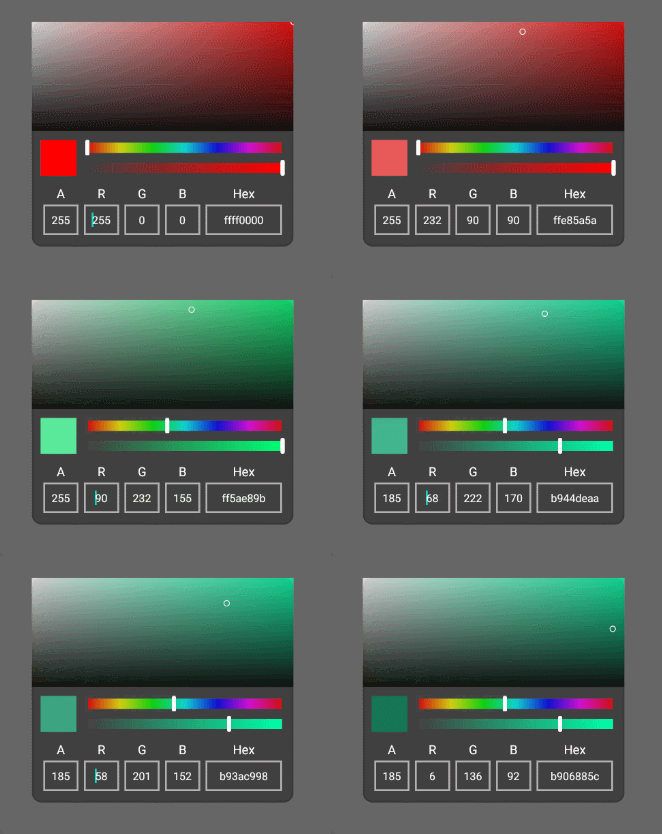
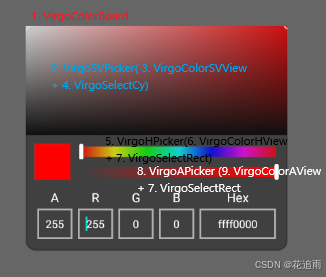
使用方法:
java
//activity 内
//1. 声明
private VirgoColorBoard colorBoard;

//2. 初始化
colorBoard = new VirgoColorBoard(this);//用content会报错
//监听回调:
//a. Avtivity -> implements VirgoColorBoard.ColorCallback
//b. 直接 new VirgoColorBoard.ColorCallback(){...}
colorBoard.setCallback(this);
//弹窗宽、高、透明属性设置,按需
colorBoard.setDialogAlpha(1);
colorBoard.setDialogWidth(768);
colorBoard.setDialogHeight(660);


//回调口执行自定义处理
 @Override
public void onPick(int color) {
    //do something
}

@Override
public void onPickStr(String hex) {
    //do something
}
=====================================
码源:
1. VirgoColorBoard.java(弹框式颜色画板)
java
import android.app.Dialog;
import android.content.Context;
import android.graphics.Color;
import android.os.Handler;
import android.os.Looper;
import android.os.Message;
import android.text.Editable;
import android.text.TextUtils;
import android.text.TextWatcher;
import android.view.Gravity;
import android.view.KeyEvent;
import android.view.LayoutInflater;
import android.view.View;
import android.view.Window;
import android.view.WindowManager;
import android.view.inputmethod.EditorInfo;
import android.view.inputmethod.InputMethodManager;
import android.widget.EditText;
import android.widget.TextView;

import androidx.annotation.ColorInt;
import androidx.annotation.NonNull;

import com.nepalese.harinetest.R;

/**
 * @author nepalese on 2024/12/03 08:43
 * @usage 弹框式颜色画板
 */
public class VirgoColorBoard extends Dialog {
    private static final String TAG = "VirgoColorBoard";
    private static final int MSG_UPDATE_UI = 1;
    private static final int MIN_VALUE = 0;
    private static final int MAX_VALUE = 255;

    private ColorCallback callback;//结果回调

    private VirgoSVPicker svPicker;//饱和度、亮度控制器
    private VirgoHPicker hPicker;//色相控制器
    private VirgoAPicker aPicker;//透明度控制器

    private View preview;//选中颜色预览
    private EditText etA, etR, etG, etB, etColor;

    private int mColor;//传入的颜色
    private int curAlpha;//当前透明度
    private int dialogWidth = -1;//默认为屏幕宽度
    private int dialogHeight = 720;//默认弹框高度
    private float dialogAlpha = 1f;//默认弹框透明度
    private final float[] hsv = new float[3];

    public VirgoColorBoard(@NonNull Context context) {
        super(context, R.style.VirgoColorBoard);
        this.init(context);
    }

    public VirgoColorBoard(@NonNull Context context, int themeResId) {
        super(context, themeResId);
        this.init(context);
    }

    private void init(Context context) {
        this.mColor = Color.RED;//默认
        this.curAlpha = MAX_VALUE;

        LayoutInflater mLayoutInflater = LayoutInflater.from(context);
        View view = mLayoutInflater.inflate(R.layout.layout_color_board, null);

        svPicker = view.findViewById(R.id.svPicker);
        hPicker = view.findViewById(R.id.hPicker);
        aPicker = view.findViewById(R.id.aPicker);

        preview = view.findViewById(R.id.colorPreview);
        etA = view.findViewById(R.id.etA);
        etR = view.findViewById(R.id.etR);
        etG = view.findViewById(R.id.etG);
        etB = view.findViewById(R.id.etB);
        etColor = view.findViewById(R.id.etColor);

        this.setContentView(view);
        this.setListener();
    }

    private void setLayout() {
        Window dialogWindow = this.getWindow();
        WindowManager.LayoutParams lp = dialogWindow.getAttributes();
        dialogWindow.setGravity(Gravity.CENTER);

        if (dialogWidth > 0) {
            lp.width = dialogWidth; // 宽度
        }
        lp.height = dialogHeight; // 高度
        lp.alpha = dialogAlpha; // 透明度

        dialogWindow.setAttributes(lp);
    }

    private void initData() {
        setLayout();
        initColor(true);
    }

    private void initColor(boolean edit) {
        Color.colorToHSV(mColor, hsv);
        curAlpha = Color.alpha(mColor);

        svPicker.setmH(hsv[0]);
        svPicker.setSV(hsv[1], hsv[2]);
        hPicker.setmH(hsv[0]);
        aPicker.setmH(hsv[0]);
        aPicker.setA(curAlpha);

        preview.setBackgroundColor(mColor);
        if(edit){
            etColor.setText(Integer.toHexString(mColor));
        }
        extraARGB(mColor);
    }

    private void setListener() {
        svPicker.setCallback(svCallBack);
        hPicker.setCallback(hCallBack);
        aPicker.setCallback(aCallBack);

        addTextListener();
        etColor.setOnEditorActionListener(new TextView.OnEditorActionListener() {
            @Override
            public boolean onEditorAction(TextView v, int actionId, KeyEvent event) {
                if (actionId == EditorInfo.IME_ACTION_SEARCH || (event != null && (event.getKeyCode() == KeyEvent.KEYCODE_ENTER))) {
                    //收起键盘
                    ((InputMethodManager) etColor.getContext().getSystemService(Context.INPUT_METHOD_SERVICE))
                            .hideSoftInputFromWindow(etColor.getWindowToken(), InputMethodManager.HIDE_NOT_ALWAYS);

                    //要执行任务(这里显示输入的内容)
                    String input = etColor.getText().toString();
                    if (input.length() == 6 || input.length() == 8) {
                        for (Character c : input.toCharArray()) {
                            if (c > 'f') {
                                return true;
                            }
                        }

                        mColor = Color.parseColor("#" + input);
                        initColor(false);
                        if (callback != null) {
                            callback.onPick(mColor);
                            callback.onPickStr("#" + input);
                        }
                    }
                    return true;
                }
                return false;
            }
        });
    }


    //防止edittext settext 与 onTextChanged 发生冲突,在赋值前取消监听,之后重新监听;
    private void addTextListener() {
        etA.addTextChangedListener(watcherA);
        etR.addTextChangedListener(watcherR);
        etG.addTextChangedListener(watcherG);
        etB.addTextChangedListener(watcherB);
    }

    private void removeTextListener() {
        etA.removeTextChangedListener(watcherA);
        etR.removeTextChangedListener(watcherR);
        etG.removeTextChangedListener(watcherG);
        etB.removeTextChangedListener(watcherB);
    }

    //当a/r/g/b输入值大于255或小于0时,强制重置为255或0;
    private void resetInputVlue(EditText et, TextWatcher watcher, int value) {
        et.removeTextChangedListener(watcher);
        if (value > MAX_VALUE) {
            et.setText(String.valueOf(MAX_VALUE));
        } else {
            et.setText(String.valueOf(MIN_VALUE));
        }
        et.addTextChangedListener(watcher);
    }

    //手动调整r/g/b值后,更新需要更改的值
    private void updateWithInput() {
        Color.colorToHSV(mColor, hsv);

        svPicker.setmH(hsv[0]);
        svPicker.setSV(hsv[1], hsv[2]);
        hPicker.setmH(hsv[0]);
        aPicker.setmH(hsv[0]);

        updateSelectColor();
    }

    //更新选中的颜色
    private void updateSelectColor() {
        if (callback != null) {
            callback.onPick(mColor);
            callback.onPickStr("#" + Integer.toHexString(mColor));
        }
        preview.setBackgroundColor(mColor);
        etColor.setText(Integer.toHexString(mColor));
    }

    private final TextWatcher watcherA = new TextWatcher() {
        @Override
        public void beforeTextChanged(CharSequence s, int start, int count, int after) {

        }

        @Override
        public void onTextChanged(CharSequence s, int start, int before, int count) {
            if (TextUtils.isEmpty(s)) return;
            int alph = Integer.parseInt(s.toString());
            if (alph <= MAX_VALUE && alph >= MIN_VALUE) {
                aPicker.setA(alph);
                curAlpha = alph;
                mColor = (alph << 24) | (mColor & 0x00ff0000) | (mColor & 0x0000ff00) | (mColor & 0x000000ff);
                updateSelectColor();
            } else {
                resetInputVlue(etA, this, alph);
            }
        }

        @Override
        public void afterTextChanged(Editable s) {

        }
    };

    private final TextWatcher watcherR = new TextWatcher() {
        @Override
        public void beforeTextChanged(CharSequence s, int start, int count, int after) {

        }

        @Override
        public void onTextChanged(CharSequence s, int start, int before, int count) {
            if (TextUtils.isEmpty(s)) return;
            int r = Integer.parseInt(s.toString());
            if (r <= MAX_VALUE && r >= MIN_VALUE) {
                mColor = (mColor & 0xff000000) | (r & 0x00ff0000) | (mColor & 0x0000ff00) | (mColor & 0x000000ff);
                updateWithInput();
            } else {
                resetInputVlue(etR, this, r);
            }
        }

        @Override
        public void afterTextChanged(Editable s) {

        }
    };

    private final TextWatcher watcherG = new TextWatcher() {
        @Override
        public void beforeTextChanged(CharSequence s, int start, int count, int after) {

        }

        @Override
        public void onTextChanged(CharSequence s, int start, int before, int count) {
            if (TextUtils.isEmpty(s)) return;
            int g = Integer.parseInt(s.toString());
            if (g <= MAX_VALUE && g >= MIN_VALUE) {
                mColor = (mColor & 0xff000000) | (mColor & 0x00ff0000) | (g & 0x0000ff00) | (mColor & 0x000000ff);
                updateWithInput();
            } else {
                resetInputVlue(etG, this, g);
            }
        }

        @Override
        public void afterTextChanged(Editable s) {

        }
    };

    private final TextWatcher watcherB = new TextWatcher() {
        @Override
        public void beforeTextChanged(CharSequence s, int start, int count, int after) {

        }

        @Override
        public void onTextChanged(CharSequence s, int start, int before, int count) {
            if (TextUtils.isEmpty(s)) return;
            int b = Integer.parseInt(s.toString());
            if (b <= MAX_VALUE && b >= MIN_VALUE) {
                mColor = (mColor & 0xff000000) | (mColor & 0x00ff0000) | (mColor & 0x0000ff00) | (b & 0x000000ff);
                updateWithInput();
            } else {
                resetInputVlue(etB, this, b);
            }
        }

        @Override
        public void afterTextChanged(Editable s) {

        }
    };

    //饱和度、亮度回调
    private final VirgoSelectCy.PointCallback svCallBack = new VirgoSelectCy.PointCallback() {
        @Override
        public void onUpdateSV(float s, float v) {
            hsv[1] = s;
            hsv[2] = v;
            mColor = Color.HSVToColor(hsv);
            //透明度不变
            mColor = (curAlpha << 24) | (mColor & 0x00ff0000) | (mColor & 0x0000ff00) | (mColor & 0x000000ff);
            handler.sendEmptyMessage(MSG_UPDATE_UI);
        }
    };

    //色相回调
    private final VirgoSelectRect.RectCallback hCallBack = new VirgoSelectRect.RectCallback() {
        @Override
        public void onProgress(float progress) {
            hsv[0] = progress;
            svPicker.setmH(progress);
            aPicker.setmH(progress);
            mColor = Color.HSVToColor(hsv);
            //透明度不变
            mColor = (curAlpha << 24) | (mColor & 0x00ff0000) | (mColor & 0x0000ff00) | (mColor & 0x000000ff);
            handler.sendEmptyMessage(MSG_UPDATE_UI);
        }
    };

    //透明度回调
    private final VirgoSelectRect.RectCallback aCallBack = new VirgoSelectRect.RectCallback() {
        @Override
        public void onProgress(float progress) {
            int alph = (int) progress;
            curAlpha = alph;
            mColor = (alph << 24) | (mColor & 0x00ff0000) | (mColor & 0x0000ff00) | (mColor & 0x000000ff);
            handler.sendEmptyMessage(MSG_UPDATE_UI);
        }
    };


    private final Handler handler = new Handler(Looper.myLooper()) {
        @Override
        public void handleMessage(@NonNull Message msg) {
            super.handleMessage(msg);
            if (msg.what == MSG_UPDATE_UI) {
                updateUI();
            }
        }
    };

    //选择变化后相应数据改变
    private void updateUI() {
        updateSelectColor();
        extraARGB(mColor);
    }

    //提取某一颜色的a/r/g/b和hex值
    private void extraARGB(int color) {
        removeTextListener();
        int a = color >> 24 & 0xff;
        int r = color >> 16 & 0xff;
        int g = color >> 8 & 0xff;
        int b = color & 0xff;

        etA.setText(String.valueOf(a));
        etR.setText(String.valueOf(r));
        etG.setText(String.valueOf(g));
        etB.setText(String.valueOf(b));
        addTextListener();
    }

    /
    @Override
    public void show() {
        super.show();
        initData();
    }

    @Override
    public void dismiss() {
        super.dismiss();
    }

    //结果回调
    public interface ColorCallback {
        //int
        void onPick(@ColorInt int color);

        //十六进制
        void onPickStr(String hex);
    }


    public void setCallback(ColorCallback callback) {
        this.callback = callback;
    }

    /**
     * 颜色赋值
     */
    public void setmColor(@ColorInt int mColor) {
        this.mColor = mColor;
        curAlpha = Color.alpha(mColor);
    }

    /**
     * 十六进制颜色
     */
    public void setmColor(String color) {
        try {
            this.mColor = Color.parseColor(color);
            curAlpha = Color.alpha(mColor);
        } catch (Exception e) {
            //
        }
    }

    /**
     * 设置弹框宽度
     */
    public void setDialogWidth(int dialogWidth) {
        this.dialogWidth = dialogWidth;
    }

    /**
     * 设置弹窗高度
     */
    public void setDialogHeight(int dialogHeight) {
        this.dialogHeight = dialogHeight;
    }

    /**
     * 设置弹窗透明度
     */
    public void setDialogAlpha(float dialogAlpha) {
        this.dialogAlpha = dialogAlpha;
    }
R.style.VirgoColorBoard (themes.xml)
xml
 <style name="VirgoColorBoard" parent="@android:style/Theme.Dialog">
        <item name="android:windowIsFloating">true</item>
        <item name="android:windowBackground">@android:color/transparent</item>
        <item name="android:windowNoTitle">true</item>
        <item name="android:background">@color/colorTransparent</item>
        <item name="android:backgroundDimEnabled">true</item>
    </style>
layout_color_board.xml
xml
<?xml version="1.0" encoding="utf-8"?>
<LinearLayout xmlns:android="http://schemas.android.com/apk/res/android"
    android:layout_width="match_parent"
    android:layout_height="match_parent"
    android:background="@drawable/frame_color_board"
    android:orientation="vertical">

    <LinearLayout
        android:layout_width="match_parent"
        android:layout_height="0dp"
        android:layout_weight="1">

        <com.nepalese.harinetest.player.color.VirgoSVPicker
            android:id="@+id/svPicker"
            android:layout_width="match_parent"
            android:layout_height="match_parent" />
    </LinearLayout>

    <LinearLayout
        android:layout_width="match_parent"
        android:layout_height="wrap_content"
        android:padding="10dp"
        android:orientation="vertical">

        <LinearLayout
            android:layout_width="match_parent"
            android:layout_height="wrap_content"
            android:layout_marginBottom="10dp"
            android:orientation="horizontal">

            <View
                android:id="@+id/colorPreview"
                android:layout_width="@dimen/size_pre_view"
                android:layout_height="@dimen/size_pre_view"
                android:layout_marginEnd="10dp"
                android:background="@color/colorRed"/>

            <LinearLayout
                android:layout_width="match_parent"
                android:layout_height="match_parent"
                android:orientation="vertical">

                <com.nepalese.harinetest.player.color.VirgoHPicker
                    android:id="@+id/hPicker"
                    android:layout_width="match_parent"
                    android:layout_height="wrap_content"
                    android:layout_weight="1"/>

                <View
                    android:layout_width="wrap_content"
                    android:layout_height="5dp"/>

                <com.nepalese.harinetest.player.color.VirgoAPicker
                    android:id="@+id/aPicker"
                    android:layout_width="match_parent"
                    android:layout_height="wrap_content"
                    android:layout_weight="1" />
            </LinearLayout>
        </LinearLayout>

        <LinearLayout
            android:layout_width="match_parent"
            android:layout_height="wrap_content"
            android:orientation="horizontal">

            <LinearLayout
                android:layout_width="0dp"
                android:layout_height="wrap_content"
                android:layout_weight="1"
                android:gravity="center"
                android:orientation="vertical">

                <TextView
                    android:layout_width="wrap_content"
                    android:layout_height="wrap_content"
                    android:textSize="@dimen/text_14"
                    android:text="A"
                    android:textColor="@color/colorWhite"/>

                <EditText
                    android:id="@+id/etA"
                    android:layout_width="match_parent"
                    android:layout_height="@dimen/size_input_h"
                    android:layout_margin="@dimen/margin_3"
                    android:textSize="@dimen/text_size_12"
                    android:background="@drawable/frame_input"
                    android:textColor="@color/colorWhite"
                    android:textAlignment="center"
                    android:inputType="numberDecimal"/>
            </LinearLayout>

            <LinearLayout
                android:layout_width="0dp"
                android:layout_height="wrap_content"
                android:layout_weight="1"
                android:gravity="center"
                android:orientation="vertical">

                <TextView
                    android:layout_width="wrap_content"
                    android:layout_height="wrap_content"
                    android:textSize="@dimen/text_14"
                    android:text="R"
                    android:textColor="@color/colorWhite"/>

                <EditText
                    android:id="@+id/etR"
                    android:layout_width="match_parent"
                    android:layout_height="@dimen/size_input_h"
                    android:layout_margin="@dimen/margin_3"
                    android:textSize="@dimen/text_size_12"
                    android:background="@drawable/frame_input"
                    android:textColor="@color/colorWhite"
                    android:textAlignment="center"
                    android:inputType="numberDecimal"/>
            </LinearLayout>

            <LinearLayout
                android:layout_width="0dp"
                android:layout_height="wrap_content"
                android:layout_weight="1"
                android:gravity="center"
                android:orientation="vertical">

                <TextView
                    android:layout_width="wrap_content"
                    android:layout_height="wrap_content"
                    android:textSize="@dimen/text_14"
                    android:text="G"
                    android:textColor="@color/colorWhite"/>

                <EditText
                    android:id="@+id/etG"
                    android:layout_width="match_parent"
                    android:layout_height="@dimen/size_input_h"
                    android:layout_margin="@dimen/margin_3"
                    android:textSize="@dimen/text_size_12"
                    android:background="@drawable/frame_input"
                    android:textColor="@color/colorWhite"
                    android:textAlignment="center"
                    android:inputType="numberDecimal"/>
            </LinearLayout>

            <LinearLayout
                android:layout_width="0dp"
                android:layout_height="wrap_content"
                android:layout_weight="1"
                android:gravity="center"
                android:orientation="vertical">

                <TextView
                    android:layout_width="wrap_content"
                    android:layout_height="wrap_content"
                    android:textSize="@dimen/text_14"
                    android:text="B"
                    android:textColor="@color/colorWhite"/>

                <EditText
                    android:id="@+id/etB"
                    android:layout_width="match_parent"
                    android:layout_height="@dimen/size_input_h"
                    android:layout_margin="@dimen/margin_3"
                    android:textSize="@dimen/text_size_12"
                    android:background="@drawable/frame_input"
                    android:textColor="@color/colorWhite"
                    android:textAlignment="center"
                    android:inputType="numberDecimal"/>
            </LinearLayout>

            <LinearLayout
                android:layout_width="0dp"
                android:layout_height="wrap_content"
                android:layout_weight="2"
                android:gravity="center"
                android:orientation="vertical">

                <TextView
                    android:layout_width="wrap_content"
                    android:layout_height="wrap_content"
                    android:textSize="@dimen/text_14"
                    android:text="Hex"
                    android:textColor="@color/colorWhite"/>

                <EditText
                    android:id="@+id/etColor"
                    android:layout_width="match_parent"
                    android:layout_height="@dimen/size_input_h"
                    android:layout_margin="@dimen/margin_3"
                    android:textSize="@dimen/text_size_12"
                    android:background="@drawable/frame_input"
                    android:textColor="@color/colorWhite"
                    android:textAlignment="center" />
            </LinearLayout>
        </LinearLayout>v
    </LinearLayout>
</LinearLayout>
dimens.xml
xml
<!--颜色板-->
<dimen name="size_input_h">34dp</dimen>
<dimen name="size_pre_view">40dp</dimen>

 <dimen name="text_size_10">10sp</dimen>
 <dimen name="text_size_12">12sp</dimen>
 <dimen name="text_size_14">14sp</dimen>
 <dimen name="text_size_16">16sp</dimen>
 <dimen name="text_size_18">18sp</dimen>
 <dimen name="text_size_20">20sp</dimen>
frame_input.xml(自定义输入边框样式)
xml
<?xml version="1.0" encoding="utf-8"?>
<shape xmlns:android="http://schemas.android.com/apk/res/android"
    android:shape="rectangle">

    <solid android:color="@color/colorTransparent"/>
    <stroke android:color="#B1B1B1"
        android:width="2dp"/>
</shape>
2. VirgoSVPicker.java(饱和度、亮度控制器)
java
import android.content.Context;
import android.util.AttributeSet;
import android.view.LayoutInflater;
import android.widget.RelativeLayout;

import com.nepalese.harinetest.R;

/**
 * @author nepalese on 2024/12/03 14:33
 */
public class VirgoSVPicker extends RelativeLayout {
    private static final String TAG = "VirgoSVPicker";

    private VirgoColorSVView svView;
    private VirgoSelectCy selectCy;

    public VirgoSVPicker(Context context) {
        this(context, null);
    }

    public VirgoSVPicker(Context context, AttributeSet attrs) {
        this(context, attrs, 0);
    }

    public VirgoSVPicker(Context context, AttributeSet attrs, int defStyleAttr) {
        super(context, attrs, defStyleAttr);
        LayoutInflater.from(context).inflate(R.layout.layout_color_sv, this, true);
        init();
    }

    private void init() {
        svView = findViewById(R.id.svView);
        selectCy = findViewById(R.id.svCircle);
    }


    //设置色调
    public void setmH(float mH) {
        svView.setmColorH(mH);
    }

    //设置圆形选择器的位置
    public void setSV(float s, float v) {
//        Log.i(TAG, "setSV: s " + s + ", v " + v);
        selectCy.setSV(s, v);
    }

    public void setCallback(VirgoSelectCy.PointCallback callback) {
        selectCy.setCallback(callback);
    }
}
layout_color_sv.xml
xml
<?xml version="1.0" encoding="utf-8"?>
<RelativeLayout xmlns:android="http://schemas.android.com/apk/res/android"
    android:layout_width="match_parent"
    android:layout_height="match_parent">

    <com.nepalese.harinetest.player.color.VirgoColorSVView
        android:id="@+id/svView"
        android:layout_width="match_parent"
        android:layout_height="match_parent"/>

    <com.nepalese.harinetest.player.color.VirgoSelectCy
        android:id="@+id/svCircle"
        android:layout_width="match_parent"
        android:layout_height="match_parent"/>
</RelativeLayout>
3. VirgoColorSVView.java(颜色面板)
java
import android.content.Context;
import android.graphics.Canvas;
import android.graphics.Color;
import android.graphics.LinearGradient;
import android.graphics.Paint;
import android.graphics.Shader;
import android.util.AttributeSet;
import android.view.View;

import androidx.annotation.ColorInt;
import androidx.annotation.Nullable;

import com.nepalese.harinetest.config.Constants;

/**
 * @author nepalese on 2024/12/03 08:57
 * @usage 颜色面板
 */
public class VirgoColorSVView extends View {
    private static final String TAG = "VirgoColorView";

    private Paint mPaint;
    private int mWidth, mHeight;

    //H表示色相(0-360),S表示饱和度(0-1),V表示亮度(0-1)
    private final float[] hsv = new float[3];
    private final int[] mColors = new int[2];//颜色组

    public VirgoColorSVView(Context context) {
        this(context, null);
    }

    public VirgoColorSVView(Context context, @Nullable AttributeSet attrs) {
        this(context, attrs, 0);
    }

    public VirgoColorSVView(Context context, @Nullable AttributeSet attrs, int defStyleAttr) {
        super(context, attrs, defStyleAttr);
        init();
    }

    private void init() {
        Color.colorToHSV(Color.RED, hsv);

        mPaint = new Paint();
        mPaint.setAntiAlias(true);
        mPaint.setStyle(Paint.Style.FILL);
    }

    @Override
    protected void onLayout(boolean changed, int left, int top, int right, int bottom) {
        super.onLayout(changed, left, top, right, bottom);
        this.mWidth = this.getWidth();
        this.mHeight = this.getHeight();
    }

    private void setShader() {
        //渐变渲染
        Shader mShader = new LinearGradient(0, 0, mWidth, 0, mColors, null, Shader.TileMode.CLAMP);
        mPaint.setShader(mShader);
    }

    @Override
    protected void onDraw(Canvas canvas) {
        super.onDraw(canvas);

        for (int h = 0; h < mHeight; h++) {
            hsv[2] = (mHeight - h) / (mHeight * 1f);

            mColors[0] = getC1();
            mColors[1] = getC2();
            setShader();
            canvas.drawLine(0, h, mWidth, h, mPaint);
        }
    }

    private int getC1() {
        hsv[1] = 0;
        return Color.HSVToColor(hsv);
    }

    private int getC2() {
        hsv[1] = 1;
        return Color.HSVToColor(hsv);
    }


    /**
     * 设置色相
     *
     * @param h; 0-360
     */
    public void setmColorH(float h) {
        if (h >  Constants.COLOR.HUE_MAX || h < 0) {
            return;
        }
        hsv[0] = h;
        invalidate();
    }

    /**
     * 设置颜色
     */
    public void setColor(@ColorInt int color) {
        Color.colorToHSV(color, hsv);
        invalidate();
    }
}
4. VirgoSelectCy.java(圆形选择器)
java
import android.content.Context;
import android.graphics.Canvas;
import android.graphics.Color;
import android.graphics.Paint;
import android.util.AttributeSet;
import android.view.MotionEvent;
import android.view.View;

import androidx.annotation.Nullable;

/**
 * @author nepalese on 2024/12/03 14:38
 * @usage 圆形选择器
 */
public class VirgoSelectCy extends View {
    private static final String TAG = "VirgoSelectCy";

    private Paint mPaint;
    private VirgoPointf point;
    private PointCallback callback;
    private int mWidth, mHeight;
    private int mRadius;
    private float mS, mV;

    public VirgoSelectCy(Context context) {
        this(context, null);
    }

    public VirgoSelectCy(Context context, @Nullable AttributeSet attrs) {
        this(context, attrs, 0);
    }

    public VirgoSelectCy(Context context, @Nullable AttributeSet attrs, int defStyleAttr) {
        super(context, attrs, defStyleAttr);
        init();
    }

    private void init() {
        mRadius = 8;
        mS = 1f;
        mV = 1f;

        point = new VirgoPointf();
        mPaint = new Paint();
        mPaint.setAntiAlias(true);
        mPaint.setColor(Color.WHITE);
        mPaint.setStyle(Paint.Style.STROKE);
        mPaint.setStrokeWidth(2);
    }

    @Override
    protected void onLayout(boolean changed, int left, int top, int right, int bottom) {
        super.onLayout(changed, left, top, right, bottom);
        this.mWidth = this.getWidth();
        this.mHeight = this.getHeight();
        point.set(mS * mWidth, (1 - mV) * mHeight);
    }

    @Override
    public boolean onTouchEvent(MotionEvent event) {
        super.onTouchEvent(event);
        switch (event.getAction()) {
            case MotionEvent.ACTION_DOWN:
            case MotionEvent.ACTION_MOVE:
                //生成新值
                updatePoint(event.getX(), event.getY());
                break;
            case MotionEvent.ACTION_UP:
                break;
        }

        return true;
    }

    private void updatePoint(float x, float y) {
        if (x < 0) {
            x = 0;
        }
        if (y < 0) {
            y = 0;
        }
        if (x > mWidth) {
            x = mWidth;
        }
        if (y > mHeight) {
            y = mHeight;
        }
        point.set(x, y);
        invalidate();
        float s = x / mWidth;
        float v = 1 - y / mHeight;
        if (s < 0) {
            s = 0;
        }
        if (v < 0) {
            v = 0;
        }
        callback.onUpdateSV(s, v);
    }

    @Override
    protected void onDraw(Canvas canvas) {
        super.onDraw(canvas);

        canvas.drawColor(Color.TRANSPARENT);
        canvas.drawCircle(point.getX(), point.getY(), mRadius, mPaint);
    }

    public interface PointCallback {
        void onUpdateSV(float s, float v);
    }

    //
    public void setCallback(PointCallback callback) {
        this.callback = callback;
    }

    public void setSV(float s, float v) {
        this.mS = s;
        this.mV = v;
        if (mWidth > 0) {
            point.set(s * mWidth, (1 - v) * mHeight);
        }
    }

    public void setmRadius(int mRadius) {
        this.mRadius = mRadius;
        invalidate();
    }
}
VirgoPointf.java
java
public class VirgoPointf {
    private float x;
    private float y;

    public VirgoPointf() {
    }

    public VirgoPointf(float x, float y) {
        this.x = x;
        this.y = y;
    }

    public float getX() {
        return x;
    }

    public void setX(float x) {
        this.x = x;
    }

    public float getY() {
        return y;
    }

    public void setY(float y) {
        this.y = y;
    }

    public void set(float x, float y) {
        this.x = x;
        this.y = y;
    }
}
5. VirgoHPicker.java(色相控制器)
java
import android.content.Context;
import android.util.AttributeSet;
import android.view.LayoutInflater;
import android.widget.RelativeLayout;

import com.nepalese.harinetest.R;
import com.nepalese.harinetest.config.Constants;

/**
 * @author nepalese on 2024/12/03 17:49
 */
public class VirgoHPicker extends RelativeLayout {
    private static final String TAG = "VirgoHPicker";

    private VirgoSelectRect selectRect;

    public VirgoHPicker(Context context) {
        this(context, null);
    }

    public VirgoHPicker(Context context, AttributeSet attrs) {
        this(context, attrs, 0);
    }

    public VirgoHPicker(Context context, AttributeSet attrs, int defStyleAttr) {
        super(context, attrs, defStyleAttr);
        LayoutInflater.from(context).inflate(R.layout.layout_color_h, this, true);
        init();
    }

    private void init() {
        selectRect = findViewById(R.id.hRect);
        selectRect.setmMaxProgress( Constants.COLOR.HUE_MAX);
    }


    public void setmH(float mH) {
        selectRect.setProgress(mH);
    }

    public void setCallback(VirgoSelectRect.RectCallback callback) {
        selectRect.setCallback(callback);
    }
}
layout_color_h.xml
xml
<?xml version="1.0" encoding="utf-8"?>
<RelativeLayout xmlns:android="http://schemas.android.com/apk/res/android"
    android:layout_width="match_parent"
    android:layout_height="match_parent"
    android:background="@color/colorTransparent">

    <com.nepalese.harinetest.player.color.VirgoColorHView
        android:layout_margin="3dp"
        android:layout_width="match_parent"
        android:layout_height="match_parent"/>

    <com.nepalese.harinetest.player.color.VirgoSelectRect
        android:id="@+id/hRect"
        android:layout_width="match_parent"
        android:layout_height="match_parent"/>
</RelativeLayout>
6. VirgoColorHView.java(色相选择器)
java
import android.content.Context;
import android.graphics.Canvas;
import android.graphics.Color;
import android.graphics.Paint;
import android.util.AttributeSet;
import android.view.View;

import androidx.annotation.Nullable;

import com.nepalese.harinetest.config.Constants;

/**
 * @author nepalese on 2024/12/03 09:57
 * @usage 色相选择器
 */
public class VirgoColorHView extends View {
    private static final String TAG = "VirgoColorHView";

    private Paint mPaint;
    private int mWidth, mHeight;
    //H表示色调(0-360),S表示饱和度(0-1),V表示亮度(0-1)
    private final float[] hsv = new float[3];

    public VirgoColorHView(Context context) {
        this(context, null);
    }

    public VirgoColorHView(Context context, @Nullable AttributeSet attrs) {
        this(context, attrs, 0);
    }

    public VirgoColorHView(Context context, @Nullable AttributeSet attrs, int defStyleAttr) {
        super(context, attrs, defStyleAttr);
        init();
    }

    private void init() {
        Color.colorToHSV(Color.RED, hsv);

        mPaint = new Paint();
        mPaint.setAntiAlias(true);
        mPaint.setStyle(Paint.Style.FILL);
    }

    @Override
    protected void onLayout(boolean changed, int left, int top, int right, int bottom) {
        super.onLayout(changed, left, top, right, bottom);
        this.mWidth = this.getWidth();
        this.mHeight = this.getHeight();
    }

    @Override
    protected void onDraw(Canvas canvas) {
        super.onDraw(canvas);
        //纵向
//        for (int h = 0; h < mHeight; h++) {
//            hsv[0] = h / (mHeight * 1f) * 360;
//            mPaint.setColor(Color.HSVToColor(hsv));
//            canvas.drawLine(0, h, mWidth, h, mPaint);
//        }

        //横向
        for (int w = 0; w < mWidth; w++) {
            hsv[0] = w / (mWidth * 1f) * Constants.COLOR.HUE_MAX;
            mPaint.setColor(Color.HSVToColor(hsv));
            canvas.drawLine(w, 0, w, mHeight, mPaint);
        }
    }
}
7. VirgoSelectRect.java(矩形选择器)
java
import android.content.Context;
import android.graphics.Canvas;
import android.graphics.Color;
import android.graphics.Paint;
import android.graphics.RectF;
import android.util.AttributeSet;
import android.view.MotionEvent;
import android.view.View;

import androidx.annotation.Nullable;

/**
 * @author nepalese on 2024/12/03 17:52
 * @usage 矩形选择器
 */
public class VirgoSelectRect extends View {
    private static final String TAG = "VirgoSelectCy";

    private Paint mPaint;
    private RectF rectF;
    private RectCallback callback;
    private int mWidth, mHeight;
    private int mMaxProgress;//最大进度值
    private int mRW;//rect 宽
    private float mProgress;//进度值
    private float mRXY;//圆角半径

    public VirgoSelectRect(Context context) {
        this(context, null);
    }

    public VirgoSelectRect(Context context, @Nullable AttributeSet attrs) {
        this(context, attrs, 0);
    }

    public VirgoSelectRect(Context context, @Nullable AttributeSet attrs, int defStyleAttr) {
        super(context, attrs, defStyleAttr);
        init();
    }

    private void init() {
        mRW = 12;
        mRXY = 5;
        mProgress = 0;
        mMaxProgress = 100;

        rectF = new RectF();
        mPaint = new Paint();
        mPaint.setAntiAlias(true);
        mPaint.setColor(Color.WHITE);
        mPaint.setStyle(Paint.Style.FILL);
    }

    @Override
    protected void onLayout(boolean changed, int left, int top, int right, int bottom) {
        super.onLayout(changed, left, top, right, bottom);
        this.mWidth = this.getWidth() - mRW;//保留底部
        this.mHeight = this.getHeight();
        float t = mProgress / mMaxProgress * mWidth;
        rectF.set(t, 0, t + mRW, mHeight);
    }

    @Override
    public boolean onTouchEvent(MotionEvent event) {
        super.onTouchEvent(event);
        switch (event.getAction()) {
            case MotionEvent.ACTION_DOWN:
            case MotionEvent.ACTION_MOVE:
                //生成新值
                updateRect(event.getX());
                break;
            case MotionEvent.ACTION_UP:
                break;
        }

        return true;
    }

    private void updateRect(float x) {
        if (x < 0) {
            x = 0;
        }
        if (x > mWidth) {
            x = mWidth;
        }

        rectF.set(x, 0, x + mRW, mHeight);
        invalidate();

        mProgress = x / mWidth * mMaxProgress;
        callback.onProgress(mProgress);
    }

    @Override
    protected void onDraw(Canvas canvas) {
        super.onDraw(canvas);

        canvas.drawColor(Color.TRANSPARENT);
        canvas.drawRoundRect(rectF, mRXY, mRXY, mPaint);
    }

    public interface RectCallback {
        void onProgress(float progress);
    }

    //
    public void setCallback(RectCallback callback) {
        this.callback = callback;
    }

    public void setProgress(float progress) {
        this.mProgress = progress;
        if (mWidth > 0) {
            float off = progress / mMaxProgress * mWidth;
            rectF.set(off, 0, off + mRW, mHeight);
            invalidate();
        }
    }

    public void setmMaxProgress(int mMaxProgress) {
        this.mMaxProgress = mMaxProgress;
    }

    public void setmRW(int mRW) {
        this.mRW = mRW;
        invalidate();
    }
}
8. VirgoAPicker.java(透明度控制器)
java
import android.content.Context;
import android.util.AttributeSet;
import android.view.LayoutInflater;
import android.widget.RelativeLayout;

import com.nepalese.harinetest.R;
import com.nepalese.harinetest.config.Constants;

/**
 * @author nepalese on 2024/12/03 13:50
 */
public class VirgoAPicker extends RelativeLayout {
    private static final String TAG = "VirgoAPicker";

    private VirgoColorAView aView;
    private VirgoSelectRect selectRect;

    public VirgoAPicker(Context context) {
        this(context, null);
    }

    public VirgoAPicker(Context context, AttributeSet attrs) {
        this(context, attrs, 0);
    }

    public VirgoAPicker(Context context, AttributeSet attrs, int defStyleAttr) {
        super(context, attrs, defStyleAttr);
        LayoutInflater.from(context).inflate(R.layout.layout_color_a, this, true);
        init();
    }

    private void init() {
        aView = findViewById(R.id.aView);
        selectRect = findViewById(R.id.aRect);
        selectRect.setmMaxProgress(Constants.COLOR.ALPHA_MAX);
        selectRect.setProgress(Constants.COLOR.ALPHA_MAX);
    }


    //设置色相
    public void setmH(float mH) {
        aView.setmColorH(mH);
    }

    public void setA(float a) {
        selectRect.setProgress(a);
    }

    public void setCallback(VirgoSelectRect.RectCallback callback) {
        selectRect.setCallback(callback);
    }
}
layout_color_a.xml
xml
<?xml version="1.0" encoding="utf-8"?>
<RelativeLayout xmlns:android="http://schemas.android.com/apk/res/android"
    android:layout_width="match_parent"
    android:layout_height="match_parent"
    android:background="@color/colorTransparent">

    <com.nepalese.harinetest.player.color.VirgoColorAView
        android:id="@+id/aView"
        android:layout_margin="3dp"
        android:layout_width="match_parent"
        android:layout_height="match_parent"/>

    <com.nepalese.harinetest.player.color.VirgoSelectRect
        android:id="@+id/aRect"
        android:layout_width="match_parent"
        android:layout_height="match_parent"/>
</RelativeLayout>
9. VirgoColorAView.java
java
import android.content.Context;
import android.graphics.Canvas;
import android.graphics.Color;
import android.graphics.LinearGradient;
import android.graphics.Paint;
import android.graphics.RectF;
import android.graphics.Shader;
import android.util.AttributeSet;
import android.view.View;

import androidx.annotation.ColorInt;
import androidx.annotation.Nullable;

import com.nepalese.harinetest.config.Constants;

/**
 * @author nepalese on 2024/12/03 14:03
 */
public class VirgoColorAView extends View {
    private static final String TAG = "VirgoColorAView";

    private Paint mPaint;
    private RectF rectF;
    private int mWidth;
    private final int[] mColors = new int[2];

    public VirgoColorAView(Context context) {
        this(context, null);
    }

    public VirgoColorAView(Context context, @Nullable AttributeSet attrs) {
        this(context, attrs, 0);
    }

    public VirgoColorAView(Context context, @Nullable AttributeSet attrs, int defStyleAttr) {
        super(context, attrs, defStyleAttr);
        init();
    }

    private void init() {
        mColors[0] = Color.parseColor("#00000000");
        mColors[1] = Color.parseColor("#ffff0000");

        mPaint = new Paint();
        mPaint.setAntiAlias(true);
        mPaint.setStyle(Paint.Style.FILL);
    }

    private void setShader() {
        //渐变渲染
        Shader mShader = new LinearGradient(0, 0, mWidth, 0, mColors, null, Shader.TileMode.CLAMP);
        mPaint.setShader(mShader);
    }

    @Override
    protected void onSizeChanged(int w, int h, int oldw, int oldh) {
        super.onSizeChanged(w, h, oldw, oldh);
        //在measure之后, layout之前
        rectF = new RectF(0, 0, w, h);
        mWidth = w;
    }

    @Override
    protected void onDraw(Canvas canvas) {
        super.onDraw(canvas);
        setShader();
        canvas.drawRect(rectF, mPaint);
    }

    /
    public void setColor(@ColorInt int color) {
        mColors[1] = color;
        invalidate();
    }

    public void setmColorH(float h) {
        if (h > Constants.COLOR.HUE_MAX || h < 0) {
            return;
        }
        float[] hsv = new float[3];
        hsv[0] = h;
        hsv[1] = 1f;
        hsv[2] = 1f;
        setColor(Color.HSVToColor(hsv));
    }
}