QSyntaxHighlighter 是 Qt 框架中的一个重要类,专门用于为文本内容提供语法高亮功能。它广泛应用于文本编辑器、代码编辑器、日志查看器等应用程序中,允许开发者对文本中的不同部分应用不同的格式,如字体颜色、背景色、加粗等。通过这个类,开发者可以高效地实现自定义的语法高亮。
本文将结合一个示例,详细讲解 QSyntaxHighlighter 类的使用,并介绍其常用函数和功能。
1. QSyntaxHighlighter 类概述
QSyntaxHighlighter 是一个抽象类,通常我们需要继承并重写其中的虚函数来定义具体的语法高亮规则。它的工作方式是通过对每个文本块应用高亮规则,将匹配的文本部分格式化。文本块可以是行、段落或其它的文本区域。
常用的函数和功能
- highlightBlock:这是一个纯虚函数,开发者需要重写这个方法来定义文本的高亮规则。
- setFormat:用于为文本区域设置格式,包括字体、颜色等。
- rehighlight:重新应用高亮规则。
- currentBlockState 、previousBlockState:管理文本块的状态。
- setDocument 、document:设置和获取高亮所作用的文档对象。
2. 示例代码讲解
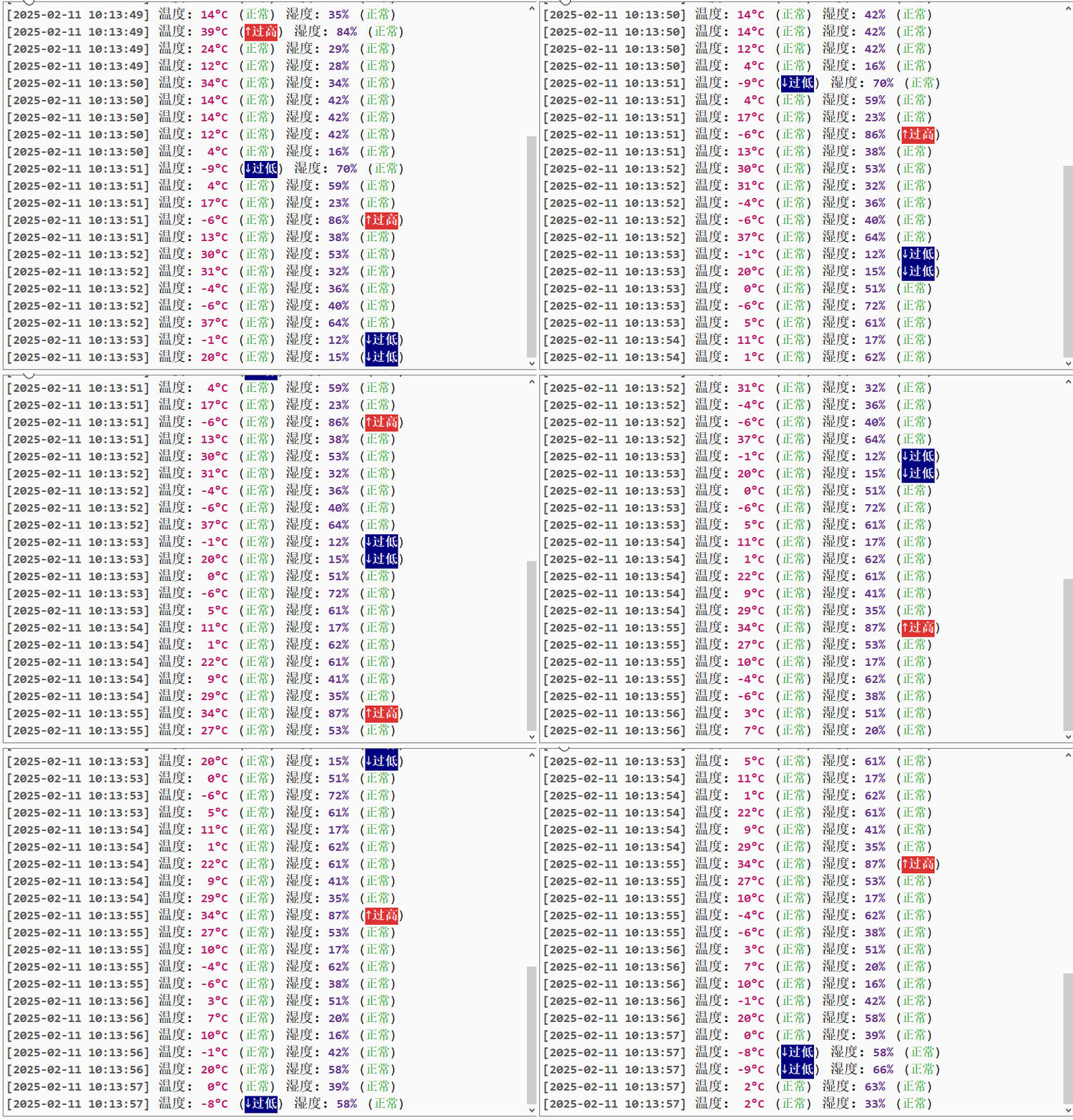
在这个示例中,我们创建了一个名为 MyHighlighter 的类,它继承自 QSyntaxHighlighter,并定义了几种高亮规则。这些规则用于突出显示特定的文本部分,例如时间、温度、湿度和报警状态。
MyHighlighter 类的实现
cpp
#include "MyHighlighter.h"
#include <QDebug>
#define tc(a) QString::fromLocal8Bit(a)  // 将本地8位字符转换为QString

MyHighlighter::MyHighlighter(QTextDocument* parent)
    : QSyntaxHighlighter(parent) {
    HighlightingRule rule;  // 定义高亮规则对象

    // 时间的高亮规则
    rule.pattern = QRegularExpression(R"(\[.*\])");
    timeFormat.setForeground(QColor(85, 85, 85));  // 设置字体颜色为灰色
    timeFormat.setBackground(QColor(240, 240, 240));  // 设置背景色为浅灰色
    timeFormat.setFontWeight(QFont::Bold);  // 设置字体为加粗
    timeFormat.setFontFamily("Consolas");  // 设置字体为Consolas
    rule.format = timeFormat;
    highlightingRules.push_back(rule);

    // 温度的高亮规则
    rule.pattern = QRegularExpression("温度");
    tempKeyFormat.setForeground(QColor(180, 30, 110));  // 设置字体颜色为紫色
    tempKeyFormat.setFontFamily("Consolas");
    rule.format = tempKeyFormat;
    highlightingRules.push_back(rule);

    // 温度值的高亮规则
    rule.pattern = QRegularExpression(tc(R"((?<=温度:)\s*-*\d+°C)"));
    tempValueFormat.setForeground(QColor(180, 30, 110));  // 设置字体颜色为紫色
    tempValueFormat.setFontWeight(QFont::Bold);
    tempValueFormat.setFontFamily("Consolas");
    rule.format = tempValueFormat;
    highlightingRules.push_back(rule);

    // 湿度的高亮规则
    rule.pattern = QRegularExpression("湿度");
    humiKeyFormat.setForeground(QColor(97, 54, 134));  // 设置字体颜色为紫色
    humiKeyFormat.setFontFamily("Consolas");
    rule.format = humiKeyFormat;
    highlightingRules.push_back(rule);

    // 湿度值的高亮规则
    rule.pattern = QRegularExpression(tc(R"((?<=湿度:)\s*\d+%)"));
    humiValueFormat.setForeground(QColor(97, 54, 134));  // 设置字体颜色为紫色
    humiValueFormat.setFontWeight(QFont::Bold);
    humiValueFormat.setFontFamily("Consolas");
    rule.format = humiValueFormat;
    highlightingRules.push_back(rule);

    // 报警:正常
    rule.pattern = QRegularExpression(tc("(正常)"));
    normalFormat.setForeground(Qt::darkGreen);
    normalFormat.setFontFamily("Consolas");
    rule.format = normalFormat;
    highlightingRules.push_back(rule);

    // 报警:下限
    rule.pattern = QRegularExpression(tc("(↓过低)"));
    lowerFormat.setForeground(Qt::white);
    lowerFormat.setBackground(Qt::darkBlue);
    lowerFormat.setFontWeight(QFont::Bold);
    lowerFormat.setFontFamily("Consolas");
    rule.format = lowerFormat;
    highlightingRules.push_back(rule);

    // 报警:上限
    rule.pattern = QRegularExpression(tc("(↑过高)"));
    upperFormat.setForeground(Qt::white);
    upperFormat.setBackground(QColor(220, 50, 50));
    upperFormat.setFontWeight(QFont::Bold);
    upperFormat.setFontFamily("Consolas");
    rule.format = upperFormat;
    highlightingRules.push_back(rule);
}

void MyHighlighter::highlightBlock(const QString& text) {
    for (HighlightingRule& rule : highlightingRules) {
        QRegularExpressionMatchIterator matchIterator = rule.pattern.globalMatch(text);
        while (matchIterator.hasNext()) {
            QRegularExpressionMatch match = matchIterator.next();
            setFormat(match.capturedStart(), match.capturedLength(), rule.format);
        }
    }
}
2.1 构造函数与规则定义
在 MyHighlighter 的构造函数中,我们定义了多个高亮规则。每个规则包含一个正则表达式和一个格式。我们用不同的格式来高亮显示时间、温度、湿度以及报警状态:
- 时间 :匹配方括号内的内容(如
[12:30]),设置灰色字体和浅灰色背景。 - 温度 :匹配
温度字符串,使用紫色字体。 - 湿度 :匹配
湿度字符串,使用紫色字体。 - 报警状态:根据报警类型(正常、过低、过高)设置不同的颜色和字体样式。
2.2 highlightBlock 函数
highlightBlock 函数是 QSyntaxHighlighter 类的核心方法。在这个方法中,我们遍历定义好的高亮规则,通过正则表达式来匹配文本中的特定部分。对于每个匹配到的部分,调用 setFormat 来设置它的格式。
3. QSyntaxHighlighter 类的其他常用方法
3.1 setDocument 和 document
setDocument 用于将一个 QTextDocument 对象与高亮器关联,document 用于获取当前文档。
cpp
void setDocument(QTextDocument *doc);
QTextDocument *document() const;
3.2 rehighlight 和 rehighlightBlock
- rehighlight:重新高亮整个文档。
- rehighlightBlock:只重新高亮某个文本块。
这些函数对于在文本内容发生变化时重新应用高亮规则非常有用。
cpp
void rehighlight();
void rehighlightBlock(const QTextBlock &block);
3.3 setFormat
setFormat 用于设置匹配到的文本部分的格式,接受字符的起始位置和长度,以及相应的格式对象。
cpp
void setFormat(int start, int count, const QTextCharFormat &format);