目录
- [1. 引言](#1. 引言)
-
- [1.1 Hadoop](#1.1 Hadoop)
- [1.2 HBase](#1.2 HBase)
- [1.3 Hive](#1.3 Hive)
- [2. Beeline](#2. Beeline)
-
- [2.1 使用Beeline访问Hive](#2.1 使用Beeline访问Hive)
-
- [2.1.1 通过beeline直接连接Hive](#2.1.1 通过beeline直接连接Hive)
- [2.1.2 先进入beeline客户端再连接Hive](#2.1.2 先进入beeline客户端再连接Hive)
- [2.1.3 先进入beeline客户端再连接MySQL](#2.1.3 先进入beeline客户端再连接MySQL)
- [2.2 Beeline命令](#2.2 Beeline命令)
- [3. Hive JDBC](#3. Hive JDBC)
-
- [3.1 pom.xml中依赖配置](#3.1 pom.xml中依赖配置)
- [3.2 Util工具类](#3.2 Util工具类)
- [3.3 代码](#3.3 代码)
- [3.4 结果](#3.4 结果)
- 参考
1. 引言
尽管Hadoop和HBase都提供了对应的启动和停止脚本,但是启动的过程都很繁琐。而Hive没有提供对应的启动和停止脚本,因此它的启动和停止比Hadoop和HBase更加困难。下面将展示如何把Hadoop、HBase和Hive配置成系统服务,然后通过service name start[/stop]进行启停。
创建Hadoop、HBase、Hive服务脚本的命令:
bash
cd /etc/init.d
touch hadoop hbase hive
chmod +x hadoop hbase hive
1.1 Hadoop
用vim hadoop编辑hadoop,输入如下内容后,然后按ESC输入:wq!保存。
bash
#!/bin/bash
export HDFS_NAMENODE_USER=root
export HDFS_DATANODE_USER=root
export HDFS_SECONDARYNAMENODE_USER=root
export YARN_RESOURCEMANAGER_USER=root
export YARN_NODEMANAGER_USER=root

LOG_FILE=/var/log/hadoop-service.log
RED='\033[0;31m'
NC='\033[0m'

case "$1" in
start)
    echo "$(date '+%Y-%m-%d %H:%M:%S') Starting Hadoop cluster..." >>$LOG_FILE
    if start-dfs.sh >>$LOG_FILE 2>&1; then
        if start-yarn.sh >>$LOG_FILE 2>&1; then
            echo "Cluster started successfully."
        else
            echo "${RED}YARN failed to start, Check $LOG_FILE.${NC}"
            exit 1
        fi
    else
        echo "${RED}HDFS failed to start, Check $LOG_FILE.${NC}"
        exit 1
    fi
    ;;
stop)
    echo "$(date '+%Y-%m-%d %H:%M:%S') Stopping Hadoop cluster..." >>$LOG_FILE
    stop-yarn.sh >>$LOG_FILE 2>&1
    stop-dfs.sh >>$LOG_FILE 2>&1
    echo "Cluster stopped."
    ;;
*)
    echo "Usage: $0 {start|stop}."
    exit 1
    ;;
esac

exit 0
1.2 HBase
用vim hbase编辑hbase,输入如下内容,然后按ESC输入:wq!保存。由于HBase依赖Hadoop,因此在HBase服务启动之前必须检查Hadoop是否启动,下面脚本中的check_dependencies函数实现了检查Hadoop是否启动的功能。
(下面的Hive同样依赖于Hadoop,同样需要该函数)
bash
#!/bin/bash
LOG_FILE=/var/log/hbase-service.log
RED='\033[0;31m'
NC='\033[0m'

check_dependencies() {
        if ! hdfs dfsadmin -report &>/dev/null; then
                echo -e "${RED}Error: HDFS didn't run!${NC}"
                return 1
        fi

        if ! yarn node -list &>/dev/null; then
                echo -e "${RED}Error: YARN didn't run!${NC}"
                return 1
        fi
}

case "$1" in
start)
        if ! check_dependencies; then
                exit 1
        fi

        echo "$(date '+%Y-%m-%d %H:%M:%S') Starting HBase cluster..." >>$LOG_FILE
        if start-hbase.sh >>$LOG_FILE 2>&1; then
                echo "HBase started successfully."
        else
                echo "${RED}HBase failed to start, Check $LOG_FILE.${NC}"
                exit 1
        fi
        ;;
stop)
        echo "$(date '+%Y-%m-%d %H:%M:%S') Stopping HBase cluster..." >>$LOG_FILE
        stop-hbase.sh >>$LOG_FILE 2>&1
        echo "HBase stopped."
        ;;
*)
        echo "Usage: $0 {start|stop}."
        exit 1
        ;;
esac

exit 0
1.3 Hive
由于Hive没有官方提供的启动和停止脚本,因此Hive服务脚本比上面两个更加复杂。因为在使用Beeline访问Hive之前,必须启动MetaStore和HiveServer2。官方提供的启动方法是:
bash
nohup hive --service metastore &
nohup hive --service hiveserver2 &接着通过运行jps命令,就会发现多了两个RunJar进程------它们就是MetaStore和Hiveserver2。而停止的方法是通过jps命令查看这两个进程的pid------即jps命令显示出的第一列中的数据,然后通过kill -9 pid1 pid2(pid1,pid2代指这两个RunJar的pid)。因此Hive的启动与停止非常繁琐。
用vim hive编辑hive,输入如下内容,然后按ESC输入:wq!保存。下面的check_dependencies函数实现了检查Hadoop是否启动的功能,start_metastore函数实现了MetaStore服务的启动,start_hiveserver2实现了HiveServer2服务的启动,stop_process实现了这两个服务的停止,脚本中停止这两个服务的具体调用命令是:
bash
stop_process "MetaStore" "metastore"
stop_process "HiveServer2" "hiveserver2"
此外,在start_metastore和start_hiveserver2中通过nc命令来检查MetaStore和HiveServer2的指定端口是否开放,以达到判断这两个服务是否启动的目的。并且由于端口开放可能存在延迟的原因,在这两个函数设置RETRY_TIMES来进行多次判断。
bash
#!/bin/bash
LOG_DIR=/var/log/hive
if [ ! -d $LOG_DIR ]; then
        mkdir -p $LOG_DIR
fi

HOST=$(hostname -I)
START_LOG=$LOG_DIR/hive-start.log
STOP_LOG=$LOG_DIR/hive-stop.log
METASTORE_PORT=9083
HIVESERVER2_PORT=10000
RETRY_TIMES=3

RED='\033[0;31m'
NC='\033[0m'

check_dependencies() {
        if ! nc --version &>/dev/null; then
                echo -e "${RED}Please use apt to install ncat!${NC}"
                return 1
        fi

        if ! pgrep --version &>/dev/null; then
                echo -e "${RED}Please use apt to install procps-ng!${NC}"
                return 1
        fi

        if ! hdfs dfsadmin -report &>/dev/null; then
                echo -e "${RED}Error: HDFS didn't run!${NC}"
                return 1
        fi

        if ! yarn node -list &>/dev/null; then
                echo -e "${RED}Error: YARN didn't run!${NC}"
                return 1
        fi
}

start_metastore() {
        local retry=0

        echo "$(date '+%Y-%m-%d %H:%M:%S') Starting metastore service..." >>$START_LOG
        nohup hive --service metastore -p $METASTORE_PORT >>$START_LOG 2>&1 &
        while [ $retry -lt $RETRY_TIMES ]; do
                sleep 5
                if nc -z $HOST $METASTORE_PORT; then
                        return 0
                fi
                ((retry++))
        done

        if [ $retry -eq $RETRY_TIMES ]; then
                echo -e "${RED}MetaStore failed to start, Check $START_LOG.${NC}"
                return 1
        fi
}

start_hiveserver2() {
        local retry=0

        echo "$(date '+%Y-%m-%d %H:%M:%S') Starting hiveserver2 service...)" >>$START_LOG
        nohup hive --service hiveserver2 >>$START_LOG 2>&1 &
        while [ $retry -le $RETRY_TIMES ]; do
                sleep 5
                if nc -z $HOST $HIVESERVER2_PORT; then
                        return 0
                fi
                ((retry++))
        done

        if [ $retry -eq $RETRY_TIMES ]; then
                echo -e "${RED}HiveServer2 failed to start, Check $START_LOG.${NC}"
                return 1
        fi
}

stop_process() {
        local name=$1
        local pattern=$2
        local pid
        pid=$(pgrep -f "$pattern")

        if [[ -n $pid ]]; then
                echo "Stopping $name..." >>$STOP_LOG
                kill $pid
                sleep 10
                if pgrep -f "$pattern" &>/dev/null; then
                        kill -9 $pid
                fi
        fi
}

case "$1" in
start)
        echo "$(date '+%Y-%m-%d %H:%M:%S') Starting Hive Cluster..." >>$START_LOG
        if ! check_dependencies; then
                exit 1
        fi

        if ! start_metastore; then
                exit 1
        fi

        if ! start_hiveserver2; then
                exit 1
        fi

        echo -e "Hive started successfully."
        ;;
stop)
        echo "$(date '+%Y-%m-%d %H:%M:%S') Stopping Hive Cluster..." >>$STOP_LOG
        stop_process "MetaStore" "metastore"
        stop_process "HiveServer2" "hiveserver2"
        echo "Hive stopped."
        ;;
*)
        echo "Usage: $0 {start|stop}"
        exit 1
        ;;
esac

exit 0
2. Beeline
Beeline是Hive目前的客户端,可以通过JDBC连接远程服务。
2.1 使用Beeline访问Hive
首先必须启动MetaStore服务和HiveServer2服务,如果你在/etc/init.d中配置了上面提到的Hadoop、HBase、Hive服务的话,就可以通过service hadoop start && service hive start来启动MetaStore服务和HiveServer2服务。

2.1.1 通过beeline直接连接Hive
beeline -u 'jdbc:hive2://172.18.0.2:10000' -n root,退出的话需要输入beeline命令!exit。

2.1.2 先进入beeline客户端再连接Hive
先输入hive进入beeline客户端,然后输入!connect 'jdbc:hive2://172.18.0.2:10000,接着输入对应的用户名root和密码123456,最后同样通过!exit退出。

2.1.3 先进入beeline客户端再连接MySQL
输入!connect 'jdbc:mysql://172.18.0.3:3306',然后输入用户名root和密码123456,最后用!close结束连接。

2.2 Beeline命令


3. Hive JDBC
3.1 pom.xml中依赖配置
xml
  <dependencies>
    <dependency>
      <groupId>junit</groupId>
      <artifactId>junit</artifactId>
      <version>4.11</version>
      <scope>test</scope>
    </dependency>
    <dependency>
      <groupId>org.apache.hive</groupId>
      <artifactId>hive-service</artifactId>
      <version>4.0.1</version>
      <exclusions>
        <exclusion>
          <groupId>org.apache.logging.log4j</groupId>
          <artifactId>log4j-slf4j-impl</artifactId>
        </exclusion>
      </exclusions>
    </dependency>
    <dependency>
      <groupId>org.apache.hive</groupId>
      <artifactId>hive-jdbc</artifactId>
      <version>4.0.1</version>
    </dependency>
    <dependency>
      <groupId>org.apache.hadoop</groupId>
      <artifactId>hadoop-client-runtime</artifactId>
      <version>3.3.6</version>
    </dependency>
  </dependencies>
3.2 Util工具类
java
import java.sql.Connection;
import java.sql.DriverManager;
import java.sql.SQLException;
import java.sql.Statement;

public class Util {
    public static Connection getConnection(String driverName, String url, String user, String password) throws ClassNotFoundException, SQLException {
        Class.forName(driverName);
        Connection conn = DriverManager.getConnection(url, user, password);
        return conn;
    }

    public static Statement getStatement(Connection conn) throws SQLException {
        return conn.createStatement();
    }

    public static void closeStatement(Statement stmt) throws SQLException {
        stmt.close();
    }

    public static void closeConnection(Connection conn) throws SQLException {
        conn.close();
    }
}
3.3 代码
java
import java.sql.Connection;
import java.sql.ResultSet;
import java.sql.ResultSetMetaData;
import java.sql.SQLException;
import java.sql.Statement;

public class App {
    public static void main(String[] args) throws ClassNotFoundException, SQLException {
        Connection conn = Util.getConnection("org.apache.hive.jdbc.HiveDriver", "jdbc:hive2://172.18.0.2:10000", "root",
                "123456");
        Statement stmt = Util.getStatement(conn);
        stmt.execute("drop table if exists users");
        stmt.execute(
                "create table users (user_id int, fname string, lname string) row format delimited fields terminated by ','");
        stmt.execute("insert into users (user_id, fname, lname) values(222, 'yang', 'yang2')");
        stmt.execute("load data local inpath '/root/CodeProject/hive-advance/data.txt' into table users");

        String sql = "select * from users";
        ResultSet res = stmt.executeQuery(sql);
        ResultSetMetaData meta = res.getMetaData();
        for (int i = 1; i <= meta.getColumnCount(); i++) {
            System.out.print(meta.getColumnName(i) + "\t");
        }
        System.out.println();

        while (res.next()) {
            System.out.print(res.getInt(1) + "\t\t");
            System.out.print(res.getString(2) + "\t\t");
            System.out.print(res.getString(3));
            System.out.println();
        }

        sql = "show tables";
        System.out.println("Running: " + sql);
        res = stmt.executeQuery(sql);
        while (res.next()) {
            System.out.print(res.getString(1));
        }
        System.out.println("");

        sql = "desc users";
        System.out.println("Running: " + sql);
        res = stmt.executeQuery(sql);
        while (res.next()) {
            System.out.println(res.getString(1) + "\t" + res.getString(2));
        }

        Util.closeStatement(stmt);
        Util.closeConnection(conn);
    }
}
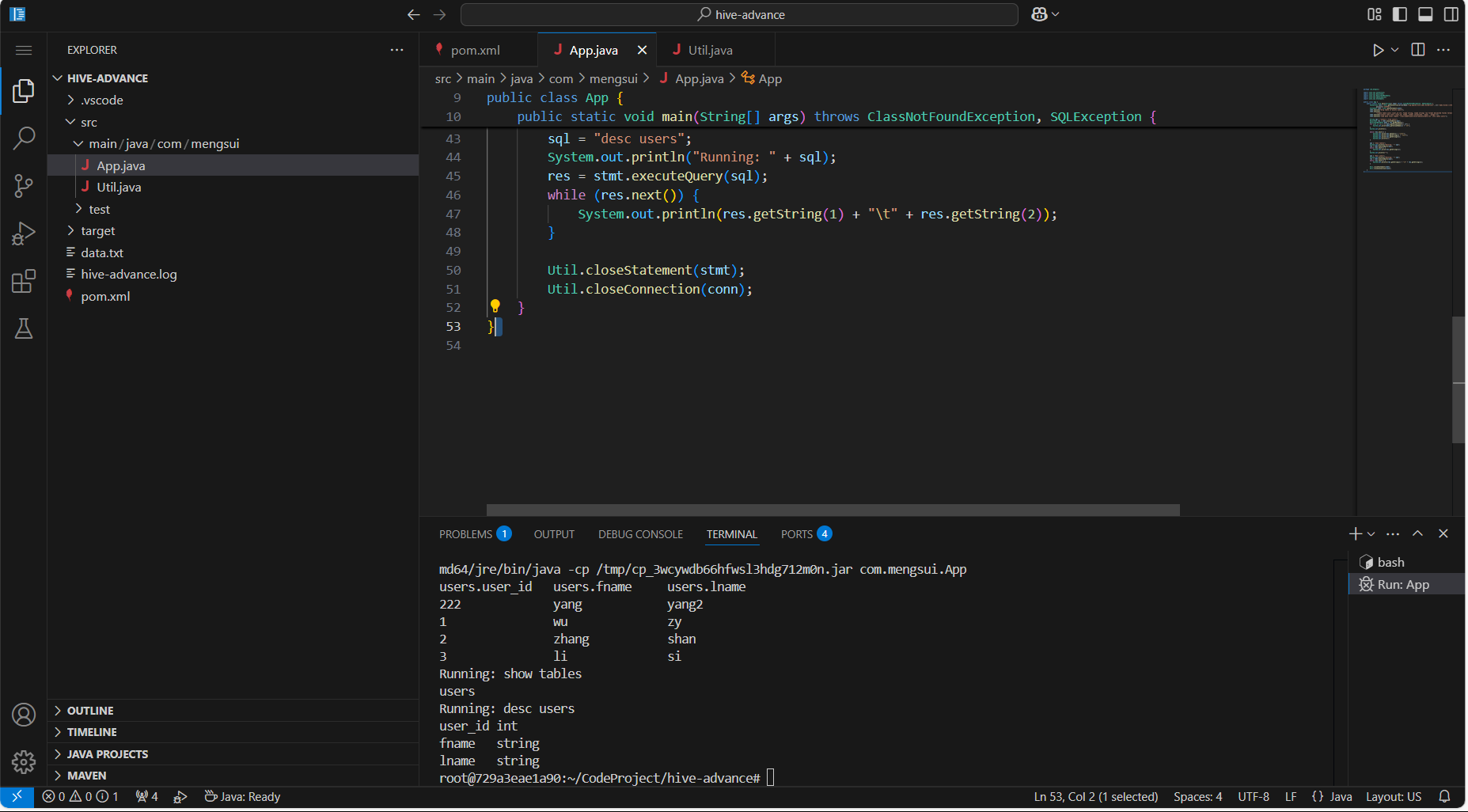
3.4 结果
参考
吴章勇 杨强著 大数据Hadoop3.X分布式处理实战
https://stackoverflow.com/questions/60943753/new-hiveconf-exception-noclassdeffounderror-com-ctc-wstx-io-inputbootstrapper通过添加hadoop-client-runtime依赖解决了这个问题。
