QQuick3D-Model的实例化
Model的实例化
- Model类继承于Node类;如果想让一个Model(模型)可以渲染,至少需要一个Mesh(网格)和material(材质)
- Mesh(网格):Qt内置了矩形(Rectangle)、Sphere(球)、立方体(Cube)、圆柱(Cylinder) 、圆锥( Cone);也可以通过Balsam 工具导入支持的其它格式,如obj,fbx之类格式
- Model可以通过实例化,通过一次调用绘制多个相同实例的技术。
Model的实例化相关属性介绍:
- 属性instanceRoot : QtQuick3D::Node:定义实例坐标系的原点
- 属性instancing : QtQuick3D::Instancing:定义实例化表
- 属性instancingLodMax : real定义显示此模型实例时与摄影机的最大距离
- 属性instancingLodMin : real定义显示此模型实例时与摄影机的最小距离
Instancing类的介绍
- Instancing 类是实例化表(instance tables)的基础类,有3个派生对象:FileInstancing , InstanceList , RandomInstancing
- 实例化类型定义了一个表,该表指定了如何相对于基础模型修改每个实例。该表为每个索引都有一个条目,其中包含一个变换矩阵、一种颜色和供自定义材质使用的通用数据。要使用实例化,请设置模型(Model)的实例化属性以引用实例化对象。
- 属性depthSortingEnabled : bool:保存实例表的深度排序启用值。启用后,实例将从离相机最远的实例到最近的实例进行排序和渲染,即从后到前。如果禁用(这是默认设置),则实例将按照在实例表中指定的顺序呈现。注意,排序仅实例间相互排序,不会与场景中其它对象排序;排序会增加帧准备时间,特别是在实例数量较大的情况下。
- 属性hasTransparency : bool:如果实例化表包含渲染模型时应使用的alpha值,此属性设置为true;如果模型具有透明材质或不透明度小于1,则无论如何都将使用实例化表中的alpha值
- 属性instanceCountOverride : int:此属性用于限制实例数量,而无需重新生成或重新上传实例表。
- 方法color instanceColor(int index):返回 index 对应的实例(instance)的颜色;
- 方法vector3d instanceCustomData(int index):返回 index 对应的实例(instance)的自定义数据;
- 方法vector3d instancePosition(int index):返回 index 对应的实例(instance)的位置;
- 方法quaternion instanceRotation(int index):返回 index 对应的实例(instance)的旋转角度;
- 方法vector3d instanceScale(int index):返回 index 对应的实例(instance)的缩放;
InstanceList类的介绍
-
InstanceList 类型允许在QML中手动定义实例表(instance tables),由InstanceListEntry 组成
-
每个InstanceListEntry都是一个可以具有属性绑定和动画的对象。这提供了极大的灵活性,但也会导致内存开销。因此,不建议对包含数千(或数百万)个实例的程序生成表使用InstanceList。此外,对条目的任何属性更改都会导致整个实例表被重新计算并上传到GPU。
-
InstanceListEntry 包含每个实例的:color : vector3d 、customData : vector4d 、eulerRotation : vector3d 、position : vector3d 、rotation : quaternion 、scale : vector3d 信息
Model实例化代码
- 实例化 Model + 实例化表(Instance Table); 实例化表(如 InstanceList) 由实例条目(InstanceListEntry)组成;
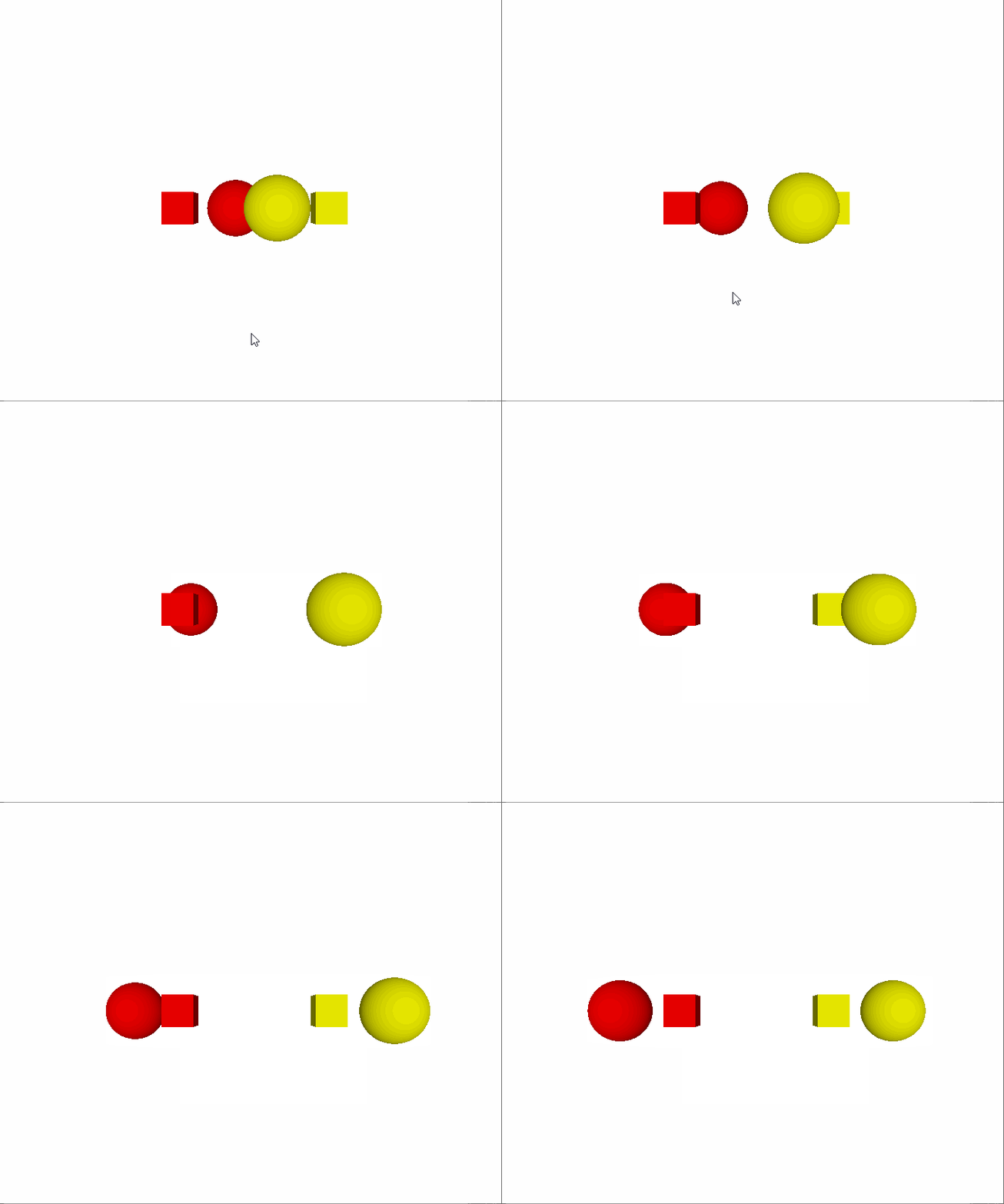
- 实例效果:会实例化两个Cube,两个Sphere, 其中Sphere 围绕Cube旋转
c
import QtQuick
import QtQuick.Controls
import QtQuick.Layouts
import QtQuick3D


//摄像机Demo
Item {
    id: root

    //场景需要 Model(mesh + Material),  Light, Camera, 3个元素
    Node{
        id: rootSceneNode                   //3D场景的根节点

        //平行光: 光源从无线远地方发射,类似于生活中太阳;平行光具有无限的范围,不会衰减;如果启用castsShadow,阴影将平行于灯光方向;
        //平行光实际上没有位置,因此移动它没有任何效果。光将始终沿光的Z轴方向发射。沿X或Y轴旋转灯光将改变发光方向。
        DirectionalLight {
            ambientColor: Qt.rgba(0.5, 0.5, 0.5, 1.0)
            brightness: 1.0
        }

        //实例化表
        InstanceList{
            id:instanceTable
            instances: [
                InstanceListEntry
                {
                     //position: Qt.vector3d(0, 0, 0)
                    position: Qt.vector3d(-120, 0, 0)
                     //eulerRotation: Qt.vector3d(-10, 0, 30)
                     color: "red"
                },
                InstanceListEntry {
                    // position: Qt.vector3d(120, 10, 100)
                     position: Qt.vector3d(120, 0, 0)
                     eulerRotation: Qt.vector3d(0, 180, 0)
                     color: "yellow"
                }
            ]
        }


        Model {
            id: cube
            instancing: instanceTable               //使用实列表创建 2个实例
            source: "#Cube"
            scale:Qt.vector3d(0.5,0.5,0.5);
            materials: DefaultMaterial { diffuseColor: "lightgray" }
        }

        Node {
            Model {
                source: "#Sphere"
                instanceRoot: cube
                instancing: instanceTable
                x: 100
                materials: DefaultMaterial { diffuseColor: "lightgray" }
            }
            NumberAnimation on eulerRotation.y {
                from: 0
                to: 360
                duration: 4000
                loops: Animation.Infinite
            }
        }

        //
        Node {
            //使用节点给摄像机设置动画。
            //Camera 做为Node 的子节点,可以通过Node节点的属性来定义相机的位置、旋转 之类属性;也会继承父节点的变换
            //透视投影:主要涉及 近平面(clipNear),远平面(clipFar),视野角(fiedOfView)
            id: idCamPNode
            PerspectiveCamera {
                id: cameraPerspectiveOne
                z: 600
            }

            //将动画至于  eulerRotation 包含 x,y,z 轴的旋转值,顺序是 zxy
            // PropertyAnimation on eulerRotation.y {
            //     loops: Animation.Infinite
            //     duration: 5000
            //     to: -360
            //     from: 0
            // }

            Component.onCompleted: {
                console.log("forward = ",cameraPerspectiveOne.forward," up = ",cameraPerspectiveOne.up, " right = ",cameraPerspectiveOne.right);
            }

        }
    }


    View3D{
        id:idView3D
        anchors.fill: parent
        importScene: rootSceneNode
        camera: cameraPerspectiveOne


        MouseArea{
            anchors.fill: parent
            onClicked:(mouse)=> {
              var viewPos = Qt.vector3d(mouse.x /parent.width,mouse.y/parent.height,0);

            //同样的viewPos 因为Camera的位置在变化,造成映射到scene中值不一致
              var scenePos = cameraPerspectiveOne.mapFromViewport(viewPos);
              console.log("scenePos = ",scenePos, " viewPos = ",mouse.x,mouse.y);

            }
        }

    }
}
Model实例化代码效果如下: