Markdown 编辑器 HTML
以下是一个美观的 Markdown 编辑器 HTML 页面,支持多种主题切换和实时预览功能:
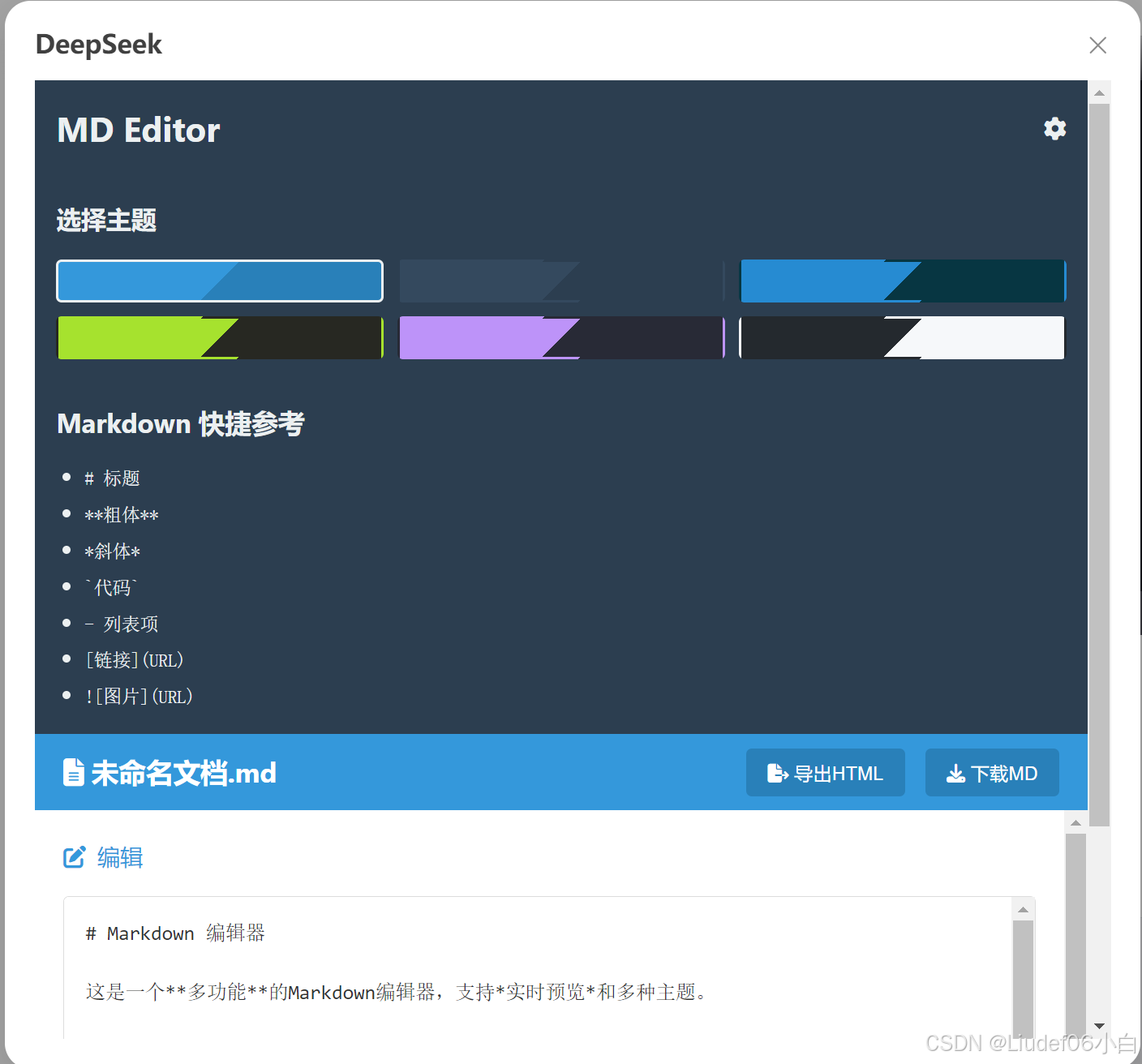
html
<!DOCTYPE html>
<html lang="zh-CN">
<head>
<meta charset="UTF-8">
<meta name="viewport" content="width=device-width, initial-scale=1.0">
<title>多功能 Markdown 编辑器</title>
<link rel="stylesheet" href="https://cdnjs.cloudflare.com/ajax/libs/font-awesome/6.4.0/css/all.min.css">
<link rel="stylesheet" href="https://cdnjs.cloudflare.com/ajax/libs/highlight.js/11.7.0/styles/github.min.css">
<script src="https://cdnjs.cloudflare.com/ajax/libs/marked/4.2.12/marked.min.js"></script>
<script src="https://cdnjs.cloudflare.com/ajax/libs/highlight.js/11.7.0/highlight.min.js"></script>
<style>
:root {
--primary-color: #3498db;
--secondary-color: #2980b9;
--background-color: #f9f9f9;
--text-color: #333;
--sidebar-color: #2c3e50;
--sidebar-text: #ecf0f1;
--editor-bg: #fff;
--preview-bg: #fff;
--border-color: #ddd;
}
* {
margin: 0;
padding: 0;
box-sizing: border-box;
}
body {
font-family: 'Segoe UI', Tahoma, Geneva, Verdana, sans-serif;
line-height: 1.6;
color: var(--text-color);
background-color: var(--background-color);
transition: all 0.3s ease;
}
.container {
display: flex;
min-height: 100vh;
}
.sidebar {
width: 250px;
background-color: var(--sidebar-color);
color: var(--sidebar-text);
padding: 20px;
transition: all 0.3s ease;
}
.sidebar-header {
display: flex;
justify-content: space-between;
align-items: center;
margin-bottom: 30px;
}
.sidebar-title {
font-size: 1.5rem;
font-weight: bold;
}
.theme-selector {
margin-bottom: 30px;
}
.theme-selector h3 {
margin-bottom: 15px;
font-size: 1.1rem;
}
.theme-options {
display: grid;
grid-template-columns: repeat(3, 1fr);
gap: 10px;
}
.theme-option {
width: 100%;
height: 30px;
border-radius: 4px;
cursor: pointer;
border: 2px solid transparent;
}
.theme-option:hover {
opacity: 0.9;
}
.theme-option.active {
border-color: var(--sidebar-text);
}
.default-theme { background: linear-gradient(135deg, #3498db 50%, #2980b9 50%); }
.dark-theme { background: linear-gradient(135deg, #34495e 50%, #2c3e50 50%); }
.solarized-theme { background: linear-gradient(135deg, #268bd2 50%, #073642 50%); }
.monokai-theme { background: linear-gradient(135deg, #a6e22e 50%, #272822 50%); }
.dracula-theme { background: linear-gradient(135deg, #bd93f9 50%, #282a36 50%); }
.github-theme { background: linear-gradient(135deg, #24292e 50%, #f6f8fa 50%); }
.main-content {
flex: 1;
display: flex;
flex-direction: column;
}
.toolbar {
background-color: var(--primary-color);
color: white;
padding: 10px 20px;
display: flex;
justify-content: space-between;
align-items: center;
}
.toolbar-title {
font-size: 1.2rem;
font-weight: bold;
}
.toolbar-actions button {
background-color: var(--secondary-color);
color: white;
border: none;
padding: 8px 15px;
border-radius: 4px;
cursor: pointer;
margin-left: 10px;
transition: background-color 0.2s;
}
.toolbar-actions button:hover {
background-color: #1a6ea0;
}
.editor-container {
display: flex;
flex: 1;
overflow: hidden;
}
.editor-section, .preview-section {
flex: 1;
padding: 20px;
overflow-y: auto;
position: relative;
}
.editor-section {
background-color: var(--editor-bg);
border-right: 1px solid var(--border-color);
}
.preview-section {
background-color: var(--preview-bg);
}
.section-title {
font-size: 1rem;
margin-bottom: 15px;
color: var(--primary-color);
display: flex;
align-items: center;
}
.section-title i {
margin-right: 8px;
}
#markdown-editor {
width: 100%;
height: calc(100% - 30px);
border: 1px solid var(--border-color);
border-radius: 4px;
padding: 15px;
font-family: 'Consolas', 'Monaco', monospace;
font-size: 14px;
line-height: 1.5;
resize: none;
background-color: var(--editor-bg);
color: var(--text-color);
}
#markdown-preview {
height: calc(100% - 30px);
overflow-y: auto;
padding: 15px;
border: 1px solid var(--border-color);
border-radius: 4px;
background-color: var(--preview-bg);
}
#markdown-preview pre {
background-color: #f5f5f5;
padding: 10px;
border-radius: 4px;
overflow-x: auto;
}
#markdown-preview code {
font-family: 'Consolas', 'Monaco', monospace;
}
#markdown-preview blockquote {
border-left: 4px solid var(--primary-color);
padding-left: 15px;
color: #666;
margin: 15px 0;
}
#markdown-preview table {
border-collapse: collapse;
width: 100%;
margin: 15px 0;
}
#markdown-preview table, #markdown-preview th, #markdown-preview td {
border: 1px solid var(--border-color);
}
#markdown-preview th, #markdown-preview td {
padding: 8px 12px;
}
#markdown-preview img {
max-width: 100%;
height: auto;
}
.status-bar {
background-color: var(--primary-color);
color: white;
padding: 8px 20px;
font-size: 0.8rem;
display: flex;
justify-content: space-between;
}
@media (max-width: 768px) {
.container {
flex-direction: column;
}
.sidebar {
width: 100%;
padding: 15px;
}
.editor-container {
flex-direction: column;
}
.editor-section, .preview-section {
flex: none;
height: 50vh;
}
.editor-section {
border-right: none;
border-bottom: 1px solid var(--border-color);
}
}
</style>
</head>
<body>
<div class="container">
<div class="sidebar">
<div class="sidebar-header">
<div class="sidebar-title">MD Editor</div>
<i class="fas fa-cog"></i>
</div>
<div class="theme-selector">
<h3>选择主题</h3>
<div class="theme-options">
<div class="theme-option default-theme active" data-theme="default"></div>
<div class="theme-option dark-theme" data-theme="dark"></div>
<div class="theme-option solarized-theme" data-theme="solarized"></div>
<div class="theme-option monokai-theme" data-theme="monokai"></div>
<div class="theme-option dracula-theme" data-theme="dracula"></div>
<div class="theme-option github-theme" data-theme="github"></div>
</div>
</div>
<div class="shortcuts">
<h3>Markdown 快捷参考</h3>
<ul style="margin-top: 10px; padding-left: 20px;">
<li><code># 标题</code></li>
<li><code>**粗体**</code></li>
<li><code>*斜体*</code></li>
<li><code>`代码`</code></li>
<li><code>- 列表项</code></li>
<li><code>[链接](URL)</code></li>
<li><code></code></li>
</ul>
</div>
</div>
<div class="main-content">
<div class="toolbar">
<div class="toolbar-title">
<i class="fas fa-file-alt"></i> 未命名文档.md
</div>
<div class="toolbar-actions">
<button id="export-html"><i class="fas fa-file-export"></i> 导出HTML</button>
<button id="download-md"><i class="fas fa-download"></i> 下载MD</button>
</div>
</div>
<div class="editor-container">
<div class="editor-section">
<div class="section-title"><i class="fas fa-edit"></i> 编辑</div>
<textarea id="markdown-editor" placeholder="在此输入Markdown文本..."># Markdown 编辑器
这是一个**多功能**的Markdown编辑器,支持*实时预览*和多种主题。
## 功能特性
- 实时预览
- 多种主题选择
- 代码高亮
- 响应式设计
- 导出功能
### 代码示例
```javascript
function helloWorld() {
console.log("Hello, Markdown Editor!");
}表格示例
| 功能 | 支持 |
|---|---|
| 标题 | ✓ |
| 列表 | ✓ |
| 代码块 | ✓ |
| 表格 | ✓ |
提示:左侧边栏可以切换主题
            <div class="preview-section">
                <div class="section-title"><i class="fas fa-eye"></i> 预览</div>
                <div id="markdown-preview"></div>
            </div>
        </div>

        <div class="status-bar">
            <div class="status-info">行: 1, 列: 1</div>
            <div class="status-mode">Markdown</div>
        </div>
    </div>
</div>

<script>
    // 初始化 marked 和 highlight.js
    marked.setOptions({
        breaks: true,
        highlight: function(code, lang) {
            if (hljs.getLanguage(lang)) {
                return hljs.highlight(lang, code).value;
            }
            return hljs.highlightAuto(code).value;
        }
    });

    // 获取DOM元素
    const editor = document.getElementById('markdown-editor');
    const preview = document.getElementById('markdown-preview');
    const themeOptions = document.querySelectorAll('.theme-option');
    const exportHtmlBtn = document.getElementById('export-html');
    const downloadMdBtn = document.getElementById('download-md');

    // 初始渲染
    function updatePreview() {
        preview.innerHTML = marked.parse(editor.value);
    }

    // 实时更新预览
    editor.addEventListener('input', updatePreview);

    // 初始化预览
    updatePreview();

    // 主题切换
    themeOptions.forEach(option => {
        option.addEventListener('click', function() {
            // 移除所有active类
            themeOptions.forEach(opt => opt.classList.remove('active'));
            // 添加active类到当前选项
            this.classList.add('active');

            // 根据选择的主题更新CSS变量
            const theme = this.dataset.theme;
            changeTheme(theme);
        });
    });

    // 主题配置
    function changeTheme(theme) {
        const root = document.documentElement;

        switch(theme) {
            case 'dark':
                root.style.setProperty('--primary-color', '#34495e');
                root.style.setProperty('--secondary-color', '#2c3e50');
                root.style.setProperty('--background-color', '#1a1a1a');
                root.style.setProperty('--text-color', '#ecf0f1');
                root.style.setProperty('--sidebar-color', '#2c3e50');
                root.style.setProperty('--sidebar-text', '#ecf0f1');
                root.style.setProperty('--editor-bg', '#2c3e50');
                root.style.setProperty('--preview-bg', '#34495e');
                root.style.setProperty('--border-color', '#444');
                break;

            case 'solarized':
                root.style.setProperty('--primary-color', '#268bd2');
                root.style.setProperty('--secondary-color', '#073642');
                root.style.setProperty('--background-color', '#fdf6e3');
                root.style.setProperty('--text-color', '#586e75');
                root.style.setProperty('--sidebar-color', '#073642');
                root.style.setProperty('--sidebar-text', '#93a1a1');
                root.style.setProperty('--editor-bg', '#eee8d5');
                root.style.setProperty('--preview-bg', '#fdf6e3');
                root.style.setProperty('--border-color', '#93a1a1');
                break;

            case 'monokai':
                root.style.setProperty('--primary-color', '#a6e22e');
                root.style.setProperty('--secondary-color', '#272822');
                root.style.setProperty('--background-color', '#272822');
                root.style.setProperty('--text-color', '#f8f8f2');
                root.style.setProperty('--sidebar-color', '#272822');
                root.style.setProperty('--sidebar-text', '#f8f8f2');
                root.style.setProperty('--editor-bg', '#272822');
                root.style.setProperty('--preview-bg', '#272822');
                root.style.setProperty('--border-color', '#49483e');
                break;

            case 'dracula':
                root.style.setProperty('--primary-color', '#bd93f9');
                root.style.setProperty('--secondary-color', '#282a36');
                root.style.setProperty('--background-color', '#282a36');
                root.style.setProperty('--text-color', '#f8f8f2');
                root.style.setProperty('--sidebar-color', '#44475a');
                root.style.setProperty('--sidebar-text', '#f8f8f2');
                root.style.setProperty('--editor-bg', '#282a36');
                root.style.setProperty('--preview-bg', '#282a36');
                root.style.setProperty('--border-color', '#6272a4');
                break;

            case 'github':
                root.style.setProperty('--primary-color', '#24292e');
                root.style.setProperty('--secondary-color', '#f6f8fa');
                root.style.setProperty('--background-color', '#ffffff');
                root.style.setProperty('--text-color', '#24292e');
                root.style.setProperty('--sidebar-color', '#24292e');
                root.style.setProperty('--sidebar-text', '#f6f8fa');
                root.style.setProperty('--editor-bg', '#ffffff');
                root.style.setProperty('--preview-bg', '#f6f8fa');
                root.style.setProperty('--border-color', '#e1e4e8');
                break;

            default: // default theme
                root.style.setProperty('--primary-color', '#3498db');
                root.style.setProperty('--secondary-color', '#2980b9');
                root.style.setProperty('--background-color', '#f9f9f9');
                root.style.setProperty('--text-color', '#333');
                root.style.setProperty('--sidebar-color', '#2c3e50');
                root.style.setProperty('--sidebar-text', '#ecf0f1');
                root.style.setProperty('--editor-bg', '#ffffff');
                root.style.setProperty('--preview-bg', '#ffffff');
                root.style.setProperty('--border-color', '#ddd');
        }
    }

    // 导出HTML
    exportHtmlBtn.addEventListener('click', function() {
        const htmlContent = `
Markdown导出 ${marked.parse(editor.value)} `;
        const blob = new Blob([htmlContent], { type: 'text/html' });
        const url = URL.createObjectURL(blob);
        const a = document.createElement('a');
        a.href = url;
        a.download = 'markdown-export.html';
        document.body.appendChild(a);
        a.click();
        document.body.removeChild(a);
        URL.revokeObjectURL(url);
    });

    // 下载Markdown
    downloadMdBtn.addEventListener('click', function() {
        const blob = new Blob([editor.value], { type: 'text/markdown' });
        const url = URL.createObjectURL(blob);
        const a = document.createElement('a');
        a.href = url;
        a.download = 'markdown-document.md';
        document.body.appendChild(a);
        a.click();
        document.body.removeChild(a);
        URL.revokeObjectURL(url);
    });

    // 更新光标位置
    editor.addEventListener('keyup', updateCursorPosition);
    editor.addEventListener('click', updateCursorPosition);

    function updateCursorPosition() {
        const cursorPos = editor.selectionStart;
        const text = editor.value.substr(0, cursorPos);
        const lines = text.split('\n');
        const line = lines.length;
        const column = lines[lines.length - 1].length + 1;

        document.querySelector('.status-info').textContent = `行: ${line}, 列: ${column}`;
    }

    // 初始化光标位置
    updateCursorPosition();
</script>
```
功能特点
- 实时预览:左侧编辑,右侧实时显示渲染结果
- 多种主题:提供6种美观主题可供选择
- 代码高亮:使用highlight.js实现代码语法高亮
- 导出功能 :
- 导出为HTML文件(包含完整样式)
- 下载原始Markdown文件
- 响应式设计:适配不同屏幕尺寸
- 用户友好 :
- 光标位置显示
- Markdown快捷参考
- 美观的UI设计
使用方法
- 将上述代码保存为HTML文件
- 在浏览器中打开该文件
- 在左侧编辑区输入Markdown文本
- 右侧会自动显示渲染结果
- 通过左侧边栏切换不同主题
- 使用顶部工具栏按钮导出或下载内容
这个编辑器完全基于前端技术实现,无需服务器支持,可以直接在本地使用。