compose bom 2025.04.00版本
实现效果
- 自动旋转转盘
- 手滑旋转转盘
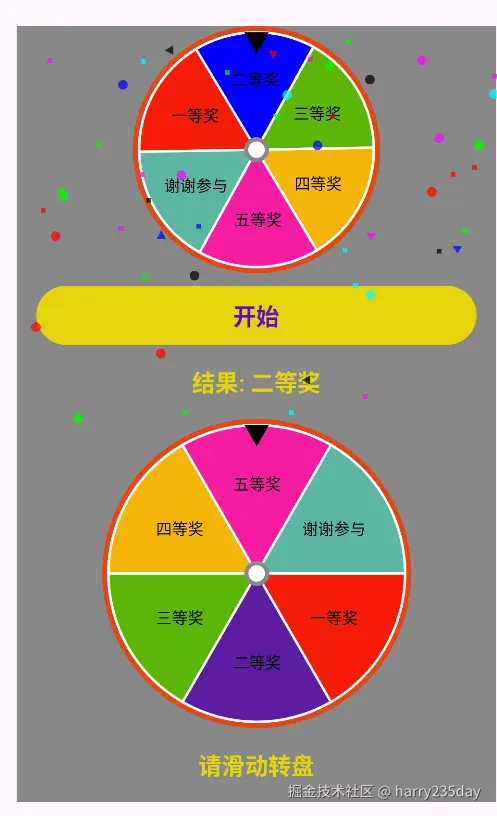
基础组件
-
Canvas组件
- drawCircle 绘制圆形
- drawOval 绘制椭圆
- drawArc 绘制扇形
- drawText 绘制文字
- drawPath 绘制路径
-
状态管理 MutableState
-
动画 Animatable
-
副作用 LaunchedEffect
-
手势处理 pointerInput {detectDragGestures}
MyWheelView 圆盘组件
根据segments均等分圆盘,rotationAngle来实现圆盘旋转效果
ini
@SuppressLint("UnusedBoxWithConstraintsScope")
@Composable
@Preview
fun MyWheelView(
    modifier: Modifier = Modifier,
    segments: List<WheelSegment>,
    selectedIndex: Int = -1,
    rotationAngle: Float = 0f,
) {
    val textMeasurer = rememberTextMeasurer()
    //每个扇形的
    val segmentAngle = 360f / segments.size
    BoxWithConstraints(modifier) {
        val canvasSize = min(constraints.maxWidth, constraints.maxHeight).toFloat()
        Canvas(modifier = Modifier.size(canvasSize.dp)) {
            val outSize = 10.dp.toPx()
            //绘制背景
            drawCircle(
                color = Color(0xFFE54615),
                radius = size.width / 2f,
            )
            //内边距
            inset(outSize / 2f) {
                val size = size.width
                //绘制外边框
                drawOval(
                    color = Color.White,
                    style = Stroke(
                        width = 2.dp.toPx(),
                    ),
                )
                segments.forEachIndexed { index, segment ->
                    //rotationAngle 旋转角度
                    val startAngle = rotationAngle + index * segmentAngle
                    val sweepAngle = segmentAngle
                    // 根据是否选中决定颜色
                    val segmentColor = if (index == selectedIndex) {
                        segment.color
                    } else {
                        segment.color.copy(alpha = 0.6f)
                    }
                    //绘制扇形
                    //相对于[startAngle]顺时针绘制的以度为单位的弧的大小
                    drawArc(
                        color = segmentColor,
                        sweepAngle = sweepAngle.toFloat(),
                        startAngle = startAngle,
                        useCenter = true
                    )
                    //绘制扇形边框
                    drawArc(
                        color = Color.White,
                        sweepAngle = sweepAngle.toFloat(),
                        startAngle = startAngle,
                        style = Stroke(
                            width = 2.dp.roundToPx().toFloat(),
                        ),
                        useCenter = true
                    )

                    // 绘制扇形上的文字
                    val middleAngle = startAngle + sweepAngle / 2f
                    val radius = size / 2f * 0.6f
                    val x = size / 2f + cos(Math.toRadians(middleAngle.toDouble())) * radius
                    val y = size / 2f + sin(Math.toRadians(middleAngle.toDouble())) * radius
                    val textLayoutResult = textMeasurer.measure(
                        //可配置样式 or text:String = ""
                        text = AnnotatedString(
                            text = segment.text,
                            spanStyle = SpanStyle(
                                fontSize = 10.sp,
                                color = Color.Black
                            )
                        ),
                        style = TextStyle(
                            fontSize = 10.sp,
                            color = Color.Black
                        )
                    )
                    //compose canvas绘制
                    drawText(
                        color = Color.Black,
                        textLayoutResult = textLayoutResult,
                        topLeft = Offset(
                            x = x.toFloat() - textLayoutResult.size.width / 2f,
                            y = y.toFloat() - textLayoutResult.size.height / 2f
                        ),
                    )
                    //绘制顶部三角指针
                    val halfSize = size / 2f
                    val pointWidth = 20.dp.roundToPx()
                    val path = Path().apply {
                        moveTo(halfSize - pointWidth / 2f, 0f)
                        lineTo(halfSize + pointWidth / 2f, 0f)
                        lineTo(halfSize, (pointWidth * sin(Math.toRadians(60.0))).toFloat())
                        close()
                    }
                    drawPath(
                        path,
                        color = Color.Black,
                    )
                    //绘制中心圆
                    drawCircle(
                        color = Color.Gray,
                        radius = outSize,
                    )
                    drawCircle(
                        color = Color.White,
                        radius = 2 * outSize / 3f,
                    )
                }
            }
        }
    }
}

data class WheelSegment(
    val text: String,
    val color: Color,
    val value: String,
)


/**
 * 指定index,确定最终角度
 */
fun selectSegment(count: Int, selectedIndex: Int): Float {
    if (count <= selectedIndex) return 0f
    val segmentAngle = 360f / segments.size
    val targetAngle =
        270f - (selectedIndex * segmentAngle + (10 until segmentAngle.toInt() - 10).random())
    return targetAngle % 360f
}

// 根据当前角度获取选中索引
fun getSelectedIndex(segmentCount: Int, rotationAngle: Float): Int {
    val segmentAngle = 360 / segmentCount
    val normalizedAngle = (360f - (rotationAngle % 360f) + 270f) % 360f
    return (normalizedAngle / segmentAngle).toInt().coerceIn(0, segmentCount - 1)
}
RotatableWheelView 圆盘动画组件
重点是根据snapTo()旋转到固定selectedIndex指定的角度
ini
@Composable
fun RotatableWheelView(
    modifier: Modifier = Modifier,
    segments: List<WheelSegment>,
    selectedIndex: Int = -1,
    isSpinning: Boolean = false,
    onSpinEnd: () -> Unit = {}
) {
    var rotationAngle by remember { mutableStateOf(0f) }
    val animatable = remember { Animatable(0f) }

    LaunchedEffect(isSpinning) {
        if (isSpinning) {
            rotationAngle = selectSegment(segments.size, selectedIndex)
            // 旋转动画
            animatable.animateTo(
                targetValue = rotationAngle + 360f * 5, // 旋转5圈
                //tween默认先快后慢FastOutSlowInEasing
                animationSpec = tween(
                    durationMillis = 2000,
                //  easing = LinearEasing
                )
            )
            // 计算最终角度,使选中的项停在指针位置
            animatable.snapTo(rotationAngle)
            onSpinEnd()
        }
    }

    MyWheelView(
        modifier = modifier,
        segments = segments,
        selectedIndex = selectedIndex,
        rotationAngle = if (isSpinning) animatable.value else rotationAngle,
    )
}
WheelExample 圆盘旋转动画示例
ini
val segments = listOf(
    WheelSegment("一等奖", Color.Red, "1000"),
    WheelSegment("二等奖", Color.Blue, "500"),
    WheelSegment("三等奖", Color.Green, "200"),
    WheelSegment("四等奖", Color.Yellow, "100"),
    WheelSegment("五等奖", Color.Magenta, "50"),
    WheelSegment("谢谢参与", Color.Cyan, "-999")
)

@Composable
fun WheelExample() {
    var selectedIndex by remember { mutableStateOf(-1) }
    var isSpinning by remember { mutableStateOf(false) }
    Box {
        Column(
            modifier = Modifier.fillMaxWidth(),
            horizontalAlignment = Alignment.CenterHorizontally,
            verticalArrangement = Arrangement.Center
        ) {
            RotatableWheelView(
                modifier = Modifier.size(200.dp),
                segments = segments,
                selectedIndex = selectedIndex,
                isSpinning = isSpinning,
                onSpinEnd = { isSpinning = false }
            )
            Spacer(modifier = Modifier.height(10.dp))
            MainButton(
                text = "开始",
                onClick = {
                    selectedIndex = (0 until segments.size).random()
                    isSpinning = true
                },
                enabled = !isSpinning
            )
            MainText(
                text = if (isSpinning) "抽奖中..."
                else if (selectedIndex == -1) "请点击开始"
                else "结果: ${segments[selectedIndex].text}",
                modifier = Modifier.padding(16.dp)
            )
        }
        if (!isSpinning && selectedIndex != -1 && segments[selectedIndex].value.toInt() > 200) {
            WheelEggView(Modifier.matchParentSize())
        }
    }
}
TouchRotatableWheelView 触摸滑动判断组件
使用Modifier.pointerInput{detectDragGestures} 处理拖拽手势
animateDecay() 处理惯性动画
scss
@SuppressLint("UnusedBoxWithConstraintsScope")
@Composable
fun TouchRotatableWheelView(
    modifier: Modifier = Modifier,
    segments: List<WheelSegment> = listOf(),
    onRotationListener: (Boolean) -> Unit = {},
    onSegmentSelected: (Int) -> Unit = {}
) {
    var rotationAngle by remember { mutableStateOf(0f) }
    var offset by remember { mutableStateOf(Offset.Zero) }
    var isDrag by remember { mutableStateOf(false) }
    val density = LocalDensity.current
    val c = remember {
        with(density) {
            (250.dp.toPx() * Math.PI).toFloat()
        }
    }
    //处理滑动惯性
    val velocityTracker = remember { MyVelocityTracker() }
    val scope = rememberCoroutineScope()
    var job: Job? = null
    Box(
        modifier = modifier
            .size(250.dp)
            .background(Color.Gray)
            .pointerInput(Unit) {
                detectDragGestures(
                    onDragStart = {
                        job?.cancel()
                        "onDragStart".log_e()
                        velocityTracker.clear()
                        velocityTracker.addPosition(it)
                        onRotationListener(true)
                        isDrag = true
                    },
                    onDrag = { change, dragAmount ->
                        offset += dragAmount
                        velocityTracker.addPosition(change.position, change.uptimeMillis)
                        val x = dragAmount.x
                        val y = dragAmount.y
                        //水平还是竖直 // >0 顺时针 <0 逆时针
                        //简略,如果更加细致以圆点为中心上下左右判断手势,效果更好...
                        if (x.absoluteValue > y.absoluteValue) {
                            val a = x / c * 360
                            rotationAngle += a
                        } else {
                            val a = y / c * 360
                            rotationAngle += a
                        }
                    },
                    onDragEnd = {
                        // 计算惯性动画目标值
                        val velocity = velocityTracker.calculateDirectionVelocity().second
                        "velocity = $velocity".log_e()
                        if (velocity > 0f) {
                            job = scope.launch {
                                animateDecay(
                                    initialValue = 0f,
                                    initialVelocity = velocity,
                                    animationSpec = SplineBasedFloatDecayAnimationSpec(density)
                                ) { value, _ ->
                                    if(isActive) {
                                        val a = value / c * 360
                                        rotationAngle += a
                                    }
                                }
                                onRotationListener(false)
                                onSegmentSelected.invoke(
                                    getSelectedIndex(
                                        segments.size,
                                        rotationAngle
                                    )
                                )
                                isDrag = false
                            }
                        } else {
                            onRotationListener(false)
                            onSegmentSelected.invoke(
                                getSelectedIndex(
                                    segments.size,
                                    rotationAngle
                                )
                            )
                            isDrag = false
                        }
                    }
                )
//                    launch {
//                        //处理平移缩放旋转手势
//                        detectTransformGestures { _, pan, _, rotation ->
//                            //滑动的距离和圆的周长比
//                            val distance = max(pan.x, pan.y)
//                            val a = distance / l * 360
//                            if (a > 0) {
//                                rotationAngle += a
//                            }
//                            "distance: $distance".log_e()
//                        }
//                    }
            }
    )
    {
        MyWheelView(
            modifier = Modifier.matchParentSize(),
            segments = segments,
            rotationAngle = rotationAngle,
        )
    }
}
TouchRotatableWheelViewExample 触摸旋转组件示例
ini
@Composable
fun TouchRotatableWheelViewExample() {
    var selectedIndex by remember { mutableStateOf(-1) }
    var isSpinning by remember { mutableStateOf(false) }
    Box {
        Column(
            modifier = Modifier.fillMaxWidth(),
            horizontalAlignment = Alignment.CenterHorizontally,
        ) {
            TouchRotatableWheelView(
                segments = segments,
                onRotationListener = { rotation ->
                    isSpinning = rotation
                })
            { index ->
                selectedIndex = index
            }
            MainText(
                if (isSpinning) "旋转中..."
                else if (selectedIndex == -1) "请滑动转盘"
                else "结果: ${segments[selectedIndex].text}",
                modifier = Modifier.padding(16.dp)
            )
        }
        if (!isSpinning && selectedIndex != -1 && segments[selectedIndex].value.toInt() > 200) {
            WheelEggView(Modifier.matchParentSize())
        }
    }
}
WheelEggView 一二等奖 庆祝组件
默认随机50个Shape
scss
@SuppressLint("UnusedBoxWithConstraintsScope")
@Composable
fun WheelEggView(modifier: Modifier = Modifier, count: Int = 50) {
    val animate = remember { Animatable(1f) }
    val side = remember { mutableStateOf(false) }
    SideEffect {
        side.value = true
    }
    LaunchedEffect(side.value) {
        animate.animateTo(
            0f,
            animationSpec = tween(
                durationMillis = 1000,
                easing = LinearEasing
            )
        )
    }
    BoxWithConstraints(modifier = modifier) {
        val maxWidth = constraints.maxWidth
        val maxHeight = constraints.maxHeight
        Canvas(
            modifier = Modifier
                .width(constraints.maxWidth.dp)
                .height(constraints.maxHeight.dp)
        ) {
            for (i in 0 until count) {
                val x = (0 until maxWidth).random().toFloat()
                val y = (0 until maxHeight).random().toFloat()
                val size = 4.dp.roundToPx().toFloat()
                val shape = Shape.entries.random()
                val color = colors.random()
                when (shape) {
                    Shape.Circle -> {
                        drawCircle(
                            color = color.copy(alpha = animate.value),
                            radius = size,
                            center = Offset(x, y)
                        )
                    }

                    Shape.Rect -> {
                        drawRect(
                            color = color.copy(alpha = animate.value),
                            topLeft = Offset(x, y),
                            size = Size(size, size)
                        )
                    }
                    //绘制随机方向的三角图案
                    Shape.Triangle -> {
                        val path = Path().apply {
                            moveTo(x, y)
                            val index = (0..3).random()
                            when(index){
                                0->{
                                    lineTo(x + size * 2, y)
                                    lineTo(
                                        x + size,
                                        y + (2 * size * sin(
                                            Math.toRadians(
                                                (40 until 70).random().toDouble()
                                            )
                                        )).toFloat()
                                    )
                                }
                                1->{
                                    lineTo(x + size * 2, y)
                                    lineTo(
                                        x + size,
                                        y - (2 * size * sin(
                                            Math.toRadians(
                                                (40 until 70).random().toDouble()
                                            )
                                        )).toFloat()
                                    )
                                }
                                2->{
                                    lineTo(x, y+ size * 2)
                                    lineTo(
                                        x - (2 * size * sin(
                                            Math.toRadians(
                                                (40 until 70).random().toDouble()
                                            )
                                        )).toFloat(),
                                        y +size
                                    )
                                }
                                else->{
                                    lineTo(x, y+ size * 2)
                                    lineTo(
                                        x - (2 * size * sin(
                                            Math.toRadians(
                                                (40 until 70).random().toDouble()
                                            )
                                        )).toFloat(),
                                        y +size
                                    )
                                }
                            }

                            close()
                        }
                        drawPath(
                            path,
                            color = color.copy(alpha = animate.value),
                        )
                    }
                }
            }
        }
    }
}

enum class Shape {
    Circle,
    Rect,
    Triangle
}
MyVelocityTracker 惯性滑动工具类
kotlin
/**
 * @param maximumVelocity 惯性滑动阈值
 */
class MyVelocityTracker(val maximumVelocity: Float = Float.MAX_VALUE) {
    private val velocityTracker = VelocityTracker()
    fun addPosition(position: Offset, timeMills: Long = System.currentTimeMillis()) {
        velocityTracker.addPosition(timeMills, position)
    }

    fun calculateVelocity(): Offset {
        val velocity = velocityTracker.calculateVelocity(
            Velocity.Zero.copy(
                x = maximumVelocity,
                y = maximumVelocity
            )
        )
        return Offset(velocity.x, velocity.y)
    }

    fun clear() {
        velocityTracker.resetTracking()
    }

    fun calculateDirectionVelocity(): Pair<Orientation, Float> {
        val velocity = velocityTracker.calculateVelocity(
            Velocity.Zero.copy(
                x = maximumVelocity,
                y = maximumVelocity
            )
        )
        val x = velocity.x
        val y = velocity.y
        return if (x.absoluteValue > y.absoluteValue) {
            Orientation.Horizontal to x
        } else {
            Orientation.Vertical to y
        }
    }
}