希望使用Nodejs操作数据库做CRUD,用deepseek实战搜索"使用Nodejs对数据库表做CRUD的项目例子",找到了解决方案,如下图所示:

项目结构
nodejs-crud-example/
├── config/
│   └── db.js          # 数据库连接配置
├── controllers/
│   └── userController.js # 业务逻辑
├── models/
│   └── userModel.js   # 数据库操作
├── routes/
│   └── userRoutes.js  # 路由定义
├── app.js             # 应用入口
├── package.json
└── README.md
1. 初始化项目
mkdir nodejs-crud-example
cd nodejs-crud-example
npm init -y
npm install express mysql2 body-parser cors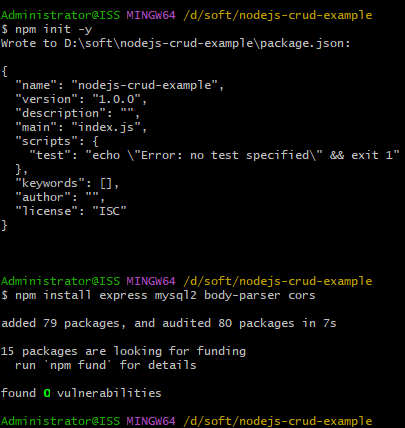
2. 配置数据库连接 (config/db.js)
const mysql = require('mysql2/promise');

const pool = mysql.createPool({
  host: 'localhost',
  user: 'root',
  password: 'yourpassword',
  database: 'testdb',
  waitForConnections: true,
  connectionLimit: 10,
  queueLimit: 0
});

module.exports = pool;
3. 创建模型 (models/userModel.js)
const pool = require('../config/db');

class User {
  static async getAll() {
    const [rows] = await pool.query('SELECT * FROM users');
    return rows;
  }

  static async getById(id) {
    const [rows] = await pool.query('SELECT * FROM users WHERE id = ?', [id]);
    return rows[0];
  }

  static async create(name, email) {
    const [result] = await pool.query(
      'INSERT INTO users (name, email) VALUES (?, ?)',
      [name, email]
    );
    return { id: result.insertId, name, email };
  }

  static async update(id, name, email) {
    await pool.query(
      'UPDATE users SET name = ?, email = ? WHERE id = ?',
      [name, email, id]
    );
    return { id, name, email };
  }

  static async delete(id) {
    await pool.query('DELETE FROM users WHERE id = ?', [id]);
    return true;
  }
}

module.exports = User;
4. 创建控制器 (controllers/userController.js)
const User = require('../models/userModel');

exports.getAllUsers = async (req, res) => {
  try {
    const users = await User.getAll();
    res.json(users);
  } catch (err) {
    res.status(500).json({ message: err.message });
  }
};

exports.getUser = async (req, res) => {
  try {
    const user = await User.getById(req.params.id);
    if (!user) {
      return res.status(404).json({ message: 'User not found' });
    }
    res.json(user);
  } catch (err) {
    res.status(500).json({ message: err.message });
  }
};

exports.createUser = async (req, res) => {
  try {
    const { name, email } = req.body;
    const newUser = await User.create(name, email);
    res.status(201).json(newUser);
  } catch (err) {
    res.status(400).json({ message: err.message });
  }
};

exports.updateUser = async (req, res) => {
  try {
    const { name, email } = req.body;
    const updatedUser = await User.update(req.params.id, name, email);
    res.json(updatedUser);
  } catch (err) {
    res.status(400).json({ message: err.message });
  }
};

exports.deleteUser = async (req, res) => {
  try {
    await User.delete(req.params.id);
    res.json({ message: 'User deleted successfully' });
  } catch (err) {
    res.status(500).json({ message: err.message });
  }
};
5. 创建路由 (routes/userRoutes.js)
const express = require('express');
const router = express.Router();
const userController = require('../controllers/userController');

// CRUD 路由
router.get('/', userController.getAllUsers);
router.get('/:id', userController.getUser);
router.post('/', userController.createUser);
router.put('/:id', userController.updateUser);
router.delete('/:id', userController.deleteUser);

module.exports = router;
6. 应用入口 (app.js)
const express = require('express');
const bodyParser = require('body-parser');
const cors = require('cors');
const userRoutes = require('./routes/userRoutes');

const app = express();

// 中间件
app.use(cors());
app.use(bodyParser.json());
app.use(bodyParser.urlencoded({ extended: true }));

// 路由
app.use('/api/users', userRoutes);

// 错误处理
app.use((err, req, res, next) => {
  console.error(err.stack);
  res.status(500).json({ message: 'Something broke!' });
});

// 启动服务器
const PORT = process.env.PORT || 3000;
app.listen(PORT, () => {
  console.log(`Server is running on port ${PORT}`);
});
7. 创建数据库表
在 MySQL 中执行以下 SQL 创建 users 表:
CREATE TABLE IF NOT EXISTS users ( id INT AUTO_INCREMENT PRIMARY KEY, name VARCHAR(100) NOT NULL, email VARCHAR(100) NOT NULL UNIQUE, created_at TIMESTAMP DEFAULT CURRENT_TIMESTAMP );8. 测试 API
你可以使用 Postman 或 curl 测试这些端点:
-
获取所有用户 :
GET /api/users -
结果为:
-

-
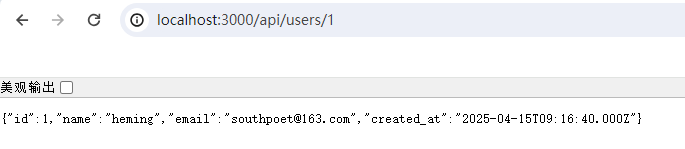
获取单个用户 :
GET /api/users/1 -
-
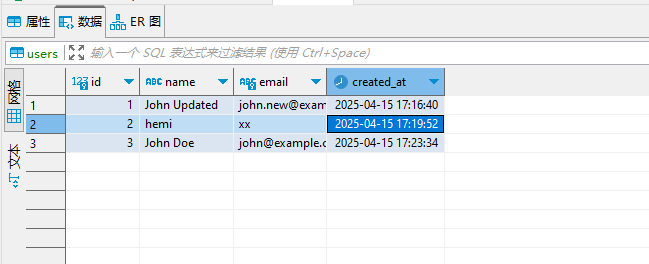
创建用户:
在cmd窗口中执行 curl -X POST -H "Content-Type: application/json" -d '{"name":"John Doe","email":"john@example.com"}' http://localhost:3000/api/users -
-
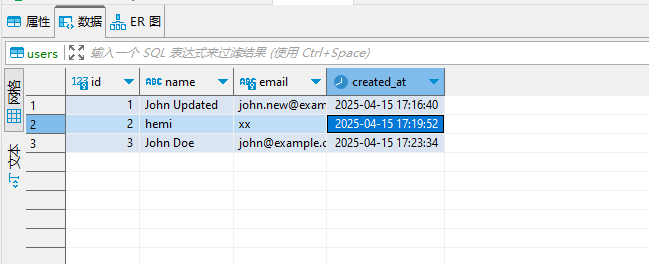
更新用户:
在cmd窗口中执行 curl -X PUT -H "Content-Type: application/json" -d '{"name":"John Updated","email":"john.new@example.com"}' http://localhost:3000/api/users/1 -
-
删除用户 :
DELETE /api/users/1 -
在cmd窗口中执行 -

-
curl -X DELETE -H "Content-Type: application/json" http://localhost:3000/api/users/1