<template>
<transition name="modal-fade">
<div v-if="isOpen" class="modal-overlay" @click.self="handleOverlayClick">
<div class="modal-container">
<div class="modal-header">
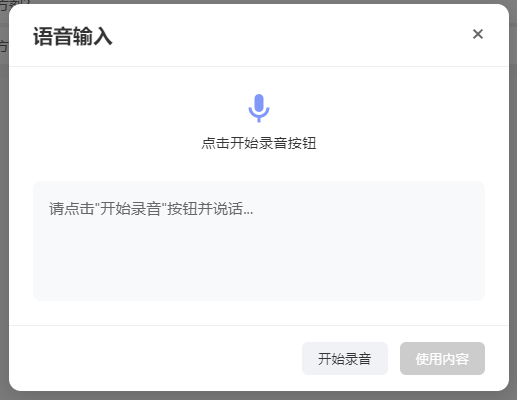
<h2>语音输入</h2>
<button class="close-button" @click="closeModal">×</button>
</div>
<div class="modal-body">
<div class="status-indicator">
<div v-if="isRecording" class="mic-animation">
<div class="mic-icon">
<svg viewBox="0 0 24 24">
<path
d="M12,2A3,3 0 0,1 15,5V11A3,3 0 0,1 12,14A3,3 0 0,1 9,11V5A3,3 0 0,1 12,2M19,11C19,14.53 16.39,17.44 13,17.93V21H11V17.93C7.61,17.44 5,14.53 5,11H7A5,5 0 0,0 12,16A5,5 0 0,0 17,11H19Z" />
</svg>
</div>
<div class="sound-wave">
<div class="wave"></div>
<div class="wave"></div>
<div class="wave"></div>
</div>
</div>
<div v-else class="mic-ready">
<svg viewBox="0 0 24 24">
<path
d="M12,2A3,3 0 0,1 15,5V11A3,3 0 0,1 12,14A3,3 0 0,1 9,11V5A3,3 0 0,1 12,2M19,11C19,14.53 16.39,17.44 13,17.93V21H11V17.93C7.61,17.44 5,14.53 5,11H7A5,5 0 0,0 12,16A5,5 0 0,0 17,11H19Z" />
</svg>
</div>
<p class="status-text">{{ statusText }}</p>
<div v-if="recognitionError" class="error-message">
<svg viewBox="0 0 24 24" class="error-icon">
<path
d="M12,2C17.53,2 22,6.47 22,12C22,17.53 17.53,22 12,22C6.47,22 2,17.53 2,12C2,6.47 6.47,2 12,2M15.59,7L12,10.59L8.41,7L7,8.41L10.59,12L7,15.59L8.41,17L12,13.41L15.59,17L17,15.59L13.41,12L17,8.41L15.59,7Z" />
</svg>
<span>{{ friendlyErrorMessage }}</span>
</div>
</div>
<div class="result-container">
<div class="result-content" :class="{ 'has-result': displayText }">
{{ displayText }}
</div>
<!-- 声音提示(只在需要时显示) -->
<div v-if="friendlyErrorMessage &&
[3301, 3305, 3312, '-3005', '-3006'].includes(recognitionError)" class="voice-hint">
{{ friendlyErrorMessage }}
</div>
</div>
</div>
<div class="modal-footer">
<button @click="toggleRecording" class="control-button" :class="{ 'listening': isRecording }"
:disabled="!isBrowserSupported">
{{ isRecording ? '停止录音' : '开始录音' }}
</button>
<button @click="confirmResult" class="confirm-button" :disabled="!transcript">
使用内容
</button>
</div>
</div>
</div>
</transition>
</template>
<script setup>
import { ref, computed, onMounted, onBeforeUnmount } from 'vue';
const props = defineProps({
isOpen: {
type: Boolean,
required: true
},
baiduConfig: {
type: Object,
required: true,
default: () => ({
appid: 0, // 百度云控制台应用 appid
appkey: '', // api key
dev_pid: 15372,
format: 'pcm',
sample: 16000
})
}
});
const emit = defineEmits(['close', 'confirm']);
const isRecording = ref(false);
const transcript = ref('');
const recognitionError = ref(null);
const isBrowserSupported = ref(true);
const interimTranscript = ref(''); // 临时识别结果
let audioContext = null;
let mediaStream = null;
let processor = null;
let socket = null;
// 错误映射表
const errorMessageMap = {
3300: '输入参数不正确',
3301: '请提高音量并清晰发音',
3302: '鉴权失败,请检查API密钥',
3303: '服务器内部错误',
3304: 'GPS信息获取失败',
3305: '未检测到有效语音',
3307: '识别引擎繁忙',
3308: '请求超时',
3309: '引擎错误',
3310: '音频过长(超过60秒)',
3311: '音频数据异常',
3312: '发音不清晰',
3313: '服务不可用',
3314: '服务器过载',
'-3005': '请提高音量并清晰发音', // 未检测到有效语音
'-3006': '请提高音量并清晰发音', // 静音超时
'no-speech': '未检测到语音,请靠近麦克风说话',
'audio-capture': '无法访问麦克风',
'not-allowed': '麦克风权限被拒绝',
'network': '网络连接失败',
'default': '识别服务异常'
};
// 计算属性
const friendlyErrorMessage = computed(() => {
if (!recognitionError.value) return '';
// 声音相关错误统一提示
if ([3301, 3305, 3312, '-3005', '-3006'].includes(recognitionError.value)) {
return '请提高音量并清晰发音';
}
return errorMessageMap[recognitionError.value] || errorMessageMap['default'];
});
const statusText = computed(() => {
if (recognitionError.value) return '识别遇到问题';
return isRecording.value ? '正在聆听中...' : '点击开始录音按钮';
});
// 显示文本优化(临时结果追加在最终结果后)
const displayText = computed(() => {
let baseText = transcript.value || '';
if (interimTranscript.value) {
baseText += baseText ? ' ' + interimTranscript.value : interimTranscript.value;
}
return baseText || '请点击"开始录音"按钮并说话...';
});
// 生成随机ID函数
const generateRandomId = () => {
return Math.random().toString(36).substring(2, 15) +
Math.random().toString(36).substring(2, 15);
};
// 主逻辑
const initRecording = async () => {
try {
transcript.value = '';
interimTranscript.value = '';
recognitionError.value = null;
// 1. 获取麦克风权限
mediaStream = await navigator.mediaDevices.getUserMedia({
audio: {
sampleRate: 16000,
channelCount: 1,
echoCancellation: false,
noiseSuppression: false,
autoGainControl: false
}
});
// 2. 初始化音频上下文
audioContext = new (window.AudioContext || window.webkitAudioContext)({
sampleRate: 16000
});
// 3. 建立WebSocket连接
initWebSocket();
// 4. 创建音频处理器
const source = audioContext.createMediaStreamSource(mediaStream);
processor = audioContext.createScriptProcessor(4096, 1, 1);
processor.onaudioprocess = (e) => {
if (!isRecording.value || !socket || socket.readyState !== WebSocket.OPEN) return;
// 获取音频数据并转换为16位PCM
const audioData = e.inputBuffer.getChannelData(0);
const pcmData = convertFloat32ToInt16(audioData);
// 发送音频数据帧 (Binary帧)
socket.send(pcmData);
};
source.connect(processor);
processor.connect(audioContext.destination);
isRecording.value = true;
} catch (error) {
console.error('初始化失败:', error);
handleError(error);
stopRecording();
}
};
// 初始化WebSocket连接
const initWebSocket = () => {
const cuid = `web_${generateRandomId()}`;
const sn = generateRandomId();
socket = new WebSocket(`wss://vop.baidu.com/realtime_asr?sn=${sn}`);
socket.onopen = () => {
const startFrame = {
type: "START",
data: {
...props.baiduConfig,
cuid: cuid
}
};
socket.send(JSON.stringify(startFrame));
};
socket.onmessage = (event) => {
try {
const data = JSON.parse(event.data);
// 重置非关键错误状态
if (data.err_no === 0 || [3301, 3305, 3312, '-3005', '-3006'].includes(data.err_no)) {
recognitionError.value = null;
}
if (data.err_no !== 0) {
handleApiError(data);
return;
}
if (data.type === "MID_TEXT") {
// 临时结果追加显示(不覆盖已有结果)
interimTranscript.value = data.result;
} else if (data.type === "FIN_TEXT") {
// 最终结果用句号分隔追加
if (data.result) {
transcript.value += transcript.value ? '。' + data.result : data.result;
}
interimTranscript.value = '';
}
} catch (e) {
console.error('解析错误:', e);
}
};
socket.onclose = (event) => {
if (isRecording.value) stopRecording();
};
socket.onerror = (error) => {
recognitionError.value = 'network';
stopRecording();
};
};
// 将Float32转换为Int16
const convertFloat32ToInt16 = (buffer) => {
const length = buffer.length;
const buf = new Int16Array(length);
for (let i = 0; i < length; i++) {
buf[i] = Math.min(1, buffer[i]) * 32767;
}
return buf;
};
// 错误处理
const handleApiError = (data) => {
// 忽略"未检测到有效语音"等非关键错误
if (data.err_no === -3005 || data.err_no === -3006) {
// console.log('语音检测提示:', data.err_msg);
return;
}
recognitionError.value = data.err_no || 'service-error';
// console.error('识别错误:', data.err_msg || '未知错误');
};
const handleError = (error) => {
recognitionError.value = error.name === 'NotAllowedError' ?
'not-allowed' :
error.message.includes('network') ? 'network' : 'audio-capture';
};
// 控制方法
const stopRecording = () => {
isRecording.value = false;
// 发送结束帧
if (socket && socket.readyState === WebSocket.OPEN) {
socket.send(JSON.stringify({ type: "FINISH" }));
// 不立即关闭,等待服务端关闭
}
// 清理资源
if (processor) {
processor.disconnect();
processor = null;
}
if (audioContext) {
audioContext.close().catch(console.error);
audioContext = null;
}
if (mediaStream) {
mediaStream.getTracks().forEach(track => track.stop());
mediaStream = null;
}
// 合并临时结果到最终结果
if (interimTranscript.value) {
transcript.value += interimTranscript.value + "\n";
interimTranscript.value = '';
}
};
const toggleRecording = () => {
isRecording.value ? stopRecording() : initRecording();
};
const closeModal = () => {
stopRecording();
if (socket) {
socket.close();
socket = null;
}
emit('close');
};
const confirmResult = () => {
emit('confirm', transcript.value);
closeModal();
};
const handleOverlayClick = (event) => {
if (event.target === event.currentTarget) closeModal();
};
// 生命周期
onMounted(() => {
isBrowserSupported.value = !!navigator.mediaDevices && !!window.WebSocket;
});
onBeforeUnmount(() => {
stopRecording();
if (socket) {
socket.close();
socket = null;
}
});
</script>
<style scoped>
/* 保持原有样式不变 */
.modal-overlay {
position: fixed;
top: 0;
left: 0;
right: 0;
bottom: 0;
background-color: rgba(0, 0, 0, 0.5);
display: flex;
justify-content: center;
align-items: center;
z-index: 1000;
}
.modal-container {
background-color: white;
border-radius: 12px;
box-shadow: 0 4px 20px rgba(0, 0, 0, 0.15);
width: 90%;
max-width: 500px;
max-height: 90vh;
display: flex;
flex-direction: column;
overflow: hidden;
}
.modal-header {
padding: 16px 24px;
border-bottom: 1px solid #eee;
display: flex;
justify-content: space-between;
align-items: center;
}
.modal-header h2 {
margin: 0;
font-size: 1.25rem;
color: #333;
}
.close-button {
background: none;
border: none;
font-size: 1.5rem;
cursor: pointer;
color: #666;
padding: 0;
line-height: 1;
outline: none;
}
.modal-body {
padding: 24px;
flex: 1;
overflow-y: auto;
}
.status-indicator {
display: flex;
flex-direction: column;
align-items: center;
margin-bottom: 24px;
}
.mic-animation {
display: flex;
align-items: center;
gap: 12px;
margin-bottom: 8px;
}
.mic-icon svg,
.mic-ready svg {
width: 36px;
height: 36px;
fill: #4a6cf7;
}
.sound-wave {
display: flex;
align-items: center;
gap: 4px;
height: 36px;
}
.wave {
width: 6px;
height: 16px;
background-color: #4a6cf7;
border-radius: 3px;
animation: wave 1.2s infinite ease-in-out;
}
.wave:nth-child(1) {
animation-delay: -0.6s;
}
.wave:nth-child(2) {
animation-delay: -0.3s;
}
.wave:nth-child(3) {
animation-delay: 0s;
}
@keyframes wave {
0%,
60%,
100% {
transform: scaleY(0.4);
}
30% {
transform: scaleY(1);
}
}
.mic-ready svg {
opacity: 0.7;
}
.status-text {
margin: 0;
color: #666;
font-size: 0.9rem;
text-align: center;
font-weight: 500;
color: #333;
margin-bottom: 4px;
}
.result-container {
background-color: #f8f9fa;
border-radius: 8px;
padding: 16px;
min-height: 120px;
}
.voice-hint {
display: flex;
align-items: center;
gap: 6px;
margin-top: 8px;
color: #ff9800;
font-size: 0.85rem;
}
.result-content {
color: #666;
font-size: 0.95rem;
line-height: 1.5;
}
.result-content.has-result {
color: #333;
}
.info-message {
display: flex;
align-items: center;
gap: 8px;
margin-top: 8px;
color: #666;
font-size: 0.8rem;
}
.modal-footer {
padding: 16px 24px;
border-top: 1px solid #eee;
display: flex;
justify-content: flex-end;
gap: 12px;
}
.control-button {
padding: 8px 16px;
background-color: #f0f2f5;
border: none;
border-radius: 6px;
color: #333;
cursor: pointer;
font-weight: 500;
transition: all 0.2s;
}
.control-button.listening {
background-color: #ffebee;
color: #f44336;
}
.control-button:hover {
background-color: #e4e6eb;
}
.control-button:disabled {
background-color: #e0e0e0;
color: #9e9e9e;
cursor: not-allowed;
}
.confirm-button {
padding: 8px 16px;
background-color: #4a6cf7;
border: none;
border-radius: 6px;
color: white;
cursor: pointer;
font-weight: 500;
transition: background-color 0.2s;
}
.confirm-button:hover {
background-color: #3a5bd9;
}
.confirm-button:disabled {
background-color: #cccccc;
cursor: not-allowed;
}
.error-message {
display: flex;
align-items: center;
justify-content: center;
gap: 8px;
margin-top: 12px;
padding: 8px 12px;
background-color: #ffebee;
border-radius: 6px;
color: #d32f2f;
font-size: 0.9rem;
}
.error-icon {
width: 18px;
height: 18px;
fill: #d32f2f;
}
.modal-fade-enter-active,
.modal-fade-leave-active {
transition: opacity 0.3s ease;
}
.modal-fade-enter-from,
.modal-fade-leave-to {
opacity: 0;
}
</style>