本以为搭建和访问FTP服务器的功能已经是被淘汰的技术了,只会在学习新技术的时候才会了解学习学习,WinFrom版本,和windows Api版本访问FTP服务器的功能示例也都写过。没想到这次会在项目中再次遇到,
这里记录下使用Qt开源库QFtpServerLib搭建FTP服务器,使用旧的QFTP模块代码访问搭建好的FTP服务器功能的示例和部分问题的解决方法。
目录导读
-
- 使用QFtpServerLib库搭建FTP服务器
- [使用QFTP 模块访问FTP服务器](#使用QFTP 模块访问FTP服务器)
使用QFtpServerLib库搭建FTP服务器
在Windows 系统环境中FTP服务器可以通过IIS搭建,但是有些部分阉割的系统是没有IIS服务的,只能通过在QT软件中搭建FTP服务,保证在软件能运行的时候,FTP服务器也能启动,这种需求自己写绝对够呛,还好在GitHub找到一个现成的三方库.
sashoalm/QFtpServer
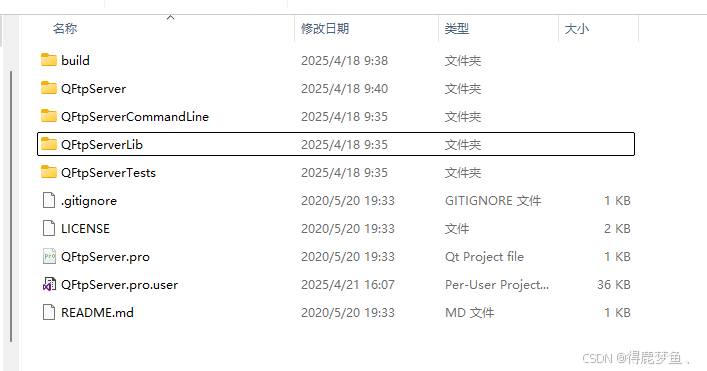
项目运行效果:
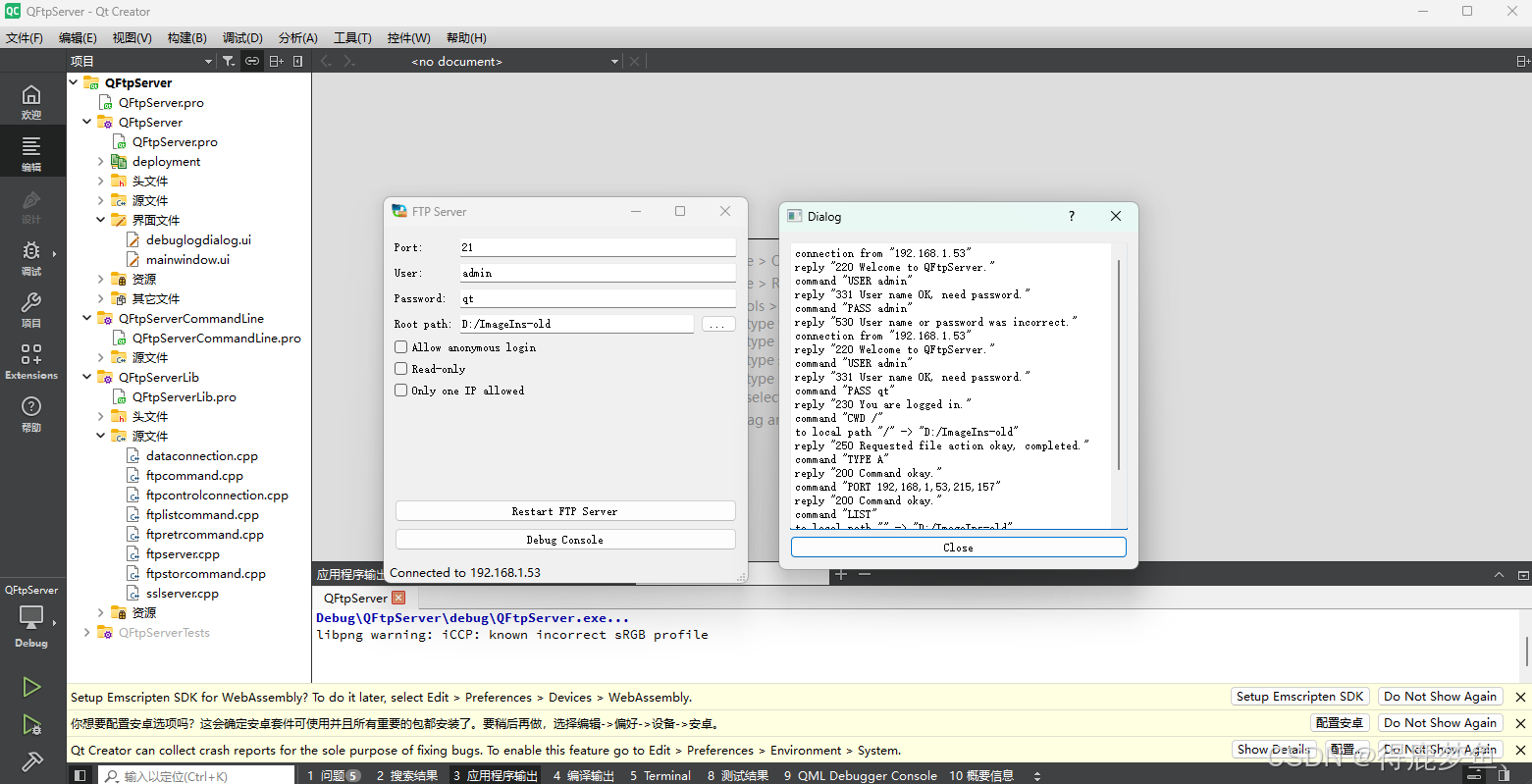
这个库基本的FTP服务都已经实现完毕了,搭建的FTP服务器甚至启动不需要管理员权限,不需要关闭防火墙,完美的解决了局域网数据交互的问题。
上面项目示例中是通过生成静态的QFtpServerLib库 调用,
后面我直接改成了.Pri调用,添加到实际项目代码中编译.
- 创建 QFtpServerLib.pri 文件引用
cpp
QT       += network
# INCLUDEPATH += $$[QT_INSTALL_HEADERS]
# TARGET = QFtpServerLib
# TEMPLATE = lib
# DEFINES += QFTPSERVERLIB_LIBRARY
# 设置Utf-8格式编码
# unix {
#     target.path = /usr/lib
#     INSTALLS += target
# }

#如果电脑环境上有多个mscv2017/2019/2022等多个版本的编译器,那么需要这一句,用于屏蔽多个vs版本造成的编译异常
QMAKE_PROJECT_DEPTH = 0

INCLUDEPATH += $$PWD
SOURCES += \
    $$PWD/dataconnection.cpp \
    $$PWD/ftpcommand.cpp \
    $$PWD/ftpcontrolconnection.cpp \
    $$PWD/ftplistcommand.cpp \
    $$PWD/ftpretrcommand.cpp \
    $$PWD/ftpserver.cpp \
    $$PWD/ftpstorcommand.cpp \
    $$PWD/sslserver.cpp

HEADERS +=\
    $$PWD/dataconnection.h \
    $$PWD/ftpcommand.h \
    $$PWD/ftpcontrolconnection.h \
    $$PWD/ftplistcommand.h \
    $$PWD/ftpretrcommand.h \
    $$PWD/ftpserver.h \
    $$PWD/ftpstorcommand.h \
    $$PWD/sslserver.h


RESOURCES += \
    $$PWD/certificates.qrc
直接移除了 qftpserverlib_global.h文件和FtpServer类中的QFTPSERVERLIBSHARED_EXPORT 声明,再将文件添加到.Pri头文件中就行了。
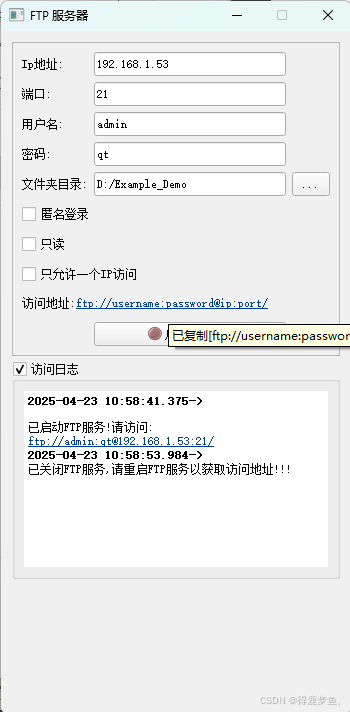
再调整下界面,修改下布局,再添加个FTP服务器启动状态判断,
就能轻松实现如下图示效果:
- 创建 FtpServer 实例代码示例:
cpp
void FrmFtpServerSetting::StartServerBy(bool bol)
{
    if(bol)
    {
       //! 启动服务器
        if(server!=nullptr)
       {
           server->stopServer();
           delete server;
           server=nullptr;
        }
        QString userName="";
        QString password="";
        if (!ui->checkBox_Anonymous->isChecked()) {
            userName = ui->lineEdit_User->text();
            password = ui->lineEdit_PassWord->text();
        }

        delete server;
        server = new FtpServer(this, ui->lineEdit_RootPath->text(), ui->lineEdit_Port->text().toInt(), userName,
                               password, ui->checkBox_ReadOnly->isChecked(), ui->checkBox_OnlyOneIpAllowed->isChecked());
        connect(server, SIGNAL(newPeerIp(QString)), SLOT(PeerIpChanged(QString)));
        if (server->isListening()) {
            EnabledWidget(true);
            // ui->statusBar->showMessage("Listening at " + FtpServer::lanIp());
            QString Address="";
            if(!ui->checkBox_Anonymous->isChecked())
                Address=QString("ftp://%1:%2@%3:%4/").arg(ui->lineEdit_User->text()).arg(ui->lineEdit_PassWord->text()).arg(FtpServer::lanIp()).arg(ui->lineEdit_Port->text().trimmed());
            else
                Address=QString("ftp://@%1:%2/").arg(FtpServer::lanIp()).arg(ui->lineEdit_Port->text().trimmed());

            ui->label_FtpAddress->setText(QString("<html><head/><body><p>访问地址:<a href=\"%1\" style=\" text-decoration: underline; color:#003e92;\">"
                                                  "%2</a></p></body></html>").arg(Address,Address));
            ui->pushButton->setIcon(QApplication::style()->standardIcon((enum QStyle::StandardPixmap)48));
            ui->pushButton->setText("关闭FTP服务");
            LoadMessInfo("已启动FTP服务!请访问:<br><a href=\"###\" style=\" text-decoration: underline; color:#003e92;\">"+Address+"</a>");
            SaveToSetting();
        } else {
            delete server;
            server=nullptr;
            ui->label_FtpAddress->setText("<html><head/><body><p>访问地址:<a href=\"ftp://username:password@ip:port/\" style=\" text-decoration: underline; color:#003e92;\">ftp://username:password@ip:port/</a></p></body></html>");
            LoadMessInfo("未能创建监听!请尝试重启FTP服务!!");
            ui->pushButton->setIcon(QApplication::style()->standardIcon((enum QStyle::StandardPixmap)49));
            ui->pushButton->setText("启动FTP服务");
            EnabledWidget(false);
        }
    }
    else
    {
        //! 启动服务器
        if(server!=nullptr)
        {
            server->stopServer();
            delete server;
            server=nullptr;
        }
       //! 关闭服务器
       ui->label_FtpAddress->setText("<html><head/><body><p>访问地址:<a href=\"ftp://username:password@ip:port/\" style=\" text-decoration: underline; color:#003e92;\">ftp://username:password@ip:port/</a></p></body></html>");
       LoadMessInfo("已关闭FTP服务,请重启FTP服务以获取访问地址!!!");
       ui->pushButton->setIcon(QApplication::style()->standardIcon((enum QStyle::StandardPixmap)49));
       ui->pushButton->setText("启动FTP服务");
        EnabledWidget(false);
    }

}
QFtpServerLib库 示例代码中已经实现了相关功能!代码简单,照抄就行了;
其他功能参考:
z1908144712/QtFtpServer也是通过基于QFtpServerLib库 实现的。
使用QFTP 模块访问FTP服务器
在Qt5中,官方已经移除了QFtp类,可以从Qt4的源代码中获取并重新编译,
这里同样是在网上找到已经编译好的Qt5.1.0版本的开源库
https://github.com/qt/qtftp
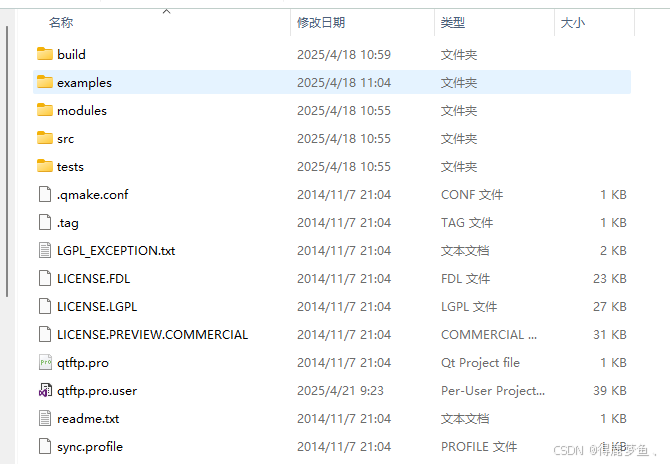
这个示例中的功能过于繁琐了,还需要生成QFTP模块,再引用到项目中,
实际上直接把
qurlinfo.h
qurlinfo.cpp
qftp.h
qftp.cpp
四个文件包含到项目文件中,添加QT += network就能直接使用。
注意将qftp.h文件中的
#include <QtFtp/qurlinfo.h>改为#include "qurlinfo.h"
除此之外这个库还需要解决两个问题:
1.解决QFtp::list()方法获取不到文件列表的问题
在使用QFtp库的时候,我测试了半天愣是没有获取到文件列表,一度怀疑前面搭建的FTP服务器是不是没搭建好,但是通过文件资源管理器和360游览器都能正常访问FTP服务器并获取文件列表,
在网上找了半天,都说是int QFTP::list(const QString &dir = QString());的解析文件目录有问题,
但是又都没说具体的问题在哪,于是只能苦逼的看qftp.cpp源代码。
通过不断地qDebug()调试,找到
621行 bool QFtpDTP::parseDir(const QByteArray &buffer, const QString &userName, QUrlInfo *info)
解析不了传进来的类 Unix 风格 的字符串
drwxrwxrwx unknown unknown 0 Apr 22 16:56 PropertyRedact\r\n
-rw-rw-rw- unknown unknown 115300 Apr 22 16:50 PropertyRedact.zip\r\n
drwxrwxrwx unknown unknown 0 Apr 22 16:58 Ftp_Server\r\n
drwxrwxrwx unknown unknown 0 Apr 07 17:19 build-PropertyRedact-Desktop_Qt_5_13_1_MSVC2017_64bit-Release\r\n
QFTP有设置Unix style FTP servers的解析格式
cpp
    // Unix style FTP servers
    QRegExp unixPattern(QLatin1String("^([\\-dl])([a-zA-Z\\-]{9,9})\\s+\\d+\\s+(\\S*)\\s+"
                                      "(\\S*)\\s+(\\d+)\\s+(\\S+\\s+\\S+\\s+\\S+)\\s+(\\S.*)"));
    int num=unixPattern.indexIn(bufferStr);
    //qDebug()<<"indexIn: "<<num;
    if (num == 0) {
        _q_parseUnixDir(unixPattern.capturedTexts(), userName, info);
        return true;
    }
但是跟上面传进来的字符就多少有点不匹配了,
通过分析正则表达式可知:
| 分段 | 匹配目标 | 示例匹配值 |
|---|---|---|
| ^(-dl) | 文件类型(首字符):-(文件)、d(目录)、l(符号链接) | d(目录) |
| (a-zA-Z-{9,9}) | 文件权限(9个字符):rwxrwxrwx 或类似组合(-表示无权限) | rwxrwxrwx |
| \s+\d+\s+ | 硬链接数量(通常为数字,目录至少为 2) | |
| (\S*)\s+ | 文件所有者(非空白字符,可能为空) | unknown |
| (\S*)\s+ | 文件所属组(非空白字符,可能为空) | unknown |
| (\d+)\s+ | 文件大小(字节数,目录通常为 0) | 0 |
| (\S+\s+\S+\s+\S+) | 修改时间(通常为 月 日 时间 或 月 日 年) | Apr 22 16:56 |
| \s+(\S.*) | 文件名(可能包含空格,直到行尾) | PropertyRedact\r\n |
在用户组前面缺了个硬链接数量 数字类型导致内容不匹配,
重新修改正则表达示字符串:以适应上述字符串
cpp
    //! 追加修改-修改字符串匹配
    QRegExp unixPattern2(QLatin1String("^([\\-dl])([a-zA-Z\\-]{9,9})\\s+(\\S+)\\s+(\\S+)\\s+"
                                       "(\\d+)\\s+(\\S+\\s+\\S+\\s+\\S+)\\s+(\\S.*)"));
    //qDebug()<<"unixPattern2 : "<<unixPattern2.indexIn(bufferStr);
    if (unixPattern2.indexIn(bufferStr) == 0) {
        _q_parseUnixDir(unixPattern2.capturedTexts(), userName, info);
        return true;
    }
这下就正常获取到文件列表了
2.解决QFtp中文乱码,上传包含中文名称的文件会失败的问题
QFtp.cpp中都是使用的QString::fromLatin1或者.toLatin1()来处理字符串,这就导致了在链接Ftp服务器后中文乱码,甚至上传中文名称文件都失败的问题,
这时只需要将
QString::fromLatin1 ->改成: QString::fromUtf8
.toLatin1() ->改成: .toUtf8()
头文件添加
#if defined(_MSC_VER) && (_MSC_VER >= 1600)
# pragma execution_character_set("utf-8")
#endif
就能解决中文乱码的问题,
再参考ftpwindow.h文件的示例,就能了解FTP库的调用,
实现如下图示功能:
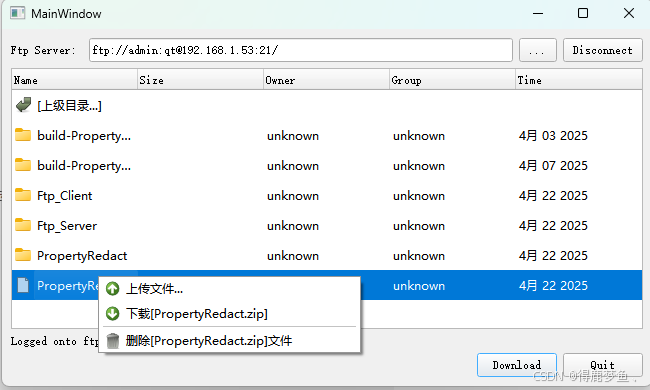
其中:
- 创建FTP客户端监听示例:
cpp
    connectOrDisconnect();

#ifndef QT_NO_CURSOR
    setCursor(Qt::WaitCursor);
#endif

    //qDebug()<<"on_connectButton_clicked-- >";
    ftp = new QFtp(this);
    connect(ftp, SIGNAL(commandFinished(int,bool)),
            this, SLOT(ftpCommandFinished(int,bool)));
    connect(ftp, SIGNAL(listInfo(QUrlInfo)),
            this, SLOT(addToList(QUrlInfo)));
    connect(ftp, SIGNAL(dataTransferProgress(qint64, qint64)),
            this, SLOT(dataTransferProgress(qint64, qint64)));
	///主动模式
    ftp->setTransferMode(QFtp::Active);

    ui->fileList->clear();
    currentPath.clear();
    isDirectory.clear();

    //![2]
    QUrl url(ui->ftpServerLineEdit->text());
    if (!url.isValid() || url.scheme().toLower() != QLatin1String("ftp")) {
        ftp->connectToHost(ui->ftpServerLineEdit->text(), 21);
    } else {
        ftp->connectToHost(url.host(), url.port(21));
        if (!url.userName().isEmpty())
            ftp->login(QUrl::fromPercentEncoding(url.userName().toUtf8()), url.password());
        else
            ftp->login();
        if (!url.path().isEmpty())
            ftp->cd(url.path());
    }
    //![2]
    //!
    ui->fileList->setEnabled(true);
    ui->connectButton->setEnabled(false);
    ui->connectButton->setText(tr("Disconnect"));
    ui->statusLabel->setText(tr("Connecting to FTP server %1...")
                             .arg(ui->ftpServerLineEdit->text()));
值得一提的是 qtftp在上传文件时,需要先关闭文件再上传,否则会上传失败,
- 上传文件示例:
cpp
 //! 上传文件
QString fileName="";
fileName=QFileDialog::getOpenFileName(this,"提示",".","");
if(fileName.isEmpty()|| !QFileInfo::exists(fileName))
    return;

upfile= new QFile(fileName);
if (!upfile->open(QFile::ReadWrite)) {
    QMessageBox::information(this, tr("FTP"),
                             tr("Unable to open the file %1: %2.")
                                 .arg(fileName).arg(upfile->errorString()));
    delete upfile;
    return;
}
//!必须先关闭文件 否则后面无法打开文件上传
upfile->close();
ui->progressBar->setMaximum(100);
ui->progressBar->setValue(0);
ui->progressBar->show();
QFileInfo info(fileName);
// ftp->put(upfile->readAll(),info.fileName());
ftp->put(upfile,info.fileName());这里展示了部分功能,更多内容建议查看QFtp.h,ftpwindow.h文件内容。