环境准备
服务器三台
10.0.0.70master
10.0.0.71worker1
10.0.0.72worker2
配置yum源(集群机器执行)
wget -O /etc/yum.repos.d/CentOS-Base.repo http://mirrors.aliyun.com/repo/Centos-7.repo`
`安装常用软件`
`yum -y install lrzsz vim  net-tools`
`
关闭firewall(集群机器执行)
systemctl stop firewalld`
`systemctl disable firewalld`

`
查看selinux,设置关闭(集群机器执行)
getenforce`
`#开启状态执行以下命令,需要重启服务器生效`
`sed -i 's/enforcing/disabled/' /etc/selinux/config`
`
三台服务器添加hosts,并更改主机名(先集群机器执行再对应执行)
cat >> /etc/hosts << EOF`
`10.0.0.70 k8s-master`
`10.0.0.71 k8s-worker1`
`10.0.0.72 k8s-worker2`
`EOF`

`10.0.0.70`
`hostnamectl set-hostname k8s-master`
`10.0.0.71`
`hostnamectl set-hostname k8s-worker1`
`10.0.0.72`
`hostnamectl set-hostname k8s-worker2`
`
安装ntpdate(集群机器执行)
yum install ntpdate -y`
`#集群所有服务器实现时间同步`
`ntpdate -u ntp1.aliyun.com`
`
关闭swap(集群机器执行)
sed -ri 's/.*swap.*/#&/' /etc/fstab`
`
配置网络(集群机器执行)
cat` `> /etc/sysctl.d/k8s.conf <<` `EOF`
`net.bridge.bridge-nf-call-ip6tables = 1`
`net.bridge.bridge-nf-call-iptables = 1`
`net.ipv4.ip_forward = 1`
`net.ipv4.tcp_tw_recycle = 0`
`EOF`

`sysctl -p`
`modprobe br_netfilter`
`lsmod |` `grep br_netfilter`
`
查看并更新内核(集群机器执行)
uname -a`
`Linux k8s-master 3.10.0-1160.71.1.el7.x86_64 #1 SMP Tue Jun 28 15:37:28 UTC 2022 x86_64 x86_64 x86_64 GNU/Linux`

`yum update`
`
配置ipvs功能(集群机器执行)
# 安装ipset和ipvsadm`
`yum install ipset ipvsadmin -y`
`#如果提示No package ipvsadmin available.需要使用`
`yum install ipvsadm`
`cat <<EOF > /etc/sysconfig/modules/ipvs.modules`
`#!/bin/bash`
`modprobe -- ip_vs`
`modprobe -- ip_vs_rr`
`modprobe -- ip_vs_wrr`
`modprobe -- ip_vs_sh`
`modprobe -- nf_conntrack_ipv4`
`EOF`
`chmod +x /etc/sysconfig/modules/ipvs.modules`
`# 执行脚本文件`
`/bin/bash /etc/sysconfig/modules/ipvs.modules`

`lsmod | grep -e ip_vs -e nf_conntrack_ipv4`
`
重启服务器(集群机器执行)
reboot`
`
安装软件
安装docker(集群机器执行)
wget https://mirrors.aliyun.com/docker-ce/linux/centos/docker-ce.repo -O /etc/yum.repos.d/docker-ce.repo`
`yum -y install docker-ce`
`systemctl enable docker && systemctl start docker`
`
配置国内源(集群机器执行)
cat > /etc/docker/daemon.json <<EOF`
`{`
`  "registry-mirrors": ["https://docker.hpcloud.cloud","https://docker.m.daocloud.io","https://docker.unsee.tech","https://docker.1panel.live","http://mirrors.ustc.edu.cn","https://docker.chenby.cn","http://mirror.azure.cn","https://dockerpull.org","https://dockerhub.icu","https://hub.rat.dev"],`
`  "exec-opts": ["native.cgroupdriver=systemd"],`
`  "log-driver": "json-file",`
`  "log-opts": {`
`    "max-size": "100m"`
`  }`
`}`
`EOF`

`systemctl restart docker`
`
安装 cri-dockerd(集群机器执行)
# 通过 wget 命令获取 cri-dockerd软件`
`wget https://github.com/Mirantis/cri-dockerd/releases/download/v0.3.12/cri-dockerd-0.3.12-3.el7.x86_64.rpm`
`#服务器无法下载离线上传`

`# 通过 rpm 命令执行安装包`
`rpm -ivh cri-dockerd-0.3.12-3.el7.x86_64.rpm`

`# 打开 cri-docker.service 配置文件`
`vim /usr/lib/systemd/system/cri-docker.service`

`# 修改对应的配置项`
`ExecStart=/usr/bin/cri-dockerd --container-runtime-endpoint fd:// --pod-infra-container-image=registry.aliyuncs.com/google_containers/pause:3.9`

`systemctl daemon-reload`
`systemctl enable cri-docker && systemctl start cri-docker`
`systemctl enable cri-docker.socket && systemctl start cri-docker.socket`
`systemctl status cri-docker.service`
`
添加国内yun源(集群机器执行)
cat >` `/etc/yum.repos.d/kubernetes.repo << EOF`
`[kubernetes]`
`name=Kubernetes`
`baseurl=https://mirrors.aliyun.com/kubernetes/yum/repos/kubernetes-el7-x86_64`
`enabled=1`
`gpgcheck=0`
`repo_gpgcheck=0`
`gpgkey=https://mirrors.aliyun.com/kubernetes/yum/doc/yum-key.gpg https://mirrors.aliyun.com/kubernetes/yum/doc/rpm-package-key.gpg`
`EOF`
`
安装 kubeadm、kubelet 和 kubectl(集群机器执行)
yum install -y kubelet-1.28.0 kubeadm-1.28.0 kubectl-1.28.0`
`systemctl start kubelet`
`systemctl enable kubelet`
`
Master 节点初始化 K8s (master执行)
#注意需要更改ip为自己服务器ip,后面同理`
`kubeadm init \`
`  --apiserver-advertise-address=10.0.0.70 \`
`  --image-repository registry.aliyuncs.com/google_containers \`
`  --kubernetes-version v1.28.0 \`
`  --service-cidr=10.96.0.0/12 \`
`  --pod-network-cidr=10.244.0.0/16 \`
`  --cri-socket=unix:///var/run/cri-dockerd.sock \`
`  --ignore-preflight-errors=all`


`#显示成功之后需要master执行以下命令`
`mkdir -p $HOME/.kube`
`cp -i /etc/kubernetes/admin.conf $HOME/.kube/config`
`chown $(id -u):$(id -g) $HOME/.kube/config`
`#kubernetes强化tab(安装之后会tab可以补全命令及参数)`
`echo 'source  <(kubectl  completion  bash)' >> ~/.bashrc`
`
示例
[root@k8s-master ~]# kubeadm init \`
`>   --apiserver-advertise-address=10.0.0.70 \`
`>   --image-repository registry.aliyuncs.com/google_containers \`
`>   --kubernetes-version v1.28.0 \`
`>   --service-cidr=10.96.0.0/12 \`
`>   --pod-network-cidr=10.244.0.0/16 \`
`>   --cri-socket=unix:///var/run/cri-dockerd.sock \`
`>   --ignore-preflight-errors=all`
`[init] Using Kubernetes version: v1.28.0`
`[preflight] Running pre-flight checks`
`[preflight] Pulling images required for setting up a Kubernetes cluster`
`[preflight] This might take a minute or two, depending on the speed of your internet connection`
`[preflight] You can also perform this action in beforehand using 'kubeadm config images pull'`
`[certs] Using certificateDir folder "/etc/kubernetes/pki"`
`[certs] Generating "ca" certificate and key`
`[certs] Generating "apiserver" certificate and key`
`[certs] apiserver serving cert is signed for DNS names [k8s-master kubernetes kubernetes.default kubernetes.default.svc kubernetes.default.svc.cluster.local] and IPs [10.96.0.1 10.0.0.70]`
`[certs] Generating "apiserver-kubelet-client" certificate and key`
`[certs] Generating "front-proxy-ca" certificate and key`
`[certs] Generating "front-proxy-client" certificate and key`
`[certs] Generating "etcd/ca" certificate and key`
`[certs] Generating "etcd/server" certificate and key`
`[certs] etcd/server serving cert is signed for DNS names [k8s-master localhost] and IPs [10.0.0.70 127.0.0.1 ::1]`
`[certs] Generating "etcd/peer" certificate and key`
`[certs] etcd/peer serving cert is signed for DNS names [k8s-master localhost] and IPs [10.0.0.70 127.0.0.1 ::1]`
`[certs] Generating "etcd/healthcheck-client" certificate and key`
`[certs] Generating "apiserver-etcd-client" certificate and key`
`[certs] Generating "sa" key and public key`
`[kubeconfig] Using kubeconfig folder "/etc/kubernetes"`
`[kubeconfig] Writing "admin.conf" kubeconfig file`
`[kubeconfig] Writing "kubelet.conf" kubeconfig file`
`[kubeconfig] Writing "controller-manager.conf" kubeconfig file`
`[kubeconfig] Writing "scheduler.conf" kubeconfig file`
`[etcd] Creating static Pod manifest for local etcd in "/etc/kubernetes/manifests"`
`[control-plane] Using manifest folder "/etc/kubernetes/manifests"`
`[control-plane] Creating static Pod manifest for "kube-apiserver"`
`[control-plane] Creating static Pod manifest for "kube-controller-manager"`
`[control-plane] Creating static Pod manifest for "kube-scheduler"`
`[kubelet-start] Writing kubelet environment file with flags to file "/var/lib/kubelet/kubeadm-flags.env"`
`[kubelet-start] Writing kubelet configuration to file "/var/lib/kubelet/config.yaml"`
`[kubelet-start] Starting the kubelet`
`[wait-control-plane] Waiting for the kubelet to boot up the control plane as static Pods from directory "/etc/kubernetes/manifests". This can take up to 4m0s`
`[apiclient] All control plane components are healthy after 6.501620 seconds`
`[upload-config] Storing the configuration used in ConfigMap "kubeadm-config" in the "kube-system" Namespace`
`[kubelet] Creating a ConfigMap "kubelet-config" in namespace kube-system with the configuration for the kubelets in the cluster`
`[upload-certs] Skipping phase. Please see --upload-certs`
`[mark-control-plane] Marking the node k8s-master as control-plane by adding the labels: [node-role.kubernetes.io/control-plane node.kubernetes.io/exclude-from-external-load-balancers]`
`[mark-control-plane] Marking the node k8s-master as control-plane by adding the taints [node-role.kubernetes.io/control-plane:NoSchedule]`
`[bootstrap-token] Using token: x3jlhw.ymjilbj6aiqyjelh`
`[bootstrap-token] Configuring bootstrap tokens, cluster-info ConfigMap, RBAC Roles`
`[bootstrap-token] Configured RBAC rules to allow Node Bootstrap tokens to get nodes`
`[bootstrap-token] Configured RBAC rules to allow Node Bootstrap tokens to post CSRs in order for nodes to get long term certificate credentials`
`[bootstrap-token] Configured RBAC rules to allow the csrapprover controller automatically approve CSRs from a Node Bootstrap Token`
`[bootstrap-token] Configured RBAC rules to allow certificate rotation for all node client certificates in the cluster`
`[bootstrap-token] Creating the "cluster-info" ConfigMap in the "kube-public" namespace`
`[kubelet-finalize] Updating "/etc/kubernetes/kubelet.conf" to point to a rotatable kubelet client certificate and key`
`[addons] Applied essential addon: CoreDNS`
`[addons] Applied essential addon: kube-proxy`

`Your Kubernetes control-plane has initialized successfully!`

`To start using your cluster, you need to run the following as a regular user:`

`  mkdir -p $HOME/.kube`
`  sudo cp -i /etc/kubernetes/admin.conf $HOME/.kube/config`
`  sudo chown $(id -u):$(id -g) $HOME/.kube/config`

`Alternatively, if you are the root user, you can run:`

`  export KUBECONFIG=/etc/kubernetes/admin.conf`

`You should now deploy a pod network to the cluster.`
`Run "kubectl apply -f [podnetwork].yaml" with one of the options listed at:`
`  https://kubernetes.io/docs/concepts/cluster-administration/addons/`

`Then you can join any number of worker nodes by running the following on each as root:`

`kubeadm join 10.0.0.70:6443 --token x3jlhw.ymjilbj6aiqyjelh \`
`	--discovery-token-ca-cert-hash sha256:e0222e1db79bd45841dbf390f9060d208b03bfa1c88c76067e2de6d5322bc845 `

`[root@k8s-master ~]#mkdir -p $HOME/.kube`
`[root@k8s-master ~]#cp -i /etc/kubernetes/admin.conf $HOME/.kube/config`
`[root@k8s-master ~]#chown $(id -u):$(id -g) $HOME/.kube/config`


`
worker节点加入master集群(worker执行)
K8s 初始化之后,就可以在其他 2 个工作节点上执行 "kubeadm join" 命令,因为我们使用了 cri-dockerd ,需要在命令加上 "--cri-socket=unix:///var/run/cri-dockerd.sock" 参数。
kubeadm join 10.0.0.70:6443 --token x3jlhw.ymjilbj6aiqyjelh --discovery-token-ca-cert-hash sha256:e0222e1db79bd45841dbf390f9060d208b03bfa1c88c76067e2de6d5322bc845 --cri-socket=unix:///var/run/cri-dockerd.sock`
`
安装网络插件 (master执行)
wget https://docs.projectcalico.org/manifests/calico.yaml`
`sed -i 's#docker.io/##g' calico.yaml`
`vim calico.yaml`
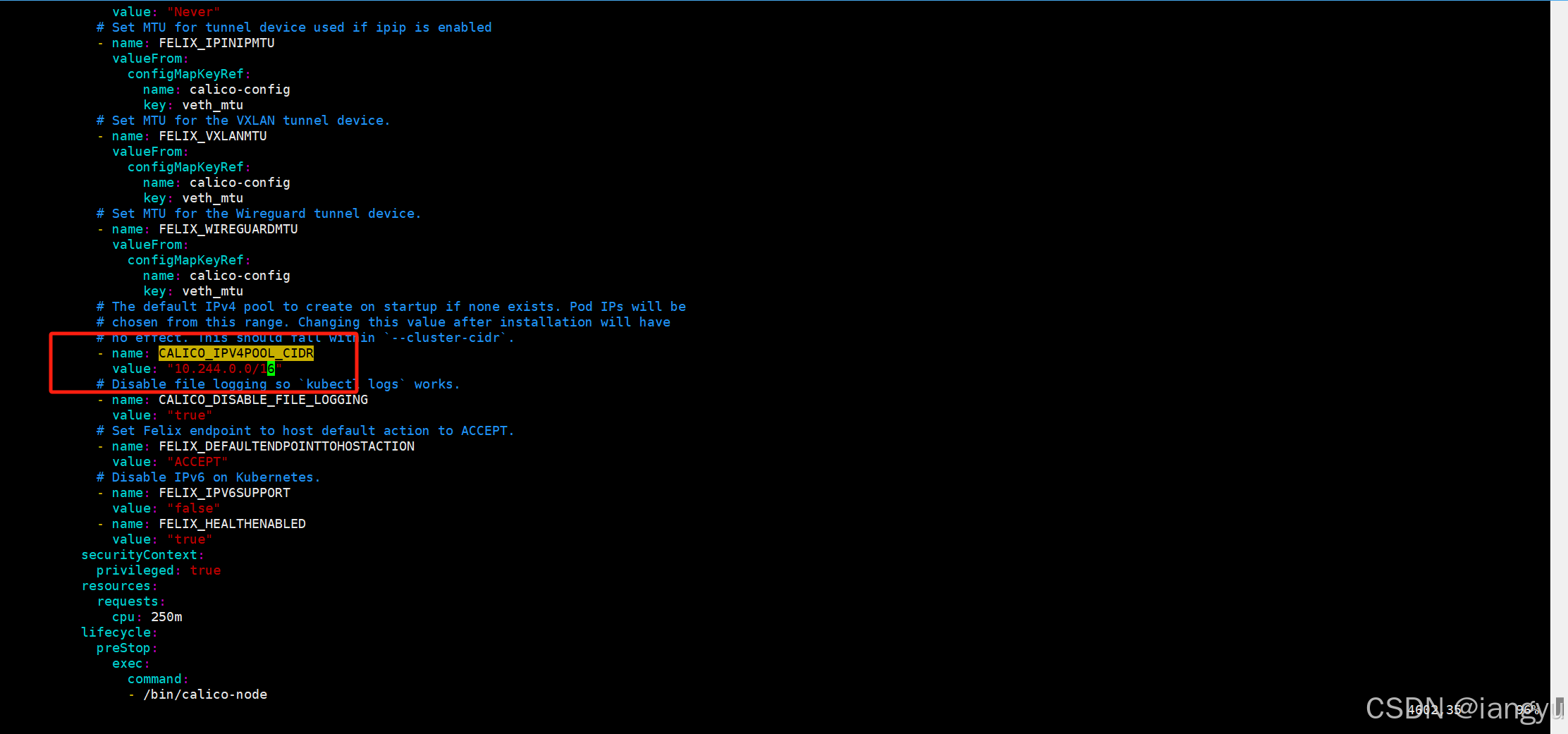
`#搜索/CALICO_IPV4POOL_CIDR`
`#效果见下图`
`# 修改文件时注意格式对齐`
` - name: CALICO_IPV4POOL_CIDR`
`   value: "10.244.0.0/16"`
`image: calico/cni:v3.25.0`
`image: calico/cni:v3.25.0`
`image: calico/node:v3.25.0`
`image: calico/node:v3.25.0`
`image: calico/kube-controllers:v3.25.0`

`
`
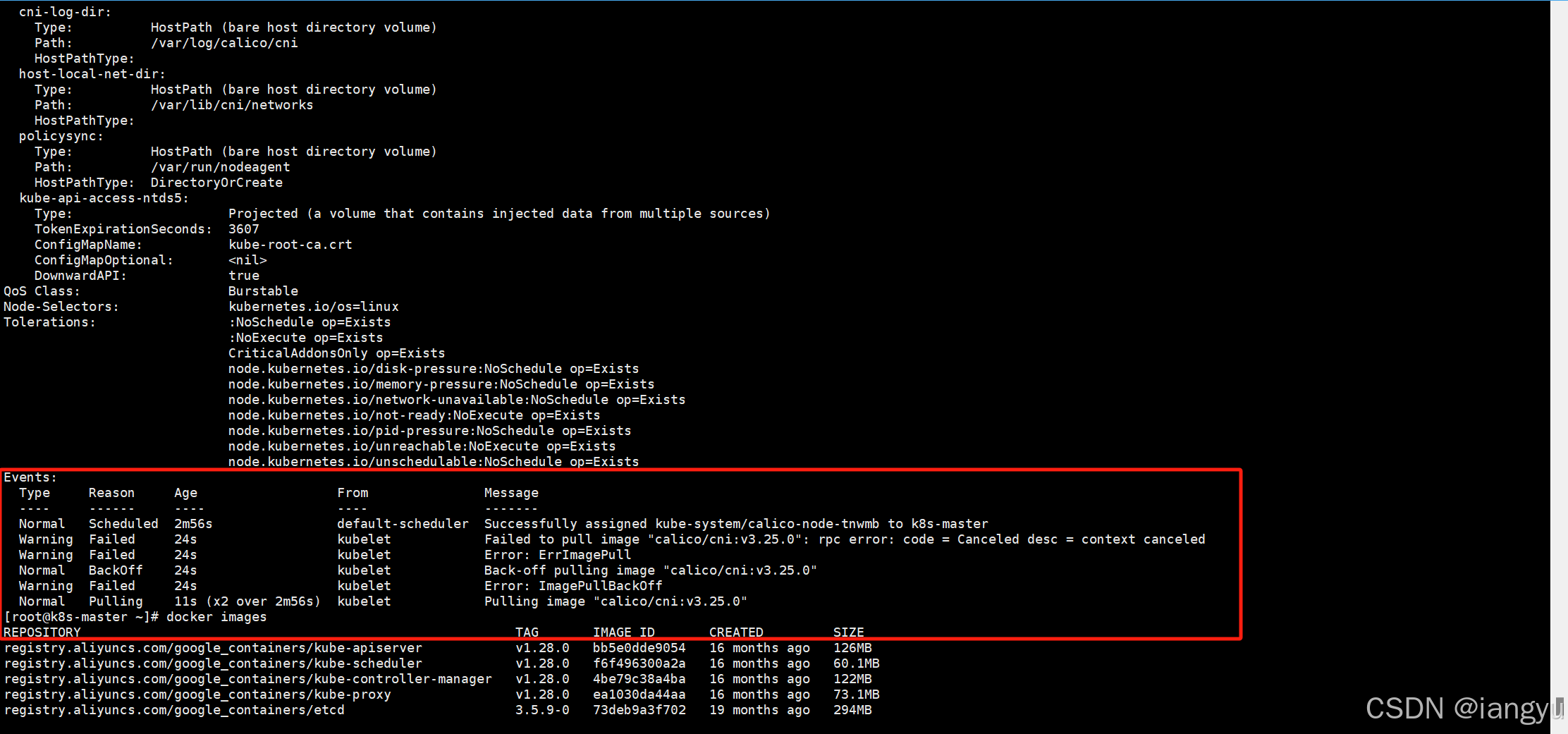
`docker pull calico/cni:v3.25.0`
`docker pull calico/node:v3.25.0`
`docker pull calico/kube-controllers:v3.25.0`

`kubectl apply -f calico.yaml`

`kubectl delete -f calico.yaml`

`kubectl apply -f calico.yaml --request-timeout=300s`
`systemctl restart kubelet`
`
离线安装(上面方案二选一)
#传输到集群中的所有 3 个节点上`
`#位置 C:\baidunetdiskdownload\k8s离线镜像包`
`calico-image-3.25.1.zip 中是离线镜像文件,解压后在每个节点上执行导入命令。`
`ls *.tar |xargs -i docker load -i {}`

`kubectl delete -f calico.yaml`

`# 依次部署两个 yaml 文件`
`kubectl apply` `-f tigera-operator.yaml --server-side`
`kubectl apply` `-f custom-resources.yaml`
`
其他
查询work加入集群的join
K8S在kubeadm init以后查询kubeadm join`
`kubeadm token create --print-join-command`
`
不进入容器执行命令
kubectl exec -it  podname -n namespace -- 命令`

`eg:`
`kubectl exec -it  nginx-deployment1-8659769b68-6zq4c -n nginx -- cat /data/nginx/nginx.conf`
`
k8s常用重启pod命令
有yaml 文件的情况下可以直接使用kubectl` `replace` `--force -f xxxx.yaml 来强制替换Pod 的 API 对象,从而达到重启的目的`
`kubectl` `replace` `--force -f xxxx.yaml`
`没有 yaml 文件,直接使用的 Pod 对象`
`kubectl` `get` `pod {podname} -n {namespace} -o` `yaml | kubectl` `replace` `--force -f -`
`删除 Pod 后,控制器(如 Deployment)会自动重新创建一个新的 Pod`
`kubectl` `delete` `pod` `<pod_name>` `-n {namespace}`
`有yaml文件直接delete后跟yaml文件`
`kubectl` `delete` `-f` `xxxx.yaml`


`
部署nginx
nginx-deployment.yaml
#volumeMounts:容器内路径`
`#volumes:宿主机路径`
`apiVersion: apps/v1`
`kind: Deployment`
`metadata:`
`  labels:`
`    app: nginx`
`  name: nginx-deployment1`
`spec:`
`  replicas: 1`
`  selector:`
`    matchLabels:`
`      app: nginx`
`  template:`
`    metadata:`
`      labels:`
`        app: nginx`
`    spec:`
`      nodeName: k8s-worker1`
`      containers:`
`      - image: nginx:1.26.1`
`        ports:`
`        - containerPort: 80`
`        name: nginx`
`        volumeMounts:`
`        - name: conf`
`          mountPath: /data/nginx/nginx.conf`
`        - name: ssl`
`          mountPath: /data/nginx/ssl`
`        - name: confd`
`          mountPath: /data/nginx/conf.d`
`        - name: log`
`          mountPath: /var/log/nginx`
`        - name: html`
`          mountPath: /data/nginx/html`
`      tolerations:`
`      - key: "key"`
`        operator: "Equal"`
`        value: "nginx"`
`        effect: "NoSchedule"`
`      volumes:`
`      - name: conf`
`        hostPath:`
`          path: /data/nginx/conf/nginx.conf`
`      - name: log`
`        hostPath:`
`          path: /data/nginx/logs`
`      - name: html`
`        hostPath:`
`          path: /data/nginx/html`
`      - name: confd`
`        hostPath:`
`          path: /data/nginx/conf.d`
`      - name: ssl`
`        hostPath:`
`          path: /data/nginx/ssl`

`
nginx-service.yaml
apiVersion: v1`
`kind: Service`
`metadata:`
  `name: nginx-service`
`spec:`
  `type: NodePort`
  `selector:`
    `app: nginx`
  `ports:`
    `-` `protocol: TCP`
      `port:` `80`
      `targetPort:` `80`
      `name: http`
      `nodePort:` `30080`
    `-` `protocol: TCP`
      `port:` `443`
      `targetPort:` `443`
      `name: https`
      `nodePort:` `30443`

`