这里写目录标题
- 开发目标
- 准备工作
- 源代码
- 程序打包
- 其他事项
-
- 命令行使用pandoc
- 关于pandoc默认表格无边框的说明
开发目标
- 采用word格式模板,实现高级定制样式。
- 具备配置保存功能,方便快捷。
- 自定义转换选项、pandoc路径。
准备工作
开发环境:Win10 + Visual Studio Code
开发语言:python3.8
pandoc下载地址
https://github.com/jgm/pandoc/releases解压缩后即得到直接使用的二进制文件pandoc.exe。
在python安装目录下执行,安装pyqt5库(PyQt5和pyqt5-tools为必选项,PyQtChart非必需):
bash
.\python.exe -m pip install PyQt5 -i https://pypi.tuna.tsinghua.edu.cn/simple
.\python.exe -m pip install pyqt5-tools -i https://pypi.tuna.tsinghua.edu.cn/simple
.\python.exe -m pip install PyQtChart -i https://pypi.tuna.tsinghua.edu.cn/simple
在python安装目录下执行,安装pypandoc库:
bash
.\python.exe -m pip install pypandoc -i https://pypi.tuna.tsinghua.edu.cn/simple在python安装目录下执行,安装打包工具pyinstaller库:
shell
.\python.exe -m pip install pyinstaller -i https://pypi.tuna.tsinghua.edu.cn/simple在VS Code自定义设置文件settings.json,添加以下内容,明确pandoc路径:
json
"terminal.integrated.env.windows": {
        "PATH": "${env:PATH};D:\\noinst\\Python\\Python38-x64-pyqt5\\Scripts;D:\\noinst\\pandoc-3.6.3"
      },
源代码
VS Code中新建一个py文件,将以下内容复制进去:
python
import sys
import os
import time
import configparser
from PyQt5.QtWidgets import (
    QApplication, QMainWindow, QWidget, QVBoxLayout, QHBoxLayout,
    QLabel, QLineEdit, QPushButton, QFileDialog, QMessageBox,
    QCheckBox, QGroupBox, QProgressBar, QComboBox
)
from PyQt5.QtGui import QIcon
from PyQt5.QtCore import QThread, pyqtSignal, QSettings
import pypandoc


# 配置文件路径
CONFIG_FILE = "config.ini"

class ConvertThread(QThread):
    """用于后台执行转换任务的线程"""
    progress_updated = pyqtSignal(int)
    conversion_finished = pyqtSignal(bool, str)

    def __init__(self, input_path, output_path, options):
        super().__init__()
        self.input_path = input_path
        self.output_path = output_path
        self.options = options

    def run(self):
        try:
            extra_args = []

            if self.options.get('use_template') and self.options.get('template_path'):
                extra_args.extend(["--reference-doc", self.options['template_path']])

            if self.options.get('add_toc'):
                extra_args.append("--toc")

            if self.options.get('metadata_title'):
                extra_args.extend(["--metadata", f"title={self.options['metadata_title']}"])

            # 模拟进度
            # for i in range(5):
            #     time.sleep(0.1)
            #     self.progress_updated.emit(i * 20)

            if self.options['conversion_direction'] == 'md_to_docx':
                pypandoc.convert_file(
                    self.input_path,
                    'docx',
                    outputfile=self.output_path,
                    format='markdown',
                    extra_args=extra_args
                )
            else:  # docx_to_md
                pypandoc.convert_file(
                    self.input_path,
                    'markdown',
                    outputfile=self.output_path,
                    format='docx',
                    extra_args=extra_args
                )

            self.progress_updated.emit(100)
            self.conversion_finished.emit(True, self.output_path)
        except Exception as e:
            self.conversion_finished.emit(False, str(e))


class MarkdownWordConverter(QMainWindow):
    def __init__(self):
        super().__init__()
        self.config = configparser.ConfigParser()
        self.load_config()  # 加载配置
        self.init_ui()
        self.check_pandoc()

    def init_ui(self):
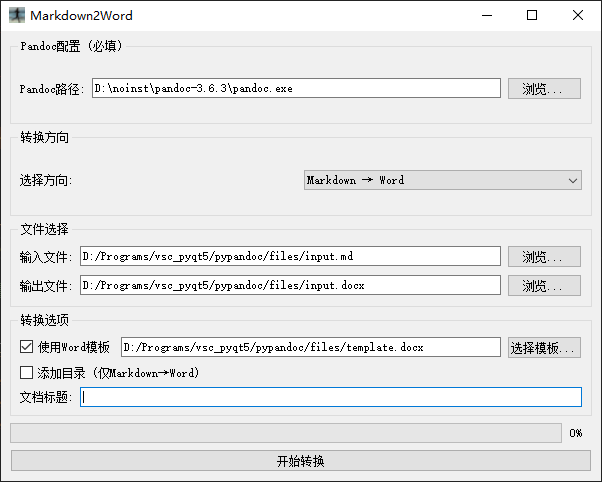
        self.setWindowTitle("Markdown2Word")
        icon = QIcon("output.ico")
        self.setWindowIcon(icon)
        self.setGeometry(
            int(self.config.get('UI', 'window_x', fallback=100)),
            int(self.config.get('UI', 'window_y', fallback=100)),
            int(self.config.get('UI', 'window_width', fallback=600)),
            int(self.config.get('UI', 'window_height', fallback=450))
        )

        self.central_widget = QWidget()
        self.setCentralWidget(self.central_widget)
        self.main_layout = QVBoxLayout()
        self.central_widget.setLayout(self.main_layout)

        # Pandoc配置
        self.pandoc_group = QGroupBox("Pandoc配置 (必填)")
        self.pandoc_layout = QHBoxLayout()
        self.pandoc_label = QLabel("Pandoc路径:")
        self.pandoc_line_edit = QLineEdit(self.config.get('PATHS', 'pandoc_path', fallback=""))
        self.pandoc_browse_button = QPushButton("浏览...")
        self.pandoc_browse_button.clicked.connect(self.browse_pandoc_path)
        self.pandoc_layout.addWidget(self.pandoc_label)
        self.pandoc_layout.addWidget(self.pandoc_line_edit)
        self.pandoc_layout.addWidget(self.pandoc_browse_button)
        self.pandoc_group.setLayout(self.pandoc_layout)
        self.main_layout.addWidget(self.pandoc_group)

        # 转换方向
        self.direction_group = QGroupBox("转换方向")
        self.direction_layout = QHBoxLayout()
        self.conversion_direction = QComboBox()
        self.conversion_direction.addItems(["Markdown → Word", "Word → Markdown"])
        self.conversion_direction.currentTextChanged.connect(self.toggle_direction)
        self.direction_layout.addWidget(QLabel("选择方向:"))
        self.direction_layout.addWidget(self.conversion_direction)
        self.direction_group.setLayout(self.direction_layout)
        self.main_layout.addWidget(self.direction_group)

        # 文件选择
        self.file_group = QGroupBox("文件选择")
        self.file_layout = QVBoxLayout()

        # 输入文件
        self.input_layout = QHBoxLayout()
        self.input_label = QLabel("输入文件:")
        self.input_line_edit = QLineEdit(self.config.get('PATHS', 'last_input_path', fallback=""))
        self.input_browse_button = QPushButton("浏览...")
        self.input_browse_button.clicked.connect(self.browse_input_file)
        self.input_layout.addWidget(self.input_label)
        self.input_layout.addWidget(self.input_line_edit)
        self.input_layout.addWidget(self.input_browse_button)
        self.file_layout.addLayout(self.input_layout)

        # 输出文件
        self.output_layout = QHBoxLayout()
        self.output_label = QLabel("输出文件:")
        self.output_line_edit = QLineEdit(self.config.get('PATHS', 'last_output_path', fallback=""))
        self.output_browse_button = QPushButton("浏览...")
        self.output_browse_button.clicked.connect(self.browse_output_file)
        self.output_layout.addWidget(self.output_label)
        self.output_layout.addWidget(self.output_line_edit)
        self.output_layout.addWidget(self.output_browse_button)
        self.file_layout.addLayout(self.output_layout)

        self.file_group.setLayout(self.file_layout)
        self.main_layout.addWidget(self.file_group)

        # 转换选项
        self.options_group = QGroupBox("转换选项")
        self.options_layout = QVBoxLayout()

        # 模板选项
        self.template_layout = QHBoxLayout()
        self.use_template_check = QCheckBox("使用Word模板")
        self.use_template_check.setChecked(self.config.getboolean('SETTINGS', 'use_template', fallback=False))
        self.template_line_edit = QLineEdit(self.config.get('PATHS', 'template_path', fallback=""))
        self.template_line_edit.setEnabled(self.use_template_check.isChecked())
        self.template_browse_button = QPushButton("选择模板...")
        self.template_browse_button.setEnabled(self.use_template_check.isChecked())
        self.template_browse_button.clicked.connect(self.browse_template_file)
        self.use_template_check.stateChanged.connect(self.toggle_template_options)
        self.template_layout.addWidget(self.use_template_check)
        self.template_layout.addWidget(self.template_line_edit)
        self.template_layout.addWidget(self.template_browse_button)
        self.options_layout.addLayout(self.template_layout)

        # 其他选项
        self.add_toc_check = QCheckBox("添加目录 (仅Markdown→Word)")
        self.add_toc_check.setChecked(self.config.getboolean('SETTINGS', 'add_toc', fallback=False))
        self.metadata_layout = QHBoxLayout()
        self.metadata_label = QLabel("文档标题:")
        self.metadata_edit = QLineEdit(self.config.get('SETTINGS', 'metadata_title', fallback=""))
        self.metadata_layout.addWidget(self.metadata_label)
        self.metadata_layout.addWidget(self.metadata_edit)
        self.options_layout.addWidget(self.add_toc_check)
        self.options_layout.addLayout(self.metadata_layout)
        self.options_group.setLayout(self.options_layout)
        self.main_layout.addWidget(self.options_group)

        # 进度条
        self.progress_bar = QProgressBar()
        self.main_layout.addWidget(self.progress_bar)

        # 转换按钮
        self.convert_button = QPushButton("开始转换")
        self.convert_button.clicked.connect(self.start_conversion)
        self.main_layout.addWidget(self.convert_button)

        # 信号连接
        self.conversion_direction.currentIndexChanged.connect(self.update_ui_for_direction)
        self.update_ui_for_direction()

    def load_config(self):
        """加载配置文件"""
        self.config.read(CONFIG_FILE, encoding='utf-8')
        if not self.config.has_section('PATHS'):
            self.config.add_section('PATHS')
        if not self.config.has_section('SETTINGS'):
            self.config.add_section('SETTINGS')
        if not self.config.has_section('UI'):
            self.config.add_section('UI')

    def save_config(self):
        """保存配置文件(UTF-8编码)"""
        self.config.set('PATHS', 'pandoc_path', self.pandoc_line_edit.text())
        self.config.set('PATHS', 'last_input_path', self.input_line_edit.text())
        self.config.set('PATHS', 'last_output_path', self.output_line_edit.text())
        self.config.set('PATHS', 'template_path', self.template_line_edit.text())
        self.config.set('SETTINGS', 'use_template', str(self.use_template_check.isChecked()))
        self.config.set('SETTINGS', 'add_toc', str(self.add_toc_check.isChecked()))
        self.config.set('SETTINGS', 'metadata_title', self.metadata_edit.text())

        # 窗口状态
        self.config.set('UI', 'window_x', str(self.x()))
        self.config.set('UI', 'window_y', str(self.y()))
        self.config.set('UI', 'window_width', str(self.width()))
        self.config.set('UI', 'window_height', str(self.height()))

        # 关键修改:使用utf-8编码写入
        with open(CONFIG_FILE, 'w', encoding='utf-8') as f:
            self.config.write(f)

    def closeEvent(self, event):
        """窗口关闭时保存配置"""
        self.save_config()
        event.accept()

    def check_pandoc(self):
        """检查Pandoc是否可用"""
        config_path = self.pandoc_line_edit.text()
        if config_path and os.path.exists(config_path):
            return True

        try:
            default_path = pypandoc.get_pandoc_path()
            self.pandoc_line_edit.setText(default_path)
            return True
        except:
            self.pandoc_line_edit.setPlaceholderText("未检测到Pandoc,请手动指定路径")
            return False

    def browse_pandoc_path(self):
        """选择Pandoc可执行文件"""
        if sys.platform == "win32":
            file_filter = "Executable Files (*.exe)"
            default_path = "C:\\Program Files\\Pandoc\\pandoc.exe"
        else:
            file_filter = ""
            default_path = "/usr/local/bin/pandoc"

        file_path, _ = QFileDialog.getOpenFileName(
            self, "选择Pandoc可执行文件",
            self.pandoc_line_edit.text() or default_path,
            file_filter
        )
        if file_path:
            self.pandoc_line_edit.setText(file_path)
            os.environ["PATH"] = os.path.dirname(file_path) + os.pathsep + os.environ.get("PATH", "")

    def update_ui_for_direction(self):
        """根据转换方向更新UI"""
        direction = self.conversion_direction.currentText()
        self.add_toc_check.setEnabled(direction == "Markdown → Word")

        if direction == "Markdown → Word":
            self.input_file_filter = "Markdown文件 (*.md *.markdown)"
            self.output_file_filter = "Word文档 (*.docx)"
        else:
            self.input_file_filter = "Word文档 (*.docx)"
            self.output_file_filter = "Markdown文件 (*.md)"

        # self.input_line_edit.clear()
        # self.output_line_edit.clear()

    def toggle_direction(self):
        self.input_line_edit.clear()
        self.output_line_edit.clear()
        if self.conversion_direction.currentText() == "Word → Markdown":
            self.add_toc_check.setCheckState(0)

    def toggle_template_options(self, state):
        """切换模板选项的可用状态"""
        enabled = state == 2  # Qt.Checked
        self.template_line_edit.setEnabled(enabled)
        self.template_browse_button.setEnabled(enabled)

    def browse_input_file(self):
        """选择输入文件"""
        file_path, _ = QFileDialog.getOpenFileName(
            self, "选择输入文件", "", self.input_file_filter
        )
        if file_path:
            self.input_line_edit.setText(file_path)
            if not self.output_line_edit.text():
                base_path = os.path.splitext(file_path)[0]
                if self.conversion_direction.currentText() == "Markdown → Word":
                    output_path = base_path + ".docx"
                else:
                    output_path = base_path + ".md"
                self.output_line_edit.setText(output_path)

    def browse_output_file(self):
        """选择输出文件"""
        file_path, _ = QFileDialog.getSaveFileName(
            self, "选择输出文件",
            self.output_line_edit.text() or os.path.expanduser("~"),
            self.output_file_filter
        )
        if file_path:
            self.output_line_edit.setText(file_path)

    def browse_template_file(self):
        """选择Word模板文件"""
        file_path, _ = QFileDialog.getOpenFileName(
            self, "选择Word模板",
            self.template_line_edit.text() or os.path.expanduser("~"),
            "Word模板 (*.docx *.dotx)"
        )
        if file_path:
            self.template_line_edit.setText(file_path)

    def validate_inputs(self):
        """验证输入是否有效"""
        errors = []
        pandoc_path = self.pandoc_line_edit.text()
        if not pandoc_path or not os.path.exists(pandoc_path):
            errors.append("请指定有效的Pandoc路径")

        input_path = self.input_line_edit.text()
        if not input_path or not os.path.exists(input_path):
            errors.append("输入文件不存在")

        if not self.output_line_edit.text():
            errors.append("请指定输出路径")

        if self.use_template_check.isChecked():
            template_path = self.template_line_edit.text()
            if not template_path or not os.path.exists(template_path):
                errors.append("模板文件不存在")

        return errors

    def start_conversion(self):
        """开始转换过程"""
        errors = self.validate_inputs()
        if errors:
            QMessageBox.warning(self, "输入错误", "\n".join(errors))
            return

        # 设置Pandoc路径
        pandoc_path = self.pandoc_line_edit.text()
        os.environ["PATH"] = os.path.dirname(pandoc_path) + os.pathsep + os.environ.get("PATH", "")

        options = {
            'conversion_direction': 'md_to_docx' if self.conversion_direction.currentText() == "Markdown → Word" else 'docx_to_md',
            'use_template': self.use_template_check.isChecked(),
            'template_path': self.template_line_edit.text(),
            'add_toc': self.add_toc_check.isChecked(),
            'metadata_title': self.metadata_edit.text()
        }

        self.progress_bar.setValue(0)
        self.convert_button.setEnabled(False)

        self.convert_thread = ConvertThread(
            self.input_line_edit.text(),
            self.output_line_edit.text(),
            options
        )
        self.convert_thread.progress_updated.connect(self.update_progress)
        self.convert_thread.conversion_finished.connect(self.conversion_complete)
        self.convert_thread.start()

    def update_progress(self, value):
        """更新进度条"""
        self.progress_bar.setValue(value)

    def conversion_complete(self, success, message):
        """转换完成处理"""
        self.convert_button.setEnabled(True)
        if success:
            QMessageBox.information(self, "成功", f"转换完成!\n文件已保存到:\n{message}")
        else:
            QMessageBox.critical(self, "错误", f"转换失败:\n{message}")
        self.progress_bar.setValue(0)


if __name__ == "__main__":
    app = QApplication(sys.argv)
    # app.setStyle("Fusion")  # 现代化界面风格

    # 首次运行时创建默认配置
    if not os.path.exists(CONFIG_FILE):
        with open(CONFIG_FILE, 'w') as f:
            config = configparser.ConfigParser()
            config.add_section('PATHS')
            config.add_section('SETTINGS')
            config.add_section('UI')
            config.write(f)

    converter = MarkdownWordConverter()
    converter.show()
    sys.exit(app.exec_())
点击运行,即可。
程序打包
为是程序不依赖于python环境,可移植于其他无Python的计算机上使用,可用pyinstaller包实现程序打包:
bash
python_path\Scripts\pyinstaller.exe -F -w -i xxx.ico py_file.py其他事项
命令行使用pandoc
在pandoc路径下,命令如下:
.\pandoc.exe test.md -o test.docx --reference-doc=template.docx如果你希望转换后的 word 的标题、表格、内容字体等都按照预置的配置进行,则可以通过参数指定模板来进行转换,具体步骤如下:
.\pandoc.exe -o custom-reference.docx --print-default-data-file reference.docx基于修改后的模板进行文档转换
.\pandoc.exe --reference-doc custom-reference.docx test.md -o test.docx关于pandoc默认表格无边框的说明
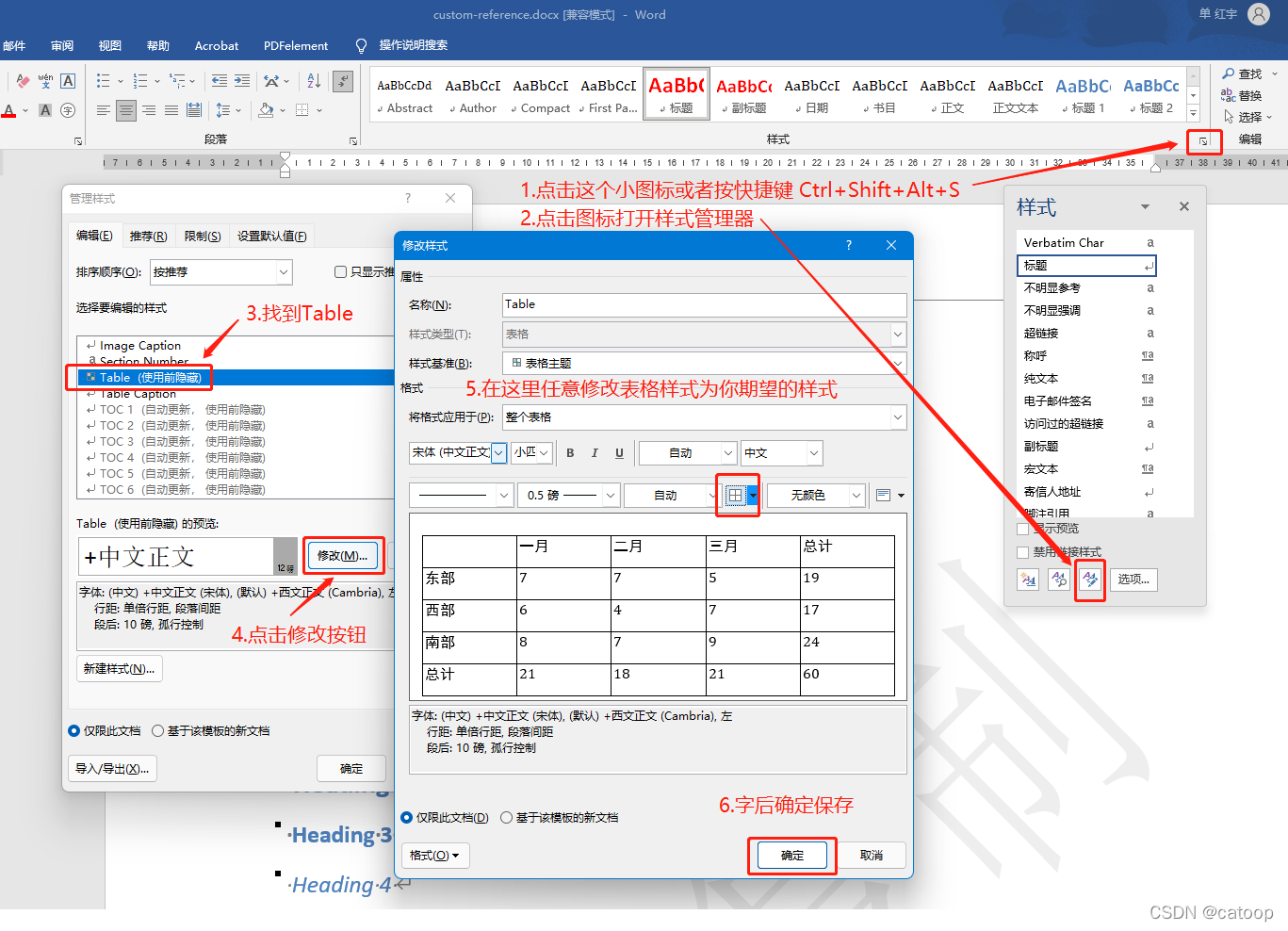
直接修改模板中的表格样式(比如加个边框)是不起作用的,必须修改名称为 Table 的表格样式才有效,具体的修改方法如下图步骤。
其他事项参考:https://blog.csdn.net/catoop/article/details/123878342?spm=1001.2014.3001.5506