文章目录
-
- [1. 编写布局文件](#1. 编写布局文件)
- 2.设计要点说明
- [3. 效果图](#3. 效果图)
- [4. 关于作者其它项目视频教程介绍](#4. 关于作者其它项目视频教程介绍)
1. 编写布局文件
- 编写
activity.login.xml布局文件
xml
<?xml version="1.0" encoding="utf-8"?>
<androidx.appcompat.widget.LinearLayoutCompat xmlns:android="http://schemas.android.com/apk/res/android"
    xmlns:app="http://schemas.android.com/apk/res-auto"
    xmlns:tools="http://schemas.android.com/tools"
    android:layout_width="match_parent"
    android:layout_height="match_parent"
    android:orientation="vertical">

    <RelativeLayout
        android:layout_width="match_parent"
        android:layout_height="200dp"
        android:background="@drawable/gradient_background5">

        <androidx.appcompat.widget.Toolbar
            android:id="@+id/toolbar"
            android:layout_width="match_parent"
            android:layout_height="wrap_content"
            app:title="登录"
            app:titleTextColor="@color/white" />
    </RelativeLayout>

    <androidx.core.widget.NestedScrollView
        android:layout_width="match_parent"
        android:layout_height="match_parent"
        android:layout_marginTop="-50dp">

        <androidx.appcompat.widget.LinearLayoutCompat
            android:layout_width="match_parent"
            android:layout_height="match_parent"
            android:background="@drawable/img_shape_login_bg"
            android:orientation="vertical">


            <androidx.appcompat.widget.LinearLayoutCompat
                android:layout_width="match_parent"
                android:layout_height="wrap_content"
                android:layout_margin="30dp"
                android:orientation="vertical">


                <TextView
                    android:layout_width="wrap_content"
                    android:layout_height="wrap_content"
                    android:text="欢迎登录雅居名宿"
                    android:textColor="@color/purple_200"
                    android:textSize="24sp"
                    android:textStyle="bold" />

                <TextView
                    android:layout_width="wrap_content"
                    android:layout_height="wrap_content"
                    android:layout_marginTop="10dp"
                    android:text="继续登录您的账号!"
                    android:textColor="#BDBDBD"
                    android:textSize="13sp" />


                <androidx.appcompat.widget.LinearLayoutCompat
                    android:layout_width="match_parent"
                    android:layout_height="wrap_content"
                    android:orientation="vertical">


                    <TextView
                        android:layout_width="wrap_content"
                        android:layout_height="wrap_content"
                        android:layout_marginLeft="10dp"
                        android:layout_marginTop="46dp"
                        android:text="用户名"
                        android:textColor="#585858" />

                    <EditText
                        android:id="@+id/et_username"
                        android:layout_width="match_parent"
                        android:layout_height="40dp"
                        android:layout_marginTop="6dp"
                        android:background="@drawable/login_et_bg"
                        android:hint="请输入用户名"
                        android:paddingLeft="10dp"
                        android:paddingRight="10dp"
                        android:textSize="14sp" />


                    <TextView
                        android:layout_width="wrap_content"
                        android:layout_height="wrap_content"
                        android:layout_marginLeft="10dp"
                        android:layout_marginTop="16dp"
                        android:text="密码"
                        android:textColor="#585858" />

                    <EditText
                        android:id="@+id/et_password"
                        android:layout_width="match_parent"
                        android:layout_height="40dp"
                        android:layout_marginTop="6dp"
                        android:background="@drawable/login_et_bg"
                        android:hint="请输入密码"
                        android:inputType="textPassword"
                        android:paddingLeft="10dp"
                        android:paddingRight="10dp"
                        android:textSize="14sp" />


                    <CheckBox
                        android:id="@+id/checkbox"
                        android:layout_width="wrap_content"
                        android:layout_height="wrap_content"
                        android:text="记住密码" />

                    <TextView
                        android:id="@+id/btn_login"
                        android:layout_width="match_parent"
                        android:layout_height="50dp"
                        android:layout_marginTop="20dp"
                        android:background="@drawable/gradient_background4"
                        android:gravity="center"
                        android:text="登录"
                        android:textColor="#ffffff"
                        android:textSize="16dp" />


                    <androidx.appcompat.widget.LinearLayoutCompat
                        android:id="@+id/btn_register"
                        android:layout_width="wrap_content"
                        android:layout_height="wrap_content"
                        android:layout_gravity="center"
                        android:layout_marginTop="20dp">

                        <TextView
                            android:layout_width="wrap_content"
                            android:layout_height="30dp"
                            android:layout_gravity="center"
                            android:gravity="center"
                            android:text="还没有账号?"
                            android:textColor="#747481"
                            android:textSize="13sp" />


                        <TextView
                            android:layout_width="wrap_content"
                            android:layout_height="30dp"
                            android:layout_gravity="center"
                            android:gravity="center"
                            android:text=" 注册"
                            android:textColor="@color/purple_200"
                            android:textSize="13sp" />
                    </androidx.appcompat.widget.LinearLayoutCompat>

                </androidx.appcompat.widget.LinearLayoutCompat>

            </androidx.appcompat.widget.LinearLayoutCompat>


        </androidx.appcompat.widget.LinearLayoutCompat>
    </androidx.core.widget.NestedScrollView>


</androidx.appcompat.widget.LinearLayoutCompat>- 在res/drawable创建顶部渐变背景
gradient_background5.xml
xml
<?xml version="1.0" encoding="utf-8"?>
<shape xmlns:android="http://schemas.android.com/apk/res/android"
    android:shape="rectangle">

    <gradient
        android:startColor="@color/purple_200"
        android:endColor="#BBCEE9"
        android:angle="270"
        android:type="linear"/>

</shape>- 在res/drawable创建登录按钮背景
gradient_background4.xml
xml
<?xml version="1.0" encoding="utf-8"?>
<shape xmlns:android="http://schemas.android.com/apk/res/android"
    android:shape="rectangle">

    <gradient
        android:startColor="#0066f5"
        android:endColor="#A9C0E7"
        android:angle="45" />
    <corners
        android:bottomLeftRadius="10dp"
        android:topRightRadius="10dp" />

</shape>- 在res/drawable创建登录区域背景
img_shape_login_bg.xml
xml
<?xml version="1.0" encoding="utf-8"?>
<shape xmlns:android="http://schemas.android.com/apk/res/android">

    <solid android:color="@color/white"/>
    <corners
        android:topLeftRadius="15dp"
        android:topRightRadius="15dp" />

</shape>
2.设计要点说明
- 父布局使用
LinearLayoutCompat线性布局包裹 - 自适应小屏幕使用
NestedScrollView包裹,在使用NestedScrollView时,特别注意它的子组件只能有且仅有一个 - 使用
shape来实现背景圆角,渐变等设置
3. 效果图
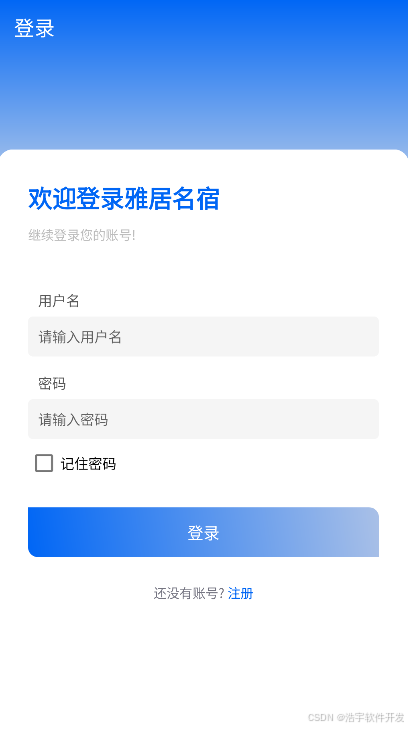
4. 关于作者其它项目视频教程介绍
- Android新闻资讯app实战:https://www.bilibili.com/video/BV1CA1vYoEad/?vd_source=984bb03f768809c7d33f20179343d8c8
- Androidstudio开发购物商城实战:https://www.bilibili.com/video/BV1PjHfeXE8U/?vd_source=984bb03f768809c7d33f20179343d8c8
- Android开发备忘录记事本实战:https://www.bilibili.com/video/BV1FJ4m1u76G?vd_source=984bb03f768809c7d33f20179343d8c8&spm_id_from=333.788.videopod.sections
- Androidstudio底部导航栏实现:https://www.bilibili.com/video/BV1XB4y1d7et/?spm_id_from=333.337.search-card.all.click&vd_source=984bb03f768809c7d33f20179343d8c8
- Android使用TabLayout+ViewPager2实现左右滑动切换:https://www.bilibili.com/video/BV1Mz4y1c7eX/?spm_id_from=333.337.search-card.all.click&vd_source=984bb03f768809c7d33f20179343d8c8