1.日志记录注解(LogRecord)
java
@Repeatable(LogRecords.class)
@Target({ElementType.METHOD, ElementType.TYPE})
@Retention(RetentionPolicy.RUNTIME)
@Inherited
@Documented
public @interface LogRecord {
    String success();

    String fail() default "";

    String operator() default "";

    String type();

    String subType() default "";

    String bizNo();

    String extra() default "";

    String condition() default "";

    String successCondition() default "";
}
1.无默认值的字段必须显式指定;
2.@Repeatable(让被注解的注解可重复使用。当一个注解被 @Repeatable 注解修饰时,就意味着在同一个元素上能够多次使用该注解)
3.@Target
- 参数解释 :
ElementType.METHOD:表明该注解可用于方法。ElementType.TYPE:表明该注解可用于类、接口、枚举等类型。
4.@Retention(表示该注解在运行时可见,这样就能通过反射机制在运行时获取注解信息)
5.@Inherited(若一个注解被 @Inherited 修饰,那么该注解会被子类继承。也就是说,若一个类被该注解标注,其所有子类也会自动拥有这个注解)
2.Services层使用注解,并给出字段的值
java
@Service
@Slf4j
public class UserServiceImpl extends ServiceImpl<UserMapper, User> implements UserService{
    @Override
    @Transactional
    @LogRecord(type = SYSTEM_USER_TYPE, subType = SYSTEM_USER_CREATE_SUB_TYPE,bizNo ="{{#user.id}}",
    success = SYSTEM_USER_CREATE_SUCCESS, fail = "{{#user.username}}创建失败!")
    public boolean creatUser(User user) {
        User userIfExist = this.getOne(new QueryWrapper<User>().eq("username", user.getUsername()));
        if (userIfExist != null) {
            log.error("用户名已存在");
            return false;
        }
        return this.save(user);
    }
}
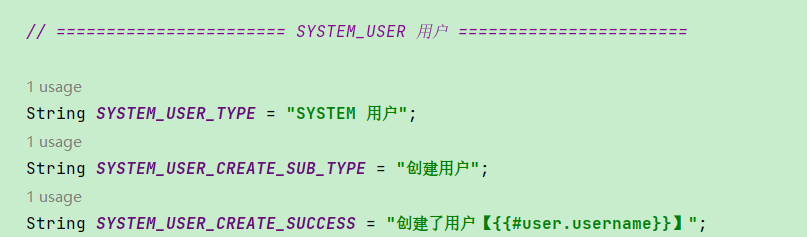
常量配置
3.过滤器进行请求过滤
1.ApiRequestFilter
作为抽象基类,提供基本的请求过滤逻辑,决定哪些请求需要被子类处理
对 HTTP 请求进行过滤,仅对以管理员 API 或应用 API 前缀开头的请求进行处理
java
/**
 * 过滤 /admin-api、/app-api 等 API 请求的过滤器
 *
 * @author 芋道源码
 */
@RequiredArgsConstructor
public abstract class ApiRequestFilter extends OncePerRequestFilter {

    protected final WebProperties webProperties;

    @Override
    protected boolean shouldNotFilter(HttpServletRequest request) {
        // 只过滤 API 请求的地址
        String apiUri = request.getRequestURI().substring(request.getContextPath().length());
        return !StrUtil.startWithAny(apiUri, webProperties.getAdminApi().getPrefix(), webProperties.getAppApi().getPrefix());
    }

}
2.ApiAccessLogFilter
java
/**
 * API 访问日志 Filter
 *
 * 目的:记录 API 访问日志到数据库中
 *
 * @author 芋道源码
 */
@Slf4j
public class ApiAccessLogFilter extends ApiRequestFilter {

    //静态常量数组,包含了需要在请求和响应中脱敏的敏感字段名,如密码、令牌等
    private static final String[] SANITIZE_KEYS = new String[]{"password", "token", "accessToken", "refreshToken"};
   //表示当前应用的名称,用于日志记录
    private final String applicationName;
    //表示API访问日志的API
    private final ApiAccessLogApi apiAccessLogApi;

    public ApiAccessLogFilter(WebProperties webProperties, String applicationName, ApiAccessLogApi apiAccessLogApi) {
        super(webProperties);
        this.applicationName = applicationName;
        this.apiAccessLogApi = apiAccessLogApi;
    }

    @Override
    @SuppressWarnings("NullableProblems")
    protected void doFilterInternal(HttpServletRequest request, HttpServletResponse response, FilterChain filterChain)
            throws ServletException, IOException {
        // 获得开始时间
        LocalDateTime beginTime = LocalDateTime.now();
        // 提前获得参数,避免 XssFilter 过滤处理
        Map<String, String> queryString = ServletUtils.getParamMap(request);
        // 缓存请求体,
        String requestBody = null;
        if (ServletUtils.isJsonRequest(request)) {
            requestBody = ServletUtils.getBody(request);
            request.setAttribute(REQUEST_BODY_ATTRIBUTE, requestBody);
        }

        try {
            // 继续过滤器
            filterChain.doFilter(request, response);
            // 正常执行,记录日志
            createApiAccessLog(request, beginTime, queryString, requestBody, null);
        } catch (Exception ex) {
            // 异常执行,记录日志
            createApiAccessLog(request, beginTime, queryString, requestBody, ex);
            throw ex;
        }
    }

    private void createApiAccessLog(HttpServletRequest request, LocalDateTime beginTime,
                                    Map<String, String> queryString, String requestBody, Exception ex) {
        ApiAccessLogCreateReqDTO accessLog = new ApiAccessLogCreateReqDTO();
        try {
            boolean enable = buildApiAccessLog(accessLog, request, beginTime, queryString, requestBody, ex);
            if (!enable) {
                return;
            }
            apiAccessLogApi.createApiAccessLogAsync(accessLog);
        } catch (Throwable th) {
            log.error("[createApiAccessLog][url({}) log({}) 发生异常]", request.getRequestURI(), toJsonString(accessLog), th);
        }
    }

    private boolean buildApiAccessLog(ApiAccessLogCreateReqDTO accessLog, HttpServletRequest request, LocalDateTime beginTime,
                                      Map<String, String> queryString, String requestBody, Exception ex) {
        // 判断:是否要记录操作日志
        HandlerMethod handlerMethod = (HandlerMethod) request.getAttribute(ATTRIBUTE_HANDLER_METHOD);
        ApiAccessLog accessLogAnnotation = null;
        if (handlerMethod != null) {
            accessLogAnnotation = handlerMethod.getMethodAnnotation(ApiAccessLog.class);
            if (accessLogAnnotation != null && BooleanUtil.isFalse(accessLogAnnotation.enable())) {
                return false;
            }
        }

        // 处理用户信息
        accessLog.setUserId(WebFrameworkUtils.getLoginUserId(request))
                .setUserType(WebFrameworkUtils.getLoginUserType(request));
        // 设置访问结果
        CommonResult<?> result = WebFrameworkUtils.getCommonResult(request);
        if (result != null) {
            accessLog.setResultCode(result.getCode())
                    .setResultMsg(result.getMsg());
        } else if (ex != null) {
            accessLog.setResultCode(GlobalErrorCodeConstants.INTERNAL_SERVER_ERROR
                    .getCode())
                    .setResultMsg(ExceptionUtil.getRootCauseMessage(ex));
        } else {
            accessLog.setResultCode(GlobalErrorCodeConstants.SUCCESS.getCode())
                    .setResultMsg("");
        }
        // 设置请求字段
        accessLog.setTraceId(TracerUtils.getTraceId())
                .setApplicationName(applicationName)
                .setRequestUrl(request.getRequestURI()).setRequestMethod(request.getMethod())
                .setUserAgent(ServletUtils.getUserAgent(request)).setUserIp(ServletUtils.getClientIP(request));
        String[] sanitizeKeys = accessLogAnnotation != null ? accessLogAnnotation.sanitizeKeys() : null;
        Boolean requestEnable = accessLogAnnotation != null ? accessLogAnnotation.requestEnable() : Boolean.TRUE;
        if (!BooleanUtil.isFalse(requestEnable)) { // 默认记录,所以判断 !false
            Map<String, Object> requestParams = MapUtil.<String, Object>builder()
                    .put("query", sanitizeMap(queryString, sanitizeKeys))
                    .put("body", sanitizeJson(requestBody, sanitizeKeys)).build();
            accessLog.setRequestParams(toJsonString(requestParams));
        }
        Boolean responseEnable = accessLogAnnotation != null ? accessLogAnnotation.responseEnable() : Boolean.FALSE;
        if (BooleanUtil.isTrue(responseEnable)) { // 默认不记录,默认强制要求 true
            accessLog.setResponseBody(sanitizeJson(result, sanitizeKeys));
        }
        // 持续时间
        accessLog.setBeginTime(beginTime)
                .setEndTime(LocalDateTime.now())
                .setDuration((int) LocalDateTimeUtil.between(accessLog.getBeginTime(), accessLog.getEndTime(), ChronoUnit.MILLIS));

        // 操作模块
        if (handlerMethod != null) {
            Tag tagAnnotation = handlerMethod.getBeanType().getAnnotation(Tag.class);
            Operation operationAnnotation = handlerMethod.getMethodAnnotation(Operation.class);
            String operateModule = accessLogAnnotation != null && StrUtil.isNotBlank(accessLogAnnotation.operateModule()) ?
                    accessLogAnnotation.operateModule() :
                    tagAnnotation != null ? StrUtil.nullToDefault(tagAnnotation.name(), tagAnnotation.description()) : null;
            String operateName = accessLogAnnotation != null && StrUtil.isNotBlank(accessLogAnnotation.operateName()) ?
                    accessLogAnnotation.operateName() :
                    operationAnnotation != null ? operationAnnotation.summary() : null;
            OperateTypeEnum operateType = accessLogAnnotation != null && accessLogAnnotation.operateType().length > 0 ?
                    accessLogAnnotation.operateType()[0] : parseOperateLogType(request);
            accessLog.setOperateModule(operateModule)
                    .setOperateName(operateName).setOperateType(operateType.getType());
        }
        return true;
    }

    // ========== 解析 @ApiAccessLog、@Swagger 注解  ==========

    private static OperateTypeEnum parseOperateLogType(HttpServletRequest request) {
        RequestMethod requestMethod = ArrayUtil.firstMatch(method ->
                StrUtil.equalsAnyIgnoreCase(method.name(), request.getMethod()), RequestMethod.values());
        if (requestMethod == null) {
            return OperateTypeEnum.OTHER;
        }
        switch (requestMethod) {
            case GET:
                return OperateTypeEnum.GET;
            case POST:
                return OperateTypeEnum.CREATE;
            case PUT:
                return OperateTypeEnum.UPDATE;
            case DELETE:
                return OperateTypeEnum.DELETE;
            default:
                return OperateTypeEnum.OTHER;
        }
    }

    // ========== 请求和响应的脱敏逻辑,移除类似 password、token 等敏感字段 ==========

    private static String sanitizeMap(Map<String, ?> map, String[] sanitizeKeys) {
        if (CollUtil.isEmpty(map)) {
            return null;
        }
        if (sanitizeKeys != null) {
            MapUtil.removeAny(map, sanitizeKeys);
        }
        MapUtil.removeAny(map, SANITIZE_KEYS);
        return JsonUtils.toJsonString(map);
    }

    private static String sanitizeJson(String jsonString, String[] sanitizeKeys) {
        if (StrUtil.isEmpty(jsonString)) {
            return null;
        }
        try {
            JsonNode rootNode = JsonUtils.parseTree(jsonString);
            sanitizeJson(rootNode, sanitizeKeys);
            return JsonUtils.toJsonString(rootNode);
        } catch (Exception e) {
            // 脱敏失败的情况下,直接忽略异常,避免影响用户请求
            log.error("[sanitizeJson][脱敏({}) 发生异常]", jsonString, e);
            return jsonString;
        }
    }

    private static String sanitizeJson(CommonResult<?> commonResult, String[] sanitizeKeys) {
        if (commonResult == null) {
            return null;
        }
        String jsonString = toJsonString(commonResult);
        try {
            JsonNode rootNode = JsonUtils.parseTree(jsonString);
            sanitizeJson(rootNode.get("data"), sanitizeKeys); // 只处理 data 字段,不处理 code、msg 字段,避免错误被脱敏掉
            return JsonUtils.toJsonString(rootNode);
        } catch (Exception e) {
            // 脱敏失败的情况下,直接忽略异常,避免影响用户请求
            log.error("[sanitizeJson][脱敏({}) 发生异常]", jsonString, e);
            return jsonString;
        }
    }

    private static void sanitizeJson(JsonNode node, String[] sanitizeKeys) {
        // 情况一:数组,遍历处理
        if (node.isArray()) {
            for (JsonNode childNode : node) {
                sanitizeJson(childNode, sanitizeKeys);
            }
            return;
        }
        // 情况二:非 Object,只是某个值,直接返回
        if (!node.isObject()) {
            return;
        }
        //  情况三:Object,遍历处理
        Iterator<Map.Entry<String, JsonNode>> iterator = node.fields();
        while (iterator.hasNext()) {
            Map.Entry<String, JsonNode> entry = iterator.next();
            if (ArrayUtil.contains(sanitizeKeys, entry.getKey())
                || ArrayUtil.contains(SANITIZE_KEYS, entry.getKey())) {
                iterator.remove();
                continue;
            }
            sanitizeJson(entry.getValue(), sanitizeKeys);
        }
    }
}- 继承 ApiRequestFilter :
- ApiAccessLogFilter 继承 ApiRequestFilter,因此只处理以 /admin-api 或 /app-api 开头的请求。
- 其他请求(如 /swagger-ui/*)被 shouldNotFilter 跳过。
- doFilterInternal 方法 :
- 记录开始时间:LocalDateTime beginTime = LocalDateTime.now(),用于计算请求耗时。
- 获取查询参数:通过 ServletUtils.getParamMap(request) 获取 URL 查询参数(如 ?key=value)。
- 缓存请求体:对于 JSON 请求(Content-Type: application/json),通过 ServletUtils.getBody(request) 获取请求体,并缓存到 request 的属性中。
- 执行过滤器链:调用 filterChain.doFilter(request, response),继续处理请求。
- 记录日志 :
- 正常执行:调用 createApiAccessLog 记录成功日志。
- 异常执行:捕获异常,记录失败日志(包含异常信息),然后重新抛出异常。
- createApiAccessLog 方法 :
- 创建 ApiAccessLogCreateReqDTO 对象,用于封装日志信息。
- 调用 buildApiAccessLog 构建日志详情。
- 如果 buildApiAccessLog 返回 false(例如,方法标注了 @ApiAccessLog(enable = false)),则跳过日志记录。
- 通过 apiAccessLogApi.createApiAccessLogAsync 异步保存日志,捕获并记录任何异常。
- buildApiAccessLog 方法 :
- 检查 @ApiAccessLog Annotation :
- 获取请求对应的 HandlerMethod(Controller 方法)。
- 检查方法是否标注了 @ApiAccessLog 注解,若 enable = false,返回 false,跳过日志记录。
- 设置用户信息 :
- userId:通过 WebFrameworkUtils.getLoginUserId(request) 获取当前登录用户 ID。
- userType:通过 WebFrameworkUtils.getLoginUserType(request) 获取用户类型(如管理员或普通用户)。
- 设置访问结果 :
- 如果请求成功,获取 CommonResult(芋道源码的统一响应格式),设置 resultCode 和 resultMsg。
- 如果发生异常,设置错误码(INTERNAL_SERVER_ERROR)和异常消息。
- 如果无 CommonResult 和异常,设置为成功状态(SUCCESS)。
- 设置请求字段 :
- traceId:链路追踪 ID(如 SkyWalking)。
- applicationName:应用名称(通过构造函数注入)。
- requestUrl、requestMethod、userAgent、userIp:从 request 获取。
- 处理请求参数 :
- 如果 @ApiAccessLog.requestEnable = true(默认),记录查询参数和请求体。
- 使用 sanitizeMap 和 sanitizeJson 脱敏敏感字段(如 password、token)。
- 处理响应数据 :
- 如果 @ApiAccessLog.responseEnable = true(默认 false),记录响应体的 data 字段(脱敏后)。
- 设置时间和耗时 :
- beginTime:请求开始时间。
- endTime:请求结束时间。
- duration:计算耗时(毫秒)。
- 设置操作模块 :
- 从 @ApiAccessLog 或 Swagger 注解(@Tag、@Operation)获取模块(operateModule)、操作名称(operateName)和操作类型(operateType)。
- 如果无注解,根据 HTTP 方法推断 operateType(如 POST 对应 CREATE)。
- 检查 @ApiAccessLog Annotation :
- 敏感字段脱敏 :
- sanitizeMap 和 sanitizeJson :
- 移除敏感字段(如 password、token),支持自定义 sanitizeKeys(来自 @ApiAccessLog)和默认 SANITIZE_KEYS。
- 对于 JSON 数据,递归处理对象和数组,确保嵌套字段也被脱敏。
- 示例 :
- 输入:{"username":"user","password":"123456"}
- 输出:{"username":"user"}
- sanitizeMap 和 sanitizeJson :
示例:
- 请求:POST /admin-api/users/createUser
- 请求体:{"username":"newUser","password":"123456"}
- 响应:{"code":200,"msg":"success","data":108}
- 日志记录:
-
ApiAccessLogCreateReqDTO:
ApiAccessLogCreateReqDTO( userId=1, userType=1, traceId="trace-123", applicationName="ruoyi-vue-pro", requestUrl="/admin-api/users/createUser", requestMethod="POST", userAgent="Apifox/1.0.0", userIp="0:0:0:0:0:0:0:1", requestParams="{\"query\":{},\"body\":{\"username\":\"newUser\"}}", responseBody=null, // 默认不记录 resultCode=200, resultMsg="success", beginTime="2025-04-29T11:12:00", endTime="2025-04-29T11:12:01", duration=1000, operateModule="用户管理", operateName="创建用户", operateType="CREATE" )WebProperties配置类,提供 API 前缀和 Controller 包路径的配置,支持动态调整过滤规则
-
java
@ConfigurationProperties(prefix = "moyun.web")
@Validated
@Data
@Component
public class WebProperties {

    @NotNull(message = "APP API 不能为空")
    private Api appApi = new Api("/app-api", "**.controller.app.**");
    @NotNull(message = "Admin API 不能为空")
    private Api adminApi = new Api("/admin-api", "**.controller.admin.**");

    @NotNull(message = "Admin UI 不能为空")
    private Ui adminUi;

    @Data
    @AllArgsConstructor
    @NoArgsConstructor
    @Valid
    public static class Api {

        /**
         * API 前缀,实现所有 Controller 提供的 RESTFul API 的统一前缀
         *
         *
         * 意义:通过该前缀,避免 Swagger、Actuator 意外通过 Nginx 暴露出来给外部,带来安全性问题
         *      这样,Nginx 只需要配置转发到 /api/* 的所有接口即可。
         *
         * @see YudaoWebAutoConfiguration#configurePathMatch(PathMatchConfigurer)
         */
        @NotEmpty(message = "API 前缀不能为空")
        private String prefix;

        /**
         * Controller 所在包的 Ant 路径规则
         *
         * 主要目的是,给该 Controller 设置指定的 {@link #prefix}
         */
        @NotEmpty(message = "Controller 所在包不能为空")
        private String controller;

    }

    @Data
    @Valid
    public static class Ui {

        /**
         * 访问地址
         */
        private String url;

    }

}
4.API 访问日志 Service 实现类
java
/**
 * API 访问日志 Service 实现类
 */
@Slf4j
@Service
@Validated
public class ApiAccessLogServiceImpl implements ApiAccessLogService {

    @Resource
    private ApiAccessLogMapper apiAccessLogMapper;

    @Override
    public void createApiAccessLog(ApiAccessLogCreateReqDTO createDTO) {
        ApiAccessLogDO apiAccessLog = BeanUtils.toBean(createDTO, ApiAccessLogDO.class);
        apiAccessLog.setRequestParams(StrUtils.maxLength(apiAccessLog.getRequestParams(), ApiAccessLogDO.REQUEST_PARAMS_MAX_LENGTH));
        apiAccessLog.setResultMsg(StrUtils.maxLength(apiAccessLog.getResultMsg(), ApiAccessLogDO.RESULT_MSG_MAX_LENGTH));
        if (TenantContextHolder.getTenantId() != null) {
            apiAccessLogMapper.insert(apiAccessLog);
        } else {
            // 极端情况下,上下文中没有租户时,此时忽略租户上下文,避免插入失败!
            TenantUtils.executeIgnore(() -> apiAccessLogMapper.insert(apiAccessLog));
        }
    }

    @Override
    public PageResult<ApiAccessLogDO> getApiAccessLogPage(ApiAccessLogPageReqVO pageReqVO) {
        return apiAccessLogMapper.selectPage(pageReqVO);
    }

    @Override
    @SuppressWarnings("DuplicatedCode")
    public Integer cleanAccessLog(Integer exceedDay, Integer deleteLimit) {
        int count = 0;
        LocalDateTime expireDate = LocalDateTime.now().minusDays(exceedDay);
        // 循环删除,直到没有满足条件的数据
        for (int i = 0; i < Short.MAX_VALUE; i++) {
            int deleteCount = apiAccessLogMapper.deleteByCreateTimeLt(expireDate, deleteLimit);
            count += deleteCount;
            // 达到删除预期条数,说明到底了
            if (deleteCount < deleteLimit) {
                break;
            }
        }
        return count;
    }

}
插入的时候新建的ApiAccessLogDO就会自动填充字段;
java
/**
 * API 访问日志
 *
 * @author 芋道源码
 */
@TableName("infra_api_access_log")
@KeySequence(value = "infra_api_access_log_seq")
@Data
@EqualsAndHashCode(callSuper = true)
@ToString(callSuper = true)
@Builder
@NoArgsConstructor
@AllArgsConstructor
public class ApiAccessLogDO extends BaseDO {

    /**
     * {@link #requestParams} 的最大长度
     */
    public static final Integer REQUEST_PARAMS_MAX_LENGTH = 8000;

    /**
     * {@link #resultMsg} 的最大长度
     */
    public static final Integer RESULT_MSG_MAX_LENGTH = 512;

    /**
     * 编号
     */
    @TableId
    private Long id;
    /**
     * 链路追踪编号
     *
     * 一般来说,通过链路追踪编号,可以将访问日志,错误日志,链路追踪日志,logger 打印日志等,结合在一起,从而进行排错。
     */
    private String traceId;
    /**
     * 用户编号
     */
    private Long userId;
    /**
     * 用户类型
     *
     * 枚举 {@link UserTypeEnum}
     */
    private Integer userType;
    /**
     * 应用名
     *
     * 目前读取 `spring.application.name` 配置项
     */
    private String applicationName;

    // ========== 请求相关字段 ==========

    /**
     * 请求方法名
     */
    private String requestMethod;
    /**
     * 访问地址
     */
    private String requestUrl;
    /**
     * 请求参数
     *
     * query: Query String
     * body: Quest Body
     */
    private String requestParams;
    /**
     * 响应结果
     */
    private String responseBody;
    /**
     * 用户 IP
     */
    private String userIp;
    /**
     * 浏览器 UA
     */
    private String userAgent;

    // ========== 执行相关字段 ==========

    /**
     * 操作模块
     */
    private String operateModule;
    /**
     * 操作名
     */
    private String operateName;
    /**
     * 操作分类
     *
     * 枚举 {@link OperateTypeEnum}
     */
    private Integer operateType;

    /**
     * 开始请求时间
     */
    private LocalDateTime beginTime;
    /**
     * 结束请求时间
     */
    private LocalDateTime endTime;
    /**
     * 执行时长,单位:毫秒
     */
    private Integer duration;

    /**
     * 结果码
     *
     * 目前使用的 {@link CommonResult#getCode()} 属性
     */
    private Integer resultCode;
    /**
     * 结果提示
     *
     * 目前使用的 {@link CommonResult#getMsg()} 属性
     */
    private String resultMsg;

}
/**
 * 基础实体对象
 */
@Data
public abstract class BaseDO implements Serializable,TransPojo {

    /**
     * 创建时间
     */
    @TableField(fill = FieldFill.INSERT)
    private LocalDateTime createTime;
    /**
     * 最后更新时间
     */
    @TableField(fill = FieldFill.INSERT_UPDATE)
    private LocalDateTime updateTime;
    /**
     * 创建者,目前使用 SysUser 的 id 编号
     *
     * 使用 String 类型的原因是,未来可能会存在非数值的情况,留好拓展性。
     */
    @TableField(fill = FieldFill.INSERT, jdbcType = JdbcType.VARCHAR)
    private String creator;
    /**
     * 更新者,目前使用 SysUser 的 id 编号
     *
     * 使用 String 类型的原因是,未来可能会存在非数值的情况,留好拓展性。
     */
    @TableField(fill = FieldFill.INSERT_UPDATE, jdbcType = JdbcType.VARCHAR)
    private String updater;
    /**
     * 是否删除
     */
    @TableLogic
    private Boolean deleted;
}
YudaoMybatisAutoConfiguration配置类
java
/**
 * MyBaits 配置类
 * 避免 @MapperScan 警告	@AutoConfiguration(before = MybatisPlusAutoConfiguration.class)	确保 Mapper 先被扫描
 * SQL 解析缓存	JsqlParserGlobal.setJsqlParseCache(...)	提高动态 SQL 解析性能
 * 分页插件	PaginationInnerInterceptor	自动分页,优化 LIMIT 查询
 * 自动填充字段	MetaObjectHandler	插入/更新时自动填充 create_time 等
 * 主键生成策略	IKeyGenerator	根据数据库类型自动选择主键生成方式
 */
@AutoConfiguration(before = MybatisPlusAutoConfiguration.class) // 目的:先于 MyBatis Plus 自动配置,避免 @MapperScan 可能扫描不到 Mapper 打印 warn 日志
@MapperScan(value = "${moyun.info.base-package}", annotationClass = Mapper.class,
        lazyInitialization = "${mybatis.lazy-initialization:false}") // Mapper 懒加载,目前仅用于单元测试
public class YudaoMybatisAutoConfiguration {

    static {
        // 动态 SQL 智能优化支持本地缓存加速解析,更完善的租户复杂 XML 动态 SQL 支持,静态注入缓存
        JsqlParserGlobal.setJsqlParseCache(new JdkSerialCaffeineJsqlParseCache(
                (cache) -> cache.maximumSize(1024)
                        .expireAfterWrite(5, TimeUnit.SECONDS))
        );
    }

    @Bean
    public MybatisPlusInterceptor mybatisPlusInterceptor() {
        MybatisPlusInterceptor mybatisPlusInterceptor = new MybatisPlusInterceptor();
        mybatisPlusInterceptor.addInnerInterceptor(new PaginationInnerInterceptor()); // 分页插件
        return mybatisPlusInterceptor;
    }

    @Bean
    public MetaObjectHandler defaultMetaObjectHandler() {
        return new DefaultDBFieldHandler(); // 自动填充参数类
    }

    @Bean
    @ConditionalOnProperty(prefix = "mybatis-plus.global-config.db-config", name = "id-type", havingValue = "INPUT")
    public IKeyGenerator keyGenerator(ConfigurableEnvironment environment) {
        DbType dbType = IdTypeEnvironmentPostProcessor.getDbType(environment);
        if (dbType != null) {
            switch (dbType) {
                case POSTGRE_SQL:
                    return new PostgreKeyGenerator();
                case ORACLE:
                case ORACLE_12C:
                    return new OracleKeyGenerator();
                case H2:
                    return new H2KeyGenerator();
                case KINGBASE_ES:
                    return new KingbaseKeyGenerator();
                case DM:
                    return new DmKeyGenerator();
            }
        }
        // 找不到合适的 IKeyGenerator 实现类
        throw new IllegalArgumentException(StrUtil.format("DbType{} 找不到合适的 IKeyGenerator 实现类", dbType));
    }
}- 核心基础设施:为整个系统提供 MyBatis-Plus 的配置,保障数据库操作的正确性和性能。
- 日志支持 :
- 扫描 OperateLogMapper 和 ApiAccessLogMapper,支持日志插入和查询。
- 通过 DefaultDBFieldHandler,确保日志实体的 createTime 等字段自动填充。
- 灵活性:支持多数据库(MySQL、PostgreSQL 等)和动态包扫描,适应不同项目需求。
- 性能优化:SQL 解析缓存和分页插件提高日志模块的高并发性能。
DefaultDBFieldHandler
java
/**
 * 通用参数填充实现类
 *
 * 如果没有显式的对通用参数进行赋值,这里会对通用参数进行填充、赋值
 *
 * creatTime、updateTime、creator、updater等信息
 *
 * @author hexiaowu
 */
public class DefaultDBFieldHandler implements MetaObjectHandler {

    @Override
    public void insertFill(MetaObject metaObject) {
        if (Objects.nonNull(metaObject) && metaObject.getOriginalObject() instanceof BaseDO) {
            BaseDO baseDO = (BaseDO) metaObject.getOriginalObject();

            LocalDateTime current = LocalDateTime.now();
            // 创建时间为空,则以当前时间为插入时间
            if (Objects.isNull(baseDO.getCreateTime())) {
                baseDO.setCreateTime(current);
            }
            // 更新时间为空,则以当前时间为更新时间
            if (Objects.isNull(baseDO.getUpdateTime())) {
                baseDO.setUpdateTime(current);
            }

            Long userId = WebFrameworkUtils.getLoginUserId();
            // 当前登录用户不为空,创建人为空,则当前登录用户为创建人
            if (Objects.nonNull(userId) && Objects.isNull(baseDO.getCreator())) {
                baseDO.setCreator(userId.toString());
            }
            // 当前登录用户不为空,更新人为空,则当前登录用户为更新人
            if (Objects.nonNull(userId) && Objects.isNull(baseDO.getUpdater())) {
                baseDO.setUpdater(userId.toString());
            }
        }
    }

    @Override
    public void updateFill(MetaObject metaObject) {
        // 更新时间为空,则以当前时间为更新时间
        Object modifyTime = getFieldValByName("updateTime", metaObject);
        if (Objects.isNull(modifyTime)) {
            setFieldValByName("updateTime", LocalDateTime.now(), metaObject);
        }

        // 当前登录用户不为空,更新人为空,则当前登录用户为更新人
        Object modifier = getFieldValByName("updater", metaObject);
        Long userId = WebFrameworkUtils.getLoginUserId();
        if (Objects.nonNull(userId) && Objects.isNull(modifier)) {
            setFieldValByName("updater", userId.toString(), metaObject);
        }
    }
}
DefaultDBFieldHandler 实现 MyBatis-Plus 的 MetaObjectHandler 接口,负责在插入和更新实体时自动填充通用字段(如 createTime、updateTime、creator、updater)。它是日志模块(如 OperateLogDO 和 ApiAccessLogDO)确保字段完整性的关键组件。