文章目录
一、构建和解析单个JSON对象
1.1 JSON对象的构建
使用key-value形式生成JSON对象
cpp
#include <QJsonObject>
#include <QJsonDocument>
#include <QDebug>

int main() {
    // 创建 JSON 对象
    QJsonObject jsonObj;
    jsonObj["name"] = "张三";
    jsonObj["age"] = 28;
    jsonObj["isStudent"] = false;

    // 转为 JSON 字符串
    QJsonDocument doc(jsonObj);
    QString strJson(doc.toJson(QJsonDocument::Compact)); // 或 Indented

    // 输出 JSON 字符串
    qDebug() << strJson;

    return 0;
}
输出结果:
cpp
{"name":"张三","age":28,"isStudent":false}使用insert函数生成JSON对象
cpp
#include <QJsonObject>
#include <QJsonDocument>
#include <QDebug>

int main()
{
    // 创建 JSON 对象
    QJsonObject jsonObj;
    jsonObj.insert("name", "李四");
    jsonObj.insert("age", 30);
    jsonObj.insert("isStudent", false);

    // 转为 JSON 字符串
    QJsonDocument doc(jsonObj);
    QString strJson(doc.toJson(QJsonDocument::Indented)); // 或 Indented

    // 输出 JSON 字符串
    qDebug() << strJson;

    return 0;
}
输出结果:
cpp
{"name":"李四","age":30,"isStudent":false}1.2 JSON对象的解析
cpp
#include <QJsonObject>
#include <QJsonDocument>
#include <QDebug>

int main()
{
    QString jsonString = R"({"name":"张三","age":28,"isStudent":false})";

    QJsonParseError parseError;
    QJsonDocument doc = QJsonDocument::fromJson(jsonString.toUtf8(), &parseError);

    if (parseError.error != QJsonParseError::NoError) {
        qDebug() << "解析错误:" << parseError.errorString();
        return -1;
    }

    if (!doc.isObject()) {
        qDebug() << "JSON 不是对象类型";
        return -1;
    }

    QJsonObject obj = doc.object();

    // 判断并提取 name
    if (obj.contains("name") && obj["name"].isString()) {
        QString name = obj["name"].toString();
        qDebug() << "姓名:" << name;
    } else {
        qDebug() << "字段 'name' 缺失或类型错误";
    }

    // 判断并提取 age
    if (obj.contains("age") && obj["age"].isDouble()) {
        int age = obj["age"].toInt();
        qDebug() << "年龄:" << age;
    } else {
        qDebug() << "字段 'age' 缺失或类型错误";
    }

    // 判断并提取 isStudent
    if (obj.contains("isStudent") && obj["isStudent"].isBool()) {
        bool isStudent = obj["isStudent"].toBool();
        qDebug() << "是否学生:" << isStudent;
    } else {
        qDebug() << "字段 'isStudent' 缺失或类型错误";
    }

    return 0;
}
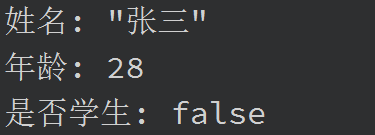
输出结果:
二、JSON对象中嵌套多个JSON对象
2.1 构建和解析包含多个子对象的JSON 对象
构建JSON对象:
cpp
#include <QJsonObject>
#include <QJsonDocument>
#include <QDebug>

int main() {
    // 创建第一个子对象(user1)
    QJsonObject user1;
    user1.insert("name", "张三");
    user1.insert("age", 28);

    // 创建第二个子对象(user2)
    QJsonObject user2;
    user2.insert("name", "李四");
    user2.insert("age", 30);

    // 创建顶层 JSON 对象
    QJsonObject root;
    root.insert("user1", user1);
    root.insert("user2", user2);

    // 将顶层对象序列化为字符串
    QJsonDocument doc(root);
    QString jsonStr = doc.toJson(QJsonDocument::Indented);
    qDebug() << jsonStr;

    return 0;
}
输出结果:
cpp
{
    "user1": {
        "name": "张三",
        "age": 28
    },
    "user2": {
        "name": "李四",
        "age": 30
    }
}
解析JSON对象:
cpp
#include <QJsonDocument>
#include <QJsonObject>
#include <QJsonParseError>
#include <QDebug>

int main() {
    QString jsonString = R"(
    {
        "user1": { "name": "张三", "age": 28 },
        "user2": { "name": "李四", "age": 30 }
    })";

    // 解析 JSON 字符串
    QJsonParseError err;
    QJsonDocument doc = QJsonDocument::fromJson(jsonString.toUtf8(), &err);

    if (err.error != QJsonParseError::NoError) {
        qDebug() << "解析错误:" << err.errorString();
        return -1;
    }

    if (!doc.isObject()) {
        qDebug() << "顶层不是 JSON 对象";
        return -1;
    }

    QJsonObject rootObj = doc.object();

    // 遍历 user1 和 user2
    for (const QString& key : rootObj.keys()) {
        QJsonValue val = rootObj.value(key);
        if (!val.isObject()) {
            qDebug() << key << "不是 JSON 对象";
            continue;
        }

        QJsonObject userObj = val.toObject();
        QString name = userObj.contains("name") && userObj["name"].isString()
                       ? userObj["name"].toString() : "未知";
        int age = userObj.contains("age") && userObj["age"].isDouble()
                  ? userObj["age"].toInt() : -1;

        qDebug() << key << ": 姓名 =" << name << ", 年龄 =" << age;
    }

    return 0;
}
输出结果:

2.2 子对象中包含JSON对象
构建JSON对象:
cpp
#include <QJsonDocument>
#include <QJsonObject>
#include <QDebug>

int main() {
    // 构建 address 对象 for user1
    QJsonObject address1;
    address1.insert("city", "北京");
    address1.insert("zip", "100000");

    // 构建 user1 对象
    QJsonObject user1;
    user1.insert("name", "张三");
    user1.insert("age", 28);
    user1.insert("address", address1);

    // 构建 address 对象 for user2
    QJsonObject address2;
    address2.insert("city", "上海");
    address2.insert("zip", "200000");

    // 构建 user2 对象
    QJsonObject user2;
    user2.insert("name", "李四");
    user2.insert("age", 30);
    user2.insert("address", address2);

    // 构建根对象
    QJsonObject root;
    root.insert("user1", user1);
    root.insert("user2", user2);

    // 转为字符串
    QJsonDocument doc(root);
    qDebug().noquote() << doc.toJson(QJsonDocument::Indented);

    return 0;
}
输出结果:
cpp
{
    "user1": {
        "name": "张三",
        "age": 28,
        "address": {
            "city": "北京",
            "zip": "100000"
        }
    },
    "user2": {
        "name": "李四",
        "age": 30,
        "address": {
            "city": "上海",
            "zip": "200000"
        }
    }
}
解析JSON对象:
cpp
#include <QJsonDocument>
#include <QJsonObject>
#include <QDebug>

int main() {
    QJsonDocument doc(root);
    QJsonObject rootObj = doc.object();

    for (const QString& key : rootObj.keys()) {
        QJsonObject userObj = rootObj.value(key).toObject();

        QString name = userObj.value("name").toString();
        int age = userObj.value("age").toInt();

        if (userObj.contains("address") && userObj["address"].isObject()) {
            QJsonObject addr = userObj["address"].toObject();
            QString city = addr.value("city").toString();
            QString zip = addr.value("zip").toString();
            qDebug() << key << ": 姓名 =" << name << ", 年龄 =" << age
                     << ", 城市 =" << city << ", 邮编 =" << zip;
        } else {
            qDebug() << key << ": 姓名 =" << name << ", 年龄 =" << age << "(无地址信息)";
        }
    }

    return 0;
}
输出结果:

三、JSON对象中组建多个数组对象
构建对象:
cpp
#include <QJsonArray>
#include <QJsonObject>
#include <QJsonDocument>
#include <QDebug>

int main() {
    // 学生数组
    QJsonArray studentArray;

    QJsonObject student1;
    student1.insert("name", "张三");
    student1.insert("age", 18);
    studentArray.append(student1);

    QJsonObject student2;
    student2.insert("name", "李四");
    student2.insert("age", 19);
    studentArray.append(student2);

    // 教师数组
    QJsonArray teacherArray;

    QJsonObject teacher1;
    teacher1.insert("name", "王老师");
    teacher1.insert("subject", "数学");
    teacherArray.append(teacher1);

    QJsonObject teacher2;
    teacher2.insert("name", "赵老师");
    teacher2.insert("subject", "英语");
    teacherArray.append(teacher2);

    // 构建根对象
    QJsonObject root;
    root.insert("students", studentArray);
    root.insert("teachers", teacherArray);

    // 输出 JSON
    QJsonDocument doc(root);
    qDebug().noquote() << doc.toJson(QJsonDocument::Indented);

    return 0;
}
输出结果:
cpp
{
    "students": [
        {
            "name": "张三",
            "age": 18
        },
        {
            "name": "李四",
            "age": 19
        }
    ],
    "teachers": [
        {
            "name": "王老师",
            "subject": "数学"
        },
        {
            "name": "赵老师",
            "subject": "英语"
        }
    ]
}
解析对象:
cpp
#include <QJsonDocument>
#include <QJsonObject>
#include <QJsonArray>
#include <QJsonValue>
#include <QDebug>

int main() {
    QString jsonString = R"(
    {
        "students": [
            { "name": "张三", "age": 18 },
            { "name": "李四", "age": 19 }
        ],
        "teachers": [
            { "name": "王老师", "subject": "数学" },
            { "name": "赵老师", "subject": "英语" }
        ]
    })";

    QJsonParseError err;
    QJsonDocument doc = QJsonDocument::fromJson(jsonString.toUtf8(), &err);

    if (err.error != QJsonParseError::NoError) {
        qDebug() << "解析失败:" << err.errorString();
        return -1;
    }

    if (!doc.isObject()) {
        qDebug() << "JSON 顶层不是对象";
        return -1;
    }

    QJsonObject root = doc.object();

    // 解析 students 数组
    if (root.contains("students") && root["students"].isArray()) {
        QJsonArray students = root["students"].toArray();
        qDebug() << "[学生列表]";
        for (const QJsonValue& val : students) {
            if (val.isObject()) {
                QJsonObject stu = val.toObject();
                QString name = stu.value("name").toString("未知");
                int age = stu.value("age").toInt(-1);
                qDebug() << "姓名:" << name << ", 年龄:" << age;
            }
        }
    }

    // 解析 teachers 数组
    if (root.contains("teachers") && root["teachers"].isArray()) {
        QJsonArray teachers = root["teachers"].toArray();
        qDebug() << "\n[教师列表]";
        for (const QJsonValue& val : teachers) {
            if (val.isObject()) {
                QJsonObject teacher = val.toObject();
                QString name = teacher.value("name").toString("未知");
                QString subject = teacher.value("subject").toString("未知");
                qDebug() << "姓名:" << name << ", 学科:" << subject;
            }
        }
    }

    return 0;
}
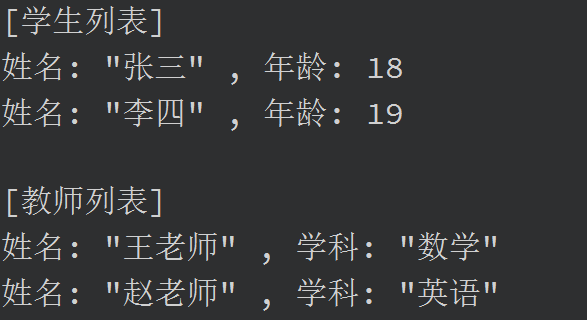
输出结果:
四、构建和解析数组对象
生成一个 JSON 数组对象:
cpp
#include <QJsonArray>
#include <QJsonObject>
#include <QJsonDocument>
#include <QDebug>

int main() {
    // 创建 JSON 数组
    QJsonArray jsonArray;

    // 添加第一个对象
    QJsonObject obj1;
    obj1.insert("name", "张三");
    obj1.insert("age", 18);
    jsonArray.append(obj1);

    // 添加第二个对象
    QJsonObject obj2;
    obj2.insert("name", "李四");
    obj2.insert("age", 19);
    jsonArray.append(obj2);

    // 序列化为 JSON 字符串(数组作为顶层)
    QJsonDocument doc(jsonArray);
    QString jsonStr = doc.toJson(QJsonDocument::Indented);
    qDebug().noquote() << jsonStr;

    return 0;
}
输出结果:
cpp
[
    {
        "name": "张三",
        "age": 18
    },
    {
        "name": "李四",
        "age": 19
    }
]
解析一个 JSON 数组对象:
cpp
#include <QJsonDocument>
#include <QJsonArray>
#include <QJsonObject>
#include <QJsonParseError>
#include <QDebug>

int main() {
    QString jsonString = R"(
    [
        { "name": "张三", "age": 18 },
        { "name": "李四", "age": 19 }
    ])";

    // 解析 JSON 字符串
    QJsonParseError err;
    QJsonDocument doc = QJsonDocument::fromJson(jsonString.toUtf8(), &err);

    if (err.error != QJsonParseError::NoError) {
        qDebug() << "解析失败:" << err.errorString();
        return -1;
    }

    if (!doc.isArray()) {
        qDebug() << "顶层不是数组";
        return -1;
    }

    QJsonArray array = doc.array();

    // 遍历数组
    for (const QJsonValue& val : array) {
        if (!val.isObject()) continue;

        QJsonObject obj = val.toObject();
        QString name = obj.value("name").toString("未知");
        int age = obj.value("age").toInt(-1);

        qDebug() << "姓名:" << name << ", 年龄:" << age;
    }
    return 0;
}
输出结果:
