1. 项目展示
boost搜索引擎具体讲解视频
2. 项目背景
对于boost库,官方是没有提供搜索功能的,我们这个项目就是来为它添加一个站内搜索的功能。
3. 项目环境与技术栈
• 项目环境: ubuntu22.04、vscode
• 技术栈: C/C++、C++11、STL、Boost、Jsoncpp、cppjieba、cpp-httplib、html5、css、js、jQuery、Ajax
4. 搜索引擎的宏观原理
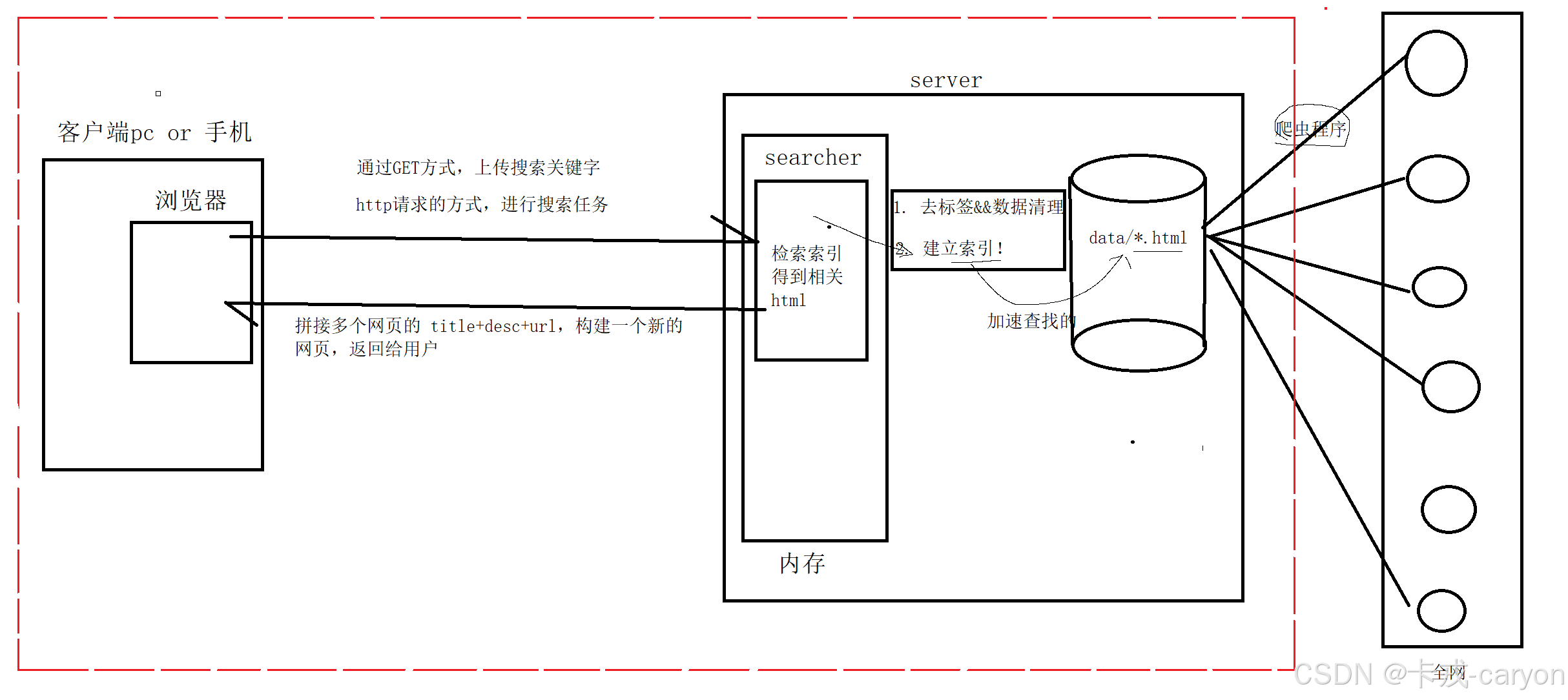
• 后端: 首先通过爬虫程序将全网中的数据保存到磁盘中,接下来通过去标签和数据清洗得到我们想要的数据格式,接下来为这些数据建立好索引方便搜索引擎检索。
• 前端: 用户通过浏览器通过GET方式上传关键字,通过http请求搜索引擎提供服务,搜索引擎检索相关的数据并动态构建网页返回用户。
5. 数据获取
我们这里就不采用爬虫的方式获取boost库中的内容了,因为官方已经提供了下载的途径:
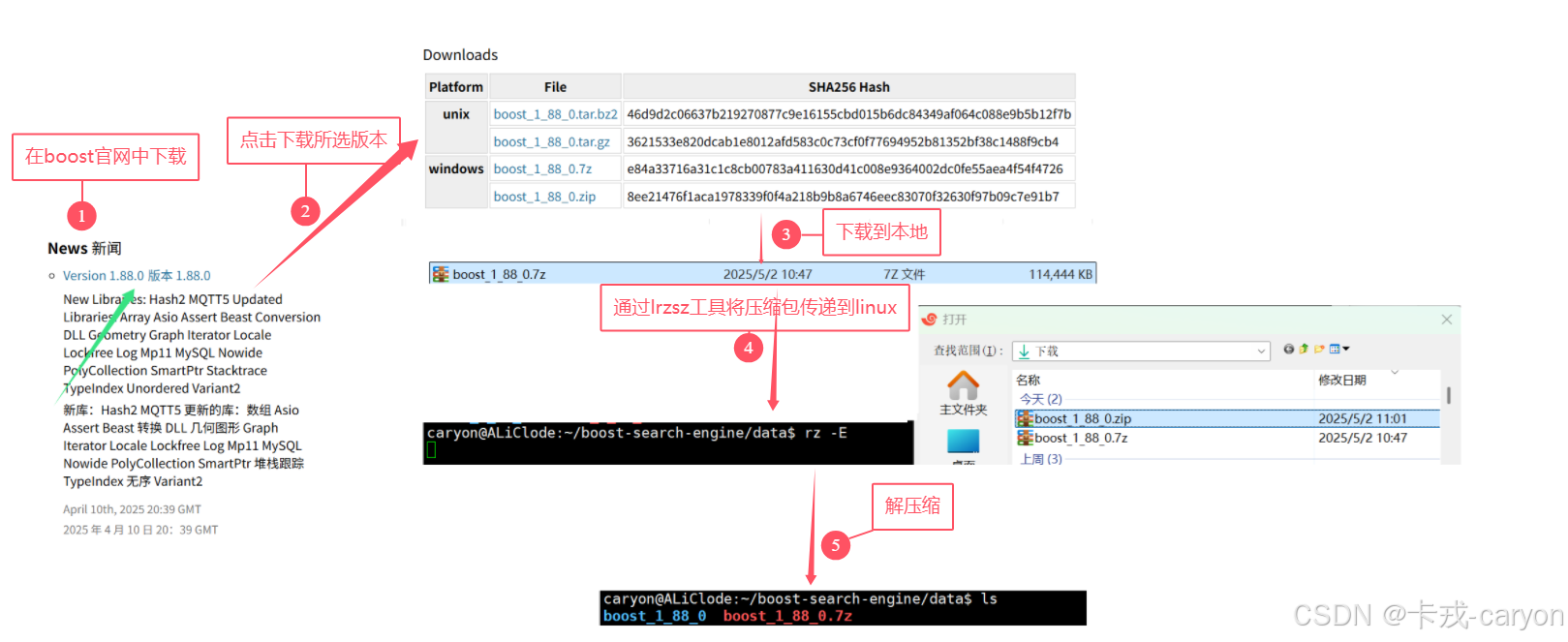
我们实际需要的只是boost_1_88_0/doc/html 这里面的内容,我们将其拷贝到我们的data/raw_input目录中方便后续使用。
6. 去标签与数据清洗
我们浏览data/raw_input其中的html文件发现其中都包含着很多的标签:
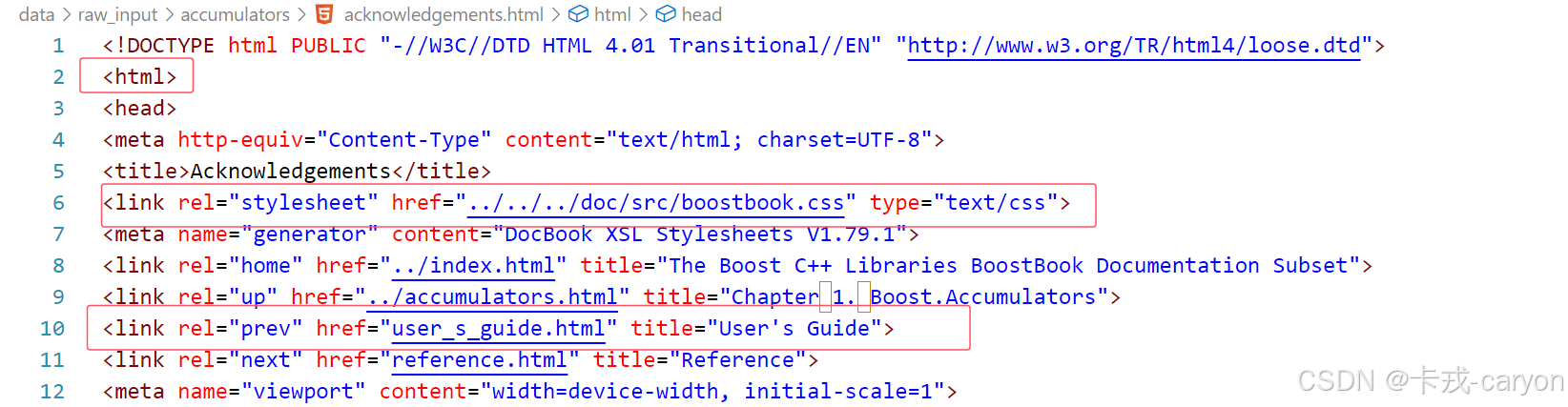
而这些标签中的内容对于我们来说是没有价值的,因此我们需要去除这些标签,并把处理好的数据放在data/input中。
6.1 处理策略
在我们搜索网页时可以看到其显示的内容主要分为三部分:

因此我们在数据清洗时也要体现出这三部分数据:将每个html文件中的内容读取成一行以\n结尾,每一行中分为三个部分(title、content、url)以\3分隔。
6.2 基本框架
cpp
#include <memory>
#include "Parse.hpp"

using namespace ParseModule;

int main()
{
    std::unique_ptr<Parse> parser = std::make_unique<Parse>();
    // 1. 枚举所有的.html文件
    if(! parser->EnumFileName())
    {
        LOG(LogLevel::FATAL) << "EnumFileName Failed";
        exit(1);
    }
    // 2. 将所有的文件名对应的文件转换成指定格式的数组
    if(!parser->ParseHtml())
    {
        LOG(LogLevel::FATAL) << "ParseHtml Failed";
        exit(2);
    }
    // 3. 将数组中的内容拼接成json字符串并保存到input_path中
    if(!parser->SaveHtml())
    {
        LOG(LogLevel::FATAL) << "SaveHtml Failed";
        exit(3);
    }
    LOG(LogLevel::DEBUG) << "Parse Succeed!";
    return 0;
}
6.3 分步实现
• 我们需要将 data/raw_input/ 下的所有 .html 文件的名字获取得到,boost库中为我们提供了相应的方法。因此我们需要引入boost库,使用boost库中的filesystem帮助我们遍历给定路径的文件,来帮我们筛选出.html的文件。
• 获取得到所有的.html文件之后,需要提取出我们想要的内容(title、content、url),所以要依次遍历所有的文件,提取出这三部分。
• 在获取到我们想要的内容之后,我们需要将这些数据以一定的格式进行保存,这里我们采用的是每个文件的内容放在一行,行内使用'\3'进行分隔,将其存储到data/input/input.bin中。
boost 库的下载
bash
sudo apt update
sudo apt install -y libboost-all-dev
具体实现
cpp
#pragma once
#include <fstream>
#include <string>
#include <vector>
#include <cstdlib>
#include <boost/filesystem.hpp>
#include "Log.hpp"

namespace ParseModule
{
    using namespace LogModule;

    const static std::string raw_input_path = "../data/raw_input";
    const static std::string input_path = "../data/input/input.bin";

    struct DataInfo
    {
        std::string title;   // 标题
        std::string content; // 正文
        std::string url;     // url
    };
    using DataInfo_t = struct DataInfo;

    class Parse
    {
    public:
        Parse()
        {
        }
        // 枚举所有的html文件
        bool EnumFileName()
        {
            boost::filesystem::path root_path(raw_input_path);
            // 如果节点不存在就返回 false
            if (!boost::filesystem::exists(root_path))
                return false;
            // 遍历所有的文件
            boost::filesystem::recursive_directory_iterator end;
            boost::filesystem::recursive_directory_iterator iter(root_path);
            for (; iter != end; iter++)
            {
                // 判断是不是常规文件
                if (!boost::filesystem::is_regular_file(*iter))
                    continue;
                // 判断是不是.html文件
                if (iter->path().extension() != std::string(".html"))
                    continue;
                // 走到这里一定是一个.html文件
                _files_name.push_back(move(iter->path().string()));
            }
            return true;
        }
        // 对文件中的内容进行划分
        bool ParseHtml()
        {
            for (auto &file_name : _files_name)
            {
                // 读取文件内容
                std::string message;
                if (!ReadFile(file_name, &message))
                {
                    LOG(LogLevel::FATAL) << "ReadFile Failed";
                    return false;
                }
                // 构建DataInfo
                DataInfo_t datainfo;
                if (!BuiltDataInfo(file_name, message, &datainfo))
                {
                    LOG(LogLevel::FATAL) << "BuiltDataInfo Failed";
                    return false;
                }
                // 将构建成功的datainfo插入datas
                _datas.push_back(datainfo);
            }
            return true;
        }
        // 将指定格式的数据写入指定文件
        bool SaveHtml()
        {
            // 按照二进制方式进行写入
            std::ofstream out(input_path, std::ios::out | std::ios::binary);
            if (!out.is_open())
            {
                std::cerr << "open " << input_path << " failed!" << std::endl;
                return false;
            }
            const static std::string sep = "\3";
            for (auto &data : _datas)
            {
                std::string outstr;
                outstr += data.title + sep;
                outstr += data.content + sep;
                outstr += data.url + '\n';

                out.write(outstr.c_str(), outstr.size());
            }
            out.close();
            return true;
        }
        ~Parse()
        {
        }
    private:
        bool ReadFile(const std::string &file_name, std::string *result)
        {
            std::ifstream in(file_name, std::ios::in);
            if (!in.is_open())
            {
                LOG(LogLevel::ERROR) << "open file " << file_name << " error";
                return false;
            }

            std::string line;
            while (std::getline(in, line))
                *result += line;

            in.close();
            return true;
        }
        bool BuiltDataInfoTitle(std::string &message, std::string *title)
        {
            size_t begin = message.find("<title>");
            if (begin == std::string::npos)
                return false;
            size_t end = message.find("</title>");
            if (end == std::string::npos)
                return false;
            begin += std::string("<title>").size();
            *title = message.substr(begin, end - begin);
            return true;
        }

        bool BuiltDataInfoContent(std::string &message, std::string *content)
        {
            size_t begin = message.find("<body");
            if (begin == std::string::npos)
                return false;
            size_t end = message.find("</body>");
            if (end == std::string::npos)
                return false;
            begin += std::string("<body>").size();

            // 基于一个简易的状态机去标签
            enum status
            {
                LABLE,
                CONTENT
            };
            enum status s = LABLE;
            while (begin != end)
            {
                switch (s)
                {
                case LABLE:
                    if (message[begin] == '>')
                        s = CONTENT;
                    break;
                case CONTENT:
                    if (message[begin] == '<')
                        s = LABLE;
                    else
                    {
                        // 我们不想保留原始文件中的\n,因为我们想用\n作为html解析之后文本的分隔符
                        if (message[begin] == '\n')
                            message[begin] = ' ';
                        content->push_back(message[begin]);
                    }
                    break;
                default:
                    break;
                }
                begin++;
            }
            return true;
        }
        bool BuiltDataInfoUrl(std::string &file_name, std::string *url)
        {
            std::string url_head = "https://www.boost.org/doc/libs/1_88_0/doc/html";
            std::string url_tail = file_name.substr(raw_input_path.size());

            *url = url_head + url_tail;
            return true;
        }
        bool BuiltDataInfo(std::string &filename, std::string &message, DataInfo_t *datainfo)
        {
            // 构建title
            if (!BuiltDataInfoTitle(message, &datainfo->title))
                return false;
            // 构建content
            if (!BuiltDataInfoContent(message, &datainfo->content))
                return false;
            // 构建url
            if(!BuiltDataInfoUrl(filename,&datainfo->url))
                return false;
            return true;
        }
    private:
        std::vector<std::string> _files_name; // 1. 将raw中的html文件名全部保存到files_name中
        std::vector<DataInfo_t> _datas;       // 2. 将所有的文件名对应的文件转换成指定格式的数组
    };
}
7. 建立索引
7.1 正排索引与倒排索引概述
正排索引: 从文档ID找到文档内容(文档内的关键字)
| 文档ID | 文档内容 |
|---|---|
| 1 | caryon爱在CSDN写博客 |
| 2 | CADN上有好多优质博客 |
倒排索引: 根据文档内容对应联系到文档ID
| 关键字 | 文档ID |
|---|---|
| caryon | 1 |
| CSDN | 1、2 |
| 写博客 | 1 |
| 博客 | 1、2 |
| 优质博客 | 2 |
7.2 基本框架
cpp
#pragma once

namespace IndexModule
{
    // 正排索引元素
    typedef struct ForwardElem
    {
        std::string title;   // title
        std::string content; // content
        std::string url;     // url
        int data_id;         // id
    } ForwardElem;
    // 倒排索引元素
    typedef struct InvertedElem
    {
        int data_id;          // data_id
        std::string key_word; // key_word
        long long weight;     // weight
    } InvertedElem;
    // 倒排链表
    using InvertedList = std::vector<InvertedElem>;

    class Index
    {
    public:
    	Index() {}
        // 获取正排索引对应的元素
        ForwardElem *GetForwardElem(int data_id)
        {
        }
        // 获取倒排索引对应的元素
        InvertedList *GetInvertedList(const std::string &word)
        {
        }
        // 构建索引
        bool BuiltIndex(const std::string &input_path)
        {
            // 构建正排索引
            // 构建倒排索引
        }
        ~Index() {}
    private:
    	Index* instance;
    };
}
7.3 分步实现
正排索引实际上就是对data/input/input.bin中的内容进行读取并按照一定的格式进行创建,它的标号天然就存在了(数组下标)。倒排索引的话就需要将获取的正排索引的元素拆分成若干词(这个工作我们交由jieba来做),而后将这些词与编号一一对应起来,这里有一点很重要,查阅到的文档内容我们按照什么样的顺序进行展示呢?这里我们采用了一定的相关性进行绑定的。
至于返回正排索引和倒排索引对应的元素只需要查找一下即可。
还有一点就是,我们实际上的索引只需要建立一次就可以了,因此可以设置为单例模式。
jieba库的下载
本次使用的jieba我们从git code获取,我是将它保存到了libs目录下的,需要注意的是要将dsps/limonp拷贝到include下才能正确使用,或者建立软连接也可以。
cpp
git clone https://gitee.com/mohatarem/cppjieba.git具体实现
cpp
#pragma once
#include <mutex>
#include <fstream>
#include <vector>
#include <string>
#include <unordered_map>
#include <boost/algorithm/string.hpp>
#include "Log.hpp"
#include "Jieba.hpp"
namespace IndexModule
{
    using namespace LogModule;
    // 正排索引元素
    typedef struct ForwardElem
    {
        std::string title;   // title
        std::string content; // content
        std::string url;     // url
        int data_id;         // id
    } ForwardElem;
    // 倒排索引元素
    typedef struct InvertedElem
    {
        int data_id;          // data_id
        std::string key_word; // key_word
        long long weight;     // weight

        // 这个函数是给search.hpp去重使用的
        bool operator==(const InvertedElem& e)
        {
            return data_id == e.data_id && key_word == e.key_word && weight == e.weight;
        }
    } InvertedElem;
    // 倒排链表
    using InvertedList = std::vector<InvertedElem>;

    class Index
    {
        Index() {}
        Index(const Index&) = delete;
        bool operator=(const Index&) = delete;
        static Index* instance;
        static std::mutex lock;
    public:
        static Index* GetInstance()
        {
            if(instance == nullptr)
            {
                std::lock_guard<std::mutex> lck (lock);
                if(instance == nullptr)
                    instance = new(Index);
            }
            return instance;
        }
        // 获取正排索引对应的元素
        ForwardElem *GetForwardElem(int data_id)
        {
            if (data_id > ForwardIndex.size())
                return nullptr;
            return &ForwardIndex[data_id];
        }
        // 获取倒排索引对应的元素
        InvertedList *GetInvertedList(const std::string &word)
        {
            auto it = InvertedIndex.find(word);
            if (it == InvertedIndex.end())
                return nullptr;
            return &InvertedIndex[word];
        }
        // 构建索引
        bool BuiltIndex(const std::string &input_path)
        {
            std::ifstream in(input_path, std::ios::in | std::ios::binary);
            if (!in.is_open())
            {
                LOG(LogLevel::FATAL) << "sorry, " << input_path << " open error";
                return false;
            }
            std::string line;
            int cnt = 0;
            while (getline(in, line))
            {
                // 构建正排索引
                ForwardElem *forward_elem = BuiltForwardIndex(line);
                if (forward_elem == nullptr)
                    continue;
                // 构建倒排索引
                if (!BuiltInvertedIndex(*forward_elem))
                    continue;
                cnt++;
                if(cnt % 50 == 0)
                    LOG(LogLevel::DEBUG) << "已经建立连接:" << cnt ;
            }
            return true;
        }
        ~Index() {}

    private:
        ForwardElem *BuiltForwardIndex(const std::string &line)
        {
            // 1. 解析字符串进行切割
            std::vector<std::string> part_elem;
            const static std::string sep = "\3";
            boost::split(part_elem, line, boost::is_any_of(sep), boost::token_compress_on);
            if (part_elem.size() != 3)
                return nullptr;
            // 2. 将其填充到ForwardElem结构
            ForwardElem forward_elem;
            forward_elem.title = part_elem[0];
            forward_elem.content = part_elem[1];
            forward_elem.url = part_elem[2];
            forward_elem.data_id = ForwardIndex.size();
            // 3. 将构造好的ForwardElem结构插入ForwardIndex
            ForwardIndex.push_back(std::move(forward_elem));
            return &ForwardIndex.back();
        }
        bool BuiltInvertedIndex(ForwardElem &forward_elem)
        {
            // 统计词频,用于weight的构造
            struct word_cnt
            {
                int title_cnt;
                int content_cnt;
                word_cnt() : title_cnt(0), content_cnt(0) {}
            };
            // 用来暂存词频的映射表
            std::unordered_map<std::string, word_cnt> word_map;

            // 对title进行切分并统计
            std::vector<std::string> title_key_words;
            JiebaUtil::CutString(forward_elem.title, &title_key_words);
            for (auto &key_word : title_key_words)
            {
                // 忽略大小写
                boost::to_lower(key_word);
                word_map[key_word].title_cnt++;
            }
            // 对content进行切分并统计
            std::vector<std::string> content_key_words;
            JiebaUtil::CutString(forward_elem.content, &content_key_words);
            for (auto &key_word : content_key_words)
            {
                boost::to_lower(key_word);
                word_map[key_word].content_cnt++;
            }
            // 将关键字依次插入InvertedIndex
            for(auto& key_word:word_map)
            {
                InvertedElem elem;
                elem.data_id = forward_elem.data_id;
                elem.key_word = key_word.first;
                elem.weight = 10 * key_word.second.title_cnt + key_word.second.content_cnt; // 这里的weight构造采用了硬编码
                InvertedIndex[key_word.first].push_back(std::move(elem));
            }
            return true;
        }
    private:
        std::vector<ForwardElem> ForwardIndex;                       // 正排索引
        std::unordered_map<std::string, InvertedList> InvertedIndex; // 倒排索引
    };
    Index* Index::instance = nullptr;
    std::mutex Index::lock;
}
8. 搜索引擎
8.1 基本框架
cpp
#pragma once

namespace SearchModule
{
	using namespace IndexModule;
    class Search
    {
    public:
        Search()
        {
        }
        // 初始化搜索引擎
        void InitSearch(const std::string &bin_path)
        {
        }
        // 对查询做出反馈
        std::string Searcher(std::string query) // 这里是故意写成拷贝的
        {
            // 1. 对 query 进行切分
            // 2. 将所有的关键字构成的 InvertedElem 进行保存
            // 3. 按weight降序排序并去重
            // 4. 将所有的结果按json串的格式返回
        }
        ~Search()
        {
        }
    private:
        Index *index;
    };
}
8.2 分步实现
搜索引擎是本博客的核心内容了,但是经过前面的处理,这里我们需要做的就只有初始化引擎和对用户的查询做出反馈,这里我们采用json串进行返回是为了方便后续的网络服务。
jsoncpp的安装
bash
sudo apt install -y libjsoncpp-dev具体实现
cpp
#pragma once
#include <string>
#include <algorithm>
#include <boost/algorithm/string.hpp>
#include <jsoncpp/json/json.h>
#include "Index.hpp"
#include "Jieba.hpp"
#include "Log.hpp"

namespace SearchModule
{
    using namespace IndexModule;
    using namespace LogModule;

    class Search
    {
    public:
        Search()
        {
        }
        // 初始化搜索引擎
        void InitSearch(const std::string &bin_path)
        {
            index = Index::GetInstance();
            LOG(LogLevel::INFO) << "获取单例成功......";
            index->BuiltIndex(bin_path);
            LOG(LogLevel::INFO) << "建立索引成功";
        }
        // 对查询做出反馈
        std::string Searcher(std::string query) // 这里是故意写成拷贝的
        {
            // 忽略大小写
            boost::to_lower(query);
            // 1. 对 query 进行切分
            std::vector<std::string> key_words;
            JiebaUtil::CutString(query, &key_words);

            // 2. 将所有的关键字构成的 InvertedElem 进行保存
            InvertedList invertedlist_all;
            for (const auto &key_word : key_words)
            {
                InvertedList *invertedlist = index->GetInvertedList(key_word);
                if (invertedlist == nullptr)
                    continue;
                invertedlist_all.insert(invertedlist_all.end(), invertedlist->begin(), invertedlist->end());
            }
            // 3. 按weight降序排序并去重
            std::sort(invertedlist_all.begin(), invertedlist_all.end(), [](const InvertedElem &e1, const InvertedElem &e2)
                      { return e1.weight > e2.weight; });
            auto last = std::unique(invertedlist_all.begin(), invertedlist_all.end());
            invertedlist_all.erase(last, invertedlist_all.end());
            // 4. 将所有的结果按json串的格式返回
            Json::Value root;
            for (auto &invertedlist : invertedlist_all)
            {
                ForwardElem *forwardelem = index->GetForwardElem(invertedlist.data_id);
                if (forwardelem == nullptr)
                {
                    continue;
                }
                Json::Value elem;
                elem["title"] = forwardelem->title;
                // content是文档的去标签的结果,但是不是我们想要的,我们要的是一部分
                elem["desc"] = GetDesc(forwardelem->content, invertedlist.key_word);
                elem["url"] = forwardelem->url;

                root.append(elem);
            }
            return Json::StyledWriter().write(root);
        }
        ~Search()
        {
        }

    private:
        std::string GetDesc(const std::string &content, const std::string &key_word)
        {
            // 找到word在html_content中的首次出现,然后往前找50字节(如果没有,从begin开始),往后找100字节(如果没有,到end就可以的)
            const int prev_step = 50;
            const int next_step = 100;
            // 1. 找到首次出现
            auto iter = std::search(content.begin(), content.end(), key_word.begin(), key_word.end(), [](int x, int y)
                                    { return (std::tolower(x) == std::tolower(y)); });
            if (iter == content.end())
            {
                return "None1";
            }
            int pos = std::distance(content.begin(), iter);

            // 2. 获取start,end
            int start = 0;
            int end = content.size() - 1;
            // 如果之前有50+字符,就更新开始位置
            if (pos > start + prev_step)
                start = pos - prev_step;
            if (pos < end - next_step)
                end = pos + next_step;

            // 3. 截取子串,return
            if (start >= end)
                return "None2";
            std::string desc = content.substr(start, end - start);
            desc += "...";
            return desc;
        }

    private:
        Index *index;
    };
}
9. 网络服务
网络服务这里我们采用cpp-httplib库来实现
cpp-httplib 安装
bash
git clone https://gitee.com/welldonexing/cpp-httplib.git具体实现
cpp
#pragma once
#include <memory>
#include "Search.hpp"
#include "../libs/cpp-httplib/httplib.h"

namespace HttpSeverModule
{
    using namespace SearchModule;
    const std::string rootpath = "../html";
    class HttpSever
    {
    public:
        HttpSever() : _searcher(std::make_unique<Search>())
        {
        }
        void Start(const std::string &bin_path)
        {
            _searcher->InitSearch(bin_path);
            _svr.set_base_dir(rootpath.c_str());
            _svr.Get("/s", [&](const httplib::Request &req, httplib::Response &rsp){
                if (!req.has_param("word"))
                {
                    rsp.set_content("必须要有搜索关键字!", "text/plain; charset=utf-8");
                    return;
                }
                std::string word = req.get_param_value("word");
                LOG(LogLevel::INFO) << "用户搜索的: " << word;
                std::string json_string = _searcher->Searcher(word);
                rsp.set_content(json_string, "application/json");
            });

            LOG(LogLevel::INFO) << "服务器启动成功...";
            _svr.listen("0.0.0.0", 8888);
        }
        ~HttpSever()
        {
        }

    private:
        std::unique_ptr<Search> _searcher;
        httplib::Server _svr;
    };
}
10. 前端界面
这一部分内容只要自己能够实现一个搜索功能即可,谨放上我的代码供大家查看
html
<!-- index.html -->
<!DOCTYPE html>
<html lang="en">
<head>
  <meta charset="UTF-8">
  <title>Boost 搜索引擎</title>
  <style>
    /* 可复用 Google 风格样式 */
    body {
      display: flex;
      justify-content: center;
      align-items: center;
      flex-direction: column;
      height: 100vh;
      font-family: Arial, sans-serif;
    }
    .logo {
      font-size: 64px;
      font-weight: bold;
      color: #4285f4;
      margin-bottom: 30px;
    }
    .search {
      display: flex;
      max-width: 600px;
      width: 100%;
      border: 1px solid #ccc;
      border-radius: 24px;
      padding: 5px 10px;
    }
    .search input {
      flex: 1;
      border: none;
      outline: none;
      font-size: 16px;
    }
    .search button {
      border: none;
      background: none;
      font-size: 16px;
      color: #4285f4;
      cursor: pointer;
    }
  </style>
</head>
<body>
  <div class="logo">Boost</div>
  <div class="search">
    <input type="text" id="searchInput" placeholder="请输入搜索关键字">
    <button onclick="jump()">🔍</button>
  </div>

  <script>
    function jump() {
      const input = document.getElementById("searchInput").value.trim();
      if (input !== "") {
        location.href = `search.html?word=${encodeURIComponent(input)}`;
      }
    }
  </script>
</body>
</html>
html
<!-- search.html -->
<!DOCTYPE html>
<html lang="en">

<head>
    <meta charset="UTF-8">
    <title>搜索结果 - Boost</title>
    <script src="https://code.jquery.com/jquery-2.1.1.min.js"></script>
    <style>
        body {
            font-family: Arial, sans-serif;
            background-color: #f8f9fa;
            margin: 0;
            padding: 0;
        }

        .container {
            max-width: 720px;
            margin: 0 auto;
            padding: 20px;
        }

        .search-bar {
            display: flex;
            margin: 20px 0;
            background: white;
            border: 1px solid #ddd;
            border-radius: 24px;
            padding: 6px 12px;
            box-shadow: 0 1px 2px rgba(0, 0, 0, 0.1);
        }

        .search-bar input {
            flex: 1;
            border: none;
            outline: none;
            font-size: 16px;
            padding: 8px;
        }

        .search-bar button {
            background-color: #4285f4;
            color: white;
            border: none;
            border-radius: 20px;
            padding: 8px 16px;
            font-size: 14px;
            cursor: pointer;
        }

        .result {
            margin-top: 20px;
            padding: 0 30px;
        }

        .result .item {
            margin-bottom: 25px;
            padding-bottom: 10px;
            border-bottom: 1px solid #eee;
        }

        .result .item a {
            display: block;
            font-size: 18px;
            font-weight: bold;
            color: #1a0dab;
            text-decoration: none;
            margin-bottom: 5px;
        }

        .result .item a:hover {
            text-decoration: underline;
        }

        .result .item p {
            font-size: 14px;
            line-height: 1.6;
            color: #4d5156;
            margin: 0;
            white-space: normal;
            /* 允许换行 */
        }
    </style>
</head>

<body>
    <div class="container">
        <div class="search-bar">
            <input type="text" id="searchInput">
            <button onclick="jump()">搜索</button>
        </div>

        <div class="result"></div>
    </div>

    <script>
        const urlParams = new URLSearchParams(window.location.search);
        const query = urlParams.get('word') || '';

        document.getElementById("searchInput").value = query;

        if (query !== '') {
            Search(query);
        }

        function Search(q) {
            $.ajax({
                type: "GET",
                url: "/s?word=" + encodeURIComponent(q),
                success: function (data) {
                    BuildHtml(data);
                }
            });
        }

        function BuildHtml(data) {
            const result_label = $(".result");
            result_label.empty();

            for (let elem of data) {
                let a_label = $("<a>", {
                    text: elem.title,
                    href: elem.url,
                    target: "_blank"
                });
                let p_label = $("<p>", {
                    text: elem.desc
                });
                let div_label = $("<div>", {
                    class: "item"
                });

                a_label.appendTo(div_label);
                p_label.appendTo(div_label);  // 不再添加网址
                div_label.appendTo(result_label);
            }
        }

        function jump() {
            const input = document.getElementById("searchInput").value.trim();
            if (input !== "") {
                location.href = `search.html?word=${encodeURIComponent(input)}`;
            }
        }
    </script>
</body>

</html>