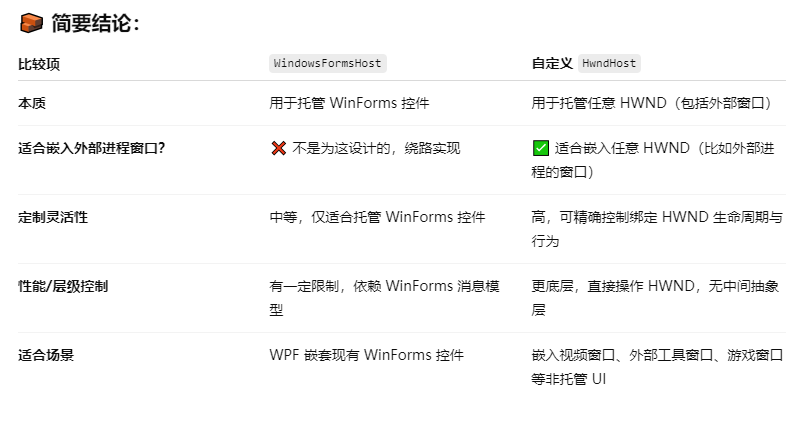
WPF内嵌其他进程窗口的常见方法有 HwndHost + SetParent 和 WindowsFormsHost + WinForms Panel + SetParent
推荐使用自定义HwndHost
两者的对比区别
示例代码
public class MyWndHost : HwndHost
{
    const int WS_CHILD = 0x40000000;
    const int WS_VISIBLE = 0x10000000;
    const int WS_CLIPCHILDREN = 0x02000000;
    const int WS_CLIPSIBLINGS = 0x04000000;

    [DllImport("user32.dll")]
    internal static extern IntPtr CreateWindowEx(int exStyle, string className, string windowName, int style, int x, int y, int width, int height, IntPtr hwndParent, IntPtr hMenu, IntPtr hInstance, IntPtr pvParam);

    [DllImport("user32.dll")]
    internal static extern bool DestroyWindow(IntPtr hwnd);

    public static readonly DependencyProperty HandleProperty = DependencyProperty.Register("Handle", typeof(IntPtr), typeof(MyWndHost), new PropertyMetadata(IntPtr.Zero));

    public new IntPtr Handle
    {
        get => (IntPtr)GetValue(HandleProperty);
        set => SetValue(HandleProperty, value);
    }

    protected override HandleRef BuildWindowCore(HandleRef hwndParent)
    {
        Handle = CreateWindowEx(
            0, "static", "",
            WS_CHILD | WS_VISIBLE | WS_CLIPCHILDREN | WS_CLIPSIBLINGS,
            0, 0,
            (int)Width, (int)Height,
            hwndParent.Handle,
            IntPtr.Zero,
            IntPtr.Zero,
            IntPtr.Zero);
        return new HandleRef(this, Handle);
    }

    protected override void DestroyWindowCore(HandleRef hwnd)
    {
        DestroyWindow(hwnd.Handle);
    }
}

<Grid>
    <!--WindowsFormsHost-->
    <Grid Margin="12,0,0,0" x:Name="web2Layout" Background="Black">
        <wfi:WindowsFormsHost Name="windowsFormsHost" >
            <wf:Panel x:Name="hostPanel"/>
        </wfi:WindowsFormsHost>
    </Grid>
    <!--自定义HwndHost-->
    <ui:MyWndHost x:Name="MyWnd"/>
</Grid>

 public partial class WebView : System.Windows.Controls.UserControl
 {
     private IntPtr m_hWndChild = IntPtr.Zero;
     private Process _electronProcess;

     [DllImport("user32.dll", SetLastError = true)]
     private static extern IntPtr SetParent(IntPtr hWndChild, IntPtr hWndNewParent);

     [DllImport("user32.dll")]
     private static extern int SetWindowLong(IntPtr hWnd, int nIndex, uint dwNewLong);

     [DllImport("user32.dll")]
     private static extern uint GetWindowLong(IntPtr hWnd, int nIndex);

     [DllImport("user32.dll")]
     private static extern bool MoveWindow(IntPtr hWnd, int X, int Y, int nWidth, int nHeight, bool bRepaint);

     private const int GWL_STYLE = -16;
     private const uint WS_CHILD = 0x40000000;
     private const uint WS_BORDER = 0x00800000;

     public WebView()
     {
         InitializeComponent();
         Loaded += Web2Container_Loaded;
         SizeChanged += Web2Container_SizeChanged;
     }

     private void Web2Container_Loaded(object sender, RoutedEventArgs e)
     {
         StartElectronApp();
     }

     private void StartElectronApp()
     {
         var path = AppDomain.CurrentDomain.BaseDirectory + @"Exteral\MyElectronApp.exe";
         _electronProcess = new Process
         {
             StartInfo =
             {
                 FileName = path,
                 UseShellExecute = false
             }
         };
         _electronProcess.Start();

         Task.Run(() =>
         {
             while (_electronProcess.MainWindowHandle == IntPtr.Zero && !_electronProcess.HasExited)
             {
                 Thread.Sleep(100);
                 _electronProcess.Refresh();
             }
             if (!_electronProcess.HasExited) ToSetWndParent(_electronProcess.MainWindowHandle);
         });
     }

     private async void ToSetWndParent(IntPtr wnd)
     {
         await Dispatcher.InvokeAsync(() =>
         {
             if (this.FindName("MyWnd") is MyWndHost wfh && wfh.Handle != IntPtr.Zero)
             {
                 m_hWndChild = wnd;
                 SetParent(m_hWndChild, wfh.Handle);

                 uint style = GetWindowLong(m_hWndChild, GWL_STYLE);
                 style = (style & ~WS_BORDER) | WS_CHILD;
                 SetWindowLong(m_hWndChild, GWL_STYLE, style);

                 AdjustChildWindowSize();
             }
         });
     }

     private void Web2Container_SizeChanged(object sender, SizeChangedEventArgs e)
     {
         AdjustChildWindowSize();
     }

     private void AdjustChildWindowSize()
     {
         if (m_hWndChild != IntPtr.Zero)
         {
             var dpiScale = GetDpiFromVisual(this);
             MoveWindow(
                 m_hWndChild,
                 0,
                 0,
                 (int)(ActualWidth * dpiScale),
                 (int)(ActualHeight * dpiScale),
                 true
             );
         }
     }

     private double GetDpiFromVisual(System.Windows.Media.Visual visual)
     {
         var source = PresentationSource.FromVisual(visual);
         double dpiX = 96.0;
         if (source?.CompositionTarget != null)
         {
             dpiX = 96.0 * source.CompositionTarget.TransformToDevice.M11;
         }
         return dpiX / 96.0;
     }
 }
效果示例