效果最终
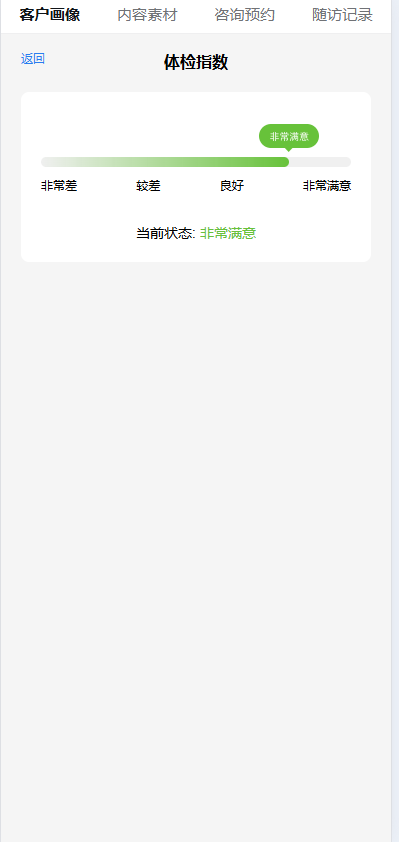
function calculatePointerPosition(value) {
    if (value < 2.6) return 12.5;  // 非常差位置
    if (value < 5.1) return 37.5;  // 较差位置
    if (value < 7.1) return 62.5;  // 良好位置
    return 90;  // 非常满意位置
}

function getStatusText(value) {
    if (value < 2.6) return '非常差';
    if (value < 5.1) return '较差';
    if (value < 7.1) return '良好';
    return '非常满意';
}

function getStatusColor(value) {
    if (value < 2.6) return '#F2F2F2';
    if (value < 5.1) return '#FF4D4F';
    if (value < 7.1) return '#FFAB2C';
    return '#67C23A';
}

function getProgressBackground(value) {
    if (value < 2.6) return 'linear-gradient(90deg, rgba(242,242,242,0) 0%, #F2F2F2 100%)';
    if (value < 5.1) return 'linear-gradient(90deg, rgba(255,77,79,0) 0%, #FF4D4F 100%)';
    if (value < 7.1) return 'linear-gradient(90deg, rgba(255,171,44,0) 0%, #FFAB2C 100%)';
    return 'linear-gradient(90deg, rgba(103,194,58,0) 0%, #67C23A 100%)';
}

function getStatusImage(value) {
    if (value < 2.6) return new URL(
        "../../../assets/images/tijian/gray.png",
        import.meta.url
    ).href;
    if (value < 5.1) return new URL(
        "../../../assets/images/tijian/error.png",
        import.meta.url
    ).href;
    if (value < 7.1) return new URL(
        "../../../assets/images/tijian/waring.png",
        import.meta.url
    ).href;
    return new URL(
        "../../../assets/images/tijian/success.png",
        import.meta.url
    ).href;
}

<!-- 进度条组件 -->
                <div style="padding: 20px; background: #fff; border-radius: 8px; margin-top: 20px;">
                    <!-- 指针在上方 -->
                    <div style="position: relative; height: 50px; margin-bottom: -5px;">
                        <img
                            :style="{
                                position: 'absolute',
                                left: `${(score/10)*100}%`,
                                bottom: '10px',
                                width: '60px',
                                height: '28px',
                                transform: 'translateX(-50%)'
                            }"
                            :src="getStatusImage(score)"
                        />
                    </div>
                    <!-- 进度条 -->
                    <div style="position: relative; height: 10px; background: #f0f0f0; border-radius: 5px;">
                        <div :style="{
                            position: 'absolute',
                            height: '100%',
                            width: `${(score/10)*100}%`,
                            borderRadius: '5px',
                            background: getProgressBackground(score)
                        }">
                        </div>
                    </div>
                    <!-- 状态值在下方 -->
                    <div style="margin-top: 10px; display: flex; justify-content: space-between;">
                        <span>非常差</span>
                        <span>较差</span>
                        <span>良好</span>
                        <span>非常满意</span>
                    </div>

                    <div style="margin-top: 30px; text-align: center; font-size: 14px;">
                        当前状态: <span :style="{ color: getStatusColor(score) }">{{ getStatusText(score) }}</span>
                    </div>
                </div>