一、概述
在 Gin 框架中,中间件(Middleware)是一种在处理 HTTP 请求之前或之后执行的函数。使用中间件可以方便地实现诸如身份验证(Auth)、日志记录、请求限流等功能。
二、编写中间件
// 中间件
func StartCost1(c *gin.Context) {
	log.Info("......start1......")
	start := time.Now()
	c.Next() //调用后续的处理函数
	// c.Abort() //阻止调用后续的处理函数
	cost := time.Since(start)
	log.Info("cost1:", cost)
	log.Info("......end1......")
}

func StartCost2(c *gin.Context) {
	log.Info("......start2......")

	log.Info("......end2......")
}

func authMiddleware(doCheck bool) gin.HandlerFunc {
	return func(ctx *gin.Context) {
		if doCheck {
			//检查用户信息
			ctx.Set("token", "20240814")
			// TODO
			log.Info("检查用户登录信息")
			ctx.Next()
		} else {
			//不检查用户信息
			log.Error("不检查用户信息即可处理")
			ctx.Next()
		}
	}
}
三、使用中间件
python
func main() {

	r := gin.Default()

	r.Use(StartCost1, StartCost2, authMiddleware(true))
	r.LoadHTMLFiles("./index.html", "./home.html")

	r.GET("/web", func(c *gin.Context) {
		name := c.Query("query")
		c.JSON(http.StatusOK, gin.H{
			"name": name,
		})
	})

	r.GET("/login", func(ctx *gin.Context) {
		ctx.HTML(http.StatusOK, "index.html", nil)
	})
	r.GET("/home", func(ctx *gin.Context) {
		ctx.Request.URL.Path = "/b"
		r.HandleContext(ctx)
	})

	r.GET("/b", func(ctx *gin.Context) {
		log.Info("request /b GetLocalIP: " + GetLocalIP())
		ctx.Redirect(http.StatusMovedPermanently, GetLocalIP()+":9090/login")
	})

	r.POST("/login", func(ctx *gin.Context) {
		log.Info("request /login GetLocalIP: " + GetLocalIP())
		username := ctx.PostForm("username")
		password := ctx.PostForm("password")
		//从请求中获取携带的参数
		f, err := ctx.FormFile("file")
		if err != nil {
			ctx.JSON(http.StatusBadRequest, gin.H{
				"error": err,
			})
		} else {
			filePath := path.Join("./", f.Filename)
			ctx.SaveUploadedFile(f, filePath)
			ctx.HTML(http.StatusOK, "home.html", gin.H{
				"Name":     username,
				"Password": password,
				"Token":    ctx.GetString("token"),
			})
		}

	})

	r.Run(":9090")

}
四、后端完整代码
python
package main

import (
	"net"
	"net/http"
	"path"
	"time"

	"github.com/gin-gonic/gin"
	log "github.com/sirupsen/logrus"
)

func GetLocalIP() string {

	ip := "127.0.0.1"

	addrs, err := net.InterfaceAddrs()

	if err != nil {
		return ip
	}
	for _, a := range addrs {
		if ipnet, ok := a.(*net.IPNet); ok && !ipnet.IP.IsLoopback() {
			if ipnet.IP.To4() != nil {
				ip = ipnet.IP.String()
				break
			}
		}
	}
	return ip

}

// 中间件
func StartCost1(c *gin.Context) {
	log.Info("......start1......")
	start := time.Now()
	c.Next() //调用后续的处理函数
	// c.Abort() //阻止调用后续的处理函数
	cost := time.Since(start)
	log.Info("cost1:", cost)
	log.Info("......end1......")
}

func StartCost2(c *gin.Context) {
	log.Info("......start2......")

	log.Info("......end2......")
}

func authMiddleware(doCheck bool) gin.HandlerFunc {
	return func(ctx *gin.Context) {
		if doCheck {
			//检查用户信息
			ctx.Set("token", "20240814")
			// TODO
			log.Info("检查用户登录信息")
			ctx.Next()
		} else {
			//不检查用户信息
			log.Error("不检查用户信息即可处理")
			ctx.Next()
		}
	}
}

func main() {

	r := gin.Default()

	r.Use(StartCost1, StartCost2, authMiddleware(true))
	r.LoadHTMLFiles("./index.html", "./home.html")

	r.GET("/web", func(c *gin.Context) {
		name := c.Query("query")
		c.JSON(http.StatusOK, gin.H{
			"name": name,
		})
	})

	r.GET("/login", func(ctx *gin.Context) {
		ctx.HTML(http.StatusOK, "index.html", nil)
	})
	r.GET("/home", func(ctx *gin.Context) {
		ctx.Request.URL.Path = "/b"
		r.HandleContext(ctx)
	})

	r.GET("/b", func(ctx *gin.Context) {
		log.Info("request /b GetLocalIP: " + GetLocalIP())
		ctx.Redirect(http.StatusMovedPermanently, GetLocalIP()+":9090/login")
	})

	r.POST("/login", func(ctx *gin.Context) {
		log.Info("request /login GetLocalIP: " + GetLocalIP())
		username := ctx.PostForm("username")
		password := ctx.PostForm("password")
		//从请求中获取携带的参数
		f, err := ctx.FormFile("file")
		if err != nil {
			ctx.JSON(http.StatusBadRequest, gin.H{
				"error": err,
			})
		} else {
			filePath := path.Join("./", f.Filename)
			ctx.SaveUploadedFile(f, filePath)
			ctx.HTML(http.StatusOK, "home.html", gin.H{
				"Name":     username,
				"Password": password,
				"Token":    ctx.GetString("token"),
			})
		}

	})

	r.Run(":9090")

}
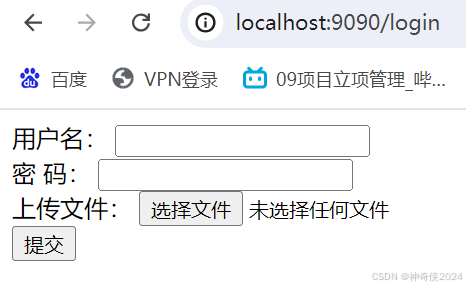
五、前端页面
1、index.html
python
<!DOCTYPE html>
<html lang="en">

<head>
    <meta charset="UTF-8">
    <meta name="viewport" content="width=device-width, initial-scale=1.0">
    <title>Form</title>
</head>

<body>
    <form action="/login" method="post" enctype="multipart/form-data">

        <div>
            <label for="username">用户名:</label>
            <input type="text" name="username" id="username" />
        </div>
        <div>
            <label for="password">密 码:</label>
            <input type="text" name="password" id="password" />
        </div>
        <div>
            <label for="file">上传文件:</label>
            <input type="file" name="file" id="file" />
        </div>
        <div>
            <input type="submit" value="提交">
        </div>

    </form>

</body>

</html>
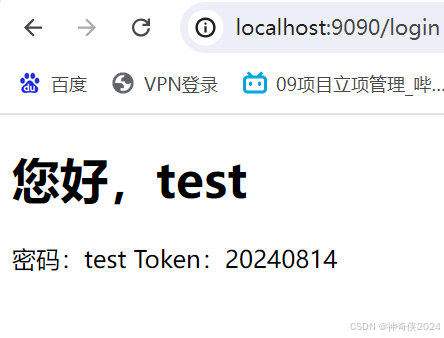
2、home.html
python
<!DOCTYPE html>
<html lang="en">

<head>
    <meta charset="UTF-8">
    <meta name="viewport" content="width=device-width, initial-scale=1.0">
    <title>用户信息</title>
</head>

<body>
    <h1> 您好,{{.Name}}</h1>
    <span>密码:{{.Password}}</span>
    <span>Token:{{.Token}}</span>
</body>

</html>
六、运行代码
go run main.go
七、展示