Word 文档中的超链接是可点击的链接,允许读者导航到一个网站或另一个文档。虽然超链接可以提供有价值的补充信息,但有时也会分散注意力或造成不必要的困扰,因此可能会需要删除这些超链接。本文将介绍如何使用 Spire.Doc for .NET通过 C# 删除 Word 文档中的超链接。
安装 Spire.Doc for .NET
Spire.Doc for .NET 是一款功能强大的 .NET 组件,它提供了丰富的 API 来操作 Word 文档,包括删除超链接。在开始前,您需要先将该.NET Word 库安装到您的项目中。可以从官网上下载该组件,然后手动将 DLL 文件作为引用添加到您的 .NET 程序中。也可以直接通过 NuGet 安装。
PM> Install-Package Spire.Doc如何通过 C# 删除 Word 文档中超链接
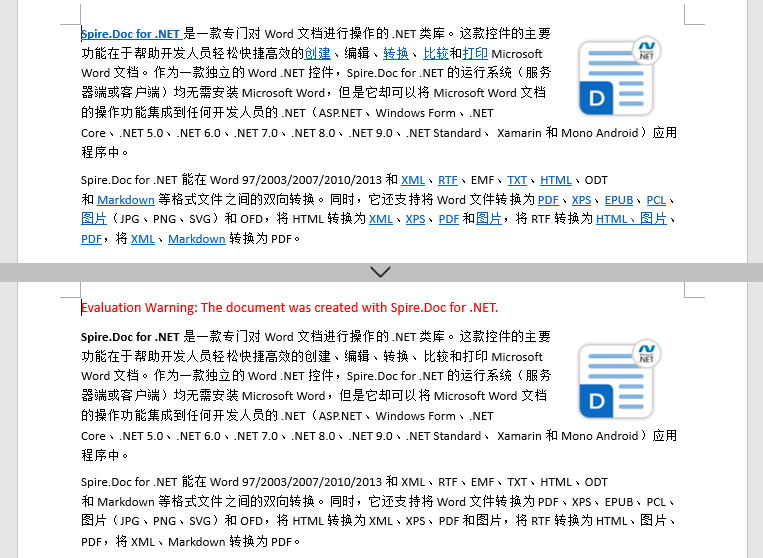
要一次性删除 Word 文档中的所有超链接,您需要先找到文档中的所有超链接,然后创建自定义方法 FlattenHyperlinks() 将其进行处理扁平化处理以移除超链接。步骤如下:
- 创建 Document 类的对象。
- 使用 Document.LoadFromFile() 方法加载 Word 文档。
- 使用自定义方法 FindAllHyperlinks() 查找文档中的所有超链接。
- 循环遍历每一个超链接,然后使用自定义方法 FlattenHyperlinks() 将其进行扁平化处理。
- 使用 Document.SaveToFile() 方法保存结果文档。
using System.Drawing;
using Spire.Doc;
using Spire.Doc.Documents;
using System.Collections.Generic;
using Spire.Doc.Fields;


namespace removeWordHyperlink
{
    class Program
    {
        static void Main(string[] args)
        {
            // 创建Document对象
            Document doc = new Document();

            // 加载示例Word文档
            doc.LoadFromFile("示例.docx");

            // 查找所有超链接
            List hyperlinks = FindAllHyperlinks(doc);

            // 扁平化所有超链接
            for (int i = hyperlinks.Count - 1; i >= 0; i--)
            {
                FlattenHyperlinks(hyperlinks[i]);
            }

            // 保存结果文件
            doc.SaveToFile("删除超链接.docx", FileFormat.Docx);

        }

        // 创建自定义方法FindAllHyperlinks()来获取文档中所有超链接
        private static List FindAllHyperlinks(Document document)
        {
            List hyperlinks = new List();

            // 遍历文档中每一节的所有元素以查找超链接
            foreach (Section section in document.Sections)
            {
                foreach (DocumentObject sec in section.Body.ChildObjects)
                {
                    if (sec.DocumentObjectType == DocumentObjectType.Paragraph)
                    {
                        foreach (DocumentObject para in (sec as Paragraph).ChildObjects)
                        {
                            if (para.DocumentObjectType == DocumentObjectType.Field)
                            {
                                Field field = para as Field;

                                if (field.Type == FieldType.FieldHyperlink)
                                {
                                    hyperlinks.Add(field);
                                }
                            }
                        }
                    }
                }
            }
            return hyperlinks;
        }

        // 创建自定义方法FlattenHyperlinks()来移除所有超链接域
        private static void FlattenHyperlinks(Field field)
        {
            int ownerParaIndex = field.OwnerParagraph.OwnerTextBody.ChildObjects.IndexOf(field.OwnerParagraph);
            int fieldIndex = field.OwnerParagraph.ChildObjects.IndexOf(field);
            Paragraph sepOwnerPara = field.Separator.OwnerParagraph;
            int sepOwnerParaIndex = field.Separator.OwnerParagraph.OwnerTextBody.ChildObjects.IndexOf(field.Separator.OwnerParagraph);
            int sepIndex = field.Separator.OwnerParagraph.ChildObjects.IndexOf(field.Separator);
            int endIndex = field.End.OwnerParagraph.ChildObjects.IndexOf(field.End);
            int endOwnerParaIndex = field.End.OwnerParagraph.OwnerTextBody.ChildObjects.IndexOf(field.End.OwnerParagraph);
            FormatFieldResultText(field.Separator.OwnerParagraph.OwnerTextBody, sepOwnerParaIndex, endOwnerParaIndex, sepIndex, endIndex);

            field.End.OwnerParagraph.ChildObjects.RemoveAt(endIndex);

            for (int i = sepOwnerParaIndex; i >= ownerParaIndex; i--)
            {
                if (i == sepOwnerParaIndex && i == ownerParaIndex)
                {
                    for (int j = sepIndex; j >= fieldIndex; j--)
                    {
                        field.OwnerParagraph.ChildObjects.RemoveAt(j);

                    }
                }
                else if (i == ownerParaIndex)
                {
                    for (int j = field.OwnerParagraph.ChildObjects.Count - 1; j >= fieldIndex; j--)
                    {
                        field.OwnerParagraph.ChildObjects.RemoveAt(j);
                    }

                }
                else if (i == sepOwnerParaIndex)
                {
                    for (int j = sepIndex; j >= 0; j--)
                    {
                        sepOwnerPara.ChildObjects.RemoveAt(j);
                    }
                }
                else
                {
                    field.OwnerParagraph.OwnerTextBody.ChildObjects.RemoveAt(i);
                }
            }
        }

        // 创建自定义方法FormatFieldResultText()对超链接文本进行格式设置
        private static void FormatFieldResultText(Body ownerBody, int sepOwnerParaIndex, int endOwnerParaIndex, int sepIndex, int endIndex)
        {
            for (int i = sepOwnerParaIndex; i <= endOwnerParaIndex; i++)
            {
                Paragraph para = ownerBody.ChildObjects[i] as Paragraph;
                if (i == sepOwnerParaIndex && i == endOwnerParaIndex)
                {
                    for (int j = sepIndex + 1; j < endIndex; j++)
                    {
                        FormatText(para.ChildObjects[j] as TextRange);
                    }

                }
                else if (i == sepOwnerParaIndex)
                {
                    for (int j = sepIndex + 1; j < para.ChildObjects.Count; j++)
                    {
                        FormatText(para.ChildObjects[j] as TextRange);
                    }
                }
                else if (i == endOwnerParaIndex)
                {
                    for (int j = 0; j < endIndex; j++)
                    {
                        FormatText(para.ChildObjects[j] as TextRange);
                    }
                }
                else
                {
                    for (int j = 0; j < para.ChildObjects.Count; j++)
                    {
                        FormatText(para.ChildObjects[j] as TextRange);
                    }
                }
            }
        }

        // 创建自定义方法FormatText()将超链接文本的字体颜色设置为黑色并移除下划线
        private static void FormatText(TextRange tr)
        {
            //Set the text color to black
            tr.CharacterFormat.TextColor = Color.Black;

            //Set the text underline style to none
            tr.CharacterFormat.UnderlineStyle = UnderlineStyle.None;
        }
    }
}
总结
使用**++Spire.Doc for .NET++** 库,您能快速定位并删除 Word 文档中的超链接,同时保留原始文本内容。通过消除不相关的链接,您可以提高文档质量、改善用户体验。Spire.Doc for .NET 库直观的 API 和高效的性能使其成为企业应用程序的理想选择。
Spire技术交流Q群(125237868)