1. HCI_Read_Local_Version_Information 命令介绍
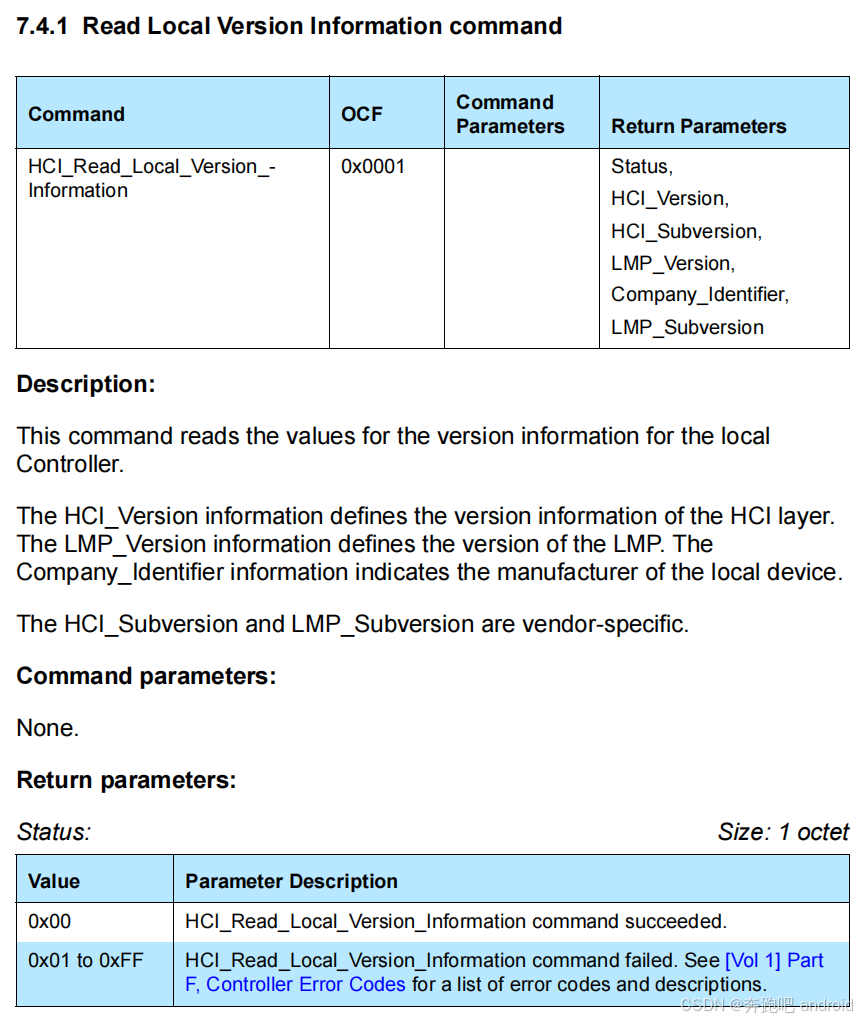
1. 功能(Description)
HCI_Read_Local_Version_Information 命令用于读取本地 Bluetooth Controller 的版本信息,包括 HCI 和 LMP 层的版本,以及厂商 ID 和子版本号。
这类信息用于 Host 识别当前控制器的 功能支持范围、厂商来源 及其具体的实现版本,通常用于以下场景:
- 协议栈 兼容性判断
- 对应厂商定制功能 条件启用
- 调试定位 版本差异导致的问题
2.命令参数(Command Parameters)
c
11	2025-04-24 15:55:53.353695	host	controller	HCI_CMD	4	Sent Read Local Version Information

Bluetooth HCI Command - Read Local Version Information
    Command Opcode: Read Local Version Information (0x1001)
        0001 00.. .... .... = Opcode Group Field: Informational Parameters (0x04)
        .... ..00 0000 0001 = Opcode Command Field: Read Local Version Information (0x001)
    Parameter Total Length: 0
    [Response in frame: 12]
    [Command-Response Delta: 0.572ms]
无参数
只需发送命令,不带任何附加内容。
3.返回参数(Return Parameters)
c
12	2025-04-24 15:55:53.354267	controller	host	HCI_EVT	15	Rcvd Command Complete (Read Local Version Information)

Bluetooth HCI Event - Command Complete
    Event Code: Command Complete (0x0e)
    Parameter Total Length: 12
    Number of Allowed Command Packets: 1
    Command Opcode: Read Local Version Information (0x1001)
        0001 00.. .... .... = Opcode Group Field: Informational Parameters (0x04)
        .... ..00 0000 0001 = Opcode Command Field: Read Local Version Information (0x001)
    Status: Success (0x00)
    HCI Version: 5.3 (0x0c)
    HCI Revision: 0
    LMP Version: 5.3 (0x0c)
    Manufacturer Name: Qualcomm (0x001d)
    LMP Subversion: 29337
    [Command in frame: 11]
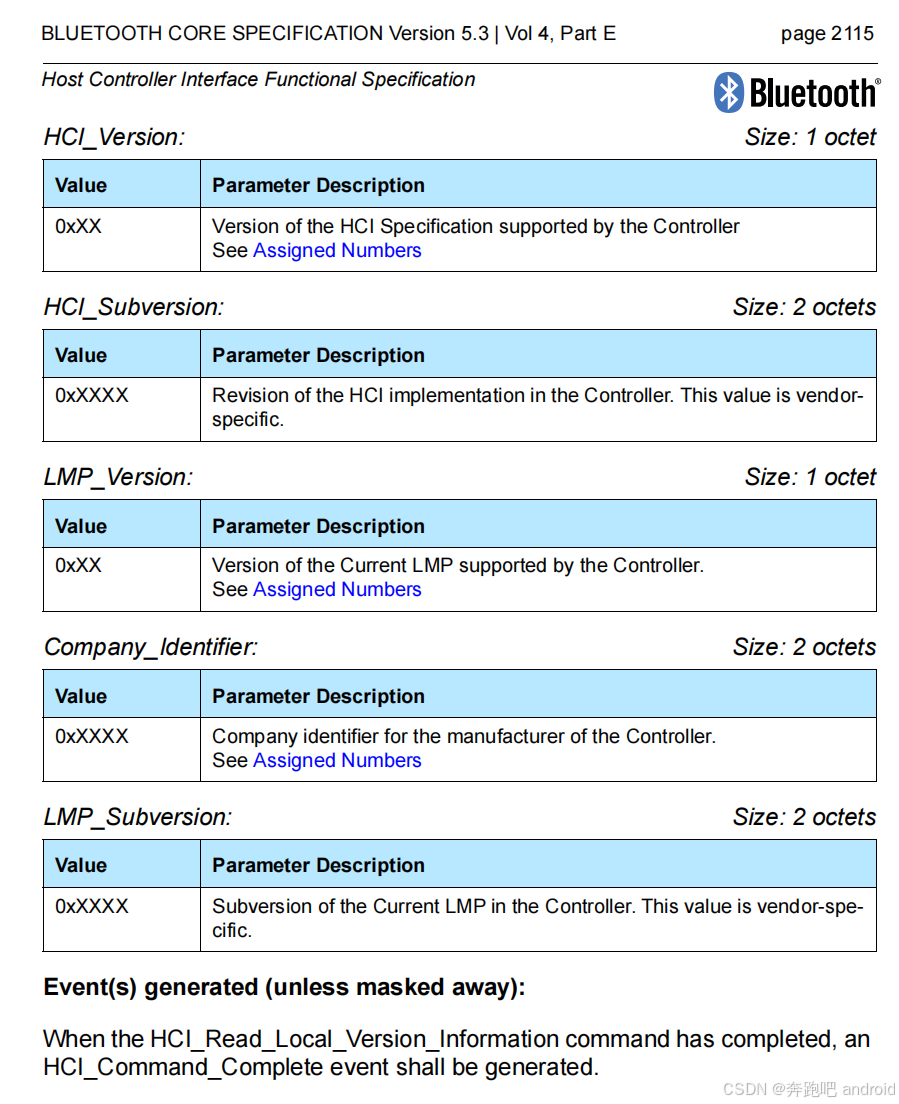
[Command-Response Delta: 0.572ms]| 参数名 | 大小 | 描述 |
|---|---|---|
Status |
1 字节 | 表示命令执行结果,0x00 表示成功 |
HCI_Version |
1 字节 | 控制器 HCI 层的版本号 |
HCI_Subversion |
2 字节 | 控制器厂商定义的 HCI 子版本号 |
LMP_Version |
1 字节 | LMP(Link Manager Protocol)版本号 |
Company_Identifier |
2 字节 | 控制器厂商 ID,定义于 Bluetooth SIG |
LMP_Subversion |
2 字节 | 厂商自定义的 LMP 子版本号 |
4. 事件
成功后,Controller 会通过
HCI_Command_Complete事件返回这些参数。
2. aosp 中如何使用
1. 字段作用与 AOSP 中的意义
下面我们逐个解释这些字段在 AOSP 蓝牙协议栈(如 stack/bt) 中的用途和意义:
1. HCI_Version(1 byte)
- 定义:控制器实现的 HCI 层版本
- 可能值:
| 值 | 含义 |
|---|---|
| 0x06 | Bluetooth 4.0 |
| 0x07 | Bluetooth 4.1 |
| 0x08 | Bluetooth 4.2 |
| 0x09 | Bluetooth 5.0 |
| 0x0A | Bluetooth 5.1 |
| ... | 持续增长 |
- 在 AOSP 中的作用 :
- 用于判断是否支持某些 HCI 命令或功能,比如 Extended Advertising(需要 BT5.0+)
- 控制某些 feature 的使能与 fallback(降级)策略
2. HCI_Subversion(2 bytes)
- 定义:控制器厂商定义的子版本号(可能代表固件版本)
- 在 AOSP 中的作用 :
- 主要用于 调试 和 厂商定制功能的兼容适配
- 某些厂商驱动层(如 Qualcomm 或 Broadcom)可能会用这个字段判断是否加载特定补丁
3. LMP_Version(1 byte)
-
定义:Link Manager Protocol 的版本号,用于表示底层链路控制协议的版本
-
常见值:
| 值 | LMP 版本 | 标准版本 |
|---|---|---|
| 0x06 | LMP 6 | BT 2.0 |
| 0x07 | LMP 7 | BT 2.1 |
| 0x08 | LMP 8 | BT 3.0 |
| 0x09 | LMP 9 | BT 4.0 |
| ... | ... | ... |
- 在 AOSP 中的作用 :
- 判断是否支持特性如 eSCO、Secure Simple Pairing、LE、BR/EDR coexistence
- 某些协议或逻辑的 fallback 依据
4. Company_Identifier(2 bytes)
- 定义:厂商 ID,由 Bluetooth SIG 分配
- 例子:
| ID | 厂商 |
|---|---|
| 0x000F | Broadcom |
| 0x000C | CSR |
| 0x001D | Apple |
| 0x003D | Intel |
| 0x0001 | Cambridge Silicon Radio (CSR) |
- 在 AOSP 中的作用 :
- 用于厂商特定补丁加载
- 在 log 中标记设备来源
- 控制 chipset-specific workarounds
5. LMP_Subversion(2 bytes)
- 定义:LMP 层的子版本号,由厂商定义
- 在 AOSP 中的作用 :
- 仅对特定厂商驱动有用
- 通常用于识别固件版本差异
- 与
HCI_Subversion一起,辅助调试判断"是否为某个具体平台"
2.这些版本信息"能干啥"?意义在哪里?
| 用途 | 说明 |
|---|---|
| 功能判断 | 判断 Controller 是否支持特定协议功能,如 LE Extended Advertising、Secure Connections 等 |
| 厂商识别 | 确定芯片是 Broadcom、Qualcomm、Intel 还是其他,从而决定加载哪些定制行为 |
| 平台兼容 | 在 AOSP 中决定是否使用某些 vendor hooks 或者是否 fallback 某些功能 |
| 调试分析 | 蓝牙功能异常时用于判断是否为固件版本问题 |
| 日志可读性 | 蓝牙连接日志中可以清晰显示 Controller 的版本与厂商,方便排查 |
3. aosp 中的例子
c
// system/gd/hci/controller.cc

struct Controller::impl {

  void Start(hci::HciLayer* hci) {
...
    hci_->EnqueueCommand(ReadLocalVersionInformationBuilder::Create(),
                         handler->BindOnceOn(this, &Controller::impl::read_local_version_information_complete_handler));

...
}
在 Controller::impl::Start 函数中,我们会获取 本地蓝牙控制器的版本信息。
当我们获取到内容后,回调 read_local_version_information_complete_handler
1. read_local_version_information_complete_handler
c
// system/gd/hci/controller.cc

  void read_local_version_information_complete_handler(CommandCompleteView view) {
    auto complete_view = ReadLocalVersionInformationCompleteView::Create(view);
    ASSERT(complete_view.IsValid());
    ErrorCode status = complete_view.GetStatus();
    ASSERT_LOG(status == ErrorCode::SUCCESS, "Status 0x%02hhx, %s", status, ErrorCodeText(status).c_str());

    local_version_information_ = complete_view.GetLocalVersionInformation();
    bluetooth::os::LogMetricBluetoothLocalVersions(
        local_version_information_.manufacturer_name_,
        static_cast<uint8_t>(local_version_information_.lmp_version_),
        local_version_information_.lmp_subversion_,
        static_cast<uint8_t>(local_version_information_.hci_version_),
        local_version_information_.hci_revision_);
  }
- 最终将 controller 获取到的版本信息,保存在 local_version_information_ 中。
c
LocalVersionInformation Controller::GetLocalVersionInformation() const {
  return impl_->local_version_information_;
}- 通过 Controller::GetLocalVersionInformation 来获取版本信息
看看如何使用
c
// system/main/shim/controller.cc
static const char GD_CONTROLLER_MODULE[] = "gd_controller_module";

EXPORT_SYMBOL extern const module_t gd_controller_module = {
    .name = GD_CONTROLLER_MODULE,

    .start_up = start_up, // 这里

    };

static future_t* start_up(void) {
  LOG_INFO("%s Starting up", __func__);
  data_.ready = true;

  if (gd_rust_is_enabled()) {

  } else {
    // 获取 mac 地址
    std::string string_address = GetController()->GetMacAddress().ToString();
    RawAddress::FromString(string_address, data_.raw_address);

    data_.le_supported_states =
        bluetooth::shim::GetController()->GetLeSupportedStates();

    // 获取 localVersionInfo
    auto local_version_info =
        bluetooth::shim::GetController()->GetLocalVersionInformation();
    data_.bt_version.hci_version =
        static_cast<uint8_t>(local_version_info.hci_version_);
    data_.bt_version.hci_revision = local_version_info.hci_revision_;
    data_.bt_version.lmp_version =
        static_cast<uint8_t>(local_version_info.lmp_version_);
    data_.bt_version.lmp_subversion = local_version_info.lmp_subversion_;
    data_.bt_version.manufacturer = local_version_info.manufacturer_name_;

    LOG_INFO("Mac address:%s", string_address.c_str());
  }
在 gd_controller_module 模块的 start_up 函数中,我们会将 local version info 信息放置在 data_.bt_version 中
c
// system/main/shim/controller.cc
static const RawAddress* get_address(void) { return &data_.raw_address; }

static const bt_version_t* get_bt_version(void) { return &data_.bt_version; }
2. 使用案例
1. BTM_SetBleDataLength
c
// system/stack/btm/btm_ble.cc
tBTM_STATUS BTM_SetBleDataLength(const RawAddress& bd_addr,
                                 uint16_t tx_pdu_length) {
...

  if (controller_get_interface()->get_bt_version()->hci_version >=
      HCI_PROTO_VERSION_5_0)
    tx_time = BTM_BLE_DATA_TX_TIME_MAX;

...
  }
根据 hci_version 来调整 ble 数据发送最大时间。
2.BTM_CreateSco
c
// system/stack/btm/btm_sco.cc

tBTM_STATUS BTM_CreateSco(const RawAddress* remote_bda, bool is_orig,
                          uint16_t pkt_types, uint16_t* p_sco_inx,
                          tBTM_SCO_CB* p_conn_cb, tBTM_SCO_CB* p_disc_cb) {
                 ...
      if (controller_get_interface()->get_bt_version()->hci_version >=
          HCI_PROTO_VERSION_2_0) {
        p_setup->packet_types |=
            (pkt_types & BTM_SCO_EXCEPTION_PKTS_MASK) |
            (btm_cb.btm_sco_pkt_types_supported & BTM_SCO_EXCEPTION_PKTS_MASK);
      }
...
}
3.l2cu_set_acl_priority 和 l2cu_set_acl_latency
c
// system/stack/l2cap/l2c_utils.cc
bool l2cu_set_acl_priority(const RawAddress& bd_addr, tL2CAP_PRIORITY priority,
                           bool reset_after_rs) {
	...
  if ((!reset_after_rs && (priority != p_lcb->acl_priority)) ||
      (reset_after_rs && p_lcb->acl_priority == L2CAP_PRIORITY_HIGH)) {
    /* Use vendor specific commands to set the link priority */
    switch (controller_get_interface()->get_bt_version()->manufacturer) {
      case LMP_COMPID_BROADCOM:
        l2cu_set_acl_priority_latency_brcm(p_lcb, priority);
        break;

      case LMP_COMPID_SYNAPTICS:
        l2cu_set_acl_priority_syna(p_lcb->Handle(), priority);
        break;

      default:
        /* Not supported/required for other vendors */
        break;
    }
  }

...
}


bool l2cu_set_acl_latency(const RawAddress& bd_addr, tL2CAP_LATENCY latency) {
...
  /* only change controller's latency when stream using latency mode */
  if (p_lcb->use_latency_mode && p_lcb->is_high_priority() &&
      latency != p_lcb->acl_latency) {
    switch (controller_get_interface()->get_bt_version()->manufacturer) {
      case LMP_COMPID_BROADCOM:
        l2cu_set_acl_latency_brcm(p_lcb, latency);
        break;

      default:
        /* Not supported/required for other vendors */
        break;
    }
    p_lcb->set_latency(latency);
  }
...
}
根据不同的厂商做不同的处理