#这是一个简单的使用第三方jar通信例子#
1.使用sshd https://mvnrepository.com/artifact/org.apache.sshd
2.下载或导入对应的jar
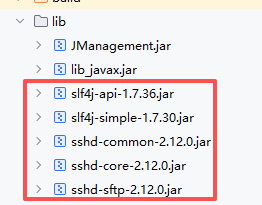
3.服务端代码
A设备 启动服务端代码
Intent intent = new Intent(this, SFTPServerService.class);
intent.putExtra("port", 2222);
intent.putExtra("userName", "root");
intent.putExtra("passWord", "123456");
startService(intent);
java
import android.app.Service;
import android.content.Intent;
import android.os.Build;
import android.os.IBinder;
import android.util.Log;
import org.apache.sshd.common.util.io.PathUtils;
import org.apache.sshd.server.SshServer;
import org.apache.sshd.server.keyprovider.SimpleGeneratorHostKeyProvider;
import org.apache.sshd.sftp.server.SftpSubsystemFactory;
import java.io.File;
import java.io.IOException;
import java.nio.file.Files;
import java.nio.file.Path;
import java.nio.file.attribute.PosixFilePermission;
import java.util.Collections;
import java.util.EnumSet;
import java.util.Set;

public class SFTPServerService extends Service {
    private static final String TAG = "SFTPServerService";
    private SshServer sshd;

    @Override
    public void onCreate() {
        super.onCreate();
        Log.d(TAG, "创建SFTP服务器服务");
        setupUserHomeFolder();
    }

    private void setupUserHomeFolder() {
        // 设置用户主目录解析器
        PathUtils.setUserHomeFolderResolver(() -> {
            File homeDir = getExternalFilesDir(null);
            if (homeDir == null) {
                homeDir = getFilesDir();
            }
            Log.d(TAG, "User home folder set to: " + homeDir.getAbsolutePath());
            if (Build.VERSION.SDK_INT >= Build.VERSION_CODES.O) {
                return homeDir.toPath();
            }
            return null;
        });
    }

    @Override
    public int onStartCommand(Intent intent, int flags, int startId) {
        int port = intent.getIntExtra("port", 2222);
        String userName = intent.getStringExtra("userName");
        String passWord = intent.getStringExtra("passWord");
        startSFTPSServer(port, userName, passWord);
        return START_STICKY;
    }

    private void startSFTPSServer(int port,String userName, String passWord) {
        new Thread(() -> {
            try {
                sshd = SshServer.setUpDefaultServer();
                sshd.setPort(port);

                // 设置主机密钥
                File hostKeyFile = new File(getFilesDir(), "hostkey.ser");
                if (Build.VERSION.SDK_INT >= Build.VERSION_CODES.O) {
                    sshd.setKeyPairProvider(new SimpleGeneratorHostKeyProvider(hostKeyFile.toPath()));
                }

                // 设置密码验证
                sshd.setPasswordAuthenticator((username, password, session) ->
                        userName.equals(username) &&
                                passWord.equals(password));

                // 设置SFTP子系统
                sshd.setSubsystemFactories(Collections.singletonList(new SftpSubsystemFactory()));

                // 设置文件系统工厂 - 使用Android的外部存储
                sshd.setFileSystemFactory(new FileSystemFactory(this));

                sshd.start();

                Log.d(TAG, "SSH服务启动成功");
            } catch (Exception e) {
                Log.e(TAG, "SSH服务启动失败", e);
            }
        }).start();
    }

    /**
     * 设置目录权限
     */
    private void setDirectoryPermissions(File directory) {
        try {
            Path path = null;
            if (Build.VERSION.SDK_INT >= Build.VERSION_CODES.O) {
                path = directory.toPath();

                // 尝试设置POSIX权限(在支持的系统上)
                try {
                    Set<PosixFilePermission> perms = EnumSet.of(
                            PosixFilePermission.OWNER_READ,
                            PosixFilePermission.OWNER_WRITE,
                            PosixFilePermission.OWNER_EXECUTE,
                            PosixFilePermission.GROUP_READ,
                            PosixFilePermission.GROUP_WRITE,
                            PosixFilePermission.GROUP_EXECUTE,
                            PosixFilePermission.OTHERS_READ,
                            PosixFilePermission.OTHERS_WRITE,
                            PosixFilePermission.OTHERS_EXECUTE
                    );
                    Files.setPosixFilePermissions(path, perms);
                    System.out.println("设置POSIX权限: " + directory.getAbsolutePath());
                } catch (UnsupportedOperationException e) {
                    // Android可能不支持POSIX权限,使用Java权限
                    System.out.println("系统不支持POSIX权限,使用Java权限系统");
                }
            }

            // 设置可读可写
            directory.setReadable(true, false);
            directory.setWritable(true, false);
            directory.setExecutable(true, false);

            System.out.println("设置目录权限: " + directory.getAbsolutePath() +
                    " [可读:" + directory.canRead() +
                    ", 可写:" + directory.canWrite() +
                    ", 可执行:" + directory.canExecute() + "]");

        } catch (Exception e) {
            System.err.println("设置目录权限时出错: " + e.getMessage());
        }
    }

    @Override
    public void onDestroy() {
        super.onDestroy();
        stopSFTPSServer();
    }

    private void stopSFTPSServer() {
        if (sshd != null) {
            try {
                sshd.stop();
                Log.i(TAG, "SFTP Server stopped");
            } catch (IOException e) {
                Log.e(TAG, "Error stopping SFTP server", e);
            }
        }
    }

    @Override
    public IBinder onBind(Intent intent) {
        return null;
    }
}
4.客户端
B设备 打开客户端界面开始连接服务
java
import android.content.Context;
import org.apache.sshd.common.session.SessionContext;
import java.io.File;
import java.io.IOException;
import java.nio.file.FileSystem;
import java.nio.file.Path;
import java.nio.file.Paths;

public class FileSystemFactory implements org.apache.sshd.common.file.FileSystemFactory {
    private final Context context;

    public FileSystemFactory(Context context) {
        this.context = context;
    }

    @Override
    public Path getUserHomeDir(SessionContext session) throws IOException {
        File rootDir = context.getFilesDir();
        return Paths.get(rootDir.getAbsolutePath()).getParent();
    }

    @Override
    public FileSystem createFileSystem(SessionContext session) throws IOException {
        // 使用Android的外部存储目录作为根目录
        File rootDir = context.getExternalFilesDir(null);
        if (rootDir == null) {
            rootDir = context.getFilesDir();
        }

        return Paths.get(rootDir.getAbsolutePath()).getFileSystem();
    }
}
java
import android.content.Context;
import android.util.Log;
import org.apache.sshd.client.SshClient;
import org.apache.sshd.client.session.ClientSession;
import org.apache.sshd.common.util.io.PathUtils;
import org.apache.sshd.sftp.client.SftpClient;
import org.apache.sshd.sftp.client.SftpClientFactory;
import java.io.File;
import java.io.FileInputStream;
import java.io.IOException;
import java.io.InputStream;
import java.io.OutputStream;
import java.nio.file.Files;
import java.nio.file.Paths;
import java.security.MessageDigest;
import java.util.ArrayList;
import java.util.List;

public class SftpClientHelper {
    private SshClient client;
    private ClientSession session;
    private SftpClient sftpClient;
    private static boolean isInitialized = false;
    //单列
    private static SftpClientHelper instance;

    public static SftpClientHelper getInstance() {
        if (instance == null) {
            instance = new SftpClientHelper();
        }
        return instance;
    }

    /**
     * 初始化SSHD配置(必须在连接前调用)
     * 这个方法是修复"No user home folder available"错误的关键
     */
    private synchronized void initialize(Context context) {
        if (!isInitialized) {
            try {
                // 设置用户主目录解析器 - 修复Android环境问题
                PathUtils.setUserHomeFolderResolver(() -> {
                    // 使用应用的缓存目录作为临时主目录
                    File cacheDir = new File("/data/data/" + getAppPackageName(context) + "/cache");
                    if (!cacheDir.exists()) {
                        cacheDir.mkdirs();
                    }
                    return Paths.get(cacheDir.getPath());
                });

                isInitialized = true;
                Log.d("SFTPClient", "SSHD initialization completed");
            } catch (Exception e) {
                Log.e("SFTPClient", "SSHD initialization failed", e);
            }
        }
    }

    /**
     * 获取应用包名
     */
    private String getAppPackageName(Context context) {
        // 这里返回您的应用包名,或者从Context获取
        return context.getPackageName(); // 请替换为您的实际包名
    }

    /**
     * 连接到SFTP服务器
     */
    public boolean connect(Context context, String host, int port, String username, String password) {
        try {
            // 确保先初始化
            initialize(context);

            // 创建SSH客户端
            client = SshClient.setUpDefaultClient();

            // 配置服务器密钥验证(接受所有服务器密钥 - 仅用于测试)
            // 在生产环境中应该实现正确的服务器密钥验证
            client.setServerKeyVerifier((clientSession, socketAddress, publicKey) -> {
                Log.d("SFTPClient", "Accepting server key: " + publicKey.getAlgorithm());
                return true; // 接受所有服务器密钥
            });

            client.start();

            // 连接到服务器
            session = client.connect(username, host, port).verify(10000).getSession();
            session.addPasswordIdentity(password);

            // 认证
            if (!session.auth().verify(15000).isSuccess()) {
                throw new IOException("Authentication failed");
            }

            // 创建SFTP客户端
            sftpClient = SftpClientFactory.instance().createSftpClient(session);

            Log.i("TAG", "SFTP连接成功: ");
            return true;

        } catch (Exception e) {
            Log.e("TAG", "SFTP连接失败: " + e.getMessage(), e);
            disconnect();
            return false;
        }
    }

    /**
     * 断开连接
     */
    public void disconnect() {
        try {
            if (sftpClient != null) {
                sftpClient.close();
                sftpClient = null;
            }
        } catch (Exception e) {
            Log.e("SFTPClient", "Error closing SFTP client", e);
        }

        try {
            if (session != null) {
                session.close();
                session = null;
            }
        } catch (Exception e) {
            Log.e("SFTPClient", "Error closing session", e);
        }

        try {
            if (client != null) {
                client.stop();
                client.close();
                client = null;
            }
        } catch (Exception e) {
            Log.e("SFTPClient", "Error closing client", e);
        }

        Log.i("SFTPClient", "Disconnected from SFTP server");
    }

    /**
     * 检查是否已连接
     */
    public boolean isConnected() {
        return session != null && session.isOpen() &&
                sftpClient != null && sftpClient.isOpen();
    }

    /**
     * 列出远程目录下的文件
     */
    public List<String> listFiles(String remoteDir) {
        List<String> fileList = new ArrayList<>();
        try {
            Iterable<SftpClient.DirEntry> entries = sftpClient.readDir(remoteDir);
            for (SftpClient.DirEntry entry : entries) {
                String filename = entry.getFilename();
                if (!filename.equals(".") && !filename.equals("..")) {
                    fileList.add(filename);
                }
            }
        } catch (Exception e) {
            System.err.println("列出文件失败: " + e.getMessage());
            e.printStackTrace();
        }
        return fileList;
    }

    /**
     * 从SFTP服务器下载文件
     * remoteFilePath:远程文件路径
     * localFilePath:本地文件路径
     */
    public boolean downloadFile(String remoteFilePath, String localFilePath) {
        try (InputStream inputStream = sftpClient.read(remoteFilePath);
             OutputStream outputStream = Files.newOutputStream(Paths.get(localFilePath))) {

            byte[] buffer = new byte[8192];
            int bytesRead;
            while ((bytesRead = inputStream.read(buffer)) != -1) {
                outputStream.write(buffer, 0, bytesRead);
            }

            System.out.println("文件下载成功: " + remoteFilePath + " -> " + localFilePath);
            return true;

        } catch (Exception e) {
            System.err.println("文件下载失败: " + e.getMessage());
            e.printStackTrace();
            return false;
        }
    }

    /**
     * 上传文件到SFTP服务器
     * localFilePath:本地文件路径
     * remoteFilePath:远程文件路径
     */
    public boolean uploadFile(String localFilePath, String remoteFilePath) {
        try (InputStream inputStream = Files.newInputStream(Paths.get(localFilePath));
             OutputStream outputStream = sftpClient.write(remoteFilePath)) {

            byte[] buffer = new byte[8192];
            int bytesRead;
            while ((bytesRead = inputStream.read(buffer)) != -1) {
                outputStream.write(buffer, 0, bytesRead);
            }

            //生成校验码
            String sha256 = calculateSHA256(localFilePath);
            System.out.println("校验码: " + sha256);
            //e3b0c44298fc1c149afbf4c8996fb92427ae41e4649b934ca495991b7852b855
            System.out.println("文件上传成功: " + localFilePath + " -> " + remoteFilePath);
//            IUpgradeImpl.setSHA256(sha256, remoteFilePath);
            return true;

        } catch (Exception e) {
            System.err.println("文件上传失败: " + e.getMessage());
            e.printStackTrace();
            return false;
        }
    }

    /**
     * 删除远程文件
     */
    public boolean deleteFile(String remoteFilePath) {
        try {
            sftpClient.remove(remoteFilePath);
            System.out.println("文件删除成功: " + remoteFilePath);
            return true;
        } catch (Exception e) {
            System.err.println("文件删除失败: " + e.getMessage());
            e.printStackTrace();
            return false;
        }
    }

    /**
     * 创建远程目录
     */
    public void createDirectory(String remoteDir) throws IOException {
        boolean directory = fileExists(remoteDir);
        if (!directory) {
            try {
                sftpClient.mkdir(remoteDir);
                System.out.println("远程目录创建成功: " + remoteDir);
            } catch (Exception e) {
                System.err.println("远程目录创建失败: " + e.getMessage());
                e.printStackTrace();
            }
        } else {
            // 目录已存在,可选择删除后重新创建或直接使用
            System.out.println("远程目录已存在");
        }
    }

    /**
     * 检查文件是否存在
     */
    public boolean fileExists(String remoteFilePath) throws IOException {
        if (!isConnected()) {
            throw new IOException("Not connected to SFTP server");
        }

        try {
            sftpClient.stat(remoteFilePath);
            return true;
        } catch (IOException e) {
            return false;
        }
    }

    /**
     * 获取当前工作目录
     */
    public String getCurrentDirectory() throws IOException {
        if (!isConnected()) {
            throw new IOException("Not connected to SFTP server");
        }

        try {
            return sftpClient.canonicalPath(".");
        } catch (IOException e) {
            throw new IOException("Failed to get current directory", e);
        }
    }

    //生成唯一指纹
    public String calculateSHA256(String apkPath) {
        try {
            MessageDigest digest = MessageDigest.getInstance("SHA-256");
            File apkFile = new File(apkPath);
            FileInputStream fis = new FileInputStream(apkFile);

            byte[] buffer = new byte[1024];
            int read;
            while ((read = fis.read(buffer)) != -1) {
                digest.update(buffer, 0, read);
            }
            fis.close();

            StringBuilder sb = new StringBuilder();
            for (byte b : digest.digest()) {
                sb.append(String.format("%02x", b));
            }
            return sb.toString();
        } catch (Exception e) {
            e.printStackTrace();
        }
        return null;
    }
}
xml布局代码
html
<?xml version="1.0" encoding="utf-8"?>
<LinearLayout xmlns:android="http://schemas.android.com/apk/res/android"
    android:layout_width="match_parent"
    android:layout_height="match_parent"
    android:orientation="vertical"
    android:padding="16dp">

    <Button
        android:id="@+id/connectButton"
        android:layout_width="match_parent"
        android:layout_height="wrap_content"
        android:text="连接SFTP服务器" />

    <Button
        android:id="@+id/btnCreate"
        android:layout_width="match_parent"
        android:layout_height="wrap_content"
        android:text="创建远程目录"
        android:layout_marginTop="8dp" />
    <Button
        android:id="@+id/btnUpload"
        android:layout_width="match_parent"
        android:layout_height="wrap_content"
        android:text="上传文件"
        android:layout_marginTop="8dp" />
    <Button
        android:id="@+id/listButton"
        android:layout_width="match_parent"
        android:layout_height="wrap_content"
        android:text="查看上传的文件"
        android:layout_marginTop="8dp" />

    <Button
        android:id="@+id/disconnectButton"
        android:layout_width="match_parent"
        android:layout_height="wrap_content"
        android:text="断开连接"
        android:layout_marginTop="8dp" />

    <ScrollView
        android:layout_width="match_parent"
        android:layout_height="match_parent"
        android:layout_marginTop="16dp">

        <TextView
            android:id="@+id/logTextView"
            android:layout_width="match_parent"
            android:layout_height="wrap_content"
            android:background="#f0f0f0"
            android:padding="8dp"
            android:textColor="@color/black"
            android:text="日志输出将显示在这里..."
            android:textSize="12sp" />

    </ScrollView>

</LinearLayout>
注意:A设备 B设备需要连接在同一个wifi下,客服端代码里host
192.168.49.76需要换成对应设备的