前言
在 RabbitMQ 中,一共有七种工作模式,我们也可以打开官网了解:
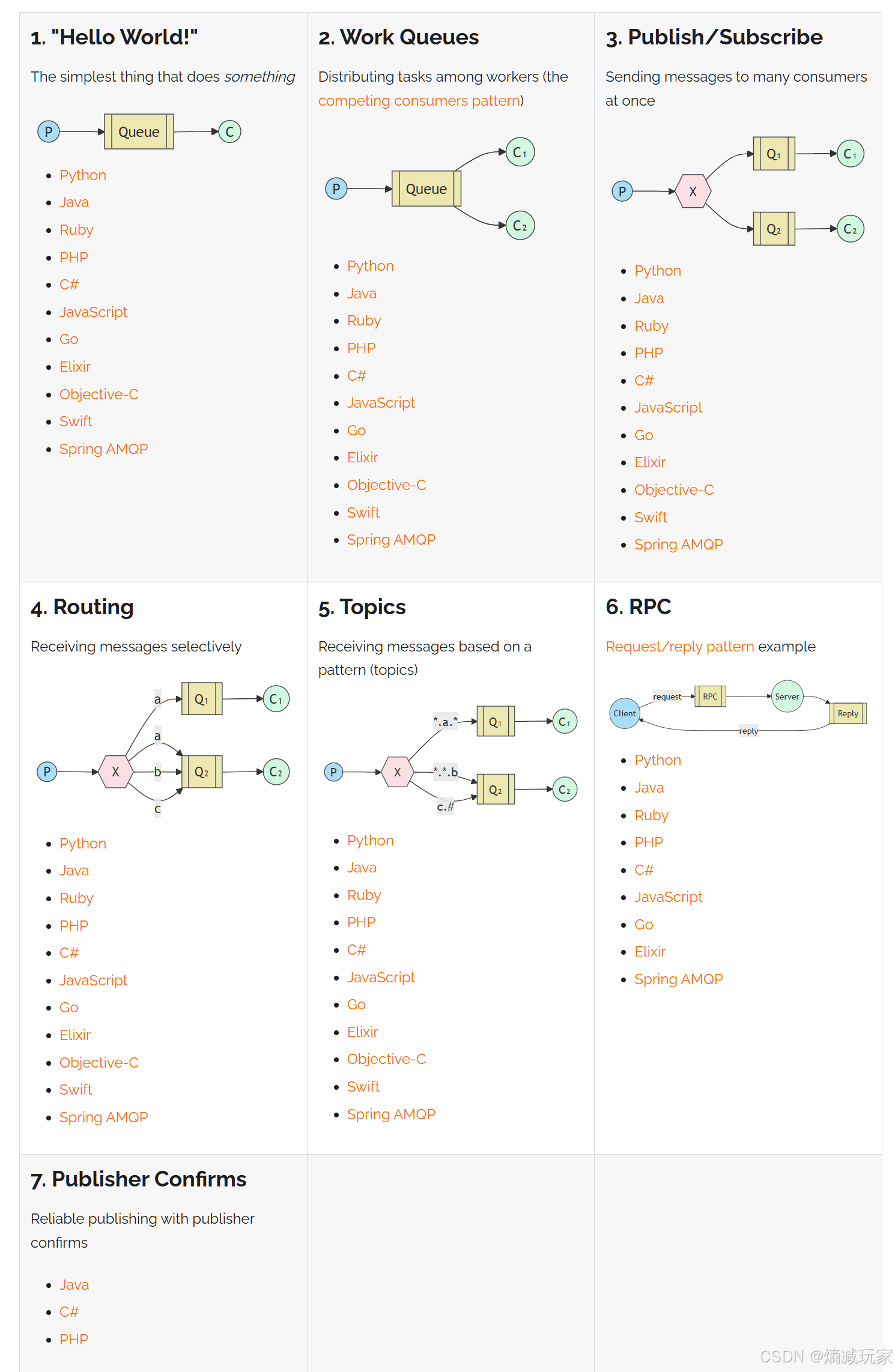
本章我们先介绍前三种工作模式
(Simple)简单模式
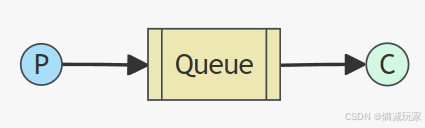
P:producer 生产者,负责发送消息
C:consumer 消费者,接收消息
Queue: 消息队列
简单模式的特点:一个生产者P,一个消费者C,消息只能被消费一次,也被称为点对点【Point-to-Point】模式
案例:上一篇文章中的快速入门RabbitMQ 就是简单模式的演示,大家可以去看一下代码的实现
Work Queue(工作队列)
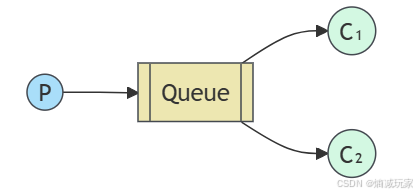
特点:多个消费者共同消费同一条队列的消息,消息不重复
假设队列有 10 条消息,C1 消费了 4 条,C2 消费了 6 条,这就是共同消费。
生产者:
java
public class Producer {
    public static void main(String[] args) throws IOException, TimeoutException {
        //进行绑定
        ConnectionFactory factory = new ConnectionFactory();
        factory.setHost(Constants.HOST);
        factory.setPort(Constants.PORT);
        factory.setUsername(Constants.NAME);
        factory.setPassword(Constants.PASSWORD);
        factory.setVirtualHost(Constants.VIRTUAL_HOST);
        //建立连接
        Connection connection = factory.newConnection();
        //开启信道
        Channel channel = connection.createChannel();
        //这里使用默认的交换机
        //声明队列
        channel.queueDeclare(Constants.WORK_QUEUE, true, false, false, null);
        //发送消息
        for (int i = 0; i < 10; i++) {
            String msg = "hello work queue...."+i;
            channel.basicPublish("",Constants.WORK_QUEUE, null, msg.getBytes());
        }
        System.out.println("发送消息成功");
        //资源释放
        channel.close();
        connection.close();
    }
}
消费者:
java
public class Consumer1 {
    public static void main(String[] args) throws IOException, TimeoutException {
        //进行参数绑定
        ConnectionFactory factory = new ConnectionFactory();
        factory.setHost(Constants.HOST);
        factory.setPort(Constants.PORT);
        factory.setUsername(Constants.NAME);
        factory.setPassword(Constants.PASSWORD);
        factory.setVirtualHost(Constants.VIRTUAL_HOST);
        //建立连接
        Connection connection = factory.newConnection();
        //开启信道
        Channel channel = connection.createChannel();
        //使用默认的交换机
        //声明队列
        channel.queueDeclare(Constants.WORK_QUEUE, true, false, false, null);
        //消息消费
        DefaultConsumer consumer = new DefaultConsumer(channel) {
            @Override
            public void handleDelivery(String consumerTag, Envelope envelope, AMQP.BasicProperties properties, byte[] body) throws IOException {
                System.out.println("接收到的消息:" + new String(body));
            }
        };
        channel.basicConsume(Constants.WORK_QUEUE, true, consumer);
    }
}
java
public class Consumer2 {
    public static void main(String[] args) throws IOException, TimeoutException {
        //进行参数绑定
        ConnectionFactory factory = new ConnectionFactory();
        factory.setHost(Constants.HOST);
        factory.setPort(Constants.PORT);
        factory.setUsername(Constants.NAME);
        factory.setPassword(Constants.PASSWORD);
        factory.setVirtualHost(Constants.VIRTUAL_HOST);
        //建立连接
        Connection connection = factory.newConnection();
        //开启信道
        Channel channel = connection.createChannel();
        //使用默认的交换机
        //声明队列
        channel.queueDeclare(Constants.WORK_QUEUE, true, false, false, null);
        //消息消费
        DefaultConsumer consumer = new DefaultConsumer(channel) {
            @Override
            public void handleDelivery(String consumerTag, Envelope envelope, AMQP.BasicProperties properties, byte[] body) throws IOException {
                System.out.println("接收到的消息:" + new String(body));
            }
        };
        channel.basicConsume(Constants.WORK_QUEUE, true, consumer);
    }
}
交换机概念
这里解释一下为什么上面两种工作模式流程图没有交换机的存在,因为交换机在上面两种工作模式中不起重要作用,为了简化,所以省略了交换机,实际在 RabbitMQ 中 生产者发送的消息是需要通过交换机将消息发送到对应的队列中。
在RabbitMQ 中,一共有四种类型的交换机,分别是 Fanout、Direct、Topic、Headers,不同类型的交换机有着不同的路由策略。
在 AMQP 协议中还有额外的两种类型:System 和 自定义,在RabbitMQ 中我们就不介绍这额外的两种
Fanout:广播模式,将小心发送给所有与该交换机绑定的队列中,对应下面即将讲解的 Publish / Subscribe (发布 / 订阅) 工作模式
Direct:定向,将消息发送给指定的 routing key 的队列中,对应 Routing 模式
Topic:通配符,将消息交给符合指定的 routing pattern (路由模式)的队列
Headers : 该交换机不依赖路由键的批匹配规则来路由消息,而是根据发送的消息内容中的headers 属性进行匹配,headers 类型的交换机性能很差,很少很在工作中遇到。
这里解释一下 routing key 和 binding key 的概念:
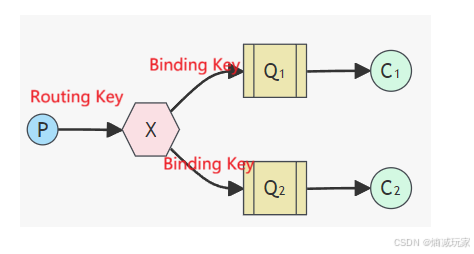
生产者和交换机的联系使用的是 Routing Key,交换机和队列的联系使用的是 Binding Key
在后续的代码中 我们也会将 Binding Key 当作 Routing Key
Publish / Subscribe (发布 / 订阅)
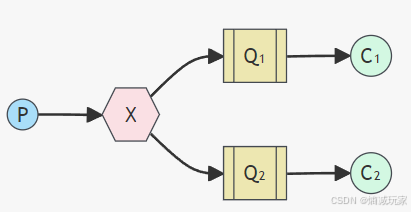
交换机将消息发送到不同的队列中,类似广播的作用,所有和该交换机绑定的队列都会收到一样的消息
java
public class Producer {
    public static void main(String[] args) throws IOException, TimeoutException {
        //设置 MQ 参数
        ConnectionFactory factory = new ConnectionFactory();
        factory.setHost(Constants.HOST);
        factory.setPort(Constants.PORT);
        factory.setUsername(Constants.NAME);
        factory.setPassword(Constants.PASSWORD);
        factory.setVirtualHost(Constants.VIRTUAL_HOST);
        //建立连接
        Connection connection = factory.newConnection();
        // 开启信道
        Channel channel = connection.createChannel();
        //声明交换机
        channel.exchangeDeclare("publish", BuiltinExchangeType.FANOUT, true, false, null);
        //声明队列
        channel.queueDeclare("fanout1", true, false, false, null);
        channel.queueDeclare("fanout2", true, false, false, null);
        //绑定队列和交换机
        channel.queueBind("fanout1","publish","");
        channel.queueBind("fanout2","publish","");
        //发送消息
        for (int i = 0; i < 10; i++) {
            channel.basicPublish("publish", "", null, ("hello" + i).getBytes());
        }
        //关闭资源
        channel.close();
        connection.close();
    }
}
方法参数介绍:
交换机声明:
java
Exchange.DeclareOk exchangeDeclare(String exchange,
BuiltinExchangeType type,
boolean durable,
boolean autoDelete,
Map<String, Object> arguments) throws IOException;
exchange:交换机的名称
BuiltinExchangeType type: 交换机的类型,点击 BuiltinExchangeType 可以查看到 这是一个枚举类,一共有四种类型的交换机:DIRECT("direct"), FANOUT("fanout"), TOPIC("topic"), HEADERS("headers");
java
public enum BuiltinExchangeType {

    DIRECT("direct"), FANOUT("fanout"), TOPIC("topic"), HEADERS("headers");

    private final String type;

    BuiltinExchangeType(String type) {
        this.type = type;
    }

    public String getType() {
        return type;
    }
}
durable:是否进行持久化
autoDelete: 是否自动删除
arguments:高级特性的设置
交换机与队列的绑定:
java
Queue.BindOk queueBind(String queue,
String exchange,
String routingKey) throws IOException;
queue:队列的名称
exchange: 交换机的名称
routingKey : 交换机和队列绑定的联系词BindingKey,这里写的RoutingKey,本质上是一样的。
消费者代码:
java
public class Consumer1 {
    public static void main(String[] args) throws IOException, TimeoutException {
        //设置 MQ 参数
        ConnectionFactory factory = new ConnectionFactory();
        factory.setHost(Constants.HOST);
        factory.setPort(Constants.PORT);
        factory.setUsername(Constants.NAME);
        factory.setPassword(Constants.PASSWORD);
        factory.setVirtualHost(Constants.VIRTUAL_HOST);
        //建立连接
        Connection connection = factory.newConnection();
        //开启信道
        Channel channel = connection.createChannel();
        //声明队列
        channel.queueDeclare("fanout1", true, false, false, null);
        //消费消息
        Consumer consumer = new DefaultConsumer(channel) {
            @Override
            public void handleDelivery(String consumerTag, Envelope envelope, AMQP.BasicProperties properties, byte[] body) throws IOException {
                System.out.println(new String(body));
            }
        };
        channel.basicConsume("fanout1", true, consumer);
    }
}
java
public class Consumer2 {
    public static void main(String[] args) throws IOException, TimeoutException {
        //设置 MQ 参数
        ConnectionFactory factory = new ConnectionFactory();
        factory.setHost(Constants.HOST);
        factory.setPort(Constants.PORT);
        factory.setUsername(Constants.NAME);
        factory.setPassword(Constants.PASSWORD);
        factory.setVirtualHost(Constants.VIRTUAL_HOST);
        //建立连接
        Connection connection = factory.newConnection();
        //开启信道
        Channel channel = connection.createChannel();
        //声明队列
        channel.queueDeclare("fanout2", true, false, false, null);
        //进行消费
        Consumer consumer = new DefaultConsumer(channel) {
            @Override
            public void handleDelivery(String consumerTag, Envelope envelope, AMQP.BasicProperties properties, byte[] body) throws IOException {
                System.out.println(new String(body));
            }
        };
        channel.basicConsume("fanout2", true, consumer);
    }
}